An Observable is a function that takes an observer and returns a function. Nothing more, nothing less. If you write a function that takes an observer and returns a function, is it async or sync? Neither. It’s a function.
This last chapter brings together the most important techniques covered in this book, including composable software as a whole, functional programming, mixin extensions, and reflective and asynchronous programming. Here, you’ll learn how they can all come together to support a computing model known as streams programming. Streams provide an abstraction that allows us to reuse a single computing model to process any type of data source regardless of its size. Think about building a real-time data application, such as a chat widget. You could set up long polling to pull messages from a server periodically, perhaps using a Promise-based API that you develop. Unfortunately, promises can deliver only a single value at a time, so you may receive one or two message objects (or potentially thousands if you have a chatty group), causing errors because you’ve exceeded the amount of data that can be transmitted in a single request. The best strategy is to set up a push solution; your application is notified when a new message is present and receives messages one at a time or in small batches. Programming with streams gives you the right level of abstraction to handle these use cases with a consistent API.
We’ve all been coding with streams in one way or another without realizing it. The flow of data between any piece of hardware, such as from memory to a processor or a disk drive, can be considered to be a stream. In fact, these input and output streams are used to read and write, respectively. Although this has been familiar for many years, we’ve never truly considered the state among the components that connect our applications—or that connect multiple applications—to be a stream.
Think about the JavaScript code you write from day to day. For the most part, the typical way to deal with state is to use a pull model. Pull occurs when a client originates a request for some piece of data it needs. This process happens asynchronously when reading from a database or a file, or querying an API. It can also happen synchronously when calling a function or looping over some data structures in memory.
The other side of the coin is the push model. With push, the client code isn’t requesting data anymore; the server sends data to you. A push exchange may start with an initial pull, but after the client and server interfaces are in agreement, data can flow to clients as it becomes available—like new messages in your chat application. You may have heard of the publish/subscribe model, which is an architecture for these types of problems. A simple, useful analogy is to think of a callback function that gets called multiple times during a single request.
Push technology can make your application much more snappy and reactive. I’ll come back to this notion of reactivity in section 9.3, because it’s an important one. Some push examples that come to mind are server-sent events (SSE), WebSockets, and the DOM’s event listeners. Imagine that instead of registering event handlers, you have to set up a timer to see when the state of a button changes to clicked. Or suppose that instead of getting notified when new message comes in, you need to explicitly click the refresh button to download new messages. We’re not in the ’90s anymore. When you know that data is available somewhere, you can issue a command to read it, but what happens when you don’t know? It’s awkward to set up polling for data that you don’t know will become available (if it ever does), not to mention inefficient.
In chapters 7 and 8, I covered the concept of iterators. Here, I’ll continue talking about this subject from a new angle: how it’s used to represent streams of data combined with generator functions. Generators allow you to control the synchronous flow of data coming out of an iterable object (array, map, object, and so on). Also, you can emulate iterable data that can be computed on the fly.
We’ll continue building on these lessons and switch gears to asynchronous iterables (async iterables, for short) and async generators used to compute sequences of values over time. Async iterables represent push streams and are an efficient, optimal, and memory-friendly way to read large amounts of asynchronous data (database, filesystem, or HTTP) piece by piece.
Although a push paradigm can sometimes be hard to understand, you’ll see that using the same JavaScript constructs you’ve been learning about so far will make push more approachable. I think you’ll find the stream pattern to be quite interesting and enjoyable to code with, so I’ll end this chapter by looking at a new API that brings data-agnostic, reactive programming to JavaScript: Observable. Observables provide a single API surface to manage data flows independent of how data is generated and of its size.
First, let’s talk about the Iterable and Iterator protocols in JavaScript.
Simply put, an iterable is an object whose elements (or properties) can be enumerated or looped over. As you learned in chapters 7 and 8, an iterable object defines its own Symbol.iterator, used to control how these elements are delivered to the caller. An iterator is the pattern or protocol that describes the structure of the iteration mechanism. Languages are free to define their own mechanisms for this purpose. In JavaScript, iteration is standardized. The following sections examine these protocols in detail.
The iterable protocol allows you to customize the iteration behavior of your objects when they appear inside a for...of construct or are used with the spread operator. JavaScript has built-in iterable objects such as Array, Map, and Set. Strings are also iterable as an individual array of characters.
Note Despite having similar names, WeakSet and WeakMap are not iterable (although they accept iterables in their constructors). In fact, neither extends from its non-weak counterpart (Set and Map, respectively). These APIs solve some interesting problems, but I don’t cover them in this book.
An iterable object (or any object from its prototype) must implement the function-valued Symbol.iterator. Inside this function, this refers to the object being iterated over, so that you have full access to its internal state and can decide what to send during the iteration process. An interesting fact about iterables is that Symbol.iterator can be a simple function or a generator function. (For more information on this topic, see section 9.2.)
An iterable by itself doesn’t do much without its iterator.
The iterator is the contract that’s presented to the language runtime when iteration behavior is required. JavaScript expects you to provide a next method to an object. This method returns objects with at least two properties:
done (Boolean)—Indicates whether there are more elements. A value of false tells the JavaScript runtime to continue looping.
value (any)—Contains the value bound to the loop variable. This value is ignored when done is equal to true, and the sequence terminates.
If an object returned by Symbol.iterator does not abide by this contract, it’s considered to be malformed, and a TypeError occurs—JavaScript’s way of enforcing this particular protocol.
This section shows some examples of iterables, starting with our own Block class. As you know, this class accepts an array of data objects, which could be Transaction objects or any other type of object stored in the chain:
class Block {

  index = 0;
  constructor(index, previousHash, data = [], difficulty = 0) {
    this.index = index;
    this.previousHash = previousHash;
    this.data = data;
    this.nonce = 0;
    this.difficulty = difficulty;
    this.timestamp = Date.now();
    this.hash = this.calculateHash();
  }

  //...

  [Symbol.iterator]() {
    return this.data[Symbol.iterator]();
  }
}
If we created a block with a list of transactions, enumerating with for...of hooks into the special symbol to deliver each transaction:
for (const transaction of block) {
   // do something with transaction
}
All the main model objects of our application (Blockchain, Block, and Transaction) are iterable. This fact made it simple to create a generic validation method in the HasValidation mixin, which extends all these objects with the same interface. In chapter 5, the algorithm used APIs such as flatMap and reduce, but it created additional arrays as the validation logic flowed through the elements of the blockchain. Iterators loop over structure that’s already in memory. Also, we don’t have to reduce over all the elements to find out whether a failure occurred. When we find the first failure, we can break out of the algorithm early. Look at this snippet of code once more:
const HasValidation = () => ({
  validate() {
    return validateModel(this);
  }
});

function validateModel(model) {
  let result = model.isValid();
  for (const element of model) {
    result = validateModel(element);
    if (result.isFailure) {
      break;
    }
  }
  return result;
}
This implementation relies on model objects implementing Symbol.iterator. In our case, the logic was simple, as the objects delegated to their internal data structure’s iterator. To see how the protocols work, let’s implement a random-number generator by using the iterator schema, as shown in the next listing.
Listing 9.1 Random-number generator using an iterator
function randomNumberIterator(size = 1) {

  function nextRandomInteger(min) {                              ❶
    return function(max) {
      return Math.floor(Math.random() * (max - min)) + min;
    };
  }

  const numbers = Array(size)                                    ❷
     .fill(1)
     .map(min => nextRandomInteger(min)(Number.MAX_SAFE_INTEGER));

  return {
    next() {
      if(numbers.length === 0) {
        return {done: true};                                     ❸
      }
      return {value: numbers.shift(), done: false};              ❹
    }
  };
}

let it = randomNumberIterator(3);
console.log(it.next().value);  // 1334873261721158             ❺
console.log(it.next().value);  // 6969972402572387             ❺
console.log(it.next().value);  // 3915714888608040             ❺
console.log(it.next().done);   // true
❶ Internal helper function to compute the next random integer
❷ Creates a sized array and fills it with random numbers
❸ Signals the end of the sequence
❹ Signals that there are more numbers to enumerate
❺ Produces different numbers each time
Notice that the object returned by randomNumberIterator is an object that conforms to the iterator schema (as you can tell by the declaration of next), but it’s not itself an iterable. To make it one, we can add Symbol.iterator in the next listing.
Listing 9.2 Making an object iterable with @@iterator
...
return {
   [Symbol.iterator]() {
      return this;            ❶
   },
   next() {
      if(numbers.length == 0) {
        return {done: true};
      }
      return {value: numbers.shift(), done: false};
   }
}
❶ Because the object already implements next, it’s enough to return itself, making it both an iterator and an iterable.
Now you can benefit from the seamless integration with for...of:
for(const num of randomNumberIterator(3)) {
  console.log(num)
}
This technique is powerful because the iterator protocol is data-agnostic; you can use it to implement any kind of iteration. You can represent directory traversals, graph/tree data structures, dictionaries, or any custom collection object with the simplicity of a for...of.
The iterable/iterator duo is ubiquitous in JavaScript, controlling how objects behave with the spread operator:
[...randomNumberIterator(3)];

// [ 6035653145325066, 7827953689861025, 1325390150299500 ]
Native, built-in types are also iterables. The following listing shows that strings behave the same way for arrays, maps, and sets. (You get the idea.)
Listing 9.3 Strings implementing @@iterator
"Joy of JavaScript"[Symbol.iterator]; // [Function: [Symbol.iterator]]

for(const letter of "Joy of JavaScript") {
  console.log(letter);                         ❶
}
❶ Logs all 17 characters to the console
Now, let’s be honest: you’ve probably never heard of a random-number iterator, but you have heard of a random-number generator. Is there a difference? You will find out in section 9.2, which covers generators.
A generator is a special type of function. Normally, when a function returns, the language runtime pops that function off the current stack frame, freeing any storage allocated for its local context. Generator functions work the same way but have a slight twist: it seems as though its context sticks and resumes to return more values. In this section, we’ll review what generator functions are, how to use them to create iterables that can send new values from thin air, and how to use them to create async iterables.
A generator is a factory function of iterators. First, you can define a generator function by placing an asterisk (*) after the function keyword
function* sayIt() {
  return 'The Joy of JavaScript!';
}
class SomeClass {
  * sayIt() {
     return 'The Joy of JavaScript!';
   }
}
These functions aren’t too useful, but are useful enough to show that generators look like any regular functions. So what’s with the special syntax? There’s a twist in the return value. Run this function to see what you get:
sayIt(); // Object [Generator] {}
As you can see, that special syntax augments the return value with an object called Generator, not a string, as the normal function would have. Syntactically, this process is similar to how an async function augments (or wraps) the value in a Promise.
Like the simple randomNumberIterator example, Generator is itself an iterable and an iterator; it implements both protocols. Therefore, to extract its value, we need to call next:
sayIt().next(); // { value: 'The Joy of JavaScript!', done: true }
Now you can recognize the shape of the iterator protocol. Simply using an iterator of one value (done: true) is not that interesting, however. The function* syntax is there so that you can produce many values, via a process called yielding. Consider this variation:
function* sayIt() {
  yield 'The';
  yield 'Joy';
  yield 'of';
  yield 'JavaScript!';
}

const it = sayIt();
it.next(); // { value: 'The', done: false }
it.next(); // { value: 'Joy', done: false }
     ...
Note Currently, there’s no support for generator functions using lambda syntax. This lack of support may seem to be a flaw in the design, but it’s not: lambda expressions are really meant to be simple expressions, and most are one-liners. It’s rare to have generator functions be that simple. There is, however, a proposal to include support for generator arrow functions: http://mng.bz/yYWq.
And, of course, because Generator implements Symbol.iterator, you can stick it inside a for...of expression:
for(const message of sayIt()) {
  console.log(message);
}
In sum, a generator is nothing more than a simple way to create an iterator. Generators and iterators work seamlessly. The code looks like it’s invoking the same function many times and somehow resuming where it left off, but it’s only a function. Behind the scenes, you’re consuming the iterable object that the function returns, and yield pushes new values into the iterator.
In this section, you’ll see how to integrate iterables to enhance the domain model of the blockchain application. You can add a generator helper function to Blockchain that can emit as many fully configured empty blocks as you want, for example. You can use this function to create chains of any size and perhaps use them for testing and running simulations.
The next listing defines a simple newBlock generator. The Blockchain class is a bit complex at this point, so I’ll show only the pertinent bits.
Listing 9.4 Custom generator function
class Blockchain {
  #blocks = new Map();

  ...

  * newBlock() {                       ❶
      while (true) {                   ❷
         const block = new Block(
          this.height(),
          this.top.hash,
          this.pendingTransactions
         );
         yield this.push(block);       ❸
     }
  }
}
❶ Uses the generator syntax on a function method
❷ Looks like an infinite loop but is not. The generator function is able to “pause” its execution on yield, so the runtime doesn’t keep executing infinitely.
❸ Pushes a new block to the chain and returns it
The caller code calls newBlock 20 times to produce 20 new blocks, making the total height of the chain 21 (remember to count the first-ever genesis block), as shown in the following listing.
Listing 9.5 Using generators to create an arbitrary amount of new blocks
const chain = new Blockchain();
let i = 0;
for (const block of chain.newBlock()) {
   if (i >= 19) {                        ❶
      break;
   }
   i++;
}
chain.height(); // 21                    ❷
❶ Stops after creating 20 blocks
❷ 20 new blocks plus genesis = 21
Furthermore, the frictionless integration between generators and iterators makes using the spread operator and its counterpart destructuring assignment a terse, idiomatic way to read properties from any custom object. We can implement naive pattern-matching expressions on algebraic data types (ADTs) such as Validation, implemented in chapter 5. First, let’s make Validation iterable and use generators to return its Failure and Success branches, respectively. This ADT is biased to the right, so the Success branch results from the second call to yield; otherwise, you can reverse this order. Symbol.iterator is implemented like this:
class Validation {
  #val;

  ...

  *[Symbol.iterator]() {
    yield this.isFailure ? Failure.of(this.#val) : undefined;
    yield this.isSuccess ? Success.of(this.#val) : undefined;
  }
}
Choice ADTs, such as Validation, can activate only one branch at a time and omit the other. Those destructuring assignment statements look like the next listing.
Listing 9.6 Using destructuring assignment to extract success and error states
const [, right] = Success.of(2);                              ❶

right.isSuccess;  // true
right.get();      // 2

const [left,] = Failure.of(new Error('Error occurred!'));     ❷

left.isFailure;    // true
left.getOrElse(5); // 5
❶ Destructuring assignment that ignores the left result
❷ Destructuring assignment that ignores the right result
Consider some simple use cases for both branches. Suppose that you’re calling some validation function. For the Failure case, you could use destructuring with default values as an alternative to calling left.getOrElse(5):
const isNotEmpty = val => val !== null && val !== undefined ?
    Success.of(val) : Failure.of('Value is empty');

const [left, right = Success.of('default')] = isNotEmpty(null);

left.isFailure; // true
right.get();    // 'default'
As you can see, iterators and generators (together with symbols) unlock idiomatic coding patterns. When you need to control how an object emits its own properties, these features make your code much more expressive and simpler to read.
As JavaScript supports async iterables by making next return promises, it also supports async generators, as we’ll discuss in the next section.
An async generator is like a normal generator, except that instead of yielding values, it yields promises that resolve asynchronously. Hence, an async generator is useful for working with Promise-based APIs that allow you to read data asynchronously in chunks, such as the fetch API in browser (which is a mixin, by the way) or the Node.js built-in “stream” library. In the next example, you’ll see the difference between working with a normal async function and an async generator function.
To obtain an async generator, combine all the keywords we’ve covered in this chapter into a single function signature:
async function* someAsyncGen() {

}
The results returned from the generator are promises, so you need to use for await ...of syntax to consume it. The next listing shows a function that uses async iteration.
Listing 9.7 Using async iteration to count the blocks in a file
async function countBlocksInFile(file) {
   try {
      await fsp.access(file, fs.constants.F_OK | fs.constants.R_OK);

      const dataStream = fs.createReadStream(file,
         { encoding: 'utf8', highWaterMark: 64 });

      let previousDecodedData = '';
      let totalBlocks = 0;

      for await (const chunk of dataStream) {       ❶
         previousDecodedData += chunk;
         let separatorIndex;
         while ((separatorIndex = previousDecodedData.indexOf(';')) >= 0) {
            const decodedData =
                  previousDecodedData.slice(0, separatorIndex + 1);

            const blocks = tokenize(';', decodedData)
                  .filter(str => str.length > 0);

            totalBlocks += count(blocks);

            previousDecodedData =
                  previousDecodedData.slice(separatorIndex + 1);
         }
      }
      if (previousDecodedData.length > 0) {
          totalBlocks += 1;
      }
      return totalBlocks;
   }
   catch (e) {
      console.error(`Error processing file: ${e.message}`);
      return 0;
   }
}
❶ dataStream is an async iterable object, which means that every chunk of data is a value in the shape of the iterator protocol, wrapped by a promise.
This function returns a count of the blocks read from a file. A more helpful, useful function would return the block objects themselves so that you could do much more than count. Maybe you could validate the entire collection of blocks.
The following listing shows a slightly refactored version that removes the counting bits. Also, it uses a generator that yields each JSON object describing each block. Let’s call this function generateBlocksFromFile.
Listing 9.8 Async generator that sends blocks read from a file
async function* generateBlocksFromFile(file) {                         ❶
   try {
      await fsp.access(file, fs.constants.F_OK | fs.constants.R_OK);

      const dataStream = fs.createReadStream(file,
           { encoding: 'utf8', highWaterMark: 64 });

      let previousDecodedData = '';

      for await (const chunk of dataStream) {
         previousDecodedData += chunk;
         let separatorIndex;
         while ((separatorIndex = previousDecodedData.indexOf(';')) >= 0) {

            const decodedData = previousDecodedData.slice(0,
               separatorIndex + 1);

            const blocks = tokenize(';', decodedData)
                .filter(str => str.length > 0)
                .map(str => str.replace(';', ''));

             for (const block of blocks) {
                yield JSON.parse(block);                               ❷
             }
             previousDecodedData = previousDecodedData.slice(
                 separatorIndex + 1);
         }
      }
      if (previousDecodedData.length > 0) {
         yield JSON.parse(previousDecodedData);                        ❷
      }
   }
   catch (e) {
      console.error(`Error processing file: ${e.message}`);
      throw e;
   }
}
❶ async function* creates an async iterator.
❷ Yields all parsed blocks as objects
Now the counting logic becomes extremely trivial, as the next listing shows.
Listing 9.9 Using generateBlocksFromFile as an async iterator
let result = 0;
for await (const block of generateBlocksFromFile('blocks.txt')) {      ❶
   console.log('Counting block', block.hash);
   result++;
}
result; // 3
❶ Each call to the generator pulls out a new block object from the file stream.
Again, the beauty of this change is that we can do much more than count; we can also validate each block as it’s being generated. This process is efficient because we don’t have to read the entire file at the same time, but process it as a moving window of data. Working with data this way is known as a stream.
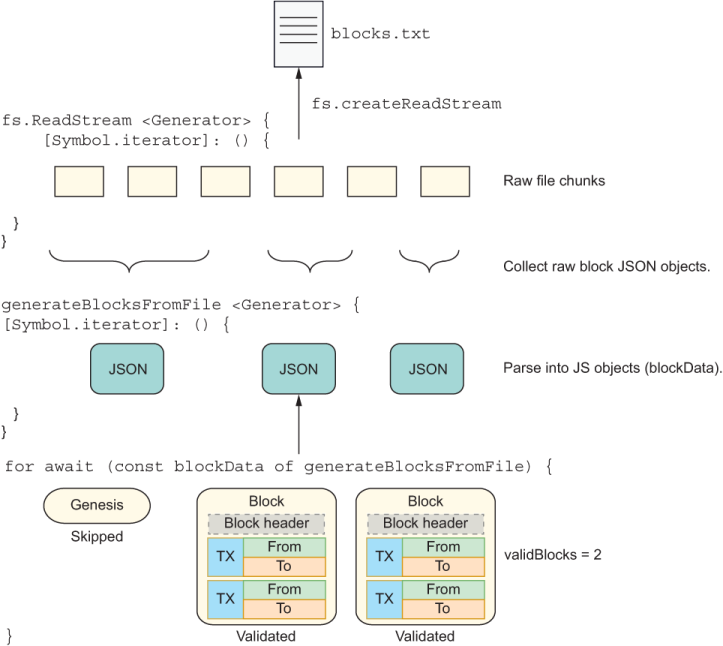
Suppose now that we want to use this function to validate all the blocks in the chain. Blockchain creates its own genesis block upon construction, so the first thing we’ll do is skip the first block that comes in. Next, we’ll convert the JSON object representation of a block to a Block object that’s added to a chain; this process is called hydration. The validation logic checks whether a block is positioned properly in a chain. Finally, it calls validate mixed from HasValidation. The test file I use in the repository (blocks.txt) has three blocks, so we’ll be validating only the remaining two. All the logic in the next listing is shown in figure 9.1.
Listing 9.10 Validating a stream of blocks generated from a file
   let validBlocks = 0;
   const chain = new Blockchain();             ❶
   let skippedGenesis = false
   for await (const blockData of generateBlocksFromFile('blocks.txt')) {
      if (!skippedGenesis) {
         skippedGenesis = true;
         continue;                             ❷
      }
      const block =
        new Block(blockData.index, chain.top.hash, blockData.data,
            blockData.difficulty);

      chain.push(block);                       ❸

      if (block.validate().isFailure) {        ❹
         continue;
      }
      validBlocks++
   }

   console.log(validBlocks) // 2
❶ Validation of each block assumes that the blocks are part of a chain.
❷ Skips the first block in the test file because it’s a genesis block from a different chain instance
❸ Blocks need to be pushed into a chain for validation.
❹ Validates each block by using HasValidation#validate
The diagram in figure 9.1 captures this flow at a high level. As you can see, two generator functions are at work. The first function calls fs.createReadStream, and the second function calls generateBlocksFromFile, which uses the first function to deliver its own data.
Figure 9.1 The two generator functions. One reads a file and yields binary chunks of data. The other processes each raw block, creates Block objects from them, validates each one, and tallies the result.
In this section, we continued to build on the lessons of chapter 8 with more asynchronous capabilities. We discussed how to use the (async) iterator protocol, symbols, and generator functions to create iterable objects. These objects can enumerate their state upon request when they become the subject of a simple for loop.
Note It’s worth mentioning that we haven’t discussed other use cases involving generators, such as pushing values into generators and linking generator functions. Generators are functions, so you could return a generator from another or accept a generator as an argument. These techniques can be used to solve a complex class of problems that are beyond the scope of this book. Check this link to find out about these other use cases: http://mng.bz/j45p.
Async generator functions can yield values asynchronously, like emitting events. When an event source sends lots of values in a sequence, this sequence is also called a stream.
What do objects of String, Array, Map, and a sequence of WebSockets events have in common? In a typical programming task, not much. When we’re talking about a stream of data, at a fundamental level, however, these types of objects can be treated the same way. In fact, this consistent programming model that allows you to work across data sources makes streams necessary. Some real-world examples in which streams are compelling include
Interacting with multiple asynchronous data sources (REST APIs, WebSockets, storage, DOM events, and others) as a single flow
Creating a pipeline that applies different transformations to the data passing through it
Creating a broadcast channel in which multiple components can be notified of a particular event
In situations like these, in which every single interaction is asynchronous and part of the same flow, using async generators to wrap every action is a daunting task, and the callback pattern won’t scale well to this level of complexity.
In this section, we’ll learn the basics of streams and the APIs needed to represent them. JavaScript’s Observable API provides the necessary interfaces to build great reactive abstractions to process data from any push-based data sources. By the end of this section, you’ll know how to transform an object into a stream so that you can manage its data through chains of Observable objects. You’ll understand how any complex data source can be abstracted and processed as though it were a simple collection of events.
To understand this concept, you must first understand how data arrives or is consumed by an application. Generally speaking, data is push or pull. In both cases, you have a producer (that creates the data) and a consumer (that subscribes to that data).
In a pull system, the producer, which could be as simple as a function, doesn’t know how or when data is needed. So the consumer must pull from (or call) the producer. On the other hand, in a push system, the producer is the one in control of when an event is sent (a button was clicked, for example), and the consumer (subscriber) has no idea when it will receive said event. We say that the consumer reacts to the event (figure 9.2).
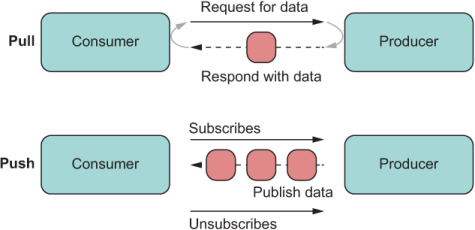
Figure 9.2 The difference between pull and push. With pull, the consumer must always initiate a request for data. With push, when the consumer subscribes, the producer sends data as it becomes available, stopping when the consumer unsubscribes or when there’s no more data to send.
Table 9.1 summarizes pull, push, and the JavaScript features typically used in those cases.
Table 9.1 JavaScript features to handle push and pull data
The pull techniques in table 9.1 are simple to understand. Pull happens when a function is invoked or an iterator’s next is called many times. A simple push scenario, by contrast, occurs when asynchronous values are represented with a Promise object. Here, the promise (the producer) controls when the event will be emitted, abstracting this logic from a consumer. The consumer becomes the handler function passed to next. We can say that the function subscribes to the promise. If a promise sets a timeout function to three seconds to resolve, for example, its value is emitted three seconds from the last event handled by the event loop. The producer knows and is in control of emitting this value.
In table 9.1, a promise represents a single push, whereas an async generator can emit multiple values with different time functions. Promises and async generators are in full control of the rate at which these events will be emitted. The for await...of loop acts as a permanent subscription to both of these data sources behind the scenes. You can imagine the async generator as being the producer, which will emit its values at its own convenience, and the async iterator as being the consumer. Recall how listing 9.8 sets up a data stream:
const dataStream = fs.createReadStream(file,
    { encoding: 'utf8', highWaterMark: 64 });
Later, the code consumes that data stream, using for await...of.
Now let’s raise the level of abstraction with streams. Streams solve the same problem, but in a way that makes it easier to reason about. A stream is a sequence of one or infinitely many pieces of data, called events. In this context, the word event does not refer only to a mouse drag or button click; it’s used in the general sense to mean any piece of data. An event is some value (synchronous or asynchronous) that gets emitted over time by some source (event emitter, generator, list, and so on) and handled by a subscriber or observer.
As streams are sequences of values over time, they can nicely wrap over any producer, manifesting as a single string or even a complex async generator. On the consuming end, we can abstract over them by using for await...of via an object known as a Subscription. Subscriptions are like iterators in that you can call them as many times as you want to notify them when data becomes available, such as a call to next. With a stream, we talk about subscribers, not consumers. To facilitate building up this abstraction, let’s warm up by creating a streamable object using arrays in the next section.
Now that you understand the basics of a stream, let’s come back to the part of listing 9.8 that declares the data stream and study it more closely:
const dataStream = fs.createReadStream(file,
    { encoding: 'utf8', highWaterMark: 64 });
The Node.js API fs.createReadStream returns an object of fs.ReadStream, which in turn extends from stream.Readable.
If you peek at this API documentation, two properties stand out for the purposes of this chapter: an on method that emits the 'data' event and the Symbol.asyncIterator method. Here’s an example:
dataStream.on('data', chunk => {
  console.log(`Received ${chunk.length} bytes of data.`);
});
This interface suggests that this object is both an async iterable and an EventEmitter. I haven’t covered event emitters in this book, but I’ll review the basics quickly to support the examples in this chapter. An EventEmitter is an API that allows you to separate the creation of some object from its use—a rudimentary form of publish/subscribe. The following listing shows an example.
Listing 9.11 Basic use of an EventEmitter
const myEmitter = new EventEmitter();

myEmitter.on('some_event', () => {        ❶
  console.log('An event occurred!');
});

myEmitter.emit('event');                  ❷
❶ Consumer of the data (subscriber). This process is similar to handling, say, an onClick event.
By combining EventEmitter and Symbol.asyncIterator, we can implement a real push solution. The emitter in this case is a nice technique for separating the method that handles pushing new data (such as push) from the method that handles a subscriber to this data (such as subscribe). Arrays, for example, are pull data structures because they have functions and properties to pull its data (indexOf and indexing, respectively) as well as to implement Symbol.iterator for pulling multiple values (refer to table 9.1). If you want to run some code in response to a new value (a process called reacting), you must set up some kind of long polling solution that peeks at the status of the array at a time interval, which is not the most optimal solution. For efficiency, let’s invert this flow. Instead of picking at the data, we’ll subscribe to it so that it lets us know when it has a new value (a process called notifying).
Let’s extend from Array with push semantics by configuring an internal EventEmitter that fires an event every time a new value is added. Consider a class called PushArray that exposes two new methods to enable subscription: subscribe and unsubscribe. The subscribe method accepts an object that implements a next(value) method, shown in the next listing.
Listing 9.12 Subclass of Array that fires events when a new elements is pushed
class PushArray extends Array {

    static EVENT_NAME = 'new_value';

    #eventEmitter = new EventEmitter();

    constructor(...values) {
       super(...values);
    }

    push(value) {
       this.#eventEmitter.emit(PushArray.EVENT_NAME, value);       ❶
       return super.push(value);
    }
    subscribe({ next }) {                                          ❷
       this.#eventEmitter.on(PushArray.EVENT_NAME, value => {
           next(value)                                             ❸
       });
    }

    unsubscribe() {                                                ❹
        this.#eventEmitter.removeAllListeners(PushArray.EVENT_NAME);
    }
}

const pushArray = new PushArray(1, 2, 3);

pushArray.subscribe({
    next(value) {
        console.log('New value:', value)
        // do something with value
    }
});
pushArray.push(4);                                                 ❺
pushArray.push(5);                                                 ❺

pushArray.unsubscribe();                                           ❻

pushArray.push(6);                                                 ❼
❷ Uses destructuring to extract the next method from the object passed in
❸ When the emitter fires a new value, it’s pushed to the subscriber.
❹ Removes all subscribers. Any further push events will not be emitted.
❺ Prints 'New value: 4' and 'New value: 4' to the console. Array now has 1,2,3,4, 5.
❻ Unsubscribes from the push array object
❼ Subscriber does not get notified of the event. Array now has 1,2,3,4,5, 6.
Let’s closely examine the call to subscribe in this example. The idea of a subscriber is central to the stream paradigm, which always requires two actors: a producer and a subscriber. When the number 4 is pushed to the array, the event emitter fires and immediately notifies the subscriber (figure 9.3).
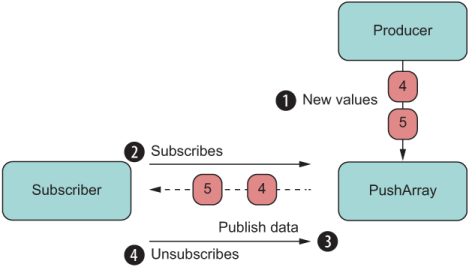
Figure 9.3 The basic flow of a push object with producer and subscriber
The call to subscribe accepts an object with the shape shown in listing 9.13.
Listing 9.13 Subscribers accepting objects with a next method
{
   next: function (value) {           ❶
       // do something with value
   }
}
❶ Using property syntax instead of shorthand, because it’s more descriptive
This object is called an observer, and it’s no coincidence that the name of the method is next. Observers align not only with the Iterable/Iterator protocols, but also with the protocol behind a push generator, which I’m omitting in this book to keep the discussions brief. If you follow this topic more closely, you’ll learn that generators can not only yield values, but also allow you to push values back. Here’s a link if you want to read more about the topic: http://mng.bz/WdOw.
Hence, the shape of the observer with the next(value) method has the sole purpose of keeping this protocol and makes the transition to stream-based programming fluid. The JavaScript API for representing a stream is known as Observable.
At the time of this writing, a proposal slowly moving through the ranks may dramatically change the way we code on a day-to-day basis (https://github.com/tc39/proposal -observable). Some people say it has already changed the way we use third-party, stream-oriented libraries, RxJS being my favorite. This project has deeply penetrated the Angular, Vue, React, Redux, and other web communities.
In this section, we’ll discuss the current status of the Observable API. This API supports the reactive streams paradigm, which creates a layer of abstraction over any data type and size, regardless of whether the mechanism is push or pull or whether data arrives synchronous or asynchronously.
You may have used reactive programming through RxJS if you’ve worked with frameworks such as Angular and React or state management libraries such as Redux. If you haven’t, at a high level, observables have these two qualities, which I’ll build on in the following examples:
Data propagation — Data propagation naturally follows the pub/sub model. You identify a publisher (known as the source), which can be a generator or a simple array. The data stream propagates or flows in a single direction all the way to a subscriber. Along the way, you can apply business logic that transforms data according to your needs.
Declarative, lazy pipeline — You can statically represent the execution of a stream regardless of publisher and subscriber, and pass it around like any other object in your application. Unlike promises, an observable object is lazy, so until a subscriber subscribes, nothing runs.
Observable streams can be hard to understand; they require strong JavaScript skills and a solid understanding of the value of composable code. Fortunately, I’ve covered all these topics (and more) in this book, and I’ll reuse a lot of what you’ve already learned as I discuss how to use this API.
The following list summarizes these concepts (and if you skipped any of them, I highly recommend that you go back to the chapters that covered them to read about them):
Observables are compositional objects, so you can combine them or create new observables from existing ones. You’ll create a mixin that extends the base functionality of Observable’s prototype. Object composition and mixin extension are covered in chapter 3.
Observable operators are pure, composable, curried functions. Any side effects should be carried out by subscribers. Pure functions, composition and currying are explained in chapter 4.
The design of the Observable API draws on the design of ADTs, particularly in its use of map. Chapter 5 shows how to design your own ADT and how to implement universal protocols such as Functor.map and Monad.flatMap.
Part of the specification defines a new function-valued built-in symbol called Symbol.observable. Objects that implement this special symbol can be passed to the Observable.from constructor. Implementing custom symbols and using built-in symbols are covered in chapter 7.
An observable models a unidirectional, linear stream of data. Chapter 8 discusses how to create chains with promises to streamline and flatten asynchronous flows and to make them easier to reason about.
With all the foundational concepts behind us, let’s dive into an observable stream in the next section.
In this section, we’ll learn what an Observable is and unpack its main components. As a simple example, consider the snippet of code in the next listing.
Listing 9.14 Creating and subscribing to an Observable
const obs$ = Observable.of('The', 'Joy', 'of', 'JavaScript');

const subs = obs$.subscribe({
   next: ::console.log            ❶
});

subs.unsubscribe();
❶ Logs every word to the console and uses the unary form of the bind operator to pass a properly bound console.log function
Can you guess what will happen? This listing is the simplest possible example that uses observables. Notice the resemblance between this code and the PushArray class. If you guessed that it prints each individual word to the console, you nailed it! But how did you arrive at this conclusion? What assumptions did you make?
An Observable object is designed to model a lazy, unidirectional, push-based data source (such as streams).
NOTE It’s worth pointing out that observables are different from the technology known as Web Streams (https://streams.spec.whatwg.org). Although the technologies have some of the same goals, observables offer an API to wrap over any data source, which could be a Web Stream but doesn’t have to be.
You can think of data as being a river that flows downstream from some source to a destination. The conduit or the context in which this flow happens is the Observable. Along the way, the flow changes course, speed, and temperature until it arrives at its destination. These points of inflexion are known as operators, which I haven’t shown yet.
There’s no point in transmitting any data if there’s nobody on the other side to receive it, however, which is why observables are lazy and wait for the call to subscribe to set things in motion.
The Observable constructor Observable.of lifts an iterable object and returns a Subscription object with the shape shown in the next listing.
Listing 9.15 Subscription declaring a method to unsubscribe from the stream
const Subscription = {
   unsubscribe () {         ❶
  //...                     ❷
   }
}
❶ Used to cancel the subscription (the stream) at any time
❷ The body of this function is supplied by the producer of the data.
This simple interface declares a single unsubscribe method. The logic of this method is specific to how the data is being generated. If the data is sent intermittently by setInterval, for example, unsubscribe takes care of clearing the interval.
On the other side of the river, the Observer object is a bit more complex than a regular iterator but behaves in much the same way. The next listing shows the contract.
Listing 9.16 Shape of the Observer object
const Observer = {
   next(event) {      ❶
  //...
   },
   error(e) {         ❷
  //...
   },
   complete() {       ❸
  //...
   }
}
❶ Receives each event in the stream
❷ Triggered when an exception occurs somewhere along the observable
❸ Called when there are no more values to emit; not called on error
Together, Observable, Observer, and Subscription make up the skeleton framework being standardized by TC39. Libraries such as RxJS extend this framework to provide a programming tool belt to handle the types of tasks at which streams excel. In the next section, we’ll use this interface to implement more examples with observables.
The static constructor functions Observable.{of, from} can be used to wrap or lift most JavaScript built-in data types (such as strings and arrays) or even another Observable. This interface is a basic one. From here, you can instantiate a new, empty Observable directly to define your own custom streams. This technique is used in case you want to wrap over, say, a DOM event listener and emit events through the Observable API. Perhaps you have created some EventListener objects that you want to combine. The next listing shows an Observable that emits random numbers every second and the subscriber that handles each event.
Listing 9.17 Using observables to emit random numbers
function newRandom(min, max) {                             ❶
   return Math.floor(Math.random() * (max - min)) + min;
}

const randomNum$ = new Observable(observer => {            ❷
   const _id = setInterval(() => {
      observer.next(newRandom(1, 10));
   }, 1_000);

   return() => {                                           ❸
      clearInterval(_id);
   };
})

const subs = randomNum$
    .subscribe({
       next(number) {
          console.log('New random number:', number);
       },
       complete() {
          console.log('Stream ended');
       }
    });

 // some time later...

 subs.unsubscribe();
❶ Returns a random number between min and max
❷ Uses the new keyword to instantiate an Observable with a custom observer
❸ A SubscriptionFunction. The body of this function is executed when calling subs.unsubscribe.
In this snippet of code, randomNum$ initially holds an inert Observable object waiting for a subscriber. The Observable constructor has not yet begun executing. Also, you may have noticed the dollar sign ($) used at the end of the variable name. No jQuery is being used here; $ is a convention indicating that this variable holds a stream. Later, the call to subscribe kicks off the stream so that new random numbers print to the console. This process happens infinitely until clients call unsubscribe. So-called marble diagrams have become a popular way of illustrating how events are emitted through an observable, as shown in figure 9.4.

Figure 9.4 The unidirectional flow of an observable is depicted as an arrow. You can think of the producer and subscribers (not shown but implied) as being on the left and right sides, respectively. Events (marbles) move across the observable.
Each marble indicates an event that happens over time—in this case, a new random number emitted every second. In place of a random number every second, you could have events such as mouse coordinates, enumerations of the elements of an array, chunks of an HTTP response, filenames in a directory traversal, keystrokes, and so on.
At this writing, the observable specification defines rules and a skeleton only for Observable and Subscriber. In the real world, you’ll need much more. Without a library like RxJS, you can’t do much. You need functions that can operate on the data. These functions are called operators.
When data starts flowing through a stream, an operator allows you to process that stream before the data reaches a subscriber. An operator represents the twists and turns. The current proposal doesn’t define any built-in set of operators, but it does define two important rules about observables that we must follow: laziness and composition. Operators extend observables and capture the business logic of your application. In this section, we’ll create our own mini RxJS library and learn how to implement our own custom operators that extend the Observable prototype. If you follow the code in GitHub, all operators will be defined in a module called rx.js.
The way we’re going to design these operators is in line with the patterns and principles of ADTs. Comparing Observable with Validation, you can see a static lifting operator called Observable.of (like Validation.of). And although Observable doesn’t declare any methods other than subscribe, the proposal makes it clear that observables are composable objects. Do you recall the map/compose correspondence discussed in chapter 4? What’s more compositional than a map operator? By design, this higher-order function gives us the ability to transform the data flowing through the observable pipeline. You can use this function to add a timestamp to each event emitted, remove fields from the event object, compute new fields on the fly, and so on.
The map operator applies a given function, fn, to each value emitted by an observable source. This behavior matches the behavior of any ADT and even simple arrays. I’ve discussed map at length in this book, so I’m not going to review the laws that oversee it. Let’s cut straight to the chase and implement Observable’s version of map.
Remember from chapter 5 that map always returns a new copy of the derived constructor. For Observable, you need to make sure that the source’s (the calling observable’s) observer and the new observer are linked so that one’s next feeds into the other’s next. Think about this concept for a moment: it’s function composition all over again, whereby one function’s return value is connected to the input of the next. This linkage creates data propagation, and the goal of every operator is to allow data to continue flowing from a producer downstream to a consumer.
Let’s define map as a standalone operator and then bind it to Observable.prototype to enable the fluent pattern of ADTsin the next listing.
Listing 9.18 Custom map operator
const map = curry(                                  ❶
    (fn, stream) =>
        new Observable(observer => {                ❷
            const subs = stream.subscribe({         ❸
               next(value) {
                  try {
                     observer.next(fn(value));      ❹
                  }
                  catch (err) {
                     observer.error(err);
                  }
               },
               error(e) {
                  observer.error(e);                ❺
               },
               complete() {
                  observer.complete();              ❻
               }
        });
        return () => subs.unsubscribe();            ❼
    });
);
❶ Currying is used to partially bind the mapping function to any stream. Currying will simplify the design of the operators to allow for standalone use as well as instance methods.
❷ map is structure-preserving and immutable, so it returns a new Observable whose subscription is tied to the source.
❸ Subscribes to the source stream
❹ Per the definition of map, applies the given function to each value emitted by the source observable and notifies observers of any errors
❺ Propagates any errors that occurred from the source observable downstream
❻ Emits the complete event from the source observable
❼ Returns this subscription’s SubscriptionFunction so that a call to unsubscribe downstream cancels all the midstream observables
From the point of view of an operator function, the producer is the stream object that came before it, and the subscriber the observer object that’s passed in (with a next method). Every operator is like map in that it creates a new Observable that subscribes to the previous one with an Observer, building a downstream chain. Every event is propagated downstream by calling the observer’s next method along the way until it reaches the final observer: the subscriber. The same thing happens for error and the final complete event. By contrast, calls to unsubscribe bubble upstream, canceling every observable object in the chain.
The point of making map a standalone function is merely a design decision that resembles what you would see in a project such as RxJS. This decision gives you the flexibility to use map as a standalone function or as a method, which is how the latest versions of RxJS export it.
The next listing shows a simple use case that applies a square function over each number emitted by a stream by using the standalone version of map.
Listing 9.19 Using observables to map a function over a number sequence
import { map } from './rx.js';

const square = num => num ** 2;

map(square, Observable.of(1, 2, 3))
   .subscribe({
      next(number) {
        console.log(number);          ❶
      },
      complete() {
        console.log('Stream ended');
      }
});
❶ Prints 1, 4, and 9, followed by "Stream ended"
The marble diagram in figure 9.5 illustrates this concept.
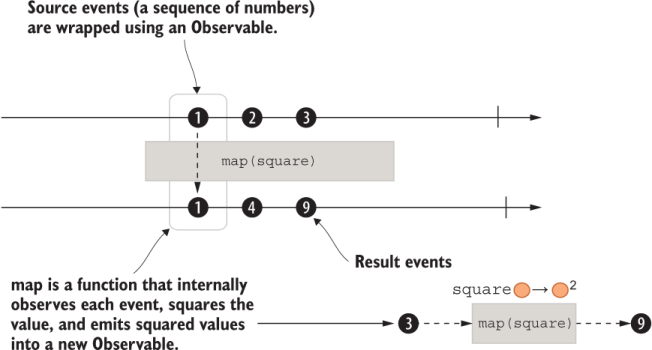
Figure 9.5 This example shows creating an observable with numbers 1, 2, and 3. As is, this code emits these numbers synchronously. The space between the marbles is added for visualization purposes.
Building on this example, the next listing and figure 9.6 showcase the composability of streams..
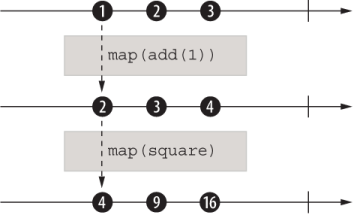
Figure 9.6 The composition of two operators. Three instances of an observable (arrow) are shown: the source observable and two operators. Each operator subscribes to the previous stream and creates a new observable.
Listing 9.20 Composing observables
const add = curry((x, y) => x + y);

const subs = map(square, map(add(1), Observable.of(1, 2, 3)))     ❶
   .subscribe({
         next(number) {
           console.log(number);                                   ❷
         },
         complete() {
           console.log('Stream ended');
         }
   });
❷ Prints 4, 9, and 16, followed by "Stream ended"
Now that you understand how an operator is designed and visualized, let’s move on to another operator: filter.
After you’ve been through map, filter should be straightforward. Like Array#filter, this operator selects which values get propagated depending on the Boolean result of a predicate function. The next listing shows the implementation.
Listing 9.21 Custom filter operator
const filter = curry(
    (predicate, stream) =>
        new Observable(observer => {
            const subs = stream.subscribe({
                next(value) {
                    if (predicate(value)) {       ❶
                        observer.next(value);
                    }
                },
                error(e) {
                    observer.error(e);
                },
                complete() {
                    observer.complete();
                }
            })
            return () => subs.unsubscribe();
        });
);
❶ If the predicate returns a truthy result, the value is kept; otherwise, the event is not emitted.
As you can see, most of the domain-specific logic resides in the observer’s next method, propagating the result to the next operator in the chain, and so on. The next section jumps ahead to complete the triad with reduce.
The reduce operator reduces or folds all the values emitted by a source observable to a single value that’s emitted when the source completes. The result is an observable of a single value, as shown in the following listing.
Listing 9.22 Custom reduce operator
const reduce = curry(
    (accumulator, initialValue, stream) => {
        let result = initialValue ?? {};                    ❶
        return new Observable(observer => {
            const subs = stream.subscribe({
                next(value) {
                    result = accumulator(result, value);    ❷
                },
                error(e) {
                    observer.error(e);
                },
                complete() {
                    observer.next(result);                  ❸
                    observer.complete();                    ❸
                }
            })
            return () => subs.unsubscribe();
        });
    };
);
❶ Creates a new object when initialValue is null or undefined
❷ Applies the accumulator callback, like Array#reduce
❸ Emits the accumulated result and sends the complete signal to end the stream
The skip operator allows you to ignore the first X number of events from a source observable. The next listing shows the implementation of that operator.
Listing 9.23 Custom skip operator
const skip = curry(
    (count, stream) => {
        let skipped = 0;
        return new Observable(observer => {
            const subs = stream.subscribe({
                next(value) {
                   if (skipped++ >= count) {
                     observer.next(value);
                   }
                },
                error(e) {
                    observer.error(e);
                },
                complete() {
                    observer.complete();
                }
            })
            return () => subs.unsubscribe();
        });
    }
);
At this point, we’ve added map, filter, reduce, and skip operators. Believe it or not, with these operators we can tackle a wide range of programming tasks. Here’s an example that shows them used together:
import { filter, map, reduce, skip } from './rx.js';
const obs = Observable.of(1, 2, 3, 4);

reduce(add, 0,
    map(square,
        filter(isEven,
          skip(1, obs)
        )
    )
 )
.subscribe({
    next(value) {
       assert.equal(value, 20);
    },
    complete() {
       done();
    }
  });
You can see the composable nature of these operators. When you’re building complex chains, this type of layout is hard to parse. Normally, full-featured reactive libraries like RxJS feature a pipe operator that makes writing all operators straightforward. An alternative is to use dot notation to write these chains fluently, similarly to how we chained then methods on promise chains. To do so, we’ll need to extend the built-in Observable object.
Let’s again use the technique of concatenative mixin extension we talked about in chapter 3, which allows us to extend any object with new functionality. First, we’ll create a small toolkit module from these operators as an object mixin, calling it ReactiveExtensions, as shown in the next listing.
Listing 9.24 Defining the shape of our mini-rxjs toolkit
export const ReactiveExtensions = {                      ❶
    filter(predicate) {
        return filter(predicate, this);                  ❷
    },
    map(fn) {
        return map(fn, this);                            ❷
    },
    skip(count) {
        return skip(count, this);                        ❷
    },
    reduce(accumulator, initialValue = {}) {             ❷
        return reduce(accumulator, initialValue, this);
    }
}
❶ Exported as a member of the rx.js module
❷ Refers to the standalone versions created within the same module
Now the extension is a simple prototype extension, like Blockchain and other model objects. Object.assign comes to the rescue once again:
Object.assign(Observable.prototype, ReactiveExtensions);
warning Again, use caution when monkey-patching JavaScript built-in types, because doing so makes your code harder to port, upgrade, or reuse. If you’re still keen on doing it for any reason, please write the required property existence checks so that you don’t break upgrades.
For the joy of it, let’s use the reactive extensions to create an observable chain. Listing 9.25 creates a simple stream out of a finite set of numbers; each number is an event.
As you can see, events flow downstream through the pipeline one at a time. Along the way, these chained, composable operators manipulate the data and form a chain in which one operator subscribes to the preceding operator’s observable.
Listing 9.25 Using observable operators to manipulate a number sequence
Observable.of(1, 2, 3, 4)
   .skip(1)                   ❶
   .filter(isEven)            ❷
   .map(square)               ❸
   .reduce(add, 0)            ❹
   .subscribe({
      next: :: console.log    ❺
   })
❶ Skips the first element, which is 1
❷ Tests whether the number is even, if it is let it through. In this case, 2 and 4 make it through.
❸ Computes the square of each number (4 and 16, respectively)
❹ Adds all of the events together (20)
Figure 9.7 illustrates how events flow through the pipeline.
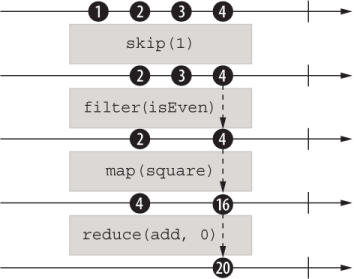
Figure 9.7 The composition of four operators, with the data (marbles) changing in response to the application of those operators. Every step of the way, a new Observable is created, and observers are connected.
The use of composition is an existential quality of streams, which allows you to chain the multiple internal subscriptions that are happening inside each operator and manage them as a single subscription object.
Now that you’ve seen how to join multiple operators (figure 9.7), let’s review how data flows unidirectionally downstream. If you were to visualize each operator as a black box, you’d see that although the data flows downstream, subscription objects flow upstream, starting from the last call to subscribe all the way up to the source (the initial Observable object). This last call to subscribe kick-starts everything and notifies the source to begin emitting events. Figure 9.8 explains the order of events.
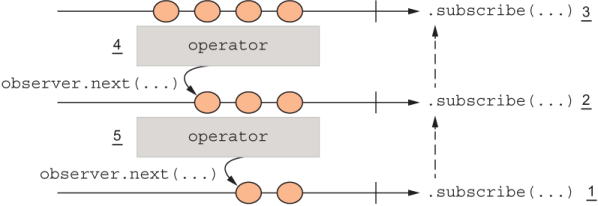
Figure 9.8 A chain of observables. Data flows downstream as observers call the next one’s next(...), while subscriptions flow upstream starting with the last call to subscribe(). Steps are numbered to show how the last call to subscribe() causes all operators to subscribe internally to one another upstream, notifying the source observable to begin sending events down.
So far, we’ve been dealing with arrays, which are relatively simple event sources. But the rubber meets the road when we start to deal with asynchronous, potentially infinite data sources such as async generators. In place of Observable.of(1,2,3), which acts like the stream source for the operations we showed previously, we can have a generator that, after the subscribe is called on the composed observable, starts feeding values down the chain. The infinite nature of streams is in principle similar to that of generators in that until a generator returns, the function will continue to yield items indefinitely. Each call to yield in turn calls the observer’s next; finally, return (implicit or explicit) calls complete.
Hence, the generator produces events over time and decides how much data to push, the observable represents your business logic, and the subscriber consumes the resulting event value flowing through the observable. Using generators is a good way to experience how to subscribe to a potentially infinite data source like a DOM event listener or receiving messages from a WebSocket. With observables, processing events from any of these data sources will look exactly the same.
Generators create an interesting opportunity to use streams programming, because you can generate arbitrary amounts of data and feed it to the observables all at the same time or in chunks. Previously, we dealt with examples that lifted an array of values into an observable. Now we need to be able to lift a generator function into the observable. To onboard a generator function, we’ll create a simple, homegrown constructor function.
Listing 9.26 defines a new static function, Observable.fromGenerator. This function takes a normal generator or an async generator. We’re going to use Node.js’s stream.Readable API to abstract over the generator function with consistent behavior. This API is ideal because it uses an event emitter internally to fire events when new data is available. When the generator yields new values, Readable fires an event that is pushed to any subscribers that are listening. We’ll create a one-to-one mapping between the data and end events and the next and complete observer methods, respectively. The use of the bind operator syntax (introduced in chapter 5) makes this mapping elegant and terse, because you can pass the bound methods directly as named functions as callbacks to those events.
Listing 9.26 Constructing Observables from a generator
Object.defineProperty(Observable, 'fromGenerator', {
   value(generator) {
      return new Observable(observer => {
         Readable
            .from(generator)                      ❶
            .on('data', :: observer.next)         ❷
            .on('end',  :: observer.complete);
         });
      },
   enumerable: false,
   writable: false,
   configurable: false                            ❸
});
❶ Instantiates a Readable stream from a generator object
❷ Passes the event value directly to the bound observer’s next method
❸ When the stream has ended (generator returns), notifies the observer that the stream has completed
Let’s put this new constructor into action with the example shown in the next listing.
Listing 9.27 Initialzing an observable with a generator function
function* words() {
   yield 'The';
   yield 'Joy';
   yield 'of';
   yield 'JavaScript';
}

Observable.fromGenerator(words())
  .subscribe({
     next: :: console.log,
});
This code would work exactly the same way if words() were an async generator (async function* words). Time is the undercurrent of a stream, and if the events are separated by seconds or nanoseconds, the programming model is the same.
Now we have a static constructor operator that lifts any generator function and a few operators to process events. Let’s tackle a more complex example with these tools. Back in listing 9.8, we wrote code that validated a stream of blocks read from a file. Here’s that code again:
let validBlocks = 0;
const chain = new Blockchain() ;
let skippedGenesis = false;
for await (const blockData of generateBlocksFromFile('blocks.txt')) {
   if (!skippedGenesis) {
      skippedGenesis = true;
      continue;
   }
   const block = new Block(
      blockData.index,
      chain.top.hash,
      blockData.data,
      blockData.difficulty
   );
   chain.push(block);

   if (block.validate().isFailure) {
      continue;
   }
   validBlocks++;
}
Using the small reactive extensions toolkit we’ve built so far, we can tackle this rather complex imperative logic and take advantage of the declarative, functional API that observables promote. When you compare the two listings, you’ll see the dramatic improvement in code readability. Listing 9.28 makes the following key changes:
Refactors the skip logic at the beginning of the loop using skip
Moves block creation logic into a different function and calls it by using map
Listing 9.28 Validating a stream of blocks using observables
const chain = new Blockchain();

// helper functions
const validateBlock = block => block.validate();
const isSuccess = validation => validation.isSuccess;
const boolToInt = bool => bool ? 1 : 0;

const addBlockToChain = curry((chain, blockData) => {
   const block = new Block(
        blockData.index,
        chain.top.hash,
        blockData.data,
        blockData.difficulty
   )
   return chain.push(block);
});

// main logic

const validBlocks$ =
   Observable.fromGenerator(generateBlocksFromFile('blocks.txt'))
    .skip(1)                                                        ❶
    .map(addBlockToChain(chain))                                    ❷
    .map(validateBlock)                                             ❸
    .filter(prop('isSuccess'))                                      ❹
    .map(compose(boolToInt, isSuccess))                             ❺
    .reduce(add, 0);                                                ❻

validBlocks$.subscribe({
       next(validBlocks) {
          if (validBlocks === chain.height() - 1) {
             console.log('All blocks are valid!');
          }
          else {
             console.log('Detected validation error in blocks.txt');
          }
       },
       error(error) {
          console.error(error.message);
       },
       complete() {
          console.log('Done validating all blocks!');
       }
 });
❶ Skips the first block (genesis)
❷ Adds block to chain (needed for validation algorithm)
❺ The successful validation result is mapped to a number (Success = 1 | Failure = 0), so it can be added up in the next step.
Listing 9.28 instantiates a source observable validBlocks$ from a generator. This variable holds a specification of your program. I use the word specification because the observable captures your intent declaratively into an object whose logic hasn’t yet executed. It starts by skipping the genesis block; then it maps a couple of business logic functions needed to validate; finally, it counts only blocks for which Validation returned successfully. This logic is simpler to parse, declarative, and point-free, and your code is much more modular than before. Also, you get error handling for free through the Observer’s error method.
We can optimize this code even more. Can you spot where? If you recall the map/ compose equivalence, you’ll remember that you can fuse multiple calls to map into a single call by using compose. I’m going to show only the Observable declaration, for brevity:
Observable.fromGenerator(generateBlocksFromFile('blocks.txt'))
   .skip(1)
   .map(compose(validateBlock, addBlockToChain(chain)))
   .filter(prop('isSuccess'))
   .map(compose(boolToInt, isSuccess))
   .reduce(add, 0)
   .subscribe({...})
This version is simpler to visualize. Figure 9.9 shows how a complex algorithm can be converted to a stepwise application of functions.
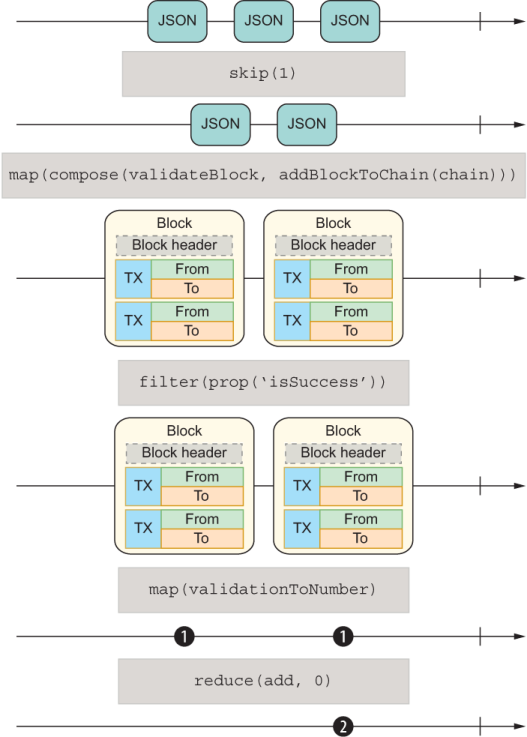
Figure 9.9 Validating blocks by using streams
Furthermore, I mentioned that observables have built-in error handling. For the sake of completeness, here’s a simple example of how errors are handled. When an exception occurs anywhere in your pipeline, the error object propagates downstream to the last observer and triggers the error method:
const toUpper = word => word.toUpperCase()

function* words() {
    yield 'The'
    yield 'Joy';
    yield 'of';
    yield 42;
}

Observable.fromGenerator(words())
    .map(toUpper)
    .subscribe({
      next: :: console.log,
      error: ({ message }) => { assert.equal('word.toUpperCase is not a
         function', message) }
    })
As you’ll recall from chapter 5, ADTs also skip business logic when validation fails so that you can handle the error from a single location, as the next listing shows.
Listing 9.29 Skipping mapped functions on Validation.Failure
const fromNullable = value =>
   (typeof value === 'undefined' || value === null)
      ? Failure.of('Expected non-null value')
      : Success.of(value);

fromNullable('j').map(toUpper).toString();        ❶

fromNullable(null).map(toUpper).toString();       ❷
❷ Skips toUpper function and returns 'Failure (Expected non-null value)'
Once again, the comparison of observables and ADTs is uncanny, which is why it was so important to understand ADTs before observables.
Let’s talk a bit more about operators. A library like RxJS will provide an arsenal of operators for most of your needs, if not all of them. In the years I’ve worked with it, I’ve rarely needed to add my own operator, but it’s good to know that the library is extensible in this way. These operators are designed to accept observables as input and return new observables, which is why they are called pipeable operators.
Observable operators are also known as pipeable functions—functions that take an observable as input and return another observable. You’ve seen how these functions are executed through composition and fluent chaining. In the near future, you will be able to synthesize observables with the pipeline syntax (|>) natively in pure, idiomatic, vanilla JavaScript without the help of any combinator functions, as shown in the next listing.
Listing 9.30 Combining observables with the new pipeline operator
import { filter, map, reduce, skip } from './rx.js';

Observable.of(1, 2, 3, 4)
    |> skip(1)
    |> filter(isEven)
    |> map(square)
    |> reduce(add, 0)
    |> ($ => $.subscribe({ next: :: console.log }));      ❶
❶ Prints the value 20 to the console
Now we’re really kicking into hyperstream! But wait. Instead of a simple number sequence, what would happen if the data were asynchronous? Would the model break? Absolutely not. This code
async function* words() {
   yield 'Start';
   yield 'The';
   yield 'Joy';
   yield 'of';
   yield 'JavaScript';
}
Observable.fromGenerator(words())
   |> skip(1)
   |> map(toUpper)
   |> ($ => $.subscribe({ next: :: console.log, complete: done }));
THE
JOY
OF
JAVASCRIPT
In this case, the observable and promises provide the right level of abstraction so that you can deal with time or latency as though it didn’t exist. This code prints the right result and in the right order.
Alternatively, you can use bind (::) syntax to perform method extraction from our catalog of reactive extension methods. Here’s that object again with map:
const ReactiveExtensions = {
    ...
    map(fn) {
       return map(fn, this);
    }
    ...
}
With the bind operator, we can control the binding of this, much as we would a virtual method. The next listing shows the same program as listing 9.30.
Listing 9.31 Combining observables with the new bind operator
const { skip, map, filter, reduce } = ReactiveExtensions;
const subs = Observable.of(1, 2, 3, 4)
   :: skip(1)                            ❶
   :: filter(isEven)                     ❷
   :: map(square)                        ❷
   :: reduce(add, 0);                    ❷
subs.subscribe({
   next(value) {
      console.log(value);                ❸
   }
});
❶ this points to the source observable Observable.of(1, 2, 3, 4).
❷ Each function’s this will be set to the preceding observable source.
In this snippet of code, Observable.of(...)becomes the this reference in skip, creating a new this reference in filter, and so on. It’s simple to see how a collection of elements or a generation function can be converted to a stream, but what about custom objects?
In chapter 8, you learned that you can create iterable objects or async iterable objects by implementing the built-in Symbol.iterator or Symbol.asyncIterator, respectively. These symbols allow objects to be enumerated by a for...of loop. It would be nice if you could do something similar so that you can treat an object like an Observable. This capability would allow us to treat any custom object in our program as an observable and enjoy all the nice capabilities I have been describing, such as composition, powerful operators, declarative API, and built-in error handling.
It turns out that we can. The TC39 observable specification proposes the addition of another well-known function-valued symbol: Symbol.observable (@@observable for short). The semantics are consistent with those of other symbols. This new symbol works in conjunction with Observable.from to lift any custom objects that need to be interpreted as observables. The symbol follows a couple of rules:
If the object defines Symbol.observable, Observable.from returns the result of invoking that method. If the return value is not an instance of Observable, it’s wrapped as one.
If Observable.from can’t find the special symbol, the argument is interpreted as an iterable, and the iteration values are delivered synchronously when subscribe is called—a sensible fallback.
I’ll show a couple of examples now, beginning with adding Symbol.observable to our custom Pair object in the next listing. I’ll omit the other symbols and properties.
Listing 9.32 Adding @@observable to Pair
const Pair = (left, right) => ({
   left,
   right,
   [Symbol.observable]() {
       return new Observable(observer => {
          observer.next(left);
          observer.next(right);
          observer.complete();
       });
    }
});
Observable.from(Pair(20, 30))         ❶
   .subscribe({
      next(value) {
         console.log('Pair element: ', value);
      }
   });
❶ Because Pair’s @@observable property returns an Observable object, the source becomes the result of invoking it. It prints Pair element: 20 and Pair element: 30
A Blockchain can also become a stream of blocks. Any time a new block is added to the chain, it pushes into the stream, and any subscribers are notified. The next listing shows a similar configuration to the PushArray example in section 9.3.2.
Listing 9.33 Streaming blocks in a blockchain
class Blockchain {
  blocks = new Map();
  blockPushEmitter = new EventEmitter();
  constructor(genesis = createGenesisBlock()) {
    this.top = genesis;
    this.blocks.set(genesis.hash, genesis);
    this.timestamp = Date.now();
    this.pendingTransactions = [];
  }

  push(newBlock) {
    newBlock.blockchain = this;
    this.blocks.set(newBlock.hash, newBlock);
    this.blockPushEmitter.emit(EVENT_NAME, newBlock);       ❶
    this.top = newBlock;
    return this.top;
  }

  //...

  [Symbol.observable]() {
    return new Observable(observer => {
      for (const block of this) {                           ❷
        observer.next(block);
      }
      this.blockPushEmitter.on(EVENT_NAME, block => {
        console.log('Emitting a new block: ', block.hash);
        observer.next(block);                               ❸
      });
    });
  }
}
❶ Notifies listeners of a new block
❷ Invokes Blockchain’s @@iterator to enumerate the current list of blocks
❸ Upon receiving new block, pushes it into the stream
One thing to note about this logic is that it never calls observer.complete. It’s infinite. Subscribers need to unsubscribe when they no longer want to receive new data, as shown in the next listing.
Listing 9.34 Subscribing to and unsubscribing from a reactive Blockchain object
const chain = new Blockchain();
chain.push(new Block(chain.height() + 1, chain.top.hash, []));
chain.push(new Block(chain.height() + 1, chain.top.hash, []));

const subs = Observable.from(chain)                                ❶
   .subscribe({
       next(block) {
          console.log('Received block: ', block.hash);
          if (block.validate().isSuccess) {
            console.log('Block is valid');
          }
          else {
            console.log('Block is invalid');
          }
       }
   });

// ... later in time

chain.push(new Block(chain.height() + 1, chain.top.hash, []));     ❷
subs.unsubscribe();                                                ❸
chain.height(); // 4
❶ Passes the blockchain object directly to the constructor
❷ Later pushes a third block, which will print its hash to the console
❸ Need to unsubscribe to finalize the stream
If you run this code, the printout should look like the following:
Received block b81e08daa89a92cc4edd995fe704fe2c5e16205eff2fc470d7ace8a1372e7de4
Block is valid
Received block 352f29c2d159437621ab37658c0624e6a7b1aed30ca3e17848bc9be1de036cfd
Block is valid
Received block 93ff8219d77be5110fa61978c0b5f77c6c8ece96dd3bba2dc6c3c4b731a724e7
Block is valid
Emitting a new block:  07a68467a3a5652f387c1be5b63159e7d1a068517070e3f4b66e5311e44796e4
Received block 07a68467a3a5652f387c1be5b63159e7d1a068517070e3f4b66e5311e44796e4
Block is valid
Suppose that you push a fourth block into the chain with an invalid index this time:
chain.push(new Block(-1, chain.top.hash, []));
Emitting a new block:  c3cc935840c71aa533c46ed7c3bfc5fc81e55519c7e52e0849afe091423bf5e0
Received block c3cc935840c71aa533c46ed7c3bfc5fc81e55519c7e52e0849afe091423bf5e0
Block is invalid
Allowing Blockchain to be treated as a stream gives you automatic reactive capabilities, which means you can connect other parts of your application that subscribe to receive notifications when new blocks are added to the chain. This example is a simple implementation, but it’s not far from a real-world scenario in which other servers (nodes) in the blockchain network can subscribe to receive push notifications when a new block is mined in any of the peer nodes.
We added quite a bit of code to make the Blockchain class reactive. The good news is that most of this behavior relied on symbols, allowing us to extract this code into a separate module and use metaprogramming techniques (chapter 7) to augment objects by hooking into these symbols. This module can be implemented as a proxy to make any iterable object reactive.
In chapter 7, we used a Proxy to implement a smart block—a block that automatically recomputes its own hash when any of its fields changes. In this section, we’ll use a similar technique to make Blockchain a reactive data structure without adding a single line of code. The code is complex so I’ve divided it into a couple of functions. The following listing shows the overall layout.
Listing 9.35 High-level structure of the reactive function
const reactivize = obj => {

    implementsPush (obj)
        || throw new TypeError('Object does
              not implement a push protocol');

    const emitter = new EventEmitter();

    const pushProxy = //... defined next

    const observable = //... defined next

    return Object.assign(pushProxy, observable);
}
Instead of adding all that observable scaffolding to Blockchain, we can define our own Push proxy to inject this behavior at runtime and keep things nicely separated. The proxy handler object requires objects to declare a push method, which Blockchain does. This code can make any pushable data structure reactive:
function implementsPush(obj) {
    return obj
        && Symbol.iterator in Object(obj)
        && typeof obj['push'] === 'function'
        && typeof obj[Symbol.iterator] === 'function';
}
Next, let’s implement pushProxy in the next listing. This proxy will trap any calls to push and automatically augment its behavior to emit the value passed in.
Listing 9.36 Using a proxy object to trap calls to push
const ON_EVENT = 'on';
const END_EVENT = 'end';

const pushProxy = new Proxy(obj, {
   get(...args) {                                                        ❶
       const [target, key] = args;                                       ❶
       if (key === 'push') {
          const methodRef = target[key];
          return (...capturedArgs) => {
             const result = methodRef.call(target, ...[capturedArgs]);   ❷
             emitter.emit(ON_EVENT, ...capturedArgs);                    ❸
             return result;
          }
       }
       return Reflect.get(...args);
    }
 });
❶ Spread operator to capture all the arguments. The first element is the target object, and the second is the property key.
❷ Executes push normally and captures its result
With the push behavior defined, the last task is implementing the observable logic. This logic listens for push events and notifies its subscribers. Also, every time you instantiate this observable, it emits (replays) any objects the data structure currently has. In listing 9.37, I’ve taken the liberty of adding some logging, using the new console APIs console.group and console.groupEnd, which I think will make tracing the data flow easier. I’ve struggled with this task myself, especially in complicated and intertwined pipelines, so the additional logging helps.
Listing 9.37 Implementing @@observable to make any object behave like a stream
const LOG_LABEL = `IN-STREAM`;
const LOG_LABEL_INNER = `${LOG_LABEL}:push`;

const observable = {
   [Symbol.observable]() {                                      ❶
      return new Observable(observer => {
          console.group(LOG_LABEL);                             ❷
          emitter.on(ON_EVENT, newValue => {
             console.group(LOG_LABEL_INNER);                    ❸
             console.log('Emitting new value: ', newValue);
             observer.next(newValue);
             console.groupEnd(LOG_LABEL_INNER);                 ❸
          })
          emitter.on(END_EVENT, () => {
             observer.complete();
          })
          for (const value of obj) {
             observer.next(value);
          }
          return () => {
             console.groupEnd(LOG_LABEL);                       ❹
             emitter.removeAllListeners(ON_EVENT, END_EVENT);
          };
      });
   }
}
❶ Declares the Symbol.observable so you can pass this object works with Observable.from
❷ Creates an outer logging group label for the entire duration of the stream. Any logs within this group are intended for better visibility.
❸ Creates an inner level of indentation to handle every push sequence in a different level
❹ Creates an outer logging group label for the entire duration of the stream. Any logs within this group are intended for better visibility.
Now that we have the components we need, let’s compose them. The result is a proxied object decorated with Symbol.observable so that the Observable API can interoperate with it. Because Object.assign copies symbols as well, let’s use it:
return Object.assign(pushProxy, observable);
The easy part is streamifying objects that have push/iterator behavior. Example are Array and Blockchain. To keep things simple, let’s use an array:
const arr$ = reactivize([1, 2, 3, 4, 5]);

const subs = Observable.from(arr$)
   .filter(isEven)
   .map(square)
   .subscribe({
      next(value) {
         console.log('Received new value', value);
         count += value;
      }
   });

//... later in time

arr$.push(6);

subs.unsubscribe();
This code flow is easy to follow. If you were to add logging statements to isEven and square, the output of this program would look something like this (the logging enhancements help us read the output):
IN-STREAM
  Is even: 1
  Is even: 2
  Squaring: 2
  Received new value 4
  Is even: 3
  Is even: 4
  Squaring: 4
  Received new value 16
  Is even: 5

  //... later in time

  IN-STREAM:push
    Emitting new value:  6
    Is even: 6
    Squaring: 6
    Received new value 36
With this function, we can write the same code as before with a much leaner Blockchain class:
const chain$ = reactivize(chain);

Observable.from(chain$)
   .subscribe({
       next(block) {
          console.log('Received block: ', block.hash);
          if (block.validate().isSuccess) {
            console.log('Block is valid');
          }
          else {
            console.log('Block is invalid');
          }
       }
   });
This chapter is the extent of this book’s coverage of observables. The goal was to give you a taste of this programming model, which without a doubt will change the way you write JavaScript applications. The way that JavaScript’s event loop operates allows us to raise the level of abstraction seamlessly from an array to iterators to generators to async generators and now to observables, creating the perfect architecture for the language.
In this chapter, the techniques I have shown you throughout this book come together, from functional style currying and composition to ADTs to iterables and generators and to the abstraction of time. All those techniques lead us to a model of programming that could not be better suited to observables. Making observables part of ECMAScript will allow platforms, frameworks, and applications to share a push-based stream protocol.
This book presented a whirlwind of JavaScript topics but only scratched the surface of what you can do with the language now, as well as what lies ahead. I hope that the topics you learned here will guide and inspire you to explore different ways of problem solving, but always consistently within the framework of the paradigms you use. Employ these techniques wisely, and use the right tool for the job. For teaching purposes, I presented lots of techniques, patterns, and paradigms in the same application. This approach was purely didactical. I expect you to cherry-pick the techniques that make sense for the type of application you are building and what’s best for the problem you are solving.
Strolling down memory lane, we began by inspecting JavaScript’s object and prototyped inheritance model. You can take advantage of this object-oriented system to create the objects that capture the state of your application. Then you learned how functional programming can help you implement the business logic in a pure and composable way. By reducing mutation and side effects, and by harnessing the power of closures and higher-order functions, you can get rid of nasty bugs that can afflict even the best-tested business logic.
With these two foundations in place, you learned how to organize your code into fine-grained, reusable modules by using a functional and orthogonal architecture. You also set clear boundaries that separate cross-cutting logic (logging, tracing, policies, and so on) with metaprogramming.
Finally, after looking at data and functions, you tackled another dimension: time. Data can arrive in many form factors and from different locations. Asynchronous programming with promises and observables can erase data locality and simplify how you handle different types of data, using a consistent set of APIs and programming models.
It’s important to realize that JavaScript has a unique challenge as the language of the web. It needs to not only remain relevant with modern programming idioms that developers want, but also continue to be the standardizing body for programming the web as a whole. These two forces are often at odds, and it’s not sensible to add every possible API natively to the language. As exciting as it is to use new and shiny features, we need to balance this novelty with the need to not bloat the core modules that are downloaded over the network. There’s still a strong preference for a canonical, bare JavaScript language, one with a small kernel into which you can plug APIs such as Promise, Proxy, Reflect, and even Observable. We’ll have to wait to see whether the JavaScript standard libraries continue to grow and whether a modular kernel is in the works so that you can download or import only the pieces of JavaScript that you need.
Our journey ends here. In closing, I’d like to urge each of you to fund your favorite NPM library or contribute to it. We rely on open source now more than ever, and open source is the main avenue for innovation. JavaScript itself is evolving in the open. Open source is where tried and tested new ideas come to fruition. ECMAScript Modules, promises, and observables all originated from open source libraries before becoming official standards, for example.
At age 25, JavaScript continues to be reimagined each year and reequipped to tackle the challenges of modern application development. What started as a typical object-oriented language is now being classified as a lambda language, according to experts like Douglas Crockford. The cloud is the limit. If all bets are on the table, I’d continue to bet on JavaScript and its future. I hope that reading this book gave you the same joy that writing it gave me!
An Iterator object has the method next, which returns an object with properties value and done. value contains the next element in the iteration, and done is the control switch that stops the iteration process.
An async iterator follows the same behavior as a normal iterator except that next returns a Promise with a result of the same shape {value, done}.
To build custom enumerable objects, you can implement Symbol.iterator. You can also define Symbol.asyncIterator to enumerate the pieces of your objects asynchronously.
Generators are a special type of function that can produce a sequence of values instead of a single value—a factory for iterables. A generator function is identified by an asterisk (*).
A generator function returns a Generator object that implements the iterator protocol, which means you can consume it by using the for...of loop.
The difference between a normal generator and an async generator is that generated values are wrapped by a Promise. To consume an async generator, you can use the for await...of loop.
Streams are sequences of values emitted over time. Anything can become a stream, such as a single value, an array, or a generator function. Anything that is iterable can be modeled as a stream.
The new Observable API proposes to make stream-based, reactive programming easier.
Observables are push-based, declarative streams. Their programming model is based on publish/subscribe. Observables are agnostic to the type of data in the sequence and to whether the data is synchronous or asynchronous; the programming model is the same.
You can create and augment your own observable objects by implementing a function-valued Symbol.observable property.