Promise APIasync/await and asynchronous iteratorsFor over a decade prophets have voiced the contention that the organization of a single computer has reached its limits and that truly significant advances can be made only by interconnection of a multiplicity of computers.
As Amdhal predicted, the web is a gigantic, distributed, interconnected network, and the language we use must rise to the challenge by providing appropriate abstractions that facilitate programming this ever-evolving and ever-changing web. Programming the web is different from programming local servers, because you can’t make assumptions about where the data is located. Is it in local storage, a cache, on the intranet, or a million miles away? Hence, one of the main design goals of JavaScript is that it needs to have strong abstractions for asynchronous data operations.
JavaScript developers had become accustomed to the callback pattern: “Here’s some piece of code. Go and do something else (time) and then call it back when you’re done.” Although this pattern kept us going for a while (and still does), it also presented difficult and unique challenges, especially when programming on a large scale and with added complexity. One common example was when we needed to orchestrate events (such as button clicks and mouse movement) with asynchronous actions (such as writing an object to a database). It was immediately obvious that callbacks don’t scale for executing more than two or three asynchronous calls. Perhaps you’ve heard the term pyramid of doom or callback hell.
For this book, it’s expected that you are familiar with the callback pattern, so we will not get into its pros and cons. What’s most important is the solution. Do we have a way to create an abstraction over callbacks that all JavaScript developers can use in a consistent manner—perhaps something with a well-defined API, such as an algebraic data type (ADT; chapter 5)? From the search for this solution, the Promise API was born, and it has become quite popular for representing most asynchronous programming tasks. In fact, new APIs, libraries, and frameworks that have any asynchronous logic are almost always represented as promises nowadays.
This chapter begins with a brief review of the architecture of a common JavaScript engine, which features, at a high-level, a task queue and an event loop. Understanding this architecture at a glance is important for understanding how asynchronous code works to provide concurrent processing. Then we move on to the Promise API to lay the foundation for JavaScript’s async/await feature. With this API, you can represent asynchronous processes in a linear, synchronous way, similar to programming in a procedural style. Promises let you think about the problem at hand without having to worry about when a task completes or where data resides. Next, you’ll learn how to take advantage of the composability of promises and powerful combinators to chain together complex asynchronous logic. Last, you will review the dynamic import statement (mentioned briefly in chapter 6), and look at features including top-level await and asynchronous iteration.
It’s hard to talk about asynchronous programming in most programming languages without mentioning threads. That’s not the case with JavaScript. What makes asynchronous programming so simple is the fact that JavaScript gives you a single-threaded model while exploiting the multithreaded capabilities of the underlying platform (the browser or Node.js). A single-threaded model is not a disadvantage, but a blessing. We’ll start by taking a peek at this architecture.
You may be somewhat familiar with how Node.js and most JavaScript engines work behind the scenes. Without getting into the weeds of any particular runtime implementation (V8, Chakra, or Spidermonkey), it’s important to give you a high-level idea of how a typical JavaScript engine works under the hood. A typical JavaScript architecture is
Event-driven — The JavaScript engine uses an event loop to constantly monitor a task queue, also known as a callback queue. When a task is detected, the event loop dequeues the task and runs it to completion.
Single-threaded — JavaScript provides a single-threaded model to developers. There are no standard, language-level threading APIs to spawn new threads.
Asynchronous — All modern JavaScript engines use multiple threads (managed by an internal worker pool) so that you can perform nonblocking I/O actions without blocking the main thread.
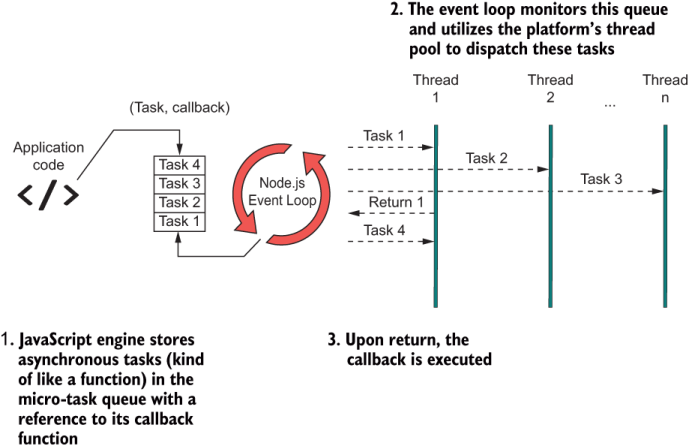
Figure 8.1 shows that the event loop is at the heart of this architecture. Every heartbeat or tick of the event loop picks and runs a new task or slices of a task.
Figure 8.1 JavaScript’s event-driven, asynchronous architecture. At the heart is the event loop (a semi-infinite loop), which is the abstraction used to handle concurrent behavior in JavaScript. The event loop takes care of scheduling new asynchronous tasks and allocating them to any threads available in the pool. When the task completes, the engine triggers the action’s callback function to return control to the user.
Node.js’s engine does a fine job of abstracting the execution of multiple asynchronous actions so that they appear to run simultaneously. Behind the scenes, the event loop performs fast scheduling and swapping, using its own thread to interact natively with the operating system’s kernel APIs or browser thread architecture and to perform all the necessary bookkeeping of managing threads (called workers) in the pool. The polling loop is infinite, but it’s not always spinning; otherwise, it would be resource-intensive. It starts ticking when there are events or actions of interest such as button clicks, file reads, and network sockets. When a task appears, the event loop dequeues it from the task queue and schedules it to run. Each task runs to completion and invokes the provided callback to return control to the user, along with the result (if any). This process works like a clock (literally), yet the user has no idea that any of it is happening. On the surface, JavaScript does not leak or expose any threading-related code.
Furthermore, threads can be created internally by server-side or client-side native APIs (DOM, AJAX, sockets, timers, and others) or by any third-party libraries that implement native extensions. As JavaScript developers, we are privileged to have this technology remove this complexity for us. To top it off, we have at our fingertips simple APIs that put even more layers of abstraction between us and the engine. Promise is the first line of defense against callback hell and the stepping stone to simplifying asynchronous flows.
Promises were created to address the increasing complexity of having to nest callback within callback functions in favor of flattening these calls into a single, fluent expression. In this section, you’ll learn how the Promise API simplifies the mental model of asynchronous programming. It’s important to master this API, because it’s the foundation of async/await and related features.
Simply put, a Promise object encapsulates some eventual (to-be-computed) value, much like a regular function. It is capable of delivering a single object, whether that object is a simple primitive or a complex array. Promises are similar to callbacks in that they clearly communicate “Go do something; then (time) go do something else,” which makes them good candidates for one-to-one replacement. The following listing shows how you’d instantiate a new promise.
Listing 8.1 Instantiating a new Promise object
const someFutureValue = new Promise((resolve, reject) => {      ❶
   const value = // do work...
   if(value === null) {
     reject(new Error('Ooops!'));
   }
   resolve(value);
});

someFutureValue.then(doSomethingElseWithThatValue);             ❷
❶ Promises also rely on a callback function. This function is called the executor.
❷ The then method allows you to sequence multiple promises together.
Like callbacks, promises take advantage of the full capabilities of the JavaScript architecture. In fact, to the engine, there shouldn’t be any difference. Generally, any event for which some form of callback function is provided (mouse event, HTTP request, promises, and so on) may use JavaScript’s event loop. (Sometimes, for simple operations such as a setTimeout, a direct nonblocking system call may be used, but it is an engine-specific optimization.) The function passed to the Promise constructor is called the executor function. The executor runs without blocking the main code, and the event loop decides how to schedule the work by nicely weaving timed slices of asynchronous blocks together with the main code. Figure 8.2 depicts this process.
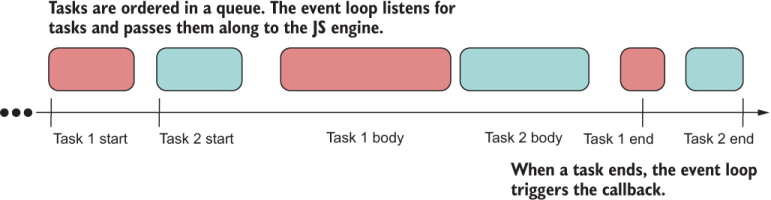
Figure 8.2 A simplified view of how the Node.js architecture handles asynchronous tasks. The event loop time slices these tasks so that code never blocks, providing the illusion of concurrency.
Every programming language nowadays supports a similar API, sometimes called a Task or a Future. The general idea is the following:
doSomething().then(doSomethingElse);
These tasks will run to completion and may take an arbitrary amount of time to run. The Promise#then method clearly communicates that promises are abstracting over time (or latency). Promises allow you to work with time in a simple manner (in plain English, if you will) so that you can focus on solving the real business issues. It helps to think of them as being the time-bound instruction separator for asynchronous calls, much like what a semicolon does with synchronous statements:
doSomething(); doSomethingElse();
Promises are ideal return wrappers for operations that may involve waiting or blocking, such as I/O or HTTP requests. In fact, the Node.js fs library has slowly evolved from using synchronous APIs to using callbacks and finally to returning promises—a good example of the adoption of this pattern over time. You can find both synchronous and asynchronous APIs to access the file system.
Let’s walk through a simple example that shows this evolution, starting with the synchronous approach:
fs.readFileSync('blocks.txt');
This approach should be your least-preferred option (and the Node.js team intended it as such by explicitly labeling it Sync), as it pauses the main thread. Blocking is the opposite of scaling and goes against the event-driven, single-threaded qualities of JavaScript. Use it with caution or only for simple one-off scripts. Second in line is the default callback version:
fs.readFile('blocks.txt', (err, data) => {
  if (err) throw err;
  console.log(data);
});
This API uses JavaScript’s internal scheduler so that code never halts on the readFile call. When the data is ready, the supplied callback is triggered with the actual file contents.
An intermediate step between callbacks and a fully promise-based filesystem library is a utility called util.promisify, which adapts callback-based functions to use Promise:
import util from 'util';

const read = util.promisify(fs.readFile);

read('blocks.txt').then(fileBuffer => console.log(fileBuffer.length));
The caveat is that this utility works with error-first callbacks, a pattern prevalent in many JavaScript APIs, stating that callbacks should be right-biased, with the error state mapped to the left argument and the success state mapped to the right. (You learned about biased APIs in chapter 5.) Like Validation and other monads, the continuation branch (the branch to which Functor.map applies) is always on the right. This resemblance is coincidental, however. As you’ll see in section 8.2.2, there’s a strong connection between promises and ADTs.
Finally, there’s the best approach, which is to use a built-in promisified alternative library to access the filesystem, available in Node.js as a separate namespace fs.promises:
import fs from 'fs';

const fsp = fs.promises;

fsp.readFile('blocks.txt').then(
    fileBuffer => console.log(fileBuffer.length));
Arguably, this version is a lot more fluent than the callback-based approach because code no longer appears to be nested. With a single asynchronous operation, the improvement might not be obvious, but think about the more intensive tasks that involve three or four asynchronous calls.
Now that you’ve seen how an API improves with the use of promises, let’s dive deeper into why this API was so earth-shaking in the JavaScript world. Earlier, I said that promises wrap over values to be computed at some arbitrary time. The beauty of this abstraction, though, is that it blurs where the data resides.
Generally speaking, the principle of data locality is the idea of moving the data closer to where some computation is taking place, or vice versa. The closer the data, the faster it moves to the desired destination, through a system bus or through the internet. The varying distances between data and a computing unit, for example, are why you have different levels of caching in your CPU architecture or even in your JavaScript applications. Promises allow us to use the same programming model no matter where the data resides (local or remote) or how long a computation takes (two seconds, two minutes, or two hours). This snippet of code can read a file whether it lives locally on the server or in some remote location around the world:
fsp.readFile('blocks.txt').then(
    fileBuffer => console.log(fileBuffer.length));
We can say that promises are façades over latency and that data locality will not affect your programming model. We’ll circle back to this idea when we discuss observables in chapter 9. Moreover, the idea of modeling a successful or error state is not coincidental. Remember Success and Failure for the Validation ADT in chapter 5?
In chapter 5, we studied ADTs and their importance in programming as tools to make certain types of problems composable. They’re also effective at modeling an asynchronous task when we consider time to be an effect. In this section, you’ll see that the design of ADTs helps you wrap your head around promises by automatically porting all the benefits of composability from ADTs to asynchronous code.
First, let’s talk about how promises work. When a Promise object is declared, it immediately begins its work (the executor function) and sets its status internally to pending:
const p = new Promise(resolve => {
   setTimeout(() => {
     resolve('Done');
   }, 3000);
});

console.log(p); // Promise { <pending> }
When a promise settles (in this case, after three seconds), there will be only two possible states: fulfilled (resolve with a value) or rejected (reject with an error). Figure 8.3 captures all the possible states of a Promise object.
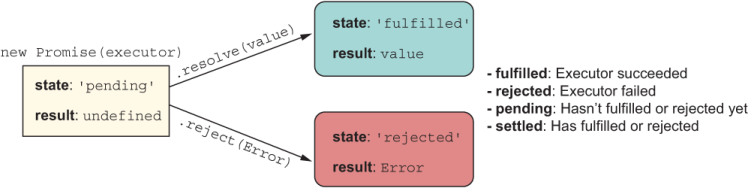
Figure 8.3 The states in which a single Promise object may be its life cycle
If you think about what you learned in chapter 5, Promise isn’t much different from Validation. In fact, you can almost stack their diagrams, as shown in figure 8.4.
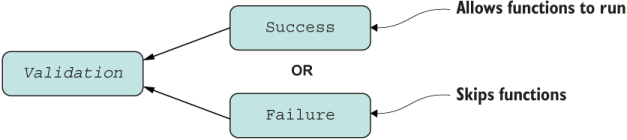
Figure 8.4 Structure of the Validation type. Validation offers a choice of Success or Failure—never both. As with promises, computations continue on the Success branch.
Validation also models a binary state. It assumes Success when initialized with a value and then switches depending on the outcome of the operations that are mapped to it. You can sort of assume that the same thing happens with promises: they start as pending or fulfilled and then switch depending on what happens with each reaction or executor function passed to Promise#then. By the same token, if Validation reaches a Failure state, the error is recorded and the chain of operations falls through, as with Promise#catch.
Looking at the example from an ADT perspective, we can reason that a Promise is a closed context with enough internal plumbing to abstract over the effects of time. Promises follow the Promise/A+ specification (https://promisesaplus.com), with the goal of standardizing them and making them interoperable across all JavaScript engines.
Given any ADT C, if you think about Promise#then as C.map and Promise.resolve as C.of, many of the universal properties of ADTs continue to hold, even composability! The one small caveat is that Promise#then is left-biased, so it defines the fulfilled (success) callback as the left argument and the error callback as the right. The reason is usability, as most people code with fulfilled callbacks only when chaining multiple promises, using a single Promise#catch function at the end to handle any errors that occur at any point in the chain.
I’ll briefly illustrate some of the properties that make promises ADT-like. The next listing shows some supporting helper functions used in the examples.
Listing 8.2 Helper functions used in subsequent code samples and figures
const unique = letters => Array.from(new Set([...letters]));    ❶
const join = arr => arr.join('');                               ❷
const toUpper = str => str.toUpperCase();                       ❸
❶ Takes a string of letters and removes duplicates, such as “aabb” -> “ab”
❷ Joins an array into a string
❸ Uppercases all characters of the given string
To prove that promises can work and be reasoned about like any ADT, here are a couple of the universal properties we discussed in chapter 5, this time using Promise:
Identity —Executing the identity function on a Promise yields another Promise with the same value. The expressions
Promise.resolve('aa').then(identity);
Promise.resolve('aa');
Promise { 'aa' }
Composition —The composition of two or more functions, such as f after g, is equivalent to applying g first and then f. The statements
Promise.resolve('aabbcc')
       .then(unique)
       .then(join)
       .then(toUpper);
Promise.resolve('aabbcc')
       .then(compose(toUpper, join, unique));
Promise { 'ABC' }
So if Promise#then is analogous to Functor.map, which method is analogous to Monad .flatMap? As you’ve probably noticed, Promise#then allows you to return unwrapped values as well as Promise-wrapped values; it handles both. Therefore, Promise#then is Functor.map and Monad.flatMap combined, with the flattening logic handled behind the scenes. The use case in the following listing showcases both scenarios.
Listing 8.3 Promise#then flattening a nested Promise automatically
Promise.resolve('aa')
   .then(value => {
      return `${value}bb`                    ❶
   })
   .then(value => {
     return Promise.resolve(`${value}cc`)    ❷
   }); // Promise { 'aabbcc' }
Can we conclude that promises are algebraic or monadic? From a theoretical perspective, they are not, because promises don’t have all mathematical properties. In fact, promises don’t follow the fantasy-land specification (chapter 5) that we’d expect from an ADT. But we’re fortunate that on the surface, promises work the same way and that we can take advantage of this sound model of programming, which has a low barrier of entry that allows us to assemble (compose) chains of promises.
A promise chain works like any ADT and is created by subsequently calling Promise#then or Promise#catch on returned Promise objects. This process is shown in figure 8.5.
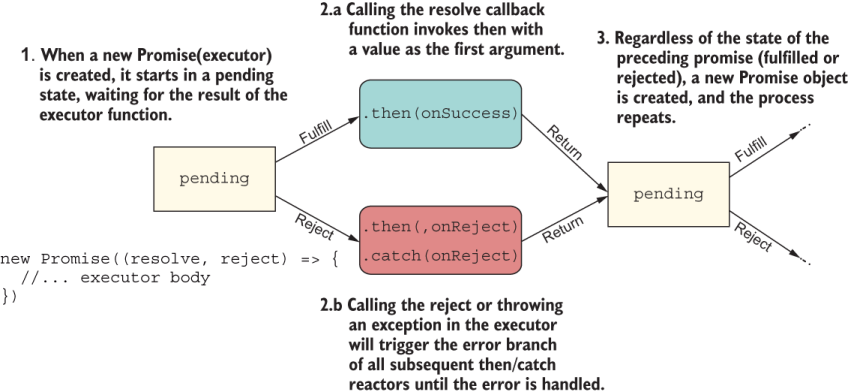
Figure 8.5 A detailed view of the execution of a promise chain. Every Promise object starts as pending and changes states depending on the outcome of the executor callback. The result is wrapped in a new pending Promise. (Diagram was inspired by http://mng.bz/Xdx6.)
Each executor returns a new pending promise that changes states depending on the result of its own executor. If successful, the fulfilled values are passed to the next promise in the chain, and so on until a non-Promise object is returned. This process sounds a lot like composition, if you think about it.
Let’s look at different scenarios of how success and error operations execute, starting with a simple scenario of a fully linked chain.
The following listing shows an example of passing three reaction functions that are executed only after the preceding promise succeeds. At each step, new Promise objects are implicitly created.
Listing 8.4 Fully linked chain of promises
Promise.resolve('aabbcc')
    .then(unique)            ❶
    .then(join)              ❶
    .then(toUpper);          ❶
❶ Executors are called only when the preceding promise is fulfilled.
Like ADTs, promises model the conveyor-belt or railway approach to data manipulation. Every operation performs a new data transformation step and returns a new pending promise that awaits the result of its handler function. If the function is applied successfully, it settles as fulfilled. You saw a detailed flow in figure 8.5. To keep things simple for the next use case, I’ll illustrate the final state of the promise at each step. Figure 8.6 describes this flow.
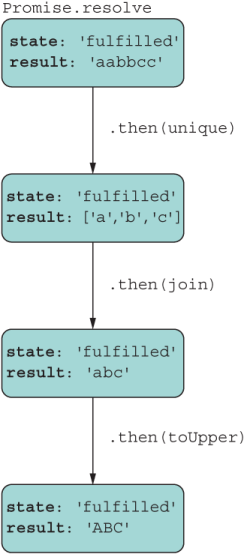
Figure 8.6 Promise chains allow you to manipulate data as a unidirectional, forward conveyor belt where every step applies a different transformation of the data.
Listing 8.4 represents a chain with a single result, whereas listing 8.5 does not.
The next listing shows a Promise object that never links to any other.
Listing 8.5 Broken chain of promises
const p = Promise.resolve('aabbcc');
p.then(unique);  // ['a','b','c']   ❶
p.then(join);    // Error           ❶
p.then(toUpper); // 'AABBCC'        ❶
❶ All executors are called when p fulfills in that order and receive the same input. This code produces three promises: two fulfilled and one rejected.
In this case, three different, disjointed Promise objects were created, none of them linked to the others. This code leads to a runtime error, which most likely was unintended. Figure 8.7 shows the bug and the values that would be stored inside each resulting promise.
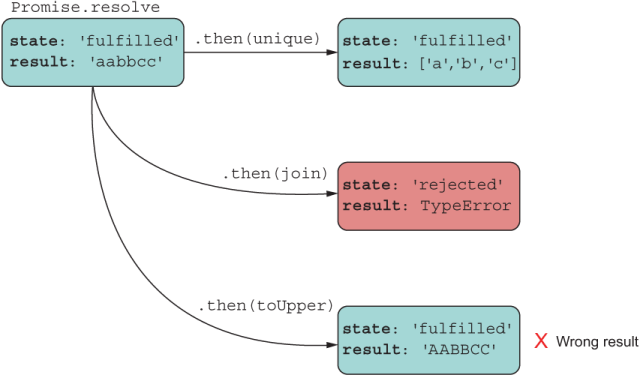
Figure 8.7 This approach does not form a chain: It’s a bug. The code adds multiple handlers to the same Promise object, each applying one transformation to the original data, and obtains three different and unexpected results.
The example shown in listing 8.5 is a common mistake. In this approach, unique, join, and toUpper all receive 'aabbcc' as input, which is not what the programmer likely intended. What happens is that the Promise object is passed three different reaction functions and then executes them in order against the same input value. Not only are the results incorrect, but one of the promises errors out with a TypeError. Let’s see what would happen if we were to attach an error handler to the failing promise (figure 8.8).
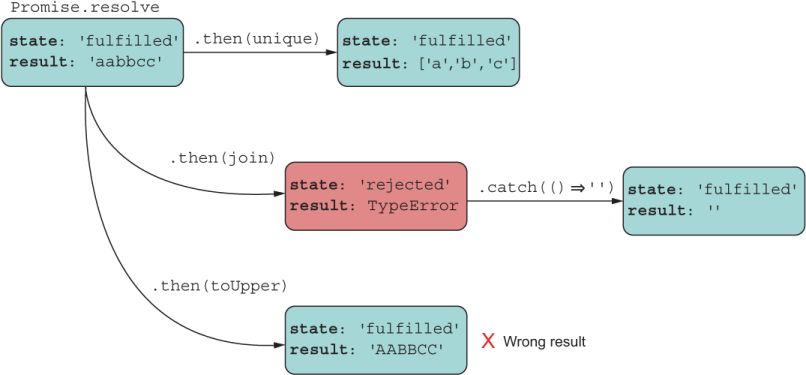
Figure 8.8 Recovering the failing promise and returning a default, empty value. This approach returns another pending promise that fulfills immediately with an empty value.
As you’d expect, the Promise#catch handler function would apply only to the isolated Promise object and recover, but another one could easily fail. When tasks involve multiple asynchronous actions, it’s common to see nested promises.
Suppose that you are working with some remote data store, and you want to pull data for a specific user together with their shopping-cart items and return the response as a single object. To do so, you’d need to merge data from two endpoints and combine both responses. The best option would be to use a promise combinator, which we’ll look at in section 5.3. Another way would be to nest promises.
It’s true that promises were designed to avoid having to write nested callbacks in favor of a flat chain. The reason why promises are much better than callbacks, though, is that a properly nested promise is still a single chained promise, indentation aside. This mental model is much easier to reason about, as the next listing illustrates.
const concat = arr1 => arr2 => arr1.concat(arr2);

Promise.resolve('aabbcc')
  .then(unique)
  .then(abc =>
    Promise.resolve('ddeeff')       ❶
       .then(unique)
       .then(def => abc.concat(def))
  )
  .then(join)
  .then(toUpper); // 'ABCDEF'
As you can see, even returning a nested promise joins back to the main chain, as shown in figure 8.9.
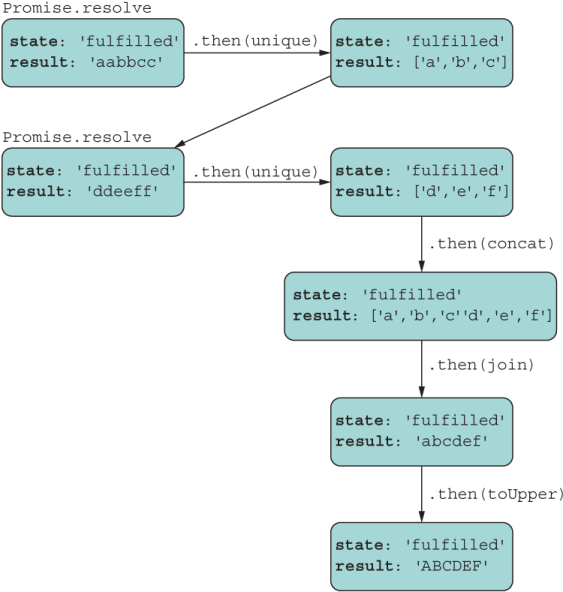
Figure 8.9 A flow that includes a nested promise. The returned nested promise links itself back with the source Promise object, modeling a linear flow.
The real challenge in nesting is handling errors. How you decide to structure your code depends on how you’re planning your data and/or errors to propagate. Data propagates by using Promise#then. Errors propagate by using Promise#then(, onRejected) or Promise#catch.
The tricky part is determining the root promise object to which you’re attaching your reaction functions. To return to our simple use case, let’s cause some function in the chain to fail on purpose in the next listing.
Listing 8.7 Fully linked chain with error
Promise.resolve('aabbcc')
   .then(unique)
   .then(() => throw new Error('Ooops!'))
   .then(join)                                        ❶
   .then(toUpper)                                     ❶
   .catch(({message}) => console.error(message));     ❷
❷ Catch handler receives the error object and prints Ooops!
The error in the third line triggers the rejection handlers downstream to the Promise#catch call, effectively skipping the join and toUpper steps.
The next listing shows an example of using nested promises with errors.
Listing 8.8 Nested promise chain with error
Promise.resolve('aabbcc')
  .then(unique)
  .then(data => {
    Promise.resolve(data)
       .then(join)
       .then(() => throw new Error('Nested Ooops!'))     ❶
  })
  .then(toUpper)                                         ❷
  .catch(({message}) => console.error(message));
❶ Nested promise fails with an error but goes unhandled
❷ Throws property access on undefined error
In this case, you’d expect the nested chain to join the main chain and print “Nested Ooops!” at the end. Can you spot the bug that prevents this from happening? That’s right: the developer forgot to return the nested promise to be embedded properly in the chain. Now that nested promise is essentially a new rogue pending promise (figure 8.10).
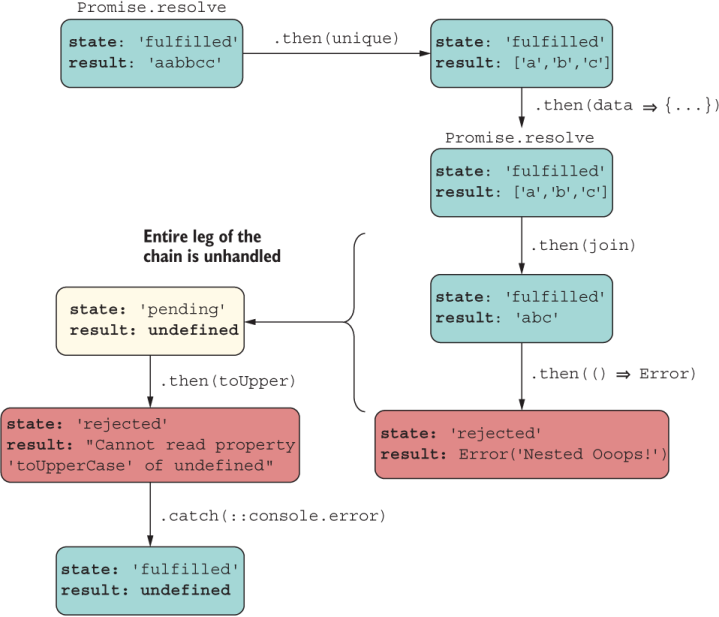
Figure 8.10 Because the developer forgot to return the Promise object, the nested promise went off on its own, and its result or error (as the case may be) would never join the main promise chain.
This result usually happens when the author forgets to return the nested promise object or wants to use an arrow function but uses curly braces incorrectly. The following listing fixes the problem.
Listing 8.9 Rejoining the nested chain to handle the error properly
Promise.resolve('aabbcc')
  .then(unique)
  .then(data =>                                        ❶
    Promise.resolve(data)
       .then(join)
       .then(() => throw new Error('Nested Ooops!'))
   )
  .then(toUpper)
  .catch(({message}) => console.error(message))        ❷
❶ Removed parenthesis to make an arrow function
❷ Prints “Nested Ooops!” to the console
Now the nested promise is properly embedded in the chain, and the data (or error in this case) propagates as intended to print “Nested Ooops!” (figure 8.11).
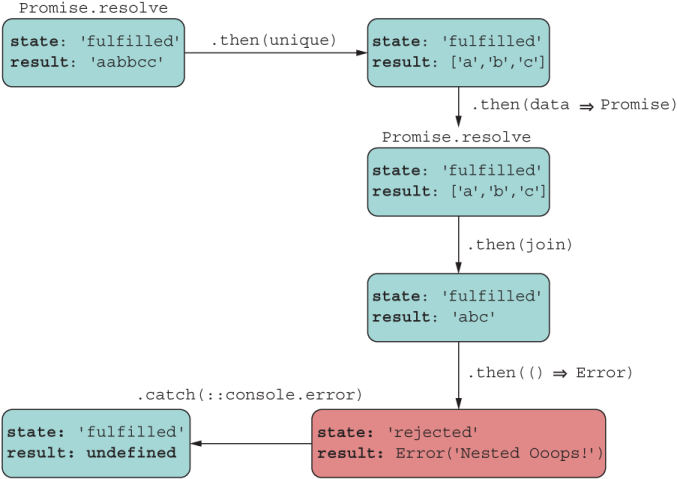
Figure 8.11 Fixing the bug effectively flattens the chain. Now each result/error is handled and accounted for.
The design of promises is also fluent on the Promise#catch call. This technique is useful for recovering from errors with default values. Consider the trivial fix in the following listing.
Listing 8.10 Recovering from an error with a default value
Promise.resolve('aabbcc')
  .then(unique)
  .then(data =>               ❶
    Promise.resolve(data)
       .then(join)
       .then(() => throw new Error('Inside Ooops!'))
       .catch(error => {
         console.error(`Catch inside: ${error.message}`)
         return 'ERROR'
       })
   )
  .then(toUpper)
  .then(::console.log)
  .catch(({message}) => console.error(message));
❶ When you use the arrow function, the return statement is implicit.
It’s important to mention that your promise chains must be able to handle error cases. If they fail to do so, JavaScript engines emit a warning (at the time of this writing). You may have seen this message in your console:
UnhandledPromiseRejectionWarning: Unhandled promise rejection. This error originated either by throwing inside of an async function without a catch block, or by rejecting a promise which was not handled with .catch().

DeprecationWarning: Unhandled promise rejections are deprecated. In the future, promise rejections that are not handled will terminate the Node.js process with a non-zero exit code.
What this message tells you is that, internally, the JavaScript engine is handling the error for you and failing gracefully. As you might expect, you wouldn’t want this situation to continue forever, so if you are seeing this warning now, you’re probably missing some error-handling code, and your best bet is to fix the problem right away.
Finally (no pun intended), you can end promise chains with the Promise#finally method. As you’d expect, the this callback has the same semantic structure as the finally block after a try block. The callback executed after the promises settles regardless of whether it fulfilled, as the next listing shows.
Listing 8.11 Promise chain with Promise#finally
Promise.resolve('aabbcc')
  .then(unique)
  .then(join)
  .then(toUpper)
  .then(console.log)        ❶
  .finally(() => {
    console.log('Done')     ❷
  });
❷ Always prints 'Done' regardless of the state of the promise
As you can see, maneuvering a promise chain involves carefully threading through and connecting promise objects. If you need to nest a promise to perform additional asynchronous logic, remember to connect it back to the main line.
This section provides a couple of real-world examples. The first example uses the promisified filesystem API to count all the blocks saved to a file. For this task, we’ll program a function called countBlocksInFile in the next listing.
Listing 8.12 Counting all blocks in a file
function countBlocksInFile(file) {
   return fsp.access(file, fs.constants.F_OK | fs.constants.R_OK)
      .then(() => {                                                 ❶
         return fsp.readFile(file)
      })
      .then(decode('utf-8'))
      .then(tokenize(';'))
      .then(count)
      .catch(error => {
          throw new Error(`File ${file} does not exist or you have
             no read permissions. Details: ${error.message}`)
       });
}

countBlocksInFile('blocks.txt')
   .then(result => {
      result // 3
   });
❶ fsp.access does not produce a value. If access is granted, it resolves; otherwise, it rejects.
Here’s another real-world example that implements the complicated logic of mining a new block into the chain. This code is complex because it mixes synchronous and asynchronous code that involves a couple of nested asynchronous operations: a long-running operation to mine a block and a dynamic import to read the mining reward setting. This service function is implemented in BitcoinService.
The code in listing 8.13 shows a crucial part of the blockchain protocol—an oversimplification, of course. It highlights the extensive work that miners need to do to gain any reward. In essence, a miner mines the new block into the chain. This mining process also runs the proof-of-work algorithm. After a successful mining, the miner would collect any rewards that were previously stored as pending transactions. After the block is inserted, a miner validates the entire blockchain structure from beginning to end. All these tasks would have run on a single miner node, which has its own copy of the entire blockchain tree. In our example, the blockchain service takes care of creating a new reward transaction and puts that transaction back into the chain as a pending transaction for the next miner to come in. All these operations can take varying amounts of time, so using promises to smooth over all of them and keep a flat, simple-to-reason-about structure is beneficial.
Listing 8.13 Mining a block in the chain
  function minePendingTransactions(rewardAddress,
       proofOfWorkDifficulty = 2) {

    const newBlock = new Block(ledger.height() + 1, ledger.top.hash,
      ledger.pendingTransactions, proofOfWorkDifficulty);

    return mineNewBlockIntoChain(newBlock)                     ❶
      .then(:: ledger.validate)                                ❷
      .then(validation => {
        if (validation.isSuccess) {
          return import('../../common/settings.js')            ❸
            .then(({ MINING_REWARD }) => {                     ❹
              const fee =
                Math.abs(
                  ledger.pendingTransactions
                    .filter(tx => tx.amount() < 0)
                    .map(tx => tx.amount())
                    .reduce((a, b) => a + b, 0)
                ) *
                ledger.pendingTransactions.length *            ❺
                0.02;


              const reward = new Transaction(
                network.address, rewardAddress,                ❻
                Money.sum(Money('B|', fee), MINING_REWARD),
                'Mining Reward');
              reward.signTransaction(network.privateKey);

              ledger.pendingTransactions = [reward];           ❼

              return ledger;
            })
        }
        else {
          new Error(`Chain validation failed ${validation.toString()}`);
        }
      })
      .catch(({ message }) => console.error(message));
  }
❶ Mines a new block into the chain: our first async operation.
❷ Validates the entire chain. As with fs.access, the promise resolves on a successful validation. A failed validation translates into a rejection downstream. The catch block receives the error and logs it. For more information on the bind operator, see appendix A.
❸ Dynamically imports the settings. Dynamic import uses promises. This new nested async operation is chained back into the existing bigger chain.
❹ Destructures the MINING_REWARD setting. This value is used by the blockchain system to insert a transaction that rewards the miner. This reward becomes effective when the next block is added to the chain.
❺ More transactions mean more rewards.
❻ Service creates a new reward transaction.
❼ Clears all pending transactions and places reward in chain to incentivize next miners
Despite the complexity, at this point the chained approach should look familiar to you because we’ve been talking about ADTs since chapter 5 and have been building sequences of operations. Everything makes more sense when you can relate Promise#then as Functor.map and Monad.flatMap. Applying the right abstractions to the problem at hand makes your code leaner and more robust, which is why promises win over callbacks.
So far, I’ve covered single-file promise chains. Often, you’ll need to handle more than one task at a time. Perhaps you’re mashing up data from multiple HTTP calls or reading from multiple files. This situation leads to promise chains that introduce forks in the road.
As function combinators (compose and curry) accept functions and return a function, promise combinators take one or more promises and return a single promise. As you know, ECMAScript 2015 shipped with two incredibly useful static operations: Promise.all and Promise.race. In this section, I’ll review those two APIs and introduce two new combinators that help fill in additional use cases: Promise.allSettled and Promise.any. These combinators are extremely useful for reducing complicated asynchronous flows to simple linear chains, especially when the task requires you to combine data from multiple remote sources. To illustrate these techniques better, we need to find some long-running operation we can use to put these APIs to the test.
Let me pause here to set up the code sample. In chapter 7 (listing 7.8), I showed a simple proof-of-work function. Here it is again:
function proofOfWork (block =
     throw new Error('Provide a non-null block object!')) {
  const hashPrefix = ''.padStart(block ?.difficulty ?? 2, '0');
  do {
    block.nonce += 1;
    block.hash = block.calculateHash();
  } while (!block.hash.toString().startsWith(hashPrefix));
  return block;
}
This function uses brute force to recalculate the given block’s hash until its value starts with the provided prefix. At every iteration, the block’s nonce property is updated and factored into the hashing process. This operation may occur immediately or may take a few seconds to complete, depending on how long hashPrefix is and on the nature of the data being hashed. Again, using promises means we don’t have to worry about this operation.
The examples that we’re about to see call the proof-of-work function asynchronously, using a new function called proofOfWorkAsync. To simulate true concurrency, we can use special Node.js libraries that implement the Worker Threads API (https:// nodejs.org/api/worker_threads.html). These libraries are not part of the JavaScript language, of course. JavaScript’s memory model is single-threaded, as discussed at the beginning of this chapter. Rather, these libraries use low-level OS threading processes with an abstraction called a Worker (a thread) to execute JavaScript in parallel.
The worker_threads module can help you get around this situation on the server and is similar to the Web Workers API in the browser. This function looks like the following listing.
Listing 8.14 Proof-of-work wrapper using the Worker Threads API
import { Worker } from 'worker_threads';
...
function proofOfWorkAsync(block) {
  return new Promise((resolve, reject) => {                          ❶
    const worker = new Worker(<path-to-proof-of-work-script>.js, {
      workerData: toJson(block)                                      ❷
    });
    worker.on('message', resolve);                                   ❸
    worker.on('error', reject);                                      ❹
    worker.on('exit', code => {
      if (code !== 0)
        reject(new Error(`Worker stopped with exit code ${code}`));
    });
  });
}
❶ Wraps the worker execution with a promise
❷ Passes serialized JSON block data to the proof-of-work script by using the toJson helper function, which hooks into the object’s Symbol.for('toJson') (see chapter 7)
❸ Handles message posted back from script as a resolve
Now let’s look at the code for the worker script. This script loads, calls the proof-of-work function, and posts its result back to the calling script. From the caller’s point of view, the time from when the worker begins and the “message” or “error/exit” events eventually fire is hidden inside the promise, effectively removing the notion of time from the equation.
The worker code is simple; it deserializes the JSON block string message passed to it and then uses it to create a new Block object that proofOfWork requires. Finally, the result is posted back to the main thread, as shown in the next listing.
import {
    parentPort, workerData
} from 'worker_threads';
import Block from '../../Block.js';
import proofOfWork from './proof_of_work.js';

const blockData = JSON.parse(workerData);       ❶

const block = new Block(blockData.index, blockData.previousHash,
     blockData.data, blockData.difficulty);
proofOfWork(block);                             ❷

parentPort.postMessage(block);                  ❸
❶ Deserializes the JSON representation
❷ Runs proof-of-work algorithm
❸ Posts the hashed block data back to the main thread
Parallelism is beyond the scope of this book, but the main idea is that you instantiate a Worker with a handle to a script that performs some task in parallel. Then you use message-passing to post data (in this case, the hashed block object) back to the main thread.
The examples that you’re about to see rely on running proofOfWokAsync passing blocks with different difficulty settings. Because we’re not interested in forming a blockchain to track transactions and all the works, we can use the Block API directly. Also, we’ll use a couple of more helper functions, one to generate random hashes to fill in the previousHash constructor argument for new blocks and one to simulate a rejection after some scheduled amount of time, as shown in the following listing.
Listing 8.16 Helper functions used in the next async examples
function randomId() {
  return crypto.randomBytes(16).toString('hex');
}

function rejectAfter(seconds) {
  return new Promise((_, reject) => {
    setTimeout(() => {
      reject(new Error(`Operation rejected after ${seconds} seconds`))
    }, seconds * 1_000);                                                ❶
  });
}
❶ This code uses numeric separators that make long numbers more readable, using a visual separation between groups of digits.
Because we’re using a promise to encapsulate this ordeal, the caller has no idea how or where the operation is taking place; it’s location-agnostic.
Let’s begin reviewing promise combinators, starting with Promise.all.
You can use Promise.all to schedule multiple independent operations in a concurrent manner and then collect a single result when all the operations are complete. This technique is useful when you need to mash together data from different APIs as a single object, taking advantage of the internal multithreading mechanism of Node.js (discussed in section 8.1). The next listing shows an example.
Listing 8.17 Combining promises with Promise.all
Promise.all([
   proofOfWorkAsync(new Block(1, randomId(), ['a', 'b', 'c'], 1), 500),
   proofOfWorkAsync(new Block(2, randomId(), [1, 2, 3], 2), 1000)
  ])
  .then(([blockDiff2, blockDiff3]) => {             ❶
     blockDiff2.hash?.startsWith('0');  // true
     blockDiff3.hash?.startsWith('00'); // true
  });
❶ Returns an array of all results in the same order as the input array
At a high level, this code looks much like the fork-join model: it starts all tasks “simultaneously,” waits for them to fulfill, and then joins them into a single aggregated result. In the event of a rejection, it rejects with the first promise that rejects.
Instead of waiting for all promises to complete, suppose that you’re only interested in the first operation that succeeds. In this case, you can use Promise.race.
This method returns a promise with the outcome of the first promise that either fulfils or rejects, with the value or reason from said promise. Promise.race solves interesting problems. Suppose that you’re implementing a web frontend with a highly available API backend or distributed caches—a common occurrence in modern cloud deployments. You have an API backend in the US East region and one in the US West region. You can use Promise.race to fetch data from both regions at the same time. The region with the lowest latency wins. This situation could guarantee consistent performance of your backend as your users roam about the country.
Let’s use this API to race the hashing of two blocks in the next listing.
Listing 8.18 Combining promises with Promise.race
Promise.race([
   proofOfWorkAsync(new Block(1, randomId(), ['a', 'b', 'c'], 1)),
   proofOfWorkAsync(new Block(2, randomId(), [1, 2, 3], 3))
  ])
  .then(blockWinner => {                             ❶
     blockWinner.hash?.startsWith('0');  // true
     blockWinner.index;                  // 1
  });
As you would expect, the block with the smaller difficulty value wins the race. Promise .all short-circuits when any promise is rejected, and Promise.race short-circuits when any promise is settled. By contrast, Promise.allSettled and Promise.any are less sensitive to errors, allowing you to provide better error handling. You see these combinators in action in section 8.3.3.
The downside to using Promise.all is that the promise will reject if any of the provided promises rejects. If you’re trying to load data to render multiple sections of an application, one failure means that you’ll have to show error messages in all sections. If that’s not what you want, perhaps you want to show an error only for the sections in which the data fetch operation failed.
As part of ECMAScript 2020, Promise.allSettled returns a Promise that resolves after all the given promises have fulfilled or rejected (settled). The result is an array of special objects that describes the outcome of each promise. Each outcome object features a status property (fulfilled or rejected) and a value property with the array of the fulfilled results, if applicable.
Let’s use this API in the next listing with a promise that fulfils and one that rejects to show you how it differs from Promise.all.
Listing 8.19 Combining promises with Promise.allSettled
Promise.allSettled([
   proofOfWorkAsync(block),
   rejectAfter(2)                                                         ❶
  ]);
  .then(results => {
     results.length; // 2
     results[0].status; // 'fulfilled'                                    ❷
     results[0].value.index; // 1                                         ❷

     results[1].status; // 'rejected'                                     ❸
     results[1].reason.message;// 'Operation rejected after 2 seconds'    ❸
   });
❶ Uses setTimeout to call reject after two seconds
❷ First result includes the hashed block.
❸ Second result object includes the rejected outcome.
Up until now, you’ve probably used Promise.all to load multiple pieces of data at the same time. Promise.allSettled is a much better alternative because a failure won’t compromise the entire promise result; it does not short-circuit. Finally, there’s Promise.any.
This method is the opposite of Promise.all. If any promise passed in is fulfilled, regardless of any rejections, the resulting promise fulfils with the value of said promise. This API is beneficial when you care only whether a promise resolves from the collection and want to ignore any failures. Promise.any returns a rejected promise when all promises reject, as the next listing shows.
Listing 8.20 Combining promises with Promise.any
return Promise.any([
   Promise.reject(new Error('Error 1')),
   Promise.reject(new Error('Error 2'))
  ])
  .catch(aggregateError => {
     aggregateError.errors.length; // 2
  })
You may think that this API behaves a lot like Promise.race. The small subtlety is that it returns the first resolved value (if present), whereas Promise.race returns the first settled (resolve/rejected) value. The one caveat is the return value. If any promise is successful, you should expect then to execute with the result. If all promises reject, however, Promise#then returns a new Error type called AggregatedError on the Promise#catch block, which contains an array of all failures.
At this point, you’ve learned how to instantiate promises, form chains, and combine the results of multiple promises. Mastering these techniques is key to designing applications that are performant and, better yet, responsive. But if promises make asynchronous programming so much easier, why not elevate them from APIs to programming-language syntax?
Section 8.4 shifts the discussion to the async/await syntax, which is a language feature that allows you to accomplish the same things you’ve learned about up to now.
The async/await feature is designed to blur the lines between synchronous and asynchronous programming at the language level. This feature appeals to developers who prefer the imperative coding style, which uses separate statements to solve a problem, instead of one long sequence of then expressions. async/await also borrows the mental model of try/catch/finally to smooth over the then(...).catch(...) .finally(...) logic. Here’s an example:
async function fetchData() {
  const a = await callEndpointA();
  const b = await callEndpointB();
  return {
    a, b
  };
}
Promises are among the building blocks of JavaScript’s async/await feature. From a usability standpoint, you can think of both features as working the same way. Like promises, async functions operate in a separate order from the rest of the code via the event loop, returning an implicit Promise as its result, which you can Promise#then or await.
To understand this way of coding, refactor countBlocksInFile. As it stands now, this function returns a Promise object, and the caller is expected to process the result through the then method. Here is that function:
function countBlocksInFile(file) {
   return fsp.access(file, fs.constants.F_OK | fs.constants.R_OK)
      .then(() => {
         return fsp.readFile(file);
      })
      .then(decode('utf-8'))
      .then(tokenize(';'))
      .then(count)
      .catch(error => {
          throw new Error(`File ${file} does not exist or you have
             no read permissions. Details: ${error.message}`);
       });
}
You can refactor the function to take advantage of async/await systematically. Here are the steps:
Add async to the function signature. This steps communicates a Promise object’s return value to the caller and makes the function self-documenting (always a good thing).
Move Promise#catch to its own try/catch block that wraps over the entire asynchronous logic.
Convert every Promise#then step to an await statement and make the input to the success function an explicit local variable. In essence, you unlink the promise chain into separate imperative statements.
The next listing shows how this function looks after the transformation.
Listing 8.21 Using async/await to count blocks in blocks.txt
const fsp = fs.promises;

async function countBlocksInFile(file) {                                ❶
   try {
      await fsp.access(file, fs.constants.F_OK | fs.constants.R_OK);    ❷
      const data = await fsp.readFile(file);                            ❸
      const decodedData = decode('utf8', data);
      const blocks = tokenize(';', decodedData);
      return count(blocks);
   }
   catch(e) {                                                           ❹
      throw new Error(`File ${file} does not exist or you have
         no read permissions. Details: ${e.message}`);
   }
}

const result = await countBlocksInFile('blocks.txt');
result; // 3
❶ Denotes an async function that returns a Promise under the covers (required to use await in the function body)
❷ Tests user’s permissions for the specified path. Underneath, the promise will fail if the user is unable to access the file or the file does not exist.
❸ All the await calls use promises behind the scenes, so although the code reads as though it’s blocking for I/O, everything is asynchronous under the hood.
❹ The rejection of any await call (promise) jumps into the catch block.
Figure 8.12 shows that when the output of an awaited expression is connected to the next as input, the data flows like a promise chain.
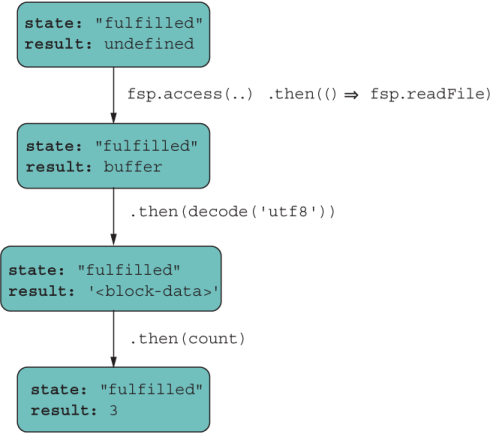
Figure 8.12 async/await follow the same chaining rules as promises.
Technically speaking, countBlocksInFile works the same as before. You can even mix the new syntax with the Promise API, and everything would work the same way:
countBlocksInFile('blocks.txt')
   .then(::console.log); // Prints 3
To clarify, the async keyword in the function signature is acting as a type definition. It’s a cue to the caller and the compiler that this function needs special handling and will return a Promise. Also, the keyword await may be deceiving. This keyword has been standardized across many languages and makes sense from a semantics point of view. But from a technical standpoint, nothing is “waiting” or “blocking.”
As mentioned earlier, async/await turns asynchronous code synchronous, making it more verbose and easier to read for people who prefer the imperative style. But this syntax has the same caveats as promises in that after you introduce an async call, every call site that leads to it needs to be await-ed. This drawback is easy to miss, because the code looks like a synchronous function. The same is true of errors. Rejections are easy to miss if you forget to wrap awaited calls inside try/catch. If you forget to write await, you’ll see the underlying Promise-wrapped return value instead of the free value.
Although async/await promotes a more imperative style of coding, JavaScript remains flexible enough that you can use it functionally. You can use the pipeline operator to compose asynchronous calls like this one, for example:
const blocks = path.join(process.cwd(), 'resources', 'blocks.txt')
    |> (await countBlocksInFile)
In this case, the resulting path string is input into countBlocksInFile and awaited. The result, as expected, is an async value that we can unwrap with another await to extract its value:
await blocks; // 3
In our trivial examples so far, we’ve worked with small files that can be easily loaded in memory. If you need to find a particular block object, it’s simple to read the file entirely into memory and work with the objects there. In the real world, this solution won’t always scale, especially with larger files or in devices with much lower available memory. A better method is to stream and iterate over the file in small chunks. Section 8.5 shows how async/await can solve this problem.
As simple and convenient as an API such as fsp.readFile is, these APIs don’t scale to larger files because they attempt to load all the file’s content into memory at the same time. You can get away with this situation on a server for small files, for the most part. But in browsers, especially on mobile devices (with reduced memory capacity), this practice is an antipattern. In these cases, you need to traverse or iterate over a file as a moving window so that you load only a chunk of the file. You face a dilemma, however: reading a file is asynchronous, whereas iteration is synchronous. How can we reconcile these two operations?
In this section, you’ll learn about async iterators, which provide an elegant way to work with large amounts of data, regardless of where that data is located. The mental model is as simple as iterating through a local array.
Chapter 7 left off with simple iterators. Recall that you make any object iterable by implementing the well-known @@iterator symbol. This method returns an Iterator object with values that have the following shape:
{value: <nextValue>, done: <isFinished?>}
The JavaScript runtime hooks into this symbol and consumes these objects until done returns true. In the synchronous world, the CPU controls the flow of data in an expected, sequential way, so the value of the {value, done} pair is known at the correct times. Unfortunately, iterators and loops were not designed to work asynchronously, so we will need a little bit of extra help, as the following example shows:
function delay(value, time) {
   return new Promise(resolve => {
      setTimeout(resolve, time, value);
   });
}

for (const p of [delay('a', 500), delay('b', 100), delay('c', 200)]) {
   p.then(::console.log);
}
Following the normal loop protocol, the output should be 'a', 'b', and then 'c'. Instead, it’s 'b', 'c', and then 'a'. We must communicate to the JavaScript runtime that it needs to wait to synchronize on the latency of the values being iterated over. One way is to treat the sequence of promises as a composition. Remember that composing is analogous to reducing. You can reduce the array of Promise objects into a single promise chain. reduce will aggregate a collection of elements into a single one, starting from an arbitrary initial object. In this case, we can start with an empty, fulfilled Promise object and use it to attach the reduced set of promises, forming a single chain. This approach effectively enforces execution in the expected order.
The next listing shows how to execute this task in a single expression.
Listing 8.22 Reducing an array of promises
[delay('a', 500), delay('b', 100), delay('c', 200)]
   .reduce(
      (chain, next) => chain.then(() => next).then(:: console.log),     ❶
      Promise.resolve()                                                 ❷
    );
❶ Reducer function concatenates the chained promise object to the next and prints the value.
❷ Initial object, which becomes the first object in the reducer chain
Now the code prints the expected 'a', 'b', and then 'c', in the correct order. The way reduce is used here is incredibly elegant and terse, but it can look obtuse if you don’t understand promise chaining or how reduce works (both of which are covered in this book). Let’s sugar-coat this logic with async iteration as a traditional for...of loop in the following listing.
Listing 8.23 Processing an array of promises with async iteration
for await (const value of                                       ❶
      [delay('a', 500), delay('b', 100), delay('c', 200)]) {
   console.log(value);
}
❶ Note the use of await in front of the loop condition.
reduce helped us create the mental model for how an asynchronous loop works, which is depicted in figure 8.13.
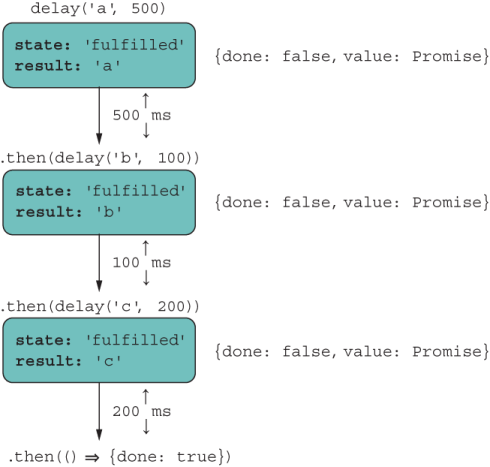
Figure 8.13 for...of processes the collection of tasks sequentially and preserves their order.
This figure looks familiar. The await keyword in front of the loop resolves each promise so that the loop variable points to the value wrapped inside it. This syntax computes the same result as the one with reduce because it takes care of unwrapping and executing the asynchronous operation in order as part of the iteration behavior. Async iteration significantly cleans up solving complicated problems that involve working with input streams, ordering a sequence of asynchronous tasks and others.
As an example, let’s rework our countBlocksInFile use case, which reads the entire file in memory, to use async iteration so that it scales to files of any size. Listing 8.24 is a bit more complex than listing 8.21, but it’s well worth examining because this function can handle much larger files. Most of the complexity inside the body of the loop stems from having to deal with the integrity of the individual block objects read in chunks and figure out where one ends and the other begins.
Listing 8.24 Counting blocks in files of any size
import fs from 'fs';

async function countBlocksInFile(file) {
   try {
      await fsp.access(file, fs.constants.F_OK | fs.constants.R_OK);

      const dataStream = fs.createReadStream(file,                       ❶
         { encoding: 'utf8', highWaterMark: 64 });                       ❷

      let previousDecodedData = '';
      let totalBlocks = 0;

      for await (const chunk of dataStream) {                            ❸
         previousDecodedData += chunk;
         let separatorIndex;
         while ((separatorIndex = previousDecodedData.indexOf(';')) >= 0) {
            const decodedData =
                  previousDecodedData.slice(0, separatorIndex + 1);      ❹

            const blocks = tokenize(';', decodedData)
                  .filter(str => str.length > 0);

            totalBlocks += count(blocks);

            previousDecodedData =
                  previousDecodedData.slice(separatorIndex + 1);         ❺
         }
      }
      if (previousDecodedData.length > 0) {
         totalBlocks += 1;
      }
      return totalBlocks;
   }
   catch (e) {
      console.error(`Error processing file: ${e.message}`);
      return 0;
   }
}
❶ Instead of reading the entire file, create a stream so that you can read chunks of “highWaterMark” size.
❷ For this example, highWaterMark is set to 64 bytes so that data is delivered in small chunks.
❸ Iterates over the stream, reading the next block of raw text
❹ Handles the block delimiter (if present) to obtain a clean row of blocks
❺ Starts the next row after the last delimiter is read to avoid reading incomplete block data
async/await gives you the freedom to double down on the logic of the problem at hand and forget about the intricacies of asynchronous programming.
Although promises certainly are the more functional, fluent approach, async/ await returns us to an imperative paradigm through the automatic wrapping and unwrapping of data. Compared with an ADT such as Validation, async is equivalent to a Success.of, await is analogous to a Validation.map (or Promise#then), and Promise#catch models the Failure state.
In listing 8.24, you saw that the object dataStream was asynchronously iterated over. You may wonder how to make your own objects async-iterable. In chapter 7, we discussed how the @@iterator symbol allows you to spread and enumerate elements of a custom object. Likewise, the @@asyncIterator symbol is executed when you use for...of with await, as before, as shown in the next listing.
Listing 8.25 Using async iteration with a Node.js stream object
for await (const chunk of dataStream) {       ❶
  //...
}
❶ Invokes the asyncIterator function-valued property of dataStream
dataStream has a function-valued symbol property called Symbol.asyncIterator. As of this writing, no native JavaScript APIs use this symbol, but Node.js ships with a few libraries of its own for filesystem streams and HTTP handling. As you might expect, the await on the loop call site must be matched with an async value (a promise) returned by the iterator itself. Everything you learned about the Iterator applies, with the small caveat that calls to next must return objects of {value, done} wrapped in a Promise. The next listing shows a trivial example.
Listing 8.26 Iterator object that emits values with a provided delay
function delayedIterator(tasks) {
   return {
      next: function () {
         if (tasks.length) {
            const [value, time] = tasks.shift();                   ❶
            return new Promise(resolve => {                        ❷
               setTimeout(resolve, time, { value, done: false });
            });
         } else {
            return Promise.resolve({
               done: true                                          ❸
            });
         }
      }
   };
}
❶ Removes the first task from the list. A task is nothing more than a value with a timeout value in the future.
❷ Returns a promise that wraps an Iterator tuple of {value, done}
❸ Signals that the iterator should stop, as there are no more tasks to perform
It helps to see this iterator used directly first:
const tasks = [
   ['a', 500],
   ['b', 100],
   ['c', 200]
];

const it = delayedIterator(tasks);

await it.next().then(({ value, done }) => {
   value; // 'a'
   done;  // false
});
Run it.next() two more times for tasks 'b', and 'c' to print, in that order. Finally, the last call emits the done value:
await it.next().then(({ value, done }) => {
   value; // undefined
   done;  // true
});
With Symbol.asyncIterator, we obtain the same result, shown in the following code.
Listing 8.27 Hooking into async iteration using @@asyncIterator
const delayedIterable = {
  [Symbol.asyncIterator]: delayedIterator
};
for await (const value of asyncIterable) {     ❶
   console.log(value);
}
❶ Internally invokes @@asyncIterator
You can also take things up a notch by making next an async function:
function delayedIterator(tasks) {
   return {
      next: async function () {
         if (tasks.length) {
            const [value, time] = tasks.shift();
            return await delay(value, time);
         } else {
            return Promise.resolve({
               done: true
            });
         }
      }
   };
}
The sky’s the limit in terms of what you can do when you have full control (and understanding) of the iteration behavior of your objects, especially when you have physical limitations such as bandwidth and amount of memory, which occur on slow networks and mobile devices, respectively. Chapter 9 goes one step further so that you can see how generators (and their async counterpart) blend with the iterator protocol. You can not only model a finite amount of data, but also model potentially infinite streams of data.
So far, we’ve discussed how to handle asynchronous tasks directly through the Promise APIs and through async/await. Most of the discussion centered on how data propagates forward through a promise chain. In this chapter, I didn’t talk much about error handling, mainly because the rules are nearly the same as those for typical imperative code, and a lot of what we discussed about Promise#then applies uniformly to Promise#catch, which is a nice design trait of promises.
Generally, every await must be matched with async, but there’s an exception. Some scenarios require you to initiate a call to load (await) something asynchronous as the first thing you do. Examples are dynamically loading modules and dependencies up front, such as internationalization/language bundles or a database connection handle.
Through regular async/await syntax, if you wanted to begin asynchronous tasks on script launch, you’d have to create an async context with a function and then immediately invoke it. Here’s an example:
const main = async () => {
  await import(...);
}

main();
In chapter 6, we discussed Immediately Invoked Function Expressions (IIFEs), a pattern that performs function declaration and execution directly at the same time. In the same vein, we can shorten the preceding code by using an Immediately Invoked Async Function Expression (IIAFE):
(async () => {
  await import(...);
})();
Top-level await cleans up this code so that you can use await on a task without having to create an async function explicitly. Behind the scenes, you have one big async function for the entire module:
await import(...);
In chapter 6, you saw an example of a dependency fallback from a module that loads code dynamically:
const useNewAlgorithm = FeatureFlags.check('USE_NEW_ALGORITHM', false);

let { default: computeBalance } = await import(
    '@joj/blockchain/domain/wallet/compute_balance.js'
);

if (useNewAlgorithm) {
   computeBalance = (await
      import('@joj/blockchain/domain/wallet/compute_balance2.js')).default;
}

return computeBalance(...);
Top-level await is meant to work with ECMAScript Modules out of the box, so here’s another good reason to start adopting that module format. This is understandable, because top-level await would require special support to create an asynchronous context for you automatically. (It helps to think of one big async function surrounding the entire module.) If module A imports module B, and B contains one or multiple await calls, A needs to wait until B finishes executing before executing its own code. Naturally, there are concerns about blocking and waiting at a critical stage of the evaluation process. (If you want to know the intricate details of this process you can read more about them at http://mng.bz/9Mwo.) As you’d expect, however, there are optimizations, so the blocking that occurs only with a dependent module does not affect loading other sibling dependencies. The event loop architecture schedules these tasks properly and yields control to the main thread to continue loading other code, as it would do with any asynchronous task. Nevertheless, developer education is key. As with dynamic import, use these features only when absolutely necessary.
As you can see, we’ve come a long way toward removing the issue of latency or time from our code. We started with the incumbent callbacks, moved on to an API-driven solution (promises), and finally saw an improvement of the language-level model via async/await. Overall, these techniques are behaviorally equivalent, and are all in line with JavaScript’s nonblocking, event-driven philosophy. Remember that programming is three-dimensional: data, behavior, and time. Applications excel when data is local to the behavior or the logic that we write. But in this modern, distributed world, this problem is hardly the one you need to solve. Without the proper support of the host language, programming can quickly become unwieldy. Promises (or async/await) collapse these dimensions (data, behavior, and time) so that we can reason about our code as being two-dimensional, removing time from the equation.
Promises have some downsides, however. For starters, you can’t cancel the execution of a promise in a standard way. Or should you? After all, a promise is meant to be kept. Perhaps Future or Task would have been a better name. Nevertheless, third-party libraries employ some form of internal cancellation token, but nothing has been made standard. The TC39 committee seeks a general cancellation mechanism that could apply to more than promises. You can find more information at https://github .com/tc39/proposal-cancellation.
To me, the biggest issue is that promises (async/await) are not lazy. In other words, a promise executor will run regardless of whether there’s a handler function down the chain. The other issue is that promises were designed to provide single results; they can succeed or fail only once. After a promise settles, you’d need to create a new one to request or poll for more data. There are many use cases for an API that can deliver or push values to your handling code without you having to request more explicitly. This pattern is called a stream, which is a convenient and elegant paradigm for working with things like WebSockets, file I/O, HTTP, and user-interface events (clicks, mouse moves, and so on). Chapter 9 takes asynchronous state management to the next level.
JavaScript is based on a single-threaded, event-driven architecture designed for scale.
A Promise is a standard, nearly algebraic data type used as an abstraction or wrapper over some asynchronous task to provide a consistent programming model that is location-agnostic. Promises free you from worrying about latency and data-locality so that you can focus on the task at hand.
Promises reuse the mechanics of callbacks and the event loop, but with much better readability.
ECMAScript 2020 proposes enhancements to the Promise API’s surface with the addition of Promise.allSettled and Promise.any. Both composable operators allow you to handle multiple tasks at the same time.
async/await offers a more familiar, imperative approach to promises that convert promise chains to a sequence of statements.
Async iterator introduces a new symbol called @@asyncIterator. You can use this symbol to endow any object with the capability of looping, emitting its data asynchronously. Node.js uses this symbol in its HTTP and filesystem modules, among others.
Top-level await takes advantage of the ESM system to automatically create an encompassing async context over a module script, under which you can spawn any number of await calls without having to create async functions explicitly.