A program's text is just one representation of the program. Programs are not text. . . . We need a different way to store and work with our programs.
—Sergey Dmitriev, president and co-founder of JetBrains
Imagine a company like Intel that builds CPU chips. To automate a lot of the repetitive tasks, the company programs robots to build chips—a task that we call programming. Then, to scale to higher industry demands, it programs factories that build robots that build chips—a task that we call metaprogramming.
I hope that by now, you’re hooked on JavaScript. I know I am. As a byproduct of all the topics we’ve covered throughout our journey, we’ve uncovered some interesting dualities. One of these dualities is “functions as data” (chapter 4): the idea of expressing an eventual value as an execution of some function. We took that concept to another level in chapter 6 with “modules as data,” referring to JavaScript’s nature of reifying a module as a bound object that you can pass around as data to other parts of your application.
In this chapter, I’m introducing another duality: “code as data.” This duality refers to the idea of metaprogramming: using code to automate code or in some way modify or alter the behavior of code. As it does for companies like Intel, metaprogramming has many applications, such as automating repetitive tasks or dynamically inserting code to handle orthogonal design issues such as logging, tracing, and tracking performance metrics, to name a few.
This chapter starts with the Symbol primitive data type, showing how you can use it to guide the flow of execution and influence low-level system operations such as how an object gets spread or iterated over, or what happens when an object appears next to some mathematical symbol. JavaScript gives you a few controls to tweak the way that this data type works. You’ll learn that you can use JavaScript symbols in many ways to define special object properties, as well as inject static hooks.
Metaprogramming is also deeply related to dynamic concepts such as reflection and introspection, which happen when a computer program treats/observes its own instruction set as raw runtime data. In this regard, you’ll use the Proxy and Reflect JavaScript APIs to change the runtime behavior of your code by hooking into the dynamic structure of objects and functions. Think about a time when you needed to add performance timers or trace logs around your functions to measure or trace their execution, but then had to live with that code forever. Proxies are great for enhancing and augmenting objects with pluggable behavior in a modular way without cluttering the source code. The Proxy and Reflect APIs are more frequently used in framework or library development, but you’ll learn how to take advantage of them in your own code.
Before you get hooked on these features, let’s begin with some simple examples of metaprogramming that occur in day-to-day coding.
When talking about code as data in the context of JavaScript, people might immediately relate it to writing code inside code or using variables to concatenate and/or replace code statements. The next listing shows the types of things you could do with eval.
Listing 7.1 Simple example that uses eval
eval(
  `
   const add = (x, y) => x + y;
   const r = add(3, 4);
   console.log(r);       ❶
  `
);
In strict mode, eval expects code in the form of a raw string literal (data as code) and executes it in its own environment. Alarms should be going off in your head at this moment. You can imagine that eval can be an extremely dangerous and insecure operation, arguably considered to be unnecessary these days.
Another example of data as code is JavaScript Object Notation (JSON) text, which is a string representation of code that can be directly understood as an object in the language. In fact, with ECMAScript Modules (ESM), you can directly import a JSON file as code without needing to do any special parsing, as follows:
import libConfig from './mylib/package.json';
Also consider computed property names, which allow you to create a key from any expression that evaluates to a string. We used this concept to support the prop and props methods back in chapter 4. Here’s a simple example:
const propName = 'foo';
const identity = x => x;

const obj = {
  bar: 10,
  [identity(propName)]: 20
};

obj.foo; // 20
Metaprogramming also occurs when introspecting the structure of an object. The most important use case is JavaScript’s own duck typing, in which the “type” of an object is determined solely by its shape with methods such as Object.getOwnPropertyNames, Object.getPrototypeOf, Object.getOwnPropertyDescriptors, and Object .getOwnPropertySymbols. Here’s a simple example:
const proto = {
  foo: 'bar',
  baz: function() {
    return 'baz';
  },
  [Symbol('private')]: 'privateData'
};

const obj = Object.create(proto);
obj.qux = 'qux';

Object.getOwnPropertyNames(obj); // [ 'qux' ]

Object.getPrototypeOf(obj);
// { foo: 'bar', baz: [Function: baz], [Symbol(private)]: 'privateData' }
Object.getOwnPropertyDescriptors(obj);
// {
//  qux: {
//    value: 'qux',
//    writable: true,
//    enumerable: true,
//    configurable: true
//  }
//}

Object.getOwnPropertySymbols(proto); // [ Symbol(private) ]
Even functions, as other objects, have some limited awareness of their own shape and contents. You can see this awareness when you use Function#toString to print the string representing the function’s signature and body:
add.toString(); // '(x, y) => x + y'
You could potentially pass this text representation to a parser that can understand what the function does and act accordingly, or even inject more instructions into it if need be.
A more useful property of functions is Function#length. Consider the way that we implemented the curry function combinator in chapter 4, using length to figure out the number of arguments with which the curried function is declared and determine how many inner functions to evaluate partially.
NOTE Because JavaScript makes it simple to use data as code, JavaScript has some qualities of a homoiconic language. This topic is interesting to research on your own, if you like. A homoiconic language mirrors the syntax of code as the syntax of data. Lisp (List Programming) programs, for example, are written as lists, which could be fed back into another (or the same) Lisp program. All JSON text is considered to be valid JavaScript (https://github.com/tc39/ proposal-json-superset), but not all JavaScript code could be understood as JSON, so it’s not a full mirror. Interestingly enough, JavaScript was inspired by the language Scheme, which is a homoiconic Lisp dialect.
These tasks are examples of basic tasks in which some form of metacoding is present. But with JavaScript, there is much more than meets the eye, especially when you start to take advantage of special symbols to annotate the static structure of your code.
Symbols are a subtle and powerful feature of the language, used mostly in library and framework development. Define them in the correct places, and with little effort, objects light up and take on new roles and new behavior. You can use symbols to establish behavioral contracts among objects, to keep data private and secret, and to enhance the way that the JavaScript runtime treats objects. Before we dive into all those topics, let’s spend some time understanding what they are and how to create them.
The first thing to know is that unlike any new API, a Symbol is a true built-in primitive data type (like number, string, or Boolean).
typeof Symbol('My Symbol'); // 'symbol'
A Symbol represents a dynamic, anonymous, unique value. Unlike number or string, symbols have no literal syntax, and you can never serialize them into a string. They follow the function factory pattern (like Money), which means that you don’t use new to create a new one. Instead, you create a symbol by calling the Symbol function, which generates a unique value behind the scenes. The next listing shows a snippet.
Listing 7.2 Basic use of symbols
const symA = Symbol('My Symbol');           ❶
const symB = Symbol('My Symbol');

symA == symB;      // false
symB.toString();   // Symbol('My Symbol')
symB.description;  // 'My Symbol'
❶ Because symbols hide their unique value, you can provide an optional description, which is used only for debugging and logging purposes. This string doesn’t factor into the underlying unique value or into the lookup process.
Because a symbol represents a unique value, it is used primarily as a collision-free object property, like a dynamic string key using the computed property-name syntax obj[symbol]. Under the hood, JavaScript maps the unique value of a symbol to a unique object key, which you can retrieve only if you possess the symbol reference. The following listing shows some simple use cases.
Listing 7.3 Using symbols as property keys
const obj = {};
const symFoo = Symbol('foo');

obj['foo']  = 'bar';                        ❶
obj[symFoo] = 'baz';                        ❷

obj.foo;     // 'bar'                       ❸
obj[symFoo]; // 'baz'                       ❸
obj[Symbol('foo')] !== 'baz'; // true       ❹
❷ Adds a property with a symbol described as foo
❸ foo and Symbol('foo') map to different keys.
❹ You can’t refer to Symbol('foo'), which would create a new symbol.
By design, symbols are not discoverable by conventional means. So iterating over an object with for..in, for..of, Object.keys, or Object.getOwnPropertyNames won’t work, mostly for backward-compatibility reasons. The only way is through introspection by explicitly calling Object.getOwnPropertySymbols:
for(const s of Object.getOwnPropertySymbols(obj)) {
  console.log(s.toString());
}
Even then, this technique offers a “view” of each symbol. Without the actual symbol reference, you still can’t access the property value. By contrast, symbol references are copied over when you spread an object and use Object.assign. The difference is subtle but important. Unlike how other primitives are copied by value, the clone of obj copies not the value, but the symbol reference itself—the same symbol, not a copy. Take a look:
const clone = {...obj};

obj[symFoo] === clone[symFoo]; // true
As discussed in chapter 3, these operations rely on the enumerable data descriptor to be set to true. If you want more privacy, you could set this descriptor to false by using Object.defineProperty.
At this point, we have not dealt with specific uses of symbols—only the basics. Before we look at some interesting examples, it is important to understand how and where symbols are created.
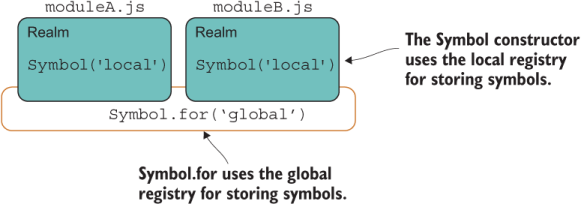
Understanding registries will help you understand how and where symbols are created and used. When a symbol is created, it generates a new, unique, and opaque value inside the JavaScript runtime. These values are automatically added to different registries—local or global, depending on how the symbol is created. With the Symbol constructor, you target the local registry, and with static methods like Symbol.for, you target the global registry, which is accessible across realms.
It helps to think of a registry as being a map data structure in memory that allows you to retrieve objects by means of a key, much like JavaScript’s own Map. Let’s begin with the local registry.
To target the local registry, you call the factory function:
const symFoo = Symbol('foo');
This function adds the value generated from Symbol('foo') to the local registry, whether you create this symbol from a global variable scope or from within a module. Remember that you can access and use a symbol only when you possess the variable to reference it. If you declare symFoo inside a module (or a function), the variable is visible only within that module’s (or function’s) scope, and callers can access it only if you export symFoo from your module (or return it from your function). Nevertheless, in all these cases, the local registry is being used.
The next listing shows an example of creating a local symbol and exporting the binding from a module.
Listing 7.4 Exporting/importing a reference to a Symbol object
export const sym = Symbol('Local registry - module scope');        ❶

...

import { sym } from './someModule.js';

global.sym = Symbol('Local registry - global scope');              ❷
global.sym.toString(); // 'Symbol(Local registry - global scope)'
sym.toString();        // 'Symbol(Local registry - module scope)'
❷ sym and global.sym point to two different variables.
Section 7.3.2 shows how the global registry comes into play.
The global registry is an internal structure available across the entire runtime. The Symbol API exposes static methods that interact with this registry, such as looking up symbols with Symbol.keyFor. Any symbols created in the local registry will not be accessible with this API. Check out the code in the following listing.
Listing 7.5 Local symbols not accessible with the global registry
const symFoo = Symbol('foo');                   ❶
global.symFoo = Symbol('foo');                  ❶
Symbol.keyFor(symFoo);         // undefined     ❷
Symbol.keyFor(global.symFoo);  // undefined     ❷
This code may seem to be rather unintuitive at first. Accessing the local registry didn’t require special APIs. You treated the symbol variables as you would any other. But when you want to use the runtime-wide registry to share symbols across many parts of your application, you need the special APIs.
The static methods Symbol.keyFor and Symbol.for are designed to interact with the global symbol registry that lives inside the JavaScript runtime. The next listing shows how we can tweak the snippet of code in listing 7.5 to target this registry.
Listing 7.6 Interacting with the global registry
export const globalSym = Symbol.for('GlobalSymbol');     ❶

...

import { globalSym } from './someModule.js';

const symFoo = Symbol.for('foo');                        ❷
Symbol.keyFor(symFoo);    // 'foo'                       ❸
Symbol.keyFor(globalSym); // 'GlobalSymbol'              ❸
❶ A globally registered symbol in someModule.js
❷ A globally registered symbol in current scope
Global symbols have the additional quality of transcending code realms. You may not be familiar with this term. Here’s how the ECMAScript specification describes a realm:
Before it is evaluated, all ECMAScript code must be associated with a realm. Conceptually, a realm consists of a set of intrinsic objects, an ECMAScript global environment, all of the ECMAScript code that is loaded within the scope of that global environment, and other associated state and resources.
In other words, a realm is the environment (set of variables and resources) associated with a script running in the browser, a module, an iframe, or even a worker script. Each module runs in its own realm; each iframe has its own window and its own realm; and unlike local symbols, global symbols are accessible across these realms, as depicted in figure 7.1.
Figure 7.1 Scope of the local and global registries
As shown in listing 7.6, you can create these symbols by using Symbol.for(key). If key isn’t in the registry yet, JavaScript creates a new symbol and files it globally under that key. Then you can look it up with Symbol.keyFor(key) anywhere else in your application. If the symbol has not yet been defined in the global registry, the API returns undefined.
Now that you understand how symbols work, section 7.4 shows some practical applications for them.
Symbols have many practical applications. In the following sections, we’ll discuss using them to implement hidden properties and make objects interoperate with other parts of your application.
Symbols provide a different way to attach properties to an object (data or functions) because these property keys are guaranteed to be conflict-free, collision-free, and unique in the runtime. This doesn’t mean you should use them to key all your properties, however, because the access rules for symbols, as discussed in section 7.3, make it inconvenient to pull them out.
For this reason, it was thought that symbols could be used to emulate private properties because users would need access to the symbol reference itself, which you can control (hide) inside the module or class in question, as the next listing shows.
Listing 7.7 Using symbols to implement private, hidden properties
const _count = Symbol('count');                ❶

class Counter {
   constructor(count) {
      Object.defineProperty(this, _count, {    ❷
          enumerable: false,
          writable: true
      });
      this[_count] = count;
    }
    inc(by = 1) {                              ❸
      return this[_count] += by;
    }
    dec(by = 1) {                              ❸
        return this[_count] -= by;
    }
}
❶ This value would never be exported and, thus, is kept private within the module.
❷ Uses Object.defineProperty to make internal property nonenumerable
❸ Increases/decreases the object’s internal count property by a specified amount
Outside this class, there’s no way to access the internal count property:
const counter = new Counter(1);
counter._count;               // undefined
counter.count;                // undefined
counter[Symbol('count')];     // undefined
counter[Symbol.for('count')]; // undefined
Unfortunately, this solution has a drawback: symbols are easily discovered via reflective APIs such as Reflect.ownKeys and Object.getOwnPropertySymbols. Hence, they are not truly private. Instead of using symbols for private access, why not use them to expose access and aid the interoperability among different realms of your code (aka different modules)? This use is much better for them.
Having a way to establish some cross-realm set of properties is analogous to what interfaces do for statically typed, class-based language (appendix B). In other words, symbols can be used to create contracts of interoperability among other parts of the code.
As an example, a third-party library could use a symbol to which objects could refer and adhere to a certain convention imposed by the library. Symbols are ideal for interoperable metadata values. Back in chapter 2, you learned that setting up your own prototype logic is an error-prone process. Here’s one of the issues again:
function HashTransaction(name, sender, recipient) {
    Transaction.call(this, sender, recipient);
    this.name = name;
}

HashTransaction.prototype = Object.create(Transaction);
Remember that the issue was forgetting to use the prototype property of Transaction. It should have been Object.create(Transaction.prototype). Otherwise, creating a new instance resulted in a weird and confusing error:
  TypeError: Cannot assign to read only property 'name' of object
  '[object Object]'
This error occurred because the code was attempting to alter the nonwritable Function .name property. Before symbols existed, you had to use normal properties to represent all metadata, such as the name of the function in this case. A much better alternative would have been to use a non-writable symbol so that adding a name property to your functions would have never caused a collision. With a symbol, a function’s name could be set as follows:
HashTransaction[Symbol('name')] = 'HashTransaction';
Symbols can make objects more extensible by preventing the code from accidentally breaking API contracts or the internal workings of an object. If every object in JavaScript had a Symbol('name') property, for example, any object’s toString could easily use it in a consistent manner to enhance its own string representation, especially in stack traces of obfuscated code. (In section 7.5, you’ll learn about a well-known symbol that performs this task.)
Furthermore, library authors could use symbols to force their users to adhere to conventions imposed by the library. The following sections present a couple of practical examples extracted from the blockchain application.
Let’s look at an example that uses symbols to define a control protocol. As you know, a protocol is a convention (contract) that defines some behavior in the language. This behavior needs to be unique and must never clash with any other language feature. Symbols fit in nicely for this kind of task.
The example that we’re about to discuss comes directly from our blockchain application. This concept is known as proof-of-work.
The “mining” or proof-of-work process of Bitcoin for obtaining a new block could be rather expensive in terms of energy use. Although the algorithm is simple to understand, it’s time-consuming to run even with today’s computing capabilities. The puzzle involves finding a block’s cryptographic hash value that fulfils certain conditions. The hash value should be hard to find but easy to verify. The only condition we’ll implement is that the computed hash string must start with an arbitrary number of leading zeroes, given by the block.difficulty property.
The next listing shows the proof-of-work function and also introduces a new proposal, throw expressions (https://github.com/tc39/proposal-throw-expressions), that will make error handling code leaner.
Listing 7.8 Proof-of work-algorithm (proof_of_work.js)
function proofOfWork(block =
     throw new Error('Provide a non-null block object!')) {         ❶
  const hashPrefix = ''.padStart(block ?.difficulty ?? 2, '0');     ❷
  do {
    block.nonce += 1;                                               ❸
    block.hash = block.calculateHash();                             ❹
  } while (!block.hash.toString().startsWith(hashPrefix));          ❺
  return block;
}
❶ Uses a throw expression as a default parameter to throw an exception if the provided block is undefined
❷ padStart is used to fill or pad the current string with another string and was added to JavaScript as part of the ECMAScript 2017 update. If difficulty is set to null or missing, it defaults to using a difficulty value of 2.
❸ Increments the nonce at every iteration
❺ Tests whether the new hash contains the string of leading zeroes
Before we discuss the algorithm, let’s spend a little bit of time talking about throw expressions as used in listing 7.8. A throw expression can be assigned like a value or an expression (function). Without it, the only way to throw exceptions in place of a default argument would be to wrap the exception inside a function. In other words, you would need to create a block context ({}) somewhere else in which throw is allowed. With this new feature, throwing an exception works like a first-class artifact, like any other object, and significantly cuts the amount of typing required. You will be able to throw exceptions in many ways, including parameter initializing (as used here); one-line arrow functions, conditionals, and switch statements; and even evaluation of logical operators, all without requiring a block scope. See appendix A for details on enabling this feature.
Listing 7.8 is a brute-force algorithm, as most proof-of-work functions are. proofOfWork will loop and compute the block’s hash until it starts with the given hashPrefix, created from a string of zeroes of size block.difficulty. Naturally, the higher the difficulty value, the harder it is to find that hash. In the real world, the miner that solves this puzzle first cashes in the mining reward, which is how miners are incentivized to invest and spend energy in dedicated mining infrastructure. Because a block’s data is constant at every iteration, the hash value is always the same, so you compute a nonce for it. (Nonce is jargon for a “number you use only once.”) You change the nonce in a certain way to differentiate the block’s data between hash calculations. If you recall the definition of Block, nonce is one the properties we provided to HasHash:
 Object.assign(
   Block.prototype,
   HasHash(['index', 'timestamp', 'previousHash', 'nonce', 'data']),
   HasValidation()
);
What does this have to do with symbols? Remember that a blockchain is a large, distributed protocol. At any point in time, miners can be running any version of the software, so changes need to be made with caution and rolled out in a timely manner. To make enhancements or even bug fixes easier to apply to large Bitcoin networks, you must keep track of versions, and code must fork accordingly. In the real world, blocks contain metadata that keeps track of the version of the software. The following listing shows another part of the Block class that I omitted earlier for brevity.
Listing 7.9 Version property inside the Block class implemented as a symbol
const VERSION = '1.0';

class Block {
  ...

  get [Symbol.for('version')]() {       ❶
     return VERSION;
  }
}
❶ Registers the software version as a global symbol
Having each block tagged with a global version symbol allows you to preserve backward compatibility with blocks persisted with a previous version of your blockchain software. Symbols let you control this compatibility in a seamless and interoperable way.
Suppose that we want to push a new release of our software that enhances proofOfWork to make it a bit more challenging and harder to compute. Listing 7.10 shows the mineNewBlockIntoChain method of BitcoinService, which uses the global symbol registry to read the version of the software implementing a Block to decide how to route the logic behind proof-of-work. We can use dynamic import to load the right proofOfWork function to use.
Although I haven’t covered all the details of async/await yet, you should be able to follow the next listing because I covered dynamic import in chapter 6 when handling a similar use case.
Listing 7.10 Mining a new block
async function mineNewBlockIntoChain(newBlock) {
    let proofOfWorkModule;
    switch (newBlock[Symbol.for('version')]) {
      case '2.0': {
        proofOfWorkModule =
            await import('./bitcoinservice/proof_of_work2.js');
        break;
      }
      default: case '1.0':
        proofOfWorkModule =
            await import('./bitcoinservice/proof_of_work.js');
        break;
    }
    const { proofOfWork } = proofOfWorkModule;

    return ledger.push(
      await proofOfWork(newBlock)
    );
}
Using a symbol here is much better than adding a regular version property to every block, which is what you would have had to do pre-ECMAScript 2015. This technique protects users of your API from accidentally breaking the contract by adding their own or modifying version at runtime. The following listing shows an enhanced proof-of-work implementation that uses a pseudorandom nonce value instead of incrementing it at every iteration.
Listing 7.11 Enhanced proof-of-work algorithm (proof_of_work2.js)
function proofOfWork(block) {
  const hashPrefix = ''.padStart(block.difficulty, '0');
  do {
    block.nonce += nextNonce();                     ❶
    block.hash = block.calculateHash();
  } while (!block.hash.toString().startsWith(hashPrefix));
  return block;
}

function nextNonce() {
  return randomInt(1, 10) + Date.now();
}

function randomInt(min, max) {
  return Math.floor(Math.random() * (max - min)) + min
}
❶ Instead of incrementing by 1, increments by a random number
In the real world, as blocks become more scarce and the difficulty parameter algorithm increases, it gets harder to compute the hash. Proof-of-work is one step required in transferring Bitcoin. In chapter 8, we’ll see the entire process involved in mining a new block into the chain and the reward that comes with it.
Section 7.4.3 looks at another practical example of symbols, this time involving functions.
Serialization is the process of converting an object from one representation to another. One of the most common examples is going from an object in memory to a file (serialization), and from a file into memory (deserialization or hydration). Because different objects may need to control how they’re serialized, it’s a good idea to implement a serialization function that gives them this control.
Years ago, Node.js tried to do a similar thing in its implementation of console .log, checking for the inspect method on the provided object and using it if it was available. This feature was clunky because it could easily clash with your own inspect method that you accidentally implemented to do something else, causing console .log to behave unexpectedly. As a result, the feature was deprecated. Had symbols been around back then, the story might have been different.
The next listing does things the right way, adding another global symbol property to the Block class in charge of returning its own JSON representation.
Listing 7.12 Symbol(toJson) that creates a JSON representation of the object
class Block {
   ...
  [Symbol.for('toJson')]() {                  ❶
    return JSON.stringify({
        index: this.index,
        previousHash: this.previousHash,
        hash: this.hash,
        timestamp: this.timestamp,
        dataCount: this.data?.length ?? 0,    ❷
        data: this.data.map(toJson),          ❸
        version: VERSION
      }
    );
  }
}
❶ Uses a global symbol so that it can be read out from other modules
❷ Uses optional chaining operator with the nullish coalesce operators, both added as part of the ECMAScript 2020 specification
❸ Converts data contents by using a toJson helper function (shown in listing 7.14)
This JSON representation is a tailored, summarized version of the block’s data. With this function, any time you need JSON, you can consult this symbol from anywhere in your application—even across realms. Serializing a blockchain to JSON uses a helper called toJson that inspects this symbol. The following listing shows the code to serialize in BitcoinService.serializeLedger.
Listing 7.13 Serializing a ledger as a list of JSON strings
import { buffer, join, toArray, toJson } from '~util/helpers.js';
...
function serializeLedger(delimeter = ';') {
   return ledger |> toArray |> join(toJson, delimeter) |> buffer;      ❶
}
❶ Uses the pipeline operator to run a sequence of functions, assuming that the pipes feature is enabled (appendix A)
I’ve taken the liberty of combining many of the concepts you’ve learned in previous chapters. The most noticeable of these concepts is breaking logic into functions and currying those functions to make them easier to compose (or pipe). As you can see, I used the pipeline operator to combine this logic and return the data as a raw buffer that can be written to a file or sent over the network, effectively keeping side effects away from the main logic. The next listing shows the code for those helper functions.
Listing 7.14 Helper functions used in serializing an entire blockchain object to a buffer
import { curry, isFunction } from './fp/combinators.js';

export const toArray = a => [...a];                          ❶

export const toJson = obj => {                               ❷
    return isFunction(obj[Symbol.for('toJson')])
        ? obj[Symbol.for('toJson')]()
        : JSON.stringify(obj);
}

export const join = curry((serializer, delimeter, arr)
       => arr.map(serializer).join(delimeter));              ❸

export const buffer = str => Buffer.from(str, 'utf8');       ❹
❶ Spreads any object to an array
❷ Converts any object to a JSON string. If the object implements Symbol('toJson'), the code uses that as its JSON string representation; otherwise, it defaults to JSON.stringify.
❸ Helper function that applies a serializer function to elements of an array and joins the array using the provided delimiter
❹ Converts any string to a UTF-8 Buffer object
As you can see, toJson checks the object’s metaproperties first for any global JSON transformation symbol; otherwise, it falls back to JSON.stringify on all fields. The rest of the helper functions are ones that you’ve seen at some point and are simple to follow.
Recall from chapter 4 that pipe is the reverse of compose. Alternatively, you could have written the logic in listing 7.13 this way, provided that you implemented or imported the compose combinator function:
 return compose(
          buffer,
          join(toJson),
          toArray)(ledger);
Custom symbols such as Symbol.for('toJson') and Symbol.for('version') are known to the entire application. This use of symbols is so far-reaching and compelling that JavaScript ships with a set of well-known system symbols of its own, which you can use to bend JavaScript’s runtime behavior to your desires. Section 7.5 explores these symbols.
As you can use symbols to augment some key processes in your application, you can also use JavaScript’s well-known symbols as an introspection mechanism to hook into core JavaScript features and create some powerful behavior. These symbols are special and are meant to target the JavaScript runtime’s own behavior, whereas any custom symbols you declare can only augment userland code.
The well-known symbols are available as static properties of the Symbol API. In this section, we’ll briefly explore
NOTE For simplicity and ease of documentation, a well-known Symbol.<name> is often abbreviated as @@<name>. Symbol.iterator, for example, is @@iterator, and Symbol.toPrimitive is @@toPrimitive.
Soon, you’ll try to log an object to the console by calling toString, only to get the infamous (and meaningless) message '[object Object]'. Fortunately, we now have a symbol that hooks into this behavior. JavaScript checks whether you have toString overridden in your own object, and if you don’t, it uses Object’s toString method, which internally hooks into a symbol called Symbol.toStringTag. I recommend adding this symbol to classes or objects for which you don’t have or need toString defined, because it will help you during debugging and troubleshooting.
Here are a couple of variations, the first using a computed-property syntax, used mostly in object literals, and the second using computed-getter syntax, used mostly inside classes:
function BitcoinService(ledger) {
  //...
  return {
    [Symbol.toStringTag]: 'BitcoinService',
    mineNewBlockIntoChain,
    calculateBalanceOfWallet,
    minePendingTransactions,
    transferFunds,
    serializeLedger
  };
}

class Block {
   //...
    get [Symbol.toStringTag]() {
       return 'Block';
    }
}
Now toString has a bit more information:
const service = BitcoinService();
service.toString(); // '[object BitcoinService]')
For objects built with classes and pseudoclassical constructors (chapter 2), to avoid hardcoding, you could use the more general
get [Symbol.toStringTag]() {
   return this.constructor.name;
}
@@toStringTag is also used for error handling. As an example, consider adding it to Money:
const Money = curry((currency, amount) =>
  compose(
    Object.seal,
    Object.freeze
  )({
    amount,
    currency,
    //...

    [Symbol.toStringTag]: `Money(${currency} ${amount})`
  })
)
If you try to mutate Money('USD', 5), JavaScript throws the following error, using toStringTag to enhance the error message:
TypeError: Cannot assign to read only property 'amount' of object '[object Money(USD 5)]'
This symbol is used to control the internal behavior of Array#concat. What outcome would you expect from this expression?
[a].concat([b])
Do you expect [['a'], ['b']] or ['a', 'b']? Most of the time, you’d want the latter. And that is exactly what happens. When concatenating objects, concat determines whether any of its arguments are “spreadable.” In other words, it tries to unpack and flatten all the elements of the target object over another, using semantics similar to those of the spread operator. Here’s a simple example that shows the effect of this operator:
const letters = ['a', 'b'];
const numbers = [1, 2];
letters.concat(numbers);  // ["a", "b", 1, 2]
letters[Symbol.isConcatSpreadable] = false;
letters.concat(numbers); // Array ["a", "b", Array [1, 2]]
In some cases, however, you don’t want the default behavior. Consider implementing record types, such as a Pair, as a simple array:
class Pair extends Array {
    constructor(left, right) {
      super()
      this.push(left);
      this.push(right);
    }
}
For Pair, you would not want to spread its elements by default when concatenating with another Pair, because then you’ll lose the proper two-element grouping:
const numbers = new Pair(1, 2);
const letters = new Pair('a', 'b');

numbers.concat(letters) // Array [1, 2, 'a', 'b']
What you want in this case is a collection of pairs. If you turn off the Symbol.isConcatSpreadable knob, everything works as expected:
class Pair extends Array {
    constructor(left, right) {
      super();
      this.push(left);
      this.push(right);
    }

    get [Symbol.isConcatSpreadable]() {
      return false;
    }
}

numbers.concat(letters); // Array [Array [1, 2], Array ['a', 'b']]
The symbols described so far hook into some superficial behavior; others go even deeper into the nooks and crannies of the JavaScript APIs. Section 7.5.3 looks at Symbol.species.
Symbol.species is a nice, clever artifact used to control what the constructor should be on a resultant or derived object after operations are used on some original object. The following sections look at two use cases for this symbol: information hiding and documenting closure of operations.
You can use Symbol.species to avoid exposing unnecessary implementation details by downgrading derived types to base types. Consider the simple use case in the next listing.
Listing 7.15 Using @@species so that EvenNumbers becomes Array
class EvenNumbers extends Array {
  constructor(...nums) {
    super();
    nums.filter(n => n % 2 === 0).forEach(n => this.push(n));     ❶
  }
  static get [Symbol.species]() {                                 ❷
     return Array;
  }
}

new EvenNumbers(1, 2, 3, 4, 5, 6); // [2, 4, 6]
❶ Excludes odd numbers from being pushed into this array
❷ Hides the derived class after any mapping operations
At this point, this object created an instance of both EvenNumber and Array, as you’d expect. But the fact that this data structure was constructed from EvenNumber is not important to users of this API after it’s been initialized, because Array would be more than adequate. With the @@species metasymbol added, after mapping over this array, you see that the type is downgraded to Array and used thereafter for all operations (some, every, filter), effectively hiding the original object. Here’s an example:
const result = evens.map(x => x ** 2);
result instanceof Array;       // true
result instanceof EvenNumbers; // false
Aside from Array, types such as Promise support this feature, as do data structures such as Map and Set. By default, @@species points to their default constructors:
Array[Symbol.species] === Array
Map[Symbol.species] === Map
RegExp[Symbol.species] === RegExp
Promise[Symbol.species] === Promise
Set[Symbol.species] === Set
Here’s another example, this one using promises. Suppose that after some user action, you’d like to fire a task that starts after some period of time has elapsed. (Normally, you should not extend from built-in types, but I’ll make an exception here for teaching purposes.) After the first deferred action runs, every subsequent action should behave like a standard promise. Consider the DelayedPromise class shown in the following listing.
Listing 7.16 Deriving DelayedPromise as a subclass of Promise
class DelayedPromise extends Promise {
   constructor(executor, seconds = 0) {       ❶
      super((resolve, reject) => {
         setTimeout(() => {
            executor(resolve, reject);
         }, seconds * 1_000);
      })
   }

   static get [Symbol.species]() {            ❷
      return Promise;
   }
}
❶ Creates a promise that delays its initial execution by the provided seconds
❷ Hides the derived class so that subsequent calls to then are not delayed
You can wrap any asynchronous task as you would any other promise, as shown next.
Listing 7.17 Using DelayedPromise
const p = new DelayedPromise((resolve) => {
      resolve(10);                            ❶
}, 3);

p.then(num => num ** 2)                       ❷
 .then(console.log);                          ❸
//Prints 100 after 3 seconds
❶ Returns the number 10 after three seconds
❷ Squares the eventual number returned
❸ Uses the bind operator to pass in a reference to the log function of a properly bound console object
Documenting closure of operations
Here’s another example in which @@species can be useful in an application, particularly in the area of functional programming. Let’s circle back to the Functor mixin in chapter 5 that implements a generic map contract:
const Functor = {
  map(f = identity) {
    return this.constructor.of(f(this.get()));
  }
}
Remember that functors have a special requirement for map: it must preserve the structure of the type being mapped over. Array#map should return a new Array, Validation#map should return a new Validation, and so on. You can use @@species to guarantee and document the fact that functors close over the type that you expect—helping preserve the species, you might say. It’s the responsibility of the implementer to respect this symbol when it exists. Arrays use this symbol, and we can add it to Validation as well, as shown in the following listing.
Listing 7.18 @@species as implemented in the Validation class
static get[Symbol.species]() {
  return this;                     ❶
}
❶ In a static context, refers to the surrounding class
Then we can enhance Functor to hook into @@species before defaulting to the object’s constructor, as shown in the next listing.
Listing 7.19 Inspecting the contents of @@species when mapping functions on functors
const Functor = {
  map(f = identity) {
    const C = getSpeciesConstructor(this);            ❶
    return C.of(f(this.get()));
  }
}

function getSpeciesConstructor(original) {
  if (original[Symbol.species]) {
    return original[Symbol.species]();
  }
  if (original.constructor[Symbol.species]) {
    return original.constructor[Symbol.species]();
  }
  return original.constructor;                        ❷
}
❶ Looks into the species function-valued symbol first to decide the derived object type
❷ Falls back to using constructor if no @@species symbol is defined
Validation.Success.of(2).map(x => x ** 2); // Success(4)
This symbol gets queried by JavaScript when it converts (or coerces) some object into a primitive value such as a string or a number—when you place an object next to a plus sign (+) or concatenate it to a string, for example. JavaScript already has a well-defined rule for its internal coercion algorithm (called an abstract operation) that goes by the name ToPrimitive.
Symbol.toPrimitive customizes this behavior. This function-valued property accepts one parameter, hint, which could have a string value of number, string, or default. This operation is in many ways equivalent to overriding Object#valueOf and Object#toString (discussed in chapter 4), except for the additional hinting capability, which allows you to be smarter about the process. In fact, both of these methods are checked when @@toPrimitive is not defined and JavaScript needs to coerce an object into a value that makes sense. For strings and numbers, the general rule is as follows:
When implementing @@toPrimitive, we should try to stay consistent with these rules. A classic example is the Date object. When a Date object is hinted to act as a string, its toString representation is used. If the object is hinted as a number, its numerical representation (seconds from the epoch) is used:
const today = new Date();

'Today is: ' + today;
// Today is: Thu Oct 31 2019 14:02:29 GMT+0000 (Coordinated Universal Time)

+today; // 1572530549275
Let’s go back to our EvenNumbers example, adding this symbol to that class with an implementation that sums all the numbers in the array when a number is requested or creates a comma-separated-values (CSV) string representation of the array in a string context, as shown in the next listing.
Listing 7.20 Defining @@toPrimitive in class EvenNumbers
class EvenNumbers extends Array {
  constructor(...nums) {
    super();
    nums.filter(n => n % 2 === 0).forEach(n => this.push(n));
  }

  static get [Symbol.species]() {
    return Array;
  }

  [Symbol.toPrimitive](hint) {
    switch (hint) {
      case 'string':
        return `[${this.join(', ')}]`;     ❶
      case 'number':
      default:
        return this.reduce(add);           ❷
    }
  }
}
❶ Returns a string representation of this array (showing only even numbers)
❷ Returns a single number representation of this array by adding up all even numbers
You can also think of @@toPrimitive as a means of unboxing or unfolding some container into its primitive value. The next listing adds this metasymbol to Validation.
Listing 7.21 Adding @@toPrimitive to the Validation class to extract its value
class Validation {
  #val;

  //...

  get() {
    return this.#val;
  }

  [Symbol.toPrimitive](hint) {       ❶
    return this.get();
  }
}
❶ When a Validation instance is in a primitive position, the JavaScript runtime folds the container automatically.
Now you can use these containers with less friction in the code because JavaScript takes care of the unboxing for you, as shown in the following listing.
Listing 7.22 Taking advantage of @@toPrimitive used with Validation objects
'The Joy of ' + Success.of('JavaScript'); // 'The Joy of JavaScript'

function validate(input) {
   return input
      ? Success.of(input)
      : Failure.of(`Expected valid result, got: ${input}`);
}

validate(10) + 5;    // 15                                                ❶
validate(null) + 5;  // "Error: Can't extract the value of a Failure"     ❷
❶ The plus operator causes the Validation.Succes object to be in primitive position. It automatically unwraps the container with its value, 10.
❷ The plus operator causes a Validation.Failure to wrongfully unbox and throw an error.
Value objects are also good opportunities to use this symbol. In Money, for example, we can use this symbol to return the numerical portion directly and make math operations easier and more transparent, as the next listing shows.
Listing 7.23 Using @@toPrimitive in Money to return its numerical portion
const Money = curry((currency, amount) =>
  compose(
    Object.seal,
    Object.freeze
  )({
    amount,
    currency,

    ...

    [Symbol.toPrimitive]: () => precisionRound(amount, 2);
  })
)

const five = Money('USD', 5);
five * 2;    // 10                ❶
five + five; // 10                ❶
❶ Both arithmetic operators unwrap Money objects to perform the numerical operation.
The last well-known symbol covered in this book, and by far the most useful, is @@iterator.
Most class-based languages have standard libraries that support some form of an Iterable or Enumerable interface. Classes that implement this interface must abide by a contract that communicates how to deliver data when some collection is looped over. JavaScript’s response is Symbol.iterator, which acts like one of these interfaces and is used to hook into the mechanics of how an object behaves when it’s the subject of a for...of loop, consumed by the spread operator, or even destructured.
As you can expect, all of JavaScript’s abstract data types already implement @@iterator, starting with arrays:
Array.prototype[Symbol.iterator](); // Object [Array Iterator] {}
Arrays are an obvious choice. What about strings? You can think of a string as being a character array. Spread it, destructure it, or iterate over it, as the next listing shows.
Listing 7.24 Enumerating a string as a character array
[...'JoJS'];  // [ 'J', 'o', 'J', 'S' ]         ❶

const [first, ...rest] = 'JoJS';                ❷
first;   // 'J'
rest;    // ['o', 'J', 'S' ]

const str = 'JoJS'[Symbol.iterator]();          ❸
str.next();  // { value: 'J', done: false }
str.next();  // { value: 'o', done: false }
str.next();  // { value: 'J', done: false }
str.next();  // { value: 'S', done: false }
str.next();  // { value: undefined, done: true }
Similarly, it makes sense that Blockchain could seamlessly deliver all blocks when it’s put through a for loop or spread over. After all, a blockchain is a collection of blocks. Blockchain delegates all of its block storage needs to a private instance field of Map (chapter 3). The following listing shows the pertinent details.
Listing 7.25 Using @@iterator for blockchain
class Blockchain {

  #blocks = new Map();

  constructor(genesis = createGenesisBlock()) {
     this.#blocks.set(genesis.hash, genesis);           ❶
  }

  push(newBlock) {
     this.#blocks.set(newBlock.hash, newBlock);
     return newBlock;
  }

  //...

  [Symbol.iterator]() {
    return this.blocks.values()[Symbol.iterator]();     ❶
  }
}
❶ Delegates to the iterator object returned from Map#values
Map is also iterable, so calling values on a Map object delivers the values (without keys) as an array, which is iterable by design, meaning we can easily have Blockchain’s @@iterator symbol delegate to it, as listing 7.25 shows. The same is true for Block to deliver the items contained in data, which in this case is each Transaction object, as shown in the next listing.
Listing 7.26 Implementing @@iterator in Block to enumerate all transactions
class Block {

  //...
  constructor(index, previousHash, data = []) {
    this.index = index;
    this.data  = data;
    this.previousHash = previousHash;
    this.timestamp = Date.now();
    this.hash = this.calculateHash();
  }

  //...

  [Symbol.iterator]() {                      ❶
    return this.data[Symbol.iterator]();
  }
}
❶ Automatically delivers transactions when a Block object is spread or looped over
To read out all the transactions in a block, loop over it:
for (const transaction of block) {
  console.log(transaction.hash);
}
You have nothing to gain from iterating over a Transaction, which is a terminal/leaf object in our design. So you can let JavaScript error out abruptly if a user of your API tries to iterate over it, or you can manipulate the iterator yourself to handle this situation gracefully and silently by sending back the object {done: true}:
class Transaction {
   // ...

   [Symbol.iterator]() {
      return {
        next: () => ({ done: true })
      }
   }
}
Furthermore, @@iterator is a central part of the validation algorithm in HasValidation that we implemented in chapter 5, which relies on traversing the entire blockchain structure. Here’s that code again (listing 7.27).
Listing 7.27 HasValidation mixin
const HasValidation = () => ({
    validate() {
       return [...this]                               ❶
        .reduce((validationResult, nextItem) =>
             validationResult.flatMap(() => nextItem.validate()),
          this.isValid()
         );
    }
})
❶ Invokes the Symbol.iterator property of the object being validated
Now that you know that @@iterator plugs into the behavior of for..of as well as the spread operator, you can design a more memory-friendly solution than the algorithm in listing 7.27. As it stands, validate is creating new arrays in memory when executing: [...this]. This code won’t scale to large data structures. Instead, you can loop over the objects inline with a more traditional for loop, as shown in the next listing.
Listing 7.28 Refactoring validate to use for loops to benefit from @@iterator
const HasValidation = () => ({            ❶
    validate() {
       let result = model.isValid();
       for (const element of model) {
          result = validateModel(element);
          if (result.isFailure) {
             break;
          }
       }
       return result;
    }
})
❶ Calls the internal @@iterator property of Blockchain, Block, and Transaction
You can do many things with @@iterator. Data structures that extend from or depend on arrays are natural candidates, but you can do much more, especially when you combine these structures with generators. A Generator is an object that is returned from a generator function and abides by the same iterator protocol. @@iterator is a function-valued property, and generators can implement it elegantly. The next listing shows a variation on a Pair object that uses a generator to yield the left and right properties during a destructuring assignment.
Listing 7.29 Using a generator to return left and right elements of a Pair
const Pair = (left, right) => ({
      left,
      right,
      equals: otherPair => left === otherPair.left &&
                           right === otherPair.right,
      [Symbol.iterator]: function* () {                    ❶
        yield left;                                        ❷
        yield right;
      }
   });

const p = Pair(20, 30);
const [left, right] = p;
left;  // 20
right; // 30
[...p]; // [20, 30]
❶ The function* notation identifies a generator function.
❷ The yield keyword is equivalent to a return in a regular function.
Again, don’t worry too much now about how generators work behind the scenes. All you need to understand is that calls to yield within the function are analogous to calling the returned iterator object’s next method. Behind the scenes, JavaScript is taking care of this task for you. I’ll cover this topic in more detail in chapter 8.
To sum up the well-known symbols, here’s Pair implementing all of the symbols at the same time, as well as our custom [Symbol.for('toJson')]:
const Pair = (left, right) => ({
      left,
      right,
      equals: otherPair => left === otherPair.left &&
                           right === otherPair.right,
      [Symbol.toStringTag]: 'Pair',
      [Symbol.species]: () => Pair,
      [Symbol.iterator]: function* () {
        yield left;
        yield right;
      },
      [Symbol.toPrimitive]: hint => {
        switch (hint) {
          case 'number':
            return left + right;
          case 'string':
            return `Pair [${left}, ${right}]`;
          default:
            return [left, right];
        }
      },
      [Symbol.for('toJson')]: () => ({
        type: 'Pair',
        left,
        right
      })
    });

const p = Pair(20, 30);
+p;           // 50
p.toString(); // '[object Pair]'
`${p}`;       // 'Pair [20, 30]'

const p2 = p[Symbol.species]()(20, 30);
p.equals(p2);  // true
Normally, you wouldn’t load objects with all possible symbols; their true power comes from using the ones that truly affect your code globally to remove sources of duplication. These examples are for teaching purposes only.
You can hook into many symbols other than the ones discussed in this chapter. The following code
Object.getOwnPropertyNames(Symbol)
   .filter(p => typeof Symbol[p] === 'symbol')
   .filter(s =>
      ![
          'toStringTag',
          'isConcatSpreadable',
          'species',
          'toPrimitive',
          'iterator'
       ]
        .includes(s));
  [
     'asyncIterator',
     'hasInstance',
     'match',
     'replace',
     'search',
     'split',
     'unscopables'
  ]
I’ll cover @@asyncIterator in chapter 8.
As you can see, symbols allow you to create static hooks that you can use to apply a fixed enhancement to the behavior of your code. But what if you need to turn things on or off at runtime? In section 7.6, we turn our attention to other JavaScript APIs that dynamically hook into running code.
The techniques discussed so far fall under the umbrella of static introspection. You created tokens (aka symbols) that you or the JavaScript runtime can use to change how running code behaves. This technique, however, requires that you add symbols directly as properties of objects. For the extended functionality that well-known symbols give you, this is the only option. But when you’re considering any custom symbols, modifying the shape of objects syntactically may seem a bit invasive. Let’s consider another option.
In this section, you’ll learn about a technique that involves changing the behavior of your code externally via dynamic introspection. Along the way, you’ll learn how to use this technique to consolidate cross-cutting logic such as logging/tracing and performance, and even the implementation of smart objects.
JavaScript makes it easy to manipulate and change the shape and structure of objects at runtime. But special APIs allow you to hook into the event of calling a method or accessing a property. To understand the motivation here, it helps to think about the popular, widely used Proxy design pattern (figure 7.2).
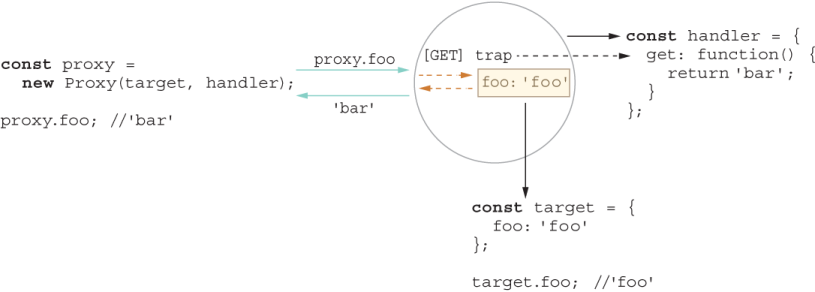
Figure 7.2 The Proxy pattern uses an object (proxy) to act on behalf of a target. When fetching for a property, if it finds the property in the proxy, the code uses that property; otherwise, it consults the target object. Proxies have lots of uses, including logging, caching, and masking.
As shown in figure 7.2, a proxy is a wrapper to another object that is being called by a client to access the real internal object. The proxy object usurps an object’s interface and takes full control of how it’s accessed and used. Proxies are used quite a bit to interface network communications and filesystems, for example. Most notably, proxies are used in application code to implement a caching layer or perhaps a centralized logging system.
Instead of requiring you to roll your own proxy code scaffolding every time, JavaScript takes this pattern to heart and makes it first-class APIs: Proxy and Reflect. Together, these APIs allow you to implement dynamic introspection so that you can weave or inject code at runtime in a non-invasive manner. This solution is optimal because it keeps your application separate from your injectable code. In some ways, this solution is similar to dynamic extension via mixins (chapter 3), except that dynamic extension occurs during object construction, whereas dynamic weaving occurs during object use.
In section 7.6.1, we use dynamic introspection to weave performance counters and logging statements into important parts of the code without touching their implementation, beginning with the Proxy API.
Proxies have many practical uses, such as interception, tracing, and profiling. A Proxy object is one that can intercept or trap access to a target object’s properties. When an object is being used with a get, set, or method call, JavaScript’s internal [[Get]] and [[Set]] mechanisms are executed, respectively. You can use proxies to plant traps in your objects that hook into these internal operations.
Proxies enable the creation of objects with the full range of behaviors available to host objects. In other words, they look and behave like regular objects, so unlike symbols, they have no additional properties.
The first thing to understand about proxies is the handler object, which sets up the traps against the host object. You can intercept nearly any operation on an object and even inherited properties.
NOTE You can apply many traps to an object. I don’t cover all traps in this book—only the most useful ones. For a full list, visit http://mng.bz/zxlX.
Let’s start with an example that showcases a tracer proxy object to trace or log any property and method access, beginning with the get ([[Get]]) trap:
const traceLogHandler = {
  get(target, key) {
    console.log(`${dateFormat(new Date())} [TRACE] Calling: ${key}`);
    return target[key];
  }
}

function dateFormat(date) {
  return ((date.getMonth() > 8)
    ? (date.getMonth() + 1)
    : ('0' + (date.getMonth() + 1))) + '/' +
        ((date.getDate() > 9)
            ? date.getDate()
            : ('0' + date.getDate())) + '/' + date.getFullYear();
}
As you can see, after creating the log entry, the handler allows the default behavior to happen by returning a reference to the original property accessed by target[key]. To see this behavior in action, consider this object:
const credentials =  {
  username: '@luijar',
  password: 'Som3thingR@ndom',
  login: () => {
    console.log('Logging in...');
  }
};
Creating a proxied version of this object is simple:
const credentials$Proxy = new Proxy(credentials, traceLogHandler);
credentials$Proxy.login();   // Prints 'Logging in...'
credentials$Proxy.username;  // '@luijar'
credentials$Proxy.password;  // 'Som3thingR@ndom'
11/06/2019 [TRACE] Calling:  login
11/06/2019 [TRACE] Calling:  username
11/06/2019 [TRACE] Calling:  password
I said before that proxies allow you to intercept anything, and I mean anything, even symbols. So trying to log the object itself (not by calling toString) invokes certain symbols behind the scenes. This code
console.log(credentials$Proxy);
11/06/2019 [TRACE] Calling:  Symbol(Symbol.toStringTag)
11/06/2019 [TRACE] Calling:  Symbol(Symbol.iterator)
The dynamic weaving happens without the API objects having any knowledge of it, which is an ideal separation of concerns. We can get a bit more creative. Suppose that we’d like to obfuscate and hide any sensitive information (such as a password) from being read as plain text. Consider the handler in the next listing, which traps get and has.
Listing 7.30 passwordObfuscatorHandler proxy handler
const passwordObfuscatorHandler = {
  get(target, key) {
    if(key === 'password' || key === 'pwd') {
      return '\u2022'.repeat(randomInt(5, 10));        ❶
    }
    return target[key];
  },
  has(target, key) {
    if(key === 'password' || key === 'pwd') {
      return false;
    }
    return true;
  }
}
❶ U+2022 is Unicode for a bullet character (•).
Now reading out a password from credentials returns the obfuscated value:
credentials$Proxy.password; // '•••••'
And checking for the password field with the in operator invokes the has trap:
'password' in credentials$Proxy; // false
Unfortunately, you seem to have lost the tracing behavior you had earlier. Because proxies wrap an object (and are themselves plain objects), you can apply proxies on top of proxies. In other words, proxies compose. Composing proxies allows you to implement progressive enhancement or decoration techniques:
const credentials$Proxy =
    new Proxy(
      new Proxy(credentials, passwordObfuscatorHandler),
    traceLogHandler);

credentials$Proxy.password; // '•••••'
                            // 11/06/2019 [TRACE] Calling:  password
The FP principles that you learned in chapter 4 apply here. You can turn those nested proxy objects into an elegant right-to-left compose pipeline. Consider this helper function:
const weave = curry((handler, target) => new Proxy(target, handler));
weave takes a handler and waits for you to supply the host object, which can be credentials or a credential proxy. Let’s partially apply two handler functions, one for log tracing and the other for automatic password obfuscation:
const tracer = weave(traceLogHandler);
const obfuscator = weave(passwordObfuscatorHandler);
Compose the functions in the right order to obfuscate before printing:
const credentials$Proxy = compose(tracer, obfuscator)(credentials);

credentials$Proxy.password; // '•••••'
                            // 11/06/2019 [TRACE] Calling:  password
You can also use the more natural left-to-right pipe operator (provided that pipes are enabled). See how clean and terse the code becomes?
const credentials$Proxy = credentials |> obfuscator |> tracer;
It’s great to see how core principles apply to all sorts of scenarios. In this case, by combining metaprogramming with functional and object-oriented paradigms, we get a best-of-breed implementation.
In section 7.6.2, we look at the mirror API to a proxy handler: Reflect.
Reflect is a complementary API to Proxy that you can use to invoke any interceptable property of an object dynamically. You could invoke a function by using Reflect .apply, for example. Arguably, you could also use the legacy parts of the language, such as Function#{call,apply}. Reflect has a similar shape to Proxy, but it provides a less verbose, more contextual, easier-to-understand API for these cases, which makes Reflect a more natural and reasonable way to forward actions on behalf of Proxy objects.
Reflect packs the most useful internal object methods into a simple-to-use API. In other words, all the methods provided by proxy handlers—get, set, has, and others--are available here. You can also use Reflect to uncover other internal behavior about objects, such as whether a property was defined or a setter operation succeeded. You can’t get this information with regular reflective inquiries such as Object.{getPrototypeOf, getOwnPropertyDescriptors, and getOwnPropertySymbols}.
One example of some internal behavior exposed by Reflect is Reflect.defineProperty, which returns a Boolean stating whether a property was created successfully. By contrast, Object.defineProperty merely returns the object that was passed to the function. Reflect.defineProperty is more useful for this reason.
The sample code in the following listing takes advantage of the Boolean result to define a new property on an object.
Listing 7.31 Using Reflect.defineProperty to create a property
const obj = {};

if(Reflect.defineProperty(obj, Symbol.for('version'), {       ❶
  value: '1.0',
  enumerable: true
})){
   console.log(obj);  // { [Symbol(version)]: '1.0' }
}
❶ Returning true means that the property was added successfully.
Again, because Reflect’s API matches that of the proxy handler for all traps, it’s naturally suitable to be the default behavior inside proxy traps. The [[Get]] trap for passwordObfuscatorHandler, for example, can be refactored as such, as shown next.
Listing 7.32 [[Get]] trap of passwordObfuscatorHandler
const passwordObfuscatorHandler = {
  get(target, key) {
    if(key === 'password' || key === 'pwd') {
      return '\u2022'.repeat(randomInt(5, 10));
    }
    return Reflect.get(target, key);       ❶
  }
}
❶ Uses Reflect.get(target, key) instead of target[key]
Furthermore, this API parity means that you don’t have to declare all parameters explicitly every time if you don’t need to use them. Let’s clean up traceLogHandler a bit:
const traceLogHandler = {
  get(...args) {
    console.log(`${dateFormat(new Date())} [TRACE] Calling: ${args[1]}`);
    return Reflect.get(...args);
  }
}
Section 7.6.3 discusses some interesting and practical uses for this feature.
In this section, you’ll learn about some interesting use cases for dynamic proxies in our blockchain application, starting with a smart block that knows to rehash itself on the fly when any of its hashed properties change. Then you’ll use proxies to measure the performance of the blockchain validate function.
Recall that a block computes its own hash upon instantiation:
const block = new Block(1, '123', []);

block.hash;
// '0632572a23d22e7e963ab4fe643af1a3a77cf11a242346352a1ad0ebc3fb0b73'
A hash value uniquely identifies a block, but it can get out of sync if some malicious actor changes or tampers with the block data, which is why validation algorithms for blockchain are so important. Ideally, if a block’s property value changes (a new transaction is added or its nonce gets incremented, for example), we should rehash it. To implement this behavior without proxies, you would need to define setters explicitly for all your mutable, hashed properties and call this.calculateHash when each one changes. The properties of interest are index, timestamp, previousHash, nonce, and data. You can imagine how much duplicated code that process would require.
Consolidating this dynamic behavior is what proxies are all about. The ability to implement this on/off behavior from a single place is a plus too. Let’s start by creating the proxy handler, as the following listing shows.
Listing 7.33 Implementing the autoHashHandler proxy handler
const autoHashHandler = (...props) => ({
    set(hashable, key) {
        if (props.includes(key) && !isFunction(hashable[key])) {
          Reflect.set(...arguments);                   ❶
          const newHash = Reflect.apply(               ❷
             hashable['calculateHash'], hashable, []
          );
          Reflect.set(hashable, 'hash', newHash);
          return true;
       }
    }
 })
❶ Executing the default set behavior. Normally, it’s best to stay away from using arguments, but in this case, arguments make the code shorter.
❷ Reflect.apply calls calculateHash on the target object being proxied.
In this case, we used a function to return a handler that monitors the properties we want, as shown in the next listing.
Listing 7.34 Using autoHashHandler to automatically rehash an object that changes
const smartBlock = new Proxy(block,
   autoHashHandler('index', 'timestamp', 'previousHash', 'nonce', 'data')
);

smartBlock.data = ['foo'];       ❶
smartBlock.hash;
// e78720807565004265b2e90ae097d856dad7ad34ae1edd94a1edd839d54fa839
❶ This [[Set]] operation calls calculateHash and updates the block’s hash value.
Making blocks autohashable is a nice property when you’re building your block objects, but you want to make sure that you revoke this behavior as soon as a block gets mined into the chain. (Checking the hash is part of validating the tamperproof nature of a blockchain.)
measuring performance with revocable proxies
In the world of blockchains, one of the most important, time-consuming operations is validating the entire chain data structure from genesis to the last mined block. You can imagine the complexity of validating a ledger with millions of blocks, each with hundreds or thousands of transactions. Capturing and monitoring the performance of the chain’s validate method can be crucial, but you don’t want that code to litter the application code. Also, remember that validate is an extension through the HasValidate mixin, so adding the code there would mean measuring the validation time not only of blockchain, but also of each block, which we don’t need. To collect these metrics, we’ll use Node.js’ process.hrtime API. We’ll start by defining the proxy handler in the next listing.
Listing 7.35 Defining the perfCountHandler proxy handler object
const perfCountHandler = (...names) => {
  return {
    get(target, key) {
      if (names.includes(key)) {
        const start = process.hrtime().bigint();         ❶
        const result = Reflect.get(target, key);
        const end = process.hrtime(start).bigint();
        console.info(`Execution time took ${end - start} nanoseconds`);
        return result;
      }
      return Reflect.get(target, key);
    }
  }
}
❶ Uses BigInt to represent integers of arbitrary precision
process.hrtime is a high-resolution API that captures time in nanoseconds, using a new ECMAScript2020 primitive type called BigInt, which can perform arbitrary precision arithmetic and prevent any issues when operating with integer values that exceed 253 - 1 (the largest value that Number can represent in JavaScript).
We use this handler to instantiate our ledger object proxy. But because performance counters should be switchable (on/off) at runtime, instead of a plain proxy, we’re going to use a revocable proxy. A revocable proxy is nothing more than an object that has a revoke method, aside from the actual proxy object:
const chain$RevocableProxy = Proxy.revocable(new Blockchain(),
    perfCountHandler('validate'));

const ledger = chain$RevocableProxy.proxy;
After a few blocks and transactions are added, at the end of calling ledger.validate, something like this prints to the console:
Execution time took 2460802 nanoseconds
Instead of printing to the console, you can send this value to a special logger to monitor your blockchain’s performance. When you’re done, call chain$RevocableProxy .revoke to switch off and remove all traps from your target blockchain object. Let me remind you that the wonderful thing about this feature is the fact that whether it’s switched on or off, objects never have knowledge that any traps were installed in the first place.
A technique known as method decorators centers on the same idea. In section 7.7, we’ll see how to use JavaScript’s Proxy API to emulate this technique.
Method decorators help you separate and modularize cross-cutting (orthogonal) code from your business logic. Similar to proxies, a method decorator can intercept a method call and apply (decorate) code that runs before and after the method call and is useful for verifying pre- and postconditions or for enhancing a method’s return value.
For illustration purposes, let’s circle back to our simple Counter example:
class Counter {
   constructor(count) {
      this[_count] = count;
   }
   inc(by = 0) {
      return this[_count] += by;
   }
   dec(by = 0) {
      return this[_count] -= by;
   }
}
We’ll write a decorator specification as an object literal that describes the actions or the functions to execute before and after a decorated method runs, as well as the names of the methods to decorate. Here’s the shape of this object:
const decorator = {
   actions: {
      before: [function],
      after: [function]
   },
   methods: [],
}
The before action preprocesses the method arguments, and the after action postprocesses the return value. In case you want to bypass or pass through any before or after action, the identity function (discussed in chapter 4) serves as a good placeholder.
The next listing creates a custom decorator called validation that captures the following use case: “Validate the function arguments passed to the function calls inc and dec on Counter objects.”
Listing 7.36 Defining a custom decorator object with before and after behavior
const validation = {
   actions: {
      before: checkLimit,     ❶
      after: identity         ❷
   },
   methods: ['inc', 'dec']    ❸
}
❶ Applies checkLimit to enforce preconditions
❷ Leaves the method’s return value untouched after it runs
❸ Decorates both inc and dec methods
Here, we’re going to apply custom behavior before the method runs and use a pass-through function (identity) as the after action. checkLimit ensures that the number passed in is a valid, positive integer; otherwise, it throws an exception. Again, we’ll use the throw expression syntax to write the function as a single arrow function:
const { isFinite, isInteger } = Number;

const checkLimit = (value = 1) =>
   (isFinite(value) && isInteger(value) && value >= 0)
      ? value
      : throw new RangeError('Expected a positive number');
To wire all this code up, we use the Proxy/Reflect APIs to create our action bindings, using the get trap. The challenge is that get doesn’t let you gain access to the method call’s actual arguments; as you know, it gives the method reference in target[key]. Hence, we’ll have to use a higher-order function to return a wrapped function call instead. This trick was inspired by http://mng.bz/0m7l. Let’s define our action binding in the next listing.
Listing 7.37 Main logic that applies a decorator to a proxy object
const decorate = (decorator, obj) => new Proxy(obj, {
    get(target, key) {
        if (!decorator.methods.includes(key)) {
          return Reflect.get(...arguments);
        }
        const methodRef = target[key];                                    ❶
        return (...capturedArgs) => {                                     ❷
          const newArgs =                                                 ❸
              decorator.actions?.before.call(target, ...capturedArgs);
          const result = methodRef.call(target, ...[newArgs]);            ❹
          return decorator.actions?.after.call(target, result) ;          ❺
       };
    }
 })
❶ Saves a reference to the method property for later use
❷ Returns a wrapped method reference that we can use to capture the arguments
❹ Executes the original method
❺ Executes the original method
Now you can see how the object behaves with the decorator applied:
const counter$Proxy = decorate(validation, new Counter(3));
counter$Proxy.inc();   // 4
counter$Proxy.inc(3);  // 7
counter$Proxy.inc(-3); // RangeError
You can see in this example how checkLimit abruptly aborts the inc operation when it sees a negative value being passed to it. Figure 7.3 reinforces the interaction between the client API augmented with a decorator.
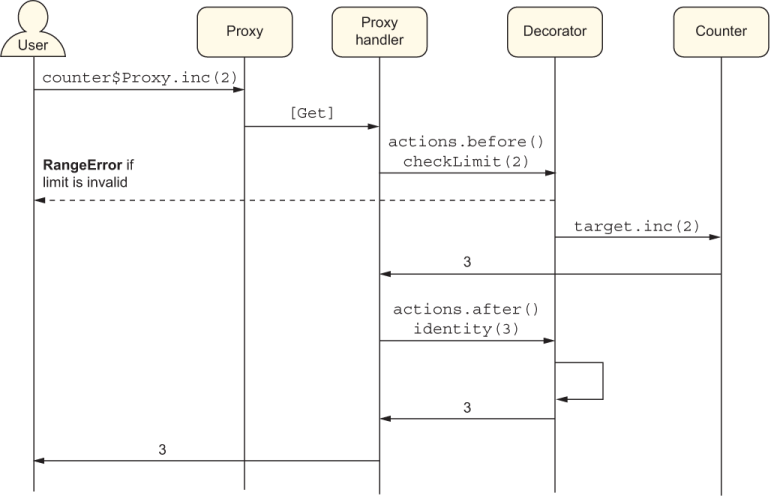
Figure 7.3 The call to counter$Proxy.inc gets intercepted and wrapped with before and after actions. The method argument (2) is validated by checkLimit and allowed to pass through to the target object of Counter. Its result (identity(3)) is echoed on the way out by the identity function and is available to the caller. In the event that checkLimit detects an invalid value, however, a RangeError is returned to the caller.
Decorators are extremely useful for removing tangential code and keeping your business logic clean. It’s simple to see how you could also refactor use cases such as logging, password obfuscation, and performance counters as before or after advice.
In fact, a proposal for static decorators (https://github.com/tc39/proposal -decorators) uses native syntax to automate a lot of what we did here. These decorators would have the look and feel of TypeScript decorators, Java annotations, or C# attributes. You could annotate a method with @trace, @perf, @before, and @after, for example, and have all the wrapping code modularized and moved away from the function code itself. Static decorators are a feature to keep your eye on; they will significantly change the game of application and framework development. This feature is used extensively in the TypeScript Angular framework.
NOTE Although you can do endless things by using reflection, whether via symbols or proxies, practice due diligence. There’s such a thing as too much reflection, and you don’t want your teammates who are debugging your code to spend hours figuring out why their code is not behaving as they expect it to, syntactically speaking. A good heuristic is duplication. When you find yourself writing the same or similar code over and over across your entire codebase, that’s a good indication that you can reach into introspection and/or code weaving to refactor and modularize it.
Metaprogramming is the art of using the programming language itself to influence new behavior or to automate code. It can be implemented statically via symbols or dynamically via code weaving.
The Symbol primitive data type is used to create unique, collision-free object properties.
Symbols make objects extensible by preventing code from accidentally breaking API contracts or the internal workings of an object.
You can use symbols to create static hooks that you can use to alter your code’s behavior with regard to fundamental operations such as looping, primitive conversion, and printing.
JavaScript ships with native reflection APIs such as Proxy and Reflect. These APIs allow you to weave code into the runtime representation of objects dynamically without polluting their interface with other concerns.
JavaScript’s reflection APIs make it easy to develop method decorators, which allow you to implement cross-cutting behavior and modularize sources of duplication in your code.