Scope is like oxygen to a programmer. It’s everywhere. You often don’t even think about it. But when it gets polluted . . . you choke.
—David Herman (Effective JavaScript)
The world of JavaScript development is changing frantically, and the part of the language that has undergone the most change is its module system.
In modern application development, we take the notion of modular programming for granted. The practice of breaking our applications into different files and then recombining them is already second nature to us. We don’t do these things to avoid getting blisters on our fingers from endless scrolling; we do them so that we can reason about and evolve different parts of our applications separately without fear of breaking others.
You may have heard the term cognitive load used to refer to the amount of information a person can hold at any point in time. Too much information—such as the state of all variables, the behavior of all components involved, and all the potential side effects—leads to cognitive overload. Computers can easily track millions of operations or changes of states per second, but humans can’t. A scientific fact is that humans can store around seven artifacts at the same time in short-term memory. (Think of a small cache.) This is why we need to subdivide our code into subprograms, modules, or functions so that we can examine each element in isolation and reduce the amount of information we take in at the same time.
As I said back in chapter 1, the days of modern JavaScript development are upon us. Every major programming language must have good support for modules, but until recently, JavaScript did not. In chapters 4 and 5, you learned about breaking complex code into functions and reassembling them with composition. That process was function/object-level modularization. This chapter covers modularization at the file level, using native JavaScript keywords.
We start with a brief overview of today’s landscape of module solutions and then move to a discussion of JavaScript’s new official standard: ECMAScript Modules (ESM), also known as ECMA262 Modules, which began as ECMAScript 2015 Modules. Unlike early module systems, ESM enhances the JavaScript syntax to use static dependency definitions, which has four significant benefits:
Improves the experience of sharing code across your applications
Makes tools such as static code analysis, dead-code elimination, and tree-shaking much more efficient
Unifies the module system for server as well as client, which solves the huge problem of requiring different module systems depending on the platform
Note It’s important to mention that this book does not cover how to package JavaScript code or how to deliver it with package managers such as NPM and Yarn. Also, because there are many JavaScript compilers, I don’t cover any specific compiler optimizations related to ESM.
We’ll start by reviewing today’s JavaScript modules landscape so that you understand what problem ESM addresses and why we’re fortunate to have it.
Modular programming has been a mainstream concept in other language communities for many years, but not for JavaScript. Even today, it’s challenging to manage dependencies and build code that can run uniformly across many environments. Keep in mind that JavaScript is in the unique position of supporting both server and client (browser) environments, which are very different in nature.
If you’re developing client-side applications, it’s likely that you’ve already had to deal with some sophisticated build tool that could take all your independent scripts and merge them into a single bundle. At the end of the day, the application runs as one endless file to create the illusion of modularity. To understand the motivation behind ESM and why it’s so important, it helps to spend a little time understanding the current state of affairs of JavaScript and modules and how we got here.
If you’ve been writing JavaScript code for some years, you probably remember that JavaScript faced a lot of pushback and criticism due to its lack of a proper module system. Without a doubt, this limitation caused the greatest amount of pain to web developers. Without modules, any decent-size codebase quickly entered a global clash of named variables and functions. This clash was magnified when multiple developers worked on the same application. You’d be surprised how many arrays named arr, functions named fn, and strings named str exist globally across hundreds of thousands of lines of code, all potentially colliding in unpredictable order. Something needed to be done urgently.
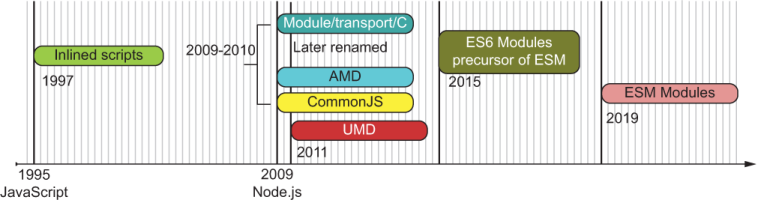
Opinions on modules for JavaScript are heated and diverse. In the past, any attempt at normalizing it added yet another element of variability to the madness. Over time, out of necessity, different schools of thought for a module specification emerged. The most notable ones were Asynchronous Module Definition (AMD) and CommonJS (CJS). Both concepts were stepping stones to the (long overdue) development of the formal standard ECMAScript Modules (ESM) (https://github.com/nodejs/ modules). Figure 6.1 shows a brief approximate timeline of the evolution of the module system in JavaScript.
Figure 6.1 Overview of the evolution of JavaScript’s module system, from simple inline scripts in the early browser days to official ESM. All dates are approximate.
AMD and CJS had different design goals. The latter is synchronous and used in the server where there’s fast file I/O; the former is asynchronous and used in the browser, where access to files is slower and travels through the internet. Although the browser side was contested, AMD made the most progress by dramatically simplifying dependency management of large-scale, client-side JavaScript applications, especially when used in conjunction with the RequireJS (https://requirejs.org) script loader library. AMD was one reason why the Single Page Apps (SPA) architecture was possible. An SPA contains not only layout, but also a good chunk of the business logic loaded into the browser. Combined with Web 2.0 technologies such as AJAX, entire apps were being put in browsers.
Still, nothing had become standard. This lack of consensus drove the creation of yet another proposal that tried to unify and standardize module systems. The Universal Module Definition (UMD) came to the rescue, along with a module loader API called SystemJS (https://github.com/systemjs/systemjs), which works on client and server. Although reading through a UMD-built module is complex and convoluted (because it involves lots of conditional logic to support any module style and environment), this standard was a blessing because it allowed plugin and library authors to target a single format that could run on both client and server.
After many years of deliberation, ESM was the be-all and end-all of module systems for JavaScript. ESM is a platform-agnostic, standardized module system for JavaScript that works on both servers and browsers, eventually replacing CJS and all other module formats. Currently, ESM is the official standard; all platform vendors are starting to adopt it and all library authors are beginning to use it. Adoption will be a slow process and one that requires all of us to help.
Before any of these formal proposals existed, JavaScript developers were hard at work creating amazing websites. So how were we modularizing applications back then, and what was considered a module? To get around making everything global scripts, developers invented clever patterns and naming schemes, and even used objects and the scope inside functions as pseudo-namespaces to avoid name collisions in the global context. We’ll explore these patterns in section 6.2.
We have multiple ways to approach modularity in JavaScript even without module specifications. Before JavaScript had any module system, all the code lived in the global space, which proved to be exceptionally hard to maintain. Code was separated into different script files. Developers had to get creative to organize their code and provide some means of abstraction over global data to create scopes that avoid name clashes with other running scripts—and to try to make it back home for dinner every day. JavaScript’s fundamental scoping mechanism has always been and will always be function scope, so it made complete sense to rely on functions to create isolated scopes of code where you could encapsulate data and behavior.
In this section, we’ll review some of the ad hoc modular programming patterns that arose out of sheer necessity before modules became a core part of the language:
These patterns are worth reviewing because they still work today and are great for small applications and scripts, especially if you’re targeting any of the older browsers, such as Internet Explorer 11.
Object namespaces grew in the browser out of the need to scale out simple scripts into full-fledged applications before tools such as AMD existed. Because browsers don’t do any dependency management of their own, the order in which you included your files (via <script /> tags) was important.
Developers got into the habit of first loading any third-party libraries (jQuery, Prototype, and others) that they needed and then loading the application-specific code that depended on those libraries. The main issue was that with the exception of iframes and web workers, scripts ran within the same global browser realm. (I’ll discuss realms briefly in chapter 7.) Without property encapsulation, a global variable, a class, or a function in one file would collide with that of the same name loaded from a different file. These issues were hard to debug, especially because browsers gave no signs or warnings of any kind when collisions happened.
NOTE Now you can load asynchronously by using the async HTML 5 attribute of the script tag, which makes this problem even worse.
One way to get around this problem was to create artificial namespaces under the global object, using object literals to group your code and identify variables uniquely. In fact, the now-discontinued Yahoo! User Interface (YUI) library for building web applications used this pattern extensively. A class called Transaction, for example, could be defined in many projects and libraries because it applied to myriad domains. To avoid errors when declaring this name multiple times, you needed to define Transaction canonically. For Node.js, this definition could look something like the next listing.
Listing 6.1 Defining Transaction object with a global object namespace
global.BlockchainApp.domain.Transaction = {}; ❶
❶ In the browser, you use window instead of global.
NOTE Remember that global is the implicit global object inside a Node.js file or module, analogous to the window object in browsers.
You saw the Transaction constructor function in chapter 2, and I’ll repeat it in the next listing, now defined under some arbitrary object namespace, which I call BlockchainApp. The properties of this object could more or less match the static directory structure of your application.
Listing 6.2 Using an object namespace
let BlockchainApp = global.BlockchainApp || {};                  ❶
BlockchainApp.domain = {};                                       ❷
BlockchainApp.domain.Transaction = (function Transaction() {     ❸

   const feePercent = 0.6;                                       ❹

   function precisionRound(number, precision) {
      const factor = Math.pow(10, precision);
      return Math.round(number * factor) / factor;
   }

   return {                                                      ❺
      construct: function(sender, recipient, funds = 0.0) {
         this.sender = sender;
         this.recipient = recipient;
         this.funds = Number(funds);
         return this;
      },
      netTotal: function() {
         return precisionRound(this.funds * feePercent, 2);
      }
   }
})();                                                            ❸
❶ Defines the BlockchainApp object if it doesn’t exist by querying global
❷ Defines a new (nested) object namespace called domain inside BlockchainApp
❸ The pattern of using a function that is immediately invoked is called an IIFE (discussed in section 6.2.2).
❹ Private variables and/or privileged functions encapsulated inside the function’s scope
❺ Public variables and/or functions exposed to the caller
Alternatively, you can use an inline class expression (see the next listing). Classes are essentially functions, so this syntax should not surprise you.
Listing 6.3 Defining a class expression in an object namespace
let BlockchainApp = global.BlockchainApp || {};
BlockchainApp.domain = {};
BlockchainApp.domain.Transaction = class {         ❶
   #feePercent = 0.6;
   constructor(sender, recipient, funds = 0.0) {
     this.sender = sender;
     this.recipient = recipient;
     this.funds = Number(funds);
     this.timestamp = Date.now();
   }

   static #precisionRound(number, precision) {
     const factor = Math.pow(10, precision);
     return Math.round(number * factor) / factor;
   }

   netTotal() {
       return BlockchainApp.domain.Transaction.precisionRound
           (this.funds * this.#feePercent, 2);
   }
}
❶ Defines a new Transaction class within the BlockchainApp.domain namespace, using a class expression
With this alternative, you can instantiate a new transaction by always specifying the canonical path to the class expression, which is meant to lessen the possibility of any collisions from, say, some third-party banking library you decided to use:
const tx = new BlockchainApp.domain.Transaction(...);
NOTE Another common technique was to use your company’s reverse URL notation. If you worked at MyCompany, the notation would look something like this:
const tx = new com.mycompany.BlockchainApp.domain.Transaction(...);
Classes offer great support for private data, but before classes, the most popular pattern for encapsulating state was the IIFE.
Immediately Invoked Function Expressions (IIFEs), which you may already know as the Module pattern, take advantage of JavaScript’s function scope to house variables and functions and provide encapsulation from the outside world. As you’re probably aware, the function is “immediately invoked” because the unnamed function (in parentheses) is evaluated at the end, giving you the opportunity to expose what you want and hide what you don’t, as with classes.
Listing 6.4 demonstrates how you can create a Transaction IIFE as an object namespace without leaking any private data. In this code snippet, all variable declarations (regardless of scope modifier var, const, or let) and functions (such as calculateHash) exist and are visible only from within this surrounding function.
(function Transaction(namespace) {

    const VERSION = '1.0';                                      ❶
    namespace.domain = {};                                      ❷

    namespace.domain.Transaction = class {                      ❸
       #feePercent = 0.6;

       constructor(sender, recipient, funds = 0.0) {
          this.sender = sender;
          this.recipient = recipient;
          this.funds = Number(funds);
          this.timestamp = Date.now();
          this.transactionId = calculateHash (                  ❹
            [this.sender, this.recipient, this.funds].join()
          );
       }

         ...
       }

    function calculateHash(data) {                              ❺
     ...
    }
})(global.BlockchainApp || (global.BlockchainApp = {}));        ❻
❶ Private properties defined in the module’s scope
❷ Creates the nested domain namespace
❹ Has access to the calculateHash private method defined later
❺ Private method. Function definitions automatically get hoisted to the top of the surrounding function scope.
❻ Checks whether Blockchain exists globally and if necessary creates global.BlockchainApp as an empty object namespace to use
This function executes immediately upon declaration, so Transaction is created on the spot. You can instantiate it as before:
const tx = new BlockchainApp.domain.Transaction(...);
IIFEs were among the most popular patterns before ECMAScript 2015 classes and still continue to be used today. In fact, many developers and JavaScript purists prefer them to classes. It’s worth pointing out that placing variables and objects in a local scope makes the property resolution mechanism (discussed in chapter 2) faster, because JavaScript always checks the local scope before the global. Finally, when used in conjunction with object namespaces, IIFEs allow you to organize your modules in different namespaces, which you’ll need to do in a medium-sized application.
Functions are versatile, to the point where you can augment their context to securely define mixins in your domain. Because we explored mixins in chapter 3, section 6.2.3 explores how these legacy solutions integrate with them.
Remember the mixin objects we discussed and defined in chapters 3 and 4? We can also use IIFEs to implement HasHash. To do so, we can take advantage of JavaScript’s context-aware function operators Function#call or Function#apply to dynamically set the object context to be extended (referred to via this) at the call site. The enhancement process is enclosed in the function, adequately walled off from the rest of the code.
Listing 6.4 shows a rehash (no pun intended) of the HasHash mixin you learned about in chapter 4. Similar to the previous techniques, we use a function to create a private boundary around the code we want to modularize. In listing 6.5, the use of an arrow function notation is a lot more intentional. calculateHash is an arrow function so that this refers to the augmented object, which is the context object or environment passed to HasHash.call.
NOTE As you know, arrow functions don’t provide their own this binding; they borrow this from their surrounding lexical context.
HasHash accepts a set of keys that identify the properties to use during the hashing process. The last part of the next listing shows how to augment the Transaction and Block classes created under the global BlockchainApp namespace.
Listing 6.5 The HasHash mixin using an IIFE
const HasHash = global.HasHash || function HasHash(keys) {

    const DEFAULT_ALGO_SHA256 = 'SHA256';
    const DEFAULT_ENCODING_HEX = 'hex';
    const options = {
       algorithm: DEFAULT_ALGO_SHA256,
       encoding:  DEFAULT_ENCODING_HEX
    };

    this.calculateHash = () =>  {                        ❶
       const objToHash = Object.fromEntries(
          new Map(keys.map(k => [k, prop(k, this)]))
       );
       return compose(
         computeCipher(options),
         assemble,
         props(keys)
       )(objToHash);
    };
}

HasHash.call(
   global.BlockchainApp.domain.Transaction.prototype,
   ['timestamp', 'sender', 'recipient', 'funds']         ❷
);

HasHash.call(
   global.BlockchainApp.domain.Block.prototype,
   ['index', 'timestamp', 'previousHash', 'data']        ❷
);
❶ this maps to the object’s prototype and adds the calculateHash method.
❷ The hash of each type of object includes a different set of keys.
A factory function is any function that always returns a new object. You saw an example of this pattern in the implementation of Money in chapter 4. Creating objects via factories has two important benefits:
You don’t have to rely on this to access instance data. Instead, you can use the closure formed around the object to achieve data privacy.
As another example, let’s introduce a new object to our blockchain application. BitcoinService handles the interaction of multiple pieces of the blockchain domain with tasks such as transferring funds and mining transactions. Services are typically stateless objects that bring together business logic orchestrating the job of multiple entities of your domain. Because service objects don’t transport any data, being stateless, we don’t need to worry about making them immutable. Listing 6.6 shows the shape of the BitcoinService with a factory function.
Listing 6.6 BitcoinService object constructed via a factory function
function BitcoinService(ledger) {                         ❶
  const network = new Wallet(                             ❶
      Key('public.pem'),
      Key('private.pem')
  );
   async function mineNewBlockIntoChain(newBlock) {       ❷

      //... omitted for now
   }

   async function minePendingTransactions(rewardAddress,
      proofOfWorkDifficulty = 2) {                        ❸

      //... omitted for now
   }

   function transferFunds(walletA, walletB, funds,
       description, transferFee = 0.02) {                 ❹

      //... omitted for now
   }

   function serializeLedger(delimeter = ';') {            ❺

      //... omitted for now
   }

   function calculateBalanceOfWallet(address) {

      //... omitted for now
   }

   return {
     mineNewBlockIntoChain,
     minePendingTransactions,
     calculateBalanceOfWallet,
     transferFunds,
     serializeLedger
  };
}
❶ Both ledger and network become part of the returning object’s closure and are used by all functions.
❷ Mines a new block into the chain. The body of this function is shown in chapter 8.
❸ Mines transactions into a new block
❹ Transfers funds between two users (digital wallets)
❺ Serializes a ledger into a string buffer of JSON objects separated by the provided delimiter
You can obtain a new service object and use it like this:
const service = BitcoinService(blockchain);

service.transferFunds(luke, ana, Money('B|',5),
    'Transfer 5 btc from Luke to Ana');
With the factory function approach, private data (such as network) exists only within the function’s scope, as with an IIFE. Accessing private data is always possible from within the new object API because it closes over that data at time of definition. In addition, not having to rely on this allows us to pass service methods around as higher-order functions without having to worry about any this bindings. Consider the transferFunds API, which has the following signature:
function transferFunds(userA, userB, funds, description,
    transferFee = 0.02)
Suppose that you want to run a batch of transfers, all with the same default transfer fee:
const transfers = [
  [luke, ana, Money('B|',5.0), 'Transfer 5 btc from Luke to Ana'],
  [ana, luke, Money('B|',2.5), 'Transfer 2.5 btc from Ana to Luke'],
  [ana, matt, Money('B|',10.0), 'Transfer 10 btc from Ana to Matthew'],
  [matt, luke, Money('B|',20.0), 'Transfer 20 btc from Matthew to Luke']
];

function runBatchTransfers(transfers, batchOperation) {
   transfers.forEach(transferData => batchOperation(...transferData))
}
You can extract the method directly from the object as a function, using destructuring assignment, and use that method as the batch operation, as shown next.
Listing 6.7 Using an extracted form of transferFunds as a callback function
const { transferFunds } = service;

runBatchTransfers(transfers, transferFunds);       ❶
❶ Passing the service method as a higher-order function. All closed-over data is still available and accessible via the method’s closure.
If BitcoinService had been defined as part of a class design, you would have been forced to set the context object explicitly, which is not straightforward, using Function#bind
runBatch(transfers, service.transferFunds.bind(service));
or the new binding operator (chapter 5):
runBatch(transfers,::service.transferFunds);
Overall, the four techniques—object namespaces, IIFEs, IIFE mixins, and factory functions—have a graceful, simple elegance because they use a subset of JavaScript’s minimal canonical language. Although these patterns are still predominant in industry, the downside is that we are responsible for making sure that all the modules are defined properly and have the proper level of encapsulation and exposure. A good module system should handle these tasks for us.
In section 6.3, we go from programmatic patterns to language-level module systems. At a high level, these systems can be classified as static or dynamic. It’s important to understand the difference because ESM is different from all others due to its static syntax.
A dynamic module system is one in which the management of dependencies and the specification of what a module exposes and consumes is done programmatically. This task involves writing the code yourself or using a third-party module loader. The techniques discussed in section 6.2 fall into this category, so the specification and definition of a module (what it exposes and what it hides) are created in memory when the code runs. You can do certain tricks with dynamic modules, such as enabling conditional access to include modules or parts of a module. Examples include the CommonJS APIs, the AMD-compatible RequireJS library, the SystemJS library, and Angular’s dependency injection mechanism.
Dynamic modules are quite different from a static format such as the new ESM. A static module system, on the other hand, defines the module’s contracts by using native language syntax—specifically, the keywords import and export. This difference is important to understand. For starters, JavaScript has never had static module definitions, which makes them uncharted territory for most developers. Also, static definitions have certain advantages; they allow the JavaScript runtime to prefetch or preload modules and allow you to build tools to optimize the package size of your application by removing code that will never execute.
Table 6.1 shows loading the Transaction class via the methods discussed in section 6.2. The most obvious difference is that dynamic module systems use the usual JavaScript functions, whereas static systems use import and export.
Table 6.1 Loading the Transaction class with different module systems (continued)
requirejs(['domain/Transaction.js'], Transaction => {
|
||
How each loading call works is not important right now; what’s important is that you see the difference in the syntax used. With ESM, instead of function calls that traverse the file system to load new code modules, you use an import statement that abstracts this process. The caveat is that in static systems, import statements must appear at the top of the file. This requirement also exists in most other languages and should not be viewed as a limitation, for good reason: making these statements static and clearly defined at the top helps compilers and tools map the structure of the application ahead of time. Also, you can run tools that perform better static-code analysis, dead-code elimination, and even tree-shaking, which I’ll cover briefly in section 6.5.
Another noticeable difference in a static module system is the type of bindings used. In CJS, modules are plain object references. Importing an object via the require function is no different from obtaining an object from any other function call. The shape of the object is given by the properties assigned to module.exports inside the module file. Here’s how you would import Validation (created in chapter 5) by using CJS:
const {Success, Failure} = require('./lib/fp/data/Validation.js');
A more common example is importing from Node.js’s filesystem fs built-in module:
const { exists, readFileSync } = require('fs');
Conversely, ESM modules take advantage of a more native and declarative syntax. Access to the API still looks somewhat like regular objects, but only for consistency with the language’s mental model and to piggyback on the success of CJS’s compact approach. Here’s the preceding example with ESM:
import { Success, Failure } from './lib/fp/data/Validation.js';
import { exists, readFileSync } from 'fs';
On the exterior, these approaches look and feel the same, but there’s a subtle difference: ESM uses immutable, live code bindings, not a regular, mutable copy of an object. The next listing shows a simple fee calculator CJS module to illustrate this difference.
Listing 6.8 calculator.js module defined with CJS
let feePercent = 0.6;

exports.feePercent = feePercent;

exports.netTotal = function(funds) {
  return precisionRound(funds * feePercent, 2);
}

exports.setFeePercent = function(newPercent) {
  feePercent = newPercent;
}

function precisionRound(number, precision) {     ❶
  const factor = Math.pow(10, precision);
  return Math.round(number * factor) / factor;
}
❶ Function is private to the module
Pay close attention to the result of each statement in the following listing.
Listing 6.9 Using calculator.js as a CJS module
let { feePercent, netTotal, setFeePercent } = require('./calculator.js');

feePercent;   // 0.6
netTotal(10); // 6
feePercent = 0.7;                                  ❶
feePercent;   // 0.7
netTotal(10); // 6                                 ❷
setFeePercent(0.7);                                ❸
netTotal(10); //7                                  ❹
require('./calculator.js').feePercent; // 0.6      ❺
❶ Resets the value of that variable of the locally defined variable
❷ Uses the original module’s value of 0.6
❸ Sets the value inside the module to 0.7
❹ New feePercent is being used
As you can see, reassigning feePercent to 0.7 changes your local exported copy of that reference, but not the reference inside the module, which is probably what you’d expect. With ESM, instead of a simple variable reference, the exported properties in ESM are connected (bound) to the properties inside the module. In the same vein, changing an exported binding within the module itself alters the binding used outside somewhere else; it’s bound both ways. There are many good uses for live bindings, but they can certainly lead to confusion. My recommendation is to try to avoid reassigning to exported references at all costs. Take a look at the code sample in the next listing.
Listing 6.10 Using calculator.js as an ESM module
import { feePercent, netTotal, setFeePercent }  from './calculator.js';

feePercent;   // 0.6
netTotal(10); // 6
feePercent = 0.7;       ❶
netTotal(10); // 6
setFeePercent(0.7);     ❷
netTotal(10); // 7      ❸
feePercent;  // 0.7     ❹
❶ Throws an error stating that feePercent is read-only. Value is immutable from the client.
❷ Sets the value inside the module to 0.7 via an API
❸ New feePercent is being used
❹ feePercent reflects the new live value.
As you can see, CJS and ESM have slightly different behavior. By design, most of the differences happen behind the scenes to make ESM adoption simpler. From a practical standpoint, ESM works similarly to CJS in that nearly every file is considered to be a module and every module has its own local scope, where you can safely store code and data (similar to the function scope created under an IIFE). If you’ve used CJS, ESM shouldn’t be a huge paradigm shift.
The future of JavaScript lies with ESM, which will eventually supersede any other module format and interoperate with existing ones. When this will happen is uncertain because Node.js (for example) needs to support CJS for some time to provide backward compatibility and allow the transition to go smoothly.
Now, without further ado and the past behind us, let’s jump into ESM.
In this section, you’ll learn about the fundamentals of ESM and how it’s used in code. Specifically, you’ll learn how to write module path identifiers, as well as the syntax needed to expose and consume modules by using variations of the import and export keywords.
ESM was designed in TC39 as a declarative module system with the goal of unifying dependency management for client and server. You can use ESM experimentally, starting with Node.js 12, by activating an experimental flag (—experimental-modules) and in Node.js 14 without a flag. Node.js treats a file with the extension .js or .mjs (section 6.4.4) as a module.
ESM standardizes on a single module format that draws experience from both CJS and AMD formats. This standardization is similar to what the Universal Module Definition (https://github.com/umdjs/umd) project set out to do many years ago, with some success. The problem is that none of these aforementioned module formats was ever fully standardized. In ESM, you get the best of both worlds: synchronous live binding statements as well as dynamic, asynchronous APIs. ESM also retains the terse syntax that CJS uses, which has withstood the test of time.
Before we dive into this topic, one important thing to keep in mind is that ESM modules automatically enter in strict mode without you having to write it explicitly.
A JavaScript module is nothing more than a file or directory that’s specified remotely (browser) or from the local file system (server) with some special semantics. ESM makes these specifiers compatible with both of these environments. Unfortunately, this constraint means that we will have a less-flexible module system on the server because we lose the extensionless specifiers that we’ve become accustomed to on the server side. On a positive note, ESM works toward a truly universal format, which helps in the long run with technologies such as Server-Side Rendering and building isomorphic applications.
First, let’s go over the syntax for importing and exporting modules, starting with path specifiers.
One important design goal of ESM is to remain compatible with the browser to truly guarantee one module format for all environments. Unlike in CJS, all module specifiers in ESM must be valid URIs, which means (sadly for Node.js) that there are no extensionless specifiers or directory modules. With the exception of bare specifiers (such as 'ramda'), if a JavaScript module file has an extension, that extension must be explicitly added to the import specifier for it to resolve properly. (We were allowed to omit it before.) The following listing is more in line with how regular browser <script> includes work.
Listing 6.11 Path specifiers using ESM
import Transaction from './Transaction.js';
import Transaction from '../Transaction.js';
import { curry } from '/lib/fp/combinators.js';
import { curry } from 'https://my.example.com/lib/fp/combinators.js';      ❶
❶ Valid only in browser environments; not supported in Node.js
NOTE It’s worth mentioning that in browsers, unlike Node.js, the file extension does not tell the browser how to parse a module as JavaScript code. It’s done with the proper MIME type (text/javascript) and shows whether the file was included with <script type='module'>, as in
<script type="module"
   src=" https://my.example.com/lib/fp/combinators.js">
</script>
If you’re using a relative path, you must start with ./ or ../. The following code generates a module-not-found error (compatible with CJS). Neither of these snippets would pass as a valid URI:
import Transaction from 'Transaction.js';
import Transaction from 'lib/fp/combinators.js';
Another drawback is that you won’t be able to perform directory imports in Node.js as with CJS. In CJS, having an index.js or a proper package.json file in a folder lets you perform an import of the folder implicitly without appending the index.js part of the specifier. Because CJS was made for the server, it had smarts built in to detect and autocomplete the index.js bit, much as web servers serve index.html from a folder by default. Sadly, because the same rules need to apply to both client and server, this behavior did not carry over to ESM.
In sections 6.4.2 and 6.4.3, we jump into the two main features of ESM: exporting and importing.
The export statement is used to expose a module’s interface or API and is analogous to module.exports in CJS. A module is defined as a single file and may contain one or many classes and functions. By default, everything within a file is private. (Thinking of a module file as an empty IIFE may help.) You need to declare what to expose via the export keyword. For brevity, I won’t cover all the possible export combinations. For a full list of possible combinations, visit http://mng.bz/YqeK. The combinations described in the following sections are used in the sample application.
So far in the book, when showing parts of the domain classes, I’ve deliberately left out how they map to the filesystem—in other words, the import statement that was used to obtain the class. The general convention in exporting is for classes to become modules of their own. You have options. You can export a single class in a single step
export default class Transaction {
   // ...
}
class Transaction {
   // ...
}

export default Transaction;
Single-valued export is usually the preferred way of exporting code for others to consume. Before Node.js had native support for classes, a class was transpiled into its own IIFE function. Think about how data that lives outside the export declaration inside the module file is completely hidden from the callers. The semantics are similar to that of an IIFE, which is nice and consistent. You can imagine one big IIFE function in which the body is your entire module code, giving you the opportunity to declare variables, functions, or other classes accessible only to the module code itself. We used this technique in HasHash to declare top-level constants, for example:
const DEFAULT_ALGO_SHA256 = 'SHA256';
const DEFAULT_ENCODING_HEX = 'hex';

const HasHash = (
  keys,
  options = { algorithm: DEFAULT_ALGO_SHA256,
              encoding: DEFAULT_ENCODING_HEX
            }
) => ({
  // ...
});

export default HasHash;
Using the default keyword allows you to export one piece of data. You could also export multiple values from a single module.
A multivalue export is an elegant way to create utility modules. This is used for the validation functions in Block and Transaction. Because you’ve already seen these functions, I’ll show you the export syntax and omit the body of each method:
export const checkDifficulty = block => //...

export const checkLinkage = curry((previousBlockHash, block) =>
  // ...
);

export const checkGenesis = block => // ...

export const checkIndex = curry((previousBlockIndex, block) =>
  // ...
);
API modules based on multivalue exports of standalone functions have another great benefit: they push you into writing with purity in mind. Because you never know the context under which a function will execute, you can’t assume or rely on any shared or closed-over state. Moreover, instead of using a factory function, another way to create the BitcoinService object is to expose individual, pure functions that declare all the data they need up front as function arguments. Instead of inheriting ledger and network from the function’s closure, you need to make them actual arguments:
export async function mineNewBlockIntoChain(ledger, newBlock) {
   //...
},

export async function minePendingTransactions(ledger, network,
       rewardAddress, proofOfWorkDifficulty = 2) {
   //...
},

export function transferFunds(ledger, network,
       walletA, walletB, funds, description) {
   //...
}
A module can export and bypass the bindings of another module, acting as a proxy. You can accomplish this task by using the export ... from statement. In our case, we can use this statement to group all the individual domain modules (including Block and Transaction) in a single module file, called domain.js:
export { default as Block } from './domain/Block.js'
export { default as Transaction } from './domain/Transaction.js'
export { default as Blockchain } from './domain/Blockchain.js'
Unlike with import, you can export at any line of your module. No rules force the placement.
On the flip side, exported code is consumed by clients or other modules through the import statement.
To consume an API, you must import the desired functionality, which you can do as a whole or in pieces. You have many ways to import from a module and can find a complete reference guide at http://mn.bz/Gx4R. The following sections describe some of the most common techniques.
To import a single object from a default export, you can use
import Block from './Block.js';
This is the simplest case, but you can also request components of a module.
You can break out pieces of a single module. The next listing shows how to do a multivalue import.
Listing 6.12 Multivalue import of validation.js
import { checkIndex, checkLinkage } from './block/validations.js'; ❶
❶ The curly braces indicate that we’re reaching into the module.
Notice that although the code snippet in listing 6.12 suggests that destructuring is occurring, as used with CJS, it’s not. Following are the main differences:
Imports are always connected with their exports (live bindings), whereas destructuring creates a local copy of the object. Because CJS imports a copy of the object, a destructure is a copy of a copy.
You can’t perform a nested destructure within an import statement. The following code won’t work:
import {foo: {bar}} from './foo.js';
The syntax for property renaming (aliasing) is different, as shown in the next listing.
Listing 6.13 Property renaming in CJS and ESM
// CJS
const { foo: newFoo } = require('./foo.js');     ❶

// ESM
import {foo as newFoo} from './foo.js';          ❷
❷ ESM: Does not rename but creates an alias called newFoo pointing to the bound foo property
You can also compose a multivalued exported API into a single object namespace by using a wildcard (alias) import:
import * as ValidationsUtil from './shared/validations.js';

ValidationsUtil.checkTampering(...);
As with native modules, importing third-party modules with ESM is done via a bare path, with no path separators or extensions. As expected, the package name needs to match the directory name inside node_modules. Then the entry point or module to load is determined by the main property in its accompanying package.json. Here’s an example:
import { map } from 'rxjs/operators';
If you’ve been coding in Node.js for a while, you’re probably used to loading modules conditionally with CJS. Unlike ESM, which requires dependencies to be declared at the beginning of the file, CJS allows you to require modules from anywhere. One use case where this happens a lot in the wild is the notion of using a module containing global settings or feature flags to roll out new code to your customers slowly. The following listing shows an example.
Listing 6.14 Loading modules dynamically with CJS
const useNewAlgorithm = FeatureFlags.check('USE_NEW_ALGORITHM', false);

let { computeBalance } = require('./wallet/compute_balance.js');

if (useNewAlgorithm) {
    computeBalance =
        require('./wallet/compute_balance2.js').computeBalance;
}

return computeBalance(...);
Depending on the status of the global USE_NEW_ALGORITHM setting, the application may decide to use the traditional compute_balance module or begin using a new one. This technique looks handy, but the first time a library or file is required, the JavaScript runtime needs to interrupt its process to access the filesystem. Because modules are singleton, this situation would happen only the first time a library is loaded. Afterward, the modules are cached locally (a behavior that both ESM and CJS support). Similarly, the second require statement blocks the main thread to access the filesystem before caching the module.
In the spirit of nonblocking code, filesystem access should be done asynchronously. The ESM specification corrects for this problem and offers a callable version of import that is asynchronous, based on promises, and aligned with loading code inside the browser. The import function fetches, instantiates, and evaluates all the requested module’s dependencies and returns a namespace object whose default property references the requested module’s (export) default API, as well as properties that match the module’s other exports. We’ll get back to asynchronous features of JavaScript in chapter 8, but I’ll show you how import works now as it pertains to the module system. Refactoring the code in listing 6.14 looks like this:
const useNewAlgorithm = FeatureFlags.check('USE_NEW_ALGORITHM', false);

let computeBalanceModule = await import(
    './ domain/wallet/compute_balance.js'
);

if (useNewAlgorithm) {
   computeBalanceModule = await
      import('./domain/wallet/compute_balance2.js');
}

const {computeBalance} = computeBalanceModule;

return computeBalance(...);
By the way, this code snippet uses a feature known as top-level-await, which is supported only in ESM. You’ll learn more about this feature in chapter 8. The basic premise is that you can use await directly to trigger an asynchronous action (loading a script in this case) without having to write an async function explicitly.
Another important part of the ESM specification is the introduction of a new extension: .mjs.
To instruct Node.js to load modules by using ESM, you have two options:
You can set the type field of package.json to "module". This option works by dynamically looking up the package.json nearest to your given .js file, starting with the current directory, followed by its parent, and so on. If JavaScript is unable to determine the type, CJS is used.
Use the new file extension (.mjs) to identify JavaScript module files. This extension will be helpful during the transitional period of moving to ESM. By the same token, .cjs files will force the use of CommonJS.
Package and library authors are encouraged to provide a type field in their package.json files to make their code clearer and better documented. Also, modern browsers support <script type='module'> to match this new behavior.
Although many people have deemed the .mjs extension to be unattractive, it has precedent. React uses .jsx to declare HTML components, for example, and we’ve all used .json as a convention to store plain-text JSON data. Browsers don’t pay much attention to the file extension; they care mostly about the MIME type (text/javascript for executable scripts or application/json for data imports). I view .mjs as being a transitional route before JavaScript applications catch up to ESM; then .js will prevail.
Nevertheless, here are some of the concrete benefits of using .mjs:
There are no problems with backward compatibility. Because the extension is new, enforcing certain properties from the start (such as mandatory strict mode on all modules) is simple.
The extension helps with deprecating non-browser-friendly module environment variables such as __dirname, __filename, module, and exports. Also, you will not be able to use require on files with an .mjs extension, or vice versa. (Use import on .cjs files.)
The new extension communicates purpose, which is a clear departure from the existing module formats (AMD, CJS, and UMD).
No additional instructions or parsing (so no performance penalty) are needed for the compiler to treat and prepare/optimize a JavaScript file for modules.
There is special processing of module files. You can now use module-scoped metaproperties such as import.meta, for example. Currently, this object contains only the URL or full path of the module, but more functionality can be added later. The url property will supersede the global __dirname and __filename globals. The example in the next listing uses import.meta.
Listing 6.15 Printing the contents of import.meta
console.log(import.meta);         ❶

// { url: "file:///home/user/../src/blockchain/domain/Transaction.js" }
Tooling experience is improved. IDEs can be more intuitive when it comes to things like refactoring, syntax highlighting, code completion, and visualization. Static code analyzers and linters can give you better heuristics and guidance.
Supporting this new extension and phasing out the existing module systems won’t happen overnight. Millions of packages and lots of tools need to start this process. When ESM begins to trickle in with new packages and old packages get updated, we’ll be able to reap the benefits of ESM. These benefits extend to much more than code. Section 6.5 describes how tools can take advantage of the static nature of this module format.
ESM’s static, declarative structure has many benefits. The one obvious benefit is good IDE support for static code checking. Other important benefits include dead-code elimination and tree-shaking, faster property lookups, and type-friendliness, all discussed in the following sections.
In simple terms, dead code is code that could never run through any paths of your code. Tools can identify dead code by closely examining the static structure of the code and tracing through the possible execution paths. The most obvious form is code that’s commented out. Naturally, it’s pointless to send that code across the network to the browser or to a remote Node.js server, so transpilers and build tools typically strip it out. You may also find dead code in the unreachable lines that appear after a function’s return statement. This situation sometimes happens in code that relies on automatic semicolon insertion (http://mng.bz/QmDj). Other, less obvious cases include unused local variables and function calls whose results are never used elsewhere.
On the server, the module system is a reflection of the filesystem. On the browser, the situation is not quite the same, but ESM aims to close this gap. For large SPAs, you need a bundling/build strategy. Instead of requesting thousands of small files (each file a module) over the wire, it makes sense to bundle them at build time (and while you’re at it, compress them) into a single payload.
I don’t cover build tools such as Browserify, Webpack, and Rollup in this book, but I highly recommend that you research them all and pick the best tool for your project. Build tools are essential parts of coding with JavaScript. The central job of these tools is to map the entire dependency tree to one or two entry points (index.js, main.js, app.js, and so on). Build tools are smart at detecting whole modules or parts of a module that are never used and then ignoring them. Hence, unused modules down the dependency tree are virtually considered to be dead and dropped by shaking the tree. Aside from reducing cognitive load, modularizing your code as much as possible instead of packing everything into a single file is good practice.
ESM’s static structure imposes restrictions that simplify tree-shaking:
A build tool can rely on the matching sets of export and import statements to map out all unused modules and remove them as shown in figure 6.2.
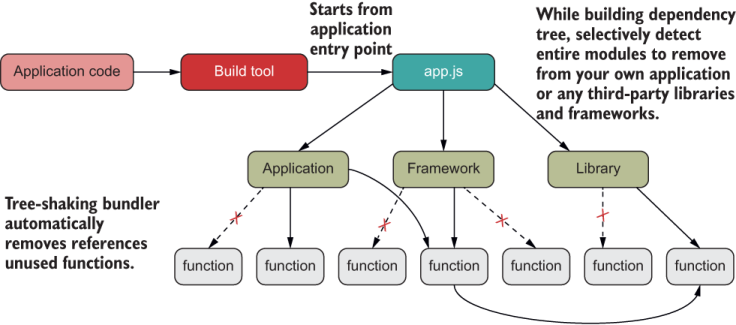
Figure 6.2 Bundler tools can use the static structure of your application to achieve tree-shaking by identifying any unused modules of code and removing them from the packaged application file.
Without these guarantees, eliminating unused parts would be complex. Going back to CJS, for example, you can require modules dynamically and sprinkle these calls anywhere in the code, making it harder to figure out what to remove and what to keep.
Furthermore, with ESM, when you’re looking at the bundled code generated, depending on the tool, you might see a comment like this when removing the foo module:
// unused export foo
A good tip is to design your modules as loosely coupled and internally cohesive as possible to facilitate analyzing your code. Some build tools even have additional support to identify when a function is pure and its result is not used and then can safely remove that call, which is a nice benefit of coding with a functional style. Recall from chapter 4 that pure functions have no side effects or use of shared state, so a pure function whose result is not used does not contribute anything to your application. Detecting whether a function is pure and free of side effects is not an easy problem to solve, so you can help the tooling by writing a bit of metadata in front of pure calls:
/*#__PURE__*/checkTampering(...)
You can run certain plugins that support this notation as part of your build process. One example is the library Terser (https://github.com/terser-js/terser), which looks for these PURE pragmas and determines whether to classify them as dead code based on whether the result of the function is used.
The call to checkTampering made in Block is a pure function, for example. It’s part of the validation logic as we discussed in chapter 5. Here it is again, annotated with the pure metacomments:
class Block {
   ...

   isValid() {
      const {
         index: previousBlockIndex,
         timestamp: previousBlockTimestamp
       } = this.#blockchain.lookUp(this.previousHash);

       return composeM(
            /*#__PURE__*/checkTampering,
            /*#__PURE__*/checkDifficulty,
            /*#__PURE__*/checkLinkage(previousBlockHash),
            /*#__PURE__*/checkLength(64),
            /*#__PURE__*/checkTimestamps(previousBlockTimestamp),
            /*#__PURE__*/checkIndex(previousBlockIndex),
            Validation.of
       )(Object.freeze(this));
}
If we move checkTampering out of the composition, Terser can easily find it and mark it for elimination—this is possible because of the guarantees that a pure function gives you.
ESM also has faster property lookups from imported code.
Another advantage of using a static structure involves calling properties on the imported module. In CJS, the require API returns a regular JavaScript object in which every function call goes through the standard JavaScript property resolution process (described in chapter 2):
const lib = require('fs');

fs.readFile(...);
Although this technique keeps the mental model consistent, it’s slower than ESM. ESM’s static structure allows the JavaScript runtime to look ahead and statically resolve a named property lookup. This process happens internally, and the code looks much the same:
import * as fs from 'fs';

fs.readFile(...);
In addition, knowing the static structure of a module allows IDEs to provide useful hints that can check whether a named property exists or is misspelled. This benefit has always been present in statically typed languages.
JavaScript could be ready for a possible optional type system down the (long) road. ESM is paving the way, because static type checking can be done only when type definitions are known statically ahead of time. We already have reference implementations in TypeScript or even an extension library such as Flow. Some proposals include types for number, string, and symbol, different-size int and floats, and new concepts such as enum and any. Although typing information is light years away, there’s some consensus about what it could look like. For more information, see appendix B.
So far, I’ve covered enough of the ESM syntax to get you started. But because ESM is a big addition to the language, I skipped many syntactical and technical details that you should become familiar with before making the leap. The ESM specification also supports a programmatic loader API that you can use to configure how modules are resolved and loaded, for example. For more information, visit https://nodejs.org/ api/esm.html.
In JavaScript, imported modules behave like objects, and you can pass them around like variables. You can refer to this notion as “module as data.” This congruence is important because in chapter 7, we enter the realm of metaprogramming.
You can use patterns such as object and function namespaces, as well as IIFEs, to enable modularity in JavaScript without the need for any module system.
A dynamic module system uses third-party or native libraries to manage dependencies at runtime. A static module system takes advantage of new language syntax and can be used to optimize dependency management at compile time.
ESM is a static module system worked on by the TC39 task group with the aim of unifying the module needs of both client and server JavaScript environments, as well as replacing all existing module formats.
ESM offers many benefits, such as dead-code elimination, tree-shaking, faster property lookup, variable checking, and compatibility with a (possible) future type system.
A distinctive part of ESM is the introduction of a new file extension, .mjs, so that compilers can enhance JavaScript files behaving as modules.