19.11 The Event Flow (Event Propagation)
Based on what you know so far, you register an event handler for a specific event and target element that you want to monitor and respond to. If the corresponding event occurs on the target element, the event handler will be triggered and executed. However, this description of the event flow is a bit vague. For this reason, we’ll briefly describe the event flow at this point, that is, how an event moves through the DOM tree when an event gets triggered. This event flow is also referred to as event propagation and takes place in three phases:
-
Capturing phase
The event descends from the topmost document node in the DOM tree to the target element of the event. The phase starts with the intercepting handlers of the window object, through those of the document object and the body object, down to those of the event target’s parents. Due to this descent to the target element, it becomes possible to look more closely at the events before they reach their destination. For example, an intercepting event handler can be used to suppress certain events, as we did earlier in the chapter with the preventDefault() method. -
Target phase
When the event reaches its target element, the corresponding event handlers get triggered (i.e., on the target element), which were registered for the corresponding event type, and the bubbling phase is initiated. -
Bubbling phase
Starting from the target element, the event now rises back up the element hierarchy of the DOM tree. This rising is called bubbling. It ensures that the registered handlers of the target element are also executed in its parent element, its grandparent element, and so on up to the document object and then the window object. In other words, the event triggered on the target element rises up the DOM tree, where it triggers the event handlers/event listeners registered for that event on those elements.
19.11.1 More about the Bubbling Phase
It may sound relatively pointless at first that in the capturing phase, everything in the DOM tree initially descends from the top down to the target element, only to ascend back up again in the bubbling phase. If you look at the following HTML code and the explanation that follows, you’ll quickly understand the meaning of bubbling:
...
  <article>
    <h1>Demonstrates bubbling</h1>
    <p onmousedown="getMouse()">Lorem ipsum dolor sit amet, adipiscing elit.
      <mark>Aenean commodo <strong>ligula</strong> eget dolor.</mark>
    </p>
  </article>
  <output></output>

  <script>
    function getMouse() {
      var text = "Mouse button was pressed!"
      var pos = document.querySelector('output');
      if (pos) {
        pos.innerHTML = text;
        pos.style.background = "lightgray";
      }
    }
  </script>
...
Listing 19.35 /examples/chapter019/19_11_1/index.html
In the example, the handler function getMouse() has been set up for the p element in the article element, which is executed when you press the mouse button in the p element. If you press the left mouse button in the p element, corresponding information is output in the output element. The same thing happens if you click on the mark element within the p element or on the strong element one level further down in the hierarchy. This occurs due to bubbling. For example, if the event is triggered on the mark element, the event will rise, and the handler in the p element will be executed. This way, you can avoid registering handlers for individual elements and instead register a single handler for a common ancestor object and respond to the event there.
While most event types ascend via the bubbling phase, there are some that don’t go up and trigger a corresponding handler in the ancestor object. For some event types such as the focus, blur, and scroll events, ascending in this way wouldn’t be very useful.
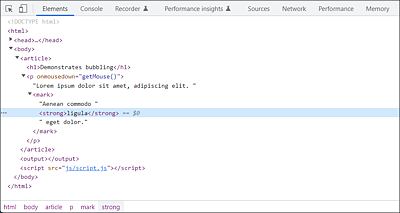
Figure 19.16 Thanks to Bubbling, the Event That Triggers on the <strong> Element or <mark> Element Will Rise, Which Will Execute the Handler of the <p> Element
19.11.2 Canceling Bubbling via the “stopPropagation()” Method
The process of rising in the bubbling phase isn’t always desired and can therefore be prevented via the stopPropagation() method. Take a look at the following HTML code, where bubbling is more annoying than useful:
...
<article onmousedown="getMouseArticle()">
  <h1>Demonstrates bubbling</h1>
  <p onmousedown="getMouseP()">Lorem ipsum dolor ... </p>
</article>
<script src="js/script.js"></script>

...
Listing 19.36 /examples/chapter019/19_11_2/index.html
let text = "";
function getMouseP() {
    alert("Mouse button was pressed in p!");
}
function getMouseArticle() {
    alert("Mouse button was pressed in article!");
}
Listing 19.37 /examples/chapter019/19_11_2/js/script.js
Here, two nested elements—the p element and article element—monitor the same event (mousedown). If you click on the p element inside the article element, the handler function getMouseP() will be executed. Because of bubbling, the event rises to the top and, upon reaching the article element, executes the getMouseArticle() handler function registered for the same event (mousedown) there as well.
You can stop this rising of nested elements by using the stopPropagation() method. Here’s the corresponding example:
...
<article onmousedown="getMouseArticle()">
  <h1>Demonstrates bubbling</h1>
  <p onmousedown="getMouseP(event)">Lorem ipsum dolor ... </p>
</article>
<script src="js/script-2.js"></script>

...
Listing 19.38 /examples/chapter019/19_11_2/index-2.html
function getMouseP(ev) {
    alert("Mouse button was pressed in p!");
    if (ev.stopPropagation) {
        ev.stopPropagation();
    }
}

function getMouseArticle() {
    alert("Mouse button was pressed in article!");
}
Listing 19.39 /examples/chapter019/19_11_2/js/script-2.js
When the left mouse button in the p element gets pressed, the getMouseP(ev) handler function set up for this purpose will be called with the event object as a parameter. In the handler function, it’s first checked whether the stopPropagation method exists, and if it does, it will be executed. By using stopPropagation(), you’ve stopped bubbling for the event type mousedown, and the type no longer gets passed up to the article element.
19.11.3 Intervening in the Event Flow during the Capturing Phase
If you want to intervene in the event flow in the capturing phase, that is, when it runs from top to bottom, you can only do that by using the addEventListener() method. Using <element onevent="handlerFunc()"> as HTML attribute (Section 19.7.1) or element. onevent = handlerFunc as a property of an object (Section 19.7.2), you can register the handler only for the bubbling phase. In the description of addEventListener() in Section 19.7.3, I withheld from you the third parameter where you can specify the Boolean value true or false. If you set the value to true in that parameter, you register the event handler or event listener for the capturing phase. By default, the third parameter is set to false and therefore doesn’t need to be explicitly specified in that case either.
Here’s an example that shows how you can set up a handler for the capturing phase:
...
  <p class="my-p">Lorem ipsum dolor... </p>
  <script src="js/script.js"></script>

...
Listing 19.40 /examples/chapter019/19_11_3/index.html
let id = document.querySelector('.my-p');
if (id) {
    id.addEventListener("mousedown", getMouseP, true);
} else {
    alert("No element with id=myId found!");
}

function getMouseP() {
    alert("Mouse button was pressed in p!");
}
Listing 19.41 /examples/chapter019/19_11_3/js/script.js
This way, you can edit nonascending events already on an ancestor element, for example. In addition, if you call the stopPropagation method of the event object already in the capturing phase, the target and bubbling phases won’t get executed at all, and thus the event type won’t reach its target element.
19.11.4 Additional Information on the Capturing and Bubbling Phases
Now that you know the difference between the descending capturing phase to the target element and the ascending bubbling phase, here’s some more useful information. If nonascending event types such as load, focus, blur, mouseenter, mouseleave, or submit get triggered, an intervention in the capturing phase via addEventListener("event-type", handler, true) enables you to monitor such types at a central position and thus process the higher-level elements during their descent. Unlike the bubbling phase, you can be sure that every event has a capturing phase.
In addition, if you register an event handler with addEventListener() for the capturing phase and that handler was called in that phase, you can be sure that it won’t be called again in the bubbling phase. For this reason, a registration can only be made for the capturing phase or the bubbling phase, not for both at the same time.