16.12 Functions “@function”
Sass also provides a way to create real functions by using @function. Unlike mixins, which output a section of code, functions return a return value. Different data types such as numeric values (20, 1.125, 1.5em), strings ("text", 'text', text), colors (#fff, #ffffff, rgba (255, 255, 0, 0.75)), CSS value lists (1em, 1.5em, "Arial Narrow", Arial, sans-serif;), Boolean values (false, true), or even a null value (null) can be returned. A function is introduced with @function followed by the name of the function. The arguments of the function must be written between parentheses. Curly brackets must contain the code of the function, while @return will return a value. Here’s a simple example that converts a pixel value to an em value:
$base-font-size: 16px;

@function px-to-em( $px-val ) {
    @return ( $px-val / $base-font-size ) * 1em;
}
You can use this function in the SCSS file as follows:
.my-article {
    width: px-to-em( 960px );
    font-size: px-to-em( 20px );
}
Then, the CSS preprocessor makes the following out of it:
.my-article {
  width: 60em;
  font-size: 1.25em;
}
Besides calculations, you can, of course, return other values from a function too. The following example uses a preferred color scheme such as Twitter or Facebook to return the color code. The list can be extended by any other color scheme.
@function select-color( $color:#fff ) {
    @if $color == facebook {
        @return #3b5998;
    }
    @if $color == twitter {
        @return #00acee;
    }

    @else {
        @return $color;
    }
}
I recommend you try out such mini samples directly in www.sassmeister.com. It’s the ideal playground to learn Sass without immediately using the individual techniques in a project.
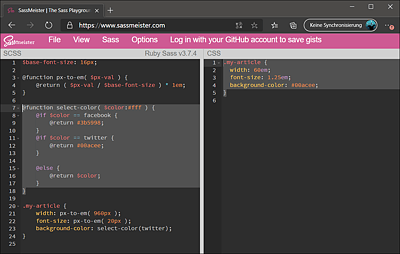
Figure 16.9 Sassmeister Is Perfect for Learning Sass without Having to Use It in the Project Right Away