Make your workspace about your work. An interested observer should be able to walk into the team space and get a general idea of how the project is going in fifteen seconds. He should be able to get more information about real or potential problems by looking more closely.
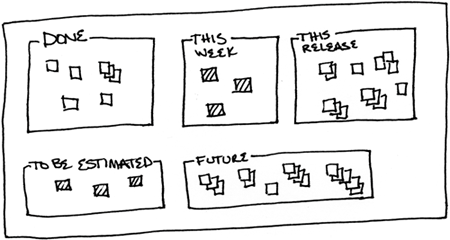
Many teams implement this practice in part by putting story cards on a wall. Sorting the cards spatially conveys information quickly. If the "Done" area isn't collecting cards, what does the team needs to improve in its planning, estimation, or execution? I'll also wonder what customers need to be involved so the slipping scope has minimal business impact. Figure 4 shows an idealized story wall with spatially sorted stories.
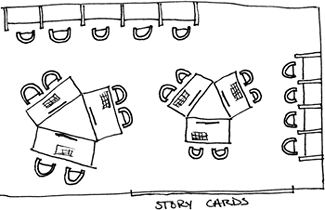
The workspace (Figure 5) also needs to provide for other human needs. Water and snacks provide comfort and encourage positive social interactions. Cleanliness and order leave minds free to think about the problems at hand. While programming happens in a public space people also need privacy, which can be provided by separate cubes or by limiting work hours.
Another implementation of the informative workspace is big, visible charts. If you have an issue that requires steady progress, begin charting it. Once the issue is resolved, or if the chart stops getting updated, take it down. Use your space for important, active information.
