Chapter 28. Build External DSLs for Flexible Syntax
My older brother turned out to be a pretty great guy. He works hard. He’s dedicated to his family. If you have a problem, he’s willing to help. Since he did turn out so well, I guess I can forgive him for being really, really popular in high school. Back then my days seemed to be filled with a continuous stream of pretty girls asking me if I was really Charlie Olsen’s brother.1 The thing is, even in my teens I was witty, I was intelligent, and I had the mesmerizing Olsen blue eyes. There’s no doubt that my high school career would have been a bigger social success if only I could have stepped out of my brother’s shadow for five minutes.2
Given this, I can sympathize with every external DSL ever written in Ruby. Ruby is a really great language for building external DSLs, those DSLs that (unlike the internal flavor) use their own parser instead of the Ruby parser. The trouble is that as useful as Ruby-based external DSLs are, they are overshadowed by the really stellar things that people have done with internal DSLs. To remedy this injustice, and because they are a real part of the Ruby style of programming, this chapter is going to explore building Ruby-based external DSLs. We will start by looking at why you might go to all the trouble of building a parser instead of just using the one that comes with Ruby. We will then examine some of the Ruby tools that you can use to create an external DSL. Finally, we will look at some of the external DSLs that exist in the Ruby world and some of the dangers inherent in building an external DSL.
The Trouble with the Ripper
To see why you might build an external DSL instead of taking advantage of all of the wonders of the internal variety, consider what might happen if our Ripper DSL from the last chapter found its way to a wider audience. Perhaps from its modest start as a handy little utility used only by you, Ripper has been picked up by your immediate and very technical colleagues. Then it spread to the equally capable system administrators, and finally to some decidedly nontechnical support staff. This last group, although they like the features of Ripper, do have some complaints. For starters, they don’t understand why the Ripper syntax is so complex. Take this typical Ripper example:
on_path( '/document/author' ) { |author| puts author.text }
What’s the deal, they want to know, with all the quotes and braces and vertical pipe characters? Could you please, your less-technical users ask, make some minor modifications to Ripper so that they could say this instead:
print /document/author
In the same way they would like simpler delete and replace commands:

As we saw at the end of the last chapter, the quick answer is that no, it is not possible. This:
replace /document/author Tolkien
Is just not a valid Ruby expression. Since the whole idea of internal DSLs is that the DSL code is Ruby, you cannot build an internal DSL able to cope with this input.
Internal Is Not the Only DSL
While an internal DSL is out, an external DSL is entirely possible. Recall that an external DSL is the more traditional language-building approach: You think up a syntax and you build a parser for it, a parser that sucks in the domain-specific program and does the right thing with it. Since you build the parser, you are not encumbered by the rules of Ruby grammar. Despite all the hoopla around Ruby internal DSLs, the fact is that Ruby, with its powerful strings and built-in regular expressions, is a pretty good language for building the external flavor of DSLs too.
Let’s see if we can’t put together a parser for our new, simplified XML processing language:
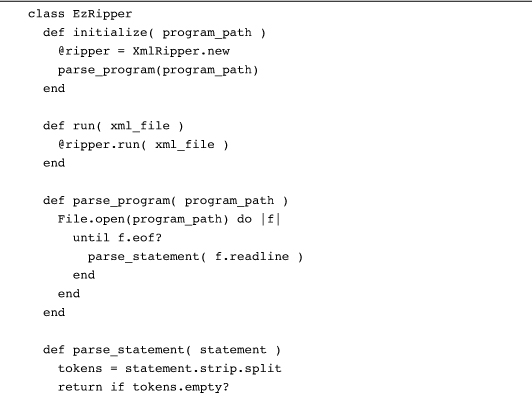
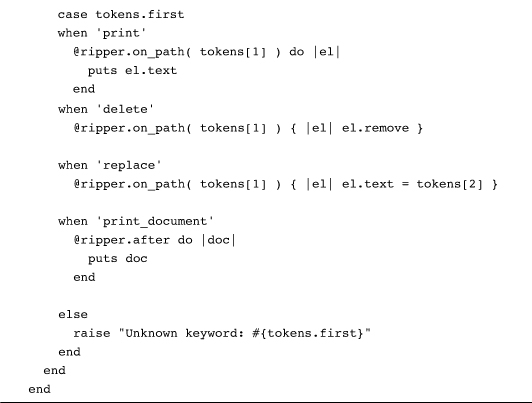
This class will parse the simplified XML processing commands that our users are requesting. For example, if we wanted to change the author’s name and delete the publication date from an XML file, we might create a file called edit.ezr containing:

The last command, print_document, will tell EzRipper to output the modified XML. To run our little program we simply feed it and the name of the XML file into EzRipper:
EzRipper.new( 'edit.ezr').run('fellowship.xml' )
The EzRipper class really just provides a fancy front end for the original XmlRipper class. All of the real XML processing work is still done by XmlRipper. The parser reads in a line at a time—we are assuming that each statement fits on a single line—and breaks up the statement into space-separated tokens using the handy String split method. To keep things simple, we also assume there are no embedded spaces in the arguments in a statement.3 Once it has broken the line up into tokens, the EzRipper parser looks at the first token, which should be something like replace or delete, and works from there.
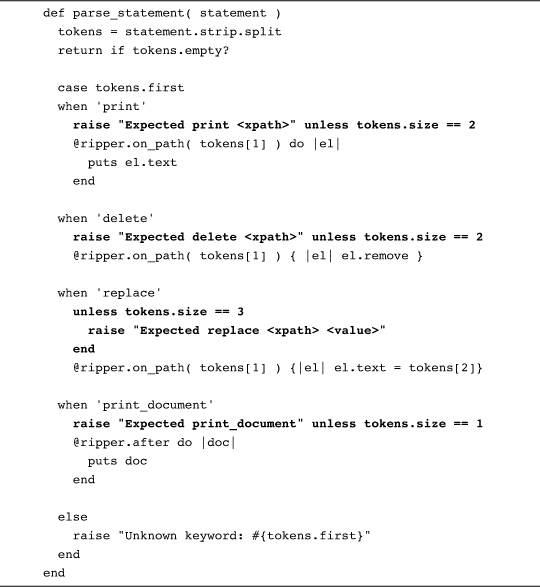
Compared with an internal DSL, you have a lot of fine control over the behavior of an external DSL. Given, for example, that EzRipper is aimed at less-technical users, we might want to provide more extensive error messages:
Within limits, it is also fairly easy to add new features to EzRipper. We might, for example, add an uppercase command that converts the text of an element to all uppercase:

We might also add comments, delimited by #:4

This last version of parse_statement deals with comments by stripping them out with a carefully aimed gsub call.
Regular Expressions for Heavier Parsing
As I say, our current implementation of EzRipper does have one potentially serious limitation: It can’t handle spaces in the command arguments. By ignoring the possibility of embedded white space, we were able to devise a little language that we can parse very easily. But what if we really needed to deal with embedded spaces? We could change the syntax so that all of the command arguments are surrounded by quotes, which would allow for spaces while enabling us to keep the individual arguments straight:5
replace '/document/author' 'Russ Olsen'
There is just no way we’ll be able to use a simple call to split to break up the command. This situation calls for some regular expressions. Here’s a new parse_statement method, one that uses regular expressions to cope with the more complex syntax:
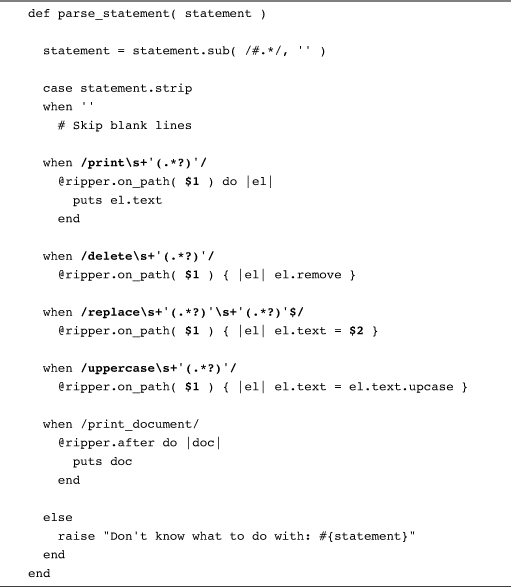
The key to this code is the gaggle of somewhat intimidating-looking regular expressions. Although they may look formidable, these regular expressions are really not that complex. Take the one that deals with the replace statement:
/replace\s+'(.*?)'\s+'(.*?)'$/
This expression starts with the obvious: A replace command needs to start with the word replace. Next we have the real key to the regular expression, a couple of instances of this:
\s+'(.*?)'
This bit of regular expression magic is designed to match one quoted argument, something like '/document/chapter/title' or 'Russ Olsen'. Again, the way to understand it is to disassemble it into its constituent parts. The expression starts with \s+, which will match one or more characters of white space. Next we have a quote, followed by anything at all [that’s the (.*?) part] followed by another quote. We use *? instead of a plain * because we want to match the smallest bit of text surrounded by quotes: The addition of the question mark prevents the expression for the first argument from matching the initial quote all the way to the quote at the end of the whole statement. By putting parentheses around the “anything” part of the regular expressions, we get Ruby to capture exactly what the anythings are and store them in the $1, $2, and $3 variables, where the rest of the code can get at them.
There is no doubt that the regular expression-based parser is more complicated than our original “just pull things apart with split” approach. It’s the price you pay for a more complex syntax.
Treetop for Really Big Jobs
Sometimes the price of regular expressions can get too high. The problem is that regular expressions don’t really scale that well. While they are great for medium-sized jobs like our last version of the EzRipper syntax, it is easy to invent a grammar that will induce regular expression madness in most coders. Think, for example, about the regular expressions that you would need to handle escaped quotes within the arguments. Or multiline statements. Or variables. Or all of the above in various combinations. As your external DSL gets more and more complex, at some point it’s going to overwhelm your ability to write and, more importantly, read, the regular expressions required to handle the grammar. If you do get to that stage, the thing to do is to turn to a real parser-building tool.
One of the more interesting of these tools is Treetop.6 Treetop describes itself as “a language for describing languages.”7 Another way to say this is: Treetop is a DSL for building parsers.
To use Treetop you need to build a treetop file that describes your grammar. Here’s the Treetop file for our improved EzRipper grammar:
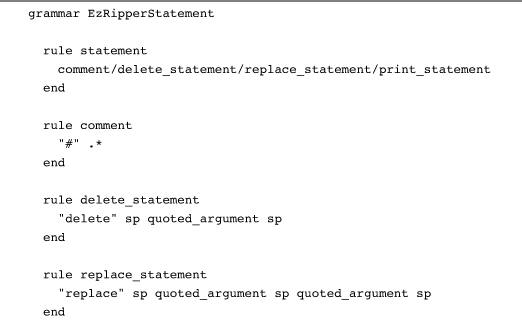
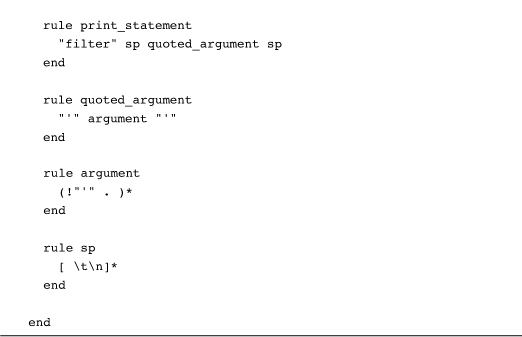
As you can see from this example, Treetop allows you to build a reasonably clear description of your grammar, one that is not completely obscured by the nuts and bolts of parsing. To use Treetop, you store your language description in a file with a name like ez_ripper_statement.tt and then run it through the treetop compiler:
tt ez_ripper_statement.tt
When you run this command, Treetop will create a file called ez_ripper_statement.rb and fill it with a class called EzRipperStatementParser, which, logically enough, will know how to parse our EzRipper statements. From there it’s all just ordinary Ruby:
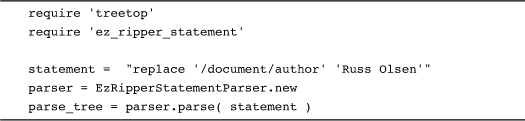
Run this code and you will end up with your statement parsed out into a tree structure that you can programmatically descend and interpret.
Staying Out of Trouble
To no one’s great surprise, the advantages and disadvantages of external DSLs are a mirror image of those of internal DSLs. With an internal DSL, you get all of Ruby, complete with comments, loops, if statements, and variables more or less for free. With an external DSL, you need to work for—or at least parse—every feature. You can see this in the implementation of HAML. HAML is a very terse language for doing HTML templating. HAML lets you write this:
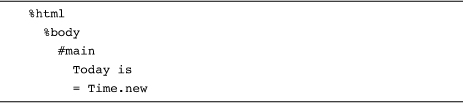
And get this:
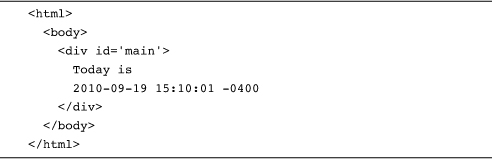
All of this convenient terseness does come at a price. Like our intermediate EzRipper example, HAML relies on a combination of regular expressions and some clever hand-built code for parsing. Here is a bit of the HAML parse_line method, which corresponds to the parse_statement method in EzRipper:
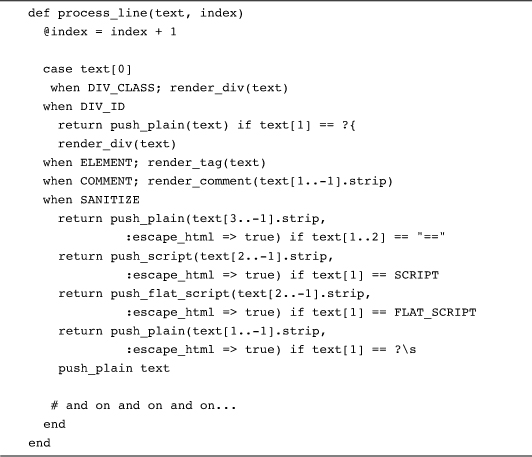
Wow. Clearly, writing the HAML parser took some real effort, which seems worth it when the result is HAML. The key question you need to ask before embarking on an external DSL is: Will my language be worth it?
Another thing we can glean from HAML is that the line between internal and external DSLs is not really all that sharp. Right in the middle of the HAML example above, we specified some plain old Ruby code (in the form of a call to Time.new) for HAML to execute. We can do the same kind of thing with EzRipper, perhaps adding a new command that lets us execute arbitrary Ruby code for each path, something like this:
execute '/document/author' 'puts "the author is #{el.text}"'
Implementing execute involves adding just a couple of lines to the EzRipper parse_statement method. Here’s the regular expression version:

The execute statement gives us a magic portal from our external DSL back into the world of internal Ruby-based code.
In the Wild
For a language known for its internal DSLs, there are a surprising number of Ruby-based external DSLs around. For example, before HAML came along, almost all Rails applications used ERB for templating. With ERB, you write something like this:
And end up with something like this:8
Today is 2009-10-18 00:25:35 -0400
Where the text inside the <%= %> brackets gets evaluated as Ruby code. ERB actually uses a variant of the String split technique that we used in our first version of EzRipper. ERB takes advantage of the fact that the split method itself can take a regular expression as an argument. If you do feed a regular expression into it, split will treat the text that matches the regular expression as delimiters, the cleavage points on which the text gets split. Thus, ERB defines this regular expression:
SplitRegexp = /(<%%)|(%%>)|(<%=)|(<%#)|(<%)|(%>)|(\n)/
Which it then uses to break up its input.
Even more interesting is the testing tool Cucumber. Cucumber presents us with the fascinating spectacle of an external DSL used in combination with an internal DSL. The idea behind Cucumber is that you build acceptance tests in a sort of structured natural language, like this:
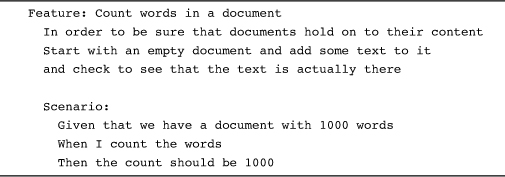
You can take this friendly feature description to a nontechnical customer and talk it over: Is this what we really need to be testing? Is there anything missing? Obviously, the feature description syntax is not Ruby; this is a very external DSL requiring a separate parser.9 Cucumber is particularly useful because you can turn the more or less natural language description into real executable tests. To do this you create “step descriptions,” expressed in an internal DSL:
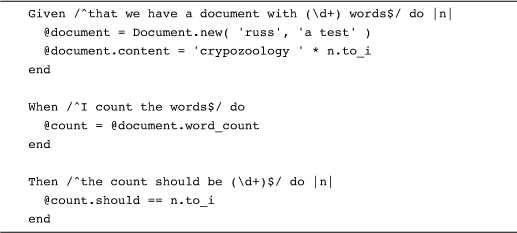
Cucumber weaves the step descriptions into the feature using the regular expressions you supply with the step descriptions. In the end you get a test that reads like a natural language specification but that’s also executable.
Finally, a very handy example of an external DSL with a really sophisticated parser is Treetop itself. Obviously, Treetop comes with a parser that understands the Treetop grammar files. And what, you might ask, is the parser for that grammar file written in? Why, Treetop itself, of course!10 Here is the Treetop rule for Treetop rules:

You have to love this kind of recursion.
Wrapping Up
In this chapter we explored some of the possibilities of Ruby-based external DSLs. We have seen that an external DSL can be anything from a program that uses a few string methods to break up its input to code that uses regular expressions, all the way to using a parser-generating tool like Treetop. Simple or complex, external DSLs free you from the constraints of Ruby syntax. But external DSLs also relieve you of that free Ruby parser. If you need to build a DSL, the choice is up to you: Do you take the ease and relative low cost of an internal DSL or go for the higher cost—and freedom—of an external DSL?