Chapter 2. Choose the Right Control Structure
If indentation, comments, and the form of your variable names are the things that give your program its look, then it’s the control structures—the ifs and elses and whiles—that bring it to life: It’s no accident that the generic name for a program is “logic.” Ruby includes a fairly familiar set of control structures, not much different than those available in more traditional languages. Look at any Ruby program and you will see the ifs, elses, and whiles of your programming youth. But if you look a little closer, you will also come across some odd-looking logical constructs, things with much less familiar names like unless and until.
In this chapter we will look at creating Ruby programs full of idiomatic control structures, at why sometimes you want to say if this then do that and at other times do this unless that. Along the way we will also explore Ruby’s take on what is true and what is false, and learn how you can avoid having your program logic take a wrong turn.
If, Unless, While, and Until
Good news always bears repeating, so let me say it again: Ruby’s most basic control structure, the if statement, contains no surprises. For example, if we wanted to add the idea of unmodifiable read-only documents to our Document class, we might end up with this very boring example of an if statement:
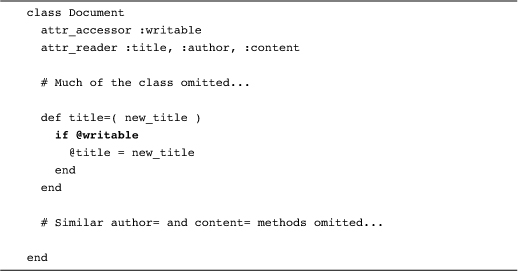
Now the if statement in the title= method above is completely generic: Plus or minus some parentheses around the condition, it could have come out of a program written in any one of a dozen programming languages. Consider, however, what would happen if we turned the logic around: What if, instead of an @writable attribute, we had coded @read_only instead? The natural tendency would be to simply throw in a ! or a not:
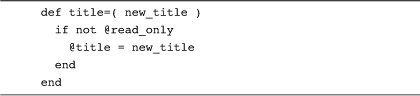
The trouble with this if statement is that it is just slightly more verbose than it needs to be. A more concise—and idiomatic—way to say the same thing is:
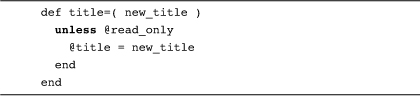
With unless, the body of the statement is executed only if the condition is false. The unless-based version of title= has two advantages: First, it is exactly one token (the not) shorter than the if not rendition. Second—and much more important—is that once you get used to it, the unless-based decision takes less mental energy to read and understand. The difference between if not and unless may seem trivial, but it is the difference between saying that “It is not true that Ruby is like Java” and saying “Ruby is different than Java”: It’s just a little clearer. Of course, the operative phrase is “once you get used to it.” If you aren’t familiar with unless, using it can feel a bit like wearing your shoes on the wrong feet. But do be persistent: For most programmers, the unless statement very rapidly loses its weirdness and becomes the way you do a backward if statement. And yes, getting rid of that one token is worth it.
In exactly the same way that if has unless, while has a negative doppelganger in until: An until loop keeps going until its conditional part becomes true. In the same way that Ruby coders avoid negated conditions in ifs, we also shy away from negated conditions in while loops. Thus, it’s not:

It’s:

Writing clear code is a battle of inches, and you need to contest every extraneous character, every bit of reversed logic.
Use the Modifier Forms Where Appropriate
Actually, our code is still not as clutter free as it might be. Take a look at the last version of our “can we modify this document?” logic:

Since the body of this unless is only one statement long, we can—and probably should—collapse the whole thing into a single line with the unless at the end:
@title = new_title unless @read_only
You can also pull the same trick with an if:
@title = new_title if @writable
You can also do similar things with both while:
document.print_next_page while document.pages_available?
And until:
document.print_next_page until document.printed?
These last examples show off the two advantages of the modifier form: Not only do they enable you to fit a lot of programming logic into a small package, but they also read very smoothly: Do this if that.
Use each, Not for
In contrast to the somewhat strange-looking unless and until, Ruby sports a very familiar for loop. You can, for example, use for to run through all the elements of an array:

The unfortunate thing about the for loop is that we tend not to use it! In place of the for loop, idiomatic Ruby says that you should use the each method:

Since the two versions of the “print my fonts” code are essentially equivalent,1 why prefer one over the other? Mainly it is a question of eliminating one level of indirection. Ruby actually defines the for loop in terms of the each method: When you say for font in fonts, Ruby will actually conjure up a call to fonts.each. Given that the for statement is really a call to each in disguise, why not just pull the mask off and write what you mean?
A Case of Programming Logic
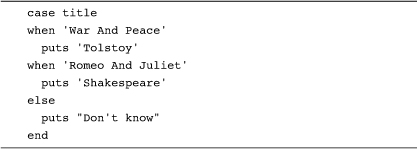
Along with the garden variety if, Ruby also sports a case statement, a multi-way decision statement similar to the switch statement that you find in many programming languages. Ruby’s case statement has a surprising number of variants. Most commonly it is used to select one of a number of bits of code to execute:
Alternatively, you can use a case statement for the value it computes:
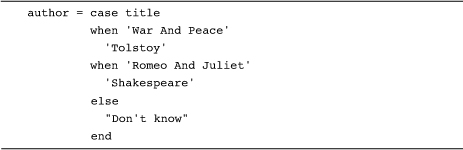
Or the equivalent, and somewhat more compact:

These last two examples rely on the fact that virtually everything in Ruby returns a value. Logically enough, a case statement returns the values of the selected when or else clause—or nil if no when clause matches and there is no else. Thus the following just might evaluate to nil:

What all this means is that you can use the case statement for exactly what it is: a giant, value-returning expression.
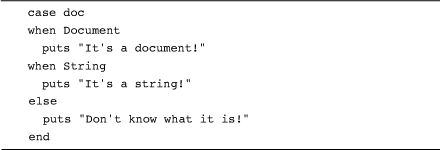
A key thing to keep in mind about all of these case statements is that they use the ===2 operator to do the comparisons. We will leave the details of === to Chapter 12, but the practical effect of the case statement’s use of === is that it can make your life easier. For example, since classes use === to identify instances of themselves, you can use a case statement to switch on the class of an object:
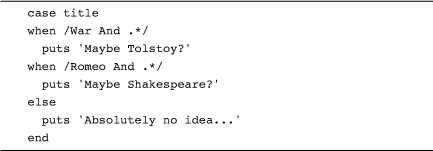
In the same spirit, you can use a case statement to detect a regular expression match:
Finally, there is a sort of degenerate version of the case statement that lets you supply your own conditions:
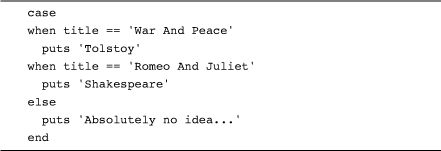
This last example is really not much more than an if/elsif statement dressed up like a case statement, and, in fact, most Ruby programmers seem to prefer the if.
Staying Out of Trouble
One of the best ways to lose control of your programming logic is to forget the fundamentals of Ruby’s boolean logic. Remember, when you are making decisions in Ruby, only false and nil are treated as false. Ruby treats everything else—and I do mean everything—as true. Former C programmers should keep in mind that the number 0, being neither false nor nil, is true in Ruby. So, this:
puts 'Sorry Dennis Ritchie, but 0 is true!' if 0
Will print an apology to the inventor of C. In the same spirit, the string "false" is also not the same as the boolean value false and thus, this:
puts 'Sorry but "false" is not false' if 'false'
Will also print something.
Ruby’s treatment of booleans means that there are two things that are false and an infinite number of things that are true. Thus you should avoid testing for truth by testing for specific values. In Ruby, this:

Is not just overly wordy, it is an invitation to disaster. After all, the value of flag may have been the result of a call to defined?. The idea behind defined? is that it will tell you whether some Ruby expression is defined or not:

The rub is that although defined? does indeed return a boolean, it never, ever returns true or false. Instead, defined? returns either a string that describes the thing passed in—in the example above, defined?( doc ) will return "local-variable". On the other hand, if the thing passed to defined? is not defined, then defined? will return nil. So defined?—like many Ruby methods—works in a boolean context, as long as you don’t explicitly ask if it returns true or false.
It’s also possible to go wrong by taking nil for granted. Imagine you have some method, get_next_object that gives you one object after another, returning nil when there are no more objects:

This code is relying on the fact that nil is false and almost everything else is true to propel the loop round and round. The trouble with this example can be summed up in a question: What happens if the next object happens to be the object false? The answer is that the loop will terminate early. Much better is:

Or:

If you are looking for nil and there is any possibility of false turning up, then look for nil explicitly.
In the Wild
As we have seen, you can take advantage of the expression-oriented nature of Ruby to pull values back from a case statement. Although relatively rare, you will sometimes come across code that captures the values of a while or if statement. Here, for instance, is a fragment of code from the RubyGems system, which uses an if statement as a big expression to check on the validity of an X509 certificate:
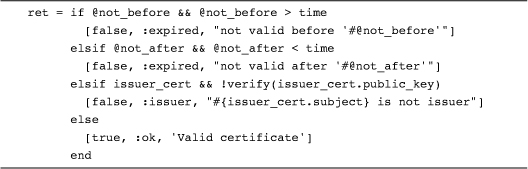
Another expression-based way to make a decision, one that you will see quite a bit, is the ternary operator or ?: operator. Here’s an example, again from RubyGems:
file = all ? 'specs' : 'latest_specs'
The ?: operator acts like a very compact if statement with the condition part coming right before the question mark. If the condition (in the example, the value of all) is true, then the value of the whole expression is the thing between the question mark and the colon—'specs' in the example. If the condition is false, then the expression evaluates to the last part, the bit after the colon, 'latest_specs' in the example. The ?: operator has been around since at least the C programming language, but many programming communities tend to ignore it. Ruby coders, always looking for a succinct way getting the point across, do use ?: quite a bit.
Another common expression-based idiom helps with a familiar initialization problem: Sometimes you are just not sure if you need to initialize a variable. For example, you might want to ensure that an instance variable is not nil. If the variable has a value you want to leave it alone, but if it is nil you want to set it to some default:
@first_name = '' unless @first_name
Although this code does work, an experienced Ruby programmer is much more likely to write it this way:
@first_name ||= ''
This construct may look a little odd, but there is (literally) logic behind it. Recall that:
count += 1
Is equivalent to:
count = count + 1
Do the same expansion on the first ||= expression and you get:
@first_name = @first_name || ''
Translated into English, the expansion says “Set the new value of @first_name to the old value of @first_name, unless that is nil, in which case set it to the empty string.” So why do Ruby programmers tend to favor ||= over the alternatives? It’s the same old answer: The ||= is a little bit less code, and (more importantly) you don’t have to repeat the name of the variable you are initializing.
Finally, be aware that this use of ||= suffers from exactly the kind of nil/false confusion that I warned you about earlier. If @first_name happened to start out as false, the code would cheerfully go ahead and reset it to the empty string. Moral of the story: Don’t try to use ||= to initialize things to booleans.
Wrapping Up
In this chapter we looked over the control structures available to the Ruby programmer. We’ve seen that when it comes to control structures, Ruby has our old friends if and while along with less familiar choices like unless and until. Spend the time and you will rapidly discover that having an extensive menu of control structures lets you say what needs to be said with as little fuss—and clutter—as possible.
So much for the control structures. Programs do not, however, live by code alone: There is always that pesky data clamoring to be read, sorted, massaged, displayed, and saved. So in the next chapter we’ll see how you can make effective use of the twin Swiss Army knives of Ruby data structures, the array and the hash.