Chapter 12. First-class configuration abstractions
This chapter covers
- The problems configuration and secrets solve and the forms those solutions take
- Modeling and solving configuration problems for Docker services
- The challenge of delivering secrets to applications
- Modeling and delivering secrets to Docker services
- Approaches for using configurations and secrets in Docker services
Applications often run in multiple environments and must adapt to different conditions in those environments. You may run an application locally, in a test environment integrated with collaborating applications and data sources, and finally in production. Perhaps you deploy an application instance for each customer in order to isolate or specialize each customer’s experience from that of others. The adaptations and specializations for each deployment are usually expressed via configuration. Configuration is data interpreted by an application to adapt its behavior to support a use case.
Common examples of configuration data include the following:
- Features to enable or disable
- Locations of services the application depends on
- Limits for internal application resources and activities such as database connection pool sizes and connection time-outs
This chapter will show you how to use Docker’s configuration and secret resources to adapt Docker service deployments according to various deployment needs. Docker’s first-class resources for modeling configuration and secrets will be used to deploy a service with different behavior and features, depending on which environment it is deployed to. You will see how the naive approach for naming configuration resources is troublesome and learn about a pattern for solving that problem. Finally, you will learn how to safely manage and use secrets with Docker services. With this knowledge, you will deploy the example web application with an HTTPS listener that uses a managed TLS certificate.
12.1. Configuration distribution and management
Most application authors do not want to change the program’s source code and rebuild the application each time they need to vary the behavior of an application. Instead, they program the application to read configuration data on startup and adjust its behavior accordingly at runtime.
In the beginning, it may be feasible to express this variation via command-line flags or environment variables. As the program’s configuration needs grow, many implementations move on to a file-based solution. These configuration files help you express both a greater number of configurations and more complex structures. The application may read its configuration from a file formatted in the ini, properties, JSON, YAML, TOML, or other format. Applications may also read configurations from a configuration server available somewhere on the network. Many applications use multiple strategies for reading configuration. For example, an application may read a file first and then merge the values of certain environment variables into a combined configuration.
Configuring applications is a long-standing problem that has many solutions. Docker directly supports several of these application configuration patterns. Before we discuss that, we will explore how the configuration change life cycle fits within the application’s change life cycle. Configurations control a wide set of application behaviors and so may change for many reasons, as illustrated in figure 12.1.
Figure 12.1. Timeline of application changes
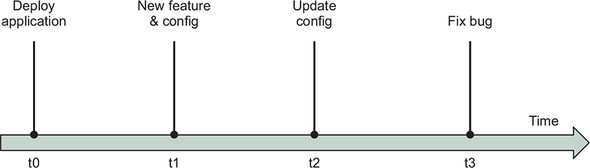
Let’s examine a few events that drive configuration changes. Configurations may change in conjunction with an application enhancement. For example, when developers add a feature, they may control access to that feature with a feature flag. An application deployment may need to update in response to a change outside the application’s scope. For example, the hostname configured for a service dependency may need to update from cluster-blue to cluster-green. And of course, applications may change code without changing configuration. These changes may occur for reasons that are internal or external to an application. The application’s delivery process must merge and deploy these changes safely regardless of the reason for the change.
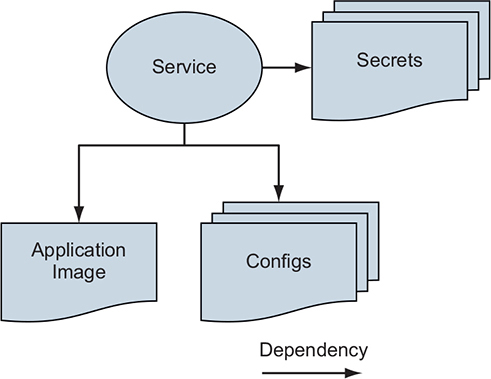
A Docker service depends on configuration resources much in the same way it depends on the Docker image containing the application, as illustrated in figure 12.2. If a configuration or secret is missing, the application will probably not start or behave properly. Also, once an application expresses a dependency on a configuration resource, the existence of that dependency must be stable. Applications will likely break or behave in unexpected ways if the configuration they depend on disappears when the application restarts. The application might also break if the values inside the configuration change unexpectedly. For example, renaming or removing entries inside a configuration file will break an application that does not know how to read that format. So the configuration lifecycle must adopt a scheme that preserves backward compatibility for existing deployments.
Figure 12.2. Applications depend on configurations.
If you separate change for software and configuration into separate pipelines, tension will exist between those pipelines. Application delivery pipelines are usually modeled in an application-centric way, with an assumption that all changes will run through the application’s source repository. Because configurations can change for reasons that are external to the application, and applications are generally not built to handle changes that break backward compatibility in the configuration model, we need to model, integrate, and sequence configuration changes to avoid breaking applications. In the next section, we will separate configuration from an application to solve deployment variation problems. Then we will join the correct configuration with the service at deployment time.
12.2. Separating application and configuration
Let’s work through a problem of needing to vary configuration of a Docker service deployed to multiple environments. Our example application is a greetings service that says “Hello World!” in different languages. The developers of this service want the service to return a greeting when a user requests one. When a native speaker verifies that a greeting translation is accurate, it is added to the list of greetings in the config.common.yml file:
greetings:
  - 'Hello World!'
  - 'Hola Mundo!'
  - 'Hallo Welt!'
The application image build uses the Dockerfile COPY instruction to populate the greetings application image with this common configuration resource. This is appropriate because that file has no deployment-time variation or sensitive data.
The service also supports loading environment-specific greetings in addition to the standard ones. This allows the development team to vary and test the greetings shown in each of three environments: dev, stage, and prod. The environment-specific greetings will be configured in a file named after the environment; for example, config.dev.yml:
# config.dev.yml
greetings:
  - 'Orbis Terrarum salve!'
  - 'Bonjour le monde!'
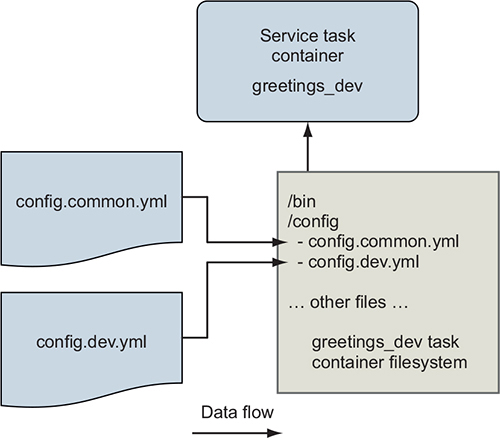
Both the common and environment-specific configuration files must be available as files on the greetings service container’s filesystem, as shown in figure 12.3.
Figure 12.3. The greetings service supports common and environment-specific configuration via files.
So the immediate problem we need to solve is how to get the environment-specific configuration file into the container by using only the deployment descriptor. Follow along with this example by cloning and reading the files in the https://github.com/dockerinaction/ch12_greetings.git source repository.
The greetings application deployment is defined using the Docker Compose application format and deployed to Docker Swarm as a stack. These concepts were introduced in chapter 11. In this application, there are three Compose files. The deployment configuration that is common across all environments is contained in docker-compose.yml. There are also environment-specific Compose files for both of the stage and prod environments (for example, docker-compose.prod.yml). The environment-specific Compose files define additional configuration and secret resources that the service uses in those deployments.
Here is the shared deployment descriptor, docker-compose.yml:
version: '3.7'

configs:
  env_specific_config:
    file: ./api/config/config.${DEPLOY_ENV:-prod}.yml           1

services:

  api:
      image: ${IMAGE_REPOSITORY:-dockerinaction/ch12_greetings}:api
      ports:
        - '8080:8080'
        - '8443:8443'
      user: '1000'
      configs:
        - source: env_specific_config
          target: /config/config.${DEPLOY_ENV:-prod}.yml        2
          uid: '1000'
          gid: '1000'
          mode: 0400 #default is 0444 - readonly for all users
      secrets: []
      environment:
        DEPLOY_ENV: ${DEPLOY_ENV:-prod}
- 1 Defines a config resource using the contents of the env-specific configuration file
- 2 Maps the env_specific_config resource to a file in the container
This Compose file loads the greetings application’s environment-specific configuration files into the api service’s containers. This supplements the common configuration file built into the application image. The DEPLOY_ENV environment variable parameterizes this deployment definition. This environment variable is used in two ways.
First, the deployment descriptor will produce different deployment definitions when Docker interpolates DEPLOY_ENV. For example, when DEPLOY_ENV is set to dev, Docker will reference and load config.dev.yml.
Second, the deployment descriptor’s value of the DEPLOY_ENV variable is passed to the greetings service via an environment variable definition. This environment variable signals to the service which environment it is running in, enabling it to do things such as load configuration files named after the environment. Now let’s examine Docker config resources and how the environment-specific configuration files are managed.
12.2.1. Working with the config resource
A Docker config resource is a Swarm cluster object that deployment authors can use to store runtime data needed by applications. Each config resource has a cluster-unique name and a value of up to 500 KB. When a Docker service uses a config resource, Swarm mounts a file inside the service’s container filesystems populated with the config resource’s contents.
The top-level configs key defines the Docker config resources that are specific to this application deployment. This configs key defines a map with one config resource, env_specific_config:
configs:
  env_specific_config:
    file: ./api/config/config.${DEPLOY_ENV:-prod}.yml
When this stack is deployed, Docker will interpolate the filename with the value of the DEPLOY_ENV variable, read that file, and store it in a config resource named env_ specific_config inside the Swarm cluster.
Defining a config in a deployment does not automatically give services access to it. To give a service access to a config, the deployment definition must map it under the service’s own configs key. The config mapping may customize the location, ownership, and permissions of the resulting file on the service container’s filesystem:
# ...snip...
services:
  api:
      # ...snip...
      user: '1000'
      configs:
        - source: env_specific_config
          target: /config/config.${DEPLOY_ENV:-prod}.yml    1
          uid: '1000'                                       2

          gid: '1000'
          mode: 0400                                        3
- 1 Overrides default target file path is /env_specific_config
- 2 Overrides default uid and gid of 0, to match service user with uid 1000
- 3 Overrides default file mode of 0444, read-only for all users
In this example, the env_specific_config resource is mapped into the greetings service container with several adjustments. By default, config resources are mounted into the container filesystem at /<config_name>; for example, /env_specific_config. This example maps env_specific_config to the target location /config/config.$ {DEPLOY_ENV:-prod}.yml. Thus, for a deployment in the dev environment, the environment-specific config file will appear at /config/config.dev.yml. The ownership of this configuration file is set to userid=1000 and groupid=1000. By default, files for config resources are owned by the user ID and group ID 0. The file permissions are also narrowed to a mode of 0400. This means the file is readable by only the file owner, whereas the default is readable by the owner, group, and others (0444).
These changes are not strictly necessary for this application because it is under our control. The application could be implemented to work with Docker’s defaults instead. However, other applications are not as flexible and may have startup scripts that work in a specific way that you cannot change. In particular, you may need to control the configuration filename and ownership in order to accommodate a program that wants to run as a particular user and read configuration files from predetermined locations. Docker’s service config resource mapping allows you to accommodate these demands. You can even map a single config resource into multiple service definitions differently, if needed.
With the config resources set along with the service definition, let’s deploy the application.
12.2.2. Deploying the application
Deploy the greetings application with the dev environment configuration by running the following command:
DEPLOY_ENV=dev docker stack deploy \
    --compose-file docker-compose.yml greetings_dev
After the stack deploys, you can point a web browser to the service at http://localhost: 8080/, and should see a welcome message like this:
Welcome to the Greetings API Server!
Container with id 642abc384de5 responded at 2019-04-16 00:24:37.0958326 +0000 UTC
DEPLOY_ENV: dev                                                                1
- 1 The value “dev” is read from environment variable.
When you run docker stack deploy, Docker reads the application’s environment-specific configuration file and stores it as a config resource inside the Swarm cluster. Then when the api service starts, Swarm creates a copy of those files on a temporary, read-only filesystem. Even if you set the file mode as writable (for example, rw-rw-rw-), it will be ignored. Docker mounts these files at the target location specified in the config. The config file’s target location can be pretty much anywhere, even inside a directory that contains regular files from the application image. For example, the greetings service’s common config files (COPY’d into app image) and environment-specific config file (a Docker config resource) are both available in the /config directory. The application container can read these files when it starts up, and those files are available for the life of the container.
On startup, the greetings application uses the DEPLOY_ENV environment variable to calculate the name of the environment-specific config file; for example, /config/ config.dev.yml. The application then reads both of its config files and merges the list of greetings. You can see how the greetings service does this by reading the api/main.go file in the source repository. Now, navigate to the http://localhost:8080/greeting endpoint and make several requests. You should see a mix of greetings from the common and environment-specific config. For example:
Hello World!
Orbis Terrarum salve!
Hello World!
Hallo Welt!
Hola Mundo!
You may recall the Configuration Image per Deployment Stage pattern described in chapter 10. In that pattern, environment-specific configurations are built into an image that runs as a container, and that filesystem is mounted into the “real” service container's filesystem at runtime. The Docker config resource automates most of this pattern. Using config resources results in a file being mounted into the service task container and does so without needing to create and track additional images. The Docker config resource also allows you to easily mount a single config file into an arbitrary location on the filesystem. With the container image pattern, it’s best to mount an entire directory in order to avoid confusion about what file came from which image.
In both approaches, you’ll want to use uniquely identified config or image names. However, it is convenient that image names can use variable substitutions in Docker Compose application deployment descriptors, avoiding the resource-naming problems that will be discussed in the next section.
So far, we have managed config resources through the convenience of a Docker Compose deployment definition. In the next section, we will step down an abstraction level and use the docker command-line tool to directly inspect and manage config resources.
12.2.3. Managing config resources directly
The docker config command provides another way to manage config resources. The config command has several subcommands for creating, inspecting, listing, and removing config resources: create, inspect, ls, and rm, respectively. You can use these commands to directly manage a Docker Swarm cluster’s config resources. Let’s do that now.
Inspect the greetings service’s env_specific_config resource:
docker config inspect greetings_dev_env_specific_config 1
- 1 Docker automatically prefixes the config resource with the greetings_dev stack name.
This should produce output similar to the following:
[
    {
        "ID": "bconc1huvlzoix3z5xj0j16u1",
        "Version": {
            "Index": 2066
        },
        "CreatedAt": "2019-04-12T23:39:30.6328889Z",
        "UpdatedAt": "2019-04-12T23:39:30.6328889Z",
        "Spec": {
            "Name": "greetings_dev_env_specific_config",
            "Labels": {
                "com.docker.stack.namespace": "greetings"
            },
            "Data":
     "Z3JlZXRpbmdzOgogIC0gJ09yYmlzIFRlcnJhcnVtIHNhbHZlIScKICAtICdCb25qb3VyIGx
     lIG1vbmRlIScK"
        }
    }
]
The inspect command reports metadata associated with the config resource and the config’s value. The config’s value is returned in the Data field as a Base64-encoded string. This data is not encrypted, so no confidentiality is provided here. The Base64 encoding only facilitates transportation and storage within the Docker Swarm cluster. When a service references a config resource, Swarm will retrieve this data from the cluster’s central store and place it in a file on the service task’s filesystem.
Docker config resources are immutable and cannot be updated after they are created. The docker config command supports only create and rm operations to manage the cluster’s config resources. If you try to create a config resource multiple times by using the same name, Docker will return an error saying the resource already exists:
$ docker config create greetings_dev_env_specific_config \
api/config/config.dev.yml
Error response from daemon: rpc error: code = AlreadyExists  desc = config greetings_dev_env_specific_config already exists
Similarly, if you change the source configuration file and try to redeploy the stack by using the same config resource name, Docker will also respond with an error:
$ DEPLOY_ENV=dev docker stack deploy \
    --compose-file docker-compose.yml greetings_dev
failed to update config greetings_dev_env_specific_config:
    Error response from daemon: rpc error: code = InvalidArgument
    desc = only updates to Labels are allowed
You can visualize the relationships between a Docker service and its dependencies as a directed graph, like the simple one shown in figure 12.4:
Figure 12.4. Docker services depend on config resources.
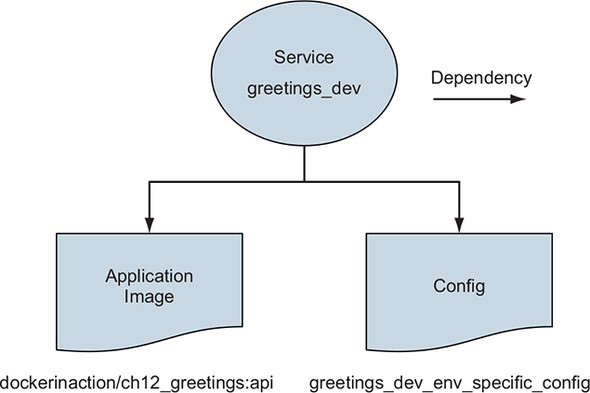
Docker is trying to maintain a stable set of dependencies between Docker services and the config resources they depend on. If the greetings_dev_env_specific_config resource were to change or be removed, new tasks for the greetings_dev service may not start. Let’s see how Docker tracks these relationships.
Config resources are each identified by a unique ConfigID. In this example, the greetings_dev_env_specific_config is identified by bconc1huvlzoix3z5xj0j16u1, which is visible in the docker config inspect command’s greetings_dev_env_ specific_config output. This same config resource is referenced by its ConfigID in the greetings service definition.
Let’s verify that now by using the docker service inspect command. This inspection command prints only the greetings service references to config resources:
docker service inspect \
    --format '{{ json .Spec.TaskTemplate.ContainerSpec.Configs }}' \
    greetings_dev_api
For this service instantiation, the command produces the following:
[
  {
    "File": {

      "Name": "/config/config.dev.yml",
      "UID": "1000",
      "GID": "1000",
      "Mode": 256
    },
    "ConfigID": "bconc1huvlzoix3z5xj0j16u1",
    "ConfigName": "greetings_dev_env_specific_config"
  }
]
There are a few important things to call out. First, the ConfigID references the greeetings_dev_env_specific_config config resource’s unique config ID, bconc1huvlzoix3z5xj0j16u1. Second, the service-specific target file configurations have been included in the service’s definition. Also note that you cannot create a config if the name already exists or remove a config while it is in use. Recall that the docker config command does not offer an update subcommand. This may leave you wondering how you update configurations. Figure 12.5 illustrates a solution to the problem.
Figure 12.5. Copy on deploy
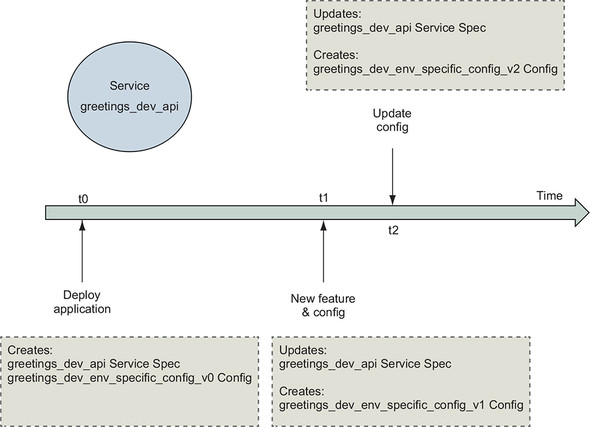
The answer is that you don’t update Docker config resources. Instead, when a configuration file changes, the deployment process should create a new resource with a different name and then reference that name in service deployments. The common convention is to append a version number to the configuration resource’s name. The greetings application’s deployment definition could define an env_specific_config_v1 resource. When the configuration changes, that configuration could be stored in a new config resource named env_specific_config_v2. Services can adopt this new config by updating configuration references to this new config resource name.
This implementation of immutable config resources creates challenges for automated deployment pipelines. The issue is discussed in detail on GitHub issue moby/moby 35048. The main challenge is that the name of a config resource cannot be parameterized directly in the YAML Docker Compose deployment definition format. Automated deployment processes can work around this by using a custom script that substitutes a unique version into the Compose file prior to running the deployment.
For example, say the deployment descriptor defines a config env_specific_config _vNNN. An automated build process could search for the _vNNN character sequence and replace it with a unique deployment identifier. The identifier could be the deployment job’s ID or the application’s version from a version-control system. A deploy job with ID 3 could rewrite all instances of env_specific_config_vNNN to env_specific_config_v3.
Try this config resource versioning scheme. Start by adding some greetings to the config.dev.yml file. Then rename the env_specific_config resource in docker-compose.yml to env_specific_config_v2. Be sure to update the key names in both the top-level config map as well as the api service’s list of configs. Now update the application by deploying the stack again. Docker should print a message saying that it is creating env_specific_config_v2 and updating the service. Now when you make requests to the greeting endpoint, you should see the greetings you added mixed into the responses.
This approach may be acceptable to some but has a few drawbacks. First, deploying resources from files that don’t match version control may be a nonstarter for some people. This issue can be mitigated by archiving a copy of the files used for deployment. A second issue is that this approach will create a set of config resources for each deployment, and the old resources will need to be cleaned up by another process. That process could periodically inspect each config resource to determine whether it is in use and remove it if it is not.
We are done with the dev deployment of the greetings application. Clean up those resources and avoid conflicts with later examples by removing the stack:
docker stack rm greetings_dev
That completes the introduction of Docker config and its integration into delivery pipelines. Next, we’ll examine Docker’s support for a special kind of configuration: secrets.
12.3. Secrets—A special kind of configuration
Secrets look a lot like configuration with one important difference. The value of a secret is important and often highly valuable because it authenticates an identity or protects data. A secret may take the form of a password, API key, or private encryption key. If these secrets leak, someone may be able to perform actions or access data they are not authorized for.
A further complication exists. Distributing secrets in artifacts such as Docker images or configuration files makes controlling access to those secrets a wide and difficult problem. Every point in the distribution chain needs to have robust and effective access controls to prevent leakage.
Most organizations give up on trying to deliver secrets without exposing them through normal application delivery channels. This is because delivery pipelines often have many points of access, and those points may not have been designed or configured to ensure confidentiality of data. Organizations avoid those problems by storing secrets in a secure vault and injecting them right at the final moment of application delivery using specialized tooling. These tools enable applications to access their secrets only in the runtime environment.
Figure 12.6 illustrates the flow of application configuration and secret data through application artifacts.
Figure 12.6. The first secret problem
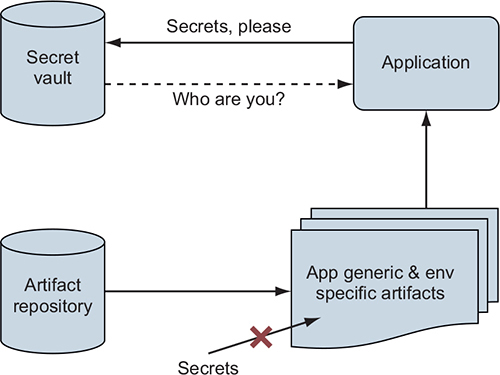
If an application is started without secret information such as a password credential to authenticate to the secret vault, how can the vault authorize access to the application’s secrets? It can’t. This is the First Secret Problem. The application needs help bootstrapping the chain of trust that will allow it to retrieve its secrets. Fortunately, Docker’s design for clustering, services, and secret management solves this problem, as illustrated in figure 12.7.
Figure 12.7. The Docker swarm cluster’s chain of trust
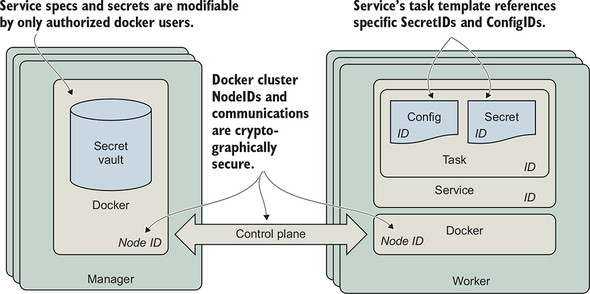
The core of the First Secret Problem is one of identity. In order for a secret vault to authorize access to a given secret, it must first authenticate the identity of the requestor. Fortunately, Docker Swarm includes a secure secret vault and solves the trust bootstrapping problem for you. The Swarm secret vault is tightly integrated with the cluster’s identity and service management functions that are using secure communication channels. The Docker service ID serves as the application’s identity. Docker Swarm uses the service ID to determine which secrets the service’s tasks should have access to. When you manage application secrets with Swarm’s vault, you can be confident that only a person or process with administrative control of the Swarm cluster can provision access to a secret.
Docker’s solution for deploying and operating services is built on a strong and cryptographically sound foundation. Each Docker service has an identity, and so does each task container running in support of that service. All of these tasks run on top of Swarm nodes that also have unique identities. The Docker secret management functionality is built on top of this foundation of identity. Every task has an identity that is associated with a service. The service definition references the secrets that the service and task needs. Since service definitions can be modified by only an authorized user of Docker on the manager node, Swarm knows which secrets a service is authorized to use. Swarm can then deliver those secrets to nodes that will run the service’s tasks.
Note
The Docker swarm clustering technology implements an advanced, secure design to maintain a secure, highly available, and optimally performing control plane. You can learn more about this design and how Docker implements it at https://www.docker.com/blog/least-privilege-container-orchestration/.
Docker services solve the First Secret Problem by using Swarm’s built-in identity management features to establish trust rather than relying on a secret passed via another channel to authenticate the application’s access to its secrets.
12.3.1. Using Docker secrets
Using Docker secret resources is similar to using Docker config resources, with a few adjustments.
Again, Docker provides secrets to applications as files mounted to a container-specific, in-memory, read-only tmpfs filesystem. By default, secrets will be placed into the container’s filesystem in the /run/secrets directory. This method of delivering secrets to applications avoids several leakage problems inherent with providing secrets to applications as environment variables.
The most important and common problems with using environment variables as secret transfer mechanisms are as follows:
- You can’t assign access-control mechanisms to an environment variable.
- This means any process executed by the application will likely have access to those env vars. To illustrate this, think about what it might mean for an application that does image resizing via ImageMagick to execute resizing operations with untrusted input in the environment containing the parent application’s secrets. If the environment contains API keys in well-known locations, as is common with cloud providers, those secrets could be stolen easily. Some languages and libraries will help you prepare a safe process execution environment, but your mileage will vary.
- Many applications will print all of their environment variables to standard out when issued a debugging command or when they crash. This means you may expose secrets in your logs on a regular basis.
Now let’s examine how to tell an application where a secret or configuration file has been placed into a container; see figure 12.8.
Figure 12.8. Provide location of secret file to read as environment variable
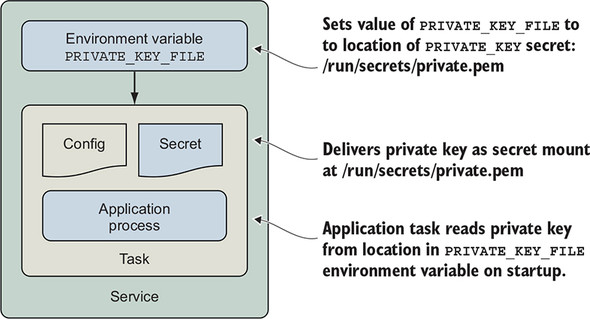
When applications read secrets from files, we often need to specify the location of that file at startup. A common pattern for solving this problem is to pass the location of the file containing a secret, such as a password to the application, as an environment variable. The location of the secret in the container is not sensitive information, and only processes running inside the container will have access to that file, file permissions permitting. The application can read the file specified by the environment variable to load the secret. This pattern is also useful for communicating the location of configuration files.
Let’s work through an example; we’ll provide the greetings service with a TLS certificate and private key so that it can start a secure HTTPS listener. We will store the certificate’s private key as a Docker secret and the public key as a config. Then we will provide those resources to the greeting service’s production service configuration. Finally, we will specify the location of the files to the greetings service via an environment variable so that it knows where to load those files from.
Now we will deploy a new instance of the greetings service with the stack configured for production. The deployment command is similar to the one you ran previously. However, the production deployment includes an additional --compose-file option to incorporate the deployment configuration in docker-compose.prod.yml. The second change is to deploy the stack by using the name greetings_prod instead of greetings_dev.
Run this docker stack deploy command now:
DEPLOY_ENV=prod docker stack deploy --compose-file docker-compose.yml \
  --compose-file docker-compose.prod.yml \
  greetings_prod
You should see some output:
Creating network greetings_prod_default
Creating config greetings_prod_env_specific_config
service api: secret not found: ch12_greetings-svc-prod-TLS_PRIVATE_KEY_V1
The deployment fails because the ch12_greetings-svc-prod-TLS_PRIVATE_KEY_V1 secret resource is not found. Let’s examine docker-compose.prod.yml and determine why this is happening. Here are the contents of that file:
version: '3.7'
configs:
  ch12_greetings_svc-prod-TLS_CERT_V1:
    external: true

secrets:
  ch12_greetings-svc-prod-TLS_PRIVATE_KEY_V1:
    external: true

services:

  api:
      environment:

        CERT_PRIVATE_KEY_FILE: '/run/secrets/cert_private_key.pem'
        CERT_FILE: '/config/svc.crt'
      configs:
        - source: ch12_greetings_svc-prod-TLS_CERT_V1
          target: /config/svc.crt
          uid: '1000'
          gid: '1000'
          mode: 0400
      secrets:
        - source: ch12_greetings-svc-prod-TLS_PRIVATE_KEY_V1
          target: cert_private_key.pem
          uid: '1000'
          gid: '1000'
          mode: 0400
There is a top-level secrets key that defines a secret named ch12_greetings-svc-prod-TLS_PRIVATE_KEY_V1, the same as what was reported in the error. The secret definition has a key we have not seen before, external: true. This means that the value of the secret is not defined by this deployment definition, which is prone to leakage. Instead, the ch12_greetings-svc-prod-TLS_PRIVATE_KEY_V1 secret must be created by a Swarm cluster administrator using the docker CLI. Once the secret is defined in the cluster, this application deployment can reference it.
Let’s define the secret now by running the following command:
$ cat api/config/insecure.key | \
    docker secret create ch12_greetings-svc-prod-TLS_PRIVATE_KEY_V1 -
vnyy0gr1a09be0vcfvvqogeoj
The docker secret create command requires two arguments: the name of the secret and the value of that secret. The value may be specified either by providing the location of a file, or by using the – (hyphen) character to indicate that the value will be provided via standard input. This shell command demonstrates the latter form by printing the contents of the example TLS certificate’s private key, insecure.key, into the docker secret create command. The command completes successfully and prints the ID of the secret: vnyy0gr1a09be0vcfvvqogeoj.
Warning
Do not use this certificate and private key for anything but working through these examples. The private key has not been kept confidential and thus cannot protect your data effectively.
Use the docker secret inspect command to view details about the secret resource that Docker created:
$ docker secret inspect ch12_greetings-svc-prod-TLS_PRIVATE_KEY_V1
[
    {
        "ID": "vnyy0gr1a09be0vcfvvqogeoj",
        "Version": {
            "Index": 2172
        },

        "CreatedAt": "2019-04-17T22:04:19.3078685Z",
        "UpdatedAt": "2019-04-17T22:04:19.3078685Z",
        "Spec": {
            "Name": "ch12_greetings-svc-prod-TLS_PRIVATE_KEY_V1",
            "Labels": {}
        }
    }
]
Notice that there is no Data field as there was with a config resource. The secret’s value is not available via the Docker tools or Docker Engine API. The secret’s value is guarded closely by the Docker Swarm control plane. Once you load a secret into Swarm, you cannot retrieve it by using the docker CLI. The secret is available only to services that use it. You may also notice that the secret’s spec does not contain any labels, as it is managed outside the scope of a stack.
When Docker creates containers for the greetings service, the secret will be mapped into the container in a way that is almost identical to the process we already described for config resources. Here is the relevant section from the docker-compose.prod.yml file:
services:
    api:
      environment:
        CERT_PRIVATE_KEY_FILE: '/run/secrets/cert_private_key.pem'
        CERT_FILE: '/config/svc.crt'
      secrets:
        - source: ch12_greetings-svc-prod-TLS_PRIVATE_KEY_V1
          target: cert_private_key.pem
          uid: '1000'
          gid: '1000'
          mode: 0400
      # ... snip ...
The ch12_greetings-svc-prod-TLS_PRIVATE_KEY_V1 secret will be mapped into the container, in the file cert_private_key.pem. The default location for secret files is /run/secrets/. This application looks for the location of its private key and certificate in environment variables, so those are also defined with fully qualified paths to the files. For example, the CERT_PRIVATE_KEY_FILE environment variable’s value is set to /run/secrets/cert_private_key.pem.
The production greetings application also depends on a ch12_greetings_svc-prod-TLS_CERT_V1 config resource. This config resource contains the public, nonsensitive, x.509 certificate the greetings application will use to offer HTTPS services. The private and public keys of an x.509 certificate change together, which is why these secret and config resources are created as a pair. Define the certificate’s config resource now by running the following command:
$ docker config create \
    ch12_greetings_svc-prod-TLS_CERT_V1 api/config/insecure.crt
5a1lybiyjnaseg0jlwj2s1v5m
The docker config create command works like the secret creation command. In particular, a config resource can be created by specifying the path to a file, as we have done here with api/config/insecure.crt. The command completed successfully and printed the new config resource’s unique ID, 5a1lybiyjnaseg0jlwj2s1v5m.
Now, rerun the deploy command:
$ DEPLOY_ENV=prod docker stack deploy \
    --compose-file docker-compose.yml \
    --compose-file docker-compose.prod.yml \
    greetings_prod
Creating service greetings_prod_api
This attempt should succeed. Run docker service ps greetings_prod_api and verify that the service has a single task in the running state:
ID                NAME              IMAGE                     NODE
DESIRED STATE        CURRENT STATE           ERROR               PORTS
93fgzy5lmarp        greetings_prod_api.1   dockerinaction/ch12_greetings:api
docker-desktop       Running             Running 2 minutes ago
Now that the production stack is deployed, we can check the service’s logs to see whether it found the TLS certificate and private key:
docker service logs --since 1m greetings_prod_api
That command will print the greetings service application logs, which should look like this:
Initializing greetings api server for deployment environment prod
Will read TLS certificate private key from
     '/run/secrets/cert_private_key.pem'
chars in certificate private key 3272
Will read TLS certificate from '/config/svc.crt'
chars in TLS certificate 1960
Loading env-specific configurations from /config/config.common.yml
Loading env-specific configurations from /config/config.prod.yml
Greetings: [Hello World! Hola Mundo! Hallo Welt!]
Initialization complete
Starting https listener on :8443
Indeed, the greetings application found the private key at /run/secrets/cert_private_ key.pem and reported that the file has 3,272 characters in it. Similarly, the certificate has 1,960 characters. Finally, the greetings application reported that it is starting a listener for HTTPS traffic on port 8443 inside the container.
Use a web browser to open https://localhost:8443. The example certificate is not issued by a trusted certificate authority, so you will receive a warning. If you proceed through that warning, you should see a response from the greetings service:
Welcome to the Greetings API Server!
Container with id 583a5837d629 responded at 2019-04-17 22:35:07.3391735 +0000 UTC
DEPLOY_ENV: prod
Woo-hoo! The greetings service is now serving traffic over HTTPS using TLS certificates delivered by Docker’s secret management facilities. You can request greetings from the service at https://localhost:8443/greeting as you did before. Notice that only the three greetings from the common config are served. This is because the application’s environment-specific configuration file for prod, config.prod.yml, does not add any greetings.
The greetings service is now using every form of configuration supported by Docker: files included in the application image, environment variables, config resources, and secret resources. You’ve also seen how to combine the usage of all these approaches to vary application behavior in a secure manner across several environments.
Summary
This chapter described the core challenges of varying application behavior at deployment time instead of build time. We explored how you can model this variation with Docker’s configuration abstractions. The example application demonstrated using Docker’s config and secret resources to vary its behavior across environments. This culminated in a Docker Service serving traffic over https with an environment-specific dataset. The key points to understand from this chapter are:
- Applications often must adapt their behavior to the environment they are deployed into.
- Docker config and secret resources can be used to model and adapt application behavior to various deployment needs.
- Secrets are a special kind of configuration data that is challenging to handle safely.
- Docker Swarm establishes a chain of trust and uses Docker service identities to ensure that secrets are delivered correctly and securely to applications.
- Docker provides config and secrets to services as files on a container-specific tmpfs filesystem that applications can read at startup.
- Deployment processes must use a naming scheme for config and secret resources that enables automation to update services.