Chapter 1. Welcome to Docker
- What Docker is
- Example: “Hello, World”
- An introduction to containers
- How Docker addresses software problems that most people tolerate
- When, where, and why you should use Docker
A best practice is an optional investment in your product or system that should yield better outcomes in the future. Best practices enhance security, prevent conflicts, improve serviceability, or increase longevity. Best practices often need advocates because justifying the immediate cost can be difficult. This is especially so when the future of the system or product is uncertain. Docker is a tool that makes adopting software packaging, distribution, and utilization best practices cheap and sensible defaults. It does so by providing a complete vision for process containers and simple tooling for building and working with them.
If you’re on a team that operates service software with dynamic scaling requirements, deploying software with Docker can help reduce customer impact. Containers come up more quickly and consume fewer resources than virtual machines.
Teams that use continuous integration and continuous deployment techniques can build more expressive pipelines and create more robust functional testing environments if they use Docker. The containers being tested hold the same software that will go to production. The results are higher production change confidence, tighter production change control, and faster iteration.
If your team uses Docker to model local development environments, you will decrease member onboarding time and eliminate the inconsistencies that slow you down. Those same environments can be version controlled with the software and updated as the software requirements change.
Software authors usually know how to install and configure their software with sensible defaults and required dependencies. If you write software, distributing that software with Docker will make it easier for your users to install and run it. They will be able to leverage the default configuration and helper material that you include. If you use Docker, you can reduce your product “Installation Guide” to a single command and a single portable dependency.
Whereas software authors understand dependencies, installation, and packaging, it is system administrators who understand the systems where the software will run. Docker provides an expressive language for running software in containers. That language lets system administrators inject environment-specific configuration and tightly control access to system resources. That same language, coupled with built-in package management, tooling, and distribution infrastructure, makes deployments declarative, repeatable, and trustworthy. It promotes disposable system paradigms, persistent state isolation, and other best practices that help system administrators focus on higher-value activities.
Launched in March 2013, Docker works with your operating system to package, ship, and run software. You can think of Docker as a software logistics provider that will save you time and let you focus on core competencies. You can use Docker with network applications such as web servers, databases, and mail servers, and with terminal applications including text editors, compilers, network analysis tools, and scripts; in some cases, it’s even used to run GUI applications such as web browsers and productivity software.
Docker runs Linux software on most systems. Docker for Mac and Docker for Windows integrate with common virtual machine (VM) technology to create portability with Windows and macOS. But Docker can run native Windows applications on modern Windows server machines.
Docker isn’t a programming language, and it isn’t a framework for building software. Docker is a tool that helps solve common problems such as installing, removing, upgrading, distributing, trusting, and running software. It’s open source Linux software, which means that anyone can contribute to it and that it has benefited from a variety of perspectives. It’s common for companies to sponsor the development of open source projects. In this case, Docker Inc. is the primary sponsor. You can find out more about Docker Inc. at https://docker.com/company/.
1.1. What is Docker?
If you’re picking up this book, you have probably already heard of Docker. Docker is an open source project for building, shipping, and running programs. It is a command-line program, a background process, and a set of remote services that take a logistical approach to solving common software problems and simplifying your experience installing, running, publishing, and removing software. It accomplishes this by using an operating system technology called containers.
1.1.1. “Hello, World”
This topic is easier to learn with a concrete example. In keeping with tradition, we’ll use “Hello, World.” Before you begin, download and install Docker for your system. Detailed instructions are kept up-to-date for every available system at https://docs.docker.com/install/. Once you have Docker installed and an active internet connection, head to your command prompt and type the following:
docker run dockerinaction/hello_world
After you do so, Docker will spring to life. It will start downloading various components and eventually print out "hello world". If you run it again, it will just print out "hello world". Several things are happening in this example, and the command itself has a few distinct parts.
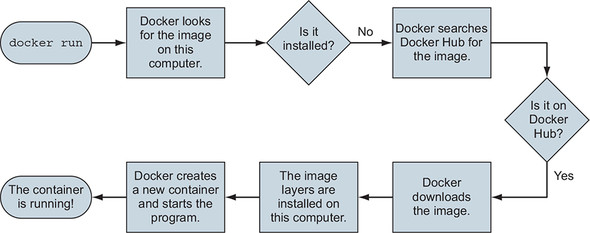
First, you use the docker run command. This tells Docker that you want to trigger the sequence (shown in figure 1.1) that installs and runs a program inside a container.
Figure 1.1. What happens after running docker run
The second part specifies the program that you want Docker to run in a container. In this example, that program is dockerinaction/hello_world. This is called the image (or repository) name. For now, you can think of the image name as the name of the program you want to install or run. The image itself is a collection of files and metadata. That metadata includes the specific program to execute and other relevant configuration details.
Note
This repository and several others were created specifically to support the examples in this book. By the end of part 2, you should feel comfortable examining these open source examples.
The first time you run this command, Docker has to figure out whether the docker-inaction/hello_world image has already been downloaded. If it’s unable to locate it on your computer (because it’s the first thing you do with Docker), Docker makes a call to Docker Hub. Docker Hub is a public registry provided by Docker Inc. Docker Hub replies to Docker running on your computer to indicate where the image (docker-inaction/hello_world) can be found, and Docker starts the download.
Once the image is installed, Docker creates a new container and runs a single command. In this case, the command is simple:
echo "hello world"
After the echo command prints "hello world" to the terminal, the program exits, and the container is marked as stopped. Understand that the running state of a container is directly tied to the state of a single running program inside the container. If a program is running, the container is running. If the program is stopped, the container is stopped. Restarting a container will run the program again.
When you give the command a second time, Docker will check again to see whether docker-inaction/hello_world is installed. This time it will find the image on the local machine and can build another container and execute it right away. We want to emphasize an important detail. When you use docker run the second time, it creates a second container from the same repository (figure 1.2 illustrates this). This means that if you repeatedly use docker run and create a bunch of containers, you’ll need to get a list of the containers you’ve created and maybe at some point destroy them. Working with containers is as straightforward as creating them, and both topics are covered in chapter 2.
Figure 1.2. Running docker run a second time. Because the image is already installed, Docker can start the new container right away.

Congratulations! You’re now an official Docker user. Using Docker is just this easy. But it can test your understanding of the application you are running. Consider running a web application in a container. If you did not know that it was a long-running application that listened for inbound network communication on TCP port 80, you might not know exactly what Docker command should be used to start that container. These are the types of sticking points people encounter as they migrate to containers.
Although this book cannot speak to the needs of your specific applications, it does identify the common use cases and help teach most relevant Docker use patterns. By the end of part 1, you should have a strong command of containers with Docker.
1.1.2. Containers
Historically, UNIX-style operating systems have used the term jail to describe a modified runtime environment that limits the scope of resources that a jailed program can access. Jail features go back to 1979 and have been in evolution ever since. In 2005, with the release of Sun’s Solaris 10 and Solaris Containers, container has become the preferred term for such a runtime environment. The goal has expanded from limiting filesystem scope to isolating a process from all resources except where explicitly allowed.
Using containers has been a best practice for a long time. But manually building containers can be challenging and easy to do incorrectly. This challenge has put them out of reach for some. Others using misconfigured containers are lulled into a false sense of security. This was a problem begging to be solved, and Docker helps. Any software run with Docker is run inside a container. Docker uses existing container engines to provide consistent containers built according to best practices. This puts stronger security within reach for everyone.
With Docker, users get containers at a much lower cost. Running the example in section 1.1.1 uses a container and does not require any special knowledge. As Docker and its container engines improve, you get the latest and greatest isolation features. Instead of keeping up with the rapidly evolving and highly technical world of building strong containers, you can let Docker handle the bulk of that for you.
1.1.3. Containers are not virtualization
In this cloud-native era, people tend to think about virtual machines as units of deployment, where deploying a single process means creating a whole network-attached virtual machine. Virtual machines provide virtual hardware (or hardware on which an operating system and other programs can be installed). They take a long time (often minutes) to create and require significant resource overhead because they run a whole operating system in addition to the software you want to use. Virtual machines can perform optimally once everything is up and running, but the startup delays make them a poor fit for just-in-time or reactive deployment scenarios.
Unlike virtual machines, Docker containers don’t use any hardware virtualization. Programs running inside Docker containers interface directly with the host’s Linux kernel. Many programs can run in isolation without running redundant operating systems or suffering the delay of full boot sequences. This is an important distinction. Docker is not a hardware virtualization technology. Instead, it helps you use the container technology already built into your operating system kernel.
Virtual machines provide hardware abstractions so you can run operating systems. Containers are an operating system feature. So you can always run Docker in a virtual machine if that machine is running a modern Linux kernel. Docker for Mac and Windows users, and almost all cloud computing users, will run Docker inside virtual machines. So these are really complementary technologies.
1.1.4. Running software in containers for isolation
Containers and isolation features have existed for decades. Docker uses Linux namespaces and cgroups, which have been part of Linux since 2007. Docker doesn’t provide the container technology, but it specifically makes it simpler to use. To understand what containers look like on a system, let’s first establish a baseline. Figure 1.3 shows a basic example running on a simplified computer system architecture.
Figure 1.3. A basic computer stack running two programs that were started from the command lin
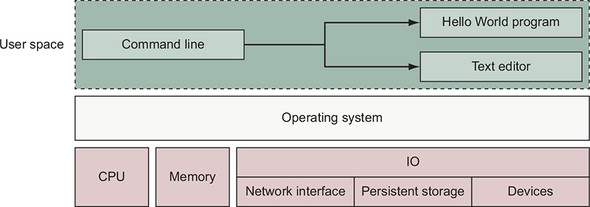
Notice that the command-line interface, or CLI, runs in what is called user space memory, just like other programs that run on top of the operating system. Ideally, programs running in user space can’t modify kernel space memory. Broadly speaking, the operating system is the interface between all user programs and the hardware that the computer is running on.
You can see in figure 1.4 that running Docker means running two programs in user space. The first is the Docker engine. If installed properly, this process should always be running. The second is the Docker CLI. This is the Docker program that users interact with. If you want to start, stop, or install software, you’ll issue a command by using the Docker program.
Figure 1.4. Docker running three containers on a basic Linux computer system
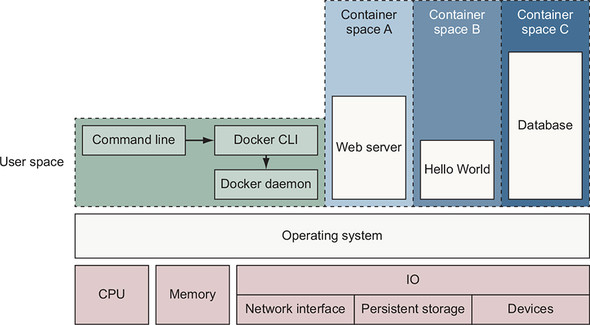
Figure 1.4 also shows three running containers. Each is running as a child process of the Docker engine, wrapped with a container, and the delegate process is running in its own memory subspace of the user space. Programs running inside a container can access only their own memory and resources as scoped by the container.
Docker builds containers using 10 major system features. Part 1 of this book uses Docker commands to illustrate how these features can be modified to suit the needs of the contained software and to fit the environment where the container will run. The specific features are as follows:
- PID namespace— Process identifiers and capabilities
- UTS namespace— Host and domain name
- MNT namespace— Filesystem access and structure
- IPC namespace— Process communication over shared memory
- NET namespace— Network access and structure
- USR namespace— User names and identifiers
- chroot syscall—Controls the location of the filesystem root
- cgroups— Resource protection
- CAP drop— Operating system feature restrictions
- Security modules— Mandatory access controls
Docker uses those to build containers at runtime, but it uses another set of technologies to package and ship containers.
1.1.5. Shipping containers
You can think of a Docker container as a physical shipping container. It’s a box where you store and run an application and all of its dependencies (excluding the running operating system kernel). Just as cranes, trucks, trains, and ships can easily work with shipping containers, so can Docker run, copy, and distribute containers with ease. Docker completes the traditional container metaphor by including a way to package and distribute software. The component that fills the shipping container role is called an image.
The example in section 1.1.1 used an image named dockerinaction/hello_world. That image contains single file: a small executable Linux program. More generally, a Docker image is a bundled snapshot of all the files that should be available to a program running inside a container. You can create as many containers from an image as you want. But when you do, containers that were started from the same image don’t share changes to their filesystem. When you distribute software with Docker, you distribute these images, and the receiving computers create containers from them. Images are the shippable units in the Docker ecosystem.
Docker provides a set of infrastructure components that simplify distributing Docker images. These components are registries and indexes. You can use publicly available infrastructure provided by Docker Inc., other hosting companies, or your own registries and indexes.
1.2. What problems does Docker solve?
Using software is complex. Before installation, you have to consider the operating system you’re using, the resources the software requires, what other software is already installed, and what other software it depends on. You need to decide where it should be installed. Then you need to know how to install it. It’s surprising how drastically installation processes vary today. The list of considerations is long and unforgiving. Installing software is at best inconsistent and overcomplicated. The problem is only worsened if you want to make sure that several machines use a consistent set of software over time.
Package managers such as APT, Homebrew, YUM, and npm attempt to manage this, but few of those provide any degree of isolation. Most computers have more than one application installed and running. And most applications have dependencies on other software. What happens when applications you want to use don’t play well together? Disaster! Things are only made more complicated when applications share dependencies:
- What happens if one application needs an upgraded dependency, but the other does not?
- What happens when you remove an application? Is it really gone?
- Can you remove old dependencies?
- Can you remember all the changes you had to make to install the software you now want to remove?
The truth is that the more software you use, the more difficult it is to manage. Even if you can spend the time and energy required to figure out installing and running applications, how confident can you be about your security? Open and closed source programs release security updates continually, and being aware of all the issues is often impossible. The more software you run, the greater the risk that it’s vulnerable to attack.
Even enterprise-grade service software must be deployed with dependencies. It is common for those projects to be shipped with and deployed to machines with hundreds, if not thousands, of files and other programs. Each of those creates a new opportunity for conflict, vulnerability, or licensing liability.
All of these issues can be solved with careful accounting, management of resources, and logistics, but those are mundane and unpleasant things to deal with. Your time would be better spent using the software that you’re trying to install, upgrade, or publish. The people who built Docker recognized that, and thanks to their hard work, you can breeze through the solutions with minimal effort in almost no time at all.
It’s possible that most of these issues seem acceptable today. Maybe they feel trivial because you’re used to them. After reading how Docker makes these issues approachable, you may notice a shift in your opinion.
1.2.1. Getting organized
Without Docker, a computer can end up looking like a junk drawer. Applications have all sorts of dependencies. Some applications depend on specific system libraries for common things like sound, networking, graphics, and so on. Others depend on standard libraries for the language they’re written in. Some depend on other applications, such as the way a Java program depends on the Java Virtual Machine, or a web application might depend on a database. It’s common for a running program to require exclusive access to a scarce resource such as a network connection or a file.
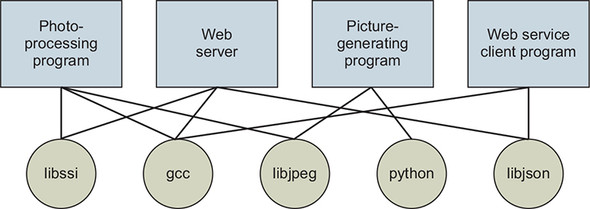
Today, without Docker, applications are spread all over the filesystem and end up creating a messy web of interactions. Figure 1.5 illustrates how example applications depend on example libraries without Docker.
Figure 1.5. Dependency relationships of example programs
In contrast, the example in section 1.1.1 installed the required software automatically, and that same software can be reliably removed with a single command. Docker keeps things organized by isolating everything with containers and images.
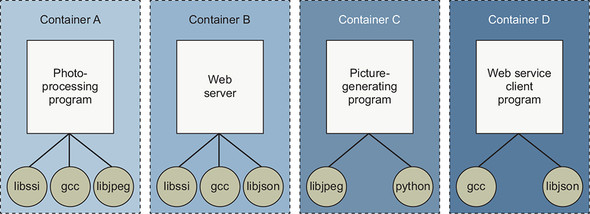
Figure 1.6 illustrates these same applications and their dependencies running inside containers. With the links broken and each application neatly contained, understanding the system is an approachable task. At first it seems like this would introduce storage overhead by creating redundant copies of common dependencies such as gcc. Chapter 3 describes how the Docker packaging system typically reduces the storage overhead.
Figure 1.6. Example programs running inside containers with copies of their dependencies
1.2.2. Improving portability
Another software problem is that an application’s dependencies typically include a specific operating system. Portability between operating systems is a major problem for software users. Although it’s possible to have compatibility between Linux software and macOS, using that same software on Windows can be more difficult. Doing so can require building whole ported versions of the software. Even that is possible only if suitable replacement dependencies exist for Windows. This represents a major effort for the maintainers of the application and is frequently skipped. Unfortunately for users, a whole wealth of powerful software is too difficult or impossible to use on their system.
At present, Docker runs natively on Linux and comes with a single virtual machine for macOS and Windows environments. This convergence on Linux means that software running in Docker containers need be written only once against a consistent set of dependencies. You might have just thought to yourself, “Wait a minute. You just finished telling me that Docker is better than virtual machines.” That’s correct, but they are complementary technologies. Using a virtual machine to contain a single program is wasteful. This is especially so when you’re running several virtual machines on the same computer. On macOS and Windows, Docker uses a single, small virtual machine to run all the containers. By taking this approach, the overhead of running a virtual machine is fixed, while the number of containers can scale up.
This new portability helps users in a few ways. First, it unlocks a whole world of software that was previously inaccessible. Second, it’s now feasible to run the same software—exactly the same software—on any system. That means your desktop, your development environment, your company’s server, and your company’s cloud can all run the same programs. Running consistent environments is important. Doing so helps minimize any learning curve associated with adopting new technologies. It helps software developers better understand the systems that will be running their programs. It means fewer surprises. Third, when software maintainers can focus on writing their programs for a single platform and one set of dependencies, it’s a huge time-saver for them and a great win for their customers.
Without Docker or virtual machines, portability is commonly achieved at an individual program level by basing the software on a common tool. For example, Java lets programmers write a single program that will mostly work on several operating systems because the programs rely on a program called a Java Virtual Machine (JVM). Although this is an adequate approach while writing software, other people, at other companies, wrote most of the software we use. For example, if we want to use a popular web server that was not written in Java or another similarly portable language, we doubt that the authors would take time to rewrite it for us. In addition to this shortcoming, language interpreters and software libraries are the very things that create dependency problems. Docker improves the portability of every program regardless of the language it was written in, the operating system it was designed for, or the state of the environment where it’s running.
1.2.3. Protecting your computer
Most of what we’ve mentioned so far have been problems from the perspective of working with software and the benefits of doing so from outside a container. But containers also protect us from the software running inside a container. There are all sorts of ways that a program might misbehave or present a security risk:
- A program might have been written specifically by an attacker.
- Well-meaning developers could write a program with harmful bugs.
- A program could accidentally do the bidding of an attacker through bugs in its input handling.
Any way you cut it, running software puts the security of your computer at risk. Because running software is the whole point of having a computer, it’s prudent to apply the practical risk mitigations.
Like physical jail cells, anything inside a container can access only things that are inside it as well. Exceptions to this rule exist, but only when explicitly created by the user. Containers limit the scope of impact that a program can have on other running programs, the data it can access, and system resources. Figure 1.7 illustrates the difference between running software outside and inside a container.
Figure 1.7. Left: A malicious program with direct access to sensitive resources. Right: A malicious program inside a container.
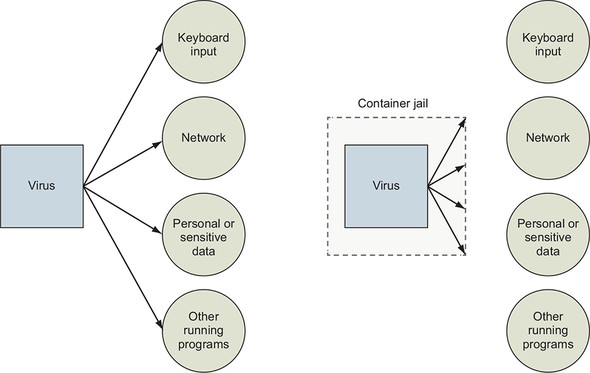
What this means for you or your business is that the scope of any security threat associated with running a particular application is limited to the scope of the application itself. Creating strong application containers is complicated and a critical component of any in-depth defense strategy. It is far too commonly skipped or implemented in a half-hearted manner.
1.3. Why is Docker important?
Docker provides an abstraction. Abstractions allow you to work with complicated things in simplified terms. So, in the case of Docker, instead of focusing on all the complexities and specifics associated with installing an application, all we need to consider is what software we’d like to install.
Like a crane loading a shipping container onto a ship, the process of installing any software with Docker is identical to any other. The shape or size of the thing inside the shipping container may vary, but the way that the crane picks up the container will always be the same. All the tooling is reusable for any shipping container.
This is also the case for application removal. When you want to remove software, you simply tell Docker which software to remove. No lingering artifacts will remain because they were all contained and accounted for by Docker. Your computer will be as clean as it was before you installed the software.
The container abstraction and the tools Docker provides for working with containers has changed the system administration and software development landscape. Docker is important because it makes containers available to everyone. Using it saves time, money, and energy.
The second reason Docker is important is that there is significant push in the software community to adopt containers and Docker. This push is so strong that companies including Amazon, Microsoft, and Google have all worked together to contribute to its development and adopt it in their own cloud offerings. These companies, which are typically at odds, have come together to support an open source project instead of developing and releasing their own solutions.
The third reason Docker is important is that it has accomplished for the computer what app stores did for mobile devices. It has made software installation, compartmentalization, and removal simple. Better yet, Docker does it in a cross-platform and open way. Imagine if all the major smartphones shared the same app store. That would be a pretty big deal. With this technology in place, it’s possible that the lines between operating systems may finally start to blur, and third-party offerings will be less of a factor in choosing an operating system.
Fourth, we’re finally starting to see better adoption of some of the more advanced isolation features of operating systems. This may seem minor, but quite a few people are trying to make computers more secure through isolation at the operating system level. It’s been a shame that their hard work has taken so long to see mass adoption. Containers have existed for decades in one form or another. It’s great that Docker helps us take advantage of those features without all the complexity.
1.4. Where and when to use Docker
Docker can be used on most computers at work and at home. Practically, how far should this be taken?
Docker can run almost anywhere, but that doesn’t mean you’ll want to do so. For example, currently Docker can run only applications that can run on a Linux operating system, or Windows applications on Windows Server. If you want to run a macOS or Windows native application on your desktop, you can’t yet do so with Docker.
By narrowing the conversation to software that typically runs on a Linux server or desktop, a solid case can be made for running almost any application inside a container. This includes server applications such as web servers, mail servers, databases, proxies, and the like. Desktop software such as web browsers, word processors, email clients, or other tools are also a great fit. Even trusted programs are as dangerous to run as a program you downloaded from the internet if they interact with user-provided data or network data. Running these in a container and as a user with reduced privileges will help protect your system from attack.
Beyond the added in-depth benefit of defense, using Docker for day-to-day tasks helps keep your computer clean. Keeping a clean computer will prevent you from running into shared resource issues and ease software installation and removal. That same ease of installation, removal, and distribution simplifies management of computer fleets and could radically change the way companies think about maintenance.
The most important thing to remember is that sometimes containers are inappropriate. Containers won’t help much with the security of programs that have to run with full access to the machine. At the time of this writing, doing so is possible but complicated. Containers are not a total solution for security issues, but they can be used to prevent many types of attacks. Remember, you shouldn’t use software from untrusted sources. This is especially true if that software requires administrative privileges. That means it’s a bad idea to blindly run customer-provided containers in a co-located environment.
1.5. Docker in the larger ecosystem
Today the greater container ecosystem is rich with tooling that solves new or higher-level problems. Those problems include container orchestration, high-availability clustering, microservice life cycle management, and visibility. It can be tricky to navigate that market without depending on keyword association. It is even trickier to understand how Docker and those products work together.
Those products work with Docker in the form of plugins or provide a certain higher-level functionality and depend on Docker. Some tools use the Docker subcomponents. Those subcomponents are independent projects such as runc, libcontainerd, and notary.
Kubernetes is the most notable project in the ecosystem aside from Docker itself. Kubernetes provides an extensible platform for orchestrating services as containers in clustered environments. It is growing into a sort of “datacenter operating system.” Like the Linux Kernel, cloud providers and platform companies are packaging Kubernetes. Kubernetes depends on container engines such as Docker, and so the containers and images you build on your laptop will run in Kubernetes.
You need to consider several trade-offs when picking up any tool. Kubernetes draws power from its extensibility, but that comes at the expense of its learning curve and ongoing support effort. Today building, customizing, or extending Kubernetes clusters is a full-time job. But using existing Kubernetes clusters to deploy your applications is straightforward with minimal research. Most readers looking at Kubernetes should consider adopting a managed offering from a major public cloud provider before building their own. This book focuses on and teaches solutions to higher-level problems using Docker alone. Once you understand what the problems are and how to solve them with one tool, you’re more likely to succeed in picking up more complicated tooling.
1.6. Getting help with the Docker command line
You’ll use the docker command-line program throughout the rest of this book. To get you started with that, we want to show you how to get information about commands from the docker program itself. This way, you’ll understand how to use the exact version of Docker on your computer. Open a terminal, or command prompt, and run the following command:
docker help
Running docker help will display information about the basic syntax for using the docker command-line program as well as a complete list of commands for your version of the program. Give it a try and take a moment to admire all the neat things you can do.
docker help gives you only high-level information about what commands are available. To get detailed information about a specific command, include the command in the <COMMAND> argument. For example, you might enter the following command to find out how to copy files from a location inside a container to a location on the host machine:
docker help cp
That will display a usage pattern for docker cp, a general description of what the command does, and a detailed breakdown of its arguments. We’re confident that you’ll have a great time working through the commands introduced in the rest of this book now that you know how to find help if you need it.
Summary
This chapter has been a brief introduction to Docker and the problems it helps system administrators, developers, and other software users solve. In this chapter you learned that:
- Docker takes a logistical approach to solving common software problems and simplifies your experience with installing, running, publishing, and removing software. It’s a command-line program, an engine background process, and a set of remote services. It’s integrated with community tools provided by Docker Inc.
- The container abstraction is at the core of its logistical approach.
- Working with containers instead of software creates a consistent interface and enables the development of more sophisticated tools.
- Containers help keep your computers tidy because software inside containers can’t interact with anything outside those containers, and no shared dependencies can be formed.
- Because Docker is available and supported on Linux, macOS, and Windows, most software packaged in Docker images can be used on any computer.
- Docker doesn’t provide container technology; it hides the complexity of working directly with the container software and turns best practices into reasonable defaults.
- Docker works with the greater container ecosystem; that ecosystem is rich with tooling that solves new and higher-level problems.
- If you need help with a command, you can always consult the docker help subcommand.