Chapter 21
Storing Secrets
We discussed the problem of storing transient secrets, such as session keys, back in Section 8.3. But how do we store long-term secrets, such as passwords and private keys? We have two opposing requirements. First of all, the secret should be kept secret. Second, the risk of losing the secret altogether (i.e., not being able to find the secret again) should be minimal.
One of the obvious ideas is to store the secret on the hard drive in the computer or on some other permanent storage medium. This works, but only if the computer is kept secure. If Alice stores her keys (without encryption) on her PC, then anyone who uses her PC can use her keys. Most PCs are used by other people, at least occasionally. Alice won't mind letting someone else use her PC, but she certainly doesn't want to grant access to her bank account at the same time! Another problem is that Alice probably uses several computers. If her keys are stored on her PC at home, she cannot use them while at work or while traveling. And should she store her keys on her desktop machine at home or on her laptop? We really don't want her to copy the keys to multiple places; that only weakens the system further.
A better solution would be for Alice to store her keys on her PDA or smart phone. Such a device is less likely to be lent out, and it is something that she takes with her everywhere she goes. But small devices such as these can also easily be lost or stolen, and we don't want someone later in possession of the device to have access to the secret keys.
You'd think that security would improve if we encrypt the secrets. Sure, but with what? We need a master key to encrypt the secrets with, and that master key needs to be stored somewhere. Storing it next to the encrypted secrets doesn't give you any advantage. This is a good technique to reduce the number and size of secrets though, and it is widely used in combination with other techniques. For example, a private RSA key is several thousand bits long, but by encrypting and authenticating it with a symmetric key, we can reduce the size of the required secure storage by a significant factor.
The next idea is to store the key in Alice's brain. We get her to memorize a password and encrypt all the other key material with this password. The encrypted key material can be stored anywhere—maybe on a disk, but it can also be stored on a Web server where Alice can download it to whatever computer she is using at the moment.
Humans are notoriously bad at memorizing passwords. If you choose very simple passwords, you don't get any security. There are simply not enough simple passwords for them to be really secret: the attacker can just try them all. Using your mother's maiden name doesn't work very well; her name is quite often public knowledge—and even if it isn't, there are probably only a few hundred thousand surnames that the attacker has to try to find the right one.
A good password must be unpredictable. In other words, it must contain a lot of entropy. Normal words, such as passwords, do not contain much entropy. There are about half a million English words—and that is counting all the very long and obscure words in an unabridged dictionary—so a single word as password provides at most 19 bits of entropy. Estimates of the amount of entropy per character in English text vary a bit, but are in the neighborhood of 1.5–2 bits per letter.
We've been using 256-bit secret keys throughout our systems to achieve 128 bits of security. In most places, using a 256-bit key has very little additional cost. However, in this situation the user has to memorize the password (or key), and the additional cost of larger keys is high. Trying to use passwords with 256 bits of entropy is too cumbersome; therefore, we will restrict ourselves to passwords with only 128 bits of entropy.1
Using the optimistic estimate of 2 bits per character, we'd need a password of 64 characters to get 128 bits of entropy. That is unacceptable. Users will simply refuse to use such long passwords.
What if we compromise and accept 64 bits of security? That is already very marginal. At 2 bits of entropy per character, we need the password to be at least 32 characters long. Even that is too long for users to deal with. Don't forget, most real-world passwords are only 6–8 letters long.
You could try to use assigned passwords, but have you ever tried to use a system where you are told that your password is “7193275827429946905186”? Or how about “aoekjk3ncmakwe”? Humans simply can't remember such passwords, so this solution doesn't work. (In practice, users will write the password down, but we'll discuss that in the next section.)
A much better solution is to use a passphrase. This is similar to a password. In fact, they are so similar that we consider them equivalent. The difference is merely one of emphasis: a passphrase is much longer than a password.
Perhaps Alice could use the passphrase, “Pink curtains meander across the ocean.” That is nonsensical, but fairly easy to remember. It is also 38 characters long, so it probably contains about 57–76 bits of entropy. If Alice expands it to “Pink dotty curtains meander over seas of Xmas wishes,” she gets 52 characters for a very reasonable key of 78–104 bits of entropy. Given a keyboard, Alice can type this passphrase in a few seconds, which is certainly much faster than she can type a string of random digits. We rely on the fact that a passphrase is much easier to memorize than random data. Many mnemonic techniques are based on the idea of converting random data to things much closer to our passphrases.
Some users don't like to do a lot of typing, so they choose their passphrases slightly differently. How about “Wtnitmtstsaaoof,ottaaasot,aboet”? This looks like total nonsense; that is, until you think of it as the first letters of the words of a sentence. In this case we used a sentence from Shakespeare: “Whether ’tis nobler in the mind to suffer the slings and arrows of outrageous fortune, or to take arms against a sea of troubles, and by opposing end them.” Of course, Alice should not use a sentence from literature; literary texts are too accessible for an attacker, and how many suitable sentences would there be in the books on Alice's bookshelf? Instead, she should invent her own sentence, one that nobody else could possibly think of.
Compared to using a full passphrase, the initial-letters-from-each-word technique requires a longer sentence, but it requires less typing for good security because the keystrokes are more random than consecutive letters in a sentence. We don't know of any estimate for the number of bits of entropy per character for this technique.
Passphrases are certainly the best way of storing a secret in a human brain. Unfortunately, many users still find it difficult to use them correctly. And even with passphrases, it is extremely difficult to get 128 bits of entropy in the human brain.
21.2.1 Salting and Stretching
To squeeze the most security out of a limited-entropy password or passphrase, we can use two techniques that sound as if they come from a medieval torture chamber. These are so simple and obvious that they should be used in every password system. There is really no excuse not to use them.
The first is to add a salt. This is simply a random number that is stored alongside the data that was encrypted with the password. If you can, use a 256-bit salt.
The next step is to stretch the password. Stretching is essentially a very long computation. Let p be the password and s be the salt. Using any cryptographically strong hash function h, we compute
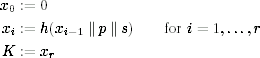
and use K as the key to actually encrypt the data. The parameter r is the number of iterations in the computation and should be as large as practical. (It goes without saying that xi and K should be 256 bits long.)
Let's look at this from an attacker's point of view. Given the salt s and some data that is encrypted with K, you try to find K by trying different passwords. Choose a particular password p, compute the corresponding K, decrypt the data and check whether it makes sense and passes the associated integrity checks. If it doesn't, then p must have been false. To check a single value for p, you have to do r different hash computations. The larger r is, the more work the attacker has to do.
It is sometimes useful to be able to check whether the derived key is correct before decrypting the data. When this is helpful, a key check value can be computed. For example, the key check value could be h(0 || xr−1 || p || s), which because of the properties of hash functions is independent from K. This key check value would be stored alongside the salt and could be used to check the password before decrypting the data with K.
In normal use, the stretching computation has to be done every time a password is used. But remember, this is at a point in time where the user has just entered a password. It has probably taken several seconds to enter the password, so using 200 ms for password processing is quite acceptable. Here is our rule to choose r: choose r such that computing K from (s, p) takes 200–1000 ms on the user's equipment. Computers get faster over time, so r should be increasing over time as well. Ideally, you determine r experimentally when the user first sets the password and store r alongside s. (Do make sure that r is a reasonable value, not too small or too large.)
How much have we gained? If r = 220 (just over a million), the attacker has to do 220 hash computations for each password she tries. Trying 260 passwords would take 280 hash computations, so effectively using r = 220 makes the effective key size of the password 20 bits longer. The larger r you choose, the larger the gain.
Look at it another way. What r does is stop the attacker from benefiting from faster and faster computers, because the faster computers get, the larger r gets, too. It is a kind of Moore's law compensator, but only in the long run. Ten years from now, the attacker can use the next decade's technology to attack the password you are using today. So you still need a decent security margin and as much entropy in the password as you can get.
This is another reason to use a key negotiation protocol with forward secrecy. Whatever the application, it is quite likely that Alice's private keys end up being protected by a password. Ten years from now, the attacker will be able to search for Alice's password and find it. But if the key that is encrypted with the password was only used to run a key negotiation protocol with forward secrecy, the attacker will find nothing of value. Alice's key is no longer valid (it has expired), and knowing her old private key does not reveal the session keys used ten years ago.
The salt stops the attacker from taking advantage of an economy of scale when she is attacking a large number of passwords simultaneously. Suppose there are a million users in the system, and each user stores an encrypted file that contains her keys. Each file is encrypted with the user's stretched password. If we did not use a salt, the attacker could attack as follows: guess a password p, compute the stretched key K, and try to decrypt each of the key files using K. The stretch function only needs to be computed once for every password, and the resulting stretched key can be used in an attempt to decrypt each of the files.
This is no longer possible when we add the salt to the stretching function. All the salts are random values, so each user will use a different salt value. The attacker now has to compute the stretching function once for each password/file combination, rather than once for each password. This is a lot more work for the attacker, and it comes at a very small price for the users of the system. Since bits are cheap, for simplicity we suggest using a 256-bit salt.
By the way, do take care when you do this. We once saw a system that implemented all this perfectly, but then some programmer wanted to improve the user interface by giving the user a faster response as to whether the password he had typed was correct or not. So he stored a checksum on the password, which defeated the entire salting and stretching procedure. If the response time is too slow, you can reduce r, but make sure there is no way to recognize whether a password is correct or not without doing at least r hash computations.
The next idea is to store key material outside the computer. The simplest form of storage is a piece of paper with passwords written on it. Most people have that in one form or another, even for noncryptographic systems like websites. Most users have at least half a dozen passwords to remember, and that is simply too much, especially for systems where you use your password only rarely. So to remember passwords, users write them down. The limitation to this solution is that the password still has to be processed by the user's eyes, brain, and fingers every time it is used. To keep user irritation and mistakes within reasonable bounds, this technique can only be used with relatively low-entropy passwords and passphrases.
As a designer, you don't have to design or implement anything to use this storage method. Users will use it for their passwords, no matter what rules you make and however you create your password system.
A more advanced form of storage would be portable memory of some form. This could be a memory-chip card, a magnetic stripe card, a USB stick, or any other kind of digital storage. Digital storage systems are always large enough to store at least a 256-bit secret key, so we can eliminate the low-entropy password. The portable memory becomes very much like a key. Whoever holds the key has access, so this memory needs to be held securely.
A better—and more expensive—solution is to use something we call a secure token. This is a small computer that Alice can carry around. The external shape of tokens can differ widely, ranging from a smart card (which looks just like a credit card), to an iButton, USB dongle, or PC Card. The main properties are nonvolatile memory (i.e., a memory that retains its data when power is removed) and a CPU.
The secure token works primarily as a portable storage device, but with a few security enhancements. First of all, access to the stored key material can be limited by a password or something similar. Before the secure token will let you use the key, you have to send it the proper password. The token can protect itself against attackers who try a brute-force search for the password by disabling access after three or five failed attempts. Of course, some users mistype their password too often, and then their token has to be resuscitated, but you can use longer, higher-entropy passphrases or keys that are far more secure for the resuscitation.
This provides a multilevel defense. Alice protects the physical token; for example, by keeping it in her wallet or on her key chain. An attacker has to steal the token to get anywhere, or at least get access to it in some way. Then the attacker needs to either physically break open the token and extract the data, or find the password to unlock the token. Tokens are often tamper-resistant to make a physical attack more difficult.2
Secure tokens are currently one of the best and most practical methods of storing secret keys. They can be relatively inexpensive and small enough to be carried around conveniently.
One problem in practical use is the behavior of the users. They'll leave their secure token plugged into their computer when going to lunch or to a meeting. As users don't want to be prompted for their password every time, the system will be set to allow hours of access from the last time the password was entered. So all an attacker has to do is walk in and start using the secret keys stored in the token.
You can try to solve this through training. There's the “corporate security in the office” video presentations, the embarrassingly bad “take your token to lunch” poster that isn't funny at all, and the “if I ever again find your token plugged in unattended, you are going to get another speech like this” speeches. But you can also use other means. Make sure the token is not only the key to access digital data, but also the lock to the office doors, so users have to take their token to get back into their office. Fix the coffee machine to only give coffee after being presented with a token. These sorts of tactics motivate employees to bring their token to the coffee machine and not leave it plugged into their computer while they are away. Sometimes security consists of silly measures like these, but they work far better than trying to enforce take-your-token-with-you rules by other means.
The secure token still has a significant weakness. The password that Alice uses has to be entered on the PC or some other device. As long as we trust the PC, this is not a problem, but we all know PCs are not terribly secure, to say the least. In fact, the whole reason for not storing Alice's keys on the PC is because we don't trust it enough. We can achieve a much better security if the token itself has a secure built-in UI. Think of a secure token with a built-in keyboard and display. Now the password, or more likely a PIN, can be entered directly into the token without the need to trust an outside device.
Having a keyboard on the token protects the PIN from compromise. Of course, once the PIN has been typed, the PC still gets the key, and then it can do anything at all with that key. So we are still limited by the security of the whole PC.
To stop this, we have to put the cryptographic processes that involve the key into the token. This requires application-specific code in the token. The token is quickly growing into a full-fledged computer, but now a trusted computer that the user carries around. The trusted computer can implement the security-critical part of each application on the token itself. The display now becomes crucial, since it is used to show the user what action he is authorizing by typing his PIN. In a typical design, the user uses the PC's keyboard and mouse to operate the application. When, for example, a bank payment has to be authorized, the PC sends the data to the token. The token displays the amount and a few other transaction details, and the user authorizes the transaction by typing her PIN. The token then signs the transaction details, and the PC completes the rest of the transaction.
At present, tokens with a secure UI are too expensive for most applications. Maybe the closest thing we have is a PDA or smart phone. However, people download programs onto their PDAs and phones, and these devices are not designed from the start as secure units, so perhaps these devices are not significantly more secure than a PC. We hope that tokens with secure UIs become more prevalent in the future.
If we want to get really fancy, we can add biometrics to the mix. You could build something like a fingerprint or iris scanner into the secure token. At the moment, biometric devices are not very useful. Fingerprint scanners can be made for a reasonable price, but the security they provide is generally not very good. In 2002, cryptographer Tsutomu Matsumoto, together with three of his students, showed how he was able to consistently fool all the commercially available fingerprint scanners he could buy, using only household and hobby materials [87]. Even making a fake finger from a latent fingerprint (i.e., the type you leave on every shiny surface) is nothing more than a hobby project for a clever high-school student.
The real shock to us wasn't that the fingerprint readers could be fooled. It was that fooling them was so incredibly simple and cheap. What's worse, the biometrics industry has been telling us how secure biometric identification is. They never told us that forging fingerprints was this easy. Then suddenly a mathematician (not even a biometrics expert) comes along and blows the whole process out of the water. A recent 2009 paper shows that these issues are still a problem [3].
Still, even though they are easy to fool, fingerprint scanners can be very useful. Suppose you have a secure token with a small display, a small keyboard, and a fingerprint scanner. To get at the key, you need to get physical control of the token, get the PIN, and forge the fingerprint. That is more work for the attacker than any of our previous solutions. It is probably the best practical key storage scheme that we can currently make. On the other hand, this secure token is going to be rather expensive, so it won't be used by many people.
Fingerprint scanners could also be used on the low-security side rather than the high-security side. Touching a finger to a scanner can be done very quickly, and it is quite feasible to ask the user to do that relatively often. A fingerprint scanner could thus be used to increase the confidence that the proper person is in fact authorizing the actions the computer is taking. This makes it more difficult for employees to lend their passwords to a colleague. Rather than trying to stop sophisticated attackers, the fingerprint scanner could be used to stop casual breaches of the security rules. This might be a more important contribution to security than trying to use the scanner as a high-security device.
Because the average user has so many passwords, it becomes very appealing to create a single sign-on system. The idea is to give Alice a single master password, which in turn is used to encrypt all the different passwords from her different applications.
To do this well, all the applications must talk to the single sign-on system. Any time an application requires a password, it should not ask the user, but rather the single sign-on program, for it. There are numerous challenges for making this a reality on a wide scale. Just think of all the different applications that would have to be changed to automatically get their passwords from the single sign-on system.
A simpler idea is to have a small program that stores the passwords in a text file. Alice types her master password and then uses the copy and paste functionality to copy the passwords from the single sign-on program to the application. Bruce designed a free program called Password Safe to do exactly this. But it's just an encrypted digital version of the piece of paper that Alice writes her passwords on. It is useful, and an improvement on the piece of paper if you always use the same computer, but not the ultimate solution that the single sign-on idea would really like to be.
But what if the secure token breaks? Or the piece of paper with the passwords is left in a pocket and run through the washing machine? Losing secret keys is always a bad thing. The cost can vary from having to reregister for each application to get a new key, to permanently losing access to important data. If you encrypt the PhD thesis you have been working on for five years with a secret key and then lose the key, you no longer have a PhD thesis. You just have a file of random-looking bits. Ouch!
It is hard to make a key storage system both easy to use and highly reliable. A good rule of thumb, therefore, is to split these functions. Keep two copies of the key—one that is easy to use, and another one that is very reliable. If the easy-to-use system ever forgets the key, you can recover it from the reliable storage system. The reliable system could be very simple. How about a piece of paper in a bank vault?
Of course, you want to be careful with your reliable storage system. By design, it will quickly be used to store all of your keys, and that would make it a very tempting target for an attacker. You'll have to do a risk analysis to determine whether it is better to have a number of smaller reliable key storage places or a single large one.
There are some keys that you need to store super-securely—for example, the private root key of your CA. As we have seen, storing a secret in a secure manner can be difficult. Storing it securely and reliably is even more difficult.
There is one cryptographic solution that can help in storing secret keys. It is called secret sharing [117], which is a bit of a misnomer because it implies that you share the secret with several people. You don't. The idea is to take the secret and split it into several different shares. It is possible to do this in such a way that, for example, three out of the five shares are needed to recover the secret. You then give one share to each of the senior people in the IT department. Any three of them can recover the secret. The real trick is to do it in a manner such that any two people together know absolutely nothing about the key.
Secret sharing systems are very tempting from an academic point of view. Each of the shares is stored using one of the techniques we talked about before. A k-out-of-n rule combines high security (at least k people are necessary to retrieve the key) with high reliability (n − k of the shares may be lost without detrimental effect). There are even fancier secret sharing schemes that allow more complex access rules, along the lines of (Alice and Bob) or (Alice and Carol and David).
In real life, secret sharing schemes are rarely used because they are too complex. They are complex to implement, but more importantly, they are complex to administrate and operate. Most companies do not have a group of highly responsible people who distrust each other. Try telling the board members that they will each be given a secure token with a key share, and that they will have to show up at 3 a.m. on a Sunday in an emergency. Oh yes, and they are not to trust each other, but to keep their own shares secure even from other board members. They will also need to come down to the secure key-management room to get a new key share every time someone joins or leaves the board. In practice, this means that using the board members is out. The CEO isn t very useful for holding a share either, because the CEO tends to travel quite a bit. Before you know it, you are down to the two or three senior IT management people. They could use a secret sharing scheme, but the expense and complexity make this unattractive. Why not use something much simpler, such as a safe? Physical solutions such as safes or bank vaults have several advantages. Everybody understands how they work, so you don t need extensive training. They have already been tested extensively, whereas the secret-reconstruction process is hard to test because it requires such a large number of user interactions and you really don t want to have a bug in the secret-reconstruction process that results in you losing the root key of your CA.
Any long-term secret that we store eventually has to be wiped. As soon as a secret is no longer needed, its storage location should be wiped to avoid any future compromise. We discussed the problems of wiping memory in Section 8.3. Wiping long-term secrets from permanent storage is much harder.
The schemes for storing long-term secrets that we discussed in this chapter use a variety of data storage technologies, ranging from paper to hard disks to USB sticks. None of these storage technologies comes with a documented wiping functionality that guarantees the data it stored is no longer recoverable.
21.10.1 Paper
Destroying a password written down on paper is typically done by destroying the paper itself. One possible method is to burn the paper, and then grind the ashes into a fine powder, or mix the ashes into a pulp with just a little bit of water. Shredding is also an option, although many shredders leave the paper in large enough pieces that reconstructing a page is relatively easy.
21.10.2 Magnetic Storage
Magnetic media are very hard to wipe. There is surprisingly little literature about how to do this; the best paper we know of is by Peter Gutmann [57], although the technical details of that paper are probably outdated now.
Magnetic media store data in tiny magnetic domains; the direction of magnetization of a domain determines the data it encodes. When the data is overwritten, the magnetization directions are changed to reflect the new data. But there are several mechanisms that prevent the old data from being completely lost. The read/write head that tries to overwrite old data is never exactly aligned and will tend to leave some parts of the old data untouched. Overwriting does not completely destroy old data. You can think of it as repainting a wall with a single coat of paint. You can still vaguely see the old coat of paint under it. The magnetic domains can also migrate away from the read/write head either to the side of the track or deeper down into the magnetic material, where they can linger for a long time. Overwritten data is typically not recoverable with the normal read/write head, but an attacker who takes apart a disk drive and uses specialized equipment might be able to retrieve some or all of the old data.
In practice, repeatedly overwriting a secret with random data is probably the best option. There are a few points to keep in mind:
- Each overwrite should use fresh random data. Some researchers have developed particular data patterns that are supposed to be better at wiping old data, but the choice of patterns depends on the exact details of the disk drive. Random data might require more overwriting passes for the same effect, but it works in all situations and is therefore safer.
- Overwrite the actual location that stored the secret. If you just change a file by writing new data to it, the file system might decide to store the new data in a different location, which would leave the original data intact.
- Make sure that each overwrite pass is actually written to disk and not just to one of the disk caches. Disk drives that have their own write-cache are a particular danger, as they might cache the new data and optimize the multiple overwrite operations into a single write.
- It is probably a good idea to wipe an area that begins well before the secret data and that ends well after it. Because the rotational speed of a disk drive is never perfectly constant, the new data will not align perfectly with the old data.
As far as we know, there is no reliable information on how many overwrite passes are required, but there is no reason to choose a small number. You only have to wipe a single key. (If you have a large amount of secret data, store that data encrypted under a key, and only wipe the key.) We consider 50 or 100 overwrites with random data perfectly reasonable.
It is theoretically possible to erase a tape or disk using a degaussing machine. However, modern high-density magnetic storage media resist degaussing to such an extent that this is not a reliable wiping method. In practice, users do not have access to degaussing machines, so this is a nonissue.
Even with extensive overwriting, you should expect that a highly specialized and well-funded attacker could still recover the secret from the magnetic medium. To completely destroy the data, you will probably have to destroy the medium itself. If the magnetic layer is bonded to plastic (floppy disk, tape), you can consider shredding and then burning the media. For a hard disk, you can use a belt sander to remove the magnetic layer from the platters, or use a blowtorch to melt the disk platters down to liquid metal. In practice, you are unlikely to convince users to take such extreme measures, so repeated overwriting is the best practical solution.
21.10.3 Solid-State Storage
Wiping nonvolatile memory, such as EPROM, EEPROM, and flash, poses similar problems. Overwriting old data does not remove all traces, and the data retention mechanisms we discussed in Section 8.3.4 are also at work. Again, repeatedly overwriting the secret with random data is the only practical solution, but it is by no means perfect. As soon as the solid-state device is no longer needed, it should be destroyed.
Exercise 21.1 Investigate how login passwords are stored on your machine. Write a program that, given a stored (encrypted or hashed) password, exhaustively searches for the real password. How long would it take your program to exhaustively search through the top one million passwords?
Exercise 21.2 Investigate how private keys are stored with GNU Privacy Guard (GPG). Write a program that, given a stored encrypted GPG private key, exhaustively searches for the password and recovers the private key. How long would it take your program to exhaustively search through the top one million passwords?
Exercise 21.3 Consider a 24-bit salt. Given a group of 64 users, would you expect two users to have the same salt? 1024 users? 4096 users? 16,777,216 users?
Exercise 21.4 Find a new product or system that maintains long-term secrets. This might be the same product or system you analyzed for Exercise 1.8. Conduct a security review of that product or system as described in Section 1.12, this time focusing on issues surrounding how the system might store these secrets.
1 For the mathematicians: passwords chosen from a probability distribution with 128 bits of entropy.
2 They are tamper-resistant, not tamper-proof; tamper-resistance merely makes tampering more expensive. Tamper-responding devices may detect tampering and self-destruct.