CHAPTER 4
Technology
In this chapter, you will learn the following Domain 3 topics:
• Define methods of deploying and operating in the AWS Cloud
• Define the AWS global infrastructure
• Identify the core AWS services
• Identity resources for technology support
Domain 3 covers the technical aspects of the AWS Cloud. This includes the tools and utilities to get users up and running in AWS, as well as code development. The core AWS services are highlighted, along with their key features and how they can improve upon legacy systems and hosting that most companies already use. Many support options are available for AWS technical aspects, including support plans, documentation, and user forums.
Deploying and Operating in the AWS Cloud
AWS offers a large suite of utilities and developer tools to enable quick migration into AWS and the ability to develop and support applications fully within the AWS environment. These tools are built upon popular standards and programming languages, are fully managed by AWS, and will scale to the needs of any developers, without the need to provision additional resources.
AWS Management Console
The AWS Management Console is the main resource where you can control all of your AWS services and perform any operations against them.
To access the AWS Management Console you can go to https://console.aws.amazon.com and log in with your root credentials. When you log in, you will be presented with the AWS Management Console dashboard, as shown in Figure 4-1.
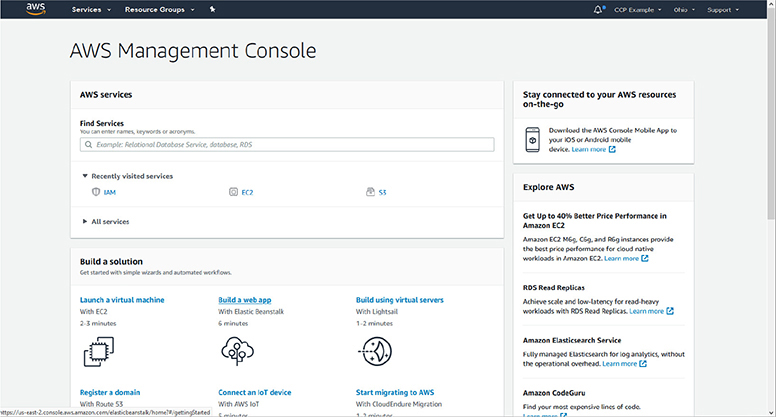
Figure 4-1 The AWS Management Console dashboard
Across the top of the Management Console are dropdown menus to gain access to most AWS services and resources. Clicking on the Services button will display a menu listing all AWS services with clickable names to get to each service’s dashboard, as shown in Figure 4-2.
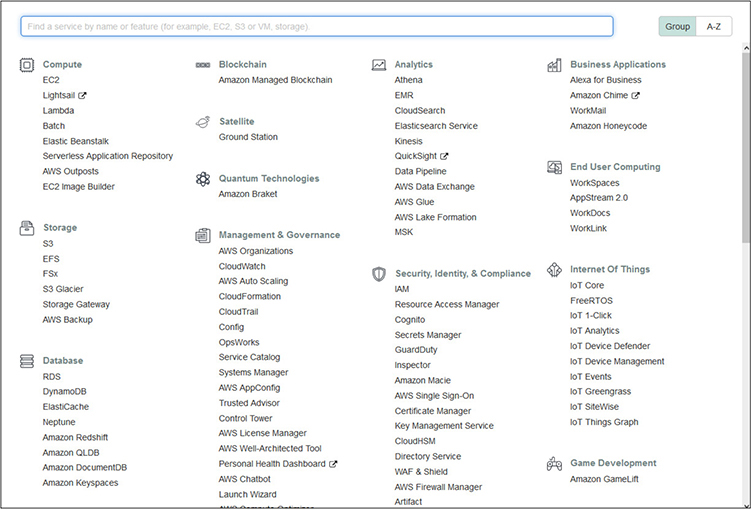
Figure 4-2 The Services menu in the AWS Management Console provides clickable access to the dashboard for all AWS services.
For example, with the Services menu expanded, clicking on Elastic Beanstalk takes you to the dashboard for that service, where you can access any applications you already have provisioned, or create a new application using the Create Application button on the right side of the screen, as shown in Figure 4-3.
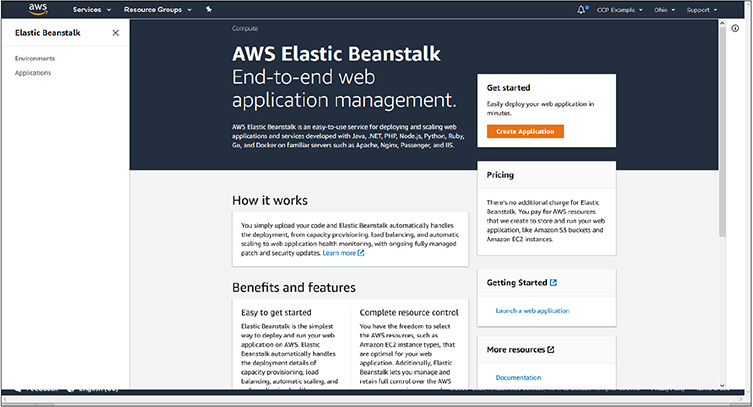
Figure 4-3 The dashboard for the Elastic Beanstalk service. The Create Application button on the right starts the process of launching a new application.
On any screen, in the upper-right corner of the console is a dropdown menu to change regions that you are viewing. As shown in Figure 4-4, each region is listed and is clickable. For some services that are global in nature, you will not see regions displayed within the dashboard for that service.
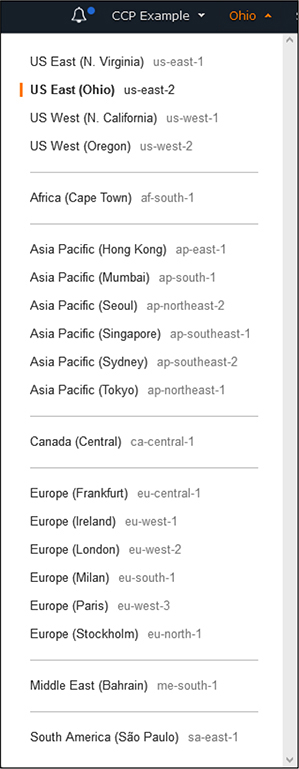
Figure 4-4 The Regions dropdown menu, allowing you to switch regions from Console dashboards

EXAM TIP As you are learning about the AWS Core services, keep track of which ones are global in nature and not bound to regions. Many services are offered at a global level, and no selection or configuration in regard to regions or availability zones is necessary.
From any screen you can also directly access the support and documentation for AWS services by clicking on the Support dropdown in the upper-right corner, as shown in Figure 4-5.
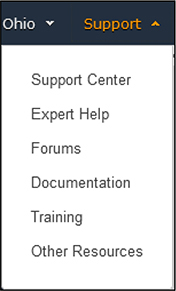
Figure 4-5 The Support menu allows direct access to AWS support options and documentation.
AWS CLI
The AWS Command Line Interface (CLI) provides a way to manage AWS services and perform many administrative functions without having to use the web-based Management Console. Through the use of CLI, users can also script and automate many functions through whatever programming languages they are familiar with or desire to use for automation. Each AWS service has CLI commands that are pertinent to it and can be found in the AWS documentation.
The AWS CLI is available for Windows, macOS, and Linux and requires a small software installation to add the AWS capabilities to their command line tools. You will also need to have outbound access on port 443 allowed through your network and firewalls. The AWS CLI also requires the use of an access/secret key for a user that can be obtained from the IAM portal.
Information on how to set up and use the AWS CLI can be found at https://docs.aws.amazon.com/cli.
AWS Developer Tools
AWS provides a suite of developer tools and services that are fully managed and will assist with code building, committing to repositories, and deployment to systems when ready for testing and release.
AWS Developer Tools and SDKs
AWS offers a variety of Software Development Kits (SDKs) that will facilitate developers across the most popular programming languages. SDKs are also offered specific to mobile and Internet of Things (IoT) development.
SDKs are offered for the following programming languages:
• JavaScript
• Python
• PHP
• .NET
• Ruby
• Java
• Go
• Node.js
• C++
Mobile SDKs are offered for the following platforms:
• iOS
• Android
• React Native
• Mobile Web
• Unity
• Xamarin
For a complete list of SDKs available, please see https://aws.amazon.com/getting-started/tools-sdks.

NOTE You are always free to use any SDKs you are familiar with or your development teams already have processes in place with. Many of these are officially supported by AWS and integrated into their infrastructure, but this is not exclusive. Keep in mind the use of other SDKs may not have the full feature set as those officially supported by AWS.
CodeBuild
AWS CodeBuild is a fully featured code building service that will compile and test code, as well as build deployment packages that are ready for implementation. CodeBuild is a fully managed AWS service that will automatically scale to the needs of developers, alleviating their need to manage and scale a system. With the ability to auto-scale, developers will not have to wait for queues for code building or testing. AWS offers a variety of prebuilt environments, or you can customize your own for specific unique needs.
CodeCommit
AWS CodeCommit is an AWS managed service for secure Git repositories. With the popularity of Git for code versioning, the AWS service allows users to be up and running quickly and in a secure environment, without having to configure and manage their own repository systems. AWS CodeCommit will automatically scale to the needs of users and is completely compatible with any tools and software that have Git capabilities.
CodeDeploy
AWS CodeDeploy is a managed deployment service that can deploy code fully across AWS services or on-premises servers. The service is designed to handle complex deployments and ensure that all pieces and configurations are properly deployed, allowing a savings in time spent on verification after rollouts. CodeDeploy will fully scale to any resources that are needed.
Configuration Management
With many AWS customers using large numbers of instances and services within AWS, the need for configuration management tools to keep systems uniform and consistent is very important. AWS offers a variety of tools to implement and audit configurations across services.
Systems Manager
The AWS Systems Manager allows you consolidate data from AWS services and automate tasks across all of your services. It allows for a holistic view of all of your AWS services, while also allowing you to create logical groups of resources that can then be viewed in a consolidated manner. Within Systems Manager there are many components that allow you to perform different administrative tasks.
• OpsCenter Provides a consolidated view for developers and operations staff to view and investigate any operational issues. Data from many different resources, such as CloudTrail logs, CloudWatch alarms, metrics, information about AWS configuration changes, and event and account information are all centralized. It allows for a quick view of your entire environment and helps diagnose problems as quickly as possible.
• Explorer A customizable dashboard that provides information on the health of your entire AWS environment and can consolidate data spanning multiple accounts and regions.
• AWS AppConfig Provides an API and console method for applying configuration changes across AWS services from a centralized service. This is done in much the same way code is deployed out to multiple locations. AppConfig can quickly deploy configuration changes to different instances of compute services and ensure they are applied in a uniform and consistent manner.
• Resource groups Allows for the logical grouping of resources within AWS for how they are presented within the Systems Manager. This allows a user to group services by application, department, tier, or any other manner they find useful, rather than looking at all resources collectively.
EXAM TIP Keep in mind the concept of resource groups, especially with large deployments within AWS. The use of resource groups can help segment services to specific applications and groups and assist with monitoring your services within AWS.
• Insights dashboard The automatically created visual dashboard of operational data from throughout your AWS account. As service data is consolidated, the dashboard is automatically populated and organized with common views into CloudTrail data, configurations, inventory, and compliance.
• Inventory Collects information from all services you have provisioned within AWS, including configuration and licensing information. It enables a central location to view and track all assets.
• Automation Provides a setup of predefined playbooks to do common repetitive tasks, but also allows for users to create their own playbooks that are appropriate for their specific services.
• Run command Provides a way to run commands on servers within AWS without having to actually access them via SSH or PowerShell. The Run command logs all activities under CloudTrail and allows for granular access control via IAM.
• Systems Manager Allows for accessing Shell and CLI for managing EC2 instances via a browser and without needing to use keys or expose ports from systems. All activities are fully auditable via CloudWatch and CloudTrail.
• Patch Manager Allows for automatically handling patching of systems across EC2 or on-premises systems through the use of baselines. Patch Manager allows for the scheduling of patching and auditing the status of them.
• Maintenance Window Enables the execution of administrative and maintenance tasks during specific time windows that are best suited for the specific service and its user base.
• Distributor Allows for the central storage, distribution, and installation of software packages to instances within AWS, including software agents. You can use Distributor to push out software files and then use the Run command to automate installation and configuration of them.
• State Manager Handles configuration management tasks across EC2 or on-premises systems. It can automatically apply configuration changes to systems on a schedule that you choose and provide compliance overviews that they have been correctly and uniformly applied.
• Parameter Store Provides a way to store configuration data for your applications. This can be either plain-text strings or passwords used to access services such as databases. A main benefit of the Parameter Store is the ability to use the same key but contain different values for systems. For example, you could have a hostname for a database or API call that gets a different value for systems that are flagged as development, test, or production but allows your code to remain the same throughout.
OpsWorks
AWS OpsWorks provides managed instances of Puppet and Chef. Both are well known and widely used automation and server configuration tools used throughout the IT world. The AWS implementation can be used for configuration automation for EC2 instances within AWS, as well as on-premises instances. Within OpsWorks, AWS offers the AWS OpsWorks for Chef Automate, AWS OpsWorks for Puppet Enterprise, and AWS OpsWorks Stacks, which allows you to manage systems within EC2 as stacks and layers, each with their own independent configurations with Chef.
AWS Global Infrastructure
AWS runs a very large cloud infrastructure that is distributed throughout the world. This network is divided into different segments that are geographically based, such as regions and availability zones. AWS also runs a network of Edge services throughout the world that serve a portion of AWS services and are optimized for low-latency and responsiveness to requests.
AWS Regions
AWS organizes resources throughout the world in regions. Each region is a group of logical data centers, called Availability Zones. While each region may seem like it is a data center or a physical location, it is actually a collection of independent data centers that are grouped and clustered together, providing redundancy and fault tolerance.
When you provision resources within AWS, they can exist in only one region and are hosted on the physical hardware present at it. That does not mean you cannot replicate instances and virtual machines across multiple regions and around the world, but each individual instance only exists in one region. However, some resources within AWS are global in nature and not bound to specific regions, such as the IAM services and the CloudFront service. Both of those regions will show up as “global” instead of a specific region.
You can see the list of current AWS regions in Table 4-1. The current list can always be found at https://docs.aws.amazon.com/AWSEC2/latest/UserGuide/using-regions-availability-zones.html.
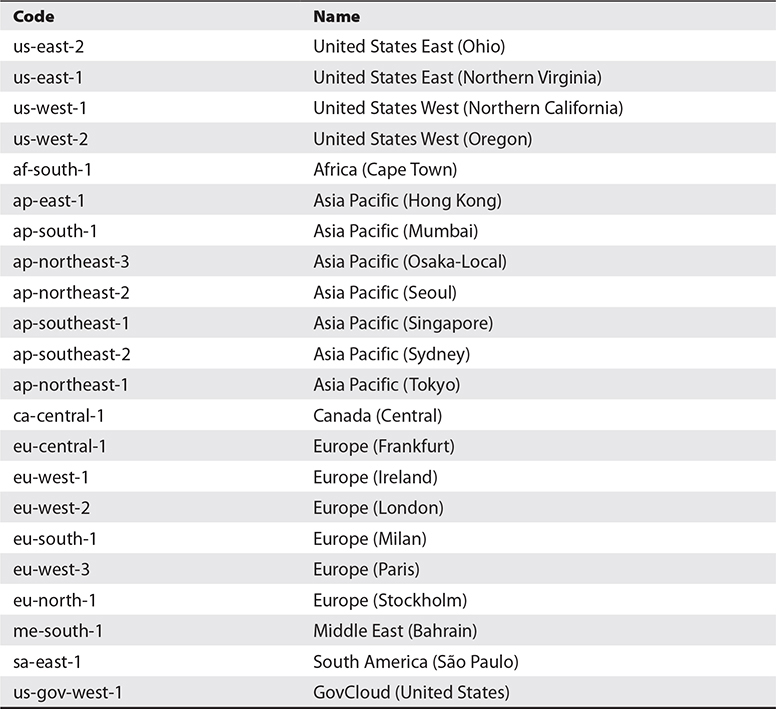
Table 4-1 AWS Global Regions
EXAM TIP Not all AWS regions are available to all AWS accounts. For example, the us-gov-west-1 is restricted to U.S. federal government accounts, and AWS accounts from China are restricted to special Beijing and Ningxia regions that are not otherwise accessible.
When you provision a resource, the decision of which region to locate it in can depend on a few different factors:
• Customer locations It makes sense to host your applications and resources closest to your customers. This will yield the fastest network times and responsiveness. The more global your business is, the more important it will be to spread resources around, but for many smaller businesses, it is easy to locate everything close to your location.
• Security requirements It may make sense, depending on your application’s needs and your appetite for risk, to completely separate resources or instances. While this can certainly be done logically within any region, you can also take the step of using completely different regions.
• Regulatory requirements Many jurisdictions have regulatory requirements that dictate how personal and financial data can be used and transported. In many instances they are required to stay within geographic areas or within their own borders. The many regions that AWS offers make compliance with jurisdictional requirements a lot easier for companies.
EXAM TIP The use of regions for regulatory compliance is very important. Most regulations are built upon where the data resides or is being processed, and the ability within AWS to control, with most services, where that happens makes compliance much easier!
Service Endpoints
To keep order and make it easier to know what service you are using, as well as the region hosting it, all AWS services use endpoints that are formulaic in nature. This enables anyone with knowledge of the AWS topography to quickly know where and what a service is just by seeing the endpoint.
The construction of AWS service endpoints uses the following formula:
AWS service designation + AWS region + amazonaws.com
An example endpoint is ec2.eu-west-2.amazonaws.com
This example would be for an EC2 instance located in the Europe West 2 region (London). All services follow this type of nomenclature, and you will see it used throughout the sections on specific services. You may have seen this naming convention already through services you have used as a customer or URLs that are provided for resources.
Availability Zones
While regions represent a group or cluster of physical data centers, an AWS Availability Zone represents those actual physical locations. Each AWS data center is built with fully independent and redundant power, cooling, networking, and physical computing hardware. All network connections are dedicated lines, supporting the highest possible throughput and lowest levels of latency.
As each region is made up of multiple Availability Zones, there are direct connections for networking access between them, and all traffic is encrypted. This allows resources within a region to be spread out and clustered between the Availability Zones, without worrying about latency or security. Replication between Availability Zones allows for high availability should one of them experience an incident, such as a power outage, earthquake, or other natural disaster. All Availability Zones within a region are separated physically but are still within 60 miles (100 kilometers) of each other.
When you provision resources within AWS, you will select the region from one of those listed in Table 4-1, but then you will also select the Availability Zone within that region. This will be designated by a letter after the region, such as eu-south-1a. The list will contain all of those that are available within that region, increasing letters through the alphabet. However, when you are presented with the list of Availability Zones, they will be in a randomized order to better facilitate distribution and prevent users from just selecting the first one listed and everything ending up on the “a” Availability Zone.
Edge Locations
To provide optimal responsiveness for customers, AWS maintains a network of Edge locations throughout the world to provide ultra-low-latency access to data. These locations are geographically dispersed throughout the world to be close to customers and organizations in order to provide the fastest response times. Unlike regular AWS regions and Availability Zones, Edge locations are optimized to perform a narrow set of tasks and duties, allowing them to be optimally tuned and maintained for their intended focus, without being burdened by the full range of AWS services. Figure 4-6 shows the current location of Edge services. The current map can always be found at https://aws.amazon.com/cloudfront/features/.
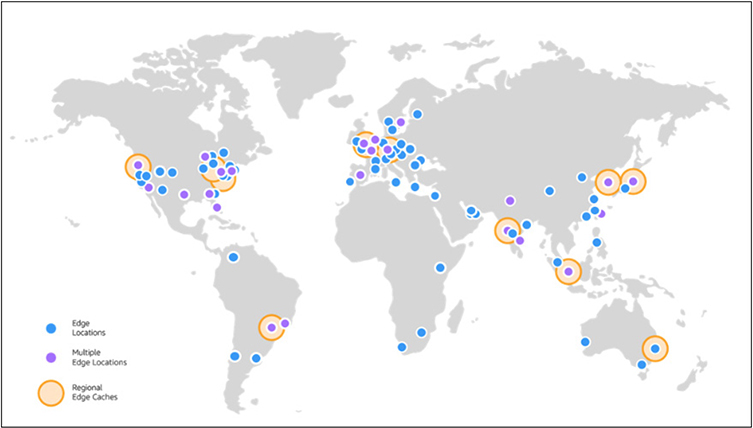
Figure 4-6 AWS Edge locations throughout the world
Services That Use Edge
As mentioned, Edge locations run a minimal set of services to optimize delivery speeds.
• Amazon CloudFront A content delivery network (CDN) that allows cached copies of data and content to be distributed on Edge servers closest to customers. This also allows repeated access to data without having to reach back to the source systems each time. Data transfers from AWS Services to CloudFront are free and do not count towards any bandwidth metering or caps.
• Amazon Route 53 The AWS DNS service that provides very fast, robust, and redundant lookup services.
• AWS Shield The AWS Distributed Denial of Service (DDoS) protection service that constantly monitors and reacts to any DDoS attacks.
• AWS WAF The AWS Web Application Firewall (WAF) that monitors and protects against web exploits and attacks based on rules that inspect traffic and requests.
• Lambda@Edge Provides a runtime environment for application code to be run on a CDN without having to provision systems or manage them. Customers pay only for the compute time they use.
Core AWS Services
AWS offers a large number of core services that are widely used and well known throughout the IT world. While we will not go through all services offered by AWS, we will touch on the most prominent ones in each category:
• Administrative, monitoring, and security services
• Networking and content delivery
• Storage
• Compute services
• Databases
• Automation
• End user computing
Administrative, Monitoring, and Security Services
AWS offers robust monitoring and auditing tools that span the breadth of all AWS service offerings. Monitoring systems are designed to collect and consolidate event data and auditing information from any services allocated under your account and provide them to you from a uniform and centralized dashboard.
CloudWatch
CloudWatch is the AWS service for monitoring and measuring services running within the AWS environment. It provides data and insights on application performance and how it may change over time, resource utilization, and a centralized and consolidated view of the overall health of systems and services. It is very useful to developers, engineers, and managers.
With any IT system, large amounts of data are produced in the form of system and application logs, but also data on performance and metrics. Across large systems, this can result in a large amount of data that is coming from many different sources. This can pose considerable challenges ranging from anyone looking to synthesize the data and formulate a picture of system health and performance, down to developers looking for specific events or instances within applications. CloudWatch collects and consolidates all of this data into a single service, making it much easier and more efficient to access. With this consolidation, developers and managers can see a picture of their overall systems and how they are performing, versus looking at individual systems or components of systems separately.
CloudWatch also integrates with the full range of services that AWS offers. If you are using a combination of different services, rather than having a dashboard and data for each individual service, you can get a full picture of everything together. CloudWatch even has agents that can be used to monitor on-premises systems, along with those hosted in AWS, for those that are using a hybrid cloud model. All of the data that is collected by CloudWatch is published with detailed one-minute metrics, but also offers the availability of custom metrics that can be done with one-second granularity, offering developers the ability to really drill down to the data points that they need. CloudWatch will keep data for up to 15 months.
Apart from the consolidation and presentation of data, CloudWatch extends its powerful capabilities with the concept of alarms. Alarms are based on predefined thresholds or through the use of machine learning algorithms and can trigger automated processes as a result. A prime example of the use of alarms is for auto-scaling based upon load or other thresholds, both with increasing and decreasing of allocated resources. Alarms can also be used to trigger workflows across the different AWS services since they are done from a consolidated standpoint and are not siloed within a particular service.
CloudTrail
CloudTrail is the AWS service for performing auditing and compliance within your AWS account. CloudTrail pairs with CloudWatch to analyze all the logs and data collected from the services within your account, which can then be audited and monitored for all activities done by users and admins within your account. This enables a full compliance capability and will store an historical record of all account activities. Should any investigations become necessary, all of the data is preserved and easily searchable.
CloudTrail will log all account activities performed, regardless of the method through which they were done. It logs all activity through the Management Console, CLI, and any API calls that are made, along with the originating IP address and all time and date data. If any unauthorized changes are made, or if a change causes a disruption in services or system problems, the logs and reports available can enable an admin to quickly determine what was done and by whom.
CloudTrail also has the ability to trigger automation processes based on detected events. For example, if a certain type of API call is made, CloudTrail can trigger certain alerts to happen, or even the initiation of policies or other service changes.
AWS Shield
AWS Shield provides protection from and mitigation of DDoS attacks on AWS services. It is always active and monitoring AWS services, providing continual coverage without needing to engage AWS support for assistance should an attack occur. AWS Shield comes in two different service categories: Standard and Advanced.
Standard coverage is provided at no additional charge and is designed to protect against common DDoS attacks, especially for any accounts utilizing CloudFront and Route 53. This will protect websites and applications from the most frequently occurring attacks and virtually all known attacks on Layer 3 and 4 against CloudFront and Route 53.
For accounts that use more complex and large systems across EC2, ELB, and many other services, there is an Advanced tier of service that comes at an additional cost. This advanced offering protects against a wider range of attacks and includes more sophisticated mitigation capabilities, along with 24-hour access to the AWS DDoS Response team. The Advanced tier will provide the best protection against attacks that can incur substantial costs from resource utilization.
AWS WAF
AWS WAF is a web application firewall that protects web applications against many common attacks. AWS WAF comes with an array of preconfigured rules from AWS that will offer comprehensive protection based on common top security risks, but you also have the ability to create your own rules. The AWS WAF includes an API that can be used to automate rule creation and deployment of them to your allocated resources. Also included is a real-time view into your web traffic that you can then use to automatically create new rules and alerts.
AWS WAF is included at no additional cost for anyone who has purchased the AWS Shield Advanced tier. If you are not utilizing the Advanced Shield tier, you can use AWS WAF separately and will only incur costs based on the number of rules you create and the number of requests they service.
EXAM TIP Remember the difference between Shield and WAF. Shield operates at the Layer 3 and 4 network levels and is used to prevent DDoS attacks, versus WAF that operates at the Layer 7 content level and can take action based on the specific contents of web traffic and requests.
Networking and Content Delivery
AWS offers robust networking and content delivery systems that are designed to optimize low latency and responsiveness to any queries, as well as complete fault tolerance and high availability. On top of the base network offers are robust security offerings through a Virtual Private Cloud topography, that include multiple layers of security controls, load balancing, and DNS services.
Virtual Private Cloud
With Amazon Virtual Private Cloud (Amazon VPC), you can create a logically defined space within AWS to create an isolated virtual network. Within this network, you retain full control over how the network is defined and allocated. You fully control the IP space, subnets, routing tables, and network gateway settings within your VPC, and you have full use of both IPv4 and IPv6.
You can provision network topographies within VPC much like you would in any kind of data center. You can have both public-facing and private network segments. For example, you can have one network segment that is open to the Internet where you host applications like web systems and other network segments that are not exposed to the Internet where you can host databases and other protected systems.
A common use for VPC is for disaster recovery planning. An organization can replicate network configurations and topographies from other cloud systems or from their own on-premise data centers into AWS for a low cost. An organization can regularly import their virtual machine instances into AWS, while also having the ability to easily replicate them back to the origin once a disaster situation has been recovered from. This allows an organization to get up to full resource levels and only incur substantial costs when it is actually needed to sustain operations, rather than paying for full systems at all times, like typically would be required.
AWS VPC also has the ability for an organization to essentially extend their corporate network into the cloud. By connecting your corporate network to AWS VPC, all of your current security mechanisms, such as firewalls, are retained and the resources in AWS inherit the same protections as if they were within your corporate network. This enables the use of storage and virtual machines in AWS, while retaining your already existing resources. Rather than having to buy additional hardware, especially for projects that are temporary, you can leverage AWS resources and only pay for what is needed and when it is needed.
Security Groups Security groups in AWS are virtual firewalls that are used to control inbound and outbound traffic. Security groups are applied on the actual instance within a VPC versus at the subnet level. This means that in a VPC where you have many services or virtual machines deployed, each one can have different security groups applied to them. In fact, each instance can have up to five security groups applied to it, allowing different policies to be enforced and maintain granularity and flexibility for administrators and developers.
When you launch an instance of a service like EC2, you specify a security group in the initial configuration, or it will automatically assign to the default group if you do not. You can also create a new security group on the fly when you launch an EC2 instance if necessary. Security groups that are created can only be used within the VPC specified when they were created. The following also apply to security groups:
• Security groups can have different rules for inbound and outbound traffic.
• By default, security groups allow all outbound traffic, but no inbound rules are applied by default.
• When specifying rules, you do them in the format of things allowed, not things denied.
• Security groups will automatically allow traffic that is in response to a request made by an allowed rule. For example, if an inbound request is allowed to be made, the corresponding reply is allowed to be made as well, regardless of what the rules specifically allow.
ACLs Access control lists (ACLs) are security layers on the VPC that control traffic at the subnet level. This differs from security groups that are on each specific instance. However, many times both will be used for additional layers of security. The following are key aspects of ACLs:
• A VPC comes with a default ACL that allows all inbound and outbound traffic.
• Any custom ACLs will by default deny all inbound and outbound traffic until specific rules are applied to them.
• Every subnet must have an ACL assigned to it, either the default ACL or a custom one.
• Each subnet may only have one ACL attached to it, but ACLs can be used for multiple subnets.
• An ACL is composed of a numbered set of rules that are processed in order.
• ACLs can have different rules for both inbound and outbound traffic.
• Differing from security groups, an ACL can have both allow and deny rules.
• Unlike security groups, ACL rules do not automatically have state and allow responses to queries. If an inbound request is made and allowed, an applicable outbound rule must be in place to allow the response to transmit.
Subnets Within a VPC, you must define a block of IP addresses that are available to it. These are called a Classless Inter-Domain Routing (CIDR) block. By default a VPC will be created with a CIDR of 172.31.0.0/16. This default block will encompass all IP addresses from 172.31.0.0 to 172.31.255.255.
You can also choose to define your own CIDR block using the same notation as a traditional data center with block sizes between /16 and /28. The smaller the number, the larger the number of addresses that are available to it. While the default block starts with 172.31, you can also specify your own desired block of addresses such as 10.10 or 192.168. This is useful if you are migrating applications into AWS or using a VPC that will also include your local network and need to match up with specifications you are already using.
Subnets are very useful for segmenting your VPC. You can use subnets to split up types of systems, public vs. private systems, or to apply different security groups. For example, if you have an application that has public-facing web servers along with back-end application or database servers, you can place the two types of systems in separate subnets. That way, you can apply a security group to the public-facing servers to allow Internet access and a different security group to the application/database servers to only allow connections from the web servers, not from the public Internet. You can use routing tables to connect subnets across the AWS infrastructure for your particular needs.
NOTE While the default subnet configuration for AWS uses IPv4 addressing, IPv6 is also available if desired or required.
Elastic Load Balancing
Elastic Load Balancing is used to distribute traffic across the AWS infrastructure. This can be done on varying degrees of granularity, ranging from spanning across multiple Availability Zones or within a single Availability Zone. It is focused on fault tolerance by implementing high availability, security, and auto-scaling capabilities. There are three different types of load balancing under its umbrella: application load balancer, network load balancer, and classic load balancer.
Application load balancing is most typically related to web traffic on both HTTP and HTTPS protocols. It has the ability to analyze the actual contents of the traffic and make determinations for routing and balancing based on rules. It is a very powerful method of load balancing that allows developers to optimize the responsiveness of their applications and segment traffic for either security or performance reasons. Application load balancing operates at Layer 7 of the OSI model, which lends to the ability to scope load balancing rules that are very specific to each individual application and the underlying ways in which they are architected. Application load balancing within AWS operates within a VPC, so it can be used across hybrid cloud models as well.
NOTE Layer 7 of the OSI model pertains to the actual web traffic and content. Developers can take advantage of data such as the HTTP method, URL, parameters, headers, etc., in order to tune load balancing based on the specifics of their applications and the type of traffic and user queries it receives.
Network load balancing is best where performance is key and there are potentially very high levels of traffic. Network load balancing is done at the Layer 4 level of the OSI model, so it is purely based on protocols and source/destination of traffic. It does not have the capabilities of application load balancing, where it can analyze the actual content of traffic and make decisions based on it. It also operates within a VPC, so it can bridge between different environments in a hybrid model and is capable of handling millions of requests per second while maintaining ultra-low latency. A network load balancer is an optimal service to use where sudden or volatile traffic patterns are anticipated with data access, as it can better handle such loads versus application load balancing.
The third and final type of load balancing is the classic load balancing service. This is only used for basic load balancing between EC2 instances that were building on the EC2-Classic network and is not used for modern applications and new services.
Route 53
Amazon Route 53 is a robust, scalable, and highly available DNS service. Rather than running their own DNS services or being dependent on another commercial service, an organization can utilize Route 53 to transform names into their IP address, as well as having full IPv6 compatibility and access. Route 53 can be used for services that reside inside AWS, as well as those outside of AWS.
Extending on traditional DNS services, Route 53 has the ability to configure health checks and monitor systems, enabling the routing of DNS queries to healthy systems or those with lower load. Traditional DNS systems will only rotate between IP addresses that are configured for a name and do not have the ability to make informed decisions on where to route based on the health of systems or the current look of traffic. For example, Route 53 DNS resolution can return different answers based on geographic location, current latency of systems, or pure round-robin. Route 53 is fully integrated with the full suite of AWS services and can automatically handle DNS assignments for any service, such as EC2, CloudFront, Elastic Beanstalk, etc.
Along with all the other AWS services, pricing for Route 53 is based upon what features you use and the number of queries you get.
CloudFront
Amazon CloudFront is a CDN that allows for delivery of data and media to users with the lowest levels of latency and the highest levels of transfer speeds. This is done by having CloudFront systems distributed across the entire AWS global infrastructure and fully integrated with many AWS services, such as S3, EC2, and Elastic Load Balancing. CloudFront optimizes speed and delivery by directing user queries to the closest locations to their requests. This is especially valuable and useful for high-resource-demand media such as live and streaming video.
CloudFront offers extensive security benefits to account holders that are included in the standard costs for the service. This includes the ability to create custom SSL certificates through the AWS Certificate Manager. CloudFront also includes built-in security protections from the AWS Shield Standard, which is also included at no additional cost.
CloudFront allows developers and administrators full access to configuration options through the standard array of AWS tools, including APIs and the Management Console.
Storage
AWS offers extremely fast and expandable storage to meet the needs of any application or system. These offerings range from block storage used by EC2 instances to the widely used object storage of S3. AWS offers different tiers of storage to meet specific needs of production data processing systems versus those for archiving and long-term storage.
Elastic Block Store
Amazon Elastic Block Storage (EBS) is high-performance block storage that is used in conjunction with EC2 where high-throughput data operations are required. This will typically include file systems, media services, and relational and nonrelational databases. There are four types of EBS volumes that a user can pick from to meet their specific needs. Two of the volume types feature storage backed by solid-state drives (SSDs) and two use traditional hard disk drives (HDDs). Figure 4-7 shows the four types of EBS volumes and their key technical specifications.
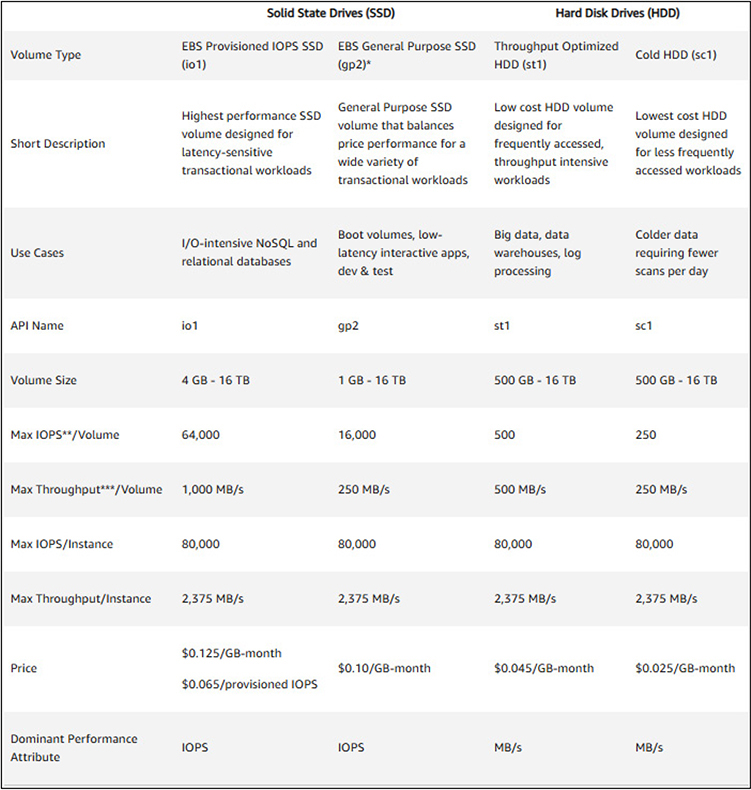
Figure 4-7 The four types of EBS volumes along with the key technical specifications and features of each
NOTE As with all AWS services, there is constant change and new types of volumes being introduced. In August 2020, AWS announced a new io2 EBS volume type that will double the input/output operations per second (IOPS) from io1 and increases the level of reliability. You can create new volumes with io2 type or can convert new volumes to it.
S3
Amazon Simple Storage Service (S3) is the most prominent and widely used storage service under AWS. It offers object storage at incredibly high availability levels, with stringent security and backups, and is used for everything from websites, backups, and archives to big data implementations.
Unlike EBS, which resembles a traditional file system with directories and files, S3 is an object file system that is flat in nature and stores files within a bucket. Rather than filenames that are organized in layers of directories, all objects are on the same level and use an alpha-numeric key value for an object name, which can be up to 1,024 bytes long. When you create a bucket, you will give it a name that is between 3 and 63 characters in length and must be globally unique within AWS. Each bucket can only exist within a single AWS region, but data can be replicated between multiple regions for improved speed and lower latency for access. By having each bucket only in a single region, regulatory compliance is easier to maintain based on the location of the region, allowing you to also keep your data in specific regions.
As each piece of data is its own object, each can have its own independent configurations, including tier of storage, security settings, backup configurations, etc. This allows S3 to meet any needs of a company for their object storage and maintain any level of granularity necessary.
EXAM TIP Remember that bucket names must be globally unique within AWS, and each bucket can only exist within one region.
S3 Storage Classes S3 offers four storage classes for users to pick from, depending on their particular needs. Storage classes are set at the object level, and a bucket for a user may contain objects using any of the storage classes concurrently. Figure 4-8 shows each type of S3 storage class and their key specifications.
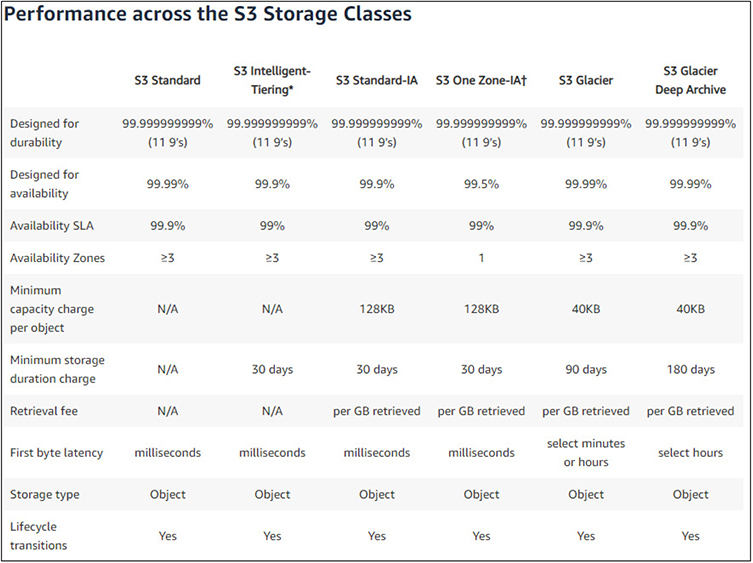
Figure 4-8 The S3 storage classes and their key technical specifications and features
• S3 Standard Used for commonly accessed data and is optimized for high-throughput and low-latency service. Used widely for cloud applications, websites, content distribution, and data analytics. Encryption is supported for data both at rest and in transit and is resilient to the loss of an entire Availability Zone.
• S3 Intelligent-Tiering Best used for data where usage patterns are unknown or may change over time. This class works by spanning objects across two tiers: one that is optimized for frequent access and the other for lesser access. For a small monitoring fee, AWS will automatically move an object between the two tiers based on access. If an object is not accessed for 30 days, it is automatically moved to the lower-cost tier. Once it is accessed, it is moved back and the clock starts anew. Use of this tier allows users to save money without having to manually monitor and update classes.
• S3 Standard-Infrequent Access Ideally used where access will be infrequent for an object, but when access is requested, a quick response is necessary. This is often used for backups and disaster recovery files that are not accessed with any regularity, but when needed there is an immediacy requirement.
• S3 One Zone-Infrequent Access Ideal for data that is infrequently used, requires quick access when it is accessed, but does not require the robust fault tolerance and replication of other S3 classes. Rather than being spread across the typical three Availability Zones, objects under this storage class are housed on a single Availability Zone. This realizes costs savings for users, as it is cheaper than other S3 storage classes that span multiple Availability Zones.
S3 Permissions AWS S3 offers three different layers of permissions and security controls on S3 objects: bucket, user, and object access control lists.
With bucket policies, security policies are applied at the level of the bucket. These policies can apply to all objects within the bucket or just some objects. For example, for a private bucket that you desire to only allow internal access to objects, a bucket-level policy can be applied that automatically protects every object within it. However, if you have a mix of objects in your bucket, you may have some that are protected to specific users for access, while others, such as those used for public web pages, are open and available to the entire Internet. As the policies are applied to objects, the ability to read, write, and delete objects can all be controlled separately.
Policies can also be applied at the user level. For the accounts you created through the IAM process, you can grant control to those accounts to your S3 objects without the use of a bucket policy. This can be particularly useful where you have users designated to manage objects that may span across multiple buckets and will negate the need to set up bucket policies on each as they are created.
ACLs are legacy methods for controlling access to S3 objects and have mostly been superseded by bucket and user policies. However, they are still available for use, but have distinct limitations as compared to the features available with bucket and user policies and are not recommended to be used for any new setups.
S3 Encryption When you upload any objects to S3, the data within the object is static and written to storage within the AWS infrastructure. If you upload an object that contains personal or sensitive data, that will now reside in AWS and be accessible based upon the policies and security controls that you have applied to it. While the bucket and user policies you have in place will be applied to those objects, it is possible to upload data that should be protected and somehow slips through your policies for various reasons.
To add another layer of security, especially for those objects that contain sensitive data and are instead to be used for archiving and backups, encryption can also be applied to the data object before it is stored in S3. As this encryption pertains to stored objects, it would be classified as encryption at rest and it can be implemented at either the server side or client side.
With server-side encryption, S3 will automatically encrypt data objects that you upload before they are stored and will decrypt them when accessed and pass the data back to you. While this is the easiest encryption method to implement with S3, it may not meet your specific needs, as AWS will have access to your data. Since AWS is handling the encryption and decryption, they are also managing the encryption keys and have access to them. This will definitely give a high degree of protection for your data, but depending upon your specific needs, regulatory requirements, or company policies, this may not be a desirable approach for you to use. Typically with server-side encryption AWS will generate the keys to use, but there is also the option for AWS to use a key that you provide. AWS will then use your key to perform encryption, but the user retains ownership over their keys.
With client-side encryption, the data object is encrypted before it is uploaded into S3 and then decrypted after the data is returned back from AWS. With this implementation, AWS does not manage the keys and does not have any access to the encrypted data within the object. The user is responsible for managing the encryption process and their own encryption keys. It is very important for the user to not lose their encryption keys or they will be unable to access their data, but it will provide the most security to the user and assurances that only they can read their data.
S3 Versioning By default, when you update an object in S3, it overwrites and replaces what you previously had uploaded. In many cases this is fine, but it puts the responsibility on the user to ensure they have a backup copy of the object or to otherwise preserve the previous copy. Without doing so, once they have uploaded a new copy, whatever existed before is gone.
A way to mitigate this problem, and to alleviate the need to actively preserve the data yourself, you can enable versioning on an S3 bucket. Versioning can only be enabled at the bucket level and applies to all objects within the bucket. Once you have it enabled, when you upload a new copy of an object, S3 will preserve the previous copy. The same happens when you delete an object. It is marked as deleted but is actually still available, though not through the usual means to access the object.
One thing to note, with versioning enabled, you will incur additional costs as each new version is maintained and adds to your overall storage footprint. You can manually delete version archives of an object or use automated methods to do so. Once you have enabled versioning, there is no default limitation to the number of versions that are retained. If you have some objects that are updated regularly, the number of copies and costs can quickly increase.
S3 Object Life Cycle To help manage versioning in AWS S3, the service provides automation tools, called actions, to handle how versions are stored and when they are removed from the system. This will be particularly useful as the number of objects you have increases or with objects that are regularly updated and will begin to accrue a large number of versions.
The first type of action is a transition action. A transition action will move S3 objects to a different storage class after it reaches a certain age. This will allow you to move objects to cheaper storage after they have been stored for a time frame that you specify and allow you to save costs by using cheaper storage. For example, if you are uploading archives of data, you can allow them to stay in Standard storage for 30 days and then automatically move to Standard-IA at that point. However, make sure you properly provision and use buckets based on the type of usage of the objects. If you have objects such as web content that is stored in S3, you will not likely want them to transition to slower and cheaper storage. If you are using objects for archives, then using a transition would make perfect sense. A strategy to manage this would be through the use of different buckets, as transition actions are done at the bucket level.
The second type of action is an expiration action. This action will automatically expire and remove objects once they reach a certain date. While you may not want to apply this to typical data objects, it is very useful to use with versioning enabled. You can configure the action to automatically remove versions after they reach a certain age, such as 90 days. This would allow you to keep versioning in place to prevent the accidental overwriting and loss of data from previous copies but prevent the continual accrual of previous copies of data objects and the associated increased costs that go with them.
With either transition or expiration actions, they are configured and applied at the bucket level, not the individual object.
S3 Glacier and S3 Glacier Deep
S3 Glacier is a special type of S3 storage that is intended to be a secure solution for long-term data archiving and backups. As compared to regular S3 storage options, Glacier is offered at significant cost savings. These savings are much greater when compared to the costs of on-premises storage solutions for long-term archiving. Depending on retrieval needs, S3 Glacier Deep is a subset of Glacier that is intended for the longest-term storage with the least likely needs for retrieval.
S3 Glacier has three different service offerings to meet varying requirements from users, along with two options for S3 Glacier Deep. Which option is chosen will dictate the costs associated with the service.
The three retrieval options for S3 Glacier are
• Expedited Offers retrieval options that will typically return within one to five minutes. This is the appropriate choice for archived data that may need to be accessed frequently or with data that will have business requirements for very quick retrieval when requested.
• Standard Offers retrieval options that will typically return in three to five hours. This is an appropriate choice for typical archives and backups that do not have a need for immediacy in retrieval.
• Bulk Offers retrieval times of 5 to 12 hours and is the best option for very large retrievals.
With S3 Glacier Deep, there are two options for retrieval times that range between 12 and 48 hours for data access.
One of the key features of S3 Glacier has to do with security and regulatory compliance of archives. S3 Glacier uses powerful encryption that is standard across AWS and integrates with CloudTrail to provide full logging and auditing of all actions taken against archived volumes. The systems in place with the S3 Glacier service meet or exceed regulatory requirements from most major global organizations, including PCI-DSS, HIPAA, FedRAMP, GDPR, and FISMA.
AWS Storage Gateway
The AWS Storage Gateway provides storage for hybrid cloud services that gives access to your on-premises resources to the full array of storage services in AWS. This enables a customer to extend their storage capabilities into AWS seamlessly and with very low latency. A common usage of Storage Gateway is for customers to use AWS to store backups of images from their on-premises environment, or to use the AWS Cloud storage to back their file shares. Many customers also utilize Storage Gateway as a key component to their disaster recovery strategy and planning.
The Storage Gateway is designed to interact with the most commonly used storage protocols, such as iSCSI, NFS, and SMB, to simplify integration with existing systems and processes. The Storage Gateway offers three types of gateways that each serve different purposes: file, tape, and volume.
File gateway is used either for backups or storing of actual application data files to AWS. It works by providing a local cache of storage that is then synced to AWS S3 storage via SMB or NFS file stores. It can be used for storage of files for on-premises systems and works much the same way as OneDrive or iCloud, where local files are synchronized to the cloud for backup purposes. It can also be used in hybrid cloud implementations where both on-premises and EC2 systems in AWS both need access to the same files.
Tape gateway provides a method for customers to utilize AWS storage systems in lieu of tape-based systems for backups. It can integrate with already used systems that customers already have and allow the uploading of tape images to AWS for storing instead of maintaining legacy tape systems in data centers, along with the hardware and facilities costs associated with them.
Volume gateway facilitates the usage of AWS-based iSCSI block storage volumes for on-premises applications. It allows for the storing of files in AWS with a local cache. Customers can also utilize snapshots for backup or disaster recovery purposes.
AWS Backup
AWS Backup provides backup services for all AWS services. It provides a single resource to configure backup policies and monitor their usage and success across any services that you have allocated. This allows administrators to access a single location for all backup services without having to separately configure and monitor on a per-service basis across AWS. From the AWS Backup console, users can fully automate backups and perform operations such as encryption and auditing. AWS Backup has been certified as compliant with many regulatory requirements such as HIPAA, PCI, and ISO, making compliance and the generation of reports trivial.
AWS Backup can also be leveraged in conjunction with the AWS Storage Gateway to provide backups in hybrid cloud implementations for on-premises resources. This functionality can be used as part of a disaster recovery plan, as backup images can easily be restored to on-premises systems or in the AWS Cloud. The same backup policies and automations that are available with AWS services are also available through the Storage Gateway and in hybrid implementations, along with the same benefits of compliance with regulatory requirements.
AWS Snow
AWS Snow is designed for offering compute and storage capabilities to those organizations or places that are outside the areas where AWS regions and resources operate. Snow is based on hardware devices that contain substantial compute and storage resources that can be used both as devices for data processing away from the cloud and as a means to get data into and out of AWS. This is particularly useful in situations where high-speed or reliable networking is not possible.
AWS Snow comes in three different tiers: AWS Snowcone, AWS Snowball, and AWS Snowmobile. All three tiers use 256-bit encryption.
AWS Snowcone is a small hardware device that is easily portable, weighing about 4.5 pounds and measuring 9 inches long, 6 inches wide, and 3 inches tall. It includes 8TB of useable storage and contains 2 vCPUs of compute power, along with 4GB of memory. It has two 1/10 Gbit network interfaces, as well as Wi-Fi capabilities, and can operate on battery power.
AWS Snowball is a larger device that comes in two flavors, one focused on storage and one focused on compute. As opposed to the smaller Snowcone device, the Snowball device weighs 49.7 pounds and measures 28.3 inches long, 10.6 inches wide, and 15.5 inches tall. The model focused on storage has 80TB of useable storage, 40vCPUs, and 80GB of memory. The model focused on compute has 42TB of usable storage, 42vCPUs, and 208GB of memory. Both models feature two 10-Gbit network interfaces, a 25 Gbit interface, and a 100 Gbit interface, but unlike the Snowcone device, they do not have Wi-Fi support.
Lastly is the Snowmobile service, which is used exclusively for the transfer of very large data sets between AWS and outside storage, typically an external data center. The Snowmobile is a 45-foot ruggedized shipping container that is outfitted with 100 petabytes of storage capacity. It is driven to the site of the customer and connected for data transfer. It is then transported to an AWS data center, connected to the network, and data is transferred into the Amazon S3 service. The container is secured during transport through multiple physical and logical means, including encryption, environmental protection, and a security team escort.
Compute Services
With any system or application, you need an underlying compute infrastructure to actually run your code, content, or services. AWS offers the ability through EC2 to run full virtual instances that you maintain control over and can customize as much as you like, as well as managed environments that allow you to just upload your content or code and be quickly running, without having to worry about the underlying environment.
EC2
Amazon Elastic Compute Cloud (EC2) is the main offering for virtual servers in the cloud. It allows users to create and deploy compute instances that they will retain full control over and offers a variety of configuration options for resources.
Amazon Machine Images Amazon Machine Images (AMIs) are the basis of virtual compute instances in AWS. An image is basically a data object that is a bootable virtual machine and can be deployed throughout the AWS infrastructure. AMIs can be either those offered by AWS through their Quick Start options, those offered by vendors through the AWS Marketplace, or those created by users for their own specific needs.
The AWS Quick Start offers virtual machines from many popular vendor flavors. There are over three dozen in the Quick Start menu and include Microsoft Windows, Red Hat Enterprise Linux (RHEL), Ubuntu Linux, or AWS’s own version of Linux called AWS Linux. Each of these offerings has multiple versions available. When you look through the Quick Start options, you will notice that many are available as part of the Free Tier offerings that we are using with our test accounts. These will all be clearly labeled as “Free tier eligible,” as shown in Figure 4-9.
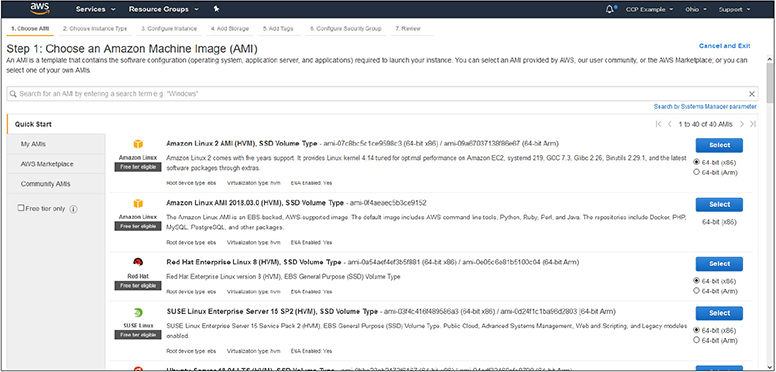
Figure 4-9 The Quick Start menu showing the types of images available. Notice the “Free tier eligible” flags
Many of the Linux offerings will be free to use. However, offerings such as Microsoft Windows and RHEL will incur licensing charges that will be applied once an instance is launched. The menu offers different versions of images that are also optimized for specific uses, such as those built specifically for containers or for hosting Microsoft SQL Server. For each image presented, you will notice that some are listed specifically for offering SSD storage or different OS release levels or versions.
Apart from the images offered under the Quick Start menu, the AWS Marketplace offers images from many vendors for their specific products. For example, you will find images from companies such as SAP that will offer fully configured images for their software platforms that are ready to deploy. When you select an image from the Marketplace, you may have the option of a trial period to see if it will work for your needs before you incur costs from the vendor. Pricing for images from the Marketplace will be divided into two costs. The first cost will be the charge from the vendor for the use of the image itself, specifically licensing costs. The second cost will be the EC2 costs of hosting the image and the resources it requires from the AWS services perspective. The two combined will be the actual cost of using the image. Within the Marketplace you will also find an enormous number of community images that are offered by others who have built and configured them. Some of these are from actual companies or development groups, but others may be offered by the individuals that created them. Take special care with the use of community images and the responsibilities you will be taking on using and supporting them going forward if they are not maintained actively or if the creator takes no responsibility for their use.
EXAM TIP Remember that costs for Marketplace applications will be presented as two costs. The licensing costs from the vendor for use of the image, as well as the EC2 costs for hosting it and the compute/storage resources it will consume.
Lastly, you have the ability to create your own images for use in AWS. This is done by taking a snapshot of the EBS storage volume you have created and configured, which will then be available to you to create new instances from. This is particularly useful when you want to use a base image and then install and configure your own software on top of it. Once you have the image where you need it to be, you can take a snapshot and then reuse as needed, without having to apply any software installations or configurations on each new instance. By creating your own instance, you will be taking the responsibility for patching and managing security issues for it going forward.
EC2 Instance Types EC2 instance types are where the underlying hardware resources are married with the type of image you are using. The instance type will dictate the type of CPU used, how many virtual CPUs (vCPUs) it has, how much memory, the type of storage used, network bandwidth, and the underlying EBS bandwidth.
Instance types are categorized by their intended purpose, and then several instance types are offered with base configuration and specifications within it, as shown in Table 4-2.
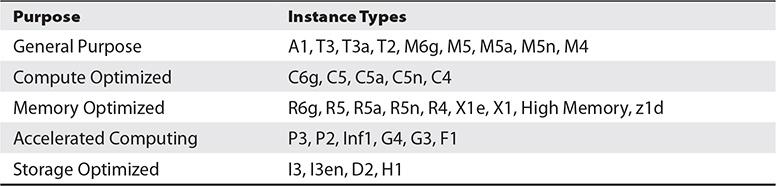
Table 4-2 The Instance Types and Their Purposes
You can find all of the instance types and tables of all configuration offerings at https://aws.amazon.com/ec2/instance-types/. This will break down each instance type, information about the specific types of processors it uses, network information, storage information, and any other specifics related to it. For example, Figure 4-10 shows the “A1” instance type from the “General Purpose” category and its technical specifications.
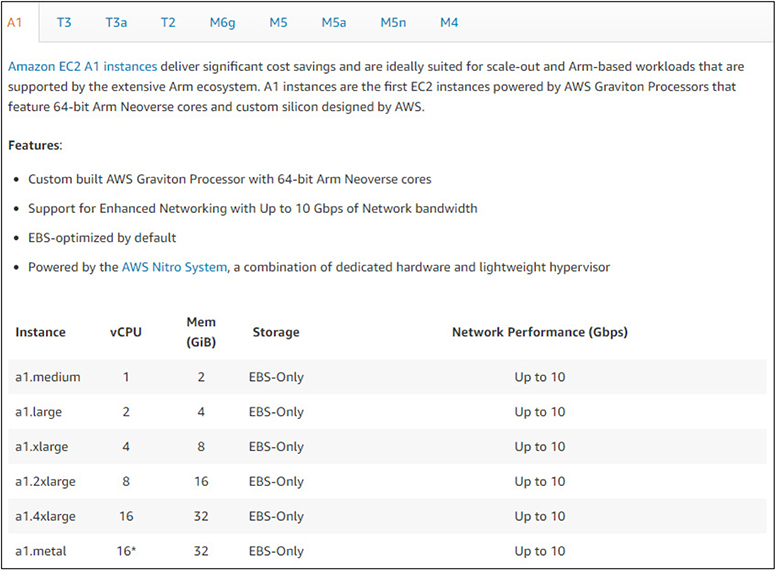
Figure 4-10 The “A1” instance type and its technical specifications from the “General Purpose” category
EXAM TIP It is not necessary to memorize all of the instance types and which purposes they associate with. However, make sure you know the five main categories/purposes of instance types.
Lightsail
Lightsail is the quickest way to get into AWS for new users. It offers blueprints that will configure fully ready systems and application stacks for you to immediately begin using and deploying your code or data into. Lightsail is fully managed by AWS and is designed to be a one-click deployment model to get you up and running quickly at a low cost.
Since Lightsail is fully managed and configured by AWS, it does not come with the same range offerings and images as EC2 does but will still cover the needs of many customers. If you start using Lightsail and later want to convert to the more powerful and customizable EC2 service, you can convert your Lightsail instances into EC2.
Many of the most popular operating systems, applications, or stacks are available with Lightsail, as shown in Figure 4-11.
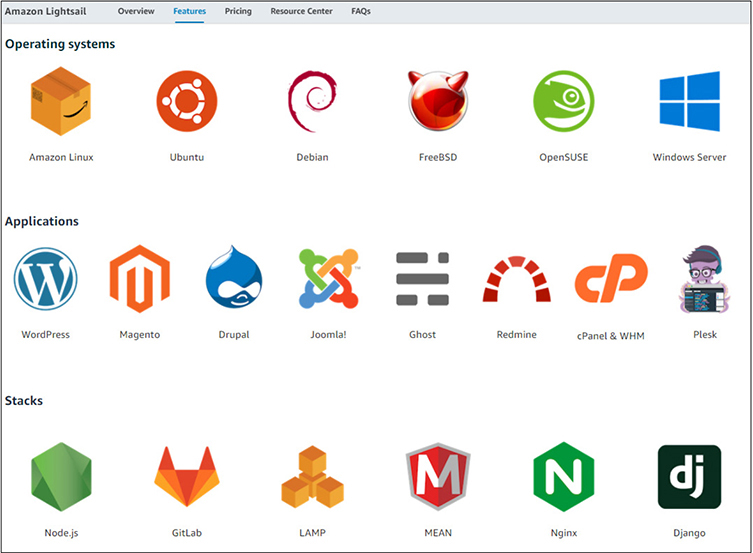
Figure 4-11 The operating systems, applications, and stacks available within the Lightsail service
Elastic Beanstalk
Elastic Beanstalk is designed to be even easier and quicker to get your applications up and running in than Lightsail is. With Elastic Beanstalk, you choose the application platform that your code is written in, such as Java, Node.js, PHP, or .NET. Once you provision the instance you can deploy your code into it and begin running. You only select the platform that you need—you do not select specific hardware or compute resources. AWS will automatically size your instance based on the traffic and compute needs and will upsize and downsize as load changes. Since you are not provisioning specific resources, you are billed for what you consume. This is particularly useful if you are using a web application that experiences a sudden spike in traffic—the AWS service will automatically meet your needs and size accordingly.
Lambda
AWS Lambda is a service for running code for virtually any application or back-end service. All you need to do is upload your code, and there are no systems or resources to manage. The code can be called by services or applications, and you will only incur costs based on the processing time and the number of times your code is called, as well as the memory that you allocate. You will always have the level of resources you need available to run your code without having to provision or monitor anything.
Containers
With typical server models, there is an enormous duplication of resources when replicas of systems are created. When you launch several instances of EC2, each one has its own operating system and underlying functions and services that are needed to run. Before your application code is even used, each instance is consuming a certain amount of compute resources just to exist. A modern approach to this problem has been through the use of containers, such as Docker. This allows a single system instance to host multiple virtual environments within it while leveraging the underlying infrastructure.
In AWS various AMIs are available from the Quick Start that are optimized for the use of container hosting. This allows for a user to pay for a single instance of EC2 but have multiple environments within it and sharing its compute resources. However, if you do not want to have to run EC2 instances, AWS offers two container solutions where you can deploy Docker containers but leverage a managed underlying infrastructure. The two AWS services that facilitate container hosting are the Amazon Elastic Container Service (ECS) and the Amazon Elastic Kubernetes Service (EKS). Both services will allow for the hosting of containers, the only difference being that EKS is the AWS-specific implementation of the popular open-source Kubernetes system.
Databases
As many modern applications are heavily dependent on databases, AWS has several database service offerings that will fit any type of use needed, ranging from relational databases to data warehousing. AWS provides robust tools for migrating databases from legacy and on-premises systems into AWS, as well as transitioning between different database services.
Database Models
Databases follow two general models. They can be either relational or nonrelational. Which one you use is entirely dependent on the needs of your application and the type of data it is accessing and dependent on.
Relational databases are often referred to as structured data. A relational database utilizes a primary key to track a unique record, but then can have many data elements associated with it. For example, with a company, a primary key may be a personnel number, with then many attached elements such as name, address, date of birth, phone number, etc. The concept of it being structured data is based on how each element must be predefined before it is populated, both with a name for the field and also what type of data it will contain. For example, a field for such a personnel number would be defined as a numeric field, and any attempt to put different data types into it would result in errors. This structure makes it possible to run very complex and layered queries against the database to return results to applications. You can run queries against any of the fields to obtain results; you are not restricted to queries just against the primary key. Within AWS, the Amazon Relational Database Service (RDS) is the primary relational database service.
Nonrelational databases are referred to as unstructured data. While their tables also utilize a primary key, the data paired with that primary key is not restricted to the type of data. This allows applications to store a variety of data within their tables. However, it also restricts queries against these tables to the primary key value, as the paired data could be in different formats and structures and would not be efficient or stable to query from applications generally. Having queries restricted to the primary key also makes these databases extremely fast to query as compared to relational databases. For applications that must handle massive amounts of data and need the fastest possible results, especially where only limited optimized queries are required, nonrelational databases are optimal. Within AWS, the DynamoDB service is the primary example of a nonrelational database and the massive throughput it is capable of.
EXAM TIP Make sure you understand the differences between relational and nonrelational databases and what they are used for, especially the key aspects of how they may be searched.
AWS Database Migration Service
That AWS Database Migration Service (DMS) is a tool for migrating data into AWS databases from existing databases with minimal downtime or other interruptions. The DMS can move data from most of the popular and widely used databases into the various AWS database services while the source system remains fully operational. DMS can do migrations where the source and destination databases are the same, such as moving from Microsoft SQL server from another location into a Microsoft SQL server database in AWS, but it can also perform migrations where they differ, such as moving from a Microsoft SQL server into the various AWS database services. Migrations can also be performed within AWS from source to destination. In either instance, data can be continuously synchronized from the source into AWS, allowing production cutover at whatever time best fits the needs for the system. When DMS is used to migrate data into an AWS database service, DMS is free to use for a period of six months.
More information about DMS, including detailed information on use cases for migration from prominent companies, can be found at https://aws.amazon.com/dms/.
NOTE The availability of DMS is a great opportunity for any users that have been contemplating changing back-end databases but have been cautious about the level of effort involved in the actual migration of data.
Amazon Relational Database Service
Amazon RDS is an umbrella service that incorporates several different kinds of database systems. Each system is fully managed by AWS and is optimized within the AWS infrastructure for memory, performance, and I/O. All aspects of database management, such as provisioning, configuration, maintenance, performance monitoring, and backups, are handled by AWS, which allows the user to fully focus on their applications and data.
The current offerings from AWS RDS are
• Microsoft SQL Server
• Oracle
• MariaDB
• MySQL
• PostgreSQL
• Amazon Aurora
Aligned with other AWS services, RDS will only incur costs for the resources you are actually using. You can also modify the allocated storage and compute resources provisioned for your RDS instances at any time and without downtime, either through the Management Console or through API calls, allowing for automation. RDS runs within the same global infrastructure as other AWS services, allowing for RDS services to be spread across multiple regions and Availability Zones like EC2, either with a standby instance or through the use of read-only replicas, depending on the requirements of your applications.
RDS runs within VPC, providing all of the security layers from it. It also allows on-premises applications to access RDS instances through your VPC and security group rules over encrypted IPsec channels and inherit all of the security controls within AWS such as encrypted storage.
You can get more detailed information about RDS and some information about actual implementations from some prominent companies at https://aws.amazon.com/rds.
Amazon Aurora Aurora is a subset of Amazon RDS that is compatible with both MySQL and PostgreSQL databases. It combines the features and simplicity of open-source databases with the robust management and security of AWS services. Aurora leverages the AWS infrastructure to offer highly optimized and fast database services, along with the robust security and reliability of AWS.
Aurora is a subset of the Amazon RDS database service. As such, it can fully leverage all of the automation features of RDS, along with the management of resource provisioning, configuration, and backups. It also inherits the fault-tolerance aspects of RDS, as it is distributed across multiple Availability Zones and continually backed up to S3 storage. Aurora can handle databases up to 64TB in size per instance and will only incur costs for those resources actually in use.
With Aurora being completely compatible with both MySQL and PostgreSQL, migration from existing on-premises systems or other virtual systems from both technologies is trivial. Aurora migrations can be fully leveraged through the AWS Database Migration Service.
DynamoDB
DynamoDB is the AWS key-value and document database solution for those applications that do not need a SQL or relational database but do need extremely high performance and scalable access to their data. As with other AWS services, DynamoDB is fully configured, maintained, and secured by AWS, so all the user needs to do is create a table and populate their data.
DynamoDB replicates tables automatically across multiple AWS regions to optimize performance and serve data from the closest location possible to the requests. AWS also offers memory caching through the DynamoDB Accelerator service for those applications that need the fastest possible access to data.
As DynamoDB is fully managed by AWS, there is nothing to configure other than populating your data. As there are no resources to provision, it will automatically scale up and down to meet your needs and adjust for capacity. High availability and fault tolerance are already built into the service, so they do not need to be provisioned or managed by the user, nor do any changes need to be made to application code to leverage either feature.
From a security standpoint, DynamoDB is fully encrypted and allows for granular access controls on tables. It is automatically backed up without any downtime or performance issues for applications and keeps 35 days of recovery points.
You can learn more about DynamoDB, along with case studies from many different market sectors and industries, at https://aws.amazon.com/dynamodb.
Amazon Redshift
Redshift is a cloud-based data warehouse solution offered by AWS. Unlike traditional on-premises data warehouses, Redshift leverages AWS storage to any capacity that is needed by a company, either now or into the future. Organizations only will incur costs for the storage they actually use, as well as the compute power they need to do analysis and retrieve data. Typically, an organization must spend money on having sufficient capacity and continually add both compute and storage infrastructure to support growth and expansion, resulting in expenses for idle systems. Redshift also has the advantage of costs being independent between storage and compute. This will properly fit resources to the needs of an organization that might need massive amounts of storage but uses little computing power to analyze it, along with the opposite—organizations that might not use as much data but continually run reports and queries. As an organization’s needs grow in either aspect, Redshift will automatically scale the resources available as needed.
Automation
In AWS, automation is essential to enable systems to be rapidly and correctly deployed and configured.
CloudFormation
CloudFormation implements an automated way to model infrastructure and resources within AWS via either a text file or through the use of programming languages. This allows administrators to build out templates for the provisioning of resources that can then be repeated in a secure and reliable manner. As you build new systems or replicate services, you can be assured that they are being done in a consistent and uniform manner, negating the process of building out from a base image and then having to apply different packages, configurations, or scripts to fully build up systems to a ready state. With the use of file-based templates, CloudFormation allows infrastructure and services to be treated as code. This allows administrators to use version control to track changes to the infrastructure and use build pipelines to deploy the infrastructure changes. CloudFormation not only helps with infrastructure, it can also help build and deploy your applications!
End-User Computing
AWS offers powerful tools to organizations to provide end-user computing such as virtual desktops and access to applications or internally protected websites.
WorkSpaces
Amazon WorkSpaces is a Desktop as a Service (DaaS) implementation that is built, maintained, configured, and secured through AWS as a managed service. WorkSpaces offers both Windows and Linux desktop solutions that can be quickly deployed anywhere throughout the AWS global infrastructure. As many organizations have moved to virtual desktop infrastructure (VDI) solutions, WorkSpaces enables them to offer the same solutions to their users without the need to actually purchase and maintain the hardware required for the VDI infrastructure, as well as the costs of managing and securing it. With the global nature of AWS infrastructure, the virtual desktops for users are available anywhere at any time and from any supported device. From the standpoint of security, WorkSpaces is fully encrypted and operates within your VPC. Users’ data is maintained within the WorkSpaces service and is not present on the actual devices used to access it, providing additional security should those devices be lost or compromised.
AppStream
AppStream is a service for providing managed and streaming applications via AWS. By streaming applications, the need to download and install applications is removed, as they will be run through a web browser. This eliminates the need for an organization to distribute software and support the installation and configuration of it to their users. This can be particularly useful for organizations like academic institutions that can offer a suite of software to their students without the need for them to actually obtain and install it, while also making it available to them from any device with network access. Another powerful use of AppStream is for demos and trial software, especially if it is continually updated and patched, as the users will always have the latest version when launching the application. Costs are only incurred when applications are actually accessed, saving organizations from the need to purchase sometimes vast libraries of software that may in some instances only be used sparingly by their users.
WorkLink
WorkLink offers users the ability to access internal applications through the use of mobile devices. Traditionally this access would be controlled and secured through the use of technologies like virtual private networks (VPNs) or through the use of mobile device management (MDM) utilities. Both of these technologies must be already installed and configured on a user’s device before they can be used, which can make access difficult for users that may need to use a variety of devices, or even for users that get new devices and will be hampered in terms of productivity until the new device can be configured. Through the use of WorkLink, users will access a web browser that can be used on any mobile device and obtain easy access to their internal systems. For optimal security, the content is first rendered on a browser running within the AWS infrastructure, with the resulting display then sent to the user’s devices. This eliminates processing being done on the actual device and removes the potential for local caching or compromise. Since costs are only incurred when WorkLink is actually used, an organization can realize significant savings by no longer needing to operate and support VPN or MDM technologies.
Technology Support
For technical support, AWS users have access to the full range of documentation, the AWS Knowledge Center, whitepapers, and support forums. For users with a Developer, Business, or Enterprise support plan, you also have the ability to submit technical support cases through the AWS Support Center, found at https://console.aws.amazon.com/support.
AWS technical support covers AWS services and their administration, as well as deployment support and troubleshooting operation issues. There is also support for many third-party applications that have agreements with AWS and are officially offered through AWS.
AWS technical support does not cover code development and debugging of code. Technical support will assist with the use of development tools and services, but not with the actual code written by users, nor will they provide assistance with tuning database queries.
AWS also offers Professional Services, which provides a specialized team with deep AWS knowledge and experience to supplement your team and help you realize outcomes and the best approaches to take within AWS. You can find out more about Professional Services at https://aws.amazon.com/professional-services/.
Chapter Review
In this chapter we covered the main AWS services and the key concepts and components of each. While these are not all of the AWS services, they are the main and most popular ones. For each service we covered how AWS can offer improvements in both services and costs as compared to legacy data centers, as well as tools that AWS has implemented to allow for an easy and efficient migration into AWS from other environments, as well as tools that AWS offers for development and even end-user computing. We also covered resources available to users for technical support of AWS services.
Exercise 4-1: Create an S3 Bucket
In this exercise we will create an S3 bucket. There are no costs associated with having an empty bucket.
1. Log in to the Management Console with your root account at https://aws.amazon.com.
2. Select the Services dropdown in the upper-right corner, then select S3 under Storage.
3. Click the Create Bucket button.
a. Enter a bucket name. Remember, this name must be unique across all of AWS, so pick a name that is unlikely to be used by anyone else, or add a string of numbers to the end of a name to reach a unique value.
b. Select a region to create your bucket.
c. Click Next.
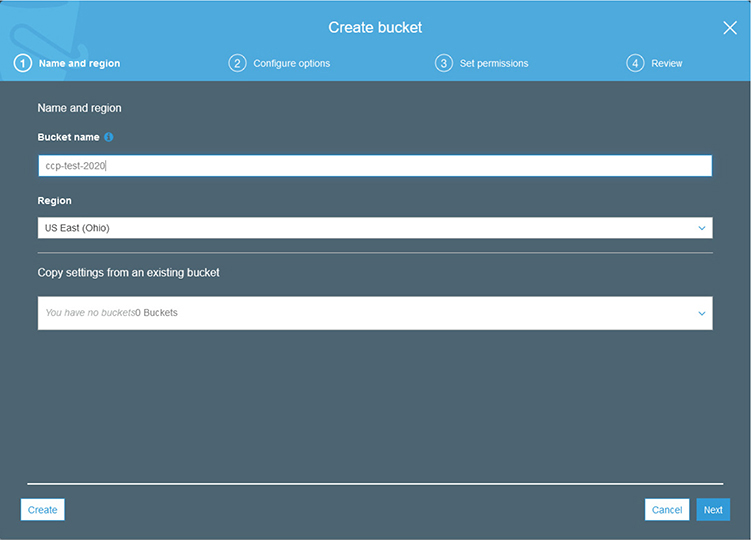
4. On the Configure Options screen you will be presented with many of the options we discussed with S3.
a. Under Versioning check the box to create versions of objects.
b. Under Encryption check the box to automatically encrypt objects when they are stored in S3. You will be presented with the choice of using AES-256 or AWS-KMS encryption. Leave the default selected for AES-256.
c. Click Next.
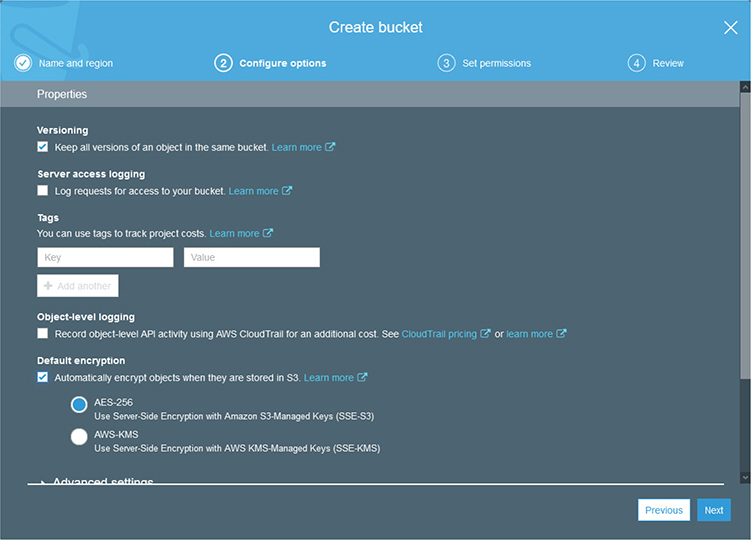
5. On the Set Permissions screen you will be able to configure the default permission on any objects created within your bucket.
a. By default, the Block All Public Access button is selected. Leave it selected for this exercise.
b. Click Next.
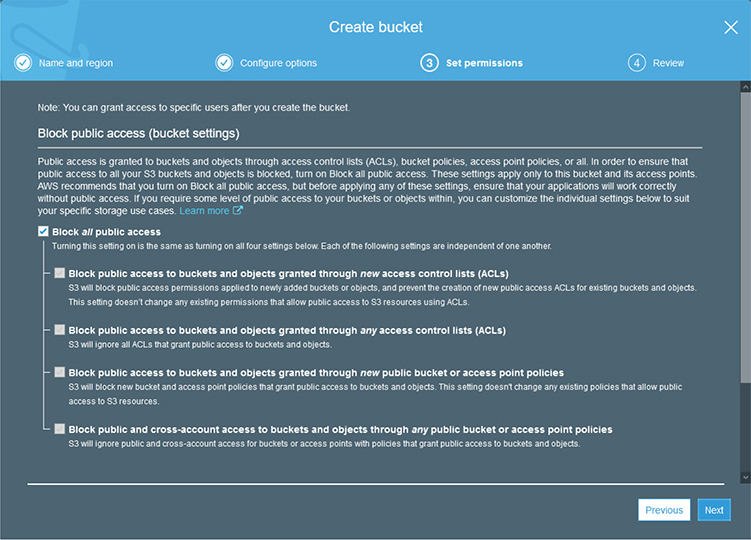
6. You will now be presented with the Review screen that will show all of the options you have selected on the previous wizard panels.
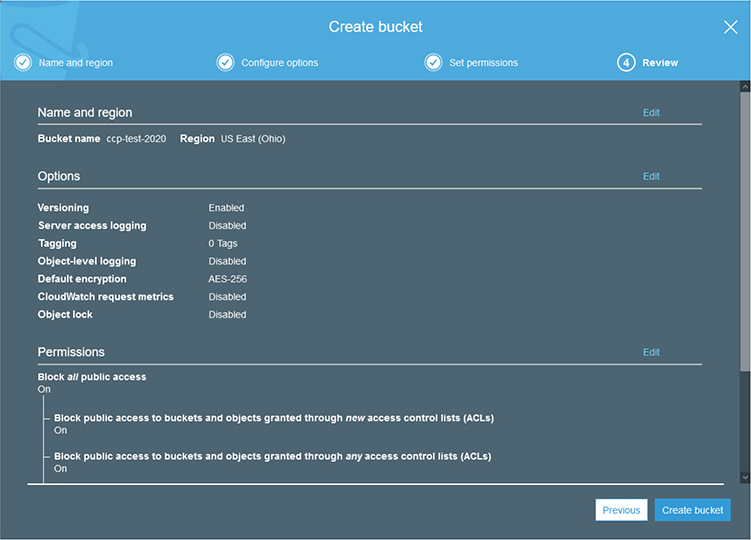
7. Click Create Bucket.
8. You will now see that your bucket has been created successfully.

Exercise 4-2: Use the AWS CLI
For a brief introduction to the AWS CLI, we are going to use it to show the bucket that you just created in the previous exercise.
1. Visit the AWS CLI page to download and install the plug-in appropriate to your platform. This can be found at https://aws.amazon.com/cli. In the upper-right corner are links for each type of supported operating system.
2. Click on the one appropriate to your operating system, allow the file to download, and then run the installer. This will add features to your built-in CLI to work with AWS.
3. Once the installer is complete, open a command line interface window.
4. We first need to configure the CLI to access your instance.
5. On the CLI window, type aws configure and press ENTER.
6. You will be prompted for the AWS access key ID for a user within your IAM. You will also need the AWS secret access key for the user.
a. To get the keys, open the IAM console at https://console.aws.amazon.com/iam/home.
b. Log in with your root user credentials.
c. Click on the Users tab on the left column.
d. Click on the user that you created under IAM previously.
e. Then click on the Security Credentials tab.
f. Under Access Keys, click the Create Access Key button.
g. This will display a window with the access key and secret key. Do not close this window until you are done with the AWS configure command on the CLI, as you can only display the secret key once. If you accidently do close it, you can create a new secret key.
7. Copy and paste the AWS access key ID from the Security Credentials window and press ENTER.
8. Click on Show for the security key and copy and paste into the CLI window for the AWS Secret Access Key and press ENTER.
9. You will be prompted for a region. This can always be changed later, so just enter us-east-2 for these purposes.
10. For the Default Output Format, enter Text and press ENTER.
11. AWS CLI is now configured for use with your account.
12. To show the bucket you previously created, enter aws s3 ls and press ENTER.
13. You should see an output like this:
C:\WINDOWS\system32>aws s3 ls
2020-08-24 00:29:22 ccp-test-2020
This has been just a brief demonstration of what you can do with the AWS CLI. Please look around the documentation and the various things you can do with different services.
Questions
1. Which of the following is not one of the purposes of instance types under EC2?
A. Compute optimized
B. Storage optimized
C. Accelerated computing
D. Network optimized
2. Which AWS service allows a user to run code in the AWS infrastructure without having to specifically provision resources?
A. Snow
B. Redshift
C. Lambda
D. AppStream
3. When creating an S3 bucket, how many versions are maintained by default for objects?
A. None
B. Unlimited
C. 1
D. 64
4. Which AWS database service is the data warehousing service?
A. Aurora
B. Redshift
C. DynamoDB
D. RDS
5. Which AWS service will inspect web traffic to your applications and apply rules and security controls based on the contents of the traffic?
A. CloudWatch
B. Shield
C. WAF
D. CloudTrail
6. Which AWS service provides central collection and auditing for event and log data from your AWS services?
A. CloudTrail
B. CloudWatch
C. Lightsail
D. WorkLink
7. Which AWS service is a Desktop as a Service offering for virtual desktop computing?
A. Aurora
B. AppStream
C. Lambda
D. WorkSpaces
8. Which AWS service is a developer tool that fully implements the popular Git utility?
A. CodeBuild
B. CodeDeploy
C. CodeCommit
D. AWS Git
9. If your application is moving to AWS and is currently built on MySQL, which AWS service would you migrate your data into?
A. Aurora
B. DynamoDB
C. RedShift
D. Lambda
10. Where would you find AMIs provided by vendors for use within AWS?
A. myAMIs menu under EC2
B. AWS Marketplace
C. AWS AMI Artifact Repository (A3R)
D. AWS Digital Library (ADL)
Questions and Answers
1. Which of the following is not one of the purposes of instance types under EC2?
A. Compute optimized
B. Storage optimized
C. Accelerated computing
D. Network optimized
 D. The EC2 service does not utilize a network-optimized purpose of instance types. The instance types are general purpose, compute optimized, storage optimized, accelerated computing, and memory optimized.
2. Which AWS service allows a user to run code in the AWS infrastructure without having to specifically provision resources?
A. Snow
B. Redshift
C. Lambda
D. AppStream
C. Lambda allows a user to run code in the AWS infrastructure for application calls or back-end services without provisioning specific compute resources. The Lambda service will provision the necessary resources and bill based on the amount of processing done and the number of calls made to code.
3. When creating an S3 bucket, how many versions are maintained by default for objects?
A. None
B. Unlimited
C. 1
D. 64
A. When a new bucket is created, versioning is not turned on automatically unless it is chosen as an option during creation.
4. Which AWS database service is the data warehousing service?
A. Aurora
B. Redshift
C. DynamoDB
D. RDS
B. Redshift is the AWS data warehousing service that allows for virtually unlimited storage of data and extremely fast queries.
5. Which AWS service will inspect web traffic to your applications and apply rules and security controls based on the contents of the traffic?
A. CloudWatch
B. Shield
C. WAF
D. CloudTrail
C. The AWS Web Application Firewall (WAF) will inspect the content of web traffic and apply rules and security controls to it.
6. Which AWS service provides central collection and auditing for event and log data from your AWS services?
A. CloudTrail
B. CloudWatch
C. Lightsail
D. WorkLink
A. CloudTrail centralizes the collection of event and security logs into a system that allows auditing and compliance of all user activities within your AWS account.
7. Which AWS service is a Desktop as a Service offering for virtual desktop computing?
A. Aurora
B. AppStream
C. Lambda
D. WorkSpaces
D. WorkSpaces offers fully managed and maintained virtual desktops that can be accessed by users from anywhere and provide access into the VPC and applications for your organization.
8. Which AWS service is a developer tool that fully implements the popular Git utility?
A. CodeBuild
B. CodeDeploy
C. CodeCommit
D. AWS Git
C. The AWS CodeCommit service is a Git-compliant repository that is fully secured and managed by AWS and capable of scaling to meet any demand.
9. If your application is moving to AWS and is currently built on MySQL, which AWS service would you migrate your data into?
A. Aurora
B. DynamoDB
C. RedShift
D. Lambda
A. Aurora is the MySQL and PostgreSQL implementation of Amazon RDS.
10. Where would you find AMIs provided by vendors for use within AWS?
A. myAMIs menu under EC2
B. AWS Marketplace
C. AWS AMI Artifact Repository (A3R)
D. AWS Digital Library (ADL)
B. The AWS Marketplace contains AMIs that are official and supported by the vendor. Many offer free trial periods for users before committing to a purchase.