CHAPTER 3
Security and Compliance
In this chapter, you will learn the following Domain 2 topics:
• Define the AWS Shared Responsibility Model
• Define AWS Cloud security and compliance concepts
• Identify AWS access management capabilities
• Identity resources for security support
Security is a primary focus for AWS across all services and one of the most prominent benefits of using a cloud provider. AWS can implement extremely robust security through economies of scale that can far exceed what any organization could have the finances and experience to implement on their own. This domain will introduce you to the Shared Responsibility Model that cloud providers employ, as well as the key concepts used with cloud security. We will cover the specific implementations of these concepts by AWS and the resources available to users for security support.
The AWS Shared Responsibility Model
Any large and complex IT system is built upon multiple layers of services and components, and a cloud is certainly a prime example of that model.
Underlying Cloud Framework
With any cloud offering, the underlying infrastructure is the sole responsibility of the cloud provider. This includes everything from the physical building and facilities to the power infrastructure and redundancy, physical security, and network cabling and hardware components. This also includes the underlying computing infrastructure such as hypervisors, CPU, memory, and storage. Within the AWS infrastructure, the responsibility for regions, availability zones, and edge locations is solely the responsibility of AWS.
However, beyond the layers of physical facilities and computing hardware, there are differing levels of responsibility based upon the cloud services model employed. Table 3-1 shows the areas of responsibility within a cloud implementation. The shaded areas represent the responsibility on the part of the cloud provider.
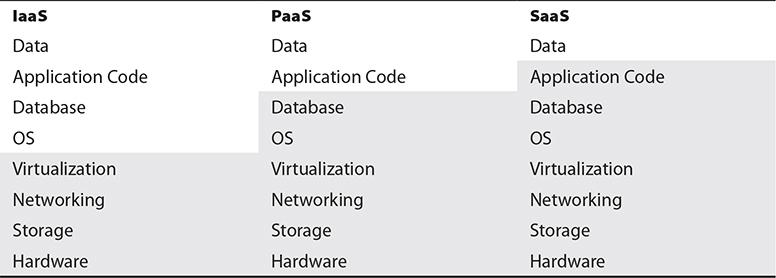
Table 3-1 Areas of Responsibility

EXAM TIP Make sure to understand the Shared Responsibility Model and what the customer is responsible for in each service category. This will play a prominent role throughout the discussion on the AWS service offerings.
IaaS
With Infrastructure as a Service (IaaS), the customer is responsible for everything beginning with the operating system. The cloud provider is responsible for the underlying host infrastructure from which the customer can deploy virtual devices into, whether they are virtual machines or virtual networking components. After that, responsibility is very similar to a traditional data center, in which the administrators are responsible for virtual machines and all software, code, and data within them.
PaaS
With Platform as a Service (PaaS), the cloud provider is responsible for an entire hosting platform, including all software, libraries, and middleware that the customer needs. The customer then deploys their application code and data into the environment. This is most heavily used for DevOps, where developers can quickly obtain fully featured hosting environments and only need to deploy their code and any needed data to test and develop with, and do not need to worry about any underlying operating system or middleware issues.
SaaS
With Software as a Service (SaaS), the cloud provider is responsible for everything except specific customer or user data. SaaS is a fully featured application that a customer only needs to load users or do minimal configuration, along with possibly importing data about customers or services. This model has the least level of responsibility for the customer, but as such, also typically comes with the highest costs of service.
Managed vs. Unmanaged
A major question for any customer is whether to use managed or unmanaged resources within a cloud environment. While both can ultimately provide what is needed to meet the business needs of the customer, there are pros and cons of each approach.
Managed resources are those where the cloud provider is responsible for the installation, patching, maintenance, and security of a resource. On the inverse, unmanaged resources are those hosted within a cloud environment, but where the customer bears responsibility for host functions. Managed resources will typically cost more directly than unmanaged resources, as the customer is paying for a premium service and the cloud provider is responsible for all of the maintenance and monitoring of the service. However, while managed resources may appear to cost more up-front, once an organization factors in all the staff time to perform the same level of responsibilities, as well as the included costs of responsibility for monitoring and uptime, managed resources almost always represent an enormous benefit to the cloud customer overall.
A prime example relating to managed versus unmanaged is with a database. A customer could opt, for example, to provision a virtual machine and install a database such as MySQL or Microsoft SQL Server on it. While this would give the customer full control over the database, it would also place the burden for all configurations, security, and patches onto the cloud customer. The customer could instead opt to use the Relational Database Service (RDS) that is offered by AWS. Going this route would leave the customer only with the responsibility of loading their data into RDS and would transfer the burden for maintenance and security to AWS, allowing the customer to more fully focus on their business operations and not on system administration.
Regulatory Compliance
If your application utilizes or stores any type of sensitive information, there will be specific regulatory requirements that you will need to ensure compliance with. This type of data can range from credit card and financial information to health records, academic records, or government systems and data. Each type of data will have specific laws and regulations for how the data must be handled and protected, governed by the jurisdiction that your systems are subject to.
To assist with meeting regulatory requirements, AWS offers their Artifact service, which can be accessed directly from the AWS Management Console that you already established an account for in the last chapter. This is included as a service with all AWS accounts and does not require additional costs or services.
As part of the Artifact service, AWS undergoes certification reviews and audits by various governing bodies. This includes prominent certifications such as PCI-DSS for financial/credit card transactions and FedRAMP for U.S. federal government systems. AWS also makes the pertinent Service Organization Controls (SOC) audit reports available to customers.
An additional feature that AWS offers through Artifact is enabling a customer to review and accept agreements for their individual account and what they need to maintain compliance with, along with terminating the agreement if no longer needed.
Data Security
Several toolsets and technologies are commonly used as data security strategies:
• Encryption
• Key management
• Masking
• Obfuscation
• Anonymization
• Tokenization
These range from the encryption of data to prevent unauthorized access to the masking and tokenization of data to render it protected in the event that it is leaked or accessed.
Encryption
With the concepts of multitenancy and resource pooling being central to any cloud environment, the use of encryption to protect data is essential and required, as the typical protections of physical separation and segregation found in a traditional data center model are not available or applicable to a cloud environment. The architecture of an encryption system has three basic components: the data itself, the encryption engine that handles all the encryption activities, and the encryption keys used in the actual encryption and use of the data.
There are many different types and levels of encryption. Within a cloud environment, it is the duty of the organization to evaluate the needs of the application, the technologies it employs, the types of data it contains, and the regulatory or contractual requirements for its protection and use. Encryption is important for many aspects of a cloud implementation. This includes the storage of data on a system, both when it is being accessed and while it is at rest, as well as the actual transmission of data and transactions between systems or between the system and a consumer. The organization must ensure that appropriate encryption is selected that will be strong enough to meet regulatory and system requirements but also efficient and accessible enough for operations to seamlessly work within the application.
Data in Transit
Data in transit is the state of data when it is actually being used by an application and is traversing systems internally or going between the client and the actual application. Whether the data is being transmitted between systems within the cloud or going out to a user’s client, data in transit is when data is most vulnerable to exposure of unauthorized capture. Within a cloud hosting model, the transmission between systems is even more important than with a traditional data center due to multitenancy; the other systems within the same cloud are potential security risks and vulnerable points where data capture could happen successfully.
In order to maintain portability and interoperability, the Cloud Security Professional should make the processes for the encryption of data in transit vendor-neutral in regard to the capabilities or limitations of a specific cloud provider. The Cloud Security Professional should be involved in the planning and design of the system or application from the earliest stages to ensure that everything is built properly from the ground up and not retrofitted after design or implementation has been completed. Whereas the use of encryption with the operations of the system is crucial during the design phase, the proper management of keys, protocols, and testing/auditing is crucial once a system has been implemented and deployed.
The most common method for data-in-transit encryption is to use the well-known SSL and TLS technologies under HTTPS. With many modern applications utilizing web services as the framework for communications, this has become the prevailing method, which is the same method used by clients and browsers to communicate with servers over the Internet. This method is now being used within cloud environments for server-to-server internal communication as well. Beyond using HTTPS, other common encryption methods for data in transit are VPNs (virtual private networks) and IPsec. These methods can be used by themselves but are most commonly used in parallel to provide the highest level of protection possible.
Data at Rest
Data at rest refers to information stored on a system or device (versus data that is actively being transmitted across a network or between systems). The data can be stored in many different forms to fit within this category. Some examples include databases, file sets, spreadsheets, documents, tapes, archives, and even mobile devices.
Data residing on a system is potentially exposed and vulnerable far longer than short transmission and transaction operations would be, so special care is needed to ensure its protection from unauthorized access. With transaction systems and data in transit, usually a small subset of records or even a single record is transmitted at any time, versus the comprehensive record sets maintained in databases and other file systems.
While encrypting data is central to the confidentiality of any system, the availability and performance of data are equally as important. The Cloud Security Professional must ensure that encryption methods provide high levels of security and protection and do so in a manner that facilitates high performance and system speed. Any use of encryption will cause higher load and processing times, so proper scaling and evaluation of systems are critical when testing deployments and design criteria.
With portability and vendor lock-in considerations, it is important for a Cloud Security Professional to ensure that encryption systems do not effectively cause a system to be bound to a proprietary cloud offering. If a system or application ends up using a proprietary encryption system from a cloud provider, portability will likely be far more difficult and thus tie that customer to that particular cloud provider. With many cloud implementations spanning multiple cloud providers and infrastructures for disaster recovery and continuity planning, having encryption systems that can maintain consistency and performance is important.
EXAM TIP Data-at-rest encryption and security are very important in a cloud environment due to the reliance on virtual machines. In a traditional data center, you can have systems that are powered off and inaccessible. In a virtual environment, when a system is not powered on or started, the disk and memory are gone, but the underlying image still exists within storage and carries a possibility of compromise or corruption, especially if a developer has stored application or customer data on the VM image.
Encryption with Data States
Encryption is used in various manners and through different technology approaches, depending on the state of the data at the time—in use, at rest, or in motion. With data in use, the data is being actively accessed and processed. Because this process is the most removed from and independent of the host system, technologies such as data rights management (DRM) and information rights management (IRM) are the most capable and mature approaches that can be taken at this time (both are discussed in depth later in this chapter). Data in transit pertains to the active transmission of data across the network, and as such, the typical security protocols and technologies employed are available within a cloud environment (for example, TLS/SSL, VPN, IPsec, and HTTPS). With data at rest, where the data is sitting idle within the environment and storage systems, file-level and storage-level encryption mechanisms will be employed, depending on the location and state of the data; files sitting on a file system versus in a database or other storage architecture will likely require different types of encryption engines and technologies to secure them based on the particular needs and requirements of the system employed. The Cloud Security Professional must pay particular attention to any specific regulatory requirements for the classification of the data under consideration and ensure that the encryption methods chosen satisfy the minimums of all applicable standards and laws.
Challenges with Encryption
There is a myriad of challenges with implementing encryption. Some are applicable no matter where the data is housed, and others are specific issues to cloud environments. A central challenge to encryption implementations is the dependence on key sets to handle the actual encryption and decryption processes. Without the proper security of encryption keys, or exposure to external parties such as the cloud provider itself, the entire encryption scheme could be rendered vulnerable and insecure. (More on the specific issues with key management will follow in the next section.) With any software-based encryption scheme, core computing components such as processor and memory are vital, and within a cloud environment specifically, these components are shared across all the hosted customers. This can make resources such as memory vulnerable to exposure and could thus compromise the implementation of the encryption operations. It can also be a challenge implementing encryption throughout applications that are moving into a cloud hosting environment that were not designed initially to engage with encryption systems, from both a technical and performance capacity, because code changes or unacceptable levels of performance degradation may become apparent with the integration of encryption. As a last major concern, encryption does not ensure data integrity, only confidentiality within an environment. Additional steps will need to be integrated for those environments where integrity is a pressing concern.
Encryption Implementations
The actual implementation of encryption and how it is applied will depend largely on the type of storage being used within the cloud environment.
With database storage systems, two layers of encryption are typically applied and available. First, database systems will reside on volume storage systems, resembling a typical file system of a server model. The actual database files can be protected through encryption methods at the file system level; this also serves to protect the data at rest. Within the database system itself are encryption methods that can be applied to the data set, either wholesale or on a granular level, by encrypting specific tables or columns of data. This type of encryption can be handled by the database application itself or by the actual software application that handles the encryption and stores the data in that state.
For object storage, apart from the encryption at the actual file level, which is handled by the cloud provider, encryption can be used within the application itself. The most prevalent means for this is through IRM technologies or via encryption within the applicant itself. With IRM, which will be covered later in this chapter, encryption can be applied to the objects to control their usage after they have left the system. With application-level encryption, the application effectively acts as a proxy between the user and the object storage and ensures encryption during the transaction. However, once the object has left the application framework, no protection is provided.
Lastly, with volume storage, many of the typical encryption systems used on a traditional server model can be employed within a cloud framework. This encryption is most useful with data-at-rest scenarios. Due to the application itself being able to read the encrypted data on the volume, any compromise of the application will render the file system encryption ineffective when it comes to protecting the data.
Hashing
Hashing involves taking data of arbitrary type, length, or size and using a function to map a value that is of a fixed size. Hashing can be applied to virtually any type of data object, including text strings, documents, images, binary data, and even virtual machine images.
The main value of hashing is to quickly verify the integrity of data objects. Within a cloud environment this can offer great value with virtual machine images and the potentially large number of data locations within a dispersed environment. As many copies of a file are potentially stored in many different locations, hashing can be used to very quickly verify that the files are of identical composure and that the integrity of them has not been compromised. Hashes are widely used in a similar fashion by vendors, and especially open-source software distributions, to enable an administrator to verify they have not been compromised in some manager on a mirror site and that the file is a pure copy of the actual distribution by the publisher. This process is widely referred to by common terms such as checksums, digests, or fingerprints.
A large variety of hashing functions are commonly used and supported. The vast majority of users will have no problem using any of the freely and widely available options, which will suit their needs for data integrity and comparison without issue. There is also the option for any organization to implement their own hashing systems or seeding with their own values for their specific internal purposes. Whether a freely available hashing function is used or if an organization opts to use their own internal processes, the overall operation and value are the same.
Key Management
Key management is the safeguarding of encryption keys and the access to them. Within a cloud environment, key management is an essential and highly important task, while also being very complex. It is one of the most important facets of cloud hosting for the Cloud Security Professional to focus on at all times.
One of the most important security considerations with key management is the access to the keys and the storage of them. Access to keys in any environment is extremely important and critical to security, but in a cloud environment, where you have multitenancy and the cloud provider personnel having broad administrative access to systems, there are more considerations than in a traditional data center concerning the segregation and control of the staff of the customer. Of course, there can also be a big difference in key management between IaaS and PaaS implementations, as well as the level of involvement and access that the cloud provider’s staff will need to have. Where the keys are stored is also an important consideration within a cloud environment. In a traditional data center configuration, the key management system will typically be on dedicated hardware and systems, segregated from the rest of the environment. Within a cloud environment, due to multitenancy, protection of the virtual machine hosting the key management system is vital. The use of encryption is crucial to prevent any unauthorized access. The Cloud Security Professional will always need to consult with applicable regulatory concerns for any key management, access, and storage requirements and determine whether a cloud provider can meet those requirements.
No matter what hosting model is used by an organization, a few principles of key management are important. Key management should always be performed only on trusted systems and by trusted processes, whether in a traditional data center or a cloud environment. In a cloud environment, careful consideration must be given to the level of trust that can be established within the environment of the cloud provider and whether that will meet management and regulatory requirements. Although confidentiality and security are always the top concerns with key management, in a cloud environment, where heavy use of encryption throughout the entire system is paramount, the issue of the availability of the key management system is also of central importance. If the key management system were to become unavailable, essentially the entire system and applications would also become unavailable for the duration of the outage. One way to mitigate the possibility of cloud provider staff having access to the keys used within the environment is to host the key management system outside of the cloud provider. Although this will certainly attain the segregation of duties and provide higher security in regard to that one specific area, it also increases the complexity of the system overall and introduces the same availability concerns. In other words, if the externally hosted key management system becomes unavailable or inaccessible, even if caused by something as mundane as an inadvertent firewall or ACL change, the entire system will be inaccessible.
Key storage can be implemented in a cloud environment in three ways. The first is internal storage, where the keys are stored and accessed within the same virtual machine as the encryption service or engine. Internal storage is the simplest implementation—it keeps the entire process together, and it is appropriate for some storage types such as database and backup system encryption. However, it also ties the system and keys closely together, and compromise of the system overall can lead to potential key compromise—although it does alleviate the external availability and connection problems. The second method is external storage, where the keys are maintained separately from the systems and security processes (such as encryption). The external hosting can be anywhere so long as it is not on the same system performing the encryption functions, so typically this would be a dedicated host within the same environment, but it could be completely external. In this type of implementation, the availability aspect is important. The third method involves having an external and independent service or system host the key storage. This will typically increase security precautions and safeguards in a widely accepted manner because the key storage is handled by an organization dedicated to that specific task that maintains systems specifically scoped for that function, with well-documented security configurations, policies, and operations.
Tokenization
Tokenization is the practice of utilizing a random and opaque “token” value in data to replace what otherwise would be a sensitive or protected data object. The token value is usually generated by the application with a means to map it back to the actual real value, and then the token value is placed in the data set with the same formatting and requirements of the actual real value, so that the application can continue to function without different modifications or code changes. Tokenization represents a way for an organization to remove sensitive data from an application without having to introduce more intensive processes such as encryption to meet regulatory or policy requirements. As with any technology used to complement an application, especially in regard to data security, the system and processes used for tokenization will need to be properly secured. Failure to implement proper controls with the tokenization process will lead to the same vulnerabilities and problems as insecure key management with encryption or other data safeguard failures. The tokenization process provided on behalf of the cloud provider should be carefully vetted, both to ensure the security and governance of it and to limit any possibility of vendor lock-in.
Data Loss Prevention
A major concept and approach employed in a cloud environment to protect data is known as data loss prevention (DLP), or sometimes as data leakage prevention. DLP is a set of controls and practices put in place to ensure that data is only accessible and exposed to those users and systems authorized to have it. The goals of a DLP strategy for an organization are to manage and minimize risk, maintain compliance with regulatory requirements, and show due diligence on the part of the application and data owner. However, it is vital for any organization to take a holistic view of DLP and not focus on individual systems or hosting environments. The DLP strategy should involve their entire enterprise, particularly with hybrid cloud environments, or those where there is a combination of cloud and traditional data center installations.
DLP Components
Any DLP implementation is composed of three common components: discovery and classification, monitoring, and enforcement.
The discovery and classification stage is the first stage of the DLP implementation; it is focused on the actual finding of data that is pertinent to the DLP strategy, ensuring that all instances of it are known and able to be exposed to the DLP solution, and determining the security classification and requirements of the data once it has been found. This also allows the matching of data within the environment to any regulatory requirements for its protection and assurance.
Once data has been discovered and classified, it can then be monitored with DLP implementations. The monitoring stage encompasses the core function and purpose of a DLP strategy. It involves the actual process of watching data as it moves through the various states of usage to ensure it is being used in appropriate and controlled ways. It also ensures that those who access and use the data are authorized to do so and are using it in an appropriate manner.
The final stage of a DLP implementation is the actual enforcement of policies and any potential violations caught as part of the monitoring stage. If any potential violations are detected by the DLP implementation, a variety of measures can be automatically taken, depending on the policies set forth by management. This can range from simply logging and alerting of a potential violation to actually blocking and stopping the potential violation when it is first detected.
DLP Data States
With data at rest (DAR), the DLP solution is installed on the systems holding the data, which can be servers, desktops, workstations, or mobile devices. In many instances, this will involve archived data and long-term storage data. This is the simplest DLP solution to deploy throughout the enterprise overall but might also require network integration to be the most effective.
With data in transit (DIT), the DLP solution is deployed near the network perimeter to capture traffic as it leaves the network through various protocols, such as HTTP/HTTPS and SMTP. It looks for data that is leaving or attempting to leave the area that does not conform to security policies, either in subject or in format. One thing to note: if the traffic leaving the environment is encrypted, the DLP solution will need to be able to read and process the encrypted traffic in order to function, which might require key management and encryption aspects coming into play.
Lastly, with data in use (DIU), the DLP solution is deployed on the users’ workstations or devices in order to monitor the data access and use from the endpoint. The biggest challenges with this type of implementation are reach and the complexity of having all access points covered. This can be especially true within a cloud environment where users are geographically dispersed and use a large variety of clients to access the systems and applications.

CAUTION DLP on end-user devices can be a particular challenge for any cloud application. Because it requires the end user to install an application or plug-in to work, you will need to make sure you fully understand the types of devices your users will be utilizing, as well as any costs and requirements associated with the use of the technology. The growth of “bring your own device” (BYOD) within many organizations will also have a profound impact on any DLP strategies and should be reflected in policies.
DLP Cloud Implementations and Practices
The cloud environment brings additional challenges to DLP, much like any other type of implementation or policy, when compared to those challenges in a traditional data center. The biggest difference/challenge is in the way cloud environments store data. Data in a cloud is spread across large storage systems, with varying degrees of replication and redundancy, and oftentimes where the data will be stored and accessed is unpredictable. For a DLP strategy, this can pose a particular challenge because it makes properly discovering and monitoring all data used by a system or application more difficult, especially because the data can change locations over time, effectively becoming a moving target. With a cloud system using metered resource cost models and DLP adding load and resource consumption to the system, the potential for higher costs above and beyond the costs of the DLP solution is a real concern.
Data De-identification
Data de-identification involves using masking, obfuscation, or anonymization. The theory behind masking or obfuscation is to replace, hide, or remove sensitive data from data sets. The most common use for masking is making available test data sets for nonproduction and development environments. By replacing sensitive data fields with random or substituted data, these nonproduction environments can quickly utilize data sets that are similar to production for testing and development, without exposing sensitive information to systems with fewer security controls and less oversight. Many regulatory systems and industry certification programs have requirements to not use sensitive or real data in nonproduction environments, and masking is often the easiest and best way to meet such a requirement.
Typically masking is accomplished either by entirely replacing the value with a new one or by adding characters to a data field. This can be done wholesale on the entire field or just portions of it. For example, many times with credit card fields, as most who have ever purchased anything online can attest, the entire credit card number will be masked with a character such as an asterisk, but the last four digits will be left visible for identification and confirmation. Another common method is to shift values, either with the entire data set or with specific values within a field based on an algorithm, which can be done from a random or predetermined perspective. The last major method is to delete the data wholesale or just parts of the data from a field or to replace the data with overwritten null pointers or values.
The two primary strategies or methods for masking are static masking and dynamic masking. With static masking, a separate and distinct copy of the data set is created with masking in place. This is typically done through a script or other process that will take a standard data set, process it to mask the appropriate and predefined fields, and then output the data set as a new one with the completed masking done. The static method is most appropriate for data sets that are created for nonproduction environments, where testing is necessary or desired and having a data set very similar in size and structure to production is paramount. This allows testing to be done without exposing sensitive data to these environments or to developers. With dynamic masking, production environments are protected by the masking process being implemented between the application and data layers of the application. This allows for a masking translation to take place live in the system and during normal application processing of data.

NOTE Dynamic masking is usually done where a system needs to have full and unmasked data but certain users should not have the same level of access. An example from my own personal experience is healthcare data, where the back-end system needs to have the full data, but users such as enrollment assistants and customer service representatives only need a subset of the data, or just enough of a data field to be able to verify codes or personal information without seeing the entire field of data.
With data anonymization, data is manipulated in a way to prevent the identification of an individual through various data objects. It’s often used in conjunction with other concepts such as masking. Data generally has direct and indirect identifiers, with direct identifiers being the actual personal and private data, and indirect identifiers being attributes such as demographic and location data that, when used together, could lead to the identity of the individual. Data anonymization is the process of removing the indirect identifiers to prevent such an identification from taking place.
AWS Identity and Access Management
In the first chapter’s exercise, you created an AWS account, which will serve as your root account. The root account has full access to all resources under your purview, and as such, must be properly protected, along with the use of other best practices for account access and security.
AWS Root Account
Just like a root account on a computer system, the AWS root account has full access to everything under your account. It can create users, provision resources, and incur financial obligations for any activities that are done with it. As with superuser accounts on any computer system, it is a best practice to not use the root account unless absolutely necessary, but instead to provision accounts that have more limited access, as well as accountability, if you have multiple users operating within the same AWS account. Along with the creation of user (IAM) accounts, the root user should be secured with a very strong and complex password, as well as the utilization of other security tools such as multifactor authentication (MFA).
The AWS IAM Dashboard
The AWS IAM dashboard can be found at https://console.aws.amazon.com/iam. You can log into this address using the same e-mail address and password that you established for your root account in the exercise from Chapter 2.
As you have just created this account, minimal security configurations and policies are applied to it at this time. When you first log in, you will see the security status of your account and the remaining steps you need to take for securing it, as shown in Figure 3-1.
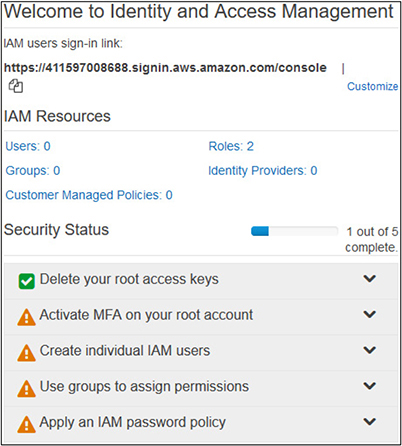
Figure 3-1 The initial status on the IAM dashboard shows the remaining steps necessary to properly secure your account.
Securing the Root User
When you created your root account in the first exercise, you established a password for it. This password is what you will use to access the AWS Console when using the root account. While all accounts should have a strong password, it is extra imperative for the root account to do so. Along with a strong password, MFA will add another layer of security to the account, should the password either get disclosed or compromised in some manner.
Multifactor Authentication
MFA, as its main principle, extends traditional authentication models beyond the system username and password combination to require additional factors and steps to provide for more protection and assurance as to the entity’s identity and their specific sensitive information.
With a traditional authentication system, an entity provides a username and password combination to prove their identity and uniqueness. While this system provides a basic level of security and assurance, it also greatly opens the possibilities of compromise, as both pieces of information can be easily obtained or possibly guessed based on information about the user, and once possessed can be easily used by a malicious actor until either changed or detected. In particular, many people will use the same username, or use their e-mail address as their username with systems where this is allowed, thus giving a malicious actor immediate knowledge of half of the information needed to authenticate. Also, out of habit, people use the same password for many different systems, opening up a grave possibility where a compromise of one system with lower security could ultimately lead to the compromise of a more secure system for which the individual happens to use the same password.
With MFA systems, the traditional username and password scheme is expanded to include a second factor that is not simply a piece of knowledge that a malicious actor could possibly obtain or compromise. A multifactor system combines at least two different requirements, the first of which is typically a password, but doesn’t need to be. Here are the three main components, of which at least two different components are required:
• Something the user knows This component is almost exclusively a password or a protected piece of information that in effect serves the same purpose as a password.
• Something the user possesses This component is something that is physically possessed by the individual. This could be a USB thumb drive, an RFID chip card, an access card with a magnetic stripe, an RSA token with a changing access code, a text message code sent to the user’s mobile device, or anything else along the same lines.
• Something the user is This component uses biometrics, such as retina scans, palm prints, fingerprints, and so on.
Exercise 3-1: Enable MFA on Your Root Account
Let’s go ahead and enable MFA on your root account to establish increased security. You should be on the IAM dashboard at this time.
1. Click on the Activate MFA On Your Root Account option.
2. Click on the Manage MFA button.
3. You will now be on the Security Credentials page. Click on the Multi-Factor Authentication (MFA) option.
4. Click on the Activate MFA button.
a. You will now be given three options for what to use for MFA:
• Virtual MFA Device This is an app installed on your smartphone, such as Authy, the Microsoft Authenticator, Google Authenticator, etc.
• U2F Security Key This uses a U2F-compliant device, such as Yubikey.
• Other Hardware MFA Device This requires the use of a hardware token such as those from Gemalto.
b. For our purposes here, please install one of the smartphone apps listed earlier that are freely available for both iPhone and Android. If you already have one on your smartphone, there is no need to get another—we can use that one.
c. With the radio button selected for Virtual MFA Device, click Continue.
d. You will now be on the Set Up Virtual MFA Device screen.
i. A link is provided to a list of compatible smartphone apps.
ii. Click on the middle box to Show QR Code.
• For our purposes here, please install one of the smartphone apps listed earlier that are freely available for both iPhone and Android. If you already have one on your smartphone, there is no need to get another—we can use that one.
ii. Click on the middle box to Show QR Code.
• Use the application you installed to scan the QR code.
iii. The application will now display codes that will rotate every 30 seconds.
1. You will need to enter the codes from two consecutive cycles in order to validate your MFA setup.
2. After you enter in both, click Active, and you will see the confirmation screen.
5. On the left menu, click the Dashboard button to return to the main page.
a. You will now see that “Activate MFA on your root account” is showing with a green checkmark as having been successfully completed.
b. You will also notice on your MFA app that the new setup shows up as a root account.
IAM Users and Security
After securing your root account, the next step will be to create IAM users and properly secure them as well.
IAM Users Password Policies
As with any account, the first line of security is the traditional password. In order to have a credible sense of security from password authentication alone, a proper password policy must be enforced. This will prevent easily guessable or breakable passwords from being used by your IAM users.
What you ultimately use for a password policy can depend on several factors. Many best practices are available for requiring passwords of sufficient complexity that you can leverage if you have no specific requirements. In many instances, if you are representing a company or organization, you will already have password requirements that you must adhere to. Additionally, if you are using any data that falls under special regulatory requirements, you may have specific password policies related to those as well. Before you set a password policy for your IAM users, make sure you understand what specific requirements you have for your circumstances.
Exercise 3-2: Create a Password Policy for IAM Users
1. If you are not already there, log into the IAM console at https://console.aws.amazon.com/iam.
2. When you log in this time with your root account, you will have to use the MFA that you previously set up, along with your root account password.
3. On the Security Status menu, click on Apply An IAM Password Policy and then click on Manage Password Policy.
4. At the top of the Password Policy screen, click on Set Password Policy.
5. You will now be presented the options for configuring the password policy for your IAM users, as shown in Figure 3-2.
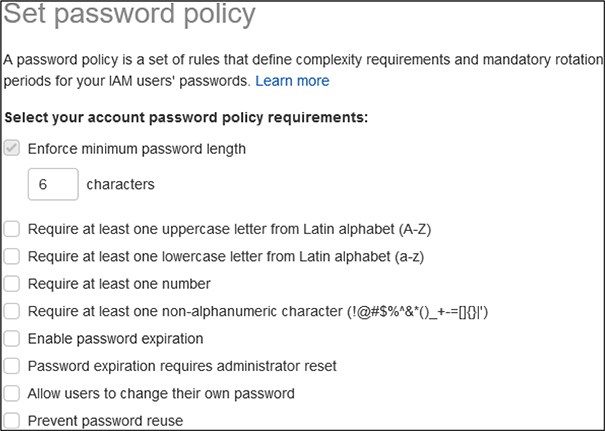
Figure 3-2 The options available for setting an IAM password policy
6. For the purposes of this exercise, we will set up a password policy with the following options selected:
• Enforce minimum password length—change from the default 6 to 8
• Require at least one uppercase letter
• Require at least one lowercase letter
• Require at least one number
• Require at least one non-alphanumeric character
• Enable password expiration—leave at the default 90 days
• Allow users to change their own password
• Prevent password reuse—leave at the default 5 passwords
• Verify you have the options properly selected to match what is shown in Figure 3-3.
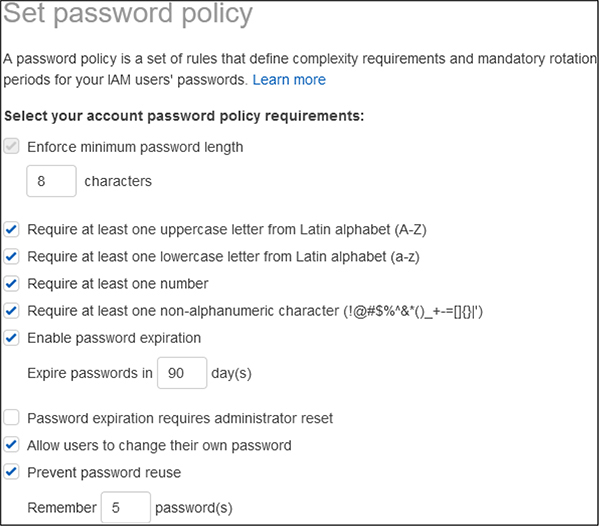
Figure 3-3 Password policy options selected for the exercise
7. Click Save Changes.
8. Click on the Dashboard link on the left menu, and you will now see on your Security Status table that you have successfully enabled a password policy for IAM users.
IAM User Groups and Roles
Before we create an IAM user, it is important to understand what groups and roles are within AWS.
Groups are used to assign a standard set of permissions to users as they are added to the system. As you add more users, going through each user and assigning permissions can become a very labor-intensive process, and one that is often fraught with error. With the wide variety of services and permissions that AWS has across the various product offerings, you could easily end up with permissions profiles that have a few dozen different roles attached to them for some users, or lots of different groups based on each product and the level of access granted to it. Groups represent the way to create packages of settings that are maintained in a single location. As users are added to the system, they can be added to the appropriate groups and will automatically inherit the appropriate permissions in a consistent manner.
Roles in AWS are the granular permissions that users can be granted. Within each AWS service, there are multiple roles that allow different activities, such as reading data, creating data, deploying services, provisioning access, etc. These roles are then used to attach to users, or as mentioned previously, to groups that users are then assigned to. AWS has a large number of roles that are predefined that you can navigate through when you create groups based on your particular needs, and you can always modify their association with users or groups at any time.
EXAM TIP The AWS system has predefined roles for every service offering that you can select to attach to groups. Keep in mind that within each service offering, there are several different roles that grant different types of access, such as read versus update, as well as a role that will allow full control over that particular service.
Exercise 3-3: Create an IAM User Account
1. If you are not already there, log into the IAM console at https://console.aws.amazon.com/iam.
2. When you log in this time with your root account, you will have to use the MFA that you previously set up, along with your root account password.
3. On the Security Status menu, click on Create Individual IAM Users and then click on Manage Users.
4. Click on the blue Add User button at the top of the page.
5. You will now be presented with the Add User wizard.
a. For this exercise, you can pick any username you would like. For illustrative purposes, we will use “testuser.”
b. Under Account Access, check both boxes to enable AWS Console access and Programmatic access.
c. Leave the default options selected to create an autogenerated password and to require the user to change their password at next sign-in. This will require them to select a password based on the policy you previously established.
d. Your screen should now look like what is shown in Figure 3-4.
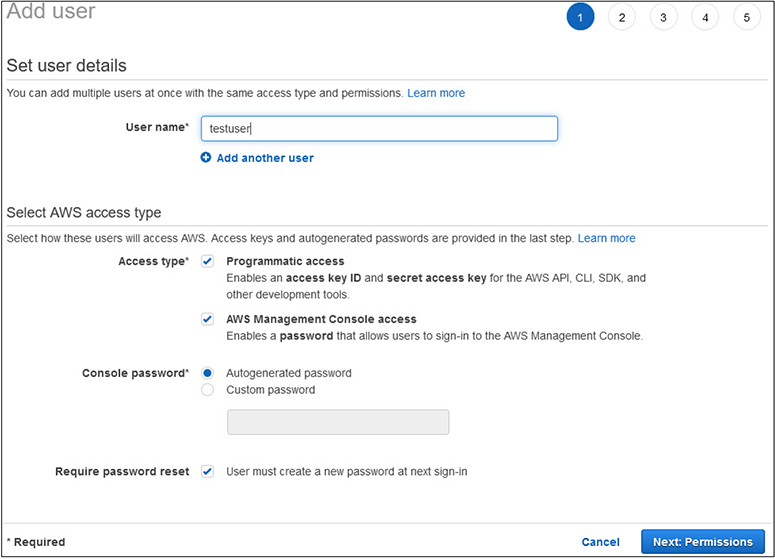
Figure 3-4 The Create User wizard with options selected to create your first IAM user
e. Click on the Next: Permissions button.
6. You will now be at Set Permissions screen.
a. Click on the Create Group button, as your account does not have any groups defined yet.
b. On the Create Group menu, input a Group Name of Admins.
c. Click on the top policy for Administrator Access.
d. Click Create Group.
7. You will now have the new Admins group selected for the IAM user.
8. Click Next: Tags at the bottom.
9. The tags are optional, so we will not add any at this point. Click on the Next: Review button.
10. You will now see a review of the user you are creating. Your screen should match what is shown in Figure 3-5.
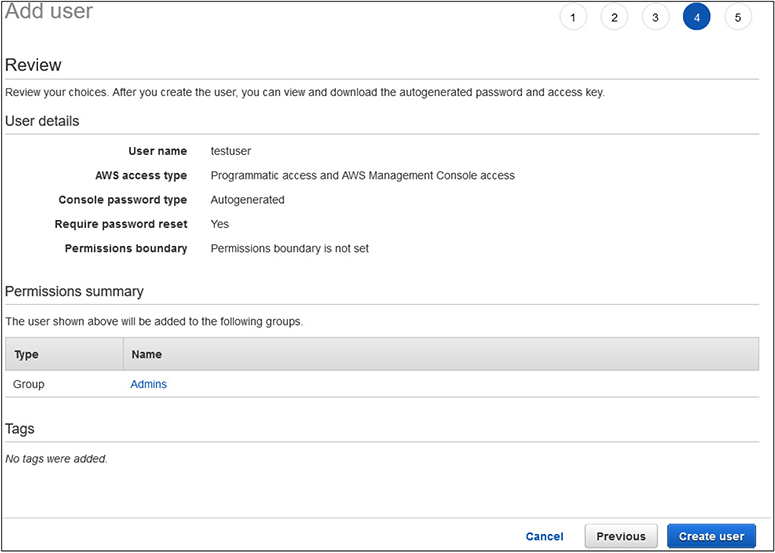
Figure 3-5 The final review of the IAM user creation before submission
11. Click Create User to finish the creation process.
12. On the confirmation page, you have the options to e-mail log-in instructions to someone to use the new account, as well as the ability to show the password and secret access key.
13. Click Close.
14. Click on the Dashboard link on the left menu.
15. You will now see in the Security Status display that all five activities have been completed.
Federated Access
A powerful way for providing user access to AWS is through federated access. With federated access, you can use technologies such as SAML or Microsoft Active Directory to provision users, rather than creating them manually through the IAM account process in the Console. The big advantage with using federated access is that users will use accounts and credentials they already have established to access AWS. This enables an organization to use already existing security and account practices, without having to worry about maintaining them in another system, as well as keeping all the user management and provisioning practices they already have. This also includes when a user is terminated access to an organization having that same termination immediately affect AWS access as well.
The most commonly used method for federated access today is through the SAML 2.0 standard.
SAML
SAML 2.0 is the latest standard put out by the nonprofit OASIS consortium and their Security Services Technical Committee and can be found at https://www.oasis-open.org/standards#samlv2.0. SAML is XML based, and it is used to exchange information used in the authentication and authorization processes between different parties. Specifically, it is used for information exchange between identity providers and service providers, and it contains within the XML block the required information that each system needs or provides. The 2.0 standard was adopted in 2005 and provides a standard framework for the XML assertions and standardized naming conventions for its various elements. In a federated system, when an entity authenticates through an identity provider, it sends a SAML assertion to the service provider containing all the information that the service provider requires to determine the identity, level of access warranted, or any other information or attributes about the entity.
User Reporting
As with any system that has a number of users on it, you will want a way to keep track of what users you have, what access they have, when they last logged in, and their status of being issued keys and when they were last rotated. This report is offered as a CSV download that you can either review directly from the CSV or import into any data or reporting tool you desire.
The report can be accessed from the left menu with the Credential Report button. You then only need to click on Download Report to have the report generated and available for downloading for whatever purposes you need. After you click to download the report, it will take a few moments to run, but will then present you with the download option that your browser uses.
AWS Support
Before we get into the specifics of security support, we need to discuss the overall support model and options that are available with AWS. When we created an account in our first exercise, we selected the free support option. However, while the free support is terrific for testing out various components to suit our purposes or for a user just starting to explore what AWS has to offer and evaluating features, it is not ideal for organizations that are more heavily invested in AWS, and certainly not for anyone running production business services in AWS.
Support Plan Options
AWS offers three different support plans beyond the free basic plan. These plans are
• Developer Ideal for testing and early stages of development in AWS and needing support during business hours
• Business Used for those with production workloads in AWS and desiring 24/7 support access
• Enterprise Highest level of support and geared towards full optimization of your AWS experience and success
Of course, with any service in the cloud, the more resources you desire, the higher the costs will be, as shown in Figure 3-6.
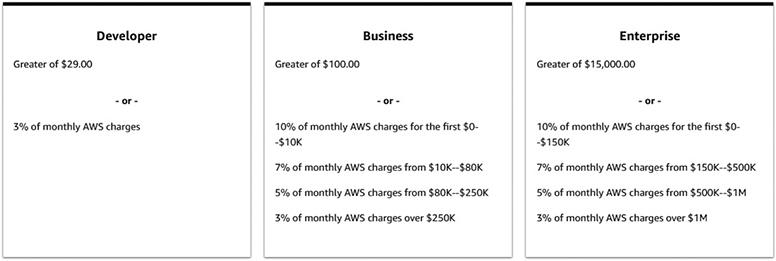
Figure 3-6 Overview of the developer, business, and enterprise support plan costs in AWS
Developer Support Plan
The developer support plan is ideal for those starting their early testing of AWS or development within AWS and want access to general guidance and technical support.
Highlights of developer support:
• AWS Trusted Advisor Provides access to the seven core Advisor checks. This will give guidance on best practices of reducing costs, how to get the most out of performance, how to implement and improve fault tolerance, and how to improve security.
• AWS Personal Health Dashboard Provides a view of overall AWS services and their current health status, along with the impact of any issues on your specific resources. This also includes API access to allow you to integrate with any monitoring and management systems you already have in place or want to use.
• Technical support The developer support option provides access to cloud support engineers during normal business hours. It allows one contact on your account to open as many support cases as you need but does not allow all of your IAM accounts to access support. You must utilize the main delegated account to open support incidents. Support response times for the developer option are
• Less than 24 hours for general guidance
• Less than 12 hours for system problems and issues
• Architecture Support Provides general guidance on AWS services and how they can be optimized for various use cases, expected workloads, or particular application requirements.
EXAM TIP The developer support plan only offers support during business hours. Remember that if production systems are being run and support is needed on a 24/7 basis, you will need to select either the business or enterprise support plans.
Business Support Plan
The business support plan is geared towards those with production workloads hosted in AWS and desiring 24/7 support. It also offers architectural guidance that is geared specifically to your systems and applications, as opposed to developer support that only offers general guidance.
• AWS Trusted Advisor Unlike the developer support plan that only gives access to 7 Trusted Advisor checks, the business support plan gives access to the entire 115 checks that AWS offers, covering cost optimization, security, fault tolerance, performance, and service limits. Each check comes with recommendations based on best practices.
• AWS Personal Health Dashboard The business support plan offers a personalized view of AWS services that you are using, along with alerts about any potential impacts.
• Technical Support The business support plan offers 24/7 access to support engineers via phone, chat, or e-mail. Unlike the developer support plan that restricts access to just one account to open support incidents, the business support plan allows an unlimited number of contacts to open tickets. Support response times with the business support plan are
• Less than 24 hours for general guidance
• Less than 12 hours for system problems and issues
• Less than 4 hours for production system problems
• Less than 1 hour for production system outages
• Architecture Support Specific guidance geared towards AWS services and how they fit your particular needs, workloads, or application configurations.
• AWS Support API Customers have access to programmatic APIs for the AWS support center, enabling them to open, update, or close support tickets, as well as to manage Trust Advisor requests and statuses.
• Third-Party Software Support Guidance and configuration assistance with AWS interoperability with commonly used applications, operations systems, and platforms.
• Access to Proactive Support Programs With the business support plan, you have the option to purchase, for an additional fee, access to the infrastructure event management services. This provides architecture and scaling guidance in real time for support during the preparation and rollout of planed events, releases, or migrations.
Enterprise Support Plan
The enterprise support plan is geared towards offering a highly personal and responsive service to AWS customers at the highest levels. It builds on the business support plan and adds some more features:
• Technical Support The enterprise support plan offers 24/7 access to support engineers via phone, chat, or e-mail. The enterprise support plan allows an unlimited number of contacts to open tickets. Support response times with the business support plan are
• Less than 24 hours for general guidance
• Less than 12 hours for system problems and issues
• Less than 4 hours for production system problems
• Less than 1 hour for production system outages
• Less than 15 minutes for critical system outages
• Proactive Support Programs With the enterprise support plan, you have access to specific reviews of your services and implementations in the areas of architecture, operations, and infrastructure event management.
• Support Concierge The concierge team is dedicated to working with enterprise support customers and are experts in billing and account issues, allowing you to quickly resolve any issues and alleviate focusing on account issues.
• Account Onboarding You are provided an AWS Technical Account Manager (TAM) to work with you on all issues and outages, as well as your access to AWS resources. The TAM will participate in disaster recovery planning and drills, as well as provide a personal and direct contact for any support or account issues.
Other Support Resources
Apart from the official support plans offered by AWS, a variety of resources are available that are more self-learning or community-support in nature.
AWS Professional Services
The AWS Professional Services group is another avenue for support and guidance on AWS services. The Professional Services group operates mostly based on a series of “offerings,” which are a set of activities, documentation, and best practices that form a methodology for customers moving to the cloud. They are designed as a blueprint to quickly achieve outcomes and allow customers to finish projects and offer high reliability of outcomes.
The Professional Services group publishes the AWS Cloud Adoption Framework, which is focused on helping organizations with successful cloud adoption. The framework is geared towards helping an organization develop a comprehensive approach to cloud adoption and increasing the rate of adoption while also lowering the risk involved through the use of best practices.
Another key offering from the Professional Services group is working with the AWS Partner Network. The AWS Partner Network works complementary with the Professional Services group to offer consulting services and software to help with cloud adoption and achieving optimal results.
The Professional Services group offers a series of whitepapers and tech-talk webinars on various AWS services and offerings focused on best practices and cloud migrations. These are freely available. More information about AWS Professional Services can be found at https://aws.amazon.com/professional-services/.
Documentation
AWS maintains a vast library of freely available and accessible documentation online. This documentation covers pretty much any topic and service you would ever think of and tends to be well maintained and curated. You can access the AWS Documentation library at https://docs.aws.amazon.com/.
On the main page you will find “Guides and API References” for every AWS service offering. Clicking on any of the names will take you to the main page for that service. Most service pages are organized with the same main headings. This will differ some based on the type of service and which ones apply to it:
• A user guide (sometimes split out for different platforms, if applicable, such as Linux and Windows)
• An API reference
• A link to the pertinent section for that service in the AWS CLI Reference
• A developer guide
Apart from the documentation for specific service offerings, there are also major sections that are thematic and cross between service offerings, such as security, management, billing, and general reference documents.
Below the guides and API references is an extensive library of “Tutorials and Projects.” This section contains how-to guides for many operations within AWS. Also included are reference links to many of the various SDKs and toolkits that are commonly used, including the AWS Command Line Interface.
Knowledge Center
The AWS Knowledge Center can be found at https://aws.amazon.com/premiumsupport/knowledge-center/.
The structure of the Knowledge Center is that of a typical FAQ page, organized by AWS services. Unlike your typical FAQ, however, the Knowledge Center has an enormous number of pages that are framed in a question-and-answer format. It is designed to work alongside and complement other AWS resources, such as documentation, discussion forums, and the AWS Support Center.
EXAM TIP The Knowledge Center is an excellent way to learn about many different features of AWS and the types of questions and common issues customers face. Just going through a service you are starting to explore or already using and looking at the questions and answers can give a lot of insight into that service and give a good basis of the types of issues to be cognizant of in your own usage.
Discussion Forums
AWS hosts a discussion forum site to enable customers to help each other with specific problems and best practices guidance. It can be found at https://forums.aws.amazon.com/.
The forums are split into numerous categories to help organize information and serve as a starting point for navigation. There is also a search feature to help find information. The organizational structure of the forums is
• Amazon Web Services Contains forums that are organized by AWS service offerings
• AWS Startups Focused on users that are new to AWS and applicable assistance
• AWS Web Site & Resources Offers forums for General Feedback, Quick Start Deployments, and specific forums based on development platforms and technologies, such as programming languages, the AWS Command Line Interface, and datasets.
• Foreign Language Forums AWS offers forums for Japanese, German, Portuguese, Korean, and Indonesian customers.
Trusted Advisor
The AWS Trusted Advisor provides a dashboard to check whether your account configurations comply with established best practices. The Trusted Advisor is split into five areas of focus:
• Cost Optimization Flags any resources that you have allocated and are incurring billing charges and are either not being used at the level they are allocated for or are allocated but inactive. This enables users to eliminate resources that are incurring billing charges and wasting money.
• Performance Flags any configurations that are implemented in a way that might be preventing resources from reaching their full potential and limiting performance.
• Security Flags any deficiencies in security configurations that do not meet established best practices
• Fault Tolerance Flags any resources that are allocated but are configured in a way that makes them vulnerable to service interruptions, such as single points of failure with nonreplicated systems, or any systems that are not being backed up.
• Service Limits Flags any services that you are using that are approaching their limits within AWS, such as number of instances of data objects or regional limitations.
Security Support Offerings
AWS provides dedicated support resources for all of their service offerings, and of course also provides specific guidance for security of data and systems, as it is a primary focus of AWS. The specific security support page can be found at https://aws.amazon.com/security/security-resources/.
On this security-focused page, you will find links to specific security resources within documentation, whitepapers, and best practice reference materials. You will also find links to the AWS Security Control Domains and security training resources. AWS does provide security information and documentation in over 20 languages to ensure compliance with regulations and systems throughout the world.
Chapter Review
In this chapter we covered the overall security concepts that apply to cloud environments and the various ways in which AWS implements them. We reviewed how to add users through IAM and how to enact security policies to protect your account and meet any organizational or regulatory requirements and policies. We then learned about the different support plans that are available to AWS users and the diverse resources for security support, including AWS Professional Services, documentation, the Knowledge Center, and discussion forums.
Questions
1. Which protocol is most commonly used for federated authentication systems?
A. JSON
B. SAML
C. XML
D. Node.js
2. Which security technology involves taking data of an arbitrary size or length and converting it to a fixed size?
A. Hashing
B. Tokenization
C. Encryption
D. Obfuscation
3. Which AWS support plan is best suited for those exploring AWS services and beginning to test deployments?
A. Basic
B. Business
C. Developer
D. Enterprise
4. Which AWS support service gives a report on configuration compliance with best practices?
A. Knowledge Center
B. IAM dashboard
C. Professional Services
D. Trusted Advisor
5. What type of encryption mechanism is used for data that is hosted and stored on a system?
A. Data at rest
B. Data in use
C. Object
D. Managed
6. What term refers to capabilities that are attached to an account and enable them to perform specific functions or control services?
A. Groups
B. Categories
C. Roles
D. Permissions
7. Which area of responsibility lies with the customer in a PaaS implementation?
A. Application code
B. Security
C. Operating system
D. Storage
8. Which AWS support plan offers response times of less than 15 minutes for critical system outages?
A. Basic
B. Enterprise
C. Business
D. Developer
9. Underutilized systems will be flagged under which component of the Trusted Advisor?
A. Cost optimization
B. Performance
C. Fault tolerance
D. Utilization
10. What should also be configured to improve the security of the root user for your account?
A. Secondary password
B. Recovery e-mail
C. Encryption
D. MFA
Questions and Answers
1. Which protocol is most commonly used for federated authentication systems?
A. JSON
B. SAML
C. XML
D. Node.js
 B. The Security Assertion Markup Language (SAML) is an open standard to facilitate the exchange of authentication and authorization data between two parties and is very commonly used with federated and web-based single sign-on (SSO) systems.
2. Which security technology involves taking data of an arbitrary size or length and converting it to a fixed size?
A. Hashing
B. Tokenization
C. Encryption
D. Obfuscation
A. Hashing involves taking data of an arbitrary type, length, or size and using a function to map a value that is of a fixed size. Hashing can be applied to virtually any type of data object, including text strings, documents, images, binary data, and even virtual machine images.
3. Which AWS support plan is best suited for those exploring AWS services and beginning to test deployments?
A. Basic
B. Business
C. Developer
D. Enterprise
C. The developer support plan is ideal for those starting their early testing of AWS or development within AWS and want access to general guidance and technical support.
4. Which AWS support service gives a report on configuration compliance with best practices?
A. Knowledge Center
B. IAM dashboard
C. Professional Services
D. Trusted Advisor
D. The AWS Trusted Advisor provides a dashboard to check whether your account configurations comply with established best practices.
5. What type of encryption mechanism is used for data that is hosted and stored on a system?
A. Data at rest
B. Data in use
C. Object
D. Managed
A. Data at rest refers to information stored on a system or device (versus data that is actively being transmitted across a network or between systems). The data can be stored in many different forms to fit within this category. Some examples include databases, file sets, spreadsheets, documents, tapes, archives, and even mobile devices.
6. What term refers to capabilities that are attached to an account and enable them to perform specific functions or control services?
A. Groups
B. Categories
C. Roles
D. Permissions
C. Roles in AWS are the granular permissions that users can be granted. Within each AWS service, there are multiple roles that allow different activities, such as reading data, creating data, deploying services, provisioning access, etc.
7. Which area of responsibility lies with the customer in a PaaS implementation?
A. Application code
B. Security
C. Operating system
D. Storage
A. The application code is the responsibility of the customer within a PaaS service model.
8. Which AWS support plan offers response times of less than 15 minutes for critical system outages?
A. Basic
B. Enterprise
C. Business
D. Developer
B. The enterprise support plan offers response times of less than 15 minutes for critical system outages.
9. Underutilized systems will be flagged under which component of the Trusted Advisor?
A. Cost optimization
B. Performance
C. Fault tolerance
D. Utilization
A. The cost optimization component of the Trusted Advisor will flag any resources that are incurring billing charges but are either inactive or underutilized.
10. What should also be configured to improve the security of the root user for your account?
A. Secondary password
B. Recovery e-mail
C. Encryption
D. MFA
D. Multifactor authentication (MFA) should always be configured on the root account of your AWS account to improve security and mitigate any potential access or damage that could occur if the password were ever disclosed or compromised.