CHAPTER 2
Cloud Concepts
In this chapter, you will learn the following Domain 1 topics:
• Define the AWS Cloud and its value proposition
• Identity aspects of AWS Cloud Economics
• List the different cloud architecture design principles
This chapter will introduce you to the AWS Cloud and what value it can bring to your organization and operations. Before you attempt to sell your stakeholders on the value AWS can bring to your organization, you need to have a full understanding of what AWS is, the value it offers, how it is structured and designed, and how it differs from the traditional data center model. This chapter will give you a sound basis and show you how to get started with using AWS from the ground up by giving you an understanding of cloud concepts.
What Is Cloud Computing?
The term “cloud” is heard almost everywhere in media and business today, from popular culture to corporate board rooms. Whether it is the old Microsoft commercials of a few years ago with the mantra of “take it to the cloud!” or the use of common applications, such as iCloud, OneDrive, or Gmail, the term has become ubiquitous in modern life. Most people you will ever run into, whether they are students or seasoned IT professionals, will be well inundated with the idea of the cloud, even if they have scant knowledge of what it actually is or does.
The National Institute of Standards and Technology (NIST) of the United States has published Special Publication (SP) 800-145, “The NIST Definition of Cloud Computing,” which gives their official definition of the cloud:
Cloud computing is a model for enabling ubiquitous, convenient, on-demand network access to a shared pool of configurable computer resources (e.g., networks, servers, storage, applications, and services) that can be rapidly provisioned and released with minimal management effort or service provider interaction. This cloud model is composed of five essential characteristics, three service models, and four deployment models.
Rather than the classic data center model with server hardware, network appliances, cabling, power units, and environmental controls, cloud computing is predicated on the concept of purchasing “services” to comprise various levels of automation and support based on the needs of the customer at any point in time. This is in contrast to the classical data center model, which requires a customer to purchase and configure systems for their maximum capacity at all times, regardless of need, due to business cycles and changing demands.
Cloud Computing Concepts
Before we dive into more thorough discussions of cloud concepts and capabilities, it is important to lay a strong foundation of cloud computing definitions first via a general overview of the technologies involved.
Cloud Computing Definitions
The following list presents some introductory definitions for this chapter, based on ISO/IEC 17788, “Cloud Computing—Overview and Vocabulary.” Many more definitions will be given later (see also the glossary in this book).
• Cloud application An application that does not reside or run on a user’s device, but rather is accessible via a network.
• Cloud application portability The ability to migrate a cloud application from one cloud provider to another.
• Cloud computing A network-accessible platform that delivers services from a large and scalable pool of systems, rather than dedicated physical hardware and more static configurations.
• Cloud data portability The ability to move data between cloud providers.
• Cloud deployment model How cloud computing is delivered through a set of particular configurations and features of virtual resources. The cloud deployment models are public, private, hybrid, and community.
• Data portability The ability to move data from one system to another without having to re-enter it.
• Infrastructure as a Service (IaaS) A cloud service category where infrastructure-level services are provided by a cloud service provider.
• Measured service Cloud services are delivered and billed for in a metered way.
• Multitenancy Having multiple customers and applications running within the same environment but in a way that they are isolated from each other and not visible to each other but share the same resources.
• On-demand self-service A cloud customer can provision services in an automatic manner, when needed, with minimal involvement from the cloud provider.
• Platform as a Service (PaaS) A cloud service category where platform services are provided to the cloud customer, and the cloud provider is responsible for the system up to the level of the actual application.
• Resource pooling The aggregation of resources allocated to cloud customers by the cloud provider.
• Reversibility The ability of a cloud customer to remove all data and applications from a cloud provider and completely remove all data from their environment.
• Software as a Service (SaaS) Cloud service category in which a full application is provided to the cloud customer, and the cloud provider maintains responsibility for the entire infrastructure, platform, and application.
• Tenant One or more cloud customers sharing access to a pool of resources.
Cloud Computing Roles
These definitions represent the basic and most important roles within a cloud system and the relationships between them, based on ISO/IEC 17788. You will see many of these used throughout any materials relating to cloud computing.
• Cloud auditor An auditor that is specifically responsible for conducting audits of cloud systems and cloud applications.
• Cloud service broker A partner that servers as an intermediary between a cloud service customer and cloud service provider.
• Cloud service customer One that holds a business relationship for services with a cloud service provider.
• Cloud service partner One that holds a relationship with either a cloud service provider or a cloud service customer to assist with cloud services and their delivery.
• Cloud service provider One that offers cloud services to cloud service customers.
• Cloud service user One that interacts with and consumes services offered by a cloud services customer.
Key Cloud Computing Characteristics
Cloud computing has six essential characteristics. In order for an implementation to be considered a cloud in a true sense, each of these six characteristics must be present and operational:
• On-demand self-service
• Broad network access
• Resource pooling
• Rapid elasticity
• Metered service
• Multitenancy
Each of these characteristics is discussed in more detail in the following sections.
On-Demand Self-Service
Cloud services can be requested, provisioned, and put into use by the customer through automated means without the need to interact with a person. This is typically offered by the cloud provider through a web portal but can also be provided in some cases through web application programming interface (API) calls or other programmatic means. As services are expanded or contracted, billing is adjusted through automatic means.
In the sense of billing, this does not just apply to large companies or firms that have contractual agreements with cloud providers for services and open lines of credit or financing agreements. Even small businesses and individuals can take advantage of the same services through such simple arrangements as having a credit card on file and an awareness of the cloud provider’s terms and charges, and many systems will tell the user at the time of the request what the additional and immediate costs will be.
Self-service comprises an integral component of the “pay-as-you-go” nature of cloud computing and the convergence of computing resources as a utility service.
Broad Network Access
All cloud services and components are accessible over the network and accessible in most cases through many different vectors. This ability for heterogeneous access through a variety of clients is a hallmark of cloud computing, where services are provided while staying agnostic to the access methods of the consumers. In the case of cloud computing, services can be accessed typically from either web browsers or thick or thin clients, regardless of whether the consumer is using a mobile device, laptop, or desktop and either from a corporate network or from a personal device on an open network.
The cloud revolution in computing has occurred concurrently with the mobile computing revolution, making the importance of being agnostic concerning the means of access a top priority. Because many companies have begun allowing bring-your-own-device (BYOD) access to their corporate IT systems, it is imperative that any environments they operate within be able to support a wide variety of platforms and software clients.

CAUTION BYOD can be a major headache for IT security professionals. It is often seen by management as a cost-cutting method or a way to appease employees regarding their personal access, but it adds a host of additional concerns to any network or application regarding secure access methods. In a cloud environment, BYOD can potentially be less of an issue, depending on the type of cloud model employed, but it always must be safely monitored. Cloud storage also alleviates the need for users to store their data on their devices and instead access it via the network, thus increasing security by removing data storage physically from the device. AWS also offers high-performance cloud desktops that can be accessed from other devices or low-performance PCs, which can help an organization with BYOD.
Resource Pooling
One of the most important concepts in cloud computing is resource pooling, or multitenancy. In a cloud environment, regardless of the type of cloud offering, you always will have a mix of applications and systems that coexist within the same set of physical and virtual resources. As cloud customers add to and expand their usage within the cloud, the new resources are dynamically allocated within the cloud, and the customer has no control over (and, really, no need to know) where the actual services are deployed. This aspect of the cloud can apply to any type of service deployed within the environment, including processing, memory, network utilization, and devices, as well as storage. At the time of provisioning, services can and will be automatically deployed throughout the cloud infrastructure, and mechanisms are in place for locality and other requirements based on the particular needs of the customer and any regulatory or legal requirements that they be physically housed in a particular country or data center. However, these will have been configured within the provisioning system via contract requirements before they are actually requested by the customer, and then they are provisioned within those rules by the system without the customer needing to specify them at that time.
Many corporations have computing needs that are cyclical in nature. With resource pooling and a large sample of different systems that are utilized within the same cloud infrastructure, companies can have the resources they need on their own cycles without having to build out systems to handle the maximum projected load, which means these resources won’t sit unused and idle at other nonpeak times. Significant cost savings can be realized for all customers of the cloud through resource pooling and the economies of scale that it affords.

TIP From my own experience working for an academic institution and in healthcare, the cyclical nature of computing needs is a huge benefit of cloud computing. In both environments, you have defined periods of the year with greatly increased loads and slow periods for most of the rest of the year. Having resources pooled and available when needed is a huge benefit.
Rapid Elasticity
With cloud computing being decoupled from hardware and with the programmatic provisioning capabilities, services can be rapidly expanded at any time additional resources are needed. This capability can be provided through the web portal or initiated on behalf of the customer, either in response to an expected or projected increase in the demand of services or during such an increase in demand; the decision to change scale is balanced against the funding and capabilities of the customer. If the applications and systems are built in a way where they can be supported, elasticity can be automatically implemented such that the cloud provider, through programmatic means and based on predetermined metrics, can automatically scale the system by adding resources and can bill the customer accordingly.
In a classic data center model, a customer needs to have ready and configured enough computing resources at all times to handle any potential and projected load on their systems. Along with what was previously mentioned under “Resource Pooling,” many companies that have cyclical and defined periods of heavy load can run leaner systems during off-peak times and then scale up, either manually or automatically, as the need arises. A prime example of this would be applications that handle healthcare enrollment or university class registrations. In both cases, the systems have very heavy peak use periods and largely sit idle the remainder of the year.
Metered Service
Depending on the type of service and cloud implementation, resources are metered and logged for billing and utilization reporting. This metering can be done in a variety of ways and using different aspects of the system, or even multiple methods. This can include storage, network, memory, processing, the number of nodes or virtual machines, and the number of users. Within the terms of the contract and agreements, these metrics can be used for a variety of uses, such as monitoring and reporting, placing limitations on resource utilization, and setting thresholds for automatic elasticity. These metrics also will be used to some degree in determining the provider’s adherence to the requirements set forth in the service level agreement (SLA).
Many large companies as a typical practice use internal billing of individual systems based on the usage of their data centers and resources. This is especially true with companies that contract IT services to other companies or government agencies. In a classic data center model with physical hardware, this was much more difficult to achieve in a meaningful way. With the metering and reporting metrics that cloud providers are able to offer, this becomes much more simplistic for companies and offers a significantly greater degree of flexibility, with granularity of systems and expansion.
Multitenancy
A traditional data center model typically has physical separation between different customers. In most cases, this is done through cages and completely separate network gear. However, a cloud environment can have many different customers running resources and applications within the same physical hardware devices and rely on virtual and logical segregation within the hosting model instead. Many customers will also use multiple tenants within a cloud environment to segregate different types of environments or services. This can be done to either isolate different offices or applications but also is commonly used for test or development environments.
Building-Block Technologies
Regardless of the service category or deployment model used for a cloud implementation, the core components and building blocks are the same. Any cloud implementation at a fundamental level is composed of processor or CPU, memory/RAM, networking, and storage solutions. Depending on the cloud service category, the cloud customer will have varying degrees of control over or responsibility for those building blocks. The next section introduces the three main cloud service categories and goes into detail about what the cloud customer has access to or responsibility for.
Virtualization
Virtualization is what makes cloud computing, and the key aspects of it, a reality. In a traditional data center model with servers, each system is a physical piece of equipment with static resources and abilities, based upon the components used to construct it. With traditional servers, if a particular system needs more memory, storage, or CPU, the only option an administrator had was to physically buy new components and add them to the system. On top of that, it would only work if the system were able to expand to meet the new demands; otherwise, a company would have to buy an entirely new system with greater capabilities.
With cloud computing, everything is in a shared environment with pooled resources. If a system needs to increase capacity for storage, memory, or CPU, no one has to add hardware components. When a request is made by a cloud customer through an automated web portal or other similar system, resources are automatically allocated to a virtual machine from the large pool of resources. This capability fully enables a company to always have the resources they need, as well as responding to cyclical demands and saving money during slower periods where resources can be deallocated until needed again.
Underlying the infrastructure in a cloud environment does ultimately have physical assets and resources that have limitations. However, this is joined together into a seamless virtual environment where resources are shared collectively. If particular host systems are running low on resources, virtual machines can automatically and dynamically be moved around without any intervention of administrators and completely transparent to users of the systems. This also allows for additional hosts to be added and the system rebalanced across the infrastructure in a seamless manner.

EXAM TIP Make sure to always look at computing within a cloud environment through the eyes of virtualization. While there are many similarities with systems in a cloud environment versus a traditional data center model, the underlying aspects of virtualization always prevail when pertaining to cloud computing, and the differences with virtualization are central to any considerations of the cloud.
Cloud Service Categories
Although many different terms are used for the specific types of cloud service models and offerings, three main models are universally accepted:
• Infrastructure as a Service (IaaS)
• Platform as a Service (PaaS)
• Software as a Service (SaaS)
Infrastructure as a Service
IaaS is the most basic cloud service and the one where the most customization and control are available for the customer. Within the AWS environment, IaaS products include Amazon Elastic Compute Cloud (EC2), Elastic Block Store (EBS), and Elastic Load Balancing.
The following is from the NIST SP 800-145 definition for IaaS:
The capability provided to the consumer is to provision processing, storage, networks, and other fundamental computing resources where the consumer is able to deploy and run arbitrary software, which can include operating systems and applications. The consumer does not manage or control the underlying cloud infrastructure but has control over operating systems, storage, and deployed applications; and possibly limited control of selected networking components (e.g., host firewalls).
Key Features and Benefits of IaaS
The following are the key features and benefits of IaaS. Some key features overlap with other cloud service models, but others are unique to IaaS.
• Scalability Within an IaaS framework, the system can be rapidly provisioned and expanded as needed, either for predictable events or in response to unexpected demand.
• Cost of ownership of physical hardware Within IaaS, the customer does not need to procure any hardware either for the initial launch and implementation or for future expansion.
• High availability The cloud infrastructure, by definition, meets high availability and redundancy requirements, which would result in additional costs for a customer to meet within their own data center.
• Physical and logical security requirements Because you’re in a cloud environment and don’t have your own data centers, the cloud provider assumes the cost and oversight of the physical security of its data centers. Data is also protected by layers of logical network security and user access security (IAM).
• Location and access independence The cloud-based infrastructure has no dependence on the physical location of the customer or users of the system, as well as no dependence on specific network locations or applications or clients to access the system. The only dependency is on the security requirements of the cloud itself and the applications settings used.
• Metered usage The customer only pays for the resources they are using and only during the durations of use. There is no need to have large data centers with idle resources for large chunks of time just to cover heavy-load periods.
• Potential for “green” data centers Many customers and companies are interested in having more environmentally friendly data centers that are high efficiency in terms of both power consumption and cooling. Within cloud environments, many providers have implemented “green” data centers that are more cost-effective with the economies of scale that would prohibit many customers from having their own. Although this is not a requirement for a cloud provider, many major providers do market this as a feature, which is of interest to many customers.
• Choice of hardware AWS offers traditional Intel-based processers, but also offers AMD, GPU, and ARM processor options. Each option has its own scaling and configuration options.
Platform as a Service
PaaS allows a customer to fully focus on their core business functions from the software and application levels, either in development or production environments, without having to worry about the resources at the typical data center operations level. Within the AWS environment, PaaS offerings include Elastic Beanstalk.
The following is from the NIST SP 800-145 definition of PaaS:
The capability provided to the customer is to deploy onto the cloud infrastructure consumer-created or acquired applications created using programming languages, libraries, services, and tools supported by the provider. The customer does not manage or control the underlying cloud infrastructure including network, servers, operating systems, or storage, but has control over the deployed applications and possibly configuration settings for the application-hosting environment.
Key Features and Benefits of PaaS
The following are the key features of the PaaS cloud service model. Although there is some overlap with IaaS and SaaS, each model has its own unique set of features and details.
• Auto-scaling As resources are needed (or not needed), the system can automatically adjust the sizing of the environment to meet demand without interaction from the customer. This is especially important for those systems whose load is cyclical in nature, and it allows an organization to only configure and use what is actually needed so as to minimize idle resources.
• Multiple host environments With the cloud provider responsible for the actual platform, the customer has a wide choice of operating systems and environments. This feature allows software and application developers to test or migrate their systems between different environments to determine the most suitable and efficient platform for their applications to be hosted under without having to spend time configuring and building new systems on physical servers. Because the customer only pays for the resources they are using in the cloud, different platforms can be built and tested without a long-term or expensive commitment by the customer. This also allows a customer evaluating different applications to be more open to underlying operating system requirements.
• Choice of environments Most organizations have a set of standards for what their operations teams will support and offer as far as operating systems and platforms are concerned. This limits the options for application environments and operating system platforms that a customer can consider, both for homegrown and commercial products. The choice of environments not only extends to actual operating systems, but it also allows enormous flexibility as to specific versions and flavors of operating systems, contingent on what the cloud provider offers and supports.
• Flexibility In a traditional data center setting, application developers are constrained by the offerings of the data center and are locked into proprietary systems that make relocation or expansion difficult and expensive. With those layers abstracted in a PaaS model, the developers have enormous flexibility to move between providers and platforms with ease. With many software applications and environments now open-source or built by commercial companies to run on a variety of platforms, PaaS offers development teams enormous ease in testing and moving between platforms or even cloud providers.
• Ease of upgrades With the underlying operating systems and platforms being offered by the cloud provider, upgrades and changes are simpler and more efficient than in a traditional data center model, where system administrators need to perform actual upgrades on physical servers, which also means downtime and loss of productivity during upgrades.
• Cost-effective Like with other cloud categories, PaaS offers significant cost savings for development teams because only systems that are actively and currently used incur costs. Additional resources can be added or scaled back as needed during development cycles in a quick and efficient manner.
• Ease of access With cloud services being accessible from the Internet and regardless of access clients, development teams can easily collaborate across national and international boundaries without needing to obtain accounts or access to propriety corporate data centers. The location and access methods of development teams become irrelevant from a technological perspective, but the Certified Cloud Security Professional needs to be cognizant of any potential contractual or regulatory requirements. For example, with many government contracts, there may be requirements that development teams or hosting of systems and data be constrained within certain geographic or political borders.
• Licensing In a PaaS environment, the cloud provider is responsible for handling proper licensing of operating systems and platforms, which would normally be incumbent on an organization to ensure compliance. Within a PaaS cloud model, those costs are assumed as part of the metered costs for services and incumbent on the cloud provider to track and coordinate with the vendors.
Software as a Service
SaaS is a fully functioning software application for a customer to use in a turnkey operation, where all the underlying responsibilities and operations for maintaining systems, patches, and operations are abstracted from the customer and are the responsibility of the cloud services provider. The following is from the NIST SP 800-145 definition of SaaS:
The capability provided to the customer is to use the provider’s applications running on a cloud infrastructure. The applications are accessible from various client devices through either a thin client interface, such as a web browser (e.g., web-based email), or a program interface. The consumer does not manage or control the underlying cloud infrastructure including network, servers, operating systems, storage, or even individual application capabilities, with the possible exception of limited user-specific application settings.
SaaS offerings are the most commonly known to consumers, as they are some of the most popular services and products used on mobile devices, such as iCloud, Dropbox, Gmail, etc.
Key Features and Benefits of SaaS
The following are the key features and benefits of the SaaS cloud service model. Some are similar to those of IaaS and PaaS, but due to the nature of SaaS being a fully built software platform, certain aspects are unique to SaaS.
• Support costs and efforts In the SaaS service category, the cloud services are solely the responsibility of the cloud provider. Because the customer only licenses access to the software platform and capabilities, the entire underlying system, from network to storage and operating systems, as well as the software and application platforms themselves, is entirely removed from the responsibility of the consumer. Only the availability of the software application is important to the customer, and any responsibility for upgrades, patching, high availability, and operations solely reside with the cloud provider. This enables the customer to focus solely on productivity and business operations instead of IT operations.
• Reduced overall costs The customer in a SaaS environment is only licensing use of the software. The customer does not need to have systems administrators or security staff on hand, nor do they need to purchase hardware and software, plan for redundancy and disaster recovery, perform security audits on infrastructure, or deal with utility and environmental costs. Apart from licensing access for appropriate resources, features, and user counts from the cloud provider, the only cost concern for the customer is training in the use of the application platform and the device or computer access that their employees or users need to use the system.
• Licensing Similar to PaaS, within a SaaS model, the licensing costs are the responsibility of the cloud provider. Whereas PaaS offers the licensing of the operating system and platforms to the cloud provider, SaaS takes it a step further with the software and everything included, leaving the customer to just “lease” licenses as they consume resources within the provided application. This removes both the bookkeeping and individual costs of licenses from the customer’s perspective and instead rolls everything into the single cost of utilization of the actual software platform. This model allows the cloud provider, based on the scale of their implementations, to also negotiate far more beneficial bulk licensing savings than a single company or user would ever be able to do on their own and thus drive lower total costs to their customers as well.
• Ease of use and administration With SaaS implementations being a fully featured software installation and product, the cost and efforts of administration are substantially lowered compared to a PaaS or IaaS model. The customer only bears responsibility for configuring user access and access controls within the system, as well as minimal configurations. The configurations typically allowed within a SaaS system are usually very restricted and may only allow slight tweaks to the user experience, such as default settings or possibly some degree of branding; otherwise, all overhead and operations are held by the cloud provider exclusively.
• Standardization Because SaaS is a fully featured software application, all users will, by definition, be running the exact same version of the software at all times. A major challenge that many development and implementation teams face relates to patching and versioning, as well as configuration baselines and requirements. Within a SaaS model, because this is all handled by the cloud provider, it is achieved automatically.
EXAM TIP The vast majority of services offered by AWS are IaaS or PaaS implementations. Make sure you fully understand the SaaS model as well, however, as it will help you understand how many very popular consumer services are built and operate, as well as how they may interact with other types of implementations.
Cloud Deployment Models
There are four main types of cloud deployment and hosting models in common use, each of which can host any of the three main cloud service models.
Public Cloud
A public cloud is just what it sounds like. It is a model that provides cloud services to the general public or any company or organization at large without restriction beyond finances and planning. The following is the NIST SP 800-145 definition:
The cloud infrastructure is provisioned for open use by the general public. It may be owned, managed, and operated by a business, academic, or government organization, or some combination of them. It exists on the premises of the cloud provider.
Key Benefits and Features of the Public Cloud Model
The following are key and unique benefits and features of the public cloud model:
• Setup Setup is very easy and inexpensive for the customer. All aspects of infrastructure, including hardware, network, licensing, bandwidth, and operational costs, are controlled and assumed by the provider.
• Scalability Even though scalability is a common feature of all cloud implementations, most public clouds are offered from very large corporations that have very broad and extensive resources and infrastructures. This allows even large implementations the freedom to scale as needed and as budgets allow, without worry of hitting capacity or interfering with other hosted implementations on the same cloud.
• Right-sizing resources Customers only pay for what they use and need at any given point in time. Their sole investment is scoped to their exact needs and can be completely fluid and agile over time based on either expected demand or unplanned demand at any given point in time.
Private Cloud
A private cloud differs from a public cloud in that it is run by and restricted to the organization that it serves. A private cloud model may also be opened up to other entities, expanding outward for developers, employees, contractors, and subcontractors, as well as potential collaborators and other firms that may offer complementary services or subcomponents. The following is the NIST SP 800-145 definition:
The cloud infrastructure is provisioned for exclusive use by a single organization comprising multiple consumers (e.g., business units). It may be owned, managed, and operated by the organization, a third party, or some combination of them, and it may exist on or off premises.
Key Benefits and Features of the Private Cloud Model
The following are key benefits and features of the private cloud model and how it differs from a public cloud:
• Ownership retention Because the organization that utilizes the cloud also owns and operates it and controls who has access to it, that organization retains full control over it. This includes control of the underlying hardware and software infrastructures, as well as control throughout the cloud in regard to data policies, access polices, encryption methods, versioning, change control, and governance as a whole. For any organization that has strict policies or regulatory controls and requirements, this model would facilitate easier compliance and verification for auditing purposes versus the more limited controls and views offered via a public cloud. In cases where contracts or regulations stipulate locality and limitations as to where data and systems may reside and operate, a private cloud ensures compliance with requirements beyond just the contractual controls that a public cloud might offer, which also would require extensive reporting and auditing to validate compliance.
• Control over systems With a private cloud, the operations and system parameters of the cloud are solely at the discretion of the controlling organization. Whereas in a public cloud model an organization would be limited to the specific offerings for software and operating system versions, as well as patch and upgrade cycles, a private cloud allows the organization to determine what versions and timelines are offered without the need for contractual negotiations or potentially increased costs if specific versions need to be retained and supported beyond the time horizon that a public cloud is willing to offer.
• Proprietary data and software control Whereas a public cloud requires extensive software and contractual requirements to ensure the segregation and security of hosted systems, a private cloud offers absolute assurance that no other hosted environments can somehow gain access or insight into another hosted environment.
Community Cloud
A community cloud is a collaboration between similar organizations that combine resources to offer a private cloud. It is comparable to a private cloud with the exception of multiple ownership and/or control versus singular ownership of a private cloud. The following is the NIST SP 800-145 definition:
The cloud infrastructure is provisioned for exclusive use by a specific community of consumers from organizations that have shared concerns (e.g., mission, security requirements, policy, and compliance considerations). It may be owned, managed, and operated by one or more of the organizations in the community, a third party, or some combination of them, and may exist on or off premises.
Hybrid Cloud
As the name implies, a hybrid cloud combines the use of both private and public cloud models to fully meet an organization’s needs. The following is the NIST SP 800-145 definition:
The cloud infrastructure is a composition of two or more distinct cloud infrastructures (private, community, or public) that remain unique entities, but are bound together by standardized or proprietary technology that enables data and application portability (e.g., cloud busting for load balancing between clouds).
Key Benefits and Features of the Hybrid Cloud Model
Building upon key features and benefits of the public and private cloud models, these are the key features of the hybrid model:
• Split systems for optimization With a hybrid model, a customer has the opportunity and benefit of splitting out their operations between public and private clouds for optimal scaling and cost-effectiveness. If desired by the organization, some parts of systems can be maintained internally while leveraging the expansive offerings of public clouds for other systems. This can be done for cost reasons, security concerns, regulatory requirements, or to leverage toolsets and offerings that a public cloud may provide that their private cloud does not.
• Flexibility in data processing Large volumes of data, such as terabytes of video data, can be processed locally, before uploading to the cloud, to save both network and processing resources.
• Retain critical systems internally When a company has the option to leverage a public cloud and its services, critical data systems can be maintained internally with private data controls and access controls.
• Disaster recovery An organization can leverage a hybrid cloud as a way to maintain systems within its own private cloud but utilize and have at its disposal the resources and options of a public cloud for disaster recovery and redundancy purposes. This would allow an organization to utilize its own private resources but have the ability to migrate systems to a public cloud when needed, without having to incur the costs of a failover site that sits idle except when an emergency arises. Because public cloud systems are only used in the event of a disaster, no costs would be incurred by the organization until such an event occurs. Also, with the organization building and maintaining its own images on its private cloud, these same images could be loaded into the provisioning system of a public cloud and be ready to use if and when required.
• Scalability Along the same lines as disaster recovery usage, an organization can have at the ready a contract with a public cloud provider to handle periods of burst traffic, either forecasted or in reaction to unexpected demand. In this scenario, an organization can keep its systems internal with its private cloud but have the option to scale out to a public cloud on short notice, only incurring costs should the need arise.
EXAM TIP While the nature of AWS and the way most people use and understand it is as a public cloud, make sure you understand how a hybrid cloud is used as well. Many companies will utilize hybrid cloud implementations for disaster recovery and business continuity planning but also to maintain flexibility for their operations and systems.
Cost-Benefit Analysis
This chapter has provided a broad overview of cloud computing and the various forms it can take. Any organization considering a move to a cloud environment should undertake a rigorous cost-benefit analysis to determine whether it is appropriate for their specific systems or applications, weighed against what a cloud can and cannot provide. In the following sections, we discuss several factors that figure prominently into any cost-benefit analysis.
Resource Pooling and Cyclical Demands
As previously mentioned, many organizations have a cyclical nature to their system demands to some extent or another. With a traditional data center, an organization has to maintain sufficient resources to handle their highest load peaks, which demands much larger up-front hardware and ongoing support costs. A move to a cloud environment would in this case be a benefit to a company in that they would only incur costs as needed, and the initial up-front costs would be far lower without having to build up a massive infrastructure from the outset. However, if a company has steady load throughout the year and is not susceptible to large bursts or cycles, then a move to a cloud environment may not yield the same level of benefits.
Data Center Costs vs. Operational Expense Costs
A typical data center setup for an organization carries expenses for facilities, utilities, systems staff, networking, storage, and all the components needed to run an operation from the ground up. In a cloud environment, with those components being largely or wholly the responsibility of the cloud provider, the focus is then shifted to management and oversight, as well as requirements for building and auditing. While the higher costs for data centers will be mitigated by a cloud, the customer will spend a far larger amount on operations and oversight in a cloud environment. It is important for any organization thinking about moving to a cloud environment to fully assess the staff and talents they already have and whether they can adapt to the new demands and changing roles in a cloud environment and whether they are willing and able to make those changes, either through training or staff changes.
Focus Change
Moving to a cloud environment brings a large degree of change in focus to an organization. Many organizations are structured in a manner that contains both operations and development staff. With a move to a cloud, the operations side will fundamentally change from running systems to overseeing them, as discussed previously. An organization will need to evaluate whether they are ready and able to make such a focus shift, as much of their upper management, policies, and organizational structure may well be built around functional focuses. A rush to a cloud environment could disrupt productivity; cause internal fighting; or even result in a significant loss of staff, talent, and corporate knowledge.
However, a move to a cloud carries enormous benefits from a change in culture as well. Developers can very easily take on new projects and try out new innovations with the ability to rapidly allocate resources, along with the broad range of options they have within a cloud environment. This can keep staff very motivated and excited about what they get to work on and the ability to quickly start projects without the traditional wait times and costs for hardware procurement and configuration.

NOTE The change in focus of an organization bridges all aspects and divisions within it. Whether you are from a technical background or not, always keep in mind this different focus and how you can apply it to your area of expertise and efforts.
Ownership and Control
When an organization owns their data centers and all the hardware, they get to set all the rules and have full control over everything. In a move to a cloud environment, the organization gives up direct control over operational procedures, system management, and maintenance, as well as upgrade plans and environment changes. While an organization can put in place strong contracts and SLA requirements, they still will not have the degree of flexibility and control that they would have in a proprietary data center. The organization will have to gauge the temperament and expectations of their management to determine whether this change is something that will be manageable over time or will cause bigger issues and tension.
However, major cloud providers such as AWS have enabled a heightened sense of ownership with the flexibility they offer for configurations and the broad range of options for resources. As compared to rented space in a traditional data center, AWS offers greater control than the limitations of renting rack space would typically offer. Coupled with the layers of network security through access control lists (ACLs) and security groups, along with robust Identity and Access Management (IAM), a move to the cloud can often bring an increased sense of ownership.
Cost Structure
Costs are very predictable in a traditional data center. An organization can appropriate funds for capital expenditures for hardware and infrastructure and then allocate appropriate staffing and resources to maintain the hardware and infrastructure over time. In a cloud environment with metered pricing, costs are realized as resources are added and changed over time. This can cause an unpredictable schedule of costs that may or may not work for a company and the way it handles finances internally. This is an aspect that will have to be carefully evaluated and understood by management. Different billing structures are available, or a middle contractor can be used to provide services that are priced on a longer-term basis, but that will vary greatly based on the needs and expectations of the organization.
Universal Cloud Concepts
Several aspects of cloud computing are universal, regardless of the particular service category or deployment model.
Interoperability
Interoperability is the ease with which one can move or reuse components of an application or service. The underlying platform, operating system, location, API structure, or cloud provider should not be an impediment to moving services easily and efficiently to an alternative solution. An organization that has a high degree of interoperability with its systems is not bound to one cloud provider and can easily move to another if the level of service or price is not suitable. This keeps pressure on cloud providers to offer a high level of services and to be competitive with pricing or risk losing customers to other cloud providers at any time. With services only incurring costs as they are used, it is even easier to change providers with a high degree of interoperability because long-term contracts are not set. Further, an organization also maintains flexibility to move between different cloud hosting models, such as moving from public to private clouds and vice versa, as its internal needs or requirements change over time. With an interoperability mandate, an organization can seamlessly move between cloud providers, underlying technologies, and hosting environments, or it can split components apart and host them in different environments without affecting the flow of data or services.
Elasticity and Scalability
Elasticity and scalability are similar concepts in terms of the changing of resources allocated to a system or application to meet current demands. The difference between the two concepts relates to the manner in which the level of resources is altered. With scalability, the allocated resources are changed statistically to meet anticipated demands or new deployments in services. Elasticity adds the ability for the dynamic modification of resources to meet demands as they evolve. With elasticity, a customer can set thresholds for when a cloud environment will automatically add or remove resources for unanticipated demands. Along with the allocation of resources comes the fluid changing of billing for a cloud customer. Careful attention must be given by a cloud customer to prevent the possible incurrence of large billing increases if unanticipated demands in increases occur, whether they materialize from legitimate customer usage or from attack attempts by malicious actors. With scalability, costs can be more easily managed, as resource allocations are only changed as they are made by an administrator—they are not automatically made by the system.
EXAM TIP Elasticity and scalability are the two most important concepts from this section. Make sure you fully understand the differences between them and how they are used. An easy way to think about the two concepts is that a system is scalable if additional resources can be added with possible downtimes or restarts, but it is elastic if resources can be added seamlessly without needing downtime or restarts.
Performance, Availability, and Resiliency
The concepts of performance, availability, and resiliency should be considered de facto aspects of any cloud environment due to the nature of cloud infrastructures and models. Given the size and scale of most cloud implementations, performance should always be second nature to a cloud unless it is incorrectly planned or managed. Resiliency and high availability are also hallmarks of a cloud environment. If any of these areas fall short, customers will not stay long with a cloud provider and will quickly move to other providers. With proper provisioning and scaling by the cloud provider, performance should always be a top concern and focus. In a virtualized environment, it is easy for a cloud provider with proper management to move virtual machines and services around within its environment to maintain performance and even load. This capability is also what allows a cloud provider to maintain high availability and resiliency within its environment. As with many other key aspects of cloud computing, SLAs will determine and test the desired performance, availability, and resiliency of the cloud services.
EXAM TIP The easiest way to remember the difference between availability and resiliency is the extent to which a system is affected by outages. Availability pertains to the overall status if a system is up or down, whereas resiliency pertains to the ability of a system to continue to function when some aspect or portions of it experience an outage. Resiliency can relate to either overall levels of resources, such as a loss of a percentage of virtual machines (VMs), or it can pertain to portions such as APIs or storage becoming unavailable.
Portability
Portability is the key feature that allows systems to easily and seamlessly move between different cloud providers. An organization that has its systems optimized for portability opens up enormous flexibility to move between different providers and hosting models and can be leveraged in a variety of ways. From a cost perspective, portability allows an organization to continually shop for cloud hosting services. Although cost can be a dominant driving factor, an organization may change providers for improved customer service, better feature sets and offerings, or SLA compliance issues. Apart from reasons to shop around for a cloud provider, portability also enables an organization to span their systems across multiple cloud hosting arrangements. This can be for disaster recovery reasons, locality diversity, or high availability, for example.
Service Level Agreements
Whereas a contract will spell out the general terms and costs for services, the SLA is where the real meat of the business relationship and concrete requirements come into play. The SLA spells out in clear terms the minimum requirements for uptime, availability, processes, customer service and support, security controls and requirements, auditing and reporting, and potentially many other areas that will define the business relationship and the success of it. Failure to meet the SLA requirements will give the customer either financial benefits or credits or form the basis for contract termination if acceptable performance cannot be rectified on behalf of the cloud provider.
Regulatory Requirements
Regulatory requirements are those imposed upon a business and its operations either by law, regulation, policy, or standards and guidelines. These requirements are specific to the locality in which the company or application is based or specific to the nature of the data and transactions conducted. These requirements can carry financial, legal, or even criminal penalties for failure to comply, either willfully or accidently. Sanctions and penalties can apply to the company itself or even in some cases the individuals working for the company and on its behalf, depending on the locality and the nature of the violation. Specific industries often have their own regulations and laws governing them above and beyond general regulations, such as the Health Insurance Portability and Accountability Act (HIPAA) in the healthcare sector, the Federal Information Security Management Act (FISMA) for U.S. federal agencies and contractors, and the Payment Card Industry Data Security Standard (PCI DSS) for the financial/retail sectors. These are just a few examples of specific regulations that go beyond general regulations that apply to all businesses. The Certified Cloud Security Professional needs to be aware of any and all regulations in which his or her systems and applications are required to comply; in most cases, failure to understand the requirements or ignorance of the requirements will not shield a company from investigations or penalties, or from potential damage to its reputation.
Security
Security is, of course, always a paramount concern for any system or application. Within a cloud environment, there can be a lot of management and stakeholder unease with using a newer technology, and many will be uncomfortable with the idea of having corporate and sensitive data not under direct control of internal IT staff and hardware housed in proprietary data centers. Depending on company policy and any regulatory or contractual requirements, different applications and systems will have their own specific security requirements and controls. Within a cloud environment, this becomes of particular interest because many customers are tenants within the same framework, and the cloud provider needs to ensure each customer that their controls are being met, and done so in a way that the cloud provider can support, with varying requirements. Another challenge exists with large cloud environments that likely have very strong security controls but will not publicly document what these controls are so as not to expose themselves to attacks. This is often mitigated within contract negotiations through nondisclosure agreements and privacy requirements, although this is still not the same level of understanding and information as an organization would have with its own internal and proprietary data centers.
The main way a cloud provider implements security is by setting baselines and minimum standards, while offering a suite of add-ons or extensions to security that typically come with an additional cost. This allows the cloud provider to support a common baseline and offer additional controls on a per-customer basis to those that require or desire them. On the other hand, for many smaller companies and organizations, who would not typically have extensive financial assets and expertise, moving to a major cloud provider may very well offer significantly enhanced security for their applications at a much lower cost than they could get on their own. In effect, they are realizing the economies of scale, and the demands of larger corporations and systems will benefit their own systems for a cheaper cost. Even the largest companies can greatly benefit, as the offerings for encryption with a cloud such as AWS far exceed what most could ever have on their own.
Privacy
Privacy in the cloud environment requires particular care due to the large number of regulatory and legal requirements that can differ greatly by use and location. Adding even more complexity is the fact that laws and regulations may differ based on where the data is stored (data at rest) and where the data is exposed and consumed (data in transit). In cloud environments, especially large public cloud systems, data has the inherent ability to be stored and moved between different locations, from within a country, between countries, and even across continents.
Cloud providers will very often have in place mechanisms to keep systems housed in geographic locations based on a customer’s requirements and regulations, but it is incumbent on the Cloud Security Professional to verify and ensure that these mechanisms are functioning properly. Contractual requirements need to be clearly spelled out between the customer and cloud provider, but strict SLAs and the ability to audit compliance are also important. In particular, European countries have strict privacy regulations that a company must always be cognizant of or else face enormous penalties that many other countries do not have; the ability of the cloud provider to properly enforce location and security requirements will not protect a company from sanctions and penalties for compliance failure, because the burden resides fully on the owner of the application and the data held within.
Auditability
Most leading cloud providers supply their customers with a good deal of auditing, including reports and evidence that show user activity, compliance with controls and regulations, systems and processes that run, and an explanation of what they do, as well as information, data access, and modification records. Auditability of a cloud environment is an area where the Cloud Security Professional needs to pay particular attention because the customer does not have full control over the environment like they would in a proprietary and traditional data center model. It is up to the cloud provider to expose auditing, logs, and reports to the customer and show diligence and evidence that they are capturing all events within their environment and properly reporting them.
Governance
Governance at its core involves assigning jobs, tasks, roles, and responsibilities and ensuring they are satisfactorily performed. Whether in a traditional data center or a cloud model, governance is mostly the same and undertaken by the same approach, with a bit of added complexity in a cloud environment due to data protection requirements and the role of the cloud provider. Although the cloud environment adds complexity to governance and oversight, it also brings some benefits as well. Most cloud providers offer extensive and regular reporting and metrics, either in real time from their web portals or in the form of regular reporting. These metrics can be tuned to the cloud environment and configured in such a way so as to give an organization greater ease in verifying compliance as opposed to a traditional data center, where reporting and collection mechanisms have to be established and maintained. However, care also needs to be taken with portability and migration between different cloud providers or hosting models to ensure that metrics are equivalent or comparable to be able to maintain a consistent and ongoing governance process.
Maintenance and Versioning
With the different types of cloud service categories, it is important for the contract and SLA to clearly spell out maintenance responsibilities. With a SaaS implementation, the cloud provider is basically responsible for all upgrades, patching, and maintenance, whereas with PaaS and certainly IaaS, some duties belong to the cloud customer while the rest are retained by the cloud provider. Outlining maintenance and testing practices and timelines with the SLA is particularly important for applications that may not always work correctly because of new versions or changes to the underlying system. This requires the cloud provider and cloud customer to work out a balance between the needs of the cloud provider to maintain a uniform environment and the needs of the cloud customer to ensure continuity of operations and system stability. Whenever a system upgrade or maintenance is performed, it is crucial to establish version numbers for platforms and software. With versioning, changes can be tracked and tested, with known versions available to fall back to if necessary due to problems with new versions. There should be an overlap period where a previous version (or versions) is available, which should be spelled out in the SLA.
Reversibility
Reversibility is the ability of a cloud customer to take all their systems and data out of a cloud provider and have assurances from the cloud provider that all the data has been securely and completely removed within an agreed-upon timeline. In most cases this will be done by the cloud customer by first retrieving all their data and processes from the cloud provider, serving notice that all active and available files and systems should be deleted, and then removing all traces from long-term archives or storage at an agreed-upon point in time.
Chapter Review
This chapter gives a strong foundation of the principles and concepts that comprise a cloud infrastructure. With virtual hosting and resource allocation, cloud customers can request and allocate resources without the need to worry about underlying hardware or adding new components to systems, as they would in a traditional data center. We covered the three main types of cloud service categories that will form a major component of AWS offerings, along with the universal concepts of cloud computing.
Exercise 2-1: Creating an AWS Account
As a first exercise, we will create an AWS account. This will allow you to navigate the AWS administrative portals and will be necessary for exercises in later chapters.
1. Open your favorite web browser.
2. Go to https://aws.amazon.com.
3. Click the Create An AWS Account button in the upper-right corner.
4. Enter the requested information on the sign-up page, as shown in Figure 2-1:
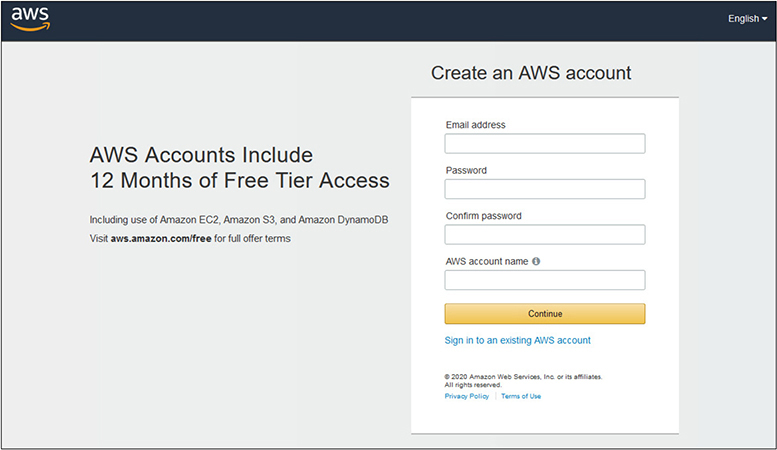
Figure 2-1 The Create An AWS Account page
a. E-mail address
b. Password (be sure to use a strong password!)
c. Confirm the password
d. AWS account name—this can be any name you desire, typically your full name, and it can be changed later from the Account Settings page
d. Click Continue
5. Fill out the Contact Information Page, as shown in Figure 2-2:
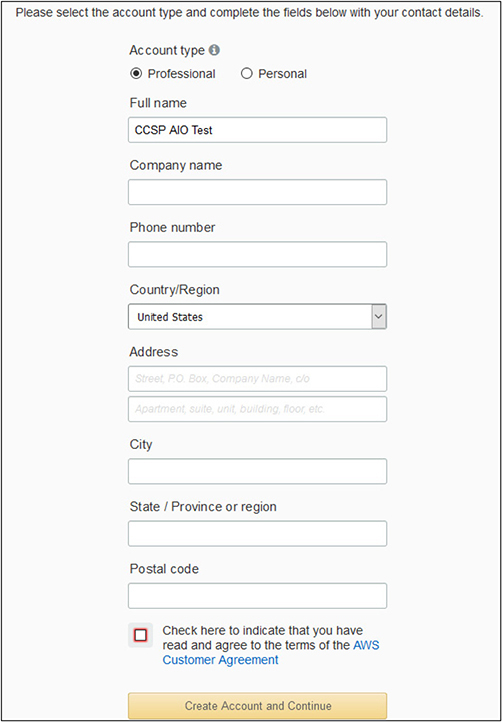
Figure 2-2 The Contact Information Page
a. Choose the account type that you would like. The only difference with Professional versus Personal is the Company Name field.
b. Fill in the pertinent contact information.
c. Check the box to confirm the AWS Customer Agreement.
d. Click the Create Account And Continue button.
6. Fill out the Payment Information page:
a. Nothing will be charged to you to simply create the account, and any exercises presented in the book will not incur any charges either, as we will use the AWS Free Tier.
NOTE AWS will make a $1 charge that will be reversed to verify the card is valid.
b. Click Verify And Add.
7. Complete the Confirm Your Identity page:
a. Enter a phone number or a mobile number to receive an SMS message.
b. Fill out the Security Check challenge.
c. Click Send SMS or Contact Me, depending on the method chosen.
8. You will receive an SMS or a call with a code:
a. Enter the code and click Verify.
b. You will receive a splash screen that your identity has been verified.
c. Click Continue.
9. You are now presented with the Select A Support Plan page:
a. For the purposes of this book, you can select the Free basic plan. If you want to change this later or use a paid plan, that is perfectly fine, but will not be necessary for any exercises.
10. You will now receive a message that your account is being created. You will receive an e-mail when it is ready.
11. Click Sign-in To The Console.
12. Keep Root User selected and enter the e-mail address you used.
13. Click Next and enter the password you used during account creation.
14. You should now be successfully logged into the AWS Management Console!
15. You will also receive an e-mail confirmation that your account has been created and is ready to use.
16. Feel free to click around and explore the Management Console some.
Exercise 2-2: Exploring the AWS Management Console
Now that you have created an AWS account, we will do some initial exploration of the Management Console to gain some familiarity as we delve into topics in the later domains.
1. Open your favorite web browser.
2. Go to https://aws.amazon.com.
3. Hover over the My Account link in the upper right, and then select AWS Management Console from the dropdown menu.
4. Log in to your account with the root user and password that you established in the previous exercise.
5. In the upper-left corner you will see an option for Services.
a. Click on the Services option, which will expand the menu and show you the breadth of AWS services, as shown in Figure 2-3.
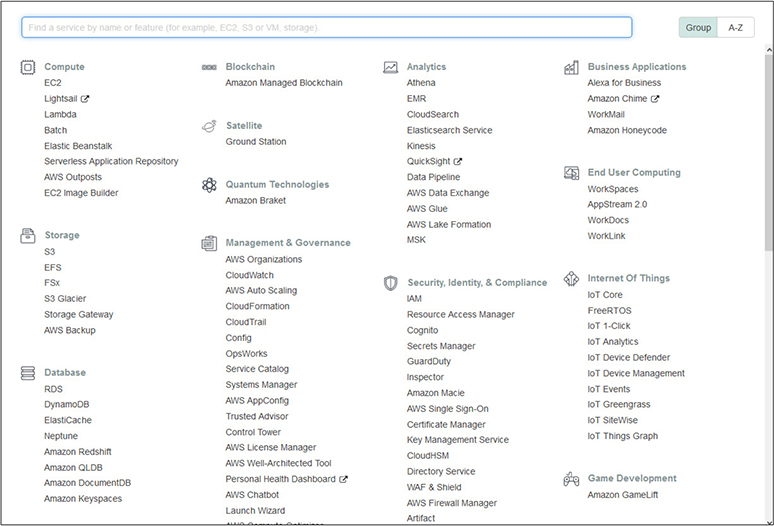
Figure 2-3 The list of services available to AWS account holders in the AWS Management Console
6. From the expanded menu, click on the first option under Compute for EC2.
7. The EC2 services dashboard is now displayed. This shows a typical screen for AWS services that you will encounter, as shown in Figure 2-4.
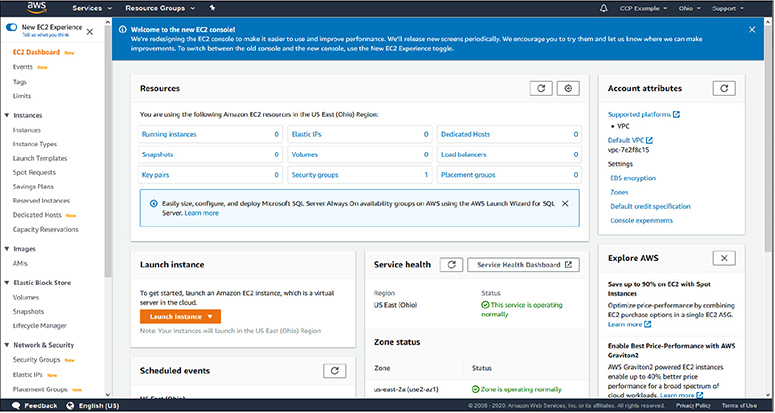
Figure 2-4 The AWS EC2 services dashboard
8. On the EC2 dashboard, you will notice a few key displays and options:
• In the middle of the page you will see the current Resources panel. This shows the current instances you have, as well as security groups, volumes, etc.
• Below the Resources panel you will have the option to Launch Instance, which will take you to the wizard to create an EC2 instance.
• Next to the Launch Instance panel you will see a readout of current service health, which displays information from the various AWS Zones and Availability Zones.
• In the left column you will have the major options for actions you would take applicable to EC2.
9. Expand the Services tab on the upper right, and this time, under Storage select S3.
10. This will display the S3 storage service. You will see that you do not have any buckets currently configured, but you will be presented with menus to create a new bucket, upload data, or set permissions, as shown in Figure 2-5.
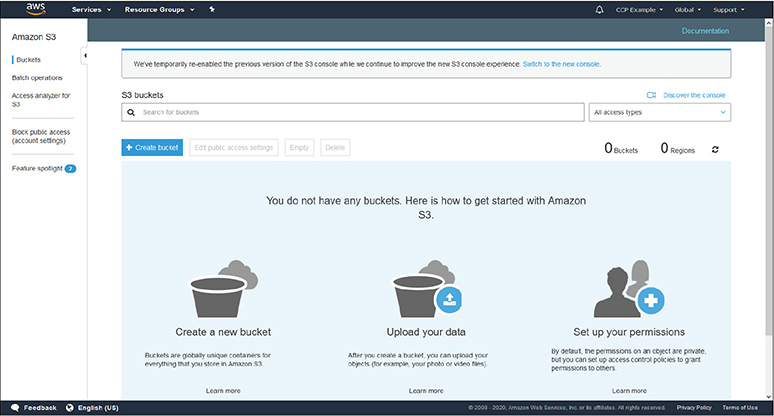
Figure 2-5 The S3 storage service Management Console screen
11. Feel free to click through many of the services from the Services tab to gain some familiarity with how the screens look for each one. This will also give you some beginning familiarity with the names of the AWS services and what type of services they are, such as compute, storage, database, etc.
Questions
1. Which of the following best describes interoperability?
A. Systems that work with any client software and access methods
B. Systems that will work with any type of network offerings
C. Systems that operate independently of particular platforms and hosting providers
D. Systems that are compatible with most operating systems and mobile devices
2. Which cloud deployment model best characterizes AWS?
A. Private
B. Public
C. Hybrid
D. Community
3. Which of the following is most pertinent to cost-saving benefits of cloud computing?
A. Broad network access
B. On-demand self-service
C. Resource pooling
D. Metered service
4. Which of the following best describes Platform as a Service?
A. The cloud customer is responsible for provisioning and configuring virtual machines from a base image.
B. The cloud provider gives the customer access to a full application where only data imports and branding are required.
C. The cloud customer provisions systems that are configured up to the point of deploying code and data.
D. The cloud provider gives the customer a fully configured network, but the customer is responsible for the configuration of all virtual machines within it.
5. Which cloud concept would most interest a company that wants flexibility in choosing different cloud providers as their needs change?
A. Reversibility
B. Availability
C. Resiliency
D. Portability
6. Which of the following best fits the responsibility of the cloud customer with a Software as a Service application?
A. A cloud customer provisions virtual machines that have a base image and just require software installation specific to their needs.
B. The cloud customer gains access to a fully featured application that just requires their user data and access, possibly with branding also allowed.
C. The cloud provider allocates fully built systems that require a customer to integrate their custom application code.
D. A cloud provider gives access to a vast software suite of utilities and libraries that a customer can access as needed for their own deployments.
7. Which of the following best describes scalability?
A. A customer only pays for the resources they need and are using at a particular time.
B. The ability to deploy as many virtual machines as a cloud customer requires.
C. The ability to statically change the level of computing or storage resources to meet changing demands.
D. Having unlimited resources within a cloud infrastructure.
8. Which cloud deployment model is often used in conjunction with a company’s disaster recovery plan?
A. Public
B. Hybrid
C. Community
D. Private
9. Which of the following situations would most benefit a company’s costs by utilizing cloud computing?
A. A healthcare company experiences a significant increase in utilization during the annual open enrollment period.
B. A company has consistent utilization through the year without many bursts or down periods.
C. A sports news system gets a 50 percent increase in traffic on weekends versus weekdays.
D. A publishing company gets short, sporadic bursts of traffic with news items.
10. Which of the following best describes Infrastructure as a Service?
A. The cloud customer is responsible for provisioning and configuring virtual machines from a base image.
B. The cloud provider gives the customer access to a full application where only data imports and branding are required.
C. The cloud customer provisions systems that are configured up to the point of deploying code and data.
D. The cloud provider gives the customer a fully configured network, but the customer is responsible for the configuration of all virtual machines within it.
Questions and Answers
1. Which of the following best describes interoperability?
A. Systems that work with any client software and access methods
B. Systems that will work with any type of network offerings
C. Systems that operate independently of particular platforms and hosting providers
D. Systems that are compatible with most operating systems and mobile devices
 C. Interoperability pertains to the ability of a system to reuse components and services, without being dependent on a particular hosting provider. This allows systems to easily move between cloud providers and maintains the most flexibility and options for a company.
2. Which cloud deployment model best characterizes AWS?
A. Private
B. Public
C. Hybrid
D. Community
B. AWS utilizes a public cloud deployment model where anyone can sign up for an account and allocate resources, with the limitations applying to their finances and resources.
3. Which of the following is most pertinent to cost-saving benefits of cloud computing?
A. Broad network access
B. On-demand self-service
C. Resource pooling
D. Metered service
D. Metered service allows a company to only pay for resources during the time they are actually allocated and in use. This allows a company to alter their resources as needed and to disable during times of nonuse, versus a traditional data center, where hardware must be purchased and active, whether it is actually being used or not.
4. Which of the following best describes Platform as a Service?
A. The cloud customer is responsible for provisioning and configuring virtual machines from a base image.
B. The cloud provider gives the customer access to a full application where only data imports and branding are required.
C. The cloud customer provisions systems that are configured up to the point of deploying code and data.
D. The cloud provider gives the customer a fully configured network, but the customer is responsible for the configuration of all virtual machines within it.
C. With Platform as a Service, the cloud provider provisions fully built systems that have all necessary libraries and software platforms that a customer can quickly deploy their code and data on to begin utilization.
5. Which cloud concept would most interest a company that wants flexibility in choosing different cloud providers as their needs change?
A. Reversibility
B. Availability
C. Resiliency
D. Portability
D. Portability pertains to the ability of a company to quickly and easily move systems between cloud providers. This is maintained by minimizing the utilization of proprietary offerings from cloud providers that would be unique to that provider and would prevent their easy move to a different offering.
6. Which of the following best fits the responsibility of the cloud customer with a Software as a Service application?
A. A cloud customer provisions virtual machines that have a base image and just require software installation specific to their needs.
B. The cloud customer gains access to a fully featured application that just requires their user data and access, possibly with branding also allowed.
C. The cloud provider allocates fully built systems that require a customer to integrate their custom application code.
D. A cloud provider gives access to a vast software suite of utilities and libraries that a customer can access as needed for their own deployments.
B. With Software as a Service, a customer contracts for a fully built and ready software application. The customer typically will need to provision user access and user data, along with possibly branding with their own logos and text. The application is fully maintained by the cloud provider, and a customer does not have the ability to modify code.
7. Which of the following best describes scalability?
A. A customer only pays for the resources they need and are using at a particular time.
B. The ability to deploy as many virtual machines as a cloud customer requires.
C. The ability to statically change the level of computing or storage resources to meet changing demands.
D. Having unlimited resources within a cloud infrastructure.
C. Scalability pertains to the ability to change the level of resources being utilized by a cloud customer to meet current demands over time. This includes both the ability to add resources for new deployments or expected needs and the ability to downgrade resources and save costs when not needed.
8. Which cloud deployment model is often used in conjunction with a company’s disaster recovery plan?
A. Public
B. Hybrid
C. Community
D. Private
B. Hybrid cloud environments, which use a mix of traditional data centers with the cloud or utilize multiple cloud models, are often used as a backup and standby platform for a company’s disaster recovery plans.
9. Which of the following situations would most benefit a company’s costs by utilizing cloud computing?
A. A healthcare company experiences a significant increase in utilization during the annual open enrollment period.
B. A company has consistent utilization through the year without many bursts or down periods.
C. A sports news system gets a 50 percent increase in traffic on weekends versus weekdays.
D. A publishing company gets short, sporadic bursts of traffic with news items.
A. With a defined period of high utilization of a cyclical nature, a healthcare company could save significant costs with cloud computing, where resources can be increased during those peak periods and otherwise operate at a much lower level the majority of the year.
10. Which of the following best describes Infrastructure as a Service?
A. The cloud customer is responsible for provisioning and configuring virtual machines from a base image.
B. The cloud provider gives the customer access to a full application where only data imports and branding are required.
C. The cloud customer provisions systems that are configured up to the point of deploying code and data.
D. The cloud provider gives the customer a fully configured network, but the customer is responsible for the configuration of all virtual machines within it.
D. With Infrastructure as a Service, the cloud provider gives the customer a base environment where they can fully deploy virtual machines and virtual network devices. The cloud customer is responsible for all deployments and configurations beyond the base environment.