13 Integrity
Several promises in the oath involve integrity.
Small Cycles
Promise 4. I will make frequent, small releases so that I do not impede the progress of others.
Making small releases just means changing a small amount of code for each release. The system may be large, but the incremental changes to that system are small.
The History of Source Code Control
Let’s go back to the 1960s for a moment. What is your source code control system when your source code is punched on a deck of cards (Figure 13.1)?

Figure 13.1 Punch card
The source code is not stored on disk. It’s not “in the computer.” Your source code is, literally, in your hand.
What is the source code control system? It is your desk drawer.
When you literally possess the source code, there is no need to “control” it. Nobody else can touch it.
And this was the situation throughout much of the 1950s and 1960s. Nobody even dreamed of something like a source code control system. You simply kept the source code under control by putting it in a drawer or a cabinet.
If anyone wanted to “check out” the source code, they simply went to the cabinet and took it. When they were done, they put it back.
We certainly didn’t have merge problems. It was physically impossible for two programmers to be making changes to the same modules at the same time.
But things started to change in the 1970s. The idea of storing your source code on magnetic tape or even on disk was becoming attractive. We wrote line editing programs that allowed us to add, replace, and delete lines in source files on tape. These programs weren’t screen editors. We punched our add, change, and delete directives on cards. The editor would read the source tape, apply the changes from the edit deck, and write the new source tape.
You may think this sounds awful. Looking back on it—it was. But it was better than trying to manage programs on cards! I mean 6,000 lines of code on cards weighs 30 pounds. What would you do if you accidentally dropped those cards and watched as they spread all over the floor and under furniture and down into heating vents?
If you drop a tape, you can just pick it up again.
Anyway, notice what happened. We started with one source tape, and in the editing process, we wound up with a second, new source tape. But the old tape still existed. If we put that old tape back on the rack, someone else might inadvertently apply their own changes to it, leaving us with a merge problem.
To prevent that, we simply kept the master source tape in our possession until we were done with our edits and our tests. Then we put a new master source tape back on the rack. We controlled the source code by keeping possession of the tape.
Protecting our source code required a process and convention. A true source code control process had to be used. No software yet, just human rules. But still, the concept of source code control had become separate from the source code itself.
As systems became increasingly larger, they needed greater numbers of programmers working on the same code at the same time. Grabbing the master tape and holding it became a real nuisance for everyone else. I mean, you could keep the master tape out of circulation for a couple of days or more.
So, we decided to extract modules from the master tape. The whole idea of modular programming was pretty new at the time. The notion that a program could be made up of many different source files was revolutionary.
We therefore started using bulletin boards like the one in Figure 13.2.
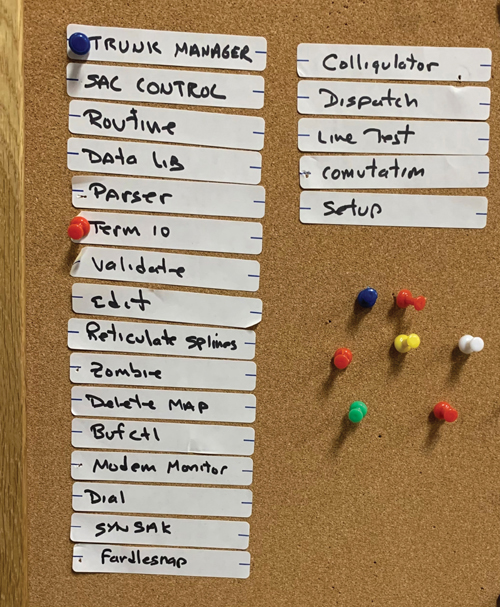
Figure 13.2 A bulletin board
The bulletin board had labels on it for each of the modules in the system. We programmers each had our own color thumbtack. I was blue. Ken was red. My buddy CK was yellow, and so on.
If I wanted to edit the Trunk Manager module, I’d look on the bulletin board to see if there was a pin in that module. If not, I put a blue pin in it. Then I took the master tape from the rack and copied it onto a separate tape.
I would edit the Trunk Manager module, and only the Trunk Manager module, generating a new tape with my changes. I’d compile, test, wash and repeat until I got my changes to work. Then I’d go get the master tape from the rack, and I would create a new master by copying the current master but replacing the Trunk Manager module with my changes. I’d put the new master back in the rack.
Finally, I’d remove my blue pin from the bulletin board.
This worked, but it only worked because we all knew each other, we all worked in the same office together, we each knew what the others were doing. And we talked to each other all the time.
I’d holler across the lab: “Ken, I’m going to change the Trunk Manager module.” He’d say: “Put a pin in it.” I’d say: “I already did.”
The pins were just reminders. We all knew the status of the code and who was working on what. And that’s why the system worked.
Indeed, it worked very well. Knowing what each of the other programmers was doing meant that we could help each other. We could make suggestions. We could warn each other about problems we’d recently encountered. And we could avoid merges.
Back then, merges were NOT fun.
Then, in the 1980s, came the disks. Disks got big, and they got permanent. By big, I mean hundreds of megabytes. By permanent, I mean that they were permanently mounted—always on line.
The other thing that happened is that we got machines like PDP11s and VAXes. We got screen editors, real operating systems, and multiple terminals. More than one person could be editing at exactly the same time.
The era of thumbtacks and bulletin boards had to come to an end.
First of all, by then, we had twenty or thirty programmers. There weren’t enough thumbtack colors. Second, we had hundreds and hundreds of modules. We didn’t have enough space on the bulletin board.
Fortunately, there was a solution.
In 1972, Marc Rochkind wrote the first source code control program. It was called the Source Code Control System (SCCS), and he wrote it in SNOBOL.1
1. A lovely little string processing language from the 1960s that had many of the pattern-matching facilities of our modern languages.
Later, he rewrote it in C, and it became part of the UNIX distribution on PDP11s. SCCS worked on only one file at a time but allowed you to lock that file so that no one else could edit it until you were done. It was a life saver.
In 1982, RCS, the Revision Control System, was created by Walter Tichy. It too was file based and knew nothing of projects, but it was considered an improvement over SCCS and rapidly became the standard source code control system of the day.
Then, in 1986, CVS, the Concurrent Versions System, came along. It extended RCS to deal with whole projects, not just individual files. It also introduced the concept of optimistic locking.
Up to this time, most source code control systems worked like my thumbtacks. If you had checked out the module, nobody else could edit it. This is called pessimistic locking.
CVS used optimistic locking. Two programmers could check out and change the same file at the same time. CVS would try to merge any nonconflicting changes and would alert you if it couldn’t figure out how to do the merge.
After that, source code control systems exploded and even became commercial products. Literally hundreds of them flooded the market. Some used optimistic locking, others used pessimistic locking. The locking strategy became a kind of religious divide in the industry.
Then, in 2000, Subversion was created. It vastly improved upon CVS, and was instrumental in driving the industry away from pessimistic locking once and for all. Subversion was also the first source code control system to be used in the cloud. Does anybody remember Source Forge?
Up to this point, all source code control systems were based on the master tape idea that I used back in my bulletin board days. The source code was maintained in a single central master repository. Source code was checked out from that master repository, and commits were made back into that master repository.
But all that was about to change.
Git
The year is 2005. Multi-gigabyte disks are in our laptops. Network speeds are fast and getting faster. Processor clock rates have plateaued at 2.6GHz.
We are very, very far beyond my old bulletin board control system for source code. But we are still using the master tape concept. We still have a central repository that everybody has to check in and out of. Every commit, every reversion, every merge requires network connectivity to the master.
And then came git.
Well, actually, git was presaged by BitKeeper and monotone; but it was git that caught the attention of the programming world and changed everything.
Because, you see, git eliminates the master tape.
Oh, you still need a final authoritative version of the source code. But git does not automatically provide this location for you. Git simply doesn’t care about that. Where you decide to put your authoritative version is entirely up to you. Git has nothing whatever to do with it.
Git keeps the entire history of the source code on your local machine. Your laptop, if that’s what you use. On your machine, you can commit changes, create branches, check out old versions, and generally do anything you could do with a centralized system like Subversion—except you don’t need to be connected to some central server.
Any time you like, you can connect to another user and push any of the changes you’ve made to that user. Or you can pull any changes they have made into your local repository. Neither is master. Both are equal. That’s why they call it peer to peer.
And the final authoritative location that you use for making production releases is just another peer that people can push to or pull from any time they like.
The end result is that you are free to make as many small commits as you like before you push your changes somewhere else. You can commit every 30 seconds if you like. You can make a commit every time you get a unit test to pass.
And that brings us to the point of this whole historical discussion.
If you stand back and look at the trajectory of the evolution of source code control systems, you can see that they have been driven, perhaps unconsciously, by a single underlying imperative.
Short Cycles
Consider again how we began. How long was the cycle when source code was controlled by physically possessing a deck of cards?
You checked the source code out by taking those cards out of the cabinet. You held on to those cards until you were done with your project. Then you committed your changes by putting the changed deck of cards back in the cabinet. The cycle time was the whole project.
Then, when we used thumbtacks on the bulletin board, the same rule applied. You kept your thumbtacks in the modules you were changing until you were done with the project you were working on.
Even in the late 1970s and into the 1980s when we were using SCCS and RCS, we continued to use this pessimistic locking strategy, keeping others from touching the modules we were changing until we were done.
But CVS changed things—at least for some of us. Optimistic locking meant that one programmer could not lock others out of a module. We still committed only when we were done with a project, but others could be working concurrently on the same modules. Consequently, the average time between commits on a project shrank drastically. The cost of concurrency, of course, was merges.
And how we hated doing merges. Merges are awful. Especially without unit tests! They are tedious, time-consuming, and dangerous.
Our distaste for merges drove us to a new strategy.
Continuous Integration
By 2000, even while we were using tools such as Subversion, we had begun teaching the discipline of committing every few minutes.
The rationale was simple. The more frequently you commit, the less likely you are to face a merge. And if you do have to merge, the merge will be trivial.
We called this discipline continuous integration.
Of course, continuous integration depends critically on having a very reliable suite of unit tests. I mean, without good unit tests, it would be easy to make a merge error and break someone else’s code. So, continuous integration goes hand in hand with test-driven development (TDD).
With tools like git, there is almost no limit to how small we can shrink the cycle. And that begs the question: Why are we so concerned about shrinking the cycle?
Because long cycles impede the progress of the team.
The longer the time between commits, the greater the chance that someone else on the team—perhaps the whole team—will have to wait for you. And that violates the promise.
Perhaps you think this is only about production releases. No, it’s actually about every other cycle. It’s about iterations and sprints. It’s about the edit/compile/test cycle. It’s about the time between commits. It’s about everything.
And remember the rationale: so that you do not impede the progress of others.
Branches versus Toggles
I used to be a branch nazi. Back when I was using CVS and Subversion, I refused to allow members on my teams to branch the code. I wanted all changes returned to the main line as frequently as possible.
My rationale was simple. A branch is simply a long-term checkout. And, as we’ve seen, long-term checkouts impede the progress of others by prolonging the time between integrations.
But then I switched to git—and everything changed overnight.
At the time, I was managing the open source FitNesse project, which had a dozen or so people working on it. I had just moved the FitNesse repository from Subversion (Source Forge) to git (GitHub). Suddenly, branches started appearing all over the place.
For the first few days, these crazy branches in git had me confused. Should I abandon my branch-nazi stance? Should I abandon continuous integration and simply allow everyone to make branches willy-nilly, forgetting about the cycle time issue?
But then it occurred to me that these branches I was seeing were not true named branches. Instead, they were just the stream of commits made by a developer between pushes. In fact, all git had really done was record the actions of the developer between continuous integration cycles.
So, I resolved to continue my rule to restrict branches. It’s just that now, it’s not commits that return immediately to the mainline. It’s pushes. Continuous integration was preserved.
If we follow continuous integration and push to the main line every hour or so, then we’ll certainly have a bunch of half-written features on the main line. There are typically two strategies for dealing with that: branches and toggles.
The branching strategy is simple. You simply create a new branch of the source code in which to develop the feature. You merge it back when the feature is done. This is most often accomplished by delaying the push until the feature is complete.
If you keep the branch out of the main line for days or weeks, then you’ll likely face a big merge, and you’ll certainly be impeding the team.
However, there are cases in which the new feature is so isolated from the rest of the code that branching it is not likely to cause a big merge. In these circumstances, it might be better to let the developers work in peace on the new feature without continuously integrating.
In fact, we had a case like this with FitNesse a few years ago. We completely rewrote the parser. This was a big project. It took a few man weeks. And there was no way to do it incrementally. I mean, the parser is the parser.
We therefore created a branch and kept that branch isolated from the rest of the system until the parser was ready.
There was a merge to do at the end, but it wasn’t too bad. The parser was isolated well enough from the rest of the system. And, fortunately, we had a very comprehensive set of unit and acceptance tests.
Despite the success of the parser branch, I think it’s usually better to keep new feature development on the main line and use toggles to turn those features off until ready.
Sometimes we use flags for those toggles, but more often we use the Command pattern, the Decorator pattern, and special versions of the Factory pattern to make sure that the partially written features cannot be executed in a production environment.
And most of the time we simply don’t give the user the option to use the new feature. I mean, if the button isn’t on the Web page, you can’t execute that feature.
In many cases, of course, new features will be completed as part of the current iteration—or at least before the next production release—so there’s no real need for any kind of toggle.
You only need a toggle if you are going to be releasing to production while some of the features are unfinished. How often should that be?
Continuous Deployment
What if we could eliminate the delays between production releases? What if we could release to production several times per day? After all, delaying production releases impedes others.
I want you to be able to release your code to production several times per day. I want you to feel comfortable enough with your work that you could release your code to production on every push.
This, of course, depends on automated testing: automated tests written by programmers to cover every line of code and automated tests written by business analysts and QA testers to cover every desired behavior.
Remember our discussion of tests in Chapter 12, “Harm.” Those tests are the scientific proof that everything works as it is supposed to. And if everything works as it is supposed to, the next step is to deploy to production.
And by the way, that’s how you know if your tests are good enough. Your tests are good enough if, when they pass, you feel comfortable deploying. If passing tests don’t allow you to deploy, your tests are deficient.
Perhaps you think that deploying every day or even several times per day would lead to chaos. However, the fact that you are ready to deploy does not mean that the business is ready to deploy. As part of a development team, your standard is to always be ready.
What’s more, we want to help the business remove all the impediments to deployment so that the business deployment cycle can be shortened as much as possible. After all, the more ceremony and ritual the business uses for deployment, the more expensive deployment becomes. Any business would like to shed that expense.
The ultimate goal for any business is continuous, safe, and ceremony-free deployment. Deployment should be as close as possible to a nonevent.
Because deployment is often a lot of work, with servers to configure and databases to load, you need to automate the deployment procedure. And because deployment scripts are part of the system, you write tests for them.
For many of you, the idea of continuous deployment may be so far from your current process that it’s inconceivable. But that doesn’t mean there aren’t things you can do to shorten the cycle.
And who knows? If you keep shortening the cycle, month after month, year after year, perhaps one day you’ll find that you are deploying continuously.
Continuous Build
Clearly, if you are going to deploy in short cycles, you have to be able to build in short cycles. If you are going to deploy continuously, you have to be able to build continuously.
Perhaps some of you have slow build times. If you do, speed them up. Seriously, with the memory and speed of modern systems, there is no excuse for slow builds. None. Speed them up. Consider it a design challenge.
And then get yourself a continuous build tool, such as Jenkins, Buildbot, or Travis, and use it. Make sure that you kick off a build at every push and do what it takes to ensure that the build never fails.
A build failure is a red alert. It’s an emergency. If the build fails, I want emails and text messages sent to every team member. I want sirens going off. I want a flashing red light on the CEO’s desk. I want everybody to stop whatever they are doing and deal with the emergency.
Keeping the build from failing is not rocket science. You simply run the build, along with all the tests, in your local environment before you push. You push the code only when all the tests pass.
If the build fails after that, you’ve uncovered some environmental issue that needs to be resolved posthaste.
You never allow the build to go on failing, because if you allow the build to fail, you’ll get used to it failing. And if you get used to the failures, you’ll start ignoring them. The more you ignore those failures, the more annoying the failure alerts become. And the more tempted you are to turn the failing tests off until you can fix them—later. You know. Later?
And that’s when the tests become lies.
With the failing tests removed, the build passes again. And that makes everyone feel good again. But it’s a lie.
So, build continuously. And never let the build fail.
Relentless Improvement
Promise 5. I will fearlessly and relentlessly improve my creations at every opportunity. I will never degrade them.
Robert Baden Powell, the father of the Boy Scouts, left a posthumous message exhorting the scouts to leave the world a better place than they found it. It was from this statement that I derived my Boy Scout rule: Always check the code in cleaner than you checked it out.
How? By performing random acts of kindness upon the code every time you check it in.
One of those random acts of kindness is to increase test coverage.
Test Coverage
Do you measure how much of your code is covered by your tests? Do you know what percentage of lines are covered? Do you know what percentage of branches are covered?
There are plenty of tools that can measure coverage for you. For most of us, those tools come as part of our IDE and are trivial to run, so there’s really no excuse for not knowing what your coverage numbers are.
What should you do with those numbers? First, let me tell you what not to do. Don’t turn them into management metrics. Don’t fail the build if your test coverage is too low. Test coverage is a complicated concept that should not be used so naively.
Such naive usage sets up perverse incentives to cheat. And it is very easy to cheat test coverage. Remember that coverage tools only measure the amount of code that was executed; not the code that was actually tested. This means that you can drive the coverage number very high by pulling the assertions out of your failing tests. And, of course, that makes the metric useless.
The best policy is to use the coverage numbers as a developer tool to help you improve the code. You should work to meaningfully drive the coverage toward 100 percent by writing actual tests.
One hundred percent test coverage is always the goal, but it is also an asymptotic goal. Most systems never reach 100 percent, but that should not deter you from constantly increasing the coverage.
That’s what you use the coverage numbers for. You use them as a measurement to help you improve, not as a bludgeon with which to punish the team and fail the build.
Mutation Testing
One hundred percent test coverage implies that any semantic change to the code should cause a test to fail. TDD is a good discipline to approximate that goal because, if you follow the discipline ruthlessly, every line of code is written to make a failing test pass.
Such ruthlessness, however, is often impractical. Programmers are human, and disciplines are always subject to pragmatics. So, the reality is that even the most assiduous test-driven developer will leave gaps in the test coverage.
Mutations testing is a way to find those gaps, and there are mutation testing tools that can help. A mutation tester runs your test suite and measures the coverage. Then it goes into a loop, mutating your code in some semantic way and then running the test suite with coverage again. The semantic changes are things like changing > to < or == to != or x=<something> to x=null. Each such semantic change is called a mutation.
The tool expects each mutation to fail the tests. Mutations that do not fail the tests are called surviving mutations. Clearly, the goal is to ensure that there are no surviving mutations.
Running a mutation test can be a big investment of time. Even relatively small systems can require hours of runtime, so these kinds of tests are best run over weekends or at month’s end. However, I have not failed to be impressed by what mutation testing tools can find. It is definitely worth the occasional effort to run them.
Semantic Stability
The goal of test coverage and mutation testing is to create a test suite that ensures semantic stability. The semantics of a system are the required behaviors of that system. A test suite that ensures semantic stability is one that fails whenever a required behavior is broken. We use such test suites to eliminate the fear of refactoring and cleaning the code. Without a semantically stable test suite, the fear of change is often too great.
TDD gives us a good start on a semantically stable test suite, but it is not sufficient for full semantic stability. Coverage, mutation testing, and acceptance testing should be used to improve the semantic stability toward completeness.
Cleaning
Perhaps the most effective of the random acts of kindness that will improve the code is simple cleaning—refactoring with the goal of improvement.
What kinds of improvements can be made? There is, of course, the obvious elimination of code smells. But I often clean code even when it isn’t smelly.
I make tiny little improvements in the names, in the structure, in the organization. These changes might not be noticed by anyone else. Some folks might even think they make the code less clean. But my goal is not simply the state of the code. By doing little minor cleanings, I learn about the code. I become more familiar and more comfortable with it. Perhaps my cleaning did not actually improve the code in any objective sense, but it improved my understanding of and my facility with that code. The cleaning improved me as a developer of that code.
The cleaning provides another benefit that should not be understated. By cleaning the code, even in minor ways, I am flexing that code. And one of the best ways to ensure that code stays flexible is to regularly flex it. Every little bit of cleaning I do is actually a test of the code’s flexibility. If I find a small cleanup to be a bit difficult, I have detected an area of inflexibility that I can now correct.
Remember, software is supposed to be soft. How do you know that it is soft? By testing that softness on a regular basis. By doing little cleanups and little improvements and feeling how easy or difficult those changes are to make.
Creations
The word used in Promise 5 is creations. In this chapter, I have focused mostly on code, but code is not the only thing that programmers create. We create designs and documents and schedules and plans. All of these artifacts are creations that should be continuously improved.
We are human beings. Human beings make things better with time. We constantly improve everything we work on.
Maintain High Productivity
Promise 6. I will do all that I can to keep the productivity of myself and others as high as possible. I will do nothing that decreases that productivity.
Productivity. That’s quite a topic, isn’t it? How often do you feel that it’s the only thing that matters at your job? If you think about it, productivity is what this book and all my books on software are about.
They’re about how to go fast.
And what we’ve learned over the last seven decades of software is that the way you go fast is to go well.
The only way to go fast is to go well.
So, you keep your code clean. You keep your designs clean. You write semantically stable tests and keep your coverage high. You know and use appropriate design patterns. You keep your methods small and your names precise.
But those are all indirect methods of achieving productivity. Here, we’re going to talk about much more direct ways to keep productivity high.
Viscosity—keeping your development environment efficient
Distractions—dealing with every day business and personal life
Time management—effectively separating productive time from all the other junk you have to do
Viscosity
Programmers are often very myopic when it comes to productivity. They view the primary component to productivity as their ability to write code quickly.
But the writing of code is a very small part of the overall process. If you made the writing of code infinitely fast, it would increase overall productivity only by a small amount.
That’s because there’s a lot more to the software process than just writing code. There’s at least
Building
Testing
Debugging
Deploying
And that doesn’t count the requirements, the analysis, the design, the meetings, the research, the infrastructure, the tooling, and all the other stuff that goes into a software project.
So, although it is important to be able to write code efficiently, it’s not even close to the biggest part of the problem.
Let’s tackle some of the other issues one at a time.
Building
If it takes you 30 minutes to build after a 5-minute edit, then you can’t be very productive, can you?
There is no reason, in the second and subsequent decades of the twenty-first century, that builds should take more than a minute or two.
Before you object to this, think about it. How could you speed the build? Are you utterly certain, in this age of cloud computing, that there is no way to dramatically speed up your build? Find whatever is causing the build to be slow, and fix it. Consider it a design challenge.
Testing
Is it your tests that are slowing the build? Same answer. Speed up your tests.
Here, look at it this way. My poor little laptop has four cores running at a clock rate of 2.8GHz. That means it can execute around 10 billion instructions per second.
Do you even have 10 billion instructions in your whole system? If not, then you should be able to test your whole system in less than a second.
Unless, of course, you are executing some of those instructions more than once. For example, how many times do you have to test login to know that it works? Generally speaking, once should be sufficient. How many of your tests go through the login process? Any more than one would be a waste!
If login is required before each test, then during tests, you should short-circuit the login process. Use one of the mocking patterns. Or, if you must, remove the login process from systems built for testing.
The point is, don’t tolerate repetition like that in your tests. It can make them horrifically slow.
As another example, how many times do your tests walk through the navigation and menu structure of the user interface? How many tests start at the top and then walk through a long chain of links to finally get the system into the state where the test can be run?
Any more than once per navigation pathway would be a waste! So, build a special testing API that allows the tests to quickly force the system into the state you need, without logging in and without navigating.
How many times do you have to execute a query to know that it works? Once! So, mock out your databases for the majority of your tests. Don’t allow the same queries to be executed over and over and over again.
Peripheral devices are slow. Disks are slow. Web sockets are slow. UI screens are slow. Don’t let slow things slow down your tests. Mock them out. Bypass them. Get them out of the critical path of your tests.
Don’t tolerate slow tests. Keep your tests running fast!
Debugging
Does it take a long time to debug things? Why? Why is debugging slow?
You are using TDD to write unit tests, aren’t you? You are writing acceptance tests too, right? And you are measuring test coverage with a good coverage analysis tool, right? And you are periodically proving that your tests are semantically stable by using a mutation tester, right?
If you are doing all those things or even just some of those things, your debug time can be reduced to insignificance.
Deployment
Does deployment take forever? Why? I mean, you are using deployment scripts, right? You aren’t deploying manually, are you?
Remember, you are a programmer. Deployment is a procedure—automate it! And write tests for that procedure too!
You should be able to deploy your system, every time, with a single click.
Managing Distractions
One of the most pernicious destroyers of productivity is distraction from the job. There are many different kinds of distractions. It is important for you to know how to recognize them and defend against them.
Meetings
Are you slowed down by meetings?
I have a very simple rule for dealing with meetings. It goes like this:
When the meeting gets boring, leave.
You should be polite about it. Wait a few minutes for a lull in the conversation, and then tell the participants that you believe your input is no longer required and ask them if they would mind if you returned to the rather large amount of work you have to do.
Never be afraid of leaving a meeting. If you don’t figure out how to leave, then some meetings will keep you forever.
You would also be wise to decline most meeting invitations. The best way to avoid getting caught in long, boring meetings is to politely refuse the invitation in the first place. Don’t be seduced by the fear of missing out. If you are truly needed, they’ll come get you.
When someone invites you to a meeting, make sure they’ve convinced you that you really need to go. Make sure they understand that you can only afford a few minutes and that you are likely to leave before the meeting is over.
And make sure you sit close to the door.
If you are a group leader or a manager, remember that one of your primary duties is to defend your team’s productivity by keeping them out of meetings.
Music
I used to code to music long, long ago. But I found that listening to music impedes my concentration. Over time, I realized that listening to music only feels like it helps me concentrate, but actually, it divides my attention.
One day, while looking over some year-old code, I realized that my code was suffering under the lash of the music. There, scattered through the code in a series of comments, were the lyrics to the song I had been listening to.
Since then, I’ve stopped listening to music while I code, and I’ve found I am much happier with the code I write and with the attention to detail that I can give it.
Programming is the act of arranging elements of procedure through sequence, selection, and iteration. Music is composed of tonal and rhythmic elements arranged through sequence, selection, and iteration. Could it be that listening to music uses the same parts of your brain that programming uses, thereby consuming part of your programming ability? That’s my theory, and I’m sticking to it.
You will have to work this out for yourself. Maybe the music really does help you. But maybe it doesn’t. I’d advise you to try coding without music for a week, and see if you don’t end up producing more and better code.
Mood
It’s important to realize that being productive requires that you become skilled at managing your emotional state. Emotional stress can kill your ability to code. It can break your concentration and keep you in a perpetually distracted state of mind.
For example, have you ever noticed that you can’t code after a huge fight with your significant other? Oh, maybe you type a few random characters in your IDE, but they don’t amount to much. Perhaps you pretend to be productive by hanging out in some boring meeting that you don’t have to pay much attention to.
Here’s what I’ve found works best to restore your productivity.
Act. Act on the root of the emotion. Don’t try to code. Don’t try to cover the feelings with music or meetings. It won’t work. Act to resolve the emotion.
If you find yourself at work, too sad or depressed to code because of a fight with your significant other, then call them to try to resolve the issue. Even if you don’t actually get the issue resolved, you’ll find that the action to attempt a resolution will sometimes clear your mind well enough to code.
You don’t actually have to solve the problem. All you have to do is convince yourself that you’ve taken enough appropriate action. I usually find that’s enough to let me redirect my thoughts to the code I have to write.
The Flow
There’s an altered state of mind that many programmers enjoy. It’s that hyperfocused, tunnel-vision state in which the code seems to pour out of every orifice of your body. It can make you feel superhuman.
Despite the euphoric sensation, I’ve found, over the years, that the code I produce in that altered state tends to be pretty bad. The code is not nearly as well considered as code I write in a normal state of attention and focus. So, nowadays, I resist getting into the flow. Pairing is a very good way to stay out of the flow. The very fact that you must communicate and collaborate with someone else seems to interfere with the flow.
Avoiding music also helps me stay out of the flow because it allows the actual environment to keep me grounded in the real world.
If I find that I’m starting to hyperfocus, I break away and do something else for a while.
Time Management
One of the most important ways to manage distraction is to employ a time management discipline. The one I like best is the Pomodoro Technique.2
2. Francesco Cirillo, The Pomodoro Technique: The Life-Changing Time-Management System (Virgin Books, 2018).
Pomodoro is Italian for “tomato.” English teams tend to use the word tomato instead. But you’ll have better luck with Google if you search for the Pomodoro Technique.
The aim of the technique is to help you manage your time and focus during a regular workday. It doesn’t concern itself with anything beyond that.
At its core, the idea is quite simple. Before you begin to work, you set a timer (traditionally a kitchen timer in the shape of a tomato) for 25 minutes.
Next, you work. And you work until the timer rings.
Then you break for 5 minutes, clearing your mind and body.
Then you start again. Set the timer for 25 minutes, work until the timer rings, and then break for 5 minutes. You do this over and over.
There’s nothing magical about 25 minutes. I’d say anything between 15 and 45 minutes is reasonable. But once you choose a time, stick with that time. Don’t change the size of your tomatoes!
Of course, if I were 30 seconds away from getting a test to pass when the timer rang, I’d finish the test. On the other hand, maintaining the discipline is important. I wouldn’t go more than a minute beyond.
So far, this sounds mundane, but handling interruptions, such as phone calls, is where this technique shines. The rule is to defend the tomato!
Tell whoever is trying to interrupt you that you’ll get back to them within 25 minutes—or whatever the length of your tomato is. Dispatch the interruption as quickly as possible, and then return to work.
Then, after your break, handle the interruption.
This means that the time between tomatoes will sometimes get pretty long, because people who interrupt you often require a lot of time.
Again, that’s the beauty of this technique. At the end of the day, you count the number of tomatoes you completed, and that gives you a measure of your productivity.
Once you’ve gotten good at breaking your day up into tomatoes like this and defending the tomatoes from interruptions, then you can start planning your day by allocating tomatoes to it. You may even begin to estimate your tasks in terms of tomatoes and plan your meetings and lunches around them.