CHAPTER 1
Overview of Cloud Computing and Amazon Web Services
In this chapter, you will
• Get an overview of cloud computing
• Learn the advantages of running cloud computing on AWS
• Look at three models of cloud computing
• Look at three cloud computing deployment models
• Explore the history of AWS
• Be introduced to AWS regions and availability zones
• Learn about AWS security and compliance
• Review AWS products and services
The National Institute of Standards and Technology (NIST) defines cloud computing as “Ubiquitous, convenient, on-demand access to shared computing resources that can be rapidly provisioned and released with minimal management effort.” In other words, cloud computing is the on-demand delivery of IT resources available from the Internet with a pay-as-you-go model. Thus, the following are the three basic characteristics of the cloud:
• On demand Cloud computing enables you to use IT infrastructure as a resource that is always available on demand per your needs. For example, when you go home and switch on a light, you don’t care from where the power is coming. You don’t generate power in your home. You know that power is always readily available for you irrespective of your needs, and you will be billed according to your usage. In the same way, cloud computing allows you to provision any IT resource on demand.
• Accessible from the Internet All the resources that you deploy in the cloud are accessible from the Internet, which means you can spin up resources from anywhere in the globe and have your users work on those resources instantly from anywhere. If you want the resources to be available only from your corporate network and not the Internet, you have the option to do that too. You can also connect to a cloud vendor such as Amazon Web Services (AWS) directly so that you can bypass the public Internet. You will explore this in subsequent chapters of the book.
• Pay-as-you-go model When you use power in your home, you pay only for what you actually use. In the same way, when you use cloud computing, you pay per your usage. For example, if you need a server to run a job for two hours, you pay for the server usage for two hours and no more. Most cloud resources are billed on an hourly basis, but some cloud resources may be billed on a separate metric.
With cloud computing you don’t have to own or manage your own data center or buy your own servers. You just provision the provider’s resources—compute (server), storage, network, database, and any other service—as per your needs. You can scale up and scale down seamlessly without worrying about where the resources are. AWS manages and maintains the technology and infrastructure in a secure environment, and businesses access the resources via the Internet or via private connections. There are many reasons for using the cloud. For example, as an enterprise, you can run all your applications that support the business in the cloud, you can shift existing applications to the cloud, you can build all your new applications for the cloud, and so on. If you are a startup, you can just focus on the next big idea and forget about purchasing and managing the hardware. Thus, cloud computing caters to everyone’s need regardless of whether you work as an individual, in a startup, or in an established enterprise.
You must be wondering, how exactly are the resources provisioned in the cloud almost instantly? Well, cloud service providers such as AWS own and maintain the hardware and keep it ready so that whenever you request some resource, it is available. In fact, AWS keeps network-connected hardware in multiple data centers and in multiple geographies so that you can provision the resource in the location nearest to you to get the best user experience. You will see this in more detail when you study regions and availability zones later in this chapter.
Advantages of Running Cloud Computing on AWS
The following are the advantages of running cloud computing on AWS:
• Gaining agility Say you wanted to start a new project; the first thing you would do is provision hardware for the project. In a traditional IT model, it can take months to provision the resources before you can actually start the project. With the cloud, you can provision all the resources you need almost instantly, saving months of time procuring them. In some organizations, the procurement process is so complex that it can take up to three to four months just to get the hardware. By provisioning the resources in the cloud, you can eliminate this time and start your project early. In a similar fashion, if you want to scale up your infrastructure, you don’t have to wait; you can do it instantly.
• Avoiding guessing about capacity In a traditional enterprise, whenever you procure the infrastructure for any workload, the first thing you do is to size it. You take various metrics into consideration such as the number of users, the volume of transactions, the desired response time, the expected growth, service level agreements (SLAs), and so on, and come up with the hardware sizing. In some enterprises, it takes months to size the hardware correctly. When you purchase hardware, it sits in your data center for a minimum of three years. In the meantime, if the application requirement changes, it is difficult to refresh the hardware. If you oversize the hardware, you will have unused capacity for which you have already paid but are not using, but if you undersize, you are going to have business and performance impacts. Say you are designing the infrastructure for a portal where customers place orders. On Black Friday you anticipate 20 times more orders than the whole rest of the year. What do you do? Do you provision 20 times more hardware? If you do, you have 20 times unused capacity for the entire year, and if you don’t, you won’t be able to meet the demand on Black Friday. With the cloud, you don’t have to worry about guessing capacity. Since the cloud is elastic, which means you can scale up and scale down based on your requirements at any time, you can provision only the resources that you need at any point of time. When you need more resources, you can quickly scale up, and when you don’t need them, you can just scale down. For the Black Friday example, if you have to design the architecture in the cloud, you just spin up all the resources one day before Black Friday, and once the big day is over, you can scale down. This way you don’t overpay for the unused resources and also never run under capacity if your application demands additional resources.
• Moving from capital expenses to variable/flexible expenses Cloud computing allows you to trade all your capital expenses for variable expenses. Whenever you purchase hardware, it always has an up-front capital expense associated with it. The capital expense model does not promote innovation in a company. Say you want to experiment with something, and for that you need to procure hardware. So, you make a huge up-front capital investment, but after three months you realize that the project does not make any sense and you need to stop experimenting. You just lost your huge investment. In addition, if you want to experiment with something else, it might require a different kind of hardware. It becomes difficult to get approval for new hardware each time you want to start a project. With an operational expense model, you have zero up-front costs. As a result, you don’t have to think much before you start a new project. Even if it does not go well, you can get rid of all the resources just by paying the usage cost of them. The variable expense model facilitates innovation since you can experiment as many times as you want.
• Benefiting from massive economics of scale You might have noticed when you go to Costco that most of the products are often 10 to 15 percent cheaper than market price. This is because Costco buys in bulk and sells in bulk, and therefore massive economies of scale come into the picture. In the same way, a user of cloud computing benefits from the massive economies of scale since hundreds of thousands of customers are aggregated in the cloud. This in turns translates to low pay-as-you-go prices.
• Avoiding spending money on data centers The cloud computing model allows you to stop paying for your own data center. Whenever you manage a data center, you need to manage the heavy lifting, racking, and powering of servers, and you have to pay for space, staff, physical security, planning, and so on. With cloud computing you don’t have any overhead to manage the data center, and you can focus more on what the business needs.
• Benefiting from the pace of innovation AWS is innovating at a startling pace. Customers can use all the new products and features instantly, whenever they are released. There is no need to upgrade or do anything in order to use the new features. The moment a new feature is available, it is automatically available to you.
• Going global in minutes Say you are running all your operations from one data center and are creating a business continuity plan and want to set up a disaster recovery site in a different part of the country. Or let’s say because of how well your business is doing you have to open an additional data center in a different part of the world. How much time do you think either of these examples is going to take? Three months? Six months? In a traditional model, it takes a minimum of three to six months to start operating from a different region. With cloud computing, you don’t have to wait for months or even days to operate from a different region. With just a few mouse clicks and a few minutes, you can be ready to operate from a different region. So, if you want to deploy or host your application from a different part of the globe or if you want to have a disaster recovery system on a different continent, you can do it almost instantly.
Three Models of Cloud Computing
There are three models of cloud computing; when you choose to use cloud computing, you can choose any one of them or all three of these models depending on your business needs, how much control you want to have, how much you want to manage, and so on. The models are Infrastructure as a Service (IaaS), Platform as a Service (PaaS), and Software as a Service (SaaS).
• IaaS IaaS provides the foundation for a cloud IT environment that includes compute (server), networking, storage, and space in a data center. IaaS lets you manage the IT resources just like the way you manage them in your own data center. It provides you with complete flexibility, and you have total control over all the resources you spin off. You can visualize IaaS as your own data center in your cloud.
• PaaS With the IaaS model, you manage the overall infrastructure. If you don’t want the overhead of managing the infrastructure but just want to focus on deploying and managing the applications, then PaaS is the model you need. PaaS eliminates the job of managing the entire infrastructure layer. With the PaaS model, a cloud service provider such as AWS manages the entire infrastructure for you. As a result, you can be even more efficient and focus on the business needs without worrying about infrastructure, capacity planning, patching cycles, upgrades, and so on.
• SaaS The SaaS model is even simpler than PaaS. SaaS is a way of delivering applications over the Internet. If you choose the SaaS model, the SaaS provider offers a complete product that is hosted and managed by the product vendor. With the SaaS model, you just need to think about how you are going to use the product. You don’t have to think about where and how the software is hosted, how to manage the software behind the scenes, what the patching or upgrading cycle is, what the maintenance window is, and so on. One of the most popular examples of SaaS software today is Salesforce.
Figure 1-1 depicts the three models of cloud computing, showing your responsibility versus the responsibility of the cloud vendor.
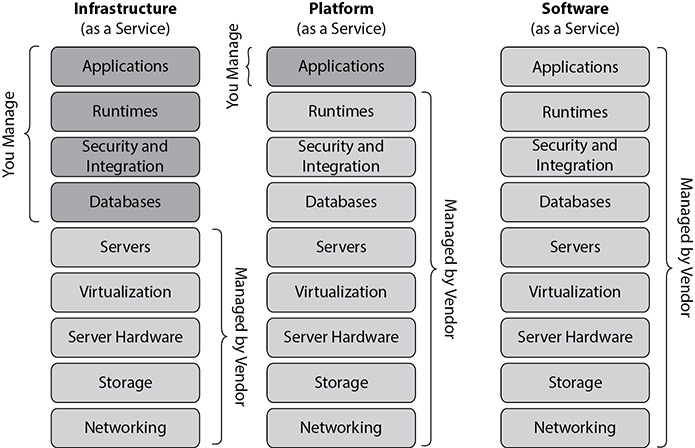
Figure 1-1 Three cloud models
Three Cloud Computing Deployment Models
The following are three deployment models when working in the cloud:
• All-in cloud When you design and deploy an application in a public cloud using a cloud service provider such as AWS, this kind of deployment is called an all-in cloud. There are two ways you can opt for an all-in cloud. First, you can create all your new applications in the cloud, or second, you can migrate existing applications to the cloud to take advantage of all the features of the cloud. Cloud-based applications either can be built on low-level infrastructure pieces or can use higher-level services that abstract the management, architecting, and scaling requirements of the core infrastructure. You might have seen in the news recently that Netflix has opted for an all-in cloud strategy, closing all its data centers and hosting all the streaming content in AWS. Many companies these days are opting for an all-in cloud strategy. Most startups and new-age companies have never operated outside of this model.
• Hybrid With the hybrid deployment model, you host some of the applications in the cloud and some of the applications at your own premises. By seamlessly connecting them together, the cloud acts as an extension of your own data center. This is the quickest way to embrace the cloud. Most organizations have already made huge investments in data centers running legacy applications, and it is not easy to move to the cloud instantly. With a hybrid cloud strategy, you can start deploying all your new applications to the cloud immediately and create a road map to migrate legacy IT systems to the cloud over a period of time. Cloud vendors such as AWS help their customers with the hybrid cloud deployment model.
• On-premise or private cloud When you deploy the resources in your own data center using virtualization or resource management tools, it is often called an on-premise cloud or a private cloud. With a private cloud, you get some of the advantages of a public cloud but not all of them since it is impossible to mimic all the services the public cloud vendor provides at your own data center. Using a private cloud strategy, you can segregate your resources and can meter them and charge back to respective business units depending on their usage. Most customers started their migration journey from on-premise data centers with an implementation of a private cloud; this was about going from nonvirtualized servers to virtualization with automated consumption and chargeback capabilities. With virtualization, instead of assigning a full physical server to a project, a “compute node” gets assigned. This capability has been around for decades in various forms, such as zones/containers in Solaris, IBM’s server partitioning, and VMware ESX. Private clouds are basically the virtualization technology with self-service capabilities such as provisioning, start/stop/resize, and chargebacks.
History of AWS
Amazon is famous for innovation. The pace at which Amazon innovates amazes me sometimes. Even as a solutions architect I sometimes find it difficult to keep up with the latest products and services because the pace at which AWS releases them is unbelievable. The best part of Amazon’s culture is it experiments with lots of things; of course, not all of them are successful, but those that are successful are wonders. AWS is one example of a successful experiment that has made history in cloud computing technology.
Amazon.com has been around for decades now. While operating and provisioning resources for Amazon.com, Amazon realized it had developed a core competency in operating massive-scale technologies and data centers. So, Amazon began offering this excess capacity to developers and businesses to build sophisticated, modern, and scalable applications, and that is how AWS started. AWS was officially launched in 2006. AWS has more than 175 fully featured services for a wide range of technologies and has been named a leader in the IaaS space by Gartner’s Magic Quadrant for the ninth consecutive year (as of July 2019).
AWS Global Infrastructure
AWS has more than a million customers in 190 countries around the world. AWS serves these customers via its global infrastructure, which consists of regions, availability zones (AZs), and points of presence (POPs). AWS maintains 24 regions spanning five continents in the world, with three additional regions being planned. A region is a physical location in the world that comprises clusters of highly redundant data centers. The regions are separated geographically, which provides data sovereignty. You can think of a region as a distinct geographical location where AWS services are made available.

NOTE By default, data residing in a region never leaves a region unless explicitly moved by AWS customers.
When you use an AWS service, you choose the region where you want to host the services. You can also choose multiple regions depending on where you want to store the data.
AWS also offers the GovCloud region in the United States, which is designed for government agencies to run their workloads in the cloud. Though it is designed for government agencies, other customers can also use this region.
Within each region there are availability zones (AZs). An AZ consists of one to six data centers, with redundant power supplies and networking connectivity. As of this writing, there are 76 AZs. A single data center can be part of only one AZ. Each AZ is located in a different floodplain; power grids are designed in such a way that a natural calamity or disaster does not impact multiple AZs. The AZs have redundant power supplies that come via different power utility companies, plus backup generators to handle an extreme power failure. The AZs are engineered to be insulated from failures in other AZs. The networking among the AZs in a particular region is designed in such a way that it offers inexpensive, low-latency, private, fiber-optic network connectivity to another AZ in the same region. The latency between the AZs within a region is less than a single digit. As a result, you can synchronously replicate the data across the AZs. The biggest advantage of this is that you can design an application in such a way that it can run on multiple AZs, and since the data can be synchronously replicated within the AZs, in the case of a disaster taking one of the AZs down, there is no impact on your application. You can even architect an application in such a way that it automatically fails over between different AZs without any service interruption. You can choose which AZs you want to host your applications.
In addition to regions and AZs, AWS also provides local zones, which can run a few specific AWS services closer to user populations where no AWS regions exist. The local zones are connected to the parent region via a high-bandwidth private network, thereby enabling seamless access to rest of the AWS series that is unavailable in these local areas. In fact, each local zone is designed to complement an existing AWS region. Figure 1-2 shows a local zone and an AZ within an AWS region.
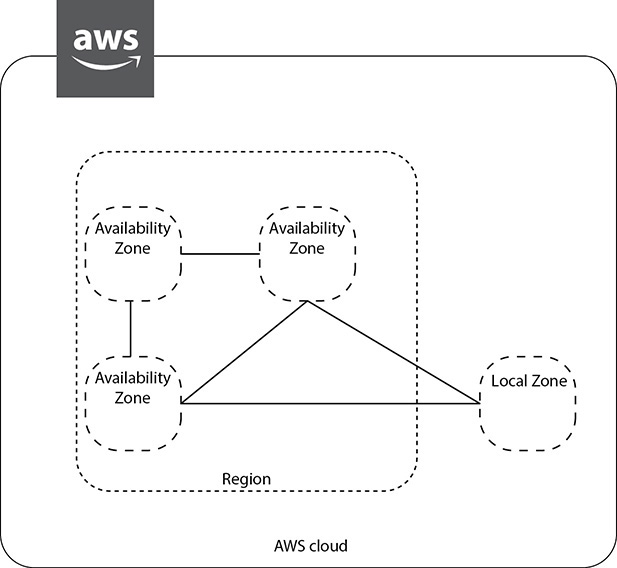
Figure 1-2 AWS region, AZ, and local zone
All the AWS data centers are always hot, which means they always have some customer using the data center. Each data center may host thousands of servers. They use custom network equipment and servers to cater to their customers.
In addition to regions and AZs, AWS offers edge locations, or points of presence (POPs), to provide a better user experience to customers. These edge locations are in most of the major cities across the globe. At the time of this writing, there are 216 POPs. The edge locations are mainly used by content delivery networks to distribute content to nearby end users to reduce latency and provide fast performance. For example, when you watch a video from Amazon Video, the video will be cached in an edge location so that when another customer watches the same video, it will be served from an edge location for a quick turnaround time and better user experience. In AWS, the edge location is used to serve Amazon CloudFront and Amazon Route 53 (which you will learn about in a little bit).
In addition to edge locations, AWS has recently added regional edge cache locations between the main servers and the edge locations. When an object is not accessed for a long time, it goes out of the cache, but because the regional edge cache maintains a larger cache, the object can be stored there for a longer amount of time. If an application accesses the object again, it does not have to go to the main server for the access. When the application is not able to find the object in the edge location, it looks for the file in the regional edge cache. This helps to improve the performance for objects that are not frequently accessed. The POPs consist of both edge locations as well as the regional edge caches.
If you want to run AWS services in your own data center, you can use AWS Outposts, which is discussed later in this chapter.

EXAM TIP AWS has 24 regions and 76 AZs as of this writing. Since AWS keeps adding regions and AZs, please check the web site to get the latest numbers.
Figure 1-3 shows the regions and Edge locations in North America. Large circles indicate a unique region, and the smaller circles indicate the number of Edge locations in that region.
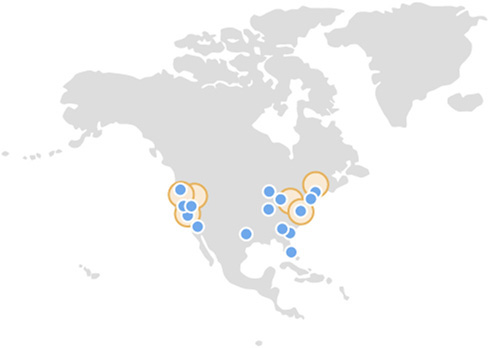
Figure 1-3 AWS regions and Edge locations in North America
AWS Security and Compliance
AWS follows the model of shared security, which means AWS is responsible for the security of the cloud, and customers are responsible for the security in the cloud. In other words, AWS is responsible for the physical security of the data centers, video surveillance, hardware, compute, storage, virtualization, networking (including cabling, router, switches, load balancers, and firewall), and so on, whereas customers are responsible for securing the application, the data being hosted, and so on.
In the case of a managed service (for example, Amazon RDS, Amazon Redshift, Amazon DynamoDB, and so on), AWS is also responsible for the security configuration of it. Figure 1-4 depicts the shared security model. This shared security model allows customers to choose the level of security they need for their application, thereby giving customers more flexibility to protect their applications and data. With the shared security model, the customer can secure the data and applications in the same way as they would do in a data center. You will learn more about this in Chapter 5.
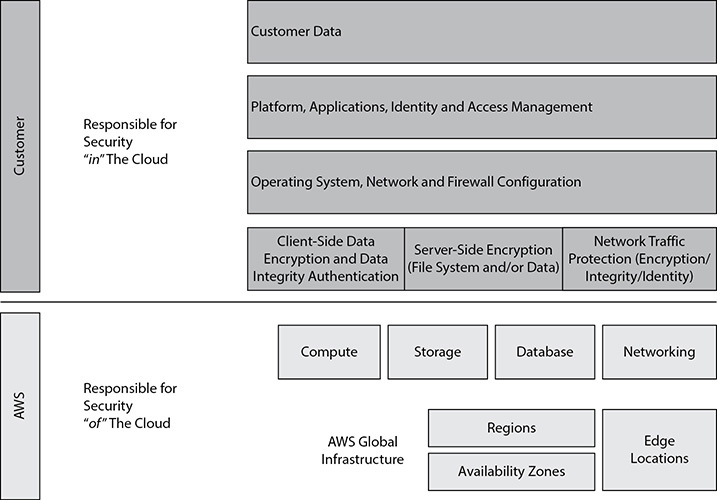
Figure 1-4 AWS shared security model
AWS has earned several industries’ recognized certifications, which provides complete peace of mind to customers since they know their data is secured and protected in the cloud. The key ones are as follows:
• SOC 1/SSAE 16/ISAE 3402 (formerly SAS 70)
• SOC 2
• SOC 3
• FISMA, DIACAP, and FedRAMP
• DOD CSM Levels 1-5
• PCI DSS Level 1
• ISO 9001/ISO 27001
• ITAR
• FIPS 140-2
• MTCS Level 3
• Cloud Security Alliance (CSA)
• Family Educational Rights and Privacy Act (FERPA)
• Criminal Justice Information Services (CJIS)
• Health Insurance Portability and Accountability Act (HIPAA)
• Motion Picture Association of America (MPAA)
AWS Products and Services
AWS is continually expanding its services to support virtually every cloud workload and now has more than 175 services that include compute, storage, networking, database, analytics, application services, deployment, management, and mobile services. In this section, you will get an overview of the products and services, and in subsequent chapters you will learn more about them.
Figure 1-5 summarizes the services of AWS visually. If you look at the bottom, it shows the AWS global infrastructure, which consists of regions, AZs, and POPs.
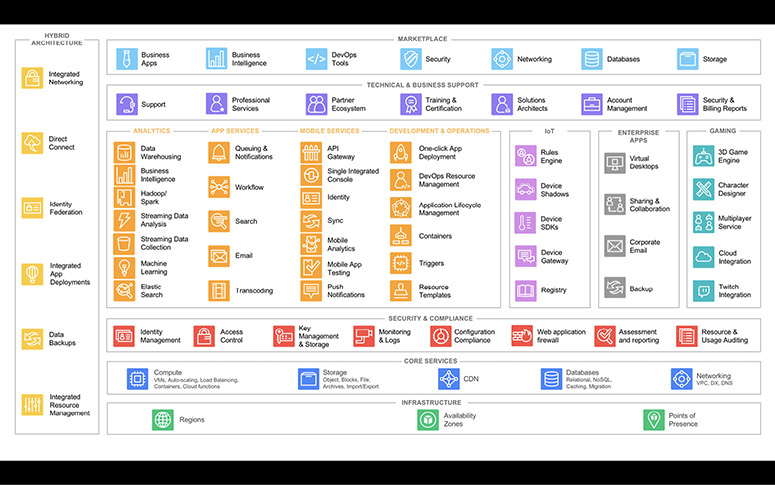
Figure 1-5 AWS products and services
Above that are core services. The core services are at the heart of the AWS offerings, and almost every customer uses the core services. The core services consist of the following.
Compute
The AWS compute services include a variety of products and services that provide scalable computing capacity in the cloud. The compute services include both servers and serverless configuration. The compute services also include the tools required for automatically scaling the resources and quickly deploying your applications on AWS. Let’s explore the products in the compute area.
Amazon Elastic Compute Cloud
Amazon Elastic Compute Cloud (EC2) includes the virtual servers, called instances, in the cloud. A customer can choose from a wide variety of instances. Some of them are CPU intensive, some of them are memory intensive, some of them are accelerated computing optimized as in GPU optimized, some of them are storage optimized, some of them are input/output (I/O) instances, and some of them are general-purpose instances. Depending on the use case, the customer can choose from a variety of instance types. For example, if you are running a database workload that needs lots of memory, you can choose a memory-intensive instance, and if you are planning to run machine learning, you can choose an accelerated computing instance.
Amazon EC2 Auto Scaling
Amazon EC2 Auto Scaling helps in automatically scaling the Amazon EC2 instances up and down as per the policies you define. Combining Amazon EC2 and Auto Scaling, you can create a high-availability architecture. Amazon EC2 Auto Scaling also ensures that you are always running with the desired number of instances. If for some reason an instance goes down, Amazon EC2 Auto Scaling quickly spins up a new instance. You can define Amazon EC2 Auto Scaling policies for various metrics and health checks. For example, you can set the CPU utilization metric to, say, 70 percent in Amazon EC2 Auto Scaling to add more servers to handle a load that exceeds that amount. Similarly, if a server is not healthy, you can use the health check metric of Amazon EC2 Auto Scaling to remove a server. There is no additional charge for using Amazon EC2 Auto Scaling. Amazon EC2 Auto Scaling integrates with Elastic Load Balancer.
AWS Lambda
AWS Lambda enables you to run code without provisioning or managing any servers or infrastructure. You can run any code for any kind of application or back-end service. You simply develop code for your application or back-end service and define the event triggers with the AWS Lambda service. AWS Lambda then takes care of provisioning the resources to run your code, produce the results, and tear down the code. You can also run code in response to event triggers such as Amazon S3 uploads, Amazon DynamoDB updates, Amazon Kinesis streams, Amazon API Gateway requests, and so on. The pricing for using AWS Lambda is simple. You pay only for the compute time when the code is getting executed; there is no charge when the code is not running. AWS Lambda scales automatically. Whenever you upload your code, AWS Lambda take cares of scaling the code automatically. When code is executed, the high availability is also taken care of automatically; in other words, the code is scaled with high availability as well.
Amazon EC2 Container Service
Amazon EC2 Container Service (ECS) allows you to run Docker containers on Amazon EC2 instances. Amazon ECS is scalable and is a performance container management service. With Amazon ECS you don’t have to install, scale, and operate your own cluster management infrastructure. You can launch and manage Docker-enabled applications using application programming interface (API) calls. You can use the built-in scheduler, write your own scheduler, or use a third-party scheduler to meet business- or application-specific requirements. Amazon ECS integrates with other services such as ELB and Amazon EBS. There are no separate charges for Amazon ECS; you pay only for the AWS resources used such as Amazon EC2 instances, Amazon Elastic Block Storage (EBS) volumes, and so on.
Amazon Elastic Kubernetes Service
Amazon Elastic Kubernetes Service (Amazon EKS) is a fully managed Kubernetes service that makes it easy for you to run your code on AWS without needing to install and operate your own Kubernetes control plane or worker nodes. Kubernetes is open source software that enables you to deploy and manage containerized applications at scale. Amazon EKS provisions and scales the Kubernetes control plane, including the API servers and back-end persistence layer, across multiple AWS AZs for high availability and fault tolerance.
AWS Fargate
AWS Fargate is a serverless compute engine for containers that works with both Amazon ECS and Amazon EKS. With AWS Fargate, you don’t have to provision and manage servers for running containers and can simply focus on building your applications. Both ECS and EKS use containers provisioned by Fargate to automatically scale, load balance, and manage scheduling of your containers for availability, providing an easier way to build and operate containerized applications.
AWS Elastic Beanstalk
AWS Elastic Beanstalk lets you run and manage web applications without worrying about the underlying infrastructure. You can use Amazon ECS to deploy web applications with Java, .NET PHP, Node.js, Python, Ruby, Go, and Docker on servers such as Apache, Nginx, and so on. You just need to upload your code, and AWS Elastic Beanstalk automatically handles deployment, load balancing, autoscaling, and application health monitoring. At the same time, you have full control over the AWS resource; you can access the underlying resources at any time using the console. There is no additional charge for AWS Elastic Beanstalk; you pay only for the AWS resources needed to run your applications.
Amazon Lightsail
Amazon Lightsail is the simplest way to get started with AWS for small businesses, developers, students, and other users who need a simple virtual private server (VPS) solution. Amazon Lightsail provides storage, networking capacity, and compute capabilities to manage and deploy web sites and web applications in the cloud. Lightsail includes a virtualized compute server, DNS management, SSD-based storage, data transfer capabilities, and a static IP address for a low, predictable monthly price. It’s a one-stop shop to launch your project instantly.
AWS Batch
AWS Batch enables users to efficiently run hundreds of thousands of batch computing jobs on AWS. AWS Batch dynamically provisions the optimal type and quantity of compute resources such as memory-optimized instances, CPU-intensive instances, or storage-optimized instances based on the storage, capacity, throughput, and specific resource requirements of the batch jobs submitted. There is no need to install, deploy, and manage batch computing software or server clusters to run your jobs, enabling you to concentrate on solving problems and analyzing results.
AWS Outposts
AWS Outposts help in extending AWS services to any data center. Using Outposts, you can run all the AWS services, APIs, and tools at your data center, at a partner data center, or at a colocation facility. This fully managed AWS service offers the same hardware infrastructure and services you need to build your applications on site and in the cloud. It is an ideal platform to provide a hybrid experience. Outposts are connected to the nearest AWS region and can be managed from the console exactly in the same way you manage the cloud service. You could say that Outposts is the on-premise version of the AWS cloud.
Networking
Networking is part of the AWS core services. AWS networking helps you to isolate your cloud infrastructure. AWS provides you with lots of options for networking, which helps you to architect your application in the most optimized way. If you want an application to be Internet-facing or if you want an application to be non-Internet-facing, you can design this using the AWS networking tools. The following are the AWS networking products.
Amazon Virtual Private Cloud
Using an Amazon Virtual Private Cloud (VPC) you can isolate cloud resources within your own private virtual network. You can say that an Amazon VPC is your own data center in the cloud. You have complete control over the networking in an Amazon VPC. You can bring your own IP addresses, you can define the subnets as you want, and you have full control over the route table and network gateways. You can connect an Amazon VPC with your existing data center using Direct Connect or a virtual private network, making it an extension of your data center in the cloud. If you have multiple Amazon VPCs, you can connect them as well using Amazon VPC peering.
Amazon Route 53
Amazon Route 53 is a Domain Name System (DNS) web service. It is highly available and scalable, and its SLA is 100 percent uptime. Amazon Route 53 is IPv4 as well as IPv6 compliant. Amazon Route 53 answers DNS queries with low latency by using a global network of DNS servers. Amazon Route 53 translates names like www.amazon.com into numeric IP addresses like 192.0.1.1. Amazon Route 53 can be integrated with other AWS services such as Amazon EC2 instances, Amazon S3 buckets, Elastic Load Balancing, and Amazon CloudFront; it also can be used to route users to infrastructure outside of AWS. Amazon Route 53 can also be configured for DNS health checks, and thus traffic can be routed to a healthy endpoint. It is often used to manage failover from primary to secondary hosted applications. Amazon Route 53 can also be used to register domain names.
Elastic Load Balancing
Elastic Load Balancing (ELB) allows you to automatically distribute the load across multiple Amazon EC2 instances. It supports load balancing of HTTP, HTTPS, and TCP traffic to Amazon EC2 instances. It can be integrated with Auto Scaling; as a result, you can automatically scale up and down your Amazon EC2 instance and dynamically grow and shrink your operation depending on the traffic. ELB can also do health checks so you can remove the unhealthy/failing instances. ELB helps you to achieve fault tolerance for your applications. An ELB can support Amazon EC2 instances across different AZs within a region.
AWS Direct Connect
Using AWS Direct Connect, you can establish private, dedicated network connectivity from your data center to AWS. AWS Direct Connect can be used from either your data center or your office or colocation. By setting up AWS Direct Connect, you can reduce bandwidth costs for high-volume data transfers and get consistent network performance. AWS Direct Connect is compatible with all the AWS services. AWS Direct Connect provides 1Gbps and 10Gbps connections, and you can easily provision multiple connections if you need more capacity.
AWS App Mesh
AWS App Mesh helps monitor, control, debug, and trace communications between services. It can be used with services running on EC2 as well as with microservice containers managed by Amazon ECS, Amazon EKS, AWS Fargate, and Kubernetes. In addition to AWS services, App Mesh can be integrated with many popular third-party tools. AWS App Mesh is a service mesh based on the open source Envoy service.
AWS Global Accelerator
AWS Global Accelerator improves the availability and performance of your applications for global users. It provides a set of static IP addresses that are anycast from the AWS edge network, which provides a fixed entry point to your applications and eliminates the complexity of managing specific IP addresses for different AWS regions and AZs. It routes the user traffic to the most favorable endpoint depending on the location, application health check, and performance, as well as any policies you configure.
Security and Compliance
The security of the cloud is the highest priority for AWS. There are lots of safeguards at every layer in the AWS infrastructure to keep the data safe and help protect customer privacy. In addition, AWS provides lots of compliance programs in its infrastructure. In this section, you will learn about the products and services related to security and compliance.
AWS Identity and Access Management
AWS Identity and Access Management (IAM) is used to create users, groups, and roles. It is also used to manage and control access to AWS services and resources. AWS IAM can be federated with other systems as well as with corporate directories and corporate single sign-on, thereby allowing existing identities (users, groups, and roles) of your enterprise to access AWS resources.
Amazon Inspector
Amazon Inspector is an automated security assessment service that helps you to identify the security vulnerabilities in your application when it is being deployed as well as when it is running in a production system. Amazon Inspector also assesses applications for deviations from best practices, which helps the overall security of the applications deployed. Amazon Inspector has hundreds of predefined rules that it checks against. To use Amazon Inspector, you need to install the AWS agent on each Amazon EC2 instance. The agent then monitors the Amazon EC2 instance, collects all the data, and passes it on to the Amazon instance service.
AWS Certificate Manager
AWS Certificate Manager (ACM) is used to manage Secure Sockets Layer (SSL) certificates for use with AWS services. Using ACM, you can provision, manage, and deploy SSL/Transport Layer Security (TLS) certificates. You can protect and secure web sites as well. You can also use ACM to obtain, renew, and import certificates. You can use certificates stored in ACM with Elastic Load Balancer and Amazon CloudFront. The best part is there is no charge for the SSL/TLS certificates you manage with AWS Certificate Manager. You only pay for the AWS resource you use for the hosted application or web site.
AWS Directory Service
AWS Directory Service is an AWS managed directory service built on Microsoft Active Directory. It can be used to manage directories in the cloud. It enables single sign-on and policy management for Amazon EC2 instances and applications. It can be implemented stand-alone or integrated with existing directories.
AWS Web Application Firewall
AWS Web Application Firewall (WAF) is a web application firewall that detects malicious traffic targeted at the web applications. Using WAF, you can create various rules with which you can protect against common attacks such as SQL injection and scripting. Using these rules, you can block the web traffic from certain IP addresses, filter certain traffic from certain geographical locations, and so on, thus safeguarding your application.
If you want to enable AWS WAF across multiple AWS accounts and resources from a single location, you can use AWS Firewall Manager, which is integrated with AWS Organizations. Using AWS Firewall Manager, you can write company-wide rules from one location and enforce them across applications protected by AWS WAF. AWS Firewall Manager monitors for new resources or accounts created to ensure that they comply with a mandatory set of security policies from day one.
AWS Shield
AWS Shield is a managed service that protects against distributed denial-of-service (DDoS) attacks targeted at the web applications. There are two tiers of AWS Shield: Standard and Advanced. AWS Shield Standard is free and protects against most commonly occurring DDoS attacks against web applications. With AWS Shield Advanced, you get higher levels of protection targeting not only against web applications but also Elastic Load Balancer, Amazon CloudFront, and Amazon Route 53.
Amazon GuardDuty
Amazon GuardDuty is a threat-detection service that continuously monitors your AWS accounts and workloads to protect them. It provides broad protection of your AWS accounts, workloads, and data by helping to identify threats such as attacker reconnaissance, instance compromise, and account compromise. It monitors and analyzes the data generated from your account and all the network activities from AWS CloudTrail Events, Amazon VPC Flow Logs, and DNS logs. It also uses integrated threat intelligence, such as known malicious IP addresses, anomaly detection, and machine learning, to identify threats more accurately. It incorporates user behavior analysis, machine learning, and anomaly detection to detect threats. Amazon GuardDuty delivers detailed and actionable alerts that are easy to integrate with existing event management and workflow systems.
Amazon Macie
Amazon Macie helps you protect your data in Amazon S3 by helping you classify what data you have, the business value of that data, and the behavior associated with access to that data. It uses machine learning to discover, classify, and protect sensitive data automatically in AWS. Amazon Macie uses machine learning to recognize sensitive data such as personally identifiable information (PII) or intellectual property, assigns a business value, and provides visibility into where this data is stored and how it is being used in your organization. Amazon Macie continuously monitors data access activity for anomalies and delivers alerts when it detects risk of unauthorized access or inadvertent data leaks. You can use Amazon Macie to protect against security threats by continuously monitoring your data and account credentials. When alerts are generated, use Amazon Macie for incident response, using Amazon CloudWatch Events to take action swiftly to protect your data.
AWS Secrets Manager
AWS Secrets Manager is a secrets management service that helps you protect access to your applications, services, and IT resources. Using Secret Manager, you can manage secrets such as database credentials, on-premise resource credentials, SaaS application credentials, third-party API keys, and Secure Shell (SSH) keys. You can secure and manage secrets used to access resources in the AWS cloud, on third-party services, and on premises. Using this service, you can protect access to your applications, services, and IT resources, without the up-front investment and ongoing maintenance costs of operating your own infrastructure.
AWS SSO
AWS Single Sign-On (SSO) is an AWS service that enables you to use your existing credentials from Microsoft Active Directory to access your cloud-based applications, such as AWS accounts and business applications (Office 365, Salesforce, Box), by using SSO. With AWS SSO, you can centrally manage SSO access and user permissions for all of your AWS accounts managed through AWS Organizations. AWS SSO eliminates the administrative complexity of the custom SSO solutions you use to provision and manage identities across AWS accounts and business applications.
AWS CloudHSM
The AWS CloudHSM service provides you with a dedicated hardware security module (HSM) in the AWS cloud. It helps you to meet all the contractual and regulatory compliance requirements. The HSM is a tamper-resistant hardware, which provides secure key storage and cryptographic operations. Using this you can easily generate and manage your own keys on the AWS cloud. It can be used for many purposes like encrypting the database, document signing, digital rights management, and so on.
AWS KMS
AWS Key Management Service (KMS) is a managed service that helps you create and control the keys used for cryptographic operations. AWS KMS presents a single control point from which to manage keys and define policies consistently across integrated AWS services and your own applications. KMS uses hardware security modules to protect the keys. With KMS, you can centrally manage the encryption keys that control access to your data. It can also help developers who need to digitally sign or verify data using asymmetric keys.
Storage and Content Delivery
AWS provides a broad set of products for storing data. You can pick a storage solution on AWS based on your business needs. In this section, you will explore all the options available to customers for storage and content delivery.
Amazon Simple Shared Storage
Amazon Simple Shared Storage (S3) was one of the first services launched by AWS in 2006. Amazon S3 is the backbone of AWS. Many AWS services use Amazon S3 or rely on Amazon S3. It is the storage for the Internet, which is also used as an object store. Amazon S3 lets you store and retrieve any amount of data, at any time, from anywhere on the Web. Amazon S3 is highly scalable, reliable, and secure. It is designed to deliver 99.999999999 percent durability. Amazon S3 supports encryption, so you can store your objects in an encrypted manner. You can store an unlimited amount of data, but each file size can’t exceed 5TB. With Amazon S3, you pay only for what you use. There is no minimum fee.
Amazon Glacier
Amazon Glacier is a low-cost cloud storage that is mainly used for data archiving and long-term backup purposes. Like Amazon S3, Amazon Glacier is secure and durable, and there is no limit to the amount of data to be stored. Amazon Glacier is cheaper than Amazon S3, and you pay only for what you use. There is no minimum fee. Amazon Glacier is integrated with Amazon S3. Through Amazon S3 lifecycle policies, you can optimize your storage costs by moving infrequently accessed objects from Amazon S3 to Amazon Glacier, or vice versa.
Amazon Elastic Block Storage
As the name suggests, Amazon Elastic Block Storage (EBS) provides persistent block storage for EC2 instances. You can choose from either magnetic or solid-state drive (SSD) disks for Amazon EBS volumes. Amazon EBS volumes are automatically replicated within their AZ to provide fault tolerance and high availability. Amazon EBS supports encryption for data in rest as well as data in transit between Amazon EC2 instances and Amazon EBS volumes. You can also create snapshots of Amazon EBS volumes in Amazon S3 at any point in time. Amazon EBS supports provisioned input/output operations per second (IOPS), which helps you to preprovision the IOPS based on your application needs.
Amazon Elastic File System
Amazon Elastic File System (Amazon EFS) is a fully managed service that provides easy, scalable, shared file storage with Amazon EC2 instances in the AWS cloud. It provides a simple file system interface and can be accessed concurrently for up to thousands of Amazon EC2 instances.
AWS Storage Gateway
AWS Storage Gateway is a service that helps to seamlessly integrate on-premise storage with AWS cloud storage. It is delivered as a virtual machine installed in an on-premise data center. You can connect it as a file server, or you can connect it as a local disk. You can also connect it as a virtual tape library. AWS Storage Gateway can be easily integrated with Amazon S3, Amazon EBS, and Amazon Glacier. The transfers are optimized since compression, encryption, and bandwidth management are built in.
Import/Export Options
AWS Import/Export is a service that helps to transfer a large amount of data into AWS using a physical storage appliance. By doing that, you can bypass the data transfer over the Internet. Using this option, you mail a storage device with your data on it. AWS loads the data into the cloud and returns your device. You can also use AWS Snowball in which case AWS ships a physical device to your premises; you can load the data and ship it back to AWS. This physical device is called AWS Snowball. Snowball comes in two sizes: 80TB and 50TB. Other options to transfer data to AWS are to use AWS Direct Connect, which is a dedicated virtual network from your location to the AWS data center, or to use Amazon Kinesis Firehose, which can capture and automatically load streaming data into Amazon S3.
Amazon CloudFront
Amazon CloudFront is the global content delivery network (CDN) service of AWS. Amazon CloudFront helps to accelerate the delivery of the static content of your web sites, including photos, videos, or any other web assets. Amazon CloudFront can also be used to deliver all the content of your web site, including the dynamic content. Amazon CloudFront provides advanced CDN features such as SSL support, geographic restriction, and private content. It can be easily integrated with other AWS products, thereby providing businesses with an easy way to accelerate content. As of this writing, AWS has 100-plus Amazon CloudFront locations.
Database
AWS provides fully managed relational and nonrelational (NoSQL) database services plus fully managed data warehousing services and in-memory caching as a service. In this section, you will learn about all the database offerings AWS has.
Amazon Relational Database Service
Amazon Relational Database Service (RDS) is a fully managed relational database service. With this service, you can host a variety of relational database management system (RDBMS) engines in the cloud. It supports both commercial and open source database engines. Amazon RDS supports MySQL, Oracle, SQL Server, PostgreSQL, and Maria DB. In addition, Amazon RDS supports Amazon’s own database, Aurora. AWS provides resizable capacity, so at any time you can scale up or down depending on your business needs. Since this is a managed database service, AWS takes care of database management and administration tasks, including patching, upgrading, and backups. AWS also offers a high-availability option for Amazon RDS for fault tolerance and durability.
Amazon DynamoDB
Amazon DynamoDB is a fully managed NoSQL database service of AWS. It is highly scalable, durable, and highly available and is capable of handling any data volume. It delivers consistent, single-digit-millisecond latency at any scale. It consists of SSD storage. Since this is also a managed service, you don’t have to deal with database administration. The data is replicated automatically in three ways, providing the high availability of data. It supports both document and key-value models. It is a great fit for mobile, web, gaming, Internet of Things (IoT), and many other applications.
Amazon Redshift
Amazon Redshift is a fully managed petabyte-scale data warehouse service. It stores the data in columnar format, thereby providing better I/O efficiency. You should be able to spin up an Amazon Redshift cluster in minutes. The data is continuously backed up in Amazon S3. As a result, you don’t have to worry about backing it up. You can choose either a magnetic or SSD-based drive to store the data. You can scale up or down an Amazon Redshift cluster depending on your business and processing needs and thus can process parallel operations. You can access the Amazon Redshift cluster via ODBC or JDBC.
Amazon ElastiCache
Amazon ElastiCache is a service that helps in deploying an in-memory cache or data store in the cloud. Amazon ElastiCache supports two open source in-memory engines: Redis and Memcached. Using Amazon ElastiCache, you can greatly improve the performance of your web application. Since it is a managed service, AWS takes care of patching, monitoring, failure recovery, and backups. Amazon ElasticCache can be integrated with Amazon CloudWatch and Amazon SNS, which you will learn about later in this chapter.
Amazon Aurora
Amazon Aurora is Amazon’s relational database built for the cloud. It supports two open source RDBMS engines: MySQL and PostgreSQL. It supports databases up to 64TB in size. It is highly available, durable, and scalable. By default, the data is mirrored across three AZs, and six copies of the data are kept. You can create up to 15 read replicas in an Amazon Aurora database. It is a fully managed database service, so database administration is taken care of by AWS. The database is constantly backed up to Amazon S3, enabling granular point-in-time recovery.
Amazon Neptune
Amazon Neptune is a fully managed graph database service with which you can build and run applications that work with highly connected data sets. Using Amazon Neptune, you can use open source and popular graph query languages to execute powerful queries that are easy to write and perform well on connected data. Amazon Neptune supports both the open source Apache TinkerPop Gremlin graph traversal language and the W3C standard Resource Description Framework (RDF) SPARQL query language. It can be used for graph use cases such as recommendation engines, knowledge graphs, fraud detection, and network security.
Amazon QLDB
Amazon QLDB is a purpose-built ledger database that provides a complete and cryptographically verifiable history of all changes made to your application data. This service provides a transparent, immutable, and cryptographically verifiable transaction log owned by a central trusted authority. It tracks each and every application data change and maintains a complete and verifiable history of changes over time. Data in Amazon QLDB is written to an append-only journal, providing the developer with full data lineage.
Amazon DocumentDB
Amazon DocumentDB is a fully managed document database service for MongoDB. It is fast, scalable, and highly available. Using this service, you can store, query, and index JSON data. Because DocumentDB is compatible with MongoDB, you can use the same MongoDB application code, drivers, and tools. In Amazon DocumentDB, the storage and compute are decoupled, thereby allowing each one to scale independently. The data in DocumentDB is replicated six times across three AZs, and it provides 99.99 percent availability.
Amazon Keyspaces
Amazon Keyspaces is a managed Apache Cassandra–compatible database service. It is scalable and highly available. Using this service, you can run your Cassandra workloads on AWS by using the same Cassandra Query Language (CQL) code, Apache 2.0–licensed drivers, and any other tools that you use today. Because Amazon Keyspaces is serverless, you don’t have to manage the overhead of provisioning, patching, or managing the server, nor do you have to install, maintain, or operate software. The tables automatically scale up and down depending on usage.
Analytics
AWS provides a variety of ways in which companies can analyze a vast amount of data quickly and efficiently. AWS provides analytics tools that can scale to very large data stores efficiently and cost-effectively. In this section, you will get an overview of these tools.
Amazon Athena
Amazon Athena is a serverless, interactive query service that enables users to easily analyze data in Amazon S3 using standard SQL. There is no infrastructure setup or management required for end users, and you can start analyzing data in Amazon S3 immediately. Amazon Athena uses Presto with full standard SQL support that works with a variety of standard data formats, including JSON, ORC, CSV, Arvo, and Apache Parquet.
Amazon EMR
Amazon EMR is a web service that enables users, businesses, enterprises, data analysts, researchers, and developers to easily and cost-effectively process enormous amounts of data. It utilizes a hosted Hadoop framework running on the web-scale infrastructure of Amazon S3 and Amazon EC2.
Amazon Elasticsearch Service
Amazon Elasticsearch Service is a fully managed web service that makes it easy to create, operate, deploy, and scale Elasticsearch clusters in the AWS cloud.
Amazon CloudSearch
Amazon CloudSearch is a fully managed web service in the AWS cloud that offers a simple, cost-effective, easy-to-use way to manage and scale a search solution for your application or web site. The Amazon CloudSearch service supports 34 languages and popular search features such as autocomplete, highlighting, and geospatial search.
AWS Data Pipeline
AWS Data Pipeline enables users to process, transform, and move data between different AWS compute and storage services, as well as on-premise data sources, at specified intervals reliably and efficiently.
Amazon Kinesis
Amazon Kinesis is a fully managed service that makes it easy to collect, analyze, and process real-time, streaming data. This enables users to get timely insights and react quickly to new information. Amazon Kinesis offers capabilities to cost-effectively process streaming data at any scale, along with the option to choose tools that best suit the requirements of your application. With Amazon Kinesis, you can ingest real-time data such as web site clickstreams, application logs, IoT data, and more into your databases, data warehouses, and data lake, or you can build your own real-time applications using this data.
AWS Glue
AWS Glue is a fully managed, extract, transform, and load (ETL) service. It can discover your data automatically and profiles the data via its built-in Glue Data Catalog. It not only recommends but also generates ETL code for transforming source data into target schema. It runs ETL jobs in an Apache Spark environment and loads the data into the target. AWS Glue Data Catalog is a central metadata repository; an ETL engine that can automatically generate Scala or Python code; and a flexible scheduler that handles dependency resolution, job monitoring, and retries. It also enables you to set up, orchestrate, and monitor complex data flows.
Amazon MSK
Amazon MSK is a managed service for managing Apache Kafka infrastructure and operations. Apache Kafka is an open source platform for building real-time streaming data pipelines and applications. This streaming data store decouples applications producing streaming data (producers) into its data store from applications consuming streaming data (consumers) from its data store. It is mainly used for analyzing and reacting to streaming data. Since Amazon MSK is a managed service, you don’t have to worry about managing your Apache Kafka clusters. Amazon MSK operates and maintains Apache Kafka clusters on your behalf, and you can quickly build one from scratch within minutes. You can also easily migrate your existing Apache Kafka workloads into Amazon MSK.
AWS Lake Formation
AWS Lake Formation makes it easy to set up a secure data lake in days. A data lake is a central data repository with a large variety of data. It contains both structured and unstructured data. Using a data lake, you can manage the full life cycle of your data. The first step of building a data lake is ingesting and cataloging data from a variety of sources. The ingesting of data can be in real time (stream) or in a batch. Once the data is ingested, it is then enriched, combined, and cleaned before analysis, which makes it easy to discover and analyze the data with direct queries, visualization, and machine learning. Building a data lake can be challenging, since there are so many moving parts involved, from loading data from diverse sources, to monitoring those data flows, setting up partitions, turning on encryption and managing keys, defining transformation jobs and monitoring their operation, reorganizing data into a columnar format, configuring access control settings, deduplicating redundant data, matching linked records, granting access to data sets, and auditing access over time. Using the AWS Lake Formation service, you can easily set up and secure a data lake. After you define the data sources and data access and security policies, Lake Formation helps you collect and catalog data from databases and object storage, move the data into your new Amazon S3 data lake, clean and classify your data using machine learning algorithms, and secure access to your sensitive data. Users can then leverage these data sets with their choice of analytics and machine learning services for performing various analyses.
Amazon QuickSight
Amazon QuickSight is an easy, fast, cloud-powered, fully managed business analytics service that makes it easy to build visualizations, perform ad hoc analysis, and quickly get meaningful insights from your data.
Application Services
AWS provides many options for running applications in the cloud. It provides you with the infrastructure for running the APIs, coordinating work across distributed application components, running microservices, and so on. In this section, you will look at the application services.
Amazon API Gateway
Amazon API Gateway is a fully managed service that provides developers with an easy, simple, scalable, flexible, pay-as-you-go service that handles all aspects of building, deploying, and operating robust APIs for application back-end services such as code running on AWS Lambda, applications running on Amazon EC2, or any web application. Amazon API Gateway handles several tasks involved in processing and accepting up to hundreds of thousands of concurrent API calls, including traffic management, access control, authorization, monitoring events, and API version management.
AWS Step Functions
AWS Step Functions is a fully managed service that enables users to efficiently and securely coordinate various components of distributed applications and microservices using visual workflows. This service provides a graphical interface for users to visualize and arrange the components of their applications, making it easy to run and build multiple layered step applications.
Amazon Simple Workflow Service
Amazon Simple Workflow Service (SWF) is a web-based cloud service that makes it easy to coordinate work across distributed application components. Amazon SWF enables applications for a range of use cases, including web application back ends, media processing, business process workflows, and data analytics pipelines, to be designed as a coordination of jobs and tasks.
Amazon Elastic Transcoder
Amazon Elastic Transcoder is an easy-to-use, highly scalable, and cost-effective way for users and businesses to convert (or transcode) video and audio files from their source format into the output format of their choice that they can play back on various devices such as smartphones, desktops, televisions, tablets, and PCs.
Developer Tools
AWS empowers you with lots of developer tools so that you can quickly build and deploy your code without having to manage the infrastructure running beneath. It helps you to continuously develop during the software development life cycle. AWS provides various SDKs and tools for developers working in various development languages and platforms. With AWS tools you don’t have to wait on anything for deploying your code. In this section, you will learn about the developer tools.
AWS CodeCommit
AWS CodeCommit is a fully managed source control service that makes it easy to host highly scalable private Git repositories securely. Users no longer need to operate their own source control system or worry about scaling their infrastructure.
AWS CodePipeline
AWS CodePipeline is a fully managed continuous integration and continuous delivery service for quick, reliable application and infrastructure updates. AWS CodePipeline builds, tests, and deploys code every time the code is modified, updated, and checked in based on the release process models you define.
AWS CodeBuild
AWS CodeBuild is a fully managed build service that builds and compiles source code, runs tests, and produces software packages that are ready to deploy, eliminating the need to provision, manage, and scale build servers.
AWS CodeDeploy
AWS CodeDeploy is a fully managed service that automates code deployments to any instance or servers, including Amazon EC2 instances and servers running on-premises. AWS CodeDeploy makes releasing new features quick and easy, helping you avoid downtime during application deployment.
Management Tools
AWS provides a broad set of services that help system administrators, IT administrators, and developers more easily manage and monitor their hybrid and cloud infrastructure resources. These fully managed services help to automatically provision, operate, configure, and manage AWS or on-premises resources at scale. They also provide capabilities to monitor infrastructure logs and metrics using real-time dashboards and alarms and to enforce compliance and security. In this section, you will look at the management tools at a very high level.
AWS CloudFormation
AWS CloudFormation helps automate resource provisioning using declarative templates and deploying resource stacks. It gives developers and systems administrators an easy way to create and manage a collection of related AWS resources, provisioning and updating them in an orderly and predictable fashion. You can use AWS’s sample CloudFormation templates, or you can create your own template to describe AWS resources. AWS CloudFormation helps to keep the infrastructure as code, and you can spin them off wherever needed. You can even use AWS CloudFormation templates to deploy resources in a different AZ or region.
AWS Service Catalog
AWS Service Catalog allows IT administrators to create, manage, and distribute catalogs of approved products to end users, who can then access the products they need in a personalized portal. Administrators can control which users have access to each product to enforce compliance with organizational business policies. Administrators can also set up adopted roles so that end users only require IAM access to AWS Service Catalog to deploy approved resources. AWS Service Catalog allows your organization to benefit from increased agility and reduced costs because end users can find and launch only the products they need from a catalog that you control.
AWS OpsWorks
AWS OpsWorks for Chef Automate provides a fully managed Chef server and suite of automation tools that give you workflow automation for continuous deployment, automated testing for compliance and security, and a user interface that gives you visibility into your nodes and their status. The Chef server gives you full stack automation by handling operational tasks such as software and operating system configurations, package installations, database setups, and more. The Chef server centrally stores your configuration tasks and provides them to each node in your compute environment at any scale, from a few nodes to thousands of nodes. AWS OpsWorks for Chef Automate is completely compatible with tooling and cookbooks from the Chef community and automatically registers new nodes with your Chef server.
AWS OpsWorks Stacks let you manage applications and servers on AWS and on-premises. With AWS OpsWorks Stacks, you can model your application as a stack containing different layers, such as load balancing, database, and application server layers. You can deploy and configure Amazon EC2 instances in each layer or connect other resources such as an Amazon RDS database.
Amazon CloudWatch
Amazon CloudWatch is a monitoring service for AWS cloud resources and the applications you run on AWS. You can use Amazon CloudWatch to collect and track metrics, collect and monitor log files, and set alarms. Amazon CloudWatch can monitor AWS resources such as Amazon EC2 instances, Amazon DynamoDB tables, and Amazon RDS DB instances, as well as custom metrics generated by your applications and services and any log files your applications generate. You can use Amazon CloudWatch to gain systemwide visibility into resource utilization, application performance, and operational health. You can use these insights to react and keep your application running smoothly.
AWS Config
AWS Config is a fully managed service that provides you with an AWS resource inventory, configuration history, and configuration change notifications to enable security and governance. With AWS Config, you can discover existing AWS resources, export a complete inventory of your AWS resources with all configuration details, and determine how a resource was configured at any point in time. These capabilities enable compliance auditing, security analysis, resource change tracking, and troubleshooting.
AWS CloudTrail
AWS CloudTrail is a managed web service that records AWS API calls and user activity in your account and delivers log files to you via Amazon S3. AWS CloudTrail provides visibility into user activity by recording API calls made on your account. AWS CloudTrail records important information about each API call, including the name of the API, the identity of the caller, the time of the API call, the request parameters, and the response elements returned by the AWS service.
Messaging
AWS has offerings that help you receive notifications from the cloud, publish messages from applications and deliver them to subscribers, and manage the message queues to store messages to be processed. In this section, you will look at these offerings from a high level.
Amazon Simple Notification Service
Amazon Simple Notification Service (SNS) is a highly scalable, flexible, and cost-effective web service that makes it easy to configure, operate, and send notifications from the cloud. It provides developers with a highly scalable, flexible, and cost-effective capability to publish messages from an application and immediately deliver them to subscribers or other applications.
Amazon Simple Email Service
Amazon Simple Email Service (SES) provides developers with a highly scalable, flexible, and cost-effective capability to publish messages from an application and immediately deliver them to subscribers or other applications. Amazon SES is an e-mail platform that provides an efficient and reliable platform to send and receive e-mail using your own e-mail addresses and domains.
Amazon Simple Queue Service
Amazon Simple Queue Service (SQS) is a managed web service that gives you access to message queues to store messages waiting to be processed. Amazon SQS enables you to quickly build message queuing applications that can run on any computer. Amazon SQS offers a reliable, scalable, messaging queue service for storing messages in transit between computers.
Migration
AWS provides a variety of ways in which you can migrate your existing applications, databases, workloads, and data into AWS. In this section, you will learn all the migration services provided by AWS.
AWS Application Discovery Service
AWS Application Discovery Service enables you to quickly and reliably plan application migration projects by automatically identifying applications running in on-premise data centers and mapping their associated dependencies and their performance profiles.
AWS Database Migration Service
AWS Database Migration Service helps you to migrate databases to AWS reliably and securely. The source database remains fully operational during the migration, minimizing downtime. AWS Database Migration Service can migrate your data homogenously or heterogeneously to and from most widely used enterprise and open source databases.
AWS Snowball
AWS Snowball helps you transport a petabyte-scale amount of data into and out of the AWS cloud. AWS Snowball eliminates common challenges with large-scale data transfer such as high network costs, security concerns, and long transfer time. Transferring data with AWS Snowball is easy, efficient, fast, and secure, and it can cost as little as one-fifth of high-speed Internet.
AWS Server Migration Service
AWS Server Migration Service (SMS) is an agentless service that helps coordinate, automate, schedule, and track large-scale server migrations. It makes it easier and faster for you to migrate thousands of on-premise workloads to AWS.
Artificial Intelligence
Amazon provides four services for artificial intelligence. As of now, the examination does not cover these services, but it is good to know the offerings from AWS for artificial intelligence.
Amazon Lex
Amazon Lex is a fully managed service for building conversational chatbot interfaces using voice and text. Amazon Lex provides high-quality language-understanding capabilities and speech recognition.
Amazon Polly
Amazon Polly is a fully managed service that converts text into lifelike speech. Amazon Polly enables existing applications to speak and creates the opportunity for entirely new categories of speech-enabled products, including chatbots, cars, mobile apps, devices, and web appliances.
Amazon Rekognition
Amazon Rekognition is a fully managed, easy-to-use, reliable, and efficient image recognition service powered by deep learning. Amazon Rekognition has been built by Amazon’s Computer Vision teams over several years and analyzes billions of images every day. Amazon Rekognition’s API detects thousands of scenes and objects, analyzes faces, compares faces to measure similarity, and identifies faces in a collection of faces.
Amazon SageMaker
Amazon SageMaker is a fully managed machine service that enables you to build, train, and deploy machine learning models very quickly. It provides managed instances of TensorFlow and Apache MXNet, where users can create their own machine learning algorithms.
Internet of Things
The Internet of Things (IoT) is a term coined by Kevin Ashton, a British technology pioneer working on radio-frequency identification (RFID) who conceived a system of ubiquitous sensors connecting the physical world to the Internet. Although things, Internet, and connectivity are the three core components of IoT, the value is in closing the gap between the physical and digital worlds in self-reinforcing and self-improving systems. The following is the overview of AWS’s offerings in IoT. This topic is not required from an examination perspective.
AWS IoT Platform
The AWS IoT platform is a fully managed cloud platform that lets connected devices interact with cloud applications and other devices securely and efficiently. AWS IoT can support trillions of messages and billions of devices and can process and route those messages to AWS endpoints and to other devices reliably and securely.
AWS Greengrass
AWS Greengrass is a software solution that lets you run local compute, messaging, and data caching for connected IoT devices in an efficient and secure way. AWS Greengrass enables devices to run AWS Lambda functions, keep data in sync, and communicate with other devices securely, even when Internet connectivity is not possible.
AWS IoT Button
AWS IoT Button is a programmable button based on the Amazon Dash Button hardware. This simple Wi-Fi device is easy to configure and designed for developers to get started with AWS IoT, AWS Lambda, Amazon DynamoDB, Amazon SNS, and many other Amazon web services without writing device-specific code.
You can code the button’s logic in the cloud to configure button clicks to count or track items, call or alert someone, start or stop something, order services, or even provide feedback. For example, you can use this button to do a variety of stuff such as control the temperature of your room, open the garage door, order food, remotely control all the electrical appliances at your home, and so on.
Mobile Services
AWS has offerings in the mobile space as well. In this section, you will learn about the services at a very high level. The examination does not cover these services.
Amazon Cognito
The Amazon Cognito web service lets you add users to sign up and sign in to your mobile and web apps fast and reliably. Amazon Cognito lets you authenticate users through social identity providers such as Twitter, Facebook, or Amazon, along with other SAML identity solutions, or by using a custom identity system. Amazon Cognito also allows your applications to work when the devices are offline, as it lets you save data locally on users’ devices.
AWS Mobile Hub
AWS Mobile Hub is a web service that provides an integrated experience for configuring, discovering, and accessing AWS cloud services for creating, testing, deploying, and monitoring usage of mobile applications. In AWS Mobile Hub, you can select and configure features to add to your mobile app. AWS Mobile Hub features help integrate various AWS services, client SDKs, and client integration code to quickly and easily add new features and capabilities to your mobile app.
AWS Device Farm
AWS Device Farm lets you test mobile apps on real mobile devices and tablets. It is an app testing web service where users can interact and test their iOS, web, and Android apps on several device platforms at once.
Amazon Mobile Analytics
Amazon Mobile Analytics is a web service that enables you to measure the app usage and revenue. It helps to track key trends and patterns such as new users versus returning users, user retention, app revenue, and custom in-app behavior events.
Chapter Review
In this chapter, you learned that cloud computing is the on-demand delivery of IT resources available from the Internet with a pay-as-you-go model.
You also learned that the following are advantages of running cloud computing on AWS:
• Gaining agility
• Avoiding guessing about capacity
• Moving from capital expenses to variable/flexible expenses
• Benefiting from massive economics of scale
• Avoiding spending money on data centers
• Benefiting from the pace of innovation
• Going global in minutes
You learned about the three models of cloud computing.
• Infrastructure as a Service
• Platform as a Service
• Software as a Service
There are three ways in which you can deploy on the cloud.
• “All-in” cloud
• Hybrid cloud
• On-premises or private cloud
AWS has more than a million customers in 190 countries across the globe. To serve these customers, AWS maintains 24 regions spanning five continents. Within each region there are availability zones. An AZ consists of one to six data centers, with redundant power supplies and networking connectivity.
AWS follows the model of shared security, which means AWS is responsible for the security of the cloud and customers are responsible for security in the cloud.
AWS has been continually expanding its services to support virtually any cloud workload and now has more than 175 services that include compute, storage, networking, database, analytics, application services, deployment, management, and mobile services.
Questions
1. If you want to run your relational database in the AWS cloud, which service would you choose?
A. Amazon DynamoDB
B. Amazon Redshift
C. Amazon RDS
D. Amazon ElastiCache
2. If you want to speed up the distribution of your static and dynamic web content such as HTML, CSS, image, and PHP files, which service would you consider?
A. Amazon S3
B. Amazon EC2
C. Amazon Glacier
D. Amazon CloudFront
3. What is a way of connecting your data center with AWS?
A. AWS Direct Connect
B. Optical fiber
C. Using an Infiniband cable
D. Using a popular Internet service from a vendor such as Comcast or AT&T
4. What is each unique location in the world where AWS has a cluster of data centers called?
A. Region
B. Availability zone
C. Point of presence
D. Content delivery network
5. You want to deploy your applications in AWS, but you don’t want to host them on any servers. Which service would you choose for doing this? (Choose two.)
A. Amazon ElastiCache
B. AWS Lambda
C. Amazon API Gateway
D. Amazon EC2
6. You want to be notified for any failure happening in the cloud. Which service would you leverage for receiving the notifications?
A. Amazon SNS
B. Amazon SQS
C. Amazon CloudWatch
D. AWS Config
7. How can you get visibility of user activity by recording the API calls made to your account?
A. By using Amazon API Gateway
B. By using Amazon CloudWatch
C. By using AWS CloudTrail
D. By using Amazon Inspector
8. You have been tasked with moving petabytes of data to the AWS cloud. What is the most efficient way of doing this?
A. Upload them to Amazon S3
B. Use AWS Snowball
C. Use AWS Server Migration Service
D. Use AWS Database Migration Service
9. How do you integrate AWS with the directories running on-premise in your organization?
A. By using AWS Direct Connect
B. By using a VPN
C. By using AWS Directory Service
D. Directly via the Internet
10. How can you have a shared file system across multiple Amazon EC2 instances?
A. By using Amazon S3
B. By mounting Elastic Block Storage across multiple Amazon EC2 servers
C. By using Amazon EFS
D. By using Amazon Glacier
Answers
1. C. Amazon DynamoDB is a NoSQL offering, Amazon Redshift is a data warehouse offering, and Amazon ElastiCache is used to deploy Redis or Memcached protocol–compliant server nodes in the cloud.
2. D. Amazon S3 can be used to store objects; it can’t speed up the operations. Amazon EC2 provides the compute. Amazon Glacier is the archive storage.
3. A. Your colocation or MPLS provider may use an optical fiber or Infiniband cable behind the scenes. If you want to connect over the Internet, then you need a VPN.
4. A. AZs are inside a region, so they are not unique. POP and content delivery both serve the purpose of speeding up distribution.
5. B, C. Amazon ElastiCache is used to deploy Redis or Memcached protocol–compliant server nodes in the cloud, and Amazon EC2 is a server.
6. A. Amazon SQS is the queue service; Amazon CloudWatch is used to monitor cloud resources; and AWS Config is used to assess, audit, and evaluate the configurations of your AWS resources.
7. C. Amazon API Gateway is a fully managed service that makes it easy for developers to create, publish, maintain, monitor, and secure APIs at any scale. Amazon CloudWatch is used to monitor cloud resources. AWS Config is used to assess, audit, and evaluate the configurations of your AWS resources, and Amazon Inspector is an automated security assessment service that helps improve the security and compliance of applications deployed on AWS.
8. B. You can also upload data to Amazon S3, but if you have petabytes of data and want to upload it to Amazon S3, it is going to take a lot of time. The quickest way would be to leverage AWS Snowball. AWS Server Migration Service is an agentless service that helps coordinate, automate, schedule, and track large-scale server migrations, whereas AWS Database Migration Service is used to migrate the data of the relational database or data warehouse.
9. C. AWS Direct Connect and a VPN are used to connect your corporate data center with AWS. You cannot use the Internet directly to integrate directories; you need a service to integrate your on-premise directory to AWS.
10. C. Amazon S3 is an object store, Amazon EBS can’t be mounted across multiple servers, and Amazon Glacier is an extension of Amazon S3.