Team Room
AUDIENCE
Whole Team, Coaches
We collaborate rapidly and effectively.
When people can’t communicate directly, the effectiveness of their communication decreases, as “FACE-TO-FACE CONVERSATION” discusses. Misunderstandings occur and delays creep in. People start guessing to avoid the hassle of waiting for answers. Mistakes appear. Us-versus-them attitudes start to form.
To combat this problem, many teams attempt to reduce the need for direct communication. It’s a sensible response. If questions lead to delays and errors, reduce the need to ask questions! They spend more time up front to figure out requirements and document every need. Later, the theory goes, programmers won’t need to talk to an expert; they can just look up all the answers in the document.
It sounds reasonable, but it doesn’t work well in practice. It’s too hard to anticipate every question in advance, and too easy for writing to be misunderstood. It also stretches out the development process: before work can begin, people need to spend time writing, handing off, and reading documents.
So instead, Agile teams use a team room to communicate directly. It’s a place, either physical or virtual, where the team works and collaborates together. Rather than having someone talk to domain experts and write a document for programmers to read later, Agile teams include domain experts and other on-site customers on the team. When programmers need to understand what to do, they talk to the on-site customers directly.
Working together in a team room has enormous benefits. In a field study of six colocated teams, [Teasley2002] found that sitting together doubled productivity and cut time to market to almost one-third of the company baseline.
Those results are worth repeating: the teams delivered software in one-third their normal time. After the pilot study, 11 more teams achieved the same result.
Secrets of Collaboration
To get the most out of your team room, be sure you have a whole team. You won’t get the advantages of cross-functional collaboration if the people you need to talk to aren’t part of your team. For people whose work takes them outside the team room frequently—product managers tend to fall into this category—make sure someone else on the team is available to act as their backup.
Even if you don’t have a whole team, though, working together in a team room gives you new opportunities to supercharge your collaboration. Here are some of my favorite techniques:
Always ask, always help
If you’re stuck on a problem and somebody on the team knows the answer, ask them to help. There’s no sense in banging your head against a wall. To support this, many teams have a working agreement: “We always help when a team member asks.”
Some people hear this rule and worry that they won’t be as productive. And they’re right, to a degree. If you spend a lot of time answering questions, you might not be as productive. But Agile is about the team. Even if you end up spending more time than you save, the team will be more productive overall.
What about programming and other work that requires deep focus? According to [DeMarco2013], it takes a programmer 15 minutes or more to get back into flow after an interruption. Won’t a culture of asking for help hurt overall programming productivity?
It can. At the same time, short-circuiting programming problems by asking for help is one of your best opportunities for improving team performance. So instead of avoiding interruptions, find ways to prevent interruptions from being distracting.
The best way to prevent questions from being disruptive is to use pair programming or mob programming. With pairing, one person answers the question while the other keeps thinking about the problem at hand. When the interruption is over, a quick “Where were we?” gets things moving again. With mobbing, interruptions are even less of an issue; they tend not to happen in the first place, because everyone’s working together. When they do, the person being interrupted just steps away while the rest of the mob keeps working.
If pairing or mobbing aren’t an option, your team will need to establish working agreements around interrupting work that requires deep focus. One approach is to put up an indicator—such as headphones when in person, or a status setting when remote—that means “fewer interruptions, please.” But remember that the goal is still to maximize the performance of the team, not the individual.
Drop in and drop out
A team room allows you to spend much less time in meetings. When you need to discuss an issue with other people on the team, don’t schedule a meeting; just tell the room what you want to discuss. Either stand up and say something (when colocated) or drop a note in the group chat (when remote). Then just start talking to one another. Each conversation needs to include only the people affected, and it should end as soon as the issue is resolved. If it turns out there’s someone else on the team who should participate, ask them to join.
When somebody starts a conversation, you don’t have to participate. Listen to the proposed topic and decide whether it’s something that needs your input. Similarly, if it turns out that the discussion isn’t relevant to you, you don’t have to stick around. You can go back to your work. It’s called the Law of Mobility: “At any time, if you are neither learning nor contributing, move yourself to a place where you are.”5 And vice versa! If a conversation turns out to be relevant to you, go ahead and join in.
In a physical team room, it’s polite to move conversations away from people who are concentrating. Most team rooms have a separate conversation area for this purpose. It’s located close enough to the rest of the team that people can overhear and drop in if they want, but separated enough that conversations aren’t distracting.
Remote teams have the opposite problem: it’s too hard to overhear other people’s conversations. Once a conversation begins, it’s usually most effective to take it out of the group chat and into a videoconference. But then nobody can overhear what’s being discussed. So consider putting occasional updates in the group chat so people can decide whether they want to drop in.
Create visualizations
When people communicate, they each have their own model of the world in their head. When their mental models are too different, misunderstandings occur.
To prevent misunderstandings, turn your internal model into an external model. Create a visualization that everyone can see, compare to their own mental model, and change. Whiteboard drawings work, but models that encourage collaboration are even better. Index cards and sticky notes, or their virtual equivalent, work best. Write your ideas on cards, then move them around to visualize relationships.
You’ll see examples of these visualizations throughout this book, such as in the visual planning and task planning practices. Don’t limit yourself to the visualizations described in this book, though. Whenever you have a discussion, particularly if people are having trouble understanding each other or coming to agreement, create a model that participants can manipulate.
Work simultaneously
When working together, don’t bottleneck contributions behind a single person. Make sure everybody can contribute simultaneously. For example, when planning, don’t have one person sit at a computer and type everything into an electronic planning tool. Instead, visualize the plan with index cards or their virtual equivalent. That way, multiple people can write new cards at the same time, and multiple people can change the plan—and discuss their changes—by moving cards around and pointing at them.
This sort of simultaneous collaboration is enormously effective. It requires the person who’s normally at the keyboard to let go of control, but once they do, your discussions will be so much faster. For colocated teams, people will naturally segregate into small groups to discuss items of interest. You’ll get two to three times as much work done in the same amount of time. Remote teams won’t see quite as much benefit, because it’s harder to form small group discussions, but they’ll still be effective.
One of my favorite ways of working simultaneously is simultaneous brainstorming. In simultaneous brainstorming, someone asks the group to come up with ideas relating to a topic, just like normal brainstorming. When somebody thinks of an idea, they say it out loud, write it on an index card, and put it where everyone can see. (One idea per card, for ease of sorting later.) Saying it out loud inspires other people to have new ideas, and writing the idea down yourself prevents the group from bottlenecking behind a note-taker.
NOTE
Remember not to critique ideas while brainstorming. Brainstorming works best when it’s two parts: first, free-form idea generation where anything goes; second, refining and filtering the ideas.
Sometimes I’ll follow simultaneous brainstorming with affinity mapping. To make an affinity map, take all the cards your group brainstormed and spread them out randomly on a table or virtual whiteboard. Then move the cards around so the ideas that are most similar are closest together, and the ideas that are least similar are farthest apart. Everybody works at the same time, moving cards as they see fit. In the end, the cards should end up forming clusters that you can name.
A variant of affinity mapping is mute mapping, which is the same as affinity mapping, except nobody is allowed to talk while the cards are being moved. It’s good for preventing arguments about where cards should go, and can lead to some fun mimed interactions, too.
Another way to filter your ideas after brainstorming is to use dot voting. In dot voting, each person gets a certain number of votes. (I multiply the number of choices by three, then divide by the number of people.) Everyone votes, all simultaneously, by putting a dot on the options they prefer. It’s okay to vote for one option multiple times. For example, if you have four votes, you could put one dot on four separate options, put four dots on one option, or anywhere in between. The options with the most votes win.
Seek consent
What do you do when people disagree? Unilateral decisions shut people out. Majority-rules results in a disappointed minority. Consensus takes too long and can deadlock.
Instead, use a consent vote. In a consent vote, somebody makes a proposal, then everybody votes “I agree” (thumbs up in person, “+1” in group chat), “I’ll go along with the group” (thumb sideways or “+0”), or “I disagree and want to explain why” (thumbs down or “–1”). To avoid accidentally pressuring people, you can optionally have everyone reveal their vote on a count of three.
If nobody votes “I agree,” the proposal fails for lack of interest. Otherwise, if nobody disagrees, it passes. If someone does disagree, though, they explain their objection, and the group adjusts the proposal to address it. The proposal doesn’t pass until all objections are addressed.
Consent votes work for two reasons. First, they leave room for people to withhold support without stopping a proposal from going forward. Second, if someone does feel strongly enough to veto a proposal, they have to explain why, which gives the group an opportunity to address their concerns.
Agree to experiment
Some decisions won’t have an obvious answer, or there will be multiple equally valid options. Discussions about these decisions can easily devolve into endless speculation about what might go wrong.
When you notice a discussion drifting into speculation, propose a concrete experiment. For example, Extreme Programming includes the “ten-minute rule”: when a pair argues about a design direction for more than ten minutes, they split up, each write temporary code illustrating the design idea, and then compare results.
Physical Team Rooms
Team rooms can be physical or virtual. When it’s possible for team members to colocate, build a physical team room. It’s more expensive than a virtual team room, but despite advances in technology, face-to-face communication is still the most effective way for teams to collaborate.
Bjorn Freeman-Benson, a technology leader with years of experience leading remote teams, said, “We got much less creativity out of our [remote teams]. We had to overstaff to get the same amount of creativity… The key thing in any business I’ve been in is the creative output. [In a remote team,] you get less of it because of friction. You may even get more units of work, but Jira tickets don’t pay the bills.” [Shore2019]
The cocktail party effect
Part of the reason physical team rooms are more effective is the cocktail party effect, which [Cockburn2006] calls osmotic communication. Have you ever been talking with someone in a crowded room and then heard your name out of the blue? Even though you were focused on your conversation, your brain was paying attention to all the other conversations in the room. When it heard your name, it replayed the sounds into your conscious mind. You not only hear your name, you hear a bit of the conversation around it, too.
Imagine a Delivering team that sits together. Team members are working in pairs and holding quiet conversations. Then somebody mentions something about managing database connections, and another programmer perks up. “Oh, Kaley and I refactored the database connection pool last week. You don’t need to manage the connections manually anymore.” When team members are comfortable speaking up like this, it happens often—at least once per day—and saves time and money every time.
Designing your team room
Design your workspace to encourage collaboration. Provide straight desks that allow two people to sit and collaborate side-by-side, rather than using an “L” shape with the monitor in the corner. Provide plenty of whiteboards and wall space for sketching ideas and posting charts. Make sure there’s a conversation area with a large table that the team can use to spread out index cards and build visualizations, and include a projector or large TV, if possible, for group discussions that involve a computer.
Group people according to the conversations they need to overhear. Typically, developers (programmers, testers, operations, etc.) should sit close together. On-site customers don’t need to be so close, but they should be close enough to answer questions as needed.
Similarly, design your workspace to minimize distracting noise. The team’s conversation area should be located away from people’s desks. Consider providing an enclosed room with a door for phone calls and private conversations, particularly if your team includes people who spend a lot of time on the phone or in videoconferences.
Finally, pay attention to the human side. People are more comfortable when their workspace includes natural light, plants, and color. Leave room for individuality, too. If people don’t have assigned desks, as often happens with mobbing and pairing, make sure they have a place for personal effects. Include books—like this one!—for people to flip through or reference.
If possible, make sure all the furniture can be moved, rather than bolting it in place, so team members can adjust their workspace to better fit their needs.
Multiple teams
Agile teams produce a buzz of conversation in their team rooms, with occasional exuberant celebrations. This isn’t likely to bother your team members, but it could bother your neighbors. Make sure there’s good insulation between your team and the rest of the organization.
That said, if teams need to collaborate frequently, put them next to each other and make sure they can overhear each other. For teams that don’t need to collaborate, separate them more, either with distance, walls, or noise barriers.
In-person equipment and supplies
Stock your physical team room with the following equipment and supplies. Although some of these can be replaced with electronic tools, invest in the physical equipment. It’s not very expensive and it will allow your team to take advantage of the strengths of face-to-face collaboration.
-
Two big magnetic whiteboards for planning purposes. I like to use a single double-sided, six-foot-wide magnetic whiteboard on wheels. It makes it easy for the team to roll their plans into meeting rooms. It needs to be magnetic so you can stick cards to it easily.
-
Lots of additional whiteboard space, preferably magnetic, for discussions and charts.
-
A large plastic perpetual calendar (three months or more) for marking important dates.
-
Sound-damping partitions to define the team’s workspace and prevent noise pollution, or an enclosed team room.
-
Stools or other ways to easily sit with someone temporarily.
-
Notepads or handheld whiteboards for sketching ideas while seated.
-
Miscellaneous toys and conversation pieces to inspire discussion and interaction among team members.
-
Flip-chart paper, one or two flip-chart easels, and a way to attach flip-chart pages to walls (such as blue tape, poster tack, or T-pins).
-
Index cards in a variety of colors (at least 2,000 of each color). Make sure everyone on the team can distinguish the colors.6
-
Sticky notes in a variety of colors, sizes, and shapes.
-
Pencils, pens, and water-based felt-tip pens for writing on cards and sticky notes. Avoid permanent markers such as Sharpies; they have a strong odor and invariably get used on a whiteboard.7
-
Dry-erase markers for whiteboards, water-based flip-chart markers for flip-charts, and wet-erase markers for semi-permanent whiteboard notes and the perpetual calendar. Avoid scented markers.
-
Magnetic push-pins for attaching index cards and documents to whiteboards.
-
A copy of this book and any other useful reference material.
In-person teams using pair programming also need pairing stations (see “Pair Programming” for details):
-
Wide desks suitable for side-by-side work. Some teams prefer a mix of standing and sitting desks, or adjustable-height desks.
-
One development-grade computer at each pairing station.
-
Two keyboards and mice at each station. Some people prefer to use their own keyboard and mouse; in that case, make sure each computer’s USB ports are easily accessible, because they’ll be moving between pairing stations multiple times per day.
-
At least two monitors at each station.
In-person teams using mob programming need a mobbing station (see “Mob Programming” for details):
-
Desks with enough seats for every member of the team, plus a few guests, with room for people to easily switch seats.
-
A “driver’s seat,” easily accessible, with a mouse, keyboard, and development-grade computer.
-
A “navigator’s seat” at the same desk as the driver’s seat, or close enough for the driver and navigator to easily talk to each other.
-
At least one monitor, typically 60” diagonal or more, that’s large enough to be seen clearly from all seats. 4K TVs often work well for this purpose. Make sure to accommodate everyone’s vision needs.
Do not purchase Agile Lifecycle Management software or other tracking software unless the team explicitly requests it, and even then, wait until team members have several months of experience using the planning practices in this book first. See “Corporate Tracking Tools” for details.
Sample team rooms
The workspace shown in Figure 7-1 is based on team rooms I saw at Spotify’s headquarters in 2015. Each room had a work area with a lot of whiteboards, a conversation area, and a room for private conversations that could accommodate three to five people. Outside the room, there was a wide corridor with comfy couches and chairs, and a coat rack.
Spotify’s team rooms were among the best I’ve seen, but they had a few flaws, according to the people that I talked to. The divider between the team room and the corridor was originally meant to be glass, but instead it was a kind of mesh (possibly due to fire codes), which allowed noisy conversations in the corridor to disturb the team. Also, the room wasn’t flexible: although Spotify had different-sized rooms for different-sized teams, teams didn’t like having to move rooms when they grew or shrank.
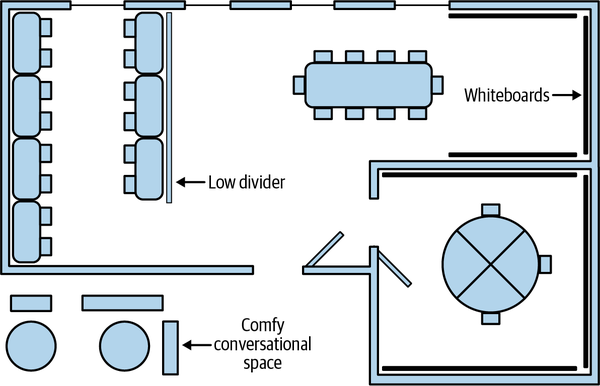
Figure 7-1. Spotify-inspired team room
The workspace shown in Figure 7-2 is based on a room created by an up-and-coming startup when they moved into new offices. They didn’t have the budget for a fancy workspace, so they made do with what they had. They put five pairing stations along a long wall with outside windows. Two of the desks were standing desks and the other three were repurposed from segments of a round conference table. A second round conference table was used for group conversations. The space was demarcated by cubicle dividers with whiteboards. Team members had a small pod of cubicles off to the side, and there were conference rooms nearby that could be used for private conversations.
It was a great workspace with one serious problem: there was a divider between the programmers and the product manager. (I’ve removed it from the figure.) As a result, the product manager was seated outside the team room—just barely!—and that was enough that he didn’t overhear or participate in team discussions. Team members couldn’t get ready answers to their questions and often struggled with requirements.
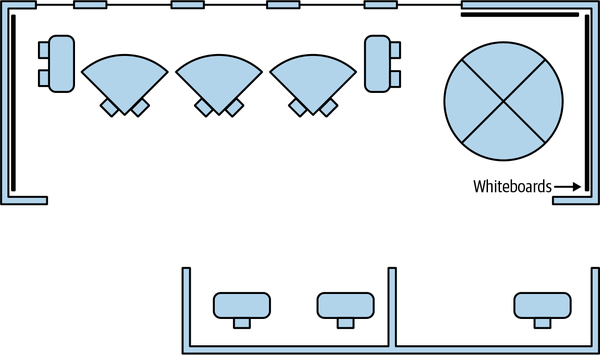
Figure 7-2. Budget team room
Adopting a physical team room
Some people may resist moving to a physical team room. Common concerns include loss of individuality and privacy, implied reduction in status from losing a private office, and managers not recognizing individual contributions.
In my experience, most people come to enjoy the benefits that sitting together provides, but it can take a few months. Teams I’ve worked with that set aside a lot of individual space in their team rooms ended up not using it. The Teasley case study found similar results: team members initially preferred cubicles to the open workspace, but by the end of the study, they preferred the open workspace.
However, forcing people to sit together in hopes that they’ll come to like it is a bad idea. Instead, talk with the team about their concerns and the trade-offs of moving to a team room. Discuss how team members will be evaluated in an Agile environment—it should emphasis team contributions, as “COLLECTIVE OWNERSHIP” discusses—and what provisions you can make for privacy.
One manager I talked to set up a team room for their team, with pairing stations, but didn’t require team members to use it. A few people on the team wanted to try pair programming, so they moved to the team room. Over time, more and more members of the team migrated to the team room so they could work with the people who were there. Eventually, the whole team had moved to pair programming and the shared team room, without any coercion.
Virtual Team Rooms
If you have a remote team, you can create a virtual team room using online tools. This works for hybrid and partially remote teams, too,8 but be careful: in-person conversations shut remote team members out. If some people are remote, the people working in person need to use the virtual team room for all their collaboration, too. A decision to use a virtual team room is a decision to act as if everyone is remote.
Remote equipment and tools
Remote teams need an electronic version of the team workspace:
-
Videoconferencing software, such as Zoom, for real-time conversation
-
Messaging software, such as Slack, for asynchronous conversation
-
Virtual whiteboard software, such as Miro or Mural, for freeform, simultaneous collaboration
-
Collaborative versions of task-specific tools, where possible, such as Figma for UX and UI design
-
A document store, such as DropBox, Google Drive, or a wiki
-
Inexpensive tablets for collaborative whiteboard sketches
-
An additional monitor or tablet for videoconferencing, so people can see one another and work at the same time
-
For Delivering teams, collaborative programming tools, such as Tuple or Visual Studio Live Share, that support pairing or mobbing (see “Pair Programming” and “Mob Programming” for details)
As with an in-person workspace, do not purchase Agile Lifecycle Management software or other tracking software.
Designing remote collaboration
Collaboration is easy when people are colocated. Achieving the same level of collaboration in a remote environment takes careful design. When your team establishes its working agreements during alignment chartering, make a point of discussing how you’ll collaborate. Remember that the goal is to maximize the performance of the team, not the individual. As work progresses, be sure to evaluate and improve your communication techniques frequently.
I asked people who had experience with great in-person and remote collaboration experience for their remote collaboration tricks.9 There were several excellent suggestions:
-
Make time for personal connections. In-person teams form bonds of friendship and mutual respect, and this allows them to make decisions quickly and effectively. In a remote team, be sure to set aside time to socialize and keep up with each other’s lives. Options include virtual coffee breaks to help ease tension, a dedicated chat channel for greetings and personal updates as people arrive and leave their office, and a 30-minute call every day for chatting or playing games. One team made a habit of reserving the first 5–10 minutes of every meeting for socializing; people could either show up early to chat or just come for the content as their mood dictated. Another set aside time specifically for celebrating successes.
-
Ensure safety. In an in-person team, people can joke around and be themselves without worrying that it will come back to haunt them. In a virtual environment, anything can be recorded. Establish clear guidelines about when it’s okay to record or share a conversation. Another way to create safety is to create a private channel in your group chat that’s only accessible to the team.
-
Make the implicit explicit. In an in-person conversation, many social cues come from subtle changes in facial expression and body language. In a remote conversation, those cues are often invisible. So instead, make them explicit. For example, one person created index cards he could hold up during video calls, labeled with phrases such as “+1,” “Concern,” “+1,000,000” and “Yeesss, do eeeet.” (Have some fun with it!) Similarly, be explicit about your availability. Put notes in the group chat about where you are, what you’re doing, and whether you’re open for conversation.
-
Upgrade your medium. Low-bandwidth communication, such as text chat, is good for brief updates, but it tends to lead to long and slow back-and-forth when discussing meaty issues. When you notice this happening, switch to a medium with more bandwidth. For example, one team established a standard of moving to a video call as soon as more than two people were discussing a subject in the team’s chat room.
-
Enable simultaneous conversation. When a bunch of people work on a visualization at the same time, they often split off into little two- to three-person person discussion groups. Establish ways of getting the same benefit from your tools. Videoconference tools have break-out rooms, and group chat applications support creating separate channels or threads.
-
Create a “wall.” In an in-person team room, information that everyone needs to see or remember is posted on the wall. For your remote team, consider creating a small number of shared documents to store the same sort of information.
-
Get tablets. It’s much more convenient to sketch diagrams on a tablet than with a mouse or trackpad, and they’re not very expensive. Get a tablet for each member of the team and leave it logged in to your virtual whiteboard. When you need to sketch something in a discussion, the tablet’s ready to go.
-
Respect differences in access. People’s internet connections vary widely. Just 10 miles can mean the difference between high-speed urban bandwidth and flaky rural bandwidth, let alone differences between countries. Talk about people’s needs and choose communication strategies that work for everyone.
Junior team members
Bjorn Freeman-Benson describes “The Junior People Problem” as one of the three challenges of distributed teams:
When a developer is just starting, they have a lot of questions. They don’t know how to do the work. But at the same time, they’re at the bottom of the pecking order. They’re hesitant to interrupt and don’t want to be seen as a burden.
…With InVision’s 100% remote teams [where Bjorn was CTO], junior developers couldn’t see what other developers were doing. They were afraid to interrupt. “They froze and got stuck,” Bjorn said, “until much later when they were explicitly asked what they were doing.” [Shore2019]
Bjorn Freeman-Benson: Three Challenges of Distributed Teams
Be sure to establish ways for junior team members to get up to speed without feeling lost or in the way. Pairing and mobbing are both excellent techniques. If those aren’t a good fit for your team, consider establishing daily check-ins, one-on-one mentoring, or other ways of ensuring junior team members aren’t left behind.
Questions
My physical team room is too noisy for me to concentrate. What can I do?
Sometimes, the team gets a little noisy and rambunctious. It’s okay to ask for quiet. When you discuss working agreements during your initial conversation about alignment, talk about how to make sure everybody’s needs are being met. If that’s not enough, bring it up during your team retrospectives, too.
Remember that pair programming is an excellent way to focus your attention away from background noise. You won’t notice it as much if you’re talking with your pair partner. Similarly, mob programming avoids the problem entirely by focusing everybody’s attention on the same thing.
Whenever a conversation starts, the whole team stops what they’re doing to listen. What can we do to prevent people from being distracted so easily?
Especially in the beginning, it’s possible that the whole team really does need to hear these conversations. It helps establish context and gets everyone on the same page. As time goes on, team members will learn which conversations they can comfortably ignore.
If it’s a continuing problem, especially in a physical team room, try stepping a little farther away from the rest of the team when a conversation starts. Interested team members can join the conversation while the rest of the team continues working.
Prerequisites
Team members need to share a set of core hours to collaborate effectively, even if they’re remote. If team members are so widely dispersed that shared hours aren’t possible, you actually have multiple teams, and you should design your work accordingly. (See Chapter 6 for more about scaling to multiple Agile teams.)
For physical team rooms, the hardest part is making the space. You’ll typically need approval from Facilities and support from management. It can take weeks or even months to complete, so start arranging for your shared workspace early.
In addition to getting management and Facilities buy-in, make sure team members agree to share a physical team room. Changes to work space can be hard for a lot of people. If they’re forced into a new arrangement against their will, they’re likely to find a way to leave the team, even if it means leaving the company. For more about getting buy-in, see Chapter 5.
If your team doesn’t use pair programming or mob programming, be careful to design your workspace and working agreements to minimize noise and distraction.
Indicators
When you have a successful team room:
-
Communication between team members is fast and effective.
-
You’re aware of when people are working on problems that you can contribute to, and they’re happy for you to join the discussion.
-
You don’t need to guess at answers. If anyone on the team knows the answer, you can ask and get a quick response.
-
Team members spontaneously form cross-functional groups to solve problems.
-
The team has a feeling of camaraderie and mutual respect.
Alternatives and Experiments
This practice is really about frictionless communication, and it doesn’t matter if you have a literal team room or not. But if you haven’t experienced the effortless collaboration of a team room—particularly a physical team room—try it for several months before experimenting with alternatives. It’s hard to appreciate how effective it can be until you’ve seen it for yourself.
Mob programming turns up the dial on collaboration even further, by having everybody on the team work together at a single computer. It may sound ridiculous, but, in a way, it’s “easy mode” for collaboration. It’s particularly effective for remote teams, who otherwise have a lot of work to do before they can reproduce the effectiveness of a physical team room.
Other than mobbing, the core idea of the shared workspace is hard to beat. Your best experiments will be in the details. How can you improve communication? Can you convert regularly scheduled meetings to continuous or ad-hoc collaboration? How can you change your tools, both physical and virtual, to enable new ways of working together? What about your workspace? Is there any way to rearrange furniture, or change your working agreements, to make communication more effective? As you work, notice where communication has friction, and try experiments that could smooth it out.
Further Reading
Agile Software Development [Cockburn2006] has an excellent chapter on communication. Chapter 3, “Communicating, Cooperating Teams,” discusses information radiators, communication quality, and many other concepts related to sharing a team room.
The Remote Facilitator’s Pocket Guide [Clacey2020] is quick, useful read about facilitation. It’s particularly geared towards remote sessions, but its advice is valuable for people working in person, too.
5 The Law of Mobility comes from Harrison Owen’s Open Space Technology, which is a superb approach for organizing large groups into productive discussions.
6 One out of eight men have some form of color blindness.
7 Pro tip: you can remove permanent marker from whiteboards by writing over it with a whiteboard marker, then immediately erasing.
8 A hybrid-remote team is in person some days and remote others. A partially remote team has some people in person and some remote.
9 Thanks to Dave Pool, Gabriel Haukness, Alexander Bird, Chris Fenton, Brian Shef, and Dave Rooney for sharing their techniques on Twitter. Thanks also to Brent Miller, Dennis McMillan, Seth McCarthy, Jeff Olfert, and Matt Plavcan for their suggestions.