Chapter 7 - Ansible Plugins and Content Collections
Ansible roles are helpful when you want to organize tasks and related variables and handlers in a maintainable way. And you can technically distribute Ansible plugins—Python code to extend Ansible’s functionality with new modules, filters, inventory plugins, and more—but adding this kind of content to a role is not ideal, and in a sense, overloads the role by putting both Python code and Ansible YAML into the same entity.
This is why, in Ansible 2.8, Collections, or more formally, Content Collections, were introduced.
Collections allow the gathering of Ansible plugins, roles, and even playbooks1 into one entity, in a more structured way that Ansible, Ansible Galaxy, and Automation Hub can scan and consume.
Creating our first Ansible Plugin — A Jinja Filter
In many Ansible tasks, you may find yourself building some relatively complex logic to check for a set of conditions. If your Jinja conditionals start making your YAML files look more like a hybrid of Python and YAML, it’s a good time to consider extracting the Python logic out into an Ansible plugin.
We’re going to use an extremely basic example. Let’s say I have a playbook, main.yml, and I have a task in it that needs to assert that a certain variable is a proper representation of the color ‘blue’ for some generated CSS:
 1 ---
 2 - hosts: all
 3
 4   vars:
 5     my_color_choice: blue
 6
 7   tasks:
 8     - name: "Verify {{ my_color_choice }} is a form of blue."
 9       assert:
10         that: my_color_choice is 'blue'
This works great… until you have another valid representation of blue. Let’s say a user set my_color_choice: '#0000ff'. You could still use the same task, but you’d need to add to the logic:
 1 ---
 2 - hosts: all
 3
 4   vars:
 5     my_color_choice: blue
 6
 7   tasks:
 8     - name: "Verify {{ my_color_choice }} is a form of blue."
 9       assert:
10         that: >
11           my_color_choice is 'blue'
12           or my_color_choice is '#0000ff'
Now, someone else might come along with the equally-valid option #00f. Time to add more logic to the task—or not.
Instead, we can write a filter plugin. Filter plugins allow you to verify data, and are some of the simpler types of plugins you’ll find in Ansible.
In our case, we want a filter that allows us to write in our playbook:
 1 ---
 2 - hosts: all
 3
 4   vars:
 5     my_color_choice: blue
 6
 7   tasks:
 8     - name: "Verify {{ my_color_choice }} is a form of blue."
 9       assert:
10         that: my_color_choice is blue
So how can we write a test filter so the is blue part in the assertion works?
The simplest way is to create a test_plugins folder alongside the main.yml playbook, create a blue.py file, and add the following Python code inside:
 1 # Ansible custom 'blue' test plugin definition.
 2
 3 def is_blue(string):
 4     ''' Return True if a valid CSS value of 'blue'. '''
 5     blue_values = [
 6         'blue',
 7         '#0000ff',
 8         '#00f',
 9         'rgb(0,0,255)',
10         'rgb(0%,0%,100%)',
11     ]
12     if string in blue_values:
13         return True
14     else:
15         return False
16
17 class TestModule(object):
18     ''' Return dict of custom jinja tests. '''
19
20     def tests(self):
21         return {
22             'blue': is_blue
23         }
This book isn’t a primer on Python programming, but as a simple explanation, the first line is a comment saying what this file contains. It’s not a requirement, but I like to always have something at the top of my code files introducing the file’s purpose.
On line 3, the is_blue function is defined. It contains some logic which takes one parameter (a string), and returns True if the string is a valid form of blue, or False if not.
In this case, it’s a simple function, but in many test plugins, the logic is more complex. The important thing to note is that this logic (which benefits from Python’s language features) is more maintainable as a plugin, rather than complex inline Jinja syntax in an Ansible playbook.
Ansible plugins are also unit testable, unlike conditionals in YAML files, which means you can test them without having to run a whole Ansible playbook to verify they are working.
Line 17 defines TestModule, and Ansible calls the tests method in this class in any Python file inside the test_plugins directory, and loads any of the returned keys as available Jinja tests—in our case, blue is the name of the Jinja test, and when a user tests with blue, Ansible maps that test back to the is_blue function.
If you run the main.yml playbook (even against localhost), it should now be able to verify that ‘blue’ is indeed blue:
Over time, you may find that you want to share this plugin with other playbooks, especially if it could be helpful in many of the projects you maintain.
The easiest way is to copy and paste the plugin code into each playbook’s directory, but that leads to code duplication and will likely result in the Python code being impossible to keep in sync as the plugin is modified in different playbooks over time.
Traditionally, people would share Ansible modules and plugins as part of roles, as you could place modules inside a special library directory in a role, and plugins in directories like test_plugins in the role (just like in a playbook). This advanced usage is mentioned in the Ansible documentation: Embedding Modules and Plugins In Roles.
But roles are primarily designed for sharing Ansible tasks, handlers, and associated variables—their architecture is not as great for sharing plugins and modules.
So where does that leave us?
The history of Ansible Content Collections
Well, in 2014, when Ansible Galaxy was created to allow roles to be shared, Ansible had less than 300 modules in Ansible’s core repository, and the decision was made to split the modules off from Ansible core to make maintenance easier, since issues and PRs were overwhelming the small core development team.
After a couple years, the modules were merged back in, because maintaining three separate git repositories using submodules and trying to track three separate issue and PR queues was a worse maintenance nightmare than what they had to begin with!
In 2017, Galaxy started to burst at the seams a little, as more users were contributing roles, and also trying to share module and plugin code by stashing them inside a role’s structure.
Also in 2017, as Red Hat expanded Ansible’s scope to more broadly embrace networking, security, and Windows automation, the amount of maintenance burden pretty much overwhelmed the core team’s ability to cope with the now thousands of modules being maintained in Ansible’s core repository:
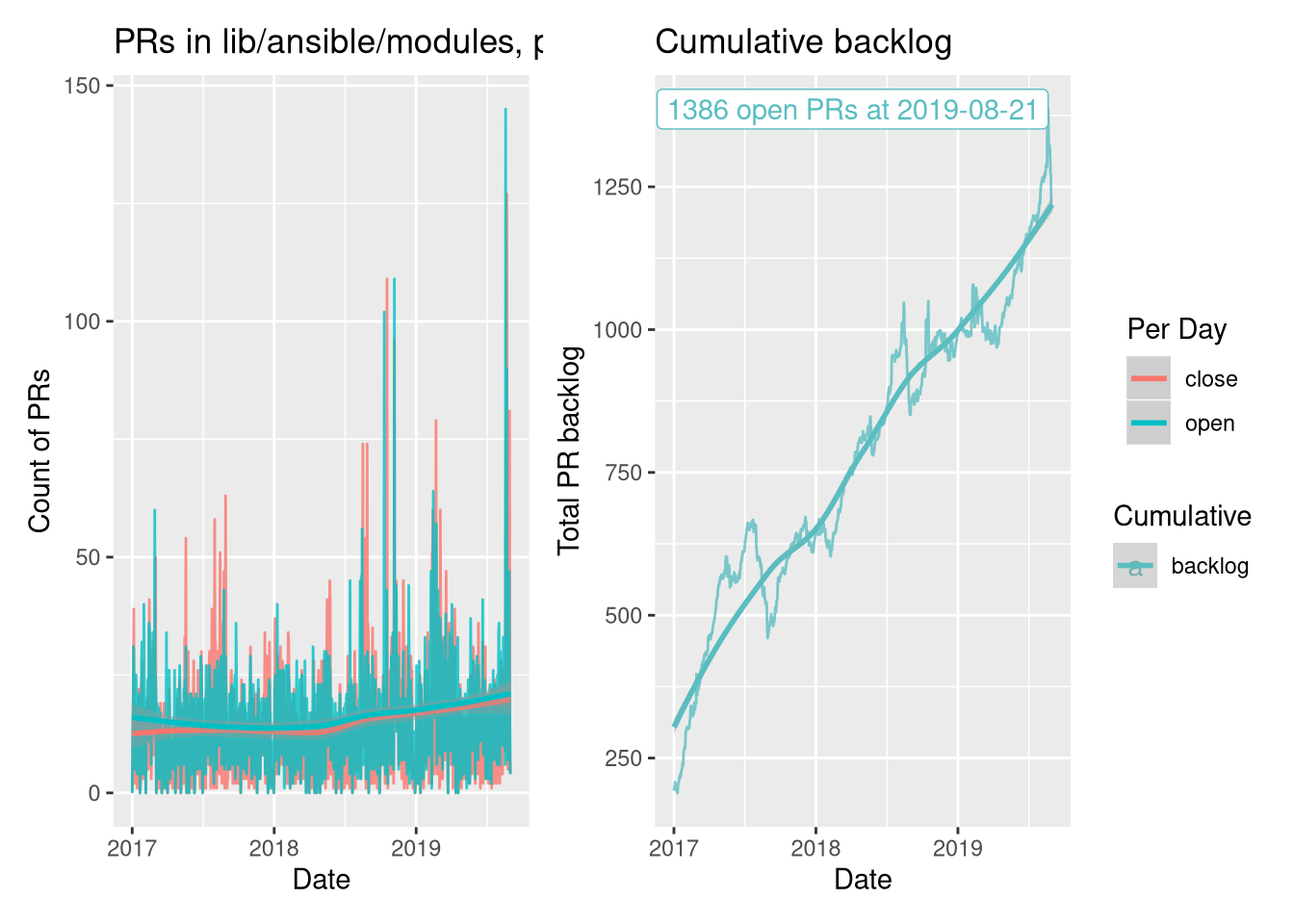
The graph above comes from Greg Sutcliffe’s blog, in a post titled Collections, The Backlog View. In the post, he explores the data behind a major decision to shift Ansible’s plugin and module development burden off the small Ansible core team and into a distributed set of collections.
Mazer was introduced in 2018 to try experiment with new ways of managing groupings of Ansible content—roles, modules, and plugins. And in the Ansible 2.9 release in 2020, most of Mazer’s functionality was merged into the already-existing ansible-galaxy command line utility that ships with Ansible.
Mazer was a character in the book Ender’s Game, from which the name ‘Ansible’ was derived. A mazer is also a hardwood drinking vessel.
And between the release of Ansible 2.8 and 2.10, the Ansible code was restructured, as explained in the blog post Thoughts on Restructuring the Ansible Project. The Ansible core repository will still hold a few foundational plugins and modules, vendor-supported and Red Hat-supported modules will be split out into their own collections, and community modules will be in their own collections.
This decision does run against the grain of the ‘batteries included’ philosophy, but the problem is that Ansible has grown to be one of the largest open source projects in existence, and it’s no longer a good idea to have modules for Cisco networking switches that require special expertise in the same repository as modules for developer build tools like PHP’s Composer or Node.js’ NPM.
But users are still able to get all a ‘batteries included’ version of Ansible—its what you’ve used most of this book! The difference is you can also strap on extra batteries, of any type (not just roles), more easily with collections.
The Anatomy of a Collection
So what’s in a collection?
At the most basic level, you need to put a collection in the right directory, otherwise Ansible’s namespace-based collection loader (based on Python’s PEP 420 standard) will not be able to see it.
Our goal is to move the blue test plugin from earlier in this chapter into a new collection, and use the plugin in that collection in our playbook.
We need to create a collection so we can put the blue plugin inside. In this example, since the collection is intended to be used local to this playbook, and since it’s meant to hold color-related functionality, we can call the collection local.colors, which means the collection namespace will be local (denoting a collection that’s local to this playbook), and the collection name will be colors.
As with Ansible roles, new collections can be scaffolded using the ansible-galaxy command, in this case:
You might be wondering why we created an extra directory
ansible_collectionsto hold our new namespace and collection—and why the collection has to be in a namespace, since it’s just a local collection. It’s required so Ansible can use Python’s built-in namespace-based loader to load content from the collection.
After running this command, you should see the following contents in your playbook directory:
The new collection includes all the necessary structure of a collection, but if you don’t need one of the docs, plugins, or roles directories, you could delete them.
The most important thing is the galaxy.yml file, which is required so Ansible can read certain metadata about the Collection when it is loaded. For local collections like this one, the defaults are fine, but later, if you want to contribute a collection to Ansible Galaxy and share it with others, you would need to adjust the configuration in this file.
Putting our Plugin into a Collection
To move our blue.py plugin into the collection, we’ll need to create a test directory inside the collection’s plugins directory (since blue is a test plugin), and then move the blue.py plugin into that folder:
At this point if you were to run the main.yml playbook, it would fail, with the message:
The problem is you need to also modify your Playbook and make sure Ansible knows you want the blue module in the local.colors collection.
There are two ways you can do this. For collection modules and roles, you could leave the playbook mostly unmodified, and just add a collections section in the play, like:
1 ---
2 - hosts: all
3
4   collections:
5     - local.colors
6
7   vars:
8     my_color_choice: blue
But in this case, we’re using a test plugin, not a regular module or role, so we need to refer to the module in a special way, using it’s ‘Fully Qualified Collection Name’ (FQCN), which in this test plugin’s case would be local.colors.blue.
So the task should be changed to look like this:
 7   tasks:
 8     - name: "Verify {{ my_color_choice }} is a form of blue."
 9       assert:
10         that: my_color_choice is local.colors.blue
Now, if you run the playbook, it will run the same as before, but using the module in the local.colors collection.
Any content you add to the collection—plugins, modules, or roles—can be called the same way. Whereas for things built into Ansible or local to your playbook you can call them with modulename or rolename, for things from collections you should call them by their FQCN.
Unless you plan on sharing your collection code with other projects or with the entire Ansible community, it may be easier to maintain custom playbook-specific content like plugins, modules, and roles individually, inside local playbook directories like we did with the test_plugins or with roles in previous chapters.
Going deeper developing collections
This example is rather simple, and doesn’t even include useful components like documentation for the blue test plugin. There are many more things you can do with collections, including adding roles, modules, and someday maybe even playbooks.
There are different requirements and limitations to roles when they are part of a collection (vs built separately in a playbook’s roles/ directory, or installed from Galaxy), and those are listed in Ansible’s documentation: Developing collections.
Collections on Automation Hub and Ansible Galaxy
Just like roles, collections can be shared with the entire community on Ansible Galaxy, or in Red Hat’s Automation Hub, which is part of Red Hat’s Ansible Automation Platform.
If you browse Galaxy or Automation Hub and find a collection you’d like to use, you can use the ansible-galaxy CLI to install the collection similar to how you’d install a role:
This command would install the geerlingguy.k8s collection into Ansible’s default collection path. We’ll talk a little more about collection paths in a bit, but first, you can also specify collections—just like roles—in a requirements.yml file.
For example, if you wanted to install the same collection, but using a requirements.yml file, you could specify it like so:
---
collections:
  - name: geerlingguy.k8s
And then, before running your playbook that uses the collection, install all the required collections with ansible-galaxy:
Once the collection is installed, you can call content from it in any playbook using the FQCN, like so:
1 ---
2 - hosts: all
3
4   roles:
5     - geerlingguy.k8s.helm
Collection version constraints
For many playbooks, installing a specific version of a collection guarantees better stability. And since contributed collections—unlike roles—require the use of semantic versioning, you can even specify version constraints when installing a collection from Galaxy or Automation Hub, either on the command line or in a requirements.yml:
---
collections:
  - name: geerlingguy.k8s
    version: >=0.10.0,<0.11.0
This version constraint tells Ansible to install any version in the 0.10.x series, but not any version in 0.11.x or newer.
For maximum stability, it is important to set a version constraint for any content you rely on. As long as the content maintainers follow the rules of semantic versioning, it should be extremely rare a playbook breaks due to any updated collection content it uses.
When a newer major version of a collection you use is released, you can bump the version constraint and test it when you’re ready, instead of having the latest version always installed.
Where are collections installed?
When you install a collection from Ansible Galaxy or Automation Hub, Ansible uses the configuration directive collections_path to determine where collections should be installed.
By default, they’ll be installed in one of the following locations:
~/.ansible/collections/usr/share/ansible/collections
But you can override the setting in your own projects by setting the ANSIBLE_COLLECTIONS_PATH environment variable, or setting collections_path in an ansible.cfg file alongside your playbook.
There are some cases when I like to install collections into a path local to my playbook (e.g. by setting collections_path = ./collections), because if you install collections to one of the more global locations, and you use the same collection with more than one project, you may run into issues if a newer version of a collection changes a behavior another playbook relies on.
One important note about the path, though: All collections in Ansible must be stored in a path that includes folders named after the collection namespace and name inside an ansible_collections subdirectory.
That’s why earlier in this chapter, when we created the local.colors collection, we ultimately created it inside the directory:
Similarly, if you install collections using Galaxy or Automation Hub with collections_path set to ./collections, then they will end up inside the ./collections/ansible_collections directory as well, inside a namespaced directory.
Summary
Ansible Collections allow for easier distribution of Ansible content—plugins, modules, and roles—and have also helped to make Ansible’s own maintenance more evenly distributed.
You may find yourself using bare roles sometimes, and collections (with or without roles) other times. In either case, Ansible makes consolidating and sharing custom Ansible functionality easy!