So far we have examined how to read and organize code. As a more senior developer, however, you will likely struggle with your own confusion and the confusion of other more junior people you work with. In many cases, you will want to manage the cognitive load junior people are experiencing to make sure they learn more effectively.
In this chapter, we will examine how to improve your onboarding process, whether that concerns onboarding an experienced developer into an unfamiliar codebase or a novice programmer.
To do so, first examine how experts and beginners think and behave differently. We will then cover a variety of activities a team can perform to onboard new team members. By the end of this chapter, you will be familiar with three techniques and activities to support newcomers more effectively.
As a more senior developer, you likely have encountered several scenarios in which you had to onboard newcomers. This can be a newcomer to a team or to an open source project. Many programmers are not necessarily trained in teaching or mentoring, making the onboarding process frustrating for both sides. In this chapter, we will dive into what happens in the brains of newcomers during the onboarding process and how you can better manage that process.
Onboarding processes I have witnessed worked more or less as follows:
A senior developer throws lots of new information at a newcomer. The amount of information is too much to process, causing high cognitive load. For example, the onboarder introduces new people, the codebase’s domain, the workflow, and the codebase all at once.
After the introduction, the senior developer asks the newcomer a question or gives the newcomer a task. The senior developer often sees this as something extremely simple, for example, fixing a small bug or adding a tiny feature.
The newcomer fails because of the high cognitive load, caused by a combination of a lack of relevant chunks for the domain and/or the programming language and a lack of automatized skills relevant.
What’s the problem with this senior developer’s interactions with a newcomer? The deepest problem in this scenario is that the senior developer is overloading the capacity of the working memory of the newcomer by asking them to learn too much at the same time. Let’s refresh our memory with a few of the key concepts covered in earlier chapters. In chapter 3, we covered cognitive load, which is the brain’s effort on a given problem. We saw that when the brain is experiencing too much cognitive load, thinking effectively is inhibited. In chapter 10, we saw that when you experience too much intrinsic and extraneous cognitive load, you have no room for germane load, meaning you will not be able to remember new information.
Because the newcomer’s working memory is overloaded, they cannot program effectively in the new codebase, nor can they retain new information properly. More than once I have seen this lead to frustration and wrong assumptions on both sides. The team lead might assume the newcomer is not very bright, and the newcomer assumes the project will be very hard. That is not good ground from which to start further collaboration.
One of the reasons more-senior people often struggle with effectively teaching and explaining is the “curse of expertise.” Once you have mastered a certain skill sufficiently, you will inevitably forget how hard it was to learn that skill or knowledge. You will, therefore, overestimate how many new things a newcomer can process at the same time.
I am sure somewhere in the last few months you have said that something was “not that hard,” “actually quite easy,” or “trivial.” I would guess that in many of those cases you were talking about knowledge that took you quite some time to acquire. Moments where you say, “Wow, that is easy!” might be moments where you fall into the curse of expertise. The first thing you can do to make the onboarding process easier is to realize that it is probably not all that easy for the person who is learning.
Often experts think that novices can reason in the same way they do, but maybe slower or with an incomplete picture of the whole codebase. The most important takeaway of this chapter is understanding that experts and novices think and behave in very different ways.
Earlier in the book, we covered reasons why experts can think differently. First, an expert’s brain stores a large collection of related memories that their working memory can fetch from LTM. These memories include strategies they have deliberately learned, such as writing a test for the issue first, or episodic memories of things they attempted in the past, such as rebooting the server. Experts don’t necessarily have all the answers. They also might need to weigh different options, but generally they already know things about problems and have some idea of how to approach them.
Second, an expert can very effectively chunk code and all sorts of code-adjacent artifacts like error messages, tests, problems, and solutions. An expert can probably glance over a part of the code and recognize that it is, for example, emptying a queue. A beginner might need to read the code line by line. A simple error message like “Array index out of bounds” for an expert represents one concept. To a novice programmer, this might represent three separate elements, leading to more cognitive load. Many situations where people assume a new colleague is “not such a strong programmer” are in fact curse-of-expertise situations where the novice is just overloaded.
To better understand the behavior of beginning programmers, let’s consider the useful psychological framework of neo-Piagetism, which explains people’s behavior when confronted with new information. Neo-Piagetism builds on Jean Piaget’s work, an influential developmental psychologist who focused on the four stages of development for young children. For our purposes, neo-Piagetism describes how programmers behave when they are just getting to know a programming language, codebase, or paradigm.
Before I can teach you how programmers behave in uncomfortable learning scenarios, let’s go over the behavioral stages that started in childhood. I first have to explain Piaget’s original model for young children, shown in table 13.1. At the first level, which describes the behavior of children aged 0 to 2 years of age, children cannot make plans or oversee situations. They simply experience things (sense) and act (motor) without too much strategy involved. In the second level, when children are between 2 and 7 years of age, children start to form hypotheses, but these hypotheses are often not very strong. For example, a 4-year-old might hypothesize that it is raining because clouds are sad. This is not precisely correct, but you can see they are trying to find explanations for their observations.
At the third stage, ages 7 to 11, children start to form hypotheses that they can reason about, but only in concrete situations. They can, for example, decide on a good move in a board game, but find it hard to generalize their thinking and reasons about whether that move will always be a good one for different boards. That type of formal reasoning happens in the final stage—the concrete operational stage—when children are over 11 years of age.
Table 13.1 Overview of Piaget’s stages of cognitive development
Neo-piagetian model for programming
Piaget’s model received some criticism, mainly because he used his own children to create the model. However, his work laid the basis for neo-Piagetism, which has great value in understanding the thinking of beginning programmers. The core idea of neo-Piagetism is that the levels of Piaget are not general but domain-specific. People can operate at the formal operational stage in one domain, like programming in Java, while they still behave at the sensorimotor level for programming in Python. It can even be the case that someone operates at the formal operational stage for a certain codebase but falls back to a lower level in a new codebase. Table 13.2 describes the neo-Piagetian model and its implications for programming, as described by Australian professor Raymond Lister.1
Table 13.2 Overview of neo-Piagetian stages of development and corresponding programming behavior
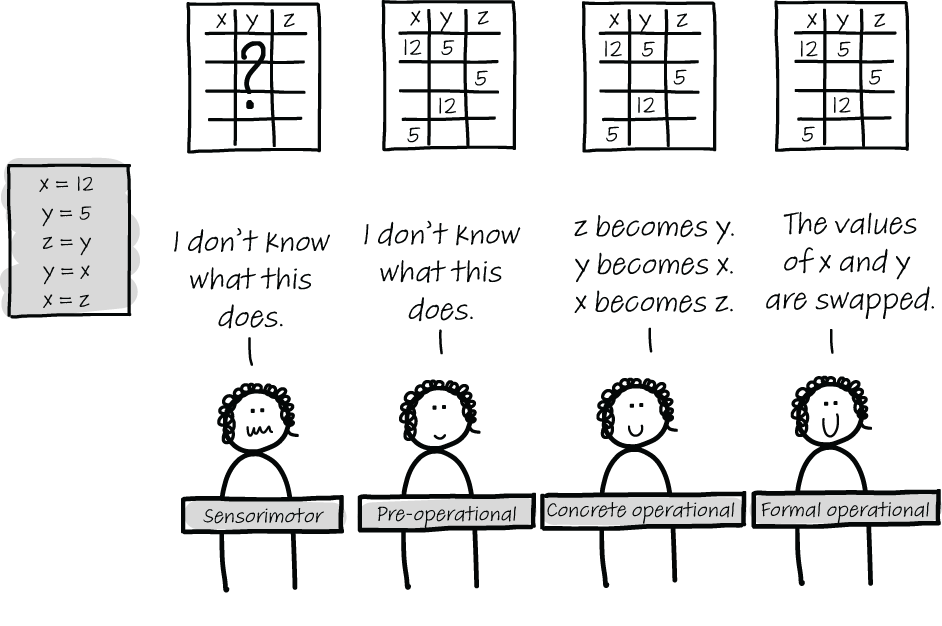
At the first level, illustrated by the left-most programmer in figure 13.1, programmers cannot correctly trace a program (that is, they cannot create a tracing table as we described in chapter 4). Behavior at this stage is common for people who have no or little programming experience, but can also occur when programmers switch between very dissimilar languages (e.g., from JavaScript to Haskell). Because program execution is so different in those two languages, an experienced JavaScript programmer may have difficulties tracing a Haskell program. Because they are so focused on the code, which for them is still not easy to comprehend, explaining general principles separate from code is not a useful way of teaching. For example, a sensorimotor programmer who is stepping through database code is not helped if you start explaining how the database is configured elsewhere in the code. First, they need an understanding of the execution model.
Figure 13.1 Overview of the four different neo-Piagetian levels for programming
The second stage is the preoperational stage, in which a programmer can trace small pieces of code, but this is also the only way they can reason about code: by using their newly learned tracing skills. Preoperational programmers find it hard to explain the meaning of that same code. The preoperational programmer is very focused on the code itself and finds it difficult to look at other artifacts, most notably diagrams. Supporting preoperational programmers in their reading or writing of code by giving them diagrams will not be helpful. Because these programmers reason inductively about code, they often guess the code’s behavior based on a few traces.
The second stage, I think, is most frustrating for programmers, but also for the people onboarding or teaching them. Because it is hard for programmers at the preoperational stage to understand the deeper meaning of code, they are often guessing. That can make programmers at this level seem erratic. Sometimes their guesses are spot on, based on prior knowledge that transfers (or luck), but five minutes later they utter entirely unreasonable ideas. This can be the situation in which the person being onboarded gets frustrated and thinks the junior programmer is not smart or not trying their best. However, the preoperational stage is a stage that is needed to advance to the next stage. Training newcomers by expanding their code vocabulary with flashcards can help them advance.
At the third stage, concrete operational programmers can reason about code without meticulously tracing it. They do this using prior knowledge: by recognizing familiar chunks in code, reading comments and names, and tracing code only when it is needed (for example, when debugging). Lister notes in his study that it is useful for programmers to use diagrams to support their thinking only at the concrete operational stage. Concrete operational programmers start to behave like proper programmers: they can reason about code, and they can make a plan and execute it when writing code. However, sometimes they can still lack the global understanding of a codebase, and they can also struggle with reflection on whether something is a good strategy to follow. This can show itself in an overcommitment to a first strategy (for example, a junior programmer who has tried for a full day to fix a certain bug and keeps failing and trying again rather than stepping back and reflecting on whether the chosen strategy is the right one).
The final stage is formal operation. This is an experienced programmer who can reason about code and about their own behavior comfortably and is thus not so interesting for the onboarding process. These programmers will likely be comfortable learning the details of codebases themselves and can ask for help when needed.
Learning new information can make you temporarily forget things
The four stages are presented as discrete stages, but in reality they are not. When learning a new programming concept or a new aspect of a codebase, learners might temporarily fall back to a lower level. If someone can reliably read Python functions without tracing, but is then exposed to variadic functions using *args, they might need to trace a few function calls to see what happens before they can comfortably read them without tracing again.
Exercise 13.1 The four different behaviors occur commonly in learning processes within companies. Reflect on the neo-Piagetian levels by coming up with an example you have seen happen in practice. Fill out the following table.
We have seen that beginning and expert programmers act and think differently. Research also shows that experts often talk about concepts in different ways, in very generic and abstract terms. For example, when explaining a variadic function in Python to someone new to the concept, experts might say that it is a function that can take in a varying number of arguments. However, they can leave many questions unanswered, for example, how to access all the different arguments, give names to each argument, or whether there is a limit on the number of arguments.
However, novices at a language or codebase benefit from both forms of explanation. Ideally, a beginner’s understanding follows a semantic wave, a concept defined by Australian scientist Karl Maton, as illustrated by figure 13.2.2
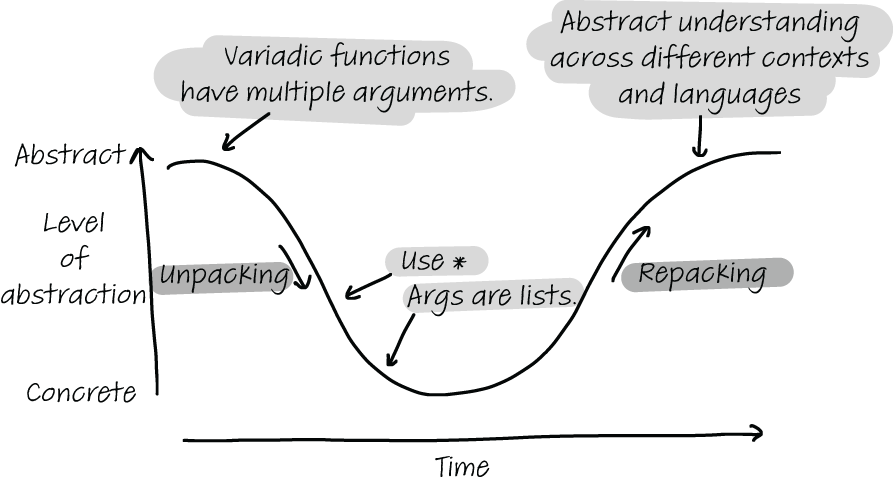
Figure 13.2 The semantic wave representing the ideal explanation that starts abstractly, allows the learner to unpack knowledge by going through concrete details, and allows the learner to then repack the learned knowledge into their LTM.
Following the semantic wave, first beginners need to understand the generic concept: what it is used for and why you need to know it. For example, a variadic function is useful because it allows you to use as many arguments in a function as are required. After beginners have seen what the concept does in general, they follow the curve down, a process known as unpacking. The beginner is then ready to learn details about the concept. For example, they can now learn that a * is used to indicate a variadic function in Python and that Python implements the list of arguments as a list, so in reality there are not multiple arguments; there is one argument that can contain all arguments of the function as elements.
Finally, the beginner needs to come back up to the abstract level, stepping away from details and feeling comfortable knowing how the concept works in general. This phase is called repacking. When a concept is properly repacked, the learner can think about it without focusing on concrete details. Repacking also involves integrating the knowledge into the LTM in relation to prior knowledge—for example, “C++ supports variadic functions, but Erlang does not.”
To beginners, there are three distinct antipatterns they use in their depth and a variety of explanations, each illustrated by figure 13.3. The first antipattern is called a high flatline and means you only use abstract terms. A newcomer to Python can learn that Python has variadic functions and why they are useful, but if they never see the syntax, there is a lot to learn later on.

Figure 13.3 Three different antipatterns: high flatlining (only abstract explanations), low flatlining (only concrete explanations), and downward escalators (starting from high to low but forgetting to leave room for repacking)
The second antipattern is the reverse, a low flatline. Some experts overload beginners with details without explaining why the concept is relevant and useful. Starting with “You can make a variadic function with a * and then Python sees all arguments as one list” is not going to mean a lot when the beginner does not know when to use a variadic function.
The final antipattern starts at the abstract, and then goes down to concrete, following the semantic wave. But after the concrete details, in this antipattern the expert forgets to allow newcomers to repack meaning. In other words, the expert shows the beginners the why and then the how of the concept but does not give them the time to integrate the new knowledge into their LTM. You can support this repacking by explicitly asking for commonalities people see between the new concept and preliminary information.
Exercise 13.2 Choose a concept you know well and find explanations that fit all three locations on the semantic wave, as shown in figure 13.1.
In the remainder of the chapter, we will dive into how to improve the onboarding process. The first and most important thing you can do is deliberately manage the cognitive load of the people you are onboarding. It is, obviously, also very useful if the newcomer can also manage their own cognitive load. Introducing concepts such as memory types (e.g., long-term, short-term, and working memory), cognitive load, and chunks can ease a team’s communication. It is a lot easier if a newcomer can say, “I experience too much load while reading this code” or “I think I lack chunks for Python” rather than “I am confused.” We will now dive into three onboarding activities in more depth.
In chapter 11, we described five activities people might do in a codebase: transcription, exploration, comprehension, searching, and incrementation. One of the issues with onboarding is that newcomers are asked to perform at least four different activities: searching for the right place to implement the feature or for relevant information, comprehending new source code, exploring the codebase to gain a better understanding, and incrementing the codebase with a new feature.
As we also saw in chapter 11, the different activities place different cognitive requirements on both the programmer and the system. Switching between the different activities is a lot to ask of a newcomer. Even though they know the programming language and maybe even the domain, performing a lot of different tasks is unnecessarily hard.
During the onboarding process, it is best to specifically choose activities in each of the five categories and have newcomers do them one by one. Let’s explore the five activities in more detail and study examples of how each activity can support newcomers.
Table 13.3 Overview of programming activities and how they can be used to support newcomers in a project
The different activities can build on each other and work on related parts of the code. For example, a first task could be searching for a class, followed by transcribing a method within that class into code, and then incrementing the class in a more complex way. You can also alternate tasks in which the focus is on learning new programming concepts with tasks that focus more on getting to know the domain, depending on the existing prior knowledge of the onboardee.
Exercise 13.3 Think of a concrete activity a newcomer could do in all five categories when new to your codebase.
One can also imagine that a team might create and maintain documents to further help newcomers (e.g., support exploration with good comments and architecture documents explaining modules, subsystems, data structures, and algorithms used in the system).
As we explained, the first thing that matters in onboarding newcomers is to understand things are not easy. As we covered in chapter 2, newcomers see and remember different things than experts. It might not need saying, but empathy and patience are important!
In addition to having a shared vocabulary of cognitive science concepts, there are three phases in which you can improve the process, which relate to the three forms of confusion that we studied in chapter 1.
Support the LTM: Explain relevant information
First, you can prepare the onboarding process for newcomers by deeply understanding the relevant information that plays a role when working with the codebase. This can be done with the exiting team, before the newcomer even arrives.
For example, you might want to document all the important domain concepts people are likely to encounter in the code. Another piece of relevant information is all libraries, frameworks, databases, and other external tools used in the code. A sentence like, “We use Laravel for this web app, which we deploy on Heroku with Jenkins” might not take an existing developer any effort, but if you do not know what even one of those tools is, you might miss all meaning in the sentence. And of course, the newcomer might know what a web framework or an automation server is in the abstract, but if they do not know these specific names, it is hard to grasp meaning and remember.
Separate domain learning from exploring code Going over all relevant concepts separately from introducing the code will make it a lot easier to learn more about the code. This looks like a small thing but can make a large difference. You could even make a deck of flashcards with relevant domain and programming concepts for the newcomer to practice with.
As a side note, even separate of the onboarding process, having an up-to-date list of all domain and programming concepts relevant to a project is also likely to help existing developers.
Exercise 13.4 Choose a project you work on often. Create two lists that could help newcomers: one containing important domain concepts and their description, and one with all the important libraries, frameworks, and programming concepts that the codebase uses. Fill out the following table.
Support the STM: Prepare small, focused tasks
Another thing I see happen in onboarding processes, which does not go perfectly, is that the newcomer explains the code. The team lead clicks through the code, showing relevant parts of the code. After the explanation session, the newcomer is asked to start on a relatively simple feature to “get to know” the codebase. The same can happen in open source projects where simple feature requests are labeled beginner-friendly. While this sounds very welcoming, it might present a cognitive problem.
The newcomer will be asked to do multiple programming activities and thus the newcomer’s brain is now doing several things: getting to know the code, searching through it, and also implementing a feature. That is likely to overload the newcomer’s STM because they cannot (yet) easily navigate the codebase. They spent a lot of time searching for code, and reading code distracts from the task at hand. It is better to split the schemes into multiple phases.
Understanding is a better welcome task THAN building If you want a newcomer to understand a certain piece of the code, ask them to understand a piece rather than giving them an implementation task. For example, ask them to write a summary of an existing class or write down all classes involved in executing a certain feature.
Giving newcomers a focused task will be less heavy on the STM and thus more likely to leave room for germane load to remember important things about the code. In addition to being easier and more effective for the novice, having good summaries of code will be helpful as documentation for other newcomers, more so than more features.
Should you choose to have a newcomer implement a small feature, that is, of course, possible too. But in that code, it is best to remove other aspects that create cognitive load, such as searching through code. You could prepare the relevant code beforehand. You could use the techniques we described in chapter 4, such as refactoring the relevant code into the class at hand to prevent searching.
Support the working memory: Draw diagrams
Chapter 4 proposed a number of techniques that can support the working memory, including using diagrams. It can be hard for someone new to a codebase to create these artifacts. In the onboarding process, the onboarder can consider creating tables that aid the working memory.
However, as we described, diagrams are not always helpful for absolute beginners who might be reluctant to step away from the code and view a larger picture. Monitor the helpfulness of diagrams often and abandon them when the technique is not (yet) helpful.
Another technique you can use to onboard newcomers is to read code as a team collaboratively. In chapter 5, we proposed seven techniques from natural language to be applied to code reading:
Activating—Actively thinking of related things to activate prior knowledge
Determining importance —Deciding what parts of text are most relevant
Inferring—Filling in facts that are not explicitly given in the text
Visualizing—Drawing diagrams of the read text to deepen understanding
In chapter 5, we proposed these activities as things to do when you read code as an individual developer. However, these tasks can also be used when you onboard a new developer into a codebase. When the team performs these activities, it lowers the newcomer’s cognitive load, and they can then focus on the code with more working memory.
Next we will detail how each of the seven activities can be used with collaboratively reading code.
Before the reading session starts, go over relevant concepts in the code. If you previously did exercise 13.1, you can have this list prepared beforehand. Remind the newcomer of relevant concepts beforehand and relieve confusion about concepts. It is better to discuss details at this point rather than when the newcomer is also trying to understand the code. For example, if you are using a Model-View-Controller model, it is better if that fact is not discovered while browsing different code files.
After the activating phase, the collaborative reading code session can start. Note that the activity being performed is comprehension. That means we want to limit the other four activities.
If you have low knowledge of something, it can be very hard to distinguish between core knowledge and what is less important. Pointing out the most relevant parts of code supports newcomers. This can be done in a collaborative reading, in which, for example, all team members point out what they think are the most relevant or important lines of the code. Alternatively, you might have a document stemming from previous code-reading sessions in which the important highlights have already been pointed out, which a newcomer can read.
Similarly, it can be tough to fill in details that are not explicitly stated. For example, a team might have clear understandings of domain concepts, such as that shipments must always contain at least one order, but such decisions might not have been explicitly documented in the code. Similarly, to determine importance you might expressly point out findings in a reading session, or these decisions might have been reported so that they can be easily shared with newcomers.
As we described, the most important thing you can do in the onboarding process in keep track of the level of understanding the onboardee currently has. Regularly ask them to give a quick recap of the read, define essential domain concepts, or recall a programming concept used in the code.
As described earlier in the book, diagrams serve two purposes. First, they can support the working memory (chapter 4), and second, their creation can help comprehension (chapter 5). Depending on the newcomer’s level, the onboarder can either create a diagram and use it to help the onboardee in code reading, or ask the newcomer to draw it to deepen their understanding of the code.
While collaboratively reading code, regularly ask and answer questions about the it. Depending on the newcomer’s level, you might ask questions that they answer, or you might encourage them to ask questions you can answer. Relatively experienced newcomers might also benefit from asking questions to find the answers, with your help, but always monitor their cognitive load in such tasks that are less guided. When the onboardee starts to guess or concludes things that do not make sense, their cognitive load might be exceeded.
As a final step in code reading for onboarding, you can write a summary of the code that was read together. An example of a summary in shown in figure 13.4. Depending on the documentation state in the codebase, this summary could be committed to the codebase as documentation, which is a great and welcoming task for the onboardee to do after the session. In that process, they will get to know the workflow of the codebase (for example, by creating a pull request and requesting a review on it, in a way that is not too scary or too hard on the working memory).
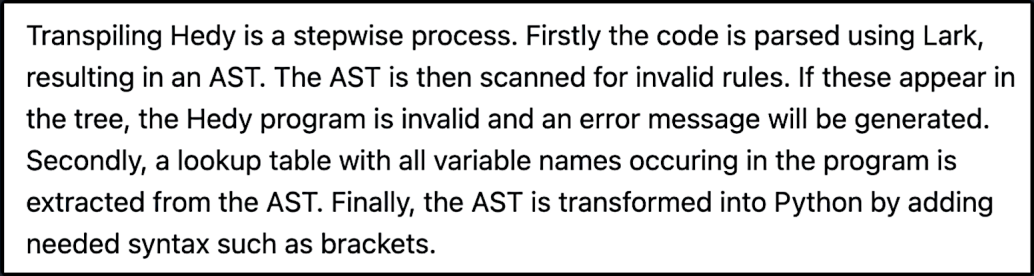
Figure 13.4 An example of a summary of code
Experts think and act differently from beginners. Experts can reason abstractly about code and have the ability to think about it without referring to the code itself. Beginners tend to focus on details in the code and have a hard time stepping back from details.
When midlevel programmers learn new information, they sometimes fall back to beginner-level thinking.
People who are learning a new concept need to learn about it in both abstract terms and in concrete examples.
People who are learning a new concept also need time to connect a new concept to prior knowledge.
When onboarding, limit the programming activities newcomers perform to one at a time.
When onboarding, prepare relevant information to support the onboardee’s long-term, short-term, and working memory.
1. Raymond Lister, “Toward a Developmental Epistemology of Computer Programming,” https://dl.acm.org/ doi/10.1145/2978249.2978251.
2. Karl Maton, “Making Semantic Waves: A Key to Cumulative Knowledge-Building,” Linguistics and Education, vol. 26, no. 1, pp. 8-22, 2013, https://www.sciencedirect.com/science/article/pii/S0898589812000678.