So far in this book, we have examined what cognitive processes play a role when reading and writing code. In the previous chapters, we looked at how to write code that is easier to read and how to solve problems better.
In this chapter, we direct our attention away from the code itself and instead look at what cognitive processes play a role when you are executing the act of programming. We will first examine what we mean when we say that someone is programming. We will dive into different activities that make up the act of programming and explore how to best support these different activities.
Second, we will look at the cognitive implications of a much-dreaded occurrence in the life of programmers: interruptions. We will investigate why interruptions while programming are so annoying and examine what can you do to make them less disruptive. By the end of this chapter you will be better able to support activities of programming and better equipped to deal with interruptions.
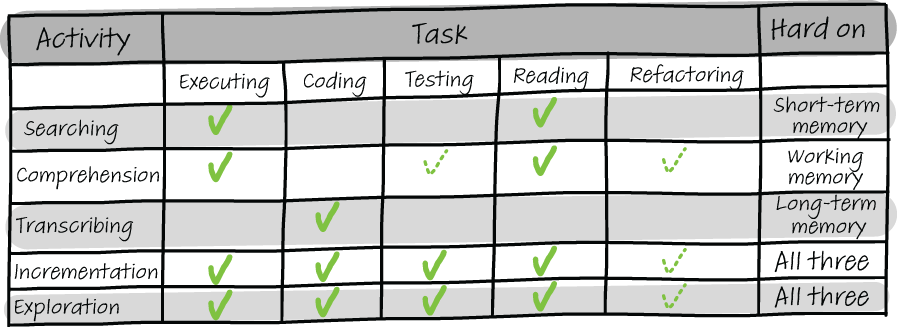
When you program, there are a lot of different types of things you might be doing. These different activities were first described by British researchers Thomas Green, Alan Blackwell, and Marian Petre (whose work we will cover in more depth in chapter 12) in their cognitive dimensions of notation (CDN) framework, which evaluates the cognitive impact of a programming language or code base and describes five activities: searching, comprehension, transcription, exploration, and incrementation.
Figure 11.1 provides an overview of the five programming activities, what programming tasks you likely do in these activities, and what makes each activity hard.
Figure 11.1 An overview of programming activities and the memory systems they use most
Searching in code is the activity where you are looking through a code base, searching for a specific piece of information. This can be the precise location of a bug you need to address, all calls of a certain method, or the location in which a variable should be initialized.
While searching, you will mainly be reading and executing code, potentially using breakpoints and a debugger, or replying on print statements while executing the code. The activity of searching is hard on your STM. You have to remember what you were searching for, what paths in the code you have already explored and why, and what you still need to explore in more depth. Therefore, this activity is best supported by making notes to offload some of the memories to paper or to a separate document on your code. Write down what information you are looking for, where you will search next, and what you have already found.
As discussed earlier, it can sometimes be beneficial to make temporary changes to code to ease a certain task. When searching within code, it can help if you leave little breadcrumbs for yourself in comments indicating why you visited the code. For example, a comment like “I read this method because I thought it might be involved in the initialization of the page class” can help you when you visit the code later on in the same search. This especially matters when you suspect you might not be able to finish the search in one go because a meeting or the end of the workday is approaching. Writing down the steps of the search will help you finish it later.
When you are performing the activity of comprehension, you are reading and executing code to gain an understanding of its functionality. It is similar to searching, but with comprehending, you lack a good understanding of what the code does in detail, possibly because it is code you wrote a long time ago or because someone else wrote the code.
As we saw in chapter 5, developers on average spend as much as 58% of their time comprehending existing source code, so this activity is pretty common in your day-to-day life.
In addition to reading and executing code, comprehension can also include running test code to gain a better understanding of the way the code is intended to work. And as we covered in chapter 4, comprehension can also include executing refactorings to make the code easier for you to understand.
Refactoring code helps because comprehension is an activity that is heavy on your working memory. You have to reason about code you do not yet fully understand. As such, supporting the working memory is the best strategy you have when it comes to comprehension. Try to draw a model of the code and update it each time you learn new information. This way, instead of retrieving information from your brain, you can retrieve it from an external source, which is easier. And having a model at hand can also help to detect misconceptions you might hold about the code. Also, should you have to finish the task of comprehension at a later time, all your notes and drawings can help you to get back into the task with more ease.
Transcription is the activity where you are “just coding.” You have a concrete plan of what you want to add or change to the code base, and you are going to do just that. In its most pure form, in transcribing you are just coding and nothing else.
Transcription is mainly hard on the LTM because you will have to be able to recall syntactic constructions for implementation.
Incrementation is a mix of searching, comprehension, and transcription. When you are incrementing a code base, you are adding a new feature, which is likely to include both searching for the location(s) to add code and comprehending the existing code to understand where to add code and how to do that, followed by the actual transcribing of the idea into syntax.
Because incrementation is a mix of activities, it can also be hard on all three memory systems. As such, incrementation tasks, which are the most common in a professional programmer’s life, have the greatest need of support for the memory systems in the form of notes and refactoring for comprehension.
Your personal experience with the programming language and code base at hand affects which system is most heavily impacted. If you know the programming language well, your LTM might not be working very hard to remember syntax. On the other hand, if you know the code base well, your working memory and STM might not be impacted by searching and comprehending the code.
But if either the code base or the language (or both) is less familiar, incrementation can be a hard task. Where possible, try to split the task of incrementation into separate smaller tasks. Being deliberate about what subtask you are doing can help you support the right memory system. Tell yourself that you will start by searching for the relevant information, then comprehending it, followed by adding the needed code.
The final activity Green, Blackwell, and Petre discuss is exploring code. When you are performing the activity of exploration, you are in essence sketching with code. You might have a vague idea of where you want to go, but by programming you gain clarity about the domain of the problem and about the programming constructs you will need to use.
As in incrementation, when exploring you are probably performing a number of different programming-related tasks in quick succession: writing code, executing the code, running tests to see if you are going in the right direction, reading existing code, and potentially refactoring code to make it more in line with your newly found plans for it.
While exploring, it is likely you heavily rely on tools in the IDE—for example, running tests to see if small changes have impacted any tests, using automated refactoring tools, or relying on “find dependents” to quickly navigate code.
Because exploration also relies on different activities, it is hard on all three memory systems, but especially on the working memory because you are making plans and designs on the fly while programming. While you might feel that documenting your plans will disrupt your flow and slow you down, it can be very helpful to make some rough notes of your design direction or design decisions so you can free up mental space to think about the problem in more depth.
When discussing this framework with developers, they often wonder why the activity of debugging is missing. The answer is that when you are debugging, you are often engaging in all five activities. Debugging entails fixing a bug, but it often also includes finding the location of the bug before you can fix it.
Therefore, debugging is often a sequence of exploration, searching, and comprehension, followed by writing code, and can often be described as a mix of the five activities.
Exercise 11.1 During your next coding session, reflect on the five activities of the CDN framework. What activity are you performing most of the time? What barriers did you encounter while searching, comprehending, transcribing, incrementing, and exploring?
Many programmers nowadays work in open plan offices, where distractions are common. What sort of results do these interruptions have on our brains and our productivity? Rini van Solingen, now professor at Delft University of Technology in the Netherlands, studied programmer interruptions as early as the mid-90s.
Van Solingen studied two different organizations and found surprisingly similar results in both organizations. He found that interruptions are common and take 15-20 minutes each. About 20% of a developer’s time is spent on interruptions. With the increasing use of Slack and other messaging apps, it is likely that nowadays interruptions are more common.1
There is more recent work on interruptions too. Chris Parnin, whose work we briefly covered in chapter 3, also studied interruptions by recording 10,000 programming sessions of 86 programmers. With this study, Parnin confirmed van Solingen’s results, finding that interruptions are common. According to Parnin’s study,2 the average programmer will have just one uninterrupted two-hour session in a day. Developers also agree that interruptions are an issue. A study at Microsoft revealed that 62% of developers regard recovering from interruptions as a serious problem.3
In chapter 9, we discussed fNIRS devices as a technique to measure cognitive load. With the help of fNIRS, we have gained not only an understanding of what type of code causes cognitive load, but also how cognitive load is distributed over tasks.
In 2014, Takao Nakagawa, a researcher at the NARA Institute of Science and Technology in Japan, measured brain activity with an fNIRS device.4 Participants in the study were asked to read two versions of an algorithm written in C. One version was a regular implementation, while the second was deliberately made complicated by the researchers. For example, they changed loop counters and other values such that the variables were updated frequently and irregularly. These modifications did not change the functionality of a program.
Nakagawa found two interesting results. First, for 9 out of the 10 participants, there was a large variation in the cognitive load during the task. Programming was not hard all the time; some things were hard, while other things were relatively easy. Second, the researchers also looked at the time in the task where the largest increase in blood flow, and thus in cognitive load, occurred. Their results showed that cognitive load in the middle of the task was highest.
Nakagawa’s results might suggest there is a sort of warm-up and cooling down phase in program comprehension tasks, between which the hardest work is performed. Professional programmers will likely recognize this warm-up time that is needed to get “in the zone” to build a mental model of the code and to get ready to start the activity of transcribing. As discussed earlier in the chapter, it can help to actively delineate subactivities in a larger programming task.
Parnin also looked at what happens after an interruption and determined they are, unsurprisingly, quite disruptive to productivity. It takes about a quarter of an hour to start editing code after an interruption. When interrupted during an edit of a method, programmers could resume their work in less than a minute only 10% of the time.
What do people do to get back to the code? From Parnin’s results, we can see that the working memory lost vital information about the code programmers were working on. Programmers in his study needed to put in deliberate effort to rebuild the context. They would often navigate to several locations to rebuild context before continuing the programming work. The participants in the study also left breadcrumbs for themselves, for example, by inserting some random characters, causing a compile error, and thus forcing what Parnin called a roadblock reminder: a way to ensure that the code would be finished rather than remain in a half-completed state. Some participants also used a source diff between their current version and master as a last-resort way to recover state, but it can be cumbersome to find the actual differences.
Now that we know that interruptions are common and hard to recover from, let’s examine what happens in your brain when you are interrupted in more depth so that we can better prepare for interruptions. This chapter suggests three techniques to help deal with interruptions.
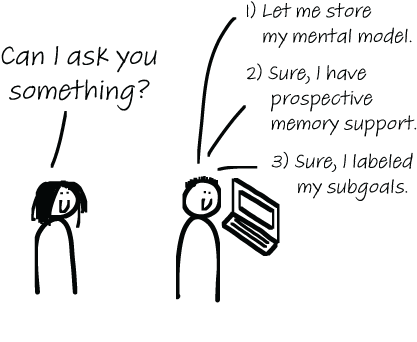
Figure 11.2 Three techniques to help recover after an interruption
Earlier in the book we discussed various techniques that can be used to support the working memory and STM, such as making notes, drawing models, and refactoring code to be easier on the brain. These techniques can also be useful for recovering from an interruption.
Nakagawa’s results showed a warm-up period in comprehension activities, which is most likely spent on building a mental model of the code at hand. If parts of the model are stored apart from the code, that can help you to quickly regain your mental model. Leaving notes about your mental model in comments is also helpful.
The use of extensive comments has gotten a bad reputation among some developers because code should be “self-documenting,” making comments unnecessary. However, code very seldom explains the thought processes of the programmer and thus most often does not adequately represent the mental model of the creator. We are not used to writing down in the code, for example, why a certain approach was chosen, what the goals of the code are, or what alternatives were considered for an implementation. When these kinds of decisions are not written down anywhere, they can at best be implicitly rediscovered, which obviously is a time-consuming process. John Ousterhout nicely describes this in his book The Philosophy of Software Design (Yaknyam Press, 2018): “The overall idea behind comments is to capture information that was in the mind of the designer but couldn’t be represented in the code.”
In addition to being very useful for others reading the code, documenting decisions can also be helpful in storing your own mental model temporarily, making it easier to continue programming at a later time. In his book the Mythical Man-Month (Addison-Wesley, 1995), Fred Brooks says that comments are most important in the program comprehension process because they are always present. While notes on paper or in documents are useful, finding relevant documents when you start again can cause extra mental notes.
When you are interrupted and have the option to hold off the interruption for a little while—for example, when it is a Slack message or a colleague at your desk who can wait for a little while, rather than a ringing phone—it can be very useful to just “brain dump” your latest mental model of the code into a comment. It will not always help, but in some cases it might.
For the second technique, we have to dive a bit deeper into different types of memories. In chapter 10, we looked at two types of memories: implicit and explicit, or declarative and procedural.
There is one additional type of memory that concerns the future rather than the past, called prospective memory, the memory of remembering to do something in the future. This type of memory is closely related to planning and problem solving. When you tell yourself that on the way home you have to remember to pick up some milk at the store, or when you remind yourself to refactor a certain piece of ugly code later, you are using your prospective memory.
How developers support their prospective memory has been the topic of a few studies. Various studies have described how developers have tried to cope with prospective memory failures. For example, developers often add “to-do” comments in the part of the code they are working on to remind them to complete or improve part of the code.5 Of course, as most programmers have experienced, these to-do comments can linger for a long time and often remain unresolved. Figure 11.3 shows a recent search on GitHub resulting in 136 million code results containing the word “to-do.”
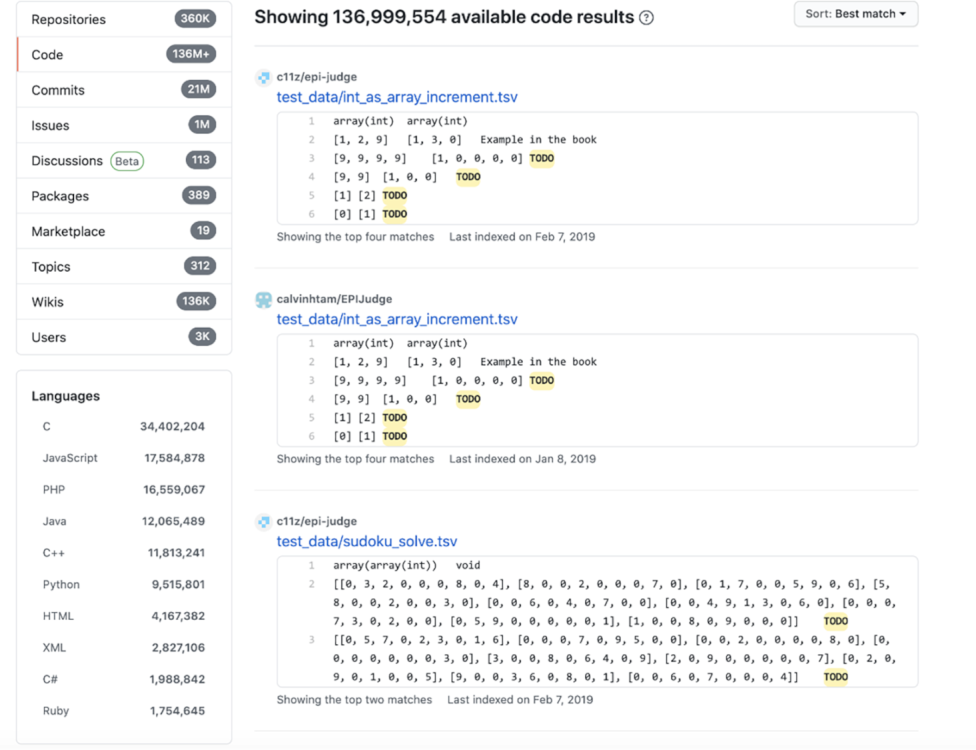
Figure 11.3 To-do comments can remain in code bases without being resolved.
In addition to to-do comments and intentional compile errors, programmers also use techniques that other office workers use: leaving sticky notes on their desk and sending emails to themselves. Paper notes and emails, of course, have the downside of being disconnected from the code base, but can still be helpful.
Parnin also developed a Visual Studio plugin that allows you to support your prospective memory when you have to stop programming.6 For example, it allows you to add to-do items to your code and give them an expiration date so you do not forget to work on tasks.
A third practice that can help protect against interruptions is called subgoal labeling, in which you explicitly write down into what small steps a problem can be divided. For example, when parsing and restructuring text, these steps could be
While these steps in themselves are not hard to imagine or to remember, when you are interrupted in between them, it can be cumbersome to return to the code and remember what you were planning to do. If I program a larger task, I try to start with writing the steps in my code as comments, like this:
# parse text
# receive parse tree
# filter the parse tree and
# flatten tree back into text format
This way, I can fill out small parts of the code, and I always have a plan to fall back on. A study on programmers by Lauren Margulieux, professor of learning technologies in the Department of Learning Sciences at Georgia State University, showed that when you provide subgoals, programmers use them in mentally organizing the solution.7
Subgoals are useful for organizing your own thinking after an interruption, but are also useful in other situations. For example, some of the subgoals placed in the code can remain as comments and serve as documentation later on. They can also be used in collaboration where a senior programmer designs the subgoals and other programmers implement parts of a larger solution.
In chapter 9, we covered various ways to detect cognitive load that people experience, including questionnaires and brain-based metrics. But there are other ways to access the cognitive load a certain task creates.
One example is to use a dual-task measure. A dual task is a second task a participant performs while working on the original task. For example, when solving a mathematical equation, at random times a letter A will appear on the screen. Whenever the A appears, the participant needs to click the A as soon as possible. How quickly and accurately a participant can perform the second task is a good measure of how much cognitive load is experienced. Researchers have shown that a dual-task measurement can be a good way to estimate cognitive load. There are downsides to using a dual task, too, as you might imagine; the second task itself can also add cognitive load, interfering with the original task.
Using a dual-task measurement, research has explored the connection between cognitive load and interruptions. Brian P. Bailey, a professor of computer science at the University of Illinois, has devoted a large part of his career to understanding the cause and effect of interruptions.
In a study from 2001,8 50 participants were asked to perform a primary task while being interrupted. The experiment used different types of tasks, from counting the occurrence of words in a grid to reading some text and answering questions about the text. While executing these primary tasks, participants were interrupted by irrelevant information such as breaking news headlines and stock market updates. This study was run as a controlled experiment, with two groups. One group received the interruptions during a primary task, while the other group received them after completing a task.
While Bailey’s results were not surprising, they do offer a deeper insight into disruptions. Bailey found that it takes longer to complete an interrupted task than a noninterrupted task (without counting the time of the actual interruption), and that people perceive interrupted tasks to be more difficult to complete than a noninterrupted task.
Bailey did not only measure the time and difficulty of tasks; he also investigated the emotional state of participants. Participants answered questions on their annoyance and anxiety levels each time an interrupting task would appear. The results of these questions showed that the level of annoyance experienced is influenced when the interrupting task is displayed. Participants in the group where the interruptions appeared during the primary task were more annoyed than in the group that saw the interruptions after a task. The same was true for anxiety. Participants whose primary task was disrupted experienced more anxiety. A follow-up study from 2006 that used a very similar setup revealed interrupted people also make twice as many mistakes.9
Based on these results, we could conclude that it could help for programmers, who will unavoidably be interrupted now and then, to be interrupted at more convenient times (for example, after having completed a task). Based on this idea, Manuela Züger, then a PhD student at the university of Zurich, developed an interactive light called the FlowLight.
The FlowLight (https://emea.embrava.com/pages/flow) is a physical light a developer can place on their desk or on top of their screen. Based on computer interactions, like typing speeds and mouse clicks, FlowLight detects whether the programmer is deeply engaged in a task and experiencing high cognitive load. Colloquially this state is sometimes also called being “in the flow” or “in the zone.” When the programmer is very much in the zone and should not be interrupted, the FlowLight will blink red. With a little bit less activity, FlowLight will glow continuously red. If a developer seems available, the light turns green.
Züger tried out the FlowLight in a large-scale field study with over 400 participants from 12 countries and found that the FlowLight can reduce interruptions by 46%. Many participants in the study kept using the FlowLight after the experiment ended, and the FlowLight is now available as a commercial product.10
While reading about interruptions, you might have pondered the concept of multitasking. Are disruptions really that bad? Can’t our brains do multiple things at the same time, like a multicore processor?
Sadly, there is overwhelming evidence that people cannot multitask while doing deep cognitive tasks. This might not be all that convincing, because you might be reading this book while listening to music, or listening to this book while running or knitting, so how can I say that a person cannot do two things at the same time?
Remember the three phases of storing information: cognitive, associative, and autonomous. Let’s phrase it differently: you cannot do two or more tasks at the same time when you have not reached the autonomous phase for them. Reading English is probably not something you still need to learn, so you can do it while engaging in other tasks you have also automatized, like knitting. Sometimes, though, when you are reading a passage that is especially hard because it contains many new ideas, you feel the need to turn down the music to be able to focus better. This is your brain telling itself you cannot multitask, and this is why people also feel compelled to turn down the radio when they park their car.
If you do not believe your own brain, there is some science that shows multitasking does not work as well as you might think.
In 2009, Annie Beth Fox, now professor of quantitative methods at the Massachusetts General Hospital’s Institute of Health Professions,11 compared students who were reading a text while also using an instant messenger to students who were fully focused on the text. While both groups understood the text equally well, the group that was interrupted by messages needed about 50% more time for both reading the text and answering questions about it afterward.
Dutch psychologist Paul Kirschner performed a study in 2010 with about 200 students in which he asked them about their Facebook habits. Heavy Facebook users studied just as long as nonusers, but heavy users had a significantly lower grade average. This was especially true for students who reported replying to messages immediately after they came in. The interesting thing is that people who multitask often feel very productive.12
In a controlled experiment where students were performing a task while also communicating with a partner using online messaging, students themselves found their performance satisfactory, but their partners gave them a much lower rating. This is likely to mean that programming while also chatting on Slack might not be the best way to get work done.13
When you are programming, you perform a combination of different programming activities: searching, comprehending, transcription, incrementation, and exploration. Each activity puts pressure on different memory systems. Therefore, each activity should be supported by different techniques.
Interruptions while you are programming are not only annoying; they are detrimental to productivity because it takes time to rebuild your mental model of the code.
To better deal with interruptions, offload mental models into notes, documentation, or comments.
Deliberately support your prospective memory if you cannot complete a task by documenting your plans.
Try to limit interruptions to moments you experience low cognitive load, for example, through automation using a FlowLight or manually by setting your status in Slack.
1. Rini van Solingen et al., “Interrupts: Just a Minute Never Is,” IEEE Software, vol. 15, no. 5, https://ieeexplore .ieee.org/document/714843.
2. Chris Parnin and Spencer Rugaber, “Resumption Strategies for Interrupted Programming Tasks,” https:// ieeexplore.ieee.org/document/5090030.
3. Thomas D. LaToza et al., “Maintaining Mental Models: A Study of Developer Work Habits,” https://dl.acm .org/doi/10.1145/1134285.1134355.
4. Takao Nakagawa et al., “Quantifying Programmers’ Mental Workload during Program Comprehension Based on Cerebral Blood Flow Measurement: A Controlled Experiment,” https://posl.ait.kyushu-u.ac.jp/ ~kamei/publications/Nakagawa_ ICSENier2014.pdf.
5. Margaret Ann Storey et al., “TODO or to Bug: Exploring How Task Annotations Play a Role in the Work Practices of Software Developers,” https://dx.doi.org/doi:10.1145/1368088.1368123.
6. https://marketplace.visualstudio.com/items?itemName=chrisparnin.attachables.
7. Lauren E. Margulieux et al., “Subgoal-Labeled Instructional Material Improves Performance and Transfer in Learning to Develop Mobile Applications,” https://doi.org/10.1145/2361276.2361291.
8. Brian P. Bailey et al., “The Effects of Interruptions on Task Performance, Annoyance, and Anxiety in the User Interface,” http://mng.bz/ZxR5.
9. Brian P. Bailey, “On the Need for Attention-Aware Systems: Measuring Effects of Interruptions on Task Performance, Error Rate, and Affective State,” Computers in Human Behavior, vo. 22, no. 4, pp. 685-708, 2006, http://mng.bz/zGAA.
10. Manuela Züger, “Reducing Interruptions at Work: A Large-Scale Field Study of FlowLight,” https:// www.zora.uzh.ch/id/eprint/136997/1/FlowLight.pdf.
11. Annie Beth Fox et al., “Distractions, Distractions: Does Instant Messaging Affect College Students’ Performance on a Concurrent Reading Comprehension Task? Cyberpsychology and Behavior, vol. 12, pp. 51-53, 2009. https://doi.org/10.1089/cpb.2008.0107.
12. Paul A. Kirschner and Aryn C. Karpinski, “Facebook® and Academic Performance,” Computers in Human Behavior, vol. 26, no. 6, pp. 1237-1245, 2010, http://mng.bz/jBze.
13. LingBei Xu, “Impact of Simultaneous Collaborative Multitasking on Communication Performance and Experience, 2008, http://mng.bz/EVNR.