As a professional programmer, I am sure you have seen code that was easy to read, as well as code you had to spend a lot of effort to understand. The reason code can be hard to understand is something we covered in earlier chapters when discussing STM, LTM, and working memory: you are experiencing too much cognitive load. Cognitive load happens when your working memory becomes too full and your brain cannot properly process anymore. In earlier chapters, we focused on how to read code. We have seen that sometimes you need to gain more knowledge of syntax, concepts, or domain knowledge to read code with greater ease.
In this chapter, we will explore what is known about writing code from a cognitive perspective. We will look at what type of code causes a high cognitive load and how to improve code so it is easier to process. In particular, we will dive into two different reasons code can cause cognitive load. First, code can be hard to understand because it is structurally confusing, and second, it can be confusing because its contents are confusing. By examining what makes code hard to read, you can learn to write code that is easier to understand and easier to maintain, which means your team members (including future you) will need less effort to read and adopt the code and the risk of bugs will be lower.
In this chapter, we examine how to write code that is not confusing for others; in other words, code that does not pose too much cognitive load for the reader. The first framework we use to study why code can be confusing is the idea of code smells: parts of code that are not structured ideally. (Code smells were coined by Martin Fowler in his 1999 book Refactoring: Improving the Design of Existing Code [Addison-Wesley Professional].) Examples of code smells are very long methods or overly complex switch statements.
You might already be familiar with code smells. If you are not, the next subsection provides a brief overview. After the brief recap of code smells, we dive into code smells and their connection to cognitive processes, especially cognitive load. Simply saying “That class is too big” is helpful, but sometimes it is not helpful enough because we want to understand precisely how big is “too big” and on what factors that depends.
Fowler describes a catalog of different code smells, paired with strategies to relieve code smells, which he called refactorings . Examples of code smells are very long methods, classes that try to do too much at the same time, and overly complex switch statements. As we have seen earlier in this book, the term “refactoring” has become somewhat separate from code smells in that a refactoring can now also indicate an improvement to code in a more generic sense, apart from relieving a code smell. For example, changing a loop into a list comprehension is seen by most people as a refactoring, even though a loop does not necessarily contain a code smell.
Fowler’s book describes a catalog of 22 code smells, which we summarize in table 9.1. While Fowler does not make this distinction in his book, the 22 code smells can be divided into different levels, also indicated in table 9.1 Some code smells concern a single method, like the long method, while others pertain to an entire codebase, like comments. The next subsection dives into the code smell at each of the levels.
Table 9.1 Overview of Fowler’s smells and the levels they pertain to
An example of a code smell that pertains to an individual method is a method that consists of many lines of code and has a lot of functionality. Such a method is said to suffer from the long method or God method smell. Another code smell occurs when a method has a large number of many parameters. According to Fowler, such a method suffers from the many parameters smell.
For readers unfamiliar with the concept, reading Fowler’s book is advised. Table 9.1 provides an overview of Fowler’s 22 code smells, including the level they occur.
In addition to code smells that exist at the method level, there are code smells at the class level. An example is a large class, sometimes also called a God class . A large class is a class that has so much functionality that it is no longer a meaningful abstraction. God classes are typically not created at once, but occur over time. First you might create a class to handle displaying a customer’s account, which might contain methods relating to nicely marking up customer information, such as print_name_and_title() or show_date_of_birth(). Slowly, the class’s functionality is expanded with some method that also performs some simple calculations like determine_age(). Over time, methods are added that do not consider one individual customer but can also list all clients of a certain representative, and so on. At some point in time, the class no longer represents the logic related to one customer but contains logic for all sorts of processes within the application and thus becomes a God class.
Similarly, a class can have too few methods and fields to be a meaningful abstraction, which Fowler calls the lazy class. A lazy class can also be created over time, when functionality is moved to other classes, or the lazy class might have been created as a stub, meant to be extended, which then never happened.
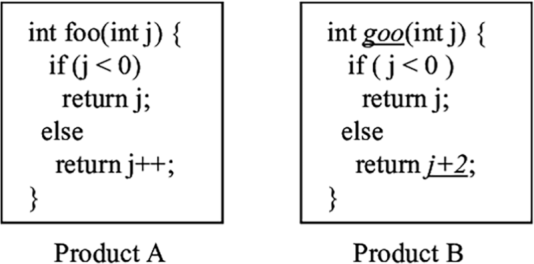
Code smells do not only occur at the level of individual methods or classes; a codebase as a whole can also have smells. For example, when a codebase contains very similar code in different places, the codebase has the duplicated code smell, also called code clones. An example of cloned code in shown in figure 9.1. Another example of a code smell in a codebase is when it contains several methods that continuously pass each other information. That phenomenon is called message chain.
Figure 9.1 An example of code clones; functions foo and goo are very similar but not the same.
The presence of a code smell does not necessarily imply the code has an error. However, it is known that code with smells is more likely to contain errors. Foutse Khomh, professor of software engineering at Polytechnique Montréal in Canada, studied the codebase of Eclipse, a well-known IDE for Java and other languages. Khomh inspected different versions of the Eclipse codebase and looked at how code smells impacted errors. He found that God classes were a significant contributor to error proneness in all versions of Eclipse analyzed, and God methods were significant contributors to errors in Eclipse 2.1.1, 2
Khomh looked not only at the impact of code smells on errors, but also at change proneness. He found that code containing smells is also more likely to change in the future than non-smelly code. The large class and long method smells were shown to have a significantly negative impact on change proneness: classes suffering from these smells are more likely to change than classes without in more than 75% of Eclipse releases.3
Exercise 9.1 Think of code you recently edited or fixed that was very hard to understand. Was that related to a code smell? At what level did those code smells occur?
Now that we have covered the code smells in detail, let’s look at the deeper cognitive issues connected to them. If you want to avoid writing code that contains code smells, it is important to understand why they are harmful to understanding. We will therefore explore the connection of code smells to cognitive processes in the brain and especially to cognitive load.
Fowler’s code smells are based on prior work and his personal experience in writing code. While Fowler does not make the connection, a lot of the code smells could be related to cognitive functions of the brain. Based on what we know about working memory and LTM, we can interpret the effect of code that contains code smells.
In previous chapters, we have seen different forms of confusion related to different cognitive processes. Similarly, different code smells have an origin in different forms of cognitive processes, which we will outline.
Long parameter list, complex switch statements: Overloading the capacity of the working memory
Knowing what we know about the working memory, we can understand why long parameter lists and complex switch statements are hard to read: both smells are related to an overloaded working memory. In part 1 of this book, we explained that the capacity of the working memory is as low as 6, so it makes sense that a parameter list of more than about six parameters will be too much for people to remember. While reading code, it will be impossible to hold all the parameters in working memory. As such, the method will be harder to understand.
There are, of course, some nuances here. Not all individual parameters will be necessarily treated as separate chunks when you read them. For example, consider a method with a signature like the one in the next listing.
Listing 9.1 Java method signature takes two x- and two y-coordinates as parameters
public void line(int xOrigin, int yOrigin, int xDestination, yDestination) {}
Your brain will likely treat this as two rather than four chunks: one chunk origin with an x- and y- coordinate and one chunk destination with its coordinates. The limited number of parameters is thus context-dependent and depends on the prior knowledge you have about elements in the code. However, long lists of parameters are more likely to overload the working memory. The same is true for complex switch statements.
God class, long method: No possibility for efficient chunking
When working with code, we create abstractions continuously. Rather than placing all functionality in one main() function, we now prefer to divide functionality into separate small functions with meaningful names. Groups of coherent attributes and functions are be combined into classes. A benefit of dividing functionality over separate functions, classes, and methods is that their names serve as documentation.
If a programmer calls square(5), they immediately have a sense of what might be returned. But another benefit of function and class names is that they help chunk the code. For example, if you see a block of code that contains a function called multiples () and one called minimum (), you might conclude that this function calculates the least common denominator without even inspecting the code in detail. This is why code smells related to large blocks of code, including God classes and long methods, are harmful: there are not enough defining characteristics to quickly comprehend the code, and we have to fall back on reading code line by line.
Code clones: Chunking gone wrong
Code clones, or the duplication smell, occur when a codebase has a lot of code with small differences.
With what we now know about the working memory, we might understand why clones are considered a code smell. Consider the previous two methods, shown again in figure 9.2. When you see a function call very similar to foo (), like goo (), your working memory might collect information on foo () from long-term storage. It is like your working memory is telling you “This might come in handy.” Next, you might inspect the implementation of goo () itself. Just glancing over it, and strengthened by your prior knowledge of foo (), it is likely you will think “Ah, that is a foo ().”
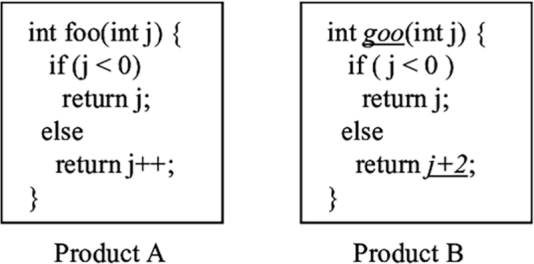
Figure 9.2 Two functions with similar names and similar, but not exactly the same, functionality. Because the names and implementation of the two functions are so similar, our brains are likely going to confuse both methods.
Thus, your brain will group the method goo (), with its small differences from foo (), into one category with foo (), much like a few different variants of the Sicilian opening are all grouped under “Sicilian” in the mind of a chess player. As such, the misconception that goo () is a foo () might be born, even though it returns a different value. We have saw earlier in this book that such misconceptions can linger in your mind for a long time. You might need several exposures to the fact that goo () is not the same as foo () to really realize your mistake.
Exercise 9.2 Revisit the smelly code you examined in exercise 9.1. What cognitive processes were involved in misunderstanding the code?
In this chapter, we are focusing on creating code that is easy to understand. So far we have looked at the framework of Fowler’s code smells, like long methods and code clones, and their effect on cognitive load.
Code smells are parts of code that suffer from structural antipatterns: the code is correct but not structured in a way that is easy to process. However, code can also have conceptual antipatterns: the code might be structured in the right way, in neat classes with short methods, but these have confusing names. Such issues with code are described in the second framework, linguistic antipatterns. Because both frameworks cover different aspects of code, they complement each other well.
Linguistic antipatterns were originally defined by Venera Arnaoudova, now a professor at Washington State. Arnaoudova describes linguistic antipatterns as inconsistencies between linguistic elements in code and their roles. Linguistic elements of code are defined as natural language parts of code, including method signatures, documentation, attribute names, types, or comments. Antipatterns occur when the linguistic elements do not correspond with their role. A simple example would be a variable that is called initial_element, which doesn’t contain an element but an index of an element, or a variable that suggests it is a Boolean, like isValid, which turns out to contain an integer.
Linguistic antipatterns commonly occur in method or function names, too, when its name describes something the method or function does not do. An example of this occurs when the name of a function sounds like it will return a collection but returns a single object, such as a method getCustomers that returns a Boolean. While this can be somewhat sensible behavior in a case where the method is checking whether there are customers, it can also be confusing.
Arnaoudova describes six categories of linguistic antipatterns, summarized in table 9.2.
Table 9.2 Arnaoudova’s six linguistic antipatterns
After defining the linguistic antipatterns, Arnaoudova studied their occurrence in seven open source projects. She found that these antipatterns are relatively common; for example, 11% of setters also return a value in addition to setting a field. In 2.5% of methods, the method name and the corresponding comment gave opposite descriptions of the working of the method, and a whopping 64% of identifiers starting with “is” turned out not to be Boolean.
Check the linguistic antipatterns in your codebase Are you curious about whether your codebase suffers from linguistic antipatterns? Based on her research, Arnaoudova created Linguistic Anti-Pattern Detector (LAPD), which can detect antipatterns in Java code. LAPD is available as an extension of Eclipse Checkstyle plugin.4
While we can all intuitively guess that linguistic antipatterns are confusing, and thus might cause a higher cognitive load, science also confirms this as fact. But before we can dive into the effects of linguistic antipatterns on cognitive load, we must first understand how cognitive load can be measured.
In earlier chapters, we introduced cognitive load, the overloading of the working memory. We also showed some examples of tasks that induce high cognitive load, for example reading code when relevant information is located in different methods or files, or reading code that contains a lot of unfamiliar keywords or programming concepts. We have, however, not covered how we measure cognitive load.
The Paas Scale for cognitive load
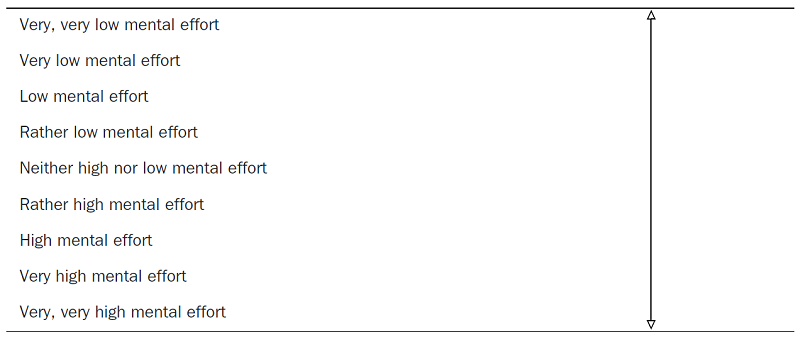
When measuring cognitive load, scientists often use the Paas Scale, designed by Dutch psychologist Fred Paas, who is now a professor at the Erasmus University in Rotterdam, shown in table 9.3.
The Paas Scale has received some criticism over the past years because it is a relatively small questionnaire, consisting of just one question. It is also unclear whether participants can reliably distinguish between, for example, having a very high load and a very, very high load.
Despite its shortcomings, the Paas Scale is commonly used. In previous chapters, we covered strategies for reading code and exercises to practice. When engaging in the task of reading unfamiliar code, the Paas Scale can be used to help you reflect on code and your relationship with the code.
Table 9.3 In the Paas Scale, participants are asked to self-rate the cognitive load on this 9-point scale.
Exercise 9.3 Choose an unfamiliar piece of code and use the Paas Scale to rate the cognitive effort you had to exert to understand this code. Then, also reflect on why this code caused you a certain amount of cognitive load. This exercise can help you to understand what types of code are hard for you to read.
In addition to metrics based on the perception of participants, newer research also makes increasing use of biometrics. By measuring the body’s reaction to a certain task, it is possible to estimate the cognitive load being caused by whatever the person is doing at that moment.
An example of a biometric measurement is eye tracking. With an eye tracker we can determine how concentrated people are. This can be done, for example, by examining a person’s blink rate, which is a measure of how often you blink. Several studies have shown that blinking behavior is not stable but can differ based on what you are doing at the moment. Several studies have also found that cognitive load affects blinking; the harder a task is, the less you will blink. A second eye-related metric that can predict cognitive load is the pupil. Studies have shown that more difficult tasks induce more cognitive load as measured by pupil size.5
The current hypothesis for why blinking correlates with cognitive load is that it can indicate how hard your brain tries to maximize your exposure to the difficult task and thus tries to get as many visual stimuli as possible. For similar reasons, larger pupils occur when performing complicated tasks, because with a larger pupil, the eye can absorb more information, which is what the brain searches for when engaged in a difficult task.
In addition to measurements based on the eyes, the skin can also tell us the cognitive load of a person. Skin temperature and the presence of sweat are indicators of cognitive load too.
While these biometric methods of measuring cognitive load might sound cool, research has shown they often correlate with the Paas Sscale, so even though you might consider using your fitness tracker to decide on the readability of your code, simply using exercise 9.3 will probably do.
In chapter 5, we discussed the fMRI scanner as a method to measure what type of activities the brain is performing. fMRI machines are precise in their measurement but also have big limitations. Since participants have to lie still, they are not able to write code while in the machine. Even reading code is a bit artificial since it can only be shown on a small screen. The fact that people are not able to move in the machine also greatly limits their possible interactions with the code; for example, they would not be able to scroll through the code, to click on identifiers to navigate to their definitions in the code, or to search for keywords or identifiers using ctrl-f. Because of these fMRI limitations, alternative brain measurements are also used.
One alternative measure of brain activity is the electroencephalogram (EEG). EEG devices measure variance in the activity of neurons in the brain caused by measuring the variance in voltage that brain activity causes. A second alternative is the use of functional near infrared spectroscopy (fNIRS). fNIRS can also be measured with a headband, and as such allows for more realistic experiments than fMRI.
As we will discuss in the next subsection, fNIRS has been used to gain a deeper understanding of the relationship between linguistic and cognitive load.
An fNIRS device uses infrared light and corresponding light sensors. Because hemoglobin in the blood absorbs the light, this device can be used to detect oxygenation the brain. The infrared light moves through in the brain, but some of it reaches the light detectors on the headband. By determining the amount of light sensed by the detector, the amount of oxygenated and deoxygenated hemoglobin in the area can be calculated. If blood is more oxygenated, there is an increase in cognitive load.
fNIRS devices are highly sensitive to motion artifacts and light, so users should remain relatively still and not touch the device during recording. While this is still a lot less intrusive than fMRI, it is a bit more inconvenient than wearing an EEG headband.
functional fNIRS and programming
In 2014, Takao Nakagawa, a researcher at the Nara Institute of Science and Technology in Japan, measured brain activity during program comprehension using a wearable fNIRS device.6 Participants in Nakagawa’s study were asked to read two versions of an algorithm written in C. One version was a regular implementation, and the second was deliberately made complicated. For example, loop counters and other values were changed such that the variables were updated frequently and irregularly. These modifications did not change the functionality of a program.
While wearing the fNIRS headband, participants were presented with the original and the deliberately complicated versions of the program. To rule out the possibility that participants would learn from the easy version and transfer that learning to the more complicated program, the setup was randomized. That meant some participants first saw the original version while others first saw the modified program.
The results of Nakagawa’s study showed that for 8 out of the 10 participants, the oxygenated blood flow while studying the complicated program was larger than when reading the original programs. This result suggests that cognitive load during programming could be quantified using cerebral blood flow measurement with an fNIRS device.
Using fNIRS, researchers have been able to measure the effects of linguistic antipatterns on cognitive load. Sarah Fakhoury, currently a graduate student supervised by Arnaoudova, studied the relationships between linguistic antipatterns and cognitive load in 2018. Fifteen participants each read code snippets gathered from open source projects. The researchers deliberately added bugs to the snippets and asked the participants to find the bugs. The bug detection task in itself was not so important; what mattered was that finding the bug would make the participants able to comprehend the code.
The researchers make some more adaptions to the code such that they had four variants of the code snippets:
Snippets that were altered to contain either linguistic antipatterns
Snippets that were altered to contain structural inconsistencies
The participants were divided into four groups, and each of the groups read the snippets in a different order to rule out any learning effects.
The researchers used an eye tracker to detect where in the code people were reading, and the participants also wore an fNIRS machine to detect cognitive load. The results of the study showed first that the parts of the code where linguistic antipatterns occurred were inspected a lot more than the rest of the code, as indicated by the eye tracker results.
Furthermore, the results from the fNIRS device indicate that the presence of linguistic antipatterns in the source code significantly increases the average oxygenated blood flow that a participant experiences (i.e., the cognitive load that is induced by the snippet is higher).
What was also interesting in this particular study was that some of the snippets contained structural antipatterns that the researchers added to the code. The code was formatted in a way that is contrary to conventional Java formatting standards; for example, opening and closing brackets were not on their lines and were not indented properly. They also increased the code’s complexity, for example by adding extra loops.
This allowed the researchers to compare the effect of bad structure with the effect of linguistic antipatterns. Participants disliked the structurally inconsistent snippets, with one participant commenting that “terrible formatting severely increases readers’ burden.” However, the researchers found no statistical evidence that structural inconsistencies increased the average cognitive load that participants experienced compared to the control snippets that were unaltered.
We know that code with more linguistic antipatterns induces greater cognitive load. More studies using brain measurements are needed to confirm these connections, but we can speculate on the effect of linguistic antipatterns based on what we know about the working memory and the LTM.
There are two likely cognitive issues in play when reading code containing linguistic antipatterns. In part 1 of this book, we covered transfer while learning: when you are reading something unfamiliar, such as code that you did not write yourself, your LTM searches for related facts and experiences. When reading a conflicting name, the wrong information will be presented to you. For example, reading a function name retrieveElements () might cause you to think of information on functions returning a list of things. That gives you the idea that you could sort, filter, or slice the returning element, which is not true for a single element.
A second reason linguistic antipatterns can confuse is that they might lead to “mischunking,” just like code clones. When you are reading a variable name such as isValid, you can simply assume the variable is a Boolean. That means there is no need for your brain to dig deeper to see that in fact it is used as a list of possible return values. By trying to save energy, your brain made a wrong assumption. As we have seen earlier, such assumptions may linger for long periods of time.
Code smells, such as long methods, indicate structural issues with code. There are different cognitive reasons why code smells cause a higher cognitive load. Duplicated code, for example, makes it harder to chunk code properly, while long parameter lists are heavy on your working memory.
There are different ways to measure cognitive load, including biometric sensors like measuring blinking rate or skin temperature. If you want to measure your own cognitive load, the Paas Scale typically is a reliable instrument.
Linguistic antipatterns indicate places in a codebase where code does something different than names involved suggest, leading to a higher cognitive load. This is likely caused by the fact that your LTM finds wrong facts while trying to support your thinking. Linguistic antipatterns can also lead to wrong chunking because your brain assumes a meaning of code that is not actually implemented.
1. Wei Le and Raed Shatnawi, “An Empirical Study of the Bad Smells and Class Error Probability in the Post-Release Object-Oriented System Evolution, Journal of Systems and Software, vol. 80, no. 11, 2007, pp. 1120-1128, http://dx.doi.org/10.1016/j.jss.2006.10.018.
2. Aloisio S. Cairo et al., “The Impact of Code Smells on Software Bugs: A Systematic Literature Review,” 2018, https://www.mdpi.com/2078-2489/9/11/273.
3. Foutse Khomh et al., “An Exploratory Study of the Impact of Antipatterns on Software Changeability,” http:// www.ptidej.net/publications/documents/Research+report+Antipatterns+Changeability+April09.doc.pdf .
4. http://www.veneraarnaoudova.ca/linguistic-anti-pattern-detector-lapd/.
5. Shamsi T. Iqbal et. al., “Task-Evolved Pupillary Response to Mental Workload in Human-Computer Interaction,” 2004, https://interruptions.net/literature/Iqbal-CHI04-p1477-iqbal.pdf.
6. Takao Nakagawa et al., “Quantifying Programmers’ Mental Workload during Program Comprehension Based on Cerebral Blood Flow Measurement: A Controlled Experiment,” https://posl.ait.kyushu-u.ac.jp/~kamei/ publications/Nakagawa_ICSENier2014.pdf.