Part 1 covered the different cognitive processes involved in reading code, including storing information in the LTM and retrieving it when needed, storing information in the STM, and processing code in the working memory. In part 2, we looked at how we think about code, what mental models are formed about code, and how we talk about code. In Part 3, we will zoom into the process of writing code rather than reading or thinking about it.
This chapter aims to study how to best name things in code, like variables, classes, and methods. Since we now know quite a bit about how the brain processes code, we can more deeply understand why naming is so important for code comprehension. Good names help activate your LTM to find relevant information you already know about the domain of the code. Bad names, on the other hand, can cause you to make assumptions about the code, leading to misconceptions.
Even though naming is important, it is also very hard. Names are often created while modeling a solution or solving a problem. During such an activity, it is likely you are experiencing a high cognitive load: your working memory is at full capacity to create a mental model and use the mental model to reason. In such a situation, thinking about a good variable name might simply cause too much cognitive load, which your brain wants to prevent. As such, it makes sense from a cognitive perspective to pick an easy name or a placeholder name so as not to exceed the capacity of the working memory.
This chapter covers the importance but also the difficulty of naming in depth. Once we have covered the basics of naming and cognitive processing, we will zoom into the effect of names on two different aspects of programming. We will first study what types of names make code easier to comprehend. Secondly, we will look at the effect of bad names on the occurrence of bugs. We close the chapter with concrete guidelines for coming up with great names.
Choosing a good variable name is hard. Phil Karlton, a programmer at Netscape, famously said that there are only two hard problems in computer science: cache invalidation and naming things. And indeed, many programmers struggle with naming things.
Representing everything a class or data structure does in one unambiguous word is not an easy task. Dror Feitelson, Berthold Badler professor of computer science at the Hebrew University of Jerusalem, recently ran an experiment to understand exactly how hard it is to come up with an unambiguous name. Feitelson performed an experiment in which almost 350 subjects were asked to choose names in different programming scenarios. The subjects in the study were both students and programming professionals with an average of six years’ work experience. Participants were asked to choose names for variables, constants, and data structures, and also for functions and their parameters. Feitelson’s experiment confirmed that naming is hard, or at least that it is hard to choose names that others also choose. In the experiment, the probability that two developers selected the same name was low. Overall, for the 47 objects that had to be named (i.e., variables, constants, data structures, functions, and parameters combined) the median probability of two people choosing the same name was only 7%.
Even though naming is hard, choosing the right names for objects we reason about in code is important. Before we dive into the connection between naming and cognitive processes in the brain, let’s look at why naming is important.
With identifier names, we mean all the things in a code base named by the programmer. Identifier names include names we assign to a type (class, interface, struct, delegate, or enum), variable, method, function, module, library, or namespace. There are four main reasons that identifier names matter.
Names make up a large part of codebases
The first reason variable names matter is that in most codebases a large part of what you will read will be names. For example, in the source code of Eclipse, which consists of about two million lines of code, 33% of tokens and 72% of characters are devoted to identifiers.1
Names play a role in code reviews
In addition to their frequent occurrence in code, programmers talk about names a lot. Miltiadis Allamanis, now a researcher at Microsoft Research in Cambridge, has investigated how often identifier names are mentioned in code reviews. To that end, Allamanis analyzed over 170 reviews with over 1,000 remarks in them. He found that one in four code reviews contained remarks related to naming and that remarks about identifier names occurred in 9%.
Names are the most accessible form of documentation
While formal documentation of code might contain a lot more background information, names serve as an important type of documentation because they are available right inside the codebase. As we saw in earlier chapters, piecing information together from different places can increase cognitive load. As such, having to navigate outside your codebase to read documentation is an act programmers try to avoid. Hence the “documentation” read most will be comments in the code and names.
In previous chapters we discussed beacons, parts of code that help an unfamiliar reader unlock the meaning of the code. Variable names are important beacons that help readers make sense of code in addition to comments.
Choosing a good name is important. Many different researchers have tried to define what makes a variable name good or bad, and they all have different perspectives on this question. But before we look at those different perspectives, let’s activate your LTM and look at your take on variable names with an exercise.
EXERCISE 8.1 What defines a good identifier name in your opinion? Can you think of an example of a good name?
What defines a bad name? Is that simply the opposite of a good name, or can you think of properties that characterize bad names you’ve seen? Do you know of an example of a bad name from your practice?
Now that you have thought about what makes a name a good name, let’s look at three different perspectives on good naming practices by researchers who study naming.
A good name can be defined syntactically
Some people believe there are several rules based on the syntax of names that should hold. For example, Simon Butler, associate senior lecturer at the Open University in the UK, created a list of issues with variable names, as shown in table 8.1.
Table 8.1 Butler’s list of naming conventions
While Butler’s list contains different types of rules, most are syntactic. For example, the rule “External underscores” states that names should not start with or end in an underscore. Butler’s rules also imply a ban on the systems Hungarian notation, which would prescribe variable names like strName for a variable representing a name stored as a string.
While rules about the precise formation of variable names might sound a bit petty, in previous chapters we saw that unnecessary information in code can cause extraneous cognitive load and distract from understanding the code, so it is sensible to also have syntactic rules such as the ones in table 8.1.
Many programming languages, of course, have conventions about how to format variable names, such as PEP8 in Python, which prescribes snake case for variable names, and the Java naming convention, which states variable names should be camel case.
Names should be Consistent within a codebase
Another perspective on good naming is consistency. Allamanis, whose work on code reviews and naming we covered earlier in the chapter, has also thought about good names. He states that the most important aspect of a good naming scheme is similar execution across a codebase.
Objecting against inconsistent naming practices fits with what we know about cognitive science. If the same word is used for similar objects across a codebase, it will be easier for the brain to find relevant related information stored in the LTM. Simon partly agrees with Allamanis’s view; his list contains a rule saying that names should not use capital letters inconsistently.
EXERCISE 8.2 Select a piece of code you have worked on recently. Make a list of all the variable names that occur in that piece of code. Now reflect on the quality of these names, given the three perspectives outlined. Are the names syntactically clear? Do they consist of words? Are they used consistently across your codebase?
Dawn Lawrie, a senior research scientist at Johns Hopkins University who has studied naming extensively, has also investigated trends in naming.2 Are naming practices different than they were a decade ago? And how do names change within a codebase over longer periods?
To answer these questions, Lawrie analyzed a total of 186 versions of 78 code bases written in C++, C, Fortran, and Java. Together these versions had over 48 million lines of code and spanned three decades. The set Lawrie analyzed contained both proprietary code and open source projects, including well-known codebases such as Apache, Eclipse, mysql and gcc, and samba.
To analyze the quality of identifier names, Lawrie investigates two aspects of naming practices. First, she looked at whether names split words within names, for example by using underscores between words or using capitals. Lawrie argues that names that split words are easier to understand. Second, she looked at whether the words that occur within variable names occur in the dictionary, following Butler’s rule that names should consist of words.
Because Lawrie studied different versions of the same codebase over time, she could analyze how naming practices change over time. She looked at how naming quality has changed over time across all 78 code bases combined and found that modern code uses identifiers consisting of dictionary words in names more than older code, both using more dictionary words and more commonly splitting the words within variable names. Lawrie attributes these improved naming practices to programming maturing as a discipline. The size of the code base showed no correlation with quality, so bigger codebases do not do better (or worse) when it comes to the quality of identifier names.
Lawrie did not only compare older codebases to younger ones; she also looked at previous versions of the same code base to see if naming practices changed over time within a codebase. She found that within a single code base, naming does not improve as the code gets older. Lawrie draws an important and actionable conclusion here, saying that “identifier quality takes hold early in a program’s development.” So, when you start a new project, you might want to take extra care in choosing good names, because the way you create names in the early stages of a project is likely going to be the way the names will be created forever.
Research on test usage in GitHub found a similar phenomenon: new contributors to a repository often look at existing tests and modify them rather than reading the project’s guidelines.3 When a repository has tests in place, new contributors feel obligated to also add tests, and as such comply with how the project is organized.
Findings on naming practices over time
So far in this chapter, we have seen two different perspectives on naming, as shown in table 8.2.
Table 8.2 Different perspectives on naming
Butler’s perspective is that we can follow several mainly syntactic guidelines to choose the right names. Allamanis, on the other hand, prescribes no fixed rules or guidelines on the quality of names but takes the stance that the codebase should be leading and that consistent and bad is better than good but inconsistent. It would be great if there was one clear way to name identifiers in code, but the fact that even researchers have varying opinions underlines that what is a good name is in the eye of the beholder.
Now that we have covered why naming matters and what different perspectives on naming are, let’s dive into naming from the perspective of what we know about cognition.
Given what we know about the cognitive processing of code in the brain, we can see that both perspectives make sense from a cognitive perspective, as outlined in table 8.3. Having clear rules for how to format variable names is likely going to help your STM make sense of the names you are reading.
Table 8.3 Different perspectives on naming and their connection to cognition
Allamanis’s approach, for example, prescribes using consistent naming practices across a codebase. That is sensible since it is likely to support chunking. If all names were formatted in different ways, you would have to spend effort on every name to find its meaning.
Butler’s perspective also fits with what we know about cognitive processing. He promotes the use of names that are syntactically similar, for example by disallowing leading underscores and using consistent capitalization. Similar names are also likely to lower your cognitive load while reading the names because the relevant information is presented in the same way every time. Butler’s limit of four words in one identifier name, while seemingly a bit random, fits with the limit of the working memory, which is now estimated to be between two and six chunks.
IMPROVE CONSISTENCY OF NAMES IN YOUR CODEBASE To improve the consistency of names in code bases, Allamanis implemented his approach to detect inconsistent names into a tool called Naturalize (http://groups.inf.ed.ac.uk/ naturalize/), which uses machine learning to learn good (consistent) names from a codebase and can then suggest new names for locals, arguments, fields, method calls, and types. In a first study, the authors of Naturalize used it to generate 18 pull requests on existing codebases with suggestions to improve names. Of these, 14 were accepted, which gives some credibility to its success. Sadly, in its current form, Naturalize only works for Java.
In their paper on Naturalize, the authors share a lovely story of a time they used Naturalize to generate a pull request for Junit. This pull request was not accepted, because according to the developers, the proposed change was not consistent with the codebase. Naturalize could then point them to all the other places where this convention was violated, causing the suggestion. Their own convention was broken so often that, to Naturalize, it seemed the wrong version was more natural!
The two perspectives on naming that we have seen so far are different from each other but share some similarities. Both methods are syntactic or statistical, and a computer program can be used to measure the quality of names according to both models. As we have seen, Allamadis’s model is also implemented into the software.
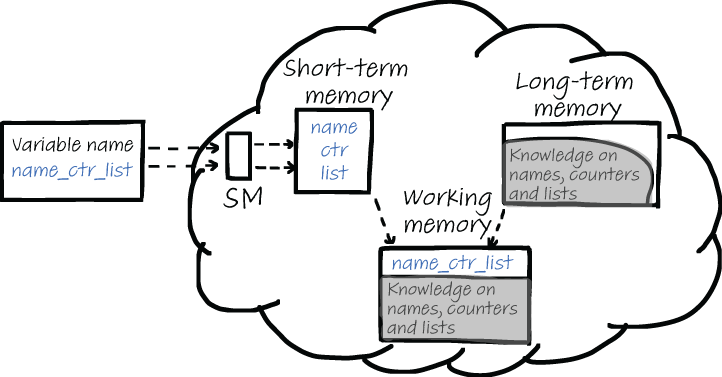
But naming, of course, is more than selecting the right syntax for a variable name. The words we choose also matter, especially from a cognitive perspective. We saw earlier in the book that when thinking about code, the working memory processes two types of information. This is illustrated in figure 8.1. First, the variable name is processed by sensory memory and then is sent to the STM. We know that the STM is limited in size and therefore tries to make the variable names separate words. The more systematic names are formatted, the more likely it is that the STM can identify individual parts. For example, in a name like nmcntravg, it can take considerable effort to find and understand the components. Alternatively, in a name like name_counter_average it is a lot easier to see what the name concerns. Despite being roughly twice as many characters, it requires a fraction of the mental effort when you read it.
Figure 8.1 When you read a name, the name will first be broken up into separate chunks and then sent to the working memory. At the same time, the LTM is searched for information related to the different parts of the variable name. Related information from the LTM is also sent to the working memory.
When processing variable names, it is not only the STM that provides information to the working memory. The working memory also receives information from your LTM after it has been searched for related facts. For this second cognitive process, the choice of words in the identifier name is important. Using the right domain concept for a variable name or class can help the reader of code find relevant information in their LTM.
As outlined in figure 8.2, three types of knowledge can exist in identifier names and can help you quickly understand an unfamiliar name:
Names can support your thinking about the domain of the code. A domain word like “customer” will have all sorts of associations in your LTM. A customer is probably buying a product, needs a name and an address, and so on.
Name can support your thinking about programming. A programming concept like a tree will also unlock information from the LTM. A tree has a root, can be traversed and flattened, and so on.
In some cases, the choice of a variable name also contains information about conventions your LTM is aware of. For example, a variable named j will remind you of a nested loop in which j is the counter of the inside- most loop.
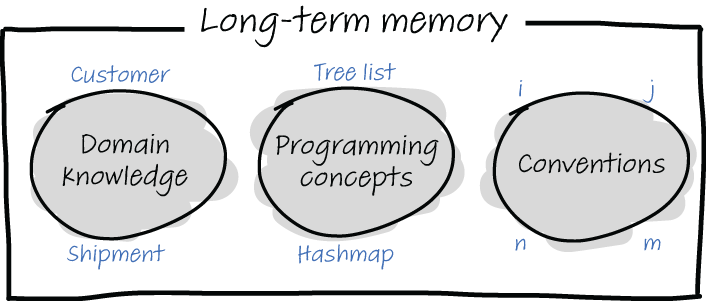
Figure 8.2 Three types of knowledge stored in your LTM can occur in variable names and can help you to understand the names: domain knowledge (like customer or shipment), programming concepts (like list, tree, or hashmap), and conventions (for example, i and j will likely be loop counters and n and m will be dimensions).
Considering how a variable name will support both the STM and the LTM of a future reader can be a great help in choosing names.
EXERCISE 8.3 Select a piece of not-too-familiar source code. It should not be entirely unfamiliar, for example, it could be some code you worked on a while ago, or a piece of code written by someone else within a codebase you also work on.
Go through the code and write down a list of all the identifier names in the code: variable names, method names, and class names. For each of the names, reflect on how the name supports your cognitive processing:
Does the formatting of the name support your STM? Can the name be improved to make the individual parts clearer?
Does the name support your LTM in understanding the domain? Can the name be improved to be clearer?
Does the name support your LTM in understanding the programming concepts used? Can the name be improved to be clearer?
Does the name support your LTM in understanding because its use is based on a programming convention?
We have seen that naming is hard because of the cognitive processes related to coding. When you are engaged in solving a problem, you are likely experiencing a high cognitive load. Maybe your load was so high while solving the problem that you had nothing left to come up with a good variable name. I think we have all written complex code in which we named a variable foo because we did not want to think about naming in addition to solving the problem at hand. Additionally, maybe the meaning of the thing you were naming didn’t become clear until later in the programming process.
Therefore, coding is not a great moment to think about names and to improve their quality. It is better to reflect on naming quality outside of the coding process. Code reviews can be a good moment to reflect on the code quality of your identifier names. Exercise 8.4 can serve as a checklist for names to use, which you can use in code reviews to specifically direct attention to names in code.
EXERCISE 8.4 Before starting the code review, mechanically list all identifier names that are present in the changed code. List those names outside of the code, for example on a whiteboard or in a separate document. For each of the identifier names, answer these questions:
Without knowing anything about the code, is it clear what the name means? For example, do you know the meaning of the words this name consists of?
What names are similar? Do these similar names also refer to similar objects in the code?
So far, we have investigated why good names are important, and we have explored the impact of names on cognitive processes. We will now zoom into more detailed choices about how to format identifier names.
Thus far, we have seen the opinion that names should be created by combining dictionary words. While using full words seems a reasonable choice, it is good to dive into the evidence we have that identifiers consisting of full words are indeed easier to understand.
Johannes Hofmeister, a researcher at the University of Passau in Germany, conducted an experiment with 72 professional C# developers in which the developers had to find bugs in C# code snippets. Hofmeister was interested in whether the meaning or the form of identifier names is more important for successful bug finding. He presented the developers with three different types of programs: one program where identifiers were letters, a second program in which the identifiers were abbreviations, and finally a program in which the identifiers were words. Hofmeister asked participants to find both syntax and semantic errors. He then measured the time it took for the participants to find bugs in the given programs.
Participants on average found 19% more defects per minute when reading programs in which the identifiers were words compared to letters and abbreviations. There was no significant difference in speed between letters and abbreviations.
While other studies confirm that variables consisting of words aid comprehension, there might also be downsides to using longer variable names.4 Lawrie, whose work we covered earlier in the chapter, ran a study in which 120 professional developers with an average of 7.5 years of professional experience were asked to comprehend and remember source code with the same three different types of identifiers: words, abbreviations, or single letters.
Participants in the study were shown a method using one of the three identifiers’ styles. The code was then removed from view, after which participants were asked to explain the code in words and then recall the variable names that occurred in the program. Contrary to Hofmeister, Lawrie measured how well the summaries of the code corresponded with the actual functionality of the code by rating the answers participants gave on a scale from 1 to 5.
Lawrie found results like Hofmeister’s: identifiers consisting of words are easier to understand than both other categories. Summaries of code using word identifiers were rated almost one point higher by the researchers than summaries of code using single-letter identifiers.
The study also revealed a downside of using word identifiers. When investigating the results of the recall assignment, Lawrie found that longer variables names are harder to remember, and it takes more time to remember them. It is not the length per se that makes variable names harder to remember, but the number of syllables the names contain. This of course is understandable from a cognitive perspective: longer names might use more chunks in the STM, and syllables are a likely method for chunking words. Thus, choosing a good variable name is a careful balance between clarity of words, which will improve the reader’s capability of understanding the code and finding bugs, and the brevity of abbreviations, which might improve recall of names.
Based on her study, Lawrie advises being careful with the use of naming conventions that involve prefixing or suffixing an identifier. These practices should be carefully evaluated to ensure that the added information outweighs the added cost of the names being hard to remember.
Beware of prefixes and suffixes Lawrie advises being careful with the use of naming conventions that involve prefixing or suffixing an identifier.
Single letters are commonly used as variables
Thus far, we have seen that words are better identifiers than abbreviations or letters, both in terms of more quickly finding bugs and in terms of better comprehension. Single letters, however, are commonly used in practice. Gal Beniamini, a researcher at the Hebrew University of Jerusalem, studied how often single letters are used in C, Java, JavaScript, PHP, and Perl. For each of these five programming languages, Beniamini downloaded the 200 most popular projects from GitHub, together with over 16 GB of source code.
Beniamini’s results showed that different programming languages have quite different conventions for the use of single-letter variable names. For example, for Perl, the three most-used single-letter names are, in order, v, i, and j, while for JavaScript the most common single-letter names are i, e, and d. Figure 8.3 shows the use of all 26 letters in the five different programming languages Beniamini analyzed.
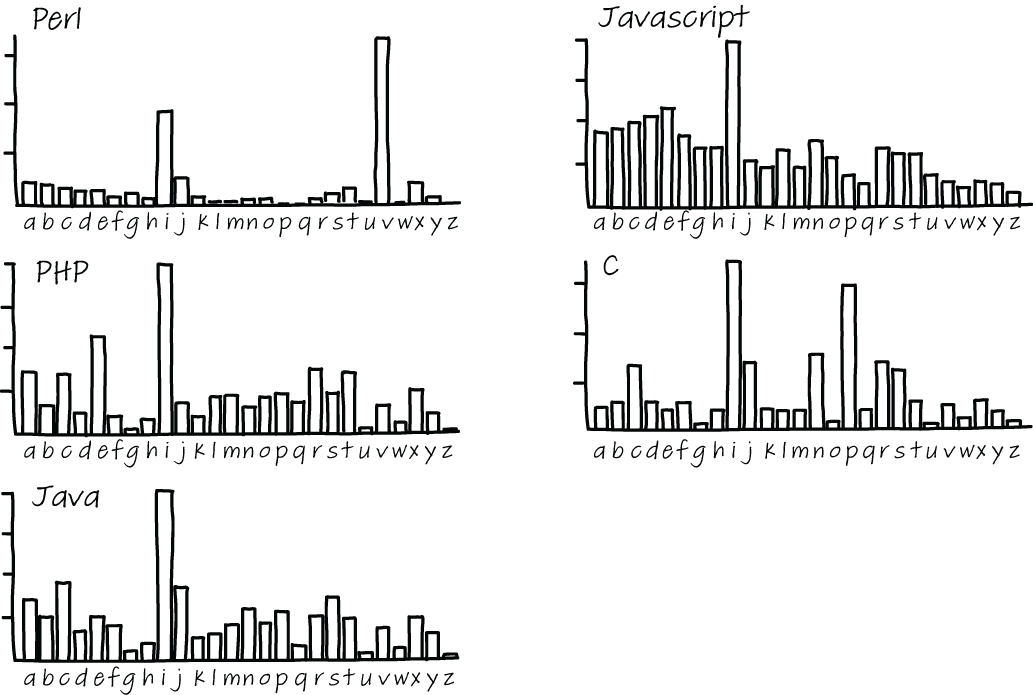
Figure 8.3 Single-letter variables used in five different programming languages that Beniamini analyzed
Beniamini did not only look at the occurrence of single-letter variable names; he was also interested in the associations programmers have for letters. For a letter like i, most programmers will think of a loop iterator, and x and y will likely be coordinates on a plane, but what about other letters, such as b, f, s, or t? Are these letters associated with a common meaning by many programmers? Knowing about the assumptions people make about variable names might help you prevent misconceptions, and also help you understand the ways others are confused about code.
To gain an understanding of the types that programmers associate with variable names, Beniamini ran a survey with 96 experienced programmers, where he asked them to list one or more types that they would associate single-letter variables with. As you can see in figure 8.4, there is little consensus on the types of most letters. Notable exceptions are s, which is overwhelmingly voted to be a string, c, which is overwhelmingly a character, and i, j, k, and n, which are integers. But for all other letters, almost anything goes.
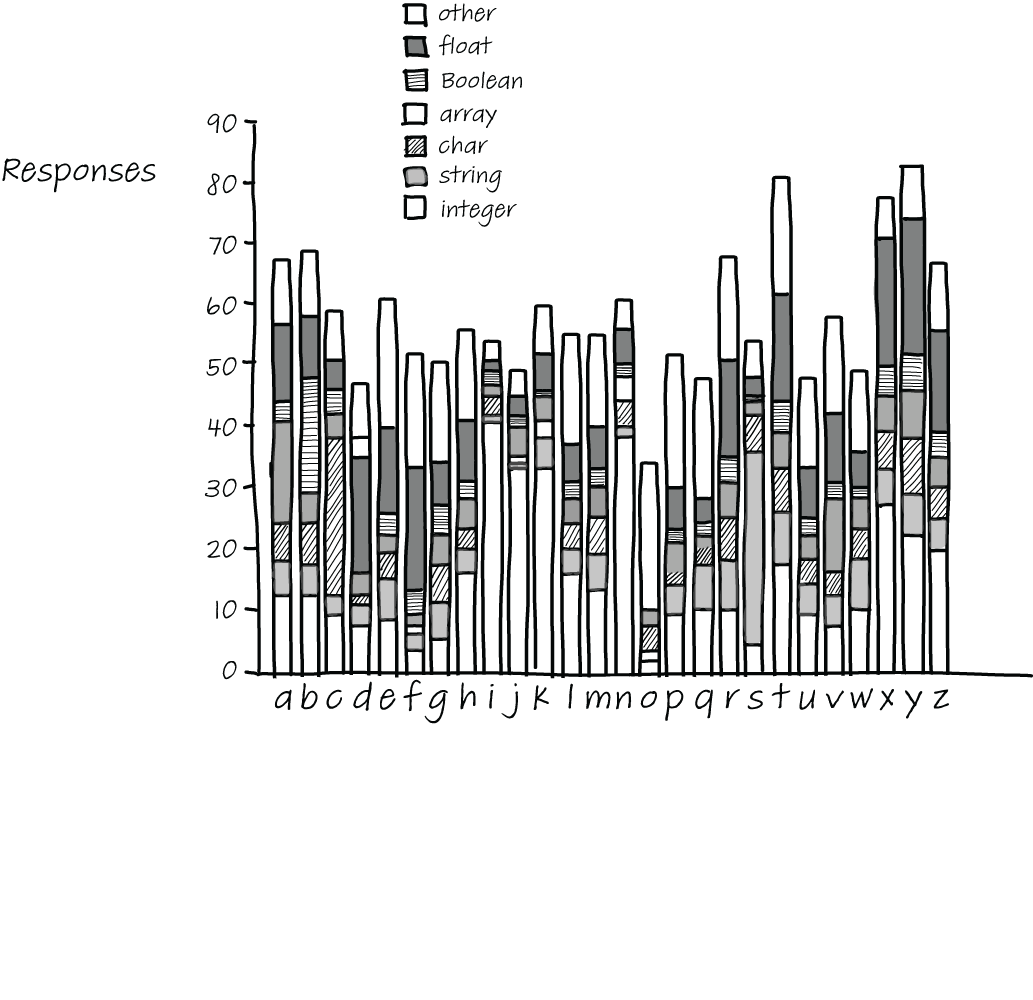
Figure 8.4 Types associated with single-letter variables
Somewhat surprisingly, d, e, f, r, and t tend to be associated with floating-point numbers, and variables x, y, and z are as strongly associated with integers as they are with floating-point numbers, which could mean that when used as coordinates, they are used both in places where the coordinates are integers and in places where they are floating-point numbers.
Beniamini’s results on type associations for one-letter variable names mostly remind us that we cannot take assumptions of others for granted. We might think that a certain letter will surely convey the idea of a certain type, helping the reader make sense of the code, but that is unlikely, apart from a few specific cases. Therefore, choosing words as names or agreeing on conventions is a better bet for future code comprehension.
EXERCISE 8.5 Write down the types you would expect for all 26 single-letter variable names in the following table. Then compare notes with your team members. Are there letters where your assumptions differ? Can you find places in your codebase where these letters are used as variables?
While most programming languages have a style guide that also describes what variable names should look like, not all style guides agree. Famously, C-family languages, including C, C++, C#, and Java, all use camel case where the first letter of any variable is lowercase, and each new word within the name starts with an uppercase letter, for example, customerPrice or nameLength. Python, on the other hand, uses a convention called snake case, which separates words in identifier names with underscores, for example, customer_price or name_length.
Dave Binkley, a professor of computer science at the Loyola University in Maryland, performed a study investigating the differences in comprehension between variables written in camel case and those written in snake case.5 Binkley wanted to know if the two identifier styles impact the speed and accuracy with which people can adapt programs. In Binkley’s study, 135 people participated, both programmers and non-programmers. Participants in the study were first shown a sentence describing the variable, for example, “Extends a list to a table.” After studying the sentence, participants were given four multiple-choice options to choose from, of which one represented the sentence. Examples of options participants could pick from are extendListAsTable, expandAliasTable, expandAliasTitle, or expandAliasTable.
The results of Binkley’s study show that the use of camel case leads to higher accuracy among both programmers and non-programmers. The model finds that there is a 51.5% higher chance of selecting the right option for identifiers written in the camel case style. But there is a cost to this higher accuracy: speed. It took participants half a second more to find identifiers written in camel case.
In addition to comparing the two different identifier styles and looking at the results of both programmers and non-programmers, Binkley also looked at the effect of programming education on the subject’s performance, comparing people with no training to people with more years of training. The participants in Binkley’s study who had received training had been mostly trained using camel case.
When comparing people with varying levels of experience, Binkley found that programmers with more training in camel case were quicker at finding the right identifiers written in the camel case style. Training in one identifier style seems to negatively impact a person’s performance in using other styles. Binkley’s results demonstrated that subjects with more training in camel case were slower on identifiers written in snake case than subjects without any training at all.
Knowing what we know about cognitive processing, these results are a bit less surprising than they might seem. If people practice using names in camel case a lot, they get better at chunking names and finding meaning in them.
Of course, if you are working in an existing code base that uses snake case, it would be unwise to change all variable names according to this study. Consistency is an important aspect also. However, should you find yourself in the position to decide on a naming convention, you might want to opt for camel case.
In this chapter so far, we have looked at why naming matters and what types of names are easier to understand. However, bad naming practices can also directly have an impact on the occurrence of bugs.
Simon Butler, whose work on naming guidelines we covered earlier in the chapter, also analyzed the relationship between bad names and bugs. Butler performed a study in 20096 that investigated the relationship between bad naming and bad code by investigating open source repositories written in Java, including Tomcat and Hibernate.
Butler created a tool to extract variable names from Java code and also detect violations of naming guidelines. Using his tool, Butler located places in the eight case bases where bad naming styles occurred. As explained in section 8.1, Butler looked both at structural naming issues, such as two consecutive underscores, as well as the components of the names, such as whether they occur in a dictionary.
Butler then compared the locations in the code with a bad naming style to the locations of bugs, as found with FindBugs, a tool that locates potential bug locations using static analysis. Intriguingly, Butler’s study found statistically significant associations between naming issues and code quality. Butler’s findings suggest that a bad naming style might point to code that is likely to be wrong as opposed to code that is merely hard to read, understand, and maintain.
Of course, the correlation between bug locations and the locations of bad names does not necessarily imply causation. It could be that both bugs and bad names are the result of code written by a novice or sloppy programmer. It could also be the case that the location where the bugs occur is where complex issues are being solved. Those complex issues might relate to the naming errors in other ways. As we have discussed before, maybe the cognitive load of the programmer was very high when creating the code because they were solving a hard problem. It might also be the case that the domain of the code is complex, and therefore coming up with a good name is hard, and the complexity of catching the right name led to confusion and thus a bug.
So, while addressing naming issues is not necessarily going to solve or prevent bugs, inspecting your codebase to find locations where bad naming practices occur might help you find places where code could be improved and bugs could be prevented. That is an extra reason to go on the hunt for bad names in code: improving names might indirectly result in fewer bugs, or at least shorter fix times because better names will make code easier to comprehend.
We have seen that the effects of bad naming are severe, might lead to lower chances of comprehending code, and might even increase the chance of bugs. Feitelson, whose work on choosing names we covered earlier, also studied how developers can select better names.7
In his survey where developers were asked to select variable names, Feitelson saw that even though developers rarely selected the same name for variables, they would be able to understand names chosen by other developers. When a specific name was chosen in Feitelson’s experiment, it was typically understood by most developers. A reason for this seeming contradiction is that developers used what Feitelson calls name molds.
Name molds are patterns in which elements in a variable name are typically combined. For example, when a name was needed for the maximal benefits someone can receive per month, the names in table 8.4 were all chosen. The names are also normalized, so “max” could be “max” or “maximum” and “benefit” could be “benefits.” The table lists the names in order of most to least chosen.
Table 8.4 Most to least chosen forms of variable names
Looking at these molds helps us understand why the chance of two developers choosing the same variable name in Feitenson’s study was so low. The plethora of different names in the experiment was mostly from developers using different name molds.
While all these names conceptually represent the same value, there are a lot of differences in style. The developers in Feitelson’s study did not all work in the same code base, but even within the same code base it is likely that these different molds occur. Knowing what we know now about both cognitive load and LTM, using different molds within a codebase is not a good idea.
First, in terms of cognitive load, looking for the relevant concept in the variable name (in this case, benefit) and in different locations within the variable name adds unnecessary, extraneous cognitive load. The mental energy you will spend on looking for the right concept cannot be spent on understanding the names. Earlier in the chapter, we saw that people can be trained to recognize variables in a certain style, such as camel case or snake case. While no studies have been done on name molds, people will likely get better at recognizing variables written in a certain mold when they use them often.
Second, if variable names are similar, using the same mold is likely going to make it easier for your LTM to find related information. For example, max_benefit_amount might remind you of code you wrote before to calculate the maximum interest amount if that variable was named max_interest_amount . Your LTM will have a harder time remembering similar code when the variable involved was called interest_maximum, even if the calculation was similar.
Because similar molds support your working memory and your LTM best, it is advisable to agree on a limited number of different molds to use in each codebase. When you start a project, agreeing on the molds can be a good step in this direction. In an existing code base, you can start by creating or extracting a list of existing variables names for the code base, see what molds are already in use, and decide on these molds going forward.
Exercise 8.6 Create a list of variable and function/method names in part of your codebase. This can be one class, all code in one file, or all code related to a certain feature. For each of the names, check which mold they follow using the following table. In the names in the table, X represents a quantity or value like interest of VAT, and Y represents a certain filter on the quantity, such as per month, for a given customer.
Discuss the results with your team. What mold(s) are commonly used? Can some variables be written using a different mold to reach more consistency in your codebase?
We have seen that programmers often use many different name molds for the same objects, while using similar molds can help comprehension. Based on these findings, Feitelson designed a three-step model to help developers choose better names:
The three-step model in detail
Let’s explore these three steps in more detail. The first step, selecting the concepts to include in the name, is very domain-specific, and the decision on which dimensions to include might be the most important decision in naming. The main thing to take into consideration when choosing which parts to include in the name is, according to Feitelson, the intent of the name, which should represent what information the object holds and what it is used for. When you feel the need to write a comment to explain the name, or when you encounter a comment close to a name in code you use, wording from the comment should probably be included in the variable name. In some cases, it can be important to also include an indication of what kind of information this is, for example, that a length is in the horizontal or vertical dimension, that a weight in stored in kilos, or that a buffer contains user input and should therefore be considered unsafe. Sometimes we might even use a new name when data is converted. For example, after the input is validated, it could be stored in another variable with a name indicating that it is safe.
The second step of Feitelson’s model is choosing the words to represent each concept. Often choosing the right words is straightforward, with one specific word being the obvious choice because it is used in the domain of the code or has been used across the codebase. However, in his experiments Feitelson observed that there were also many cases in which for at least one of the words many different contending options were suggested by participants. Such diversity can cause problems when developers become confused about whether synonyms mean the same thing or represent nuanced differences. A project lexicon, in which all important definitions are noted and alternatives for synonyms are registered, can help programmers select names consistently.
Feitelson notes that the steps of his model do not necessarily need to be executed in order. Sometimes you might think of words to use in a variable name without considering the concepts they represent. In such cases, it is important to still consider the concepts.
The third step of Feitelson’s model is constructing a name using the chosen words, which comes down to selecting one of the naming molds. As we have explained, when choosing a mold, alignment with your codebase can be important. Consistent names will make it easier for others to locate the important elements within the name and to relate the name to other names. A second consideration Feitelson advises is to use molds so they fit with the natural language the variables are defined in. For example, in an English sentence you would say, “the maximum number of points” rather than “the point maximum.” Therefore, you might prefer max_points over points_max. Another way to make variable names sound more natural is to add a preposition, such as in indexOf or elementAt.
The success of Feitelson’s three-step model
After defining the three-step model, Feitelson ran a second experiment with 100 new participants.
The researchers explained the model to new participants, who were given an example. After the explanation, participants were given the same names as the participants in Feitelson’s original study. Two external judges were then asked to compare pairs of two names: one from the first study, where participants were not aware of the model, and one stemming from the second experiment, in which participants were trained in using the model. The judges did not know which name came from which study.
The judges’ choices showed that names selected by subjects using the model were seen as superior to names chosen in the original experiment by a ratio of two to one. Thus, using these three steps leads to better names.
There are different perspectives on what makes a good name, ranging from syntactic rules, such as using camel case, to emphasis on consistency within a codebase.
Without other differences, camel case variables are easier to remember than variables written in snake case, but people are quicker to identify variables when using snake case.
Locations in code where bad naming occur are also more likely to contain bugs, but that does not necessarily mean there is a causation.
There are many different name molds used to shape variable names, but limiting yourself to a smaller number of molds will likely help comprehension.
Applying Feitelson’s three-step model (what concepts to use in a name, what words to use for those concepts, and how to combine them) leads to higher quality names.
1. Florian Deißenbock and Markus Pizka, “Concise and Consistent Naming,” https://www.cqse.eu/fileadmin/ content/news/publications/2005-concise-and-consistent-naming.pdf.
2. Dawn Lawrie, Henry Field, and David Binkley, “Quantifying Identifier Quality: AN. Analysis of Trends,” http://www.cs.loyola.edu/~lawrie/papers/lawrieJese07.pdf.
3. Raphael Pham et al., “Creating a Shared Understanding of Testing Culture on a Social Coding Site,” 2013, http://etc.leif.me/papers/Pham2013.pdf.
4. Dawn Lawrie et al., “Effective Identifier Names for Comprehension and Memory,” 2007, https://www.researchgate.net/publication/220245890_Effective_identifier_names_for_comprehension_and_memory.
5. Dave Binkley, “To Camel Case or Under_Score,” 2009, https://ieeexplore.ieee.org/abstract/document/ 5090039.
6. Simon Butler, “Relating Identifier Naming Flaws and Code Quality: An Empirical Study,” 2009, http:// oro.open.ac.uk/17007/1/butler09wcreshort_latest.pdf.
7. Dror G. Fietelson, “How Developers Choose Names,” https://www.cs.huji.ac.il/~feit/papers/Names20TSE.pdf.