Earlier in this book we discussed using flashcards and repeated practice as techniques to learn syntax, and we covered strategies to quickly familiarize yourself with new code, such as highlighting variables and their relationships. While knowing syntax and understanding the relationships between variables is an important step to understanding code, there are deeper issues that play a role when thinking about code.
When you read an unfamiliar piece of code, it can be hard to see what the code is doing. To use a cognitive term introduced earlier in this book, you might say that when reading unfamiliar code, your cognitive load is high. We have seen that cognitive load can be lowered substantially by learning syntax and new programming concepts and by rewriting code.
Once you have a good understanding of what the code is doing, the next step is to think about the code at hand in more depth. How was it created? Where might you add a new feature? What are some possible design alternatives?
In earlier chapters we talked about schemata, or how memories are organized in the brain. Memories are not stored separately but have links to other memories. You can take advantage of these connections when reasoning about code because memories stored in your LTM help you create chunks in your working memory that can help you think about code.
Thinking about code is the topic of this chapter, in which we will dive into gaining a deeper understanding of code. We will cover three strategies to reflect on code at a deeper level, including methods to reason about the ideas, thoughts, and decisions of the code’s creator. First, we will examine a framework that will help you reason about code. Then we’ll discuss different levels of understanding and some techniques for going deeper. Finally, we’ll dig into some strategies originating from reading natural language that can help with reading code. Recent research indicates that the skills we need for reading code and the skills we use for reading natural language are strongly related, which means that we programmers can learn a lot from how natural language is read for deeper understanding.
When reasoning about code, it is clear that variables play a central role. Understanding what types of information variables hold is key to being able to reason about and make changes to code. If you don’t understand what a certain variable is supposed to represent, thinking about the code will be tremendously hard. This is why good variable names can serve as beacons, helping us gain a deeper understanding of the code that we are reading.
According to professor Jorma Sajaniemi at the University of Eastern Finland, the reason variables are hard to understand is that most programmers do not have a good schema in their LTM to relate variables to. Sajaniemi argues that we tend to use chunks that either encompass too much, like “variable” or “integer,” or are too small, such as a specific variable name like number_of_customers. Instead, programmers need something in between, which motivated him to design the roles of variables framework. A variable’s role indicates what it does within the program.
As an example of the different roles variables can play, consider the following Python program. The function prime_factors(n) in the code returns the number of prime factors into which n can be separated:
upperbound = int(input('Upper bound?'))
max_prime_factors = 0
for counter in range(upperbound):
     factors = prime_factors(counter)
     if factors > max_prime_factors:
         max_prime_factors = factors
This program contains four variables: upperbound, counter, factors,; and max_prime_ factors. However, if we simply describe this program as having four variables, it’s not going to be all that helpful for comprehending the program; that is too abstract. Looking at the variable names might help a bit but does not explain everything. counter, for example, is still very generic. Is this a static number of things, or does it change in the program? Examining the roles that each of the four variables plays might help.
In this program, the user is asked for a value, which is stored in the variable upperbound. After this a loop will run until it reaches this upper bound in the variable counter. The variable factors temporarily holds the number of prime factors for the current value of counter. Finally, the variable max_prime_factors represents the highest number encountered in the execution of the loop.
The roles of variables framework captures this difference in the behavior of these variables. The variable upperbound plays the role of a most recent holder : it stores the most recently entered upper bound. counter, on the other hand, is a stepper , which iterates through a loop. max_prime_factors is a most wanted holder; it stores a value that is being searched for. The variable factors is a most recent holder; it stores the most recent number of prime factors. In the following section, I will explain these roles, and the others in the framework, in more detail.
As the previous example shows, the roles that variables play are common. Many programs have a variable that is a stepper or a most wanted holder. In fact, Sajaniemi argues that with just 11 roles, you can describe almost all variables:
Fixed value—A variable whose value does not change after initialization plays the role of a fixed value. This can be a constant value if the programming language you are using allows for values to be fixed, or it can be a variable that is initialized once and afterward is not changed. Examples of fixed-value variables include mathematical constants like pi, or data read from a file or database.
Stepper—When iterating in a loop, there is always a variable stepping through a list of values. That is the role of the stepper, whose value can be predicted as soon as the succession starts. This can be an integer, like the canonical i iterating in a for-loop, but more complicated steppers are also possible, like size = size / 2 in a binary search, where the size of the array to be searched is cut in half on every iteration.
Flag 1—A variable used to indicate that something has happened or is the case. Typical examples are is_set, is_available, or is_error. Flags are often Booleans, but they can be integers or even strings.
Walker—A walker traverses a data structure, similar to a stepper. The difference lies in the way the data structure is traversed. A stepper always iterates over a list of values that are known beforehand, like in a for-loop in Python: for i in range(0, n). A walker, on the other hand, is a variable that traverses a data structure in a way that is unknown before the loop starts. Depending on the programming language, walkers can be pointers or integer indices. Walkers can traverse lists, for example in binary search, but more often traverse data structures like a stack or a tree. Examples of a walker are a variable that is traversing a linked list to find the position where a new element should be added or a search index in a binary tree.
Most recent holder—A variable that holds the latest value encountered in going through a series of values is a most recent holder. For example, it might store the latest line read from a file (line = file.readline()), or a copy of the array element last referenced by a stepper (element = list[i]).
Most wanted holder—Often when you are iterating over a list of values, you are doing that to search for a certain value. The variable that holds that value, or the best value found so far, is what we call a most wanted holder. Canonical examples of a most wanted holder are a variable that stores a minimum value, a maximum value, or the first value meeting a certain condition.
Gatherer—A gatherer is a variable that collects data and aggregates it into one value. This can be a variable that starts at zero and collects values while iterating through a loop, like this:
sum = 0
for i in range(list):
    sum += list[i]
Its value can, however, also be calculated directly in functional languages or languages that encompass certain functional aspects: functional_total = sum(list).
Container—A container is any data structure that holds multiple elements that can be added and removed. Examples of containers are lists, arrays, stacks, and trees.
Follower—Some algorithms require you to keep track of a previous or subsequent value. A variable in this role is called a follower and is always coupled to another variable. Examples of follower variables are a pointer that points to a previous element in a linked list when traversing the list, or the lower index in a binary search.
Organizer—Sometimes a variable has to be transformed in some way for further processing. For example, in some languages, you cannot access individual characters in a string without converting the string to a character array first, or you may want to store a sorted version of a given list. These are examples of organizers, which are variables that are only used for rearranging or storing values differently. Often, they are temporary variables.
Temporary—Temporary variables are variables that are used only briefly and are often called temp or t. These variables may be used to swap data or to store the result of a computation that is used multiple times in a method or function.
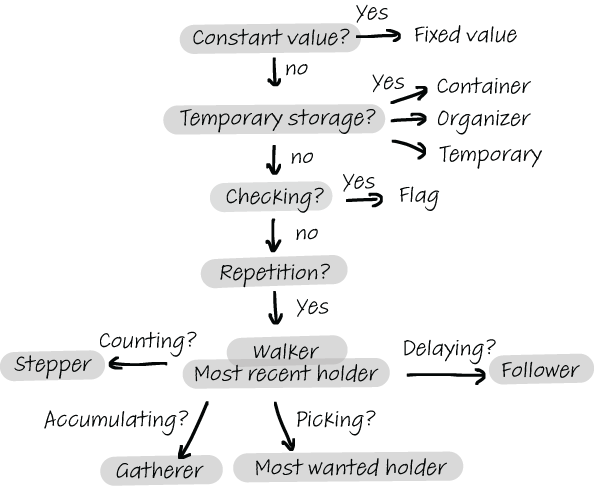
Figure 5.1 presents an overview of Sajaniemi’s 11 roles and helps you figure out what role a variable might play.
Figure 5.1 You can use this flowchart to help you determine the role of a variable in a piece of code.
Roles are not restricted to a specific programming paradigm, but they occur in all paradigms. We have already seen in the example of the gatherer that gatherers also occur in functional languages. You’ll see the variables playing the roles outlined in the previous section in object-oriented programming too. For example, consider the following Java class:
public class Dog {
  String name;
  int age;
  public Dog (String n) {
    name = n;
    age = 0;
  }
  public void birthday () {
    age++;
  }
}
Instances of Dog have two attributes: name and age. The value of the attribute name does not change after initialization; it is a fixed value. The attribute age behaves similarly to the variable counter in the Python program we looked at earlier: it steps through a known sequence starting at 0 and increasing on each birthday, so as such, its role is stepper.
For most professional programmers, the roles in Sajaniemi’s framework will be somewhat familiar (maybe by other names). Rather than introducing new concepts, the purpose of this list is to give you a new vocabulary to use when discussing variables. Especially when shared among a team, the framework can be a great way to improve understanding and communication about code.
Being familiar with these roles can have benefits for newcomers too. Studies have shown that this framework can help students to mentally process source code and that students who use the roles of variables framework outperform those who do not.2 One reason it’s so effective is that often a group of roles together characterizes a certain type of program. For example, a program with a stepper and a most wanted holder value is a search program.
EXERCISE 5.1 This is a great time to practice using the roles of variables framework. Find some code that you are unfamiliar with and examine the variables taking note of the following for each:
Fill out this table for each variable you find in the code.
Once you have filled out the table, reflect on your decisions about the role of each variable. How did you determine the role? Which of the other aspects played a part in your decision? Was it influenced by the name of the variable, its operations, comments in the code, or maybe your own experience with the code?
Practical tips for working with roles of variables
When reading entirely unfamiliar code, I find that it helps to print out the code on paper or save it as a PDF that I can annotate. I realize it may feel weird to read code outside of the IDE, and you will certainly miss some features, like being able to search through the code. However, being able to write notes can deepen your thinking about the code, enabling you to interact with it on a different level.
I have done code on paper exercises with many professional programmers, and once they get past their first inhibitions, they have all found it tremendously valuable. Of course, for larger projects you may not be able to print all the relevant source code, but you can start with one class or part of the program. If printing out the code is not feasible because of its size or for other practical reasons, many of the note-taking techniques described here can also be done in an IDE using comments.
When working through exercise 5.1, I like to print the code out and mark the role of each variable with a little icon, as shown in figure 5.2.
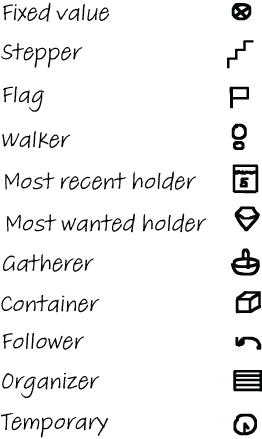
Figure 5.2 You can create a set of icons corresponding to the 11 roles a variable can play according to Sajaniemi’s framework and use them to mark the roles of variables in unfamiliar code. These are the icons I use.
Once you have memorized the icons, they quickly become a strong memory aid. To make memorizing them easier, you can create a deck of flashcards.
Figure 5.3 shows the earlier Python code example with the roles of variables annotated.
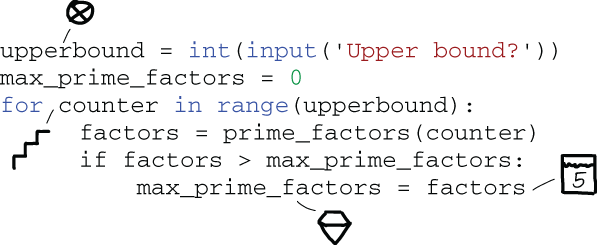
Figure 5.3 A code snippet in Python, annotated with icons that indicate the roles of the variables in the program. The upperbound variable is a most recent holder, counter is a stepper, and max_prime_factors is a most wanted holder.
When writing code, it can be very valuable to put the name of the role into the variable name, especially when all people working with the code are familiar with the concept of roles. While it might make the name of the variable longer, it does convey important information and saves the reader the effort of figuring out the role for themselves.
The roles of variables framework may have reminded you of something called Hungarian notation. The idea of Hungarian notation is to encode the type of a variable into its name—for example, strName is a string that represents a name and lDistance is a long that represents a distance. This convention stems from languages lacking a type system for encoding the types of variables.
Hungarian notation was described by Charles Simonyi in his 1976 PhD thesis “Meta-Programming: A Software Production Method”—which still makes for a good read. Simonyi went on to work for Microsoft, where he led the development of Word and Excel. His naming convention became the standard for software developed by Microsoft, and later for software developed in Microsoft languages like Visual Basic.
Hungarian notation was first used extensively in the Basic Combined Programming Language (BCPL), seen by many as an ancestor of C, back in the 1970s. In the days when there were no IDEs with IntelliSense, you could not easily see the type of a variable in the editor. Therefore, adding information about a variable’s type to its name could improve the readability of a codebase. The trade-off was that it made the names longer and thus harder to read, and when a type had to change, many variable names could potentially be impacted. Nowadays, because most editors can easily show the type of a variable, Hungarian notation is not seen as adding value in a language with types, because it just makes variable names longer. Encoding types in a variable’s name like this is thus not common practice anymore, and today the use of Hungarian notation is generally frowned upon.
Apps Hungarian vs. System Hungarian
However, simply encoding types in variable names is in fact not what Simonyi proposes in his thesis. Encoding the types of variables in their names is what we now call systems Hungarian notation.
Simonyi’s proposal was far more semantic in nature. Today, it’s referred to as Apps Hungarian notation. In Apps Hungarian, prefixes have a more specific meaning than just indicating the types of variables. For example, in his thesis, Simonyi suggests using c X to count instances of X (so cColors could be the number of colors in a UI) and l X to indicate the length of an array, as in lCustomers. The reason this form of the convention is called Apps Hungarian is because of Simonyi’s involvement with Word and Excel at Microsoft. The Excel codebase contains many variables prefixed rw or col, which are excellent examples of the convention put to good use. Row and column values will both be integers, but for readability purposes, it is great to be able to tell from the name which one is meant.
For reasons that are not entirely clear, the Windows team also adopted the convention, but only for data types, not semantic. Joel Spolsky, who worked on Excel before founding Stack Overflow, has attributed the misinterpretation of Hungarian notation to the fact that Simonyi uses the word “type” instead of “kind” to explain the role of the prefix.3
If you look at Simonyi’s original work, however, his explanation of types appears on the same page as concrete, non-type examples like c X for counting. I think it is more likely that a small group of people, or maybe just one, simply started to use the system in the wrong way, and that usage spread. As we will see in more detail in chapter 10, people often stick with conventions once they are in the code. However it came to be, the wrong form of Hungarian notation was popularized in the Windows world—largely by Charles Petzold’s influential book Programming Windows (Microsoft Press, 1998)—and then came people saying, “Hungarian notation is considered harmful,” and the rest is history.
However, I think there is still a lot of value in Simonyi’s ideas. Some of the proposals advocated by Apps Hungarian are very much like the roles in Sajamieni’s framework. For example, Simonyi used the prefix t to denote a temporary value, and also proposed min and max as prefixes for the minimal and maximal values in an array, which are typical examples of most wanted values from the roles of variables framework. It’s a pity that the main benefit of the original Hungarian notation—making it easier to read code because less mental effort is needed to reason about the role of a variable—seems to have been lost because of a misunderstanding of the goal of the naming convention.
So far in this chapter, we have seen that determining the roles of variables can help us reason about code. In chapter 4, I introduced another technique to quickly gain knowledge about code: circling the variables and determining the relationships between them. These techniques are tremendously useful but are relatively local: they help us to understand individual pieces of code. We will now focus on methods to seek a deeper understanding of the code. What was the goal of its creator? What were they trying to achieve, and what decisions were made in that process?
Dissecting different levels of understanding was the goal of Nancy Pennington, a professor of psychology at the University of Colorado. She created a model of two different levels at which a programmer can understand source code: text structure knowledge and plan knowledge.
According to Pennington’s model, text structure knowledge relates to surface-level understanding of parts of the program, such as knowing what a keyword does or knowing the role of a variable. Plan knowledge, on the other hand, represents understanding what a programmer planned when they created the program or what they were aiming to achieve. The goals of the programmer who created the code are not only hidden in variables and their roles but become more apparent when we examine how code is structured and connected. The next subsections will teach you how to dig more deeply into the intentions of code.
Having plan knowledge of a program means understanding what parts of the code relate to other parts and how. The goal of this subsection is to describe the theory behind comprehension of code in detail, as well as suggest exercises to help you practice quickly seeing the flow.
Jonathan Sillito, a professor at Brigham Young University, has defined four different stages at which a person can understand code.4 According to Sillito, who observed 25 programmers while they were reading code, programmers typically start by searching for a focal point in the code. This can be the entry point in the code, such as a main () method in a Java program or an onLoad() method in a web application. It may also be a line that is interesting for another reason, like a line at which an error has just occurred or a line a profiler has flagged as consuming many resources.
From this focal point, programmers can build their knowledge. This can be done by executing the code and placing a breakpoint on that line or by inspecting the code, for example, by searching the codebase for other occurrences of the variables involved or using IDE features to jump to other places in the code using that line.
The understanding of the programmer grows from there, developing into an understanding of a larger concept—for example, understanding the results of one function on input or knowing which fields a class has. In the final stage, the programmer has a full understanding of the entire program, like seeing that the focal line of code is part of a certain algorithm or understanding all the different subclasses of a class.
To summarize, the four steps commonly taken when moving from superficial knowledge of a program to deeper understanding are as follows:
The focal point of code is an important notion when reading code. Simply put, you have to know where to start reading. Some frameworks and techniques, like dependency injection frameworks, can fragment focal points so that they are far apart and hard to link together. To be able to know where to start, you need to understand how the framework links code together.
Such a situation can leave a reader of the code (and oftentimes even the writer) unsure of the actual structure of the running system, even if each line of code is quite understandable. This is an example of a situation in which the programmer has text knowledge but lacks plan knowledge. This can be frustrating because you have the feeling that you should know what the code does (as it doesn’t look complicated), but the underlying structure is hard to see.
Applying the stages for deep understanding to code
Now that you understand the difference between plan knowledge and text knowledge, let’s revisit the technique demonstrated in chapter 4 as a way to relieve cognitive load when reading complex code:
Maybe you realized that these six steps are an instantiation of Sillito’s abstract model. The difference is that in the steps in chapter 4 there was no specific entry point; the model was applied to all variables, methods, and instances. When you want to gain a deeper understanding of a specific part of code, follow these steps, but for a specific entry point.
These steps again are best executed by printing out the code on paper and manually highlighting parts of it. Alternatively, you can work through the steps in an IDE, where you add comments to the relevant lines of code. Just as we did with the six-step process in chapter 4, let’s walk through the four-step process for gaining plan knowledge of code in a little more detail:
Start your exploration of the code at a certain focal point. This may be the main () method, but it can also be a certain part of the code that warrants a deeper understanding, such as the location of a runtime error or a line of code that a profiler has flagged as slow.
Expand knowledge from the focal point.
Look for relationships in the code. Starting at the focal point, circle all the relevant entities (variables, methods, and classes) that play a role. You might want to link similar variables, for example, accesses into one list, like customers[0] and customers[i]. Expand your search by looking at what methods and functions the lines of code at the first level themselves link to.
What you are highlighting now is called a slice of code. The slice of a line of code X is defined as all lines of code that transitively relate to line X .
Focusing on a slice helps you understand where data is used in the program. For example, you can now ask yourself whether there is a certain line or method heavily connected to the focal point. Where do these relationships occur? Those locations might be a great starting point for exploring the code in more depth. What parts of code are heavy on method calls? Those too might be good focus points for further investigation.
Understand a concept from a set of related entities.
You now have several lines highlighted that relate to the focal point. There are several lessons that can be learned from the call patterns in a piece of code. For example, is there a method called in several places within the slice you’ve highlighted? That method likely plays a large role in the codebase and warrants further investigation. Similarly, any methods that are not being used in the code you are studying can be disregarded for now. When you are editing code in the IDE, you might want to reformat the code so that the methods being called are close to the focal point and methods not in use are placed outside of your view. That saves you a bit of cognitive load in scrolling through the code.
We can also look at what parts within the slice are heavy on method calls. Heavily connected parts of code are likely to represent key concepts, so these can also be good focus points for further study. Once you have investigated the important locations further, you can create a list of all related classes. Write the list of relationships down and reflect on it in depth. Do the entities you’ve identified and the relationships between them help you form an initial idea of the concept behind the code?
Understand concepts across multiple entities.
As a final step, you want to get a high-level understanding of the different concepts in the code. For example, you want to understand not only the data structures contained in the code, but also the operations applied to them and the constraints on them. What are you allowed to do, and what is forbidden? For example, is a tree a binary tree or can a node have an arbitrary number of children? Are there constraints on the tree? For example, will an error be thrown if you add a third node, or is that up to the user?
In the final step, you can create a list of concepts present in the code to document your understanding. Both the list of entities resulting from step 3 and this list of concepts might be valuable to add back to the code as documentation.
EXERCISE 5.2 Find another piece of unfamiliar code in your own codebase. Alternatively, you can search for some code on GitHub. It doesn’t really matter what code you use, but it should be something you’re not familiar with. Now follow these steps to gain a deep understanding of this code:
Find a focal point in the code. Since you are not fixing a bug or adding a feature, your entry point into the code will likely be the start of the code—for example, a main () method.
Determine the slice of code related to the focal point, either on paper or within the IDE. This might require some refactoring of the code to move the code involved in the slice closer together.
Based on your exploration in step 2, write down what you learned about the code. For example, what entities and concepts are present in the code, and how do they related to each other?
Even though programmers have to read a lot of code—as mentioned earlier in this book, it’s estimated that the average programmer spends nearly 60% of their workday reading code rather than writing it5—we developers do not practice reading code much. For his book Coders at Work (Apress, 2009), Peter Seibel interviewed developers about their habits, including code reading. While most people Seibel interviewed said that reading code was important and that programmers should do it more, very few of them could name code that they had read recently. Donald Knuth was a notable exception.
Because we lack practice, good strategies, and good schemata, we often must rely on the much slower praxis of reading the code line by line or stepping through the code with a debugger. This in turn leads to a situation where people prefer to write their own code rather than reuse or adapt existing code because “It’s just easier to build it myself.” What if it were as easy to read code as it is to read natural language? In the remainder of this chapter, we will first explore how reading code and reading language are similar, and then dive into techniques for reading natural language that can be applied to reading code to make it easier.
Researchers have tried to understand what happens in someone’s brain when they’ve been programming for a very long time. We saw some early examples of this earlier in the book, such as the experiments conducted in the 1980s by Bell Labs researcher Katherine McKeithen, whose work we covered in chapter 2, where she asked people to remember ALGOL programs in order to form an initial understanding of chunking in programming.6
Early experiments involving programming and the brain often used techniques common at the time, like having participants remember words or keywords. While these research methods are still commonly used today, researchers also employ more modern—and arguably much cooler—techniques. These include the use of brain imaging techniques to gain a deeper understanding of what brain areas, and corresponding cognitive processes, programming triggers.
Even though a lot about the brain is not yet known, we have a pretty decent understanding of what parts of the brain are related to what types of cognitive functions. This is mainly thanks to German neurologist Korbinian Brodmann. As early as 1909, he published a book, Vergleichende Lokalisationslehre der Großhirnrinde, detailing the locations of 52 different regions in the brain, now known as Brodmann areas. For each area, Brodmann detailed the mental functions that reside primarily in that region, such as reading words or remembering. The amount of detail in the map he produced is continuously increasing, thanks to numerous studies in the ensuing years.7
Because of Brodmann’s work and subsequent studies on the regions of the brain, we now have a reasonable idea of where cognitive functions “live” in the human brain. Knowing which parts of the brain are associated with reading or the working memory has helped us understand the essence of larger tasks.
These types of studies can be done using a functional magnetic resonance imaging (fMRI) machine. An fMRI machine can detect which Brodmann areas are active by measuring blood flow in the brain. In fMRI studies, participants are commonly asked to perform a complex task, such as solving a mental puzzle. By measuring increases in blood flow to different Brodmann areas, we can determine what cognitive processes are involved in solving that task, such as the working memory. A limitation of the fMRI machine, however, is that people are not allowed to move while the machine is scanning. As such, the range of tasks participants can do is limited and does not include tasks that involve making notes or producing code.
Evidence from fMRI about what code does in the brain
The existence of the Brodmann map (and fMRI machines, of course) also made scientists curious about programming. What brain areas and cognitive functions might be involved? In 2014, the first study on programming in an fMRI machine was done by German computer science professor Janet Siegmund.8 Participants were asked to read Java code that represented well-known algorithms, including sorting or searching in a list and computing the power of two numbers. Meaningful variable names in the code snippets were replaced by obfuscated names, so participants would spend cognitive effort comprehending the program’s flow rather than guessing at the functionality of the code based on variable names.
Siegmund’s findings reliably showed that program comprehension activates five Brodmann areas, all located in the left hemisphere of the brain: BA6, BA21, BA40, BA44, and BA4.
The fact that Brodmann areas BA6 and BA40 are involved in programming is not surprising. These areas are related to working memory (the brain’s processor) and attention. The involvement of BA21, BA44, and BA47, however, might be a bit more surprising to programmers. These areas are related to natural language processing. This finding is interesting because Siegmund obfuscated all variable names in the programs.
This suggests that, even though the variable names were obfuscated, the participants were reading other elements of the code (for example, keywords) and attempting to draw meaning from them, just as we do when reading words in a natural language text.
We’ve seen that fMRI scans have shown that areas of the brain related to both working memory and language processing are involved in programming. Does that imply that people with a larger working memory capacity and better natural language skills will be better programmers?
Recent research sheds more light on the question of what cognitive abilities play a role in programming. Associate Professor Chantel Prat of the University of Washington led a study on the connection between cognitive skills and programming that assessed the performance of its participants (36 students who took a Python course on Code Academy) in a range of areas, including mathematics, language, and reasoning, as well as programming ability.9 The tests Prat used to measure the non-programming cognitive abilities of the participants in this study were commonly used and known to reliably test these skills. For example, for mathematical skills, an example question reads: “If it takes five machines 5 minutes to make five widgets, how long would it take 100 machines to make 100 widgets?” The test for fluid reasoning resembled an IQ test; students, for example, had to finish a sequence of abstract images.
For programming ability, the researchers looked at three factors: the scores of the students on the Code Academy quizzes; an end project in which the students had to create a Rock, Paper, Scissors game; and a multiple-choice exam. Python experts created the exam and the grading scheme for the end project.
Because the researchers had access to both programming ability scores and scores for other cognitive abilities for each student, they were able to create a predictive model to see what cognitive abilities predicted programming ability. What Prat and her colleagues found might be surprising to some programmers. Numeracy—the knowledge and skills people need to apply mathematics—had only a minor predictive effect, predicting just 2% of the variance between participants. Language abilities were a better predictor, accounting for 17% of the variance. This is interesting because we as a field typically stress the fact that mathematical skills are important, and many programmers I know insist they are bad at learning natural languages. The best predictor for all three tests was working memory capacity and reasoning skills, accounting for 34% of the variance between participants.
In this study, the researchers not only measured the cognitive abilities of the 36 participants, but also brain activity during testing, using an electroencephalography (EEG) device. Unlike an fMRI machine, this is a relatively simple device that measures brain activity with electrodes placed on the head. The EEG data was taken into account when examining the three programming tasks.
For learning rate—that is, how quickly students passed through the Code Academy course—language ability was a particularly large factor. Learning rate and other programming skills were correlated, so it wasn’t as though the quick students were simply rushing through the course without understanding anything. Of course, the underlying factor here might be that students who read well learn a lot in general, while students who struggle with reading do not learn as quickly or easily, independent of the domain of programming they were taught in this study.
For programming accuracy, measured by performance on the Rock, Paper, Scissors task, general cognitive skills (including working memory and reasoning) mattered most. For declarative knowledge, measured by a multiple-choice test, EEG activity was an important factor too. As shown in figure 5.4, the results of this study seem to indicate that how well you can learn a programming language is predicted by your skill at learning natural languages.
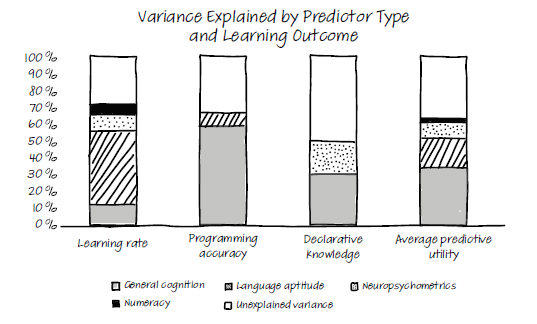
Figure 5.4 The results of Prat’s study, which show that numeracy skills (in light blue) are only a minor predictor of programming ability. Language aptitude (in pink) is a much stronger predictor, especially of how quickly one can learn a programming language. Source: www.nature.com/articles/ s41598-020-60661-8.pdf . Source: Chantal S. Prat et al. (2020).
This is a result that may be somewhat unexpected to many programmers. Computer science is often seen as a STEM (science, technology, engineering, and mathematics) field and grouped with those subjects at universities (including mine). In the culture of programming, mathematics skills are sought after as helpful or even required skills. These new findings might require us to update our thinking on what predicts programming ability.
Before we dive into reading code, let’s reflect on how we read a (nonfiction) text, such as a newspaper. What do you do when you read a newspaper article?
There are a lot of strategies people commonly use when reading text. For example, you might scan the text before reading it in depth to determine if it’s worth your time. You might also consciously look at images that appear alongside the text as you read to help support your understanding of the text and its context or make notes to summarize what you’re reading or to highlight the most important parts. Scanning text and looking at accompanying images are text comprehension strategies . Many of these strategies are actively taught and practiced in school, so it’s likely that they’re automatic and you use them without thinking.
We’ll dive into improving your code-reading skills shortly, but first let’s look at what scientific research has found about how people read code.
EXERCISE 5.3 Think of a time when you were reading a nonfiction text. What strategies did you employ before, during, and after reading the text?
When programmers read code, they scan it first
When researchers want to understand what people look at, they use eye trackers. Eye trackers are devices that can be used to determine where on a screen or page people are focusing their attention. They’re used extensively in marketing research to determine what kinds of advertisements catch people’s eyes the longest. Eye trackers can be physical devices and were used as early as the 1920s, when they still occupied an entire room. Modern eye trackers are a lot smaller. They can work with hardware, like a Microsoft Kinect tracking depth, or even be entirely software-based and track the user’s gaze with image recognition.
Eye trackers have enabled researchers to better understand how people read code. For example, a team of researchers at the Nara Institute of Science and Technology, led by professor Hidetake Uwano, observed that programmers scan code to get an idea of what the program does.10 They found that in the first 30% of the time spent reviewing the code, the participants viewed over 70% of the lines. Performing this type of quick scan is common behavior when reading natural language to get an overview of the structure of the text, and it appears that people transfer this strategy to reading code.
Beginners and experts read code differently
To compare how developers read code and how people read natural language, Teresa Busjahn, a researcher at Freie Universität Berlin, led a study involving 14 novice programmers and 6 experts.11 Busjahn and her colleagues first studied the difference between text reading and natural language reading. She found that code is read less linearly than natural language: novice programmers followed a linear path on text with approximately 80% of their eye movements, while they read linearly in 75% of eye movements for code. In the cases where the novice programmers did not read linearly, they often followed the call stack rather than reading from top to bottom.
Busjahn not only compared code to text, she also compared novice programmers with expert programmers. Comparing the code-reading practices of the novices with those of the experts revealed a difference in the two groups’ code reading practices: novices read more linearly and follow the call stack more frequently than expert programmers. Learning to follow the call stack while reading code, apparently, is a practice that comes with experience.
As the previous section showed, the cognitive skills used for reading code are similar to those used for reading natural language. This means we may be able to apply insights gained from studying how people read texts in natural language to reading code.
There has been a lot of research into effective reading strategies and how to learn them. Strategies for reading comprehension can be roughly divided into these seven categories:12
Activating—Actively thinking of related things to activate prior knowledge
Determining importance—Deciding what parts of a text are most relevant
Inferring—Filling in facts that are not explicitly given in the text
Visualizing—Drawing diagrams of the read text to deepen understanding
Because there are cognitive similarities between reading code and reading text, it’s feasible that strategies for reading natural language will also be useful in code reading. This section explores each of the seven known strategies for reading text in the context of reading code.
We know that programmers scan new code before diving in. But why would scanning code be helpful? One reason is that it will give you an initial sense of the concepts and syntactic elements that are present in the code.
In previous chapters, we saw that when you think about things, your working memory will search your LTM for related memories. Actively thinking about code elements will help your working memory to find relevant information stored in the LTM that might be helpful in comprehending the code at hand. A good strategy for deliberately activating prior knowledge is to give yourself a fixed amount of time—say, 10 minutes—to study code and get a sense of what it’s about.
EXERCISE 5.4 Study a piece of unfamiliar code for a fixed amount of time (say, 5 or 10 minutes, depending on the length). After studying the code for this fixed amount of time, try to answer the following concrete questions about it:
What was the first element (variable, class, programming concept, and so on) that caught your eye?
Are these two things (variables, classes, programming concepts) related?
What concepts are present in the code? Do you know all of them?
What syntactic elements are present in the code? Do you know all of them?
What domain concepts are present in the code? Do you know all of them?
The result of this exercise might motivate you to look up more information about unfamiliar programming or domain concepts in the code. When you encounter an unfamiliar concept, it is best to try to study it before diving into the code again. Learning about a new concept at the same time as reading new code will likely cause excessive cognitive load, making both the concept and the code less effective.
When reading code, it is important to keep track of what you are reading and whether you understand it. Keep a mental note not only of what you understand, but also of what you find confusing. A good strategy is to print out the code and mark the lines you understand and the ones that confuse you. You can do this with icons like the ones you used to mark the roles of variables.
Figure 5.5 shows a piece of JavaScript code that I’ve annotated this way—I use a tick mark for code that I understand and a question mark for lines or parts of lines that confuse me. Monitoring your understanding like this will help you when you read the code for a second time, as you can then focus on the confusing lines in more depth.
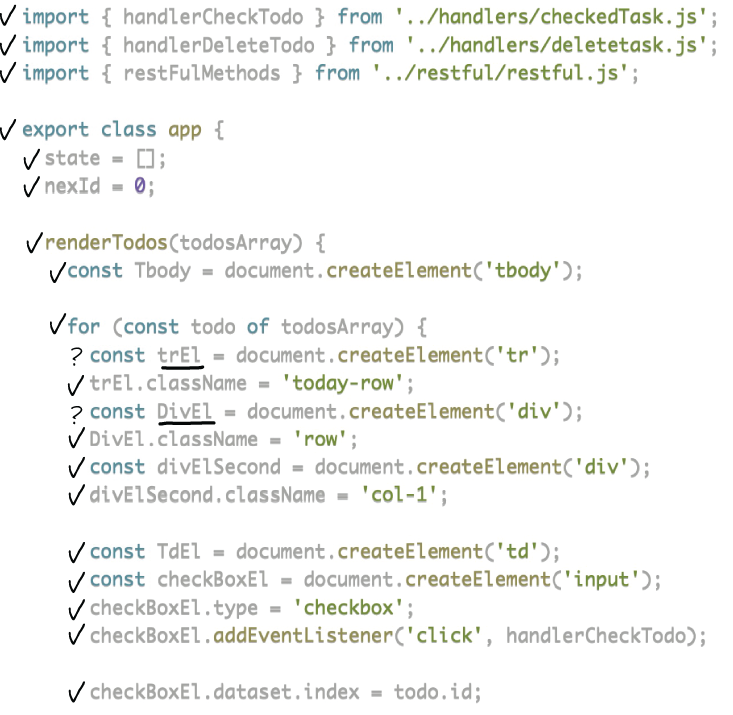
Figure 5.5 A code snippet in JavaScript annotated with icons that indicate understanding. A check mark means the line is understood, and a question mark indicates a certain line is confusing.
Annotations marking what confuses you can be very helpful in monitoring your own understanding, but they can also be an aid in seeking help. If you can clearly communicate which parts of the code are confusing, you can ask the author for an explanation about certain lines. This will be more effective than if you say, “I have no idea what this does.”
When reading code, it can be very useful to reflect on which lines are important. You can do this as a deliberate exercise. It doesn’t matter all that much how many important lines you choose—it could be 10 for a short snippet or 25 for a larger program. What matters is that you think about which parts of the code are likely to have the most influence on the program’s execution.
If you are using printed code, you can mark important lines with an exclamation mark.
EXERCISE 5.5 Select a piece of unfamiliar code and give yourself a few minutes to decide on the most important lines in the program. Once you have selected the lines, answer these questions:
What role do those lines have? For example, are they lines that perform initialization, or input/output, or data processing?
How are these lines connected to the overall goal of the program?
What is an important line of code? You might wonder what an important line of code is, and that’s a great question! I have often done the exercise of marking important lines of code with a development team, where each team member individually marks what they think are the most important lines and the team compares notes afterward.
It’s not uncommon for people in a team to disagree about which lines are important. Some people argue that the lines where the most intensive calculations happen are the most important lines, while other people select an import statement for a relevant library or an explanatory comment. People with backgrounds in different programming languages or domains might have different ideas about the importance of particular lines of code, and that’s OK. Don’t think of it as a disagreement to be solved but an opportunity to learn.
The nice thing about doing this exercise with your team is that it doesn’t just teach you about the code, but also about yourself and your teammates (priorities, experience, and so on).
A lot of the meaning of a program is contained in the structure of the code itself—for example, in the use of loops and conditional statements. There is also meaning in the names of program elements such as variables, and some of that meaning might need to be inferred. If code contains a variable called shipment, it can be valuable to gain an understanding of what a shipment means within the domain of the code. Is a shipment the same as an order, a group of products meant for one customer? Or is a shipment a set of products to be shipped to a factory?
As you’ve seen already, variable names can serve as important beacons: hints as to what the code is about. When reading code, it can thus be valuable to consciously pay attention to them.
An exercise for this is to go through the code line by line and create a list of all the identifier names (variables, classes, methods, functions). This is something you can do even when you are totally confused about what the code does. It may feel a bit weird to analyze code so mechanically, but reading all the identifiers will help your working memory. Once you focus on the names, you can then search your LTM for related information. The information that is found supports the working memory to process the code with more ease.
Once you’ve created the list of identifiers, you can use it to gain a deeper understanding of the code. For example, you can divide the variable names into two different categories: names of variables that are related to the domain of the code, such as Customer or Package, and variable names that are related to programming concepts, such as Tree or List. Some variable names combine both categories, such as CustomerList or FactorySet. Others cannot be understood without context, which means you will need to spend more effort to investigate their meaning—for example, by trying to decide which role they play using Sajaniemi’s framework, discussed earlier in this chapter.
EXERCISE 5.6 Select a piece of source code and meticulously create a list of all the variable names present in the program.
Fill out the following table for all of the variable names.
Using the table of variable names, you can answer these questions:
In previous chapters you saw several techniques for visualizing code to gain a deeper understanding, including creating a state table and tracing the flow of a piece of code.
There are several other visualization strategies that can be used for understanding code. One technique that can be helpful for very complex code of which a deeper understanding is needed is to list all operations in which variables are involved.
When working with unfamiliar code, it can sometimes be difficult to predict how the values of variables will change as the code is executed. When code is too hard to process right away, it can help to create an operation table. For example, the following JavaScript code snippet may be hard to understand if you do not know that a zip function merges two lists.
Listing 5.1 JavaScript code that zips lists as and bs using a given function f
zipWith: function (f, as, bs) {
  var length = Math.min(as.length, bs.length);
  var zs = [];
  for (var i = 0; i < length; i++) {
    zs[i] = f(as[i], bs[i]);
  }
  return zs;
}
In such a case it can help to inspect the variables, methods, and functions and determine what operations they are involved in. For example, f is applied to as[i] and bs[i], so it is a function. Inspecting as and bs, we see that they are being indexed, so these variables must be lists or dictionaries. Once you have determined the types of variables in a complex piece of code through their operations, it can be easier to determine their roles.
EXERCISE 5.7 Select a piece of unfamiliar code and write down the names of all the variables, functions, and classes in the code. Then list all the operations associated with each identifier.
Once you’ve created this table, read through the code again. Has filling in the table helped you gain a deeper understanding of the roles of the variables and the meaning of the problem as a whole?
Asking yourself questions while reading code will help you understand the code’s goals and functionality. In the previous sections, you saw numerous examples of questions you can ask about code. A few more valuable questions are as follows:
What are the five most central concepts of the code? These could be identifier names, themes, classes, or information found in comments.
What strategies did you use to identify the central concepts? For example, did you look at method names, documentation, or variable names or draw on your prior knowledge of a system?
What are the five most central computer science concepts in the code? These could be algorithms, data structures, assumptions, or techniques.
What can you determine about the decisions made by the creator(s) of the code—for example, the decision to implement a certain version of an algorithm, use a certain design pattern, or use a certain library or API?
These questions go deeper than text structure knowledge and can help you reach a plan to understand the code.
A final strategy from text comprehension that we can apply to code comprehension is summarizing what you have just read. Writing a summary of code in natural language will help you gain a deeper understanding of what’s happening in that code. This summary might also serve as additional documentation, either for yourself personally or even as actual documentation of the code if it was lacking beforehand.
Some of the techniques we covered earlier in this chapter can be a great aid in summarizing code. For example, looking at the most important lines, listing all the variables and their related operations, and reflecting on the decisions that were made by the creator of the code are great ways to get started on a summary.
EXERCISE 5.8 Summarize a piece of code by filling in the following table. Of course, you can add more information to the summary than I’ve suggested in this exercise.
When reading unfamiliar code, figuring out what roles the variables play, such as stepper or most wanted value, can help deepen your understanding.
When it comes to understanding code, there is a difference between text structure knowledge, which means knowing the syntactic concepts used in code, and plan knowledge, which means understanding the intentions of the code’s creator.
There are many similarities between reading code and reading natural language, and your ability to learn a natural language can be a predictor of your ability to learn to program.
Strategies that are commonly used to aid deep understanding of natural language texts, such as visualizing and summarizing, can also be applied to gain a deeper understanding of code.
1. Sajaniemi’s framework specifically names this a “one-way flag,” but I think that specific role is too narrow.
2. See, for example, “An Experiment on Using Roles of Variables in Teaching Introductory Programming” by Jorma Sajaniemi and Marja Kuittinen (2007), www.tandfonline.com/doi/full/10.1080/08993400500056563.
3. “Making Wrong Code Look Wrong,” by Joel Sprosky, May 11, 2005, www.joelonsoftware.com/2005/05/11/ making-wrong-code-look-wrong/.
4. See “Questions Programmers Ask During Software Evolution Tasks” by Jonathan Sillito, Gail C. Murphy, and Kris De Volder (2006), www.cs.ubc.ca/~murphy/papers/other/asking-answering-fse06.pdf.
5. See “Measuring Program Comprehension: A Large-Scale Field Study with Professionals” by Xin Xia et al. (2017), https://ieeexplore.ieee.org/abstract/document/7997917.
6. “Knowledge Organization and Skill Differences in Computer Programmers” by Katherine B. McKeithen et al. (1981), http://spider.sci.brooklyn.cuny.edu/~kopec/research/sdarticle11.pdf.
7. If you’re interested, you can visit www.cognitiveatlas.org for a recent map.
8. See “Understanding Programmers’ Brains with fMRI” by Janet Siegmund et al. (2014), www.frontiersin .org/10.3389/conf.fninf.2014.18.00040/event_abstract.
9. “Relating Natural Language Aptitude to Individual Differences in Learning Programming Languages” by Chantal S. Prat et al. (2020), www.nature.com/articles/s41598-020-60661-8.
10. See “Analyzing Individual Performance of Source Code Review Using Reviewers’ Eye Movement” by Hidetake Uwano et al. (2006), www.cs.kent.edu/~jmaletic/cs69995-PC/papers/Uwano06.pdf.
11. See “Eye Movements in Code Reading: Relaxing the Linear Order” by Teresa Busjahn et al. (2015), https:// ieeexplore.ieee.org/document/7181454.
12. “The Seven Habits of Highly Effective Readers,” by Kathy Ann Mills, 2008, https://www.researchgate.net/ publication/27474121_The_Seven_Habits_of_Highly_Effective_Readers.