Chapter 1 introduced the different ways in which code can be confusing. We’ve seen that confusion can be caused by a lack of information, which must be acquired and stored in your STM, or by a lack of knowledge, which requires storing information in your LTM. This chapter covers the third source of confusion: a lack of processing power in the brain.
Sometimes the code you are reading is just too complex for you to fully understand. Because reading code is not an activity that most programmers practice often, you might find that you lack strategies to deal with reading code you do not understand. Common techniques such as “read it again” and “give up” are not helpful.
In the previous chapters, we covered techniques to help you read code better. In chapter 2 you learned about techniques for more effective chunking of code, and chapter 3 provided tips for storing more syntax knowledge in your LTM, which also aids in reading code. However, sometimes code is so complex that even with a lot of syntax knowledge and efficient chunking strategies it’s still too hard to process.
This chapter dives into the cognitive processes that underlie the processing power of the brain, which we commonly call the working memory. We will explore what working memory is and how code can be so confusing that it overloads your working memory. After we’ve covered the basics, I’ll show you three techniques to support your working memory so you can process complex code with more ease.
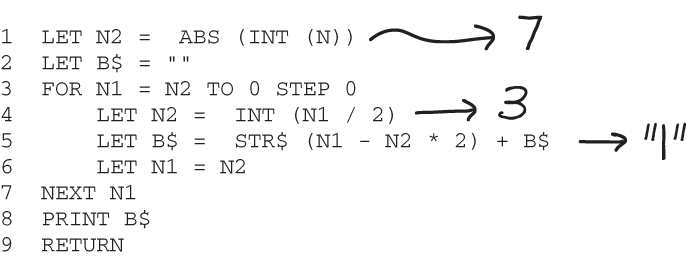
In chapter 1, I showed you an example of a BASIC program whose execution was complicated enough that you probably couldn’t process it all just by reading the code. In such a case you might be tempted to scribble intermediate values next to the code, as shown in figure 4.1.
Figure 4.1 A program converting the number N into a binary representation in BASIC. The program is confusing because you cannot see all the small steps that are being executed. If you need to understand all the steps, you may use a memory aid like writing down the intermediate values of the variables.
The fact that you feel the need to do this means that your brain lacks the capacity to process the code. Let’s compare the BASIC code to the second example from chapter 1, a Java program that calculates the binary representation of an integer n. While interpreting this code might also take some mental energy, and it’s possible that unfamiliarity with the inner workings of the toBinaryString () method may cause you some confusion, it is unlikely you’ll feel the need to make notes while reading it.
Listing 4.1 A Java program to convert n to a binary representation
public class BinaryCalculator {
    public static void main(Integer n) {
       System.out.println(Integer.toBinaryString(n));
    }
}
Not knowing about the inner workings of toBinaryString () can cause confusion. In previous chapters we delved into two of the cognitive processes at play when you read complex code: STM and LTM. To understand why you sometimes need to offload information, you need to understand the third cognitive process introduced in chapter 1, which we have not yet discussed in detail. The working memory represents the brain’s capacity to think, to form new ideas, and to solve problems. Earlier, we compared the STM to the RAM of a computer and the LTM to the hard drive. Following that analogy, the working memory is like the brain’s processor.
Some people use working memory as a synonym for STM, and you might have seen the two terms used interchangeably. Others, however, distinguish between the two concepts, and we will do that in this book. The role of the STM is to remember information. The role of the working memory, on the other hand, is to process information. We will treat these processes as separate.
DEFINITION The definition of working memory that we will use in the remainder of this book is “STM applied to a problem.”
Figure 4.2 shows an example of the difference between the two processes: if you are remembering a phone number you use your STM, whereas if you are adding integers you use your working memory.
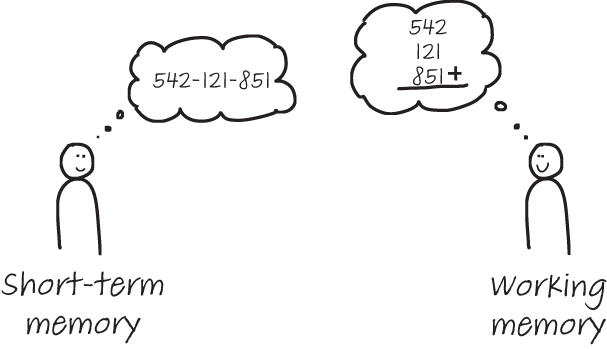
Figure 4.2 The STM briefly stores information (like a phone number, as shown on the left), while the working memory processes information (like when performing a calculation, as shown on the right).
As you saw in chapter 2, the STM can typically only hold two to six items at a time. More information can be processed when the information is divided into recognizable chunks, like words, chess openings, or design patterns. Because the working memory is the STM applied to a certain problem, it has the same limitation.
Like the STM, the working memory is only capable of processing two to six things at a time. In the context of working memory, this capacity is known as the cognitive load . When you are trying to solve a problem that involves too many elements that cannot be divided efficiently into chunks, your working memory will become “overloaded.”
This chapter will introduce methods to systematically address cognitive load, but before we can cover these techniques, we need to explore the different types that exist. The researcher who first proposed cognitive load theory was the Australian professor John Sweller. Sweller distinguished three different types of cognitive load: intrinsic, extraneous, and germane. Table 4.1 provides a quick summary of how cognitive load varies.
Table 4.1 Types of cognitive load
|
Cognitive load created by having to store your thought to LTM |
We will focus on the first two types of cognitive load here; we discuss germane load in more depth in a later chapter.
Intrinsic cognitive load when reading code
Intrinsic cognitive load is cognitive load caused by features of a problem that the problem contains by nature. For example, imagine that you have to calculate the hypotenuse of a triangle, as illustrated in figure 4.3.
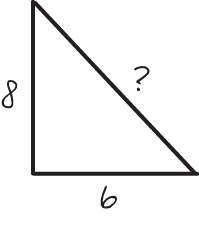
Figure 4.3 A geometry problem in which the lenghts of two sides of a triangle are given and the third needs to be calculated. This can be a problem that is hard to solve, depending on your prior knowledge. However, the problem itself cannot be made any simpler without changing it.
Solving this calculation has certain characteristics that are inherent to the problem. For example, you need to know Pythagoras’s theorem (a^2 + b^2 = c^2) to solve it, and you have to be able to calculate first the squares of 8 and 6 and then the square root of the sum of the results. Because there is no other way to solve the problem or to simplify these steps, this load is intrinsic to the problem. In programming, we often use the term inherent complexity to describe these intrinsic aspects of a problem. In cognitive science, we say that these aspects cause cognitive load of the intrinsic type.
Extraneous cognitive load when reading code
In addition to the natural, intrinsic load that problems can cause in the brain, there is also cognitive load that is added to problems, often by accident. For example, in figure 4.4, the same question about finding the length of the hypotenuse is formulated in a different way, requiring us to make a mental connection between the labels for the two sides of the triangle, whose lengths and values are known. This additional work results in a higher extraneous cognitive load.
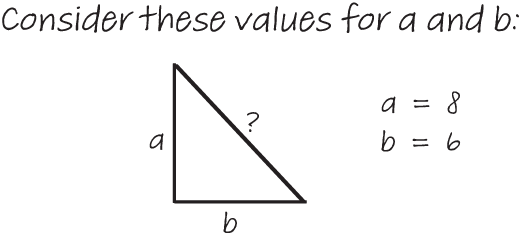
Figure 4.4 This way of finding the length of the third side of a triangle incurs a higher extraneous cognitive load in this form.
Solving the problem has not really been made harder—we still need to remember and apply Pythagoras’s theorem. However, our brains do need to work harder on extraneous tasks: connecting a to the value 8 and b to the value 6. In programming, we think of this type of extraneous load as similar to accidental complexity: aspects of a program that make a problem harder than it needs to be.
What creates extraneous load is not the same for every programmer. The more experience you have using a certain concept, the less cognitive load it creates for you. For example, the two Python code examples in the following listing are computationally equivalent.
Listing 4.2 Two versions of a Python program to select all items above 10
above_ten = [a for a in items if a > 10]

above_ten = []
for a in items:
    if a > 10: new_items.append(a)
Because the two code snippets both solve the same problem, they share the same intrinsic cognitive load. However, whether they represent the same extraneous cognitive load for you depends on your prior knowledge: if you’re not familiar with list comprehensions, then the extraneous load caused by the first example will be much higher than for someone who is experienced in using them.
Exercise 4.1 The next time you read unfamiliar code, try to monitor your own cognitive load. When the code is hard to process and you feel the need to make notes or follow the execution step by step, it is likely you are experiencing a high cognitive load.
When you experience high cognitive load, it is worthwhile to examine which parts of the code are creating the different types of cognitive load. You can use the following table to analyze this.
Now that you know the diverse ways in which code can overload the working memory, it’s time to direct our attention to ways of lowering cognitive load. The remainder of this chapter discusses three methods that will make it easier for you to read complex code. The first technique is one you might already be familiar with, albeit in a different context: refactoring.
A refactoring is a transformation of code that improves its internal structure but does not change the code’s external behavior. For example, if a certain block of code is very long, you might want to split the logic into multiple functions, or if the codebase exhibits duplication, you might want to refactor it to gather all the duplicated code in one place for easy reuse. In the following Python code listing, for example, the repeated calculation could be placed into a method.
Listing 4.3 Python code that repeats the same calculation twice
vat_1 = Vat(waterlevel = 10, radius = 1)
volume_vat_1 = math.pi * vat_1.radius **2 * vat_1. water_level
print(volume_vat_1)

vat_1 = Vat(waterlevel = 25, radius = 3)
volume_vat_2 = math.pi * vat_2. radius **2 * vat_2. water_level
print(volume_vat_2)
In most cases, refactoring is done to make it easier to maintain the resulting code. For example, eliminating duplicate code means changes to that code only have to be made in one location.
But code that is more maintainable overall is not always more readable now. For example, consider a piece of code that contains many method calls and thus depends on code spread out over many different places in a file or even in multiple files. That architecture might be more maintainable because all the logic has its own method. However, such delocalized code can also be harder on your working memory because you will have to scroll or search for function definitions in different locations.
Therefore, sometimes you might want to refactor code not to make it more maintainable in the long run but more readable for you at that point in time. We define such a refactoring as a cognitive refactoring. A cognitive refactoring is a change to a code base that does not change its external behavior, similar to a regular refactoring. However, the goal of a cognitive refactoring is not to make the code more maintainable, but to make it more readable for the current reader at the current point in time.
A cognitive refactoring can sometimes involve reverse refactoring, which decreases maintainability, such as inlining— taking the implementation of a method and copying the body of the function directly at the call site. Some IDEs can perform this refactoring automatically. Inlining code can be especially helpful when a method’s name is not very revealing, such as calculate () or transform (). When reading a call to a method with a vague name, you will need to spend some time up front to understand what the method does—and it will likely take several exposures before the functionality of the method is stored in your LTM.
Inlining the method lowers your extraneous cognitive load and might help you comprehend the code that calls the method. Additionally, studying the code of the method itself might help you understand the code, which can be easier with more context. Within the new context, you might also be able to choose a better name for the method.
Alternatively, you might want to reorder methods within the code—for example, code may be easier to read if a method’s definition appears close to the first method call. Of course, many IDEs nowadays have shortcuts to navigate to method and function definitions, but using such a function also takes up a bit of working memory and might thus cause additional extraneous cognitive load.
Cognitive refactorings are often meant for one person, because what is understandable depends on your own prior knowledge. In many cases, cognitive refactorings are temporary, only meant to allow you understand the code, and can be rolled back once your understanding is solidified.
While this process might have been a big hassle a few years ago, version control systems are now used for most codebases and are integrated into most IDEs, which makes it relatively easy to start a local “understanding” branch where you execute the changes needed to comprehend the code. And if some of your refactorings turn out to be valuable in a broader sense, they can be merged with relative ease.
The remainder of this chapter covers techniques that can help you combat the three possible sources of confusion when reading code (lack of knowledge, information, and processing power). If the code you are reading contains programming concepts you are not familiar with, you are dealing with a lack of knowledge. We’ll start with a technique that can be helpful in these cases.
In some situations, the unfamiliar constructs you are working with could be expressed in a different, more familiar way. For example, many modern programming languages (like Java and C#) support anonymous functions, often referred to as lambdas. Lambdas are functions that do not need to be given a name (hence “anonymous”). Another example is a list comprehension in Python. Lambdas and list comprehensions are great ways to make code shorter and more readable, but many programmers are not familiar with them and read them with less ease than they would read a for- or while-loop.
If the code you are reading or writing is simple and straightforward, lambdas or list comprehensions might not pose a problem, but if you are working with more complex code, such advanced structures might cause your working memory to become overloaded. Less familiar language constructs increase the extraneous cognitive load on your working memory, so when you are reading complex code, it can be beneficial for your working memory to not have to deal with these.
While the precise language constructs you might want to replace are, of course, dependent on your own prior knowledge, there typically are two reasons to replace code to lower your cognitive load: first because these constructs are known to be confusing, and second because they have a clear equivalent that is more basic. Both conditions apply to lambdas and list comprehensions, so these are good examples to use to demonstrate this technique. It can be useful to translate these to a for- or while-loop to lower the cognitive load until you gain more understanding of what the code is doing. Ternary operators are also a good candidate for such a refactoring.
The Java code in the following listing is an example of an anonymous function used as a parameter for a filter() function. If you are familiar with the use of lambdas, this code will be easy enough to follow.
Listing 4.4 A filter() function in Java that takes an anonymous function as an argument
Optional<Product> product = productList.stream().
              filter(p -> p.getId() == id).
              findFirst();
However, if lambdas are new to you, this code might cause too much extraneous cognitive load. If you feel you are struggling with the lambda expression, you can simply rewrite the code to use a regular function temporarily, as in the following example.
Listing 4.5 A filter() function in Java that uses a traditional function as an argument
public static class Toetsie implements Predicate <Product> {
    private int id;

    Toetsie(int id){
        this.id = id;
    }

       boolean test(Product p){
                  return p.getID() == this.id;
}
}

Optional<Product> product = productList.stream().
       filter(new Toetsie(id)).
       findFirst();
Python supports a syntactic structure called list comprehensions, which can create lists based on other lists. For example, you can use the following code to create a list of first names based on a list of customers.
Listing 4.6 A list comprehension in Python transforming one list into another list
customer_names = [c.first_name for c in customers]
List comprehensions can also use filters that make them a bit more complex—for example, to create a list of the names of customers over 50 years of age, as shown in the next listing.
Listing 4.7 A list comprehension in Python using a filter
customer_names =
     [c.first_name for c in customers if c.age > 50]
While this code might be easy enough to read for someone who is used to list comprehensions, for someone who isn’t (or even someone who is, if it’s embedded in a complex piece of code), it might cause too much strain on the working memory. When that happens, you can transform the list comprehension to a for-loop to ease understanding.
Listing 4.8 A for-loop in Python transforming one list into another list using a filter
customer_names = []

for c in customers:
    if c.age > 50:
        customer_names.append(c.first_name)
Many languages support ternary operators, which are shorthand for if statements. They typically have the form of a condition followed by the result when the condition is true and then the result when the condition is false. For example, listing 4.9 is a line of JavaScript code that checks whether the Boolean variable isMember is true using a ternary operator. If isMember is true, the ternary operator returns $2.00; if not, it returns $10.00.
Listing 4.9 JavaScript code using a ternary operator
isMember ? '$2.00' : '$10.00'
Some languages, such as Python, support ternary operations in a different order, giving first the result when the condition is true, followed by the condition and then the result when the condition is false. The following example is a line of Python code that checks whether the Boolean variable isMember is true using a ternary operator. As in the JavaScript example, if isMember is true, the ternary operator returns $2.00, and if it isn’t, it returns $10.00.
Listing 4.10 Python code using a ternary operator
'$2.00' if is_member else '$10.00'
Conceptually, a ternary operator is not hard to understand; as a professional programmer, you’re probably familiar with conditional code. However, the fact that the operation is placed on one line or that the order of the arguments is different from a traditional if statement might cause the code to create too much extraneous cognitive load for you.
To some people, the refactorings described in the previous sections might feel weird or wrong. You might believe that shortening code with a lambda or a ternary is always preferable because it’s more readable, and you might object to the idea of refactoring code to a worse state. However, as you’ve seen in this chapter and earlier in this book, “readable” is really in the eye of the beholder. If you’re familiar with chess openings, it’s easy to remember them; likewise, if you’re familiar with using ternaries, it’s easy to read code that contains them. What is easy to read depends on your prior knowledge, and there is no shame in helping yourself understand code by translating it to a more familiar form.
Depending on your codebase, however, you might want to revert the changes you’ve made to the code for readability purposes once you’re sure you understand it. If you are new to a team and you’re the only one unfamiliar with list comprehensions, you’ll want to leave them in place and roll back your refactorings.
While there’s no shame in changing code temporarily to aid comprehension, this does point to a limitation in your understanding. In chapter 3, you learned about creating a deck of flashcards to use as a learning and memory aid, with code on one side and a textual prompt on the other. For example, a card on for-loops could have “print all numbers between 0 and 10 in C++” on one side and the corresponding C++ code (shown in the following listing) on the other.
Listing 4.11 C++ code for printing the numbers between 0 and 10
for (int i = 0; i <= 10; i = i + 1) {
  cout << i << "\n";
}
If you often struggle with, for example, list comprehensions, you can consider adding a few cards on that programming construct to your deck. For more advanced programming concepts like these, it can work better to have code on both sides of the flashcard rather than a text explanation—that is, you can have the vanilla code on one side, and on the other the equivalent code using the advanced concept, such as a ternary or lambda.
The previous section introduced a technique to reduce the cognitive load that code can create, refactoring it to a more familiar form. However, even in its refactored state, code might still overload your working memory if its structure is too complex. There are two ways code with a complicated structure can overload the working memory.
First, you may not know exactly which parts of the code you need to read. This causes you to read more of the code than is needed, which may be more than your working memory is able to process.
Second, with code that is highly connected, your brain is trying to do two things at the same time: understand individual lines of code and understand the structure of the code to decide where to continue reading. For example, when you encounter a method call for which you do not know the exact functionality, you might need to locate and read the method before you can continue reading the code at the call site.
If you have ever read the same piece of code five times in a row without making progress, you probably didn’t know what parts of the code to focus on, or in what order. You may have been able to understand each line of code individually, but lacked an understanding of the bigger picture. When you reach the limits of your working memory, you can use a memory aid to help you focus on the right parts of the code.
Creating a dependency graph on top of your code can help you to understand the flow and to read the code by following the logical flow. For this technique, I would advise you to print out the code, or convert it to a PDF and open it on a tablet so you can make annotations digitally. Follow these steps to annotate the code to support your memory in processing it:
Once you have the code in a form you can annotate, start by finding all the variables and circling them, as shown in figure 4.5.
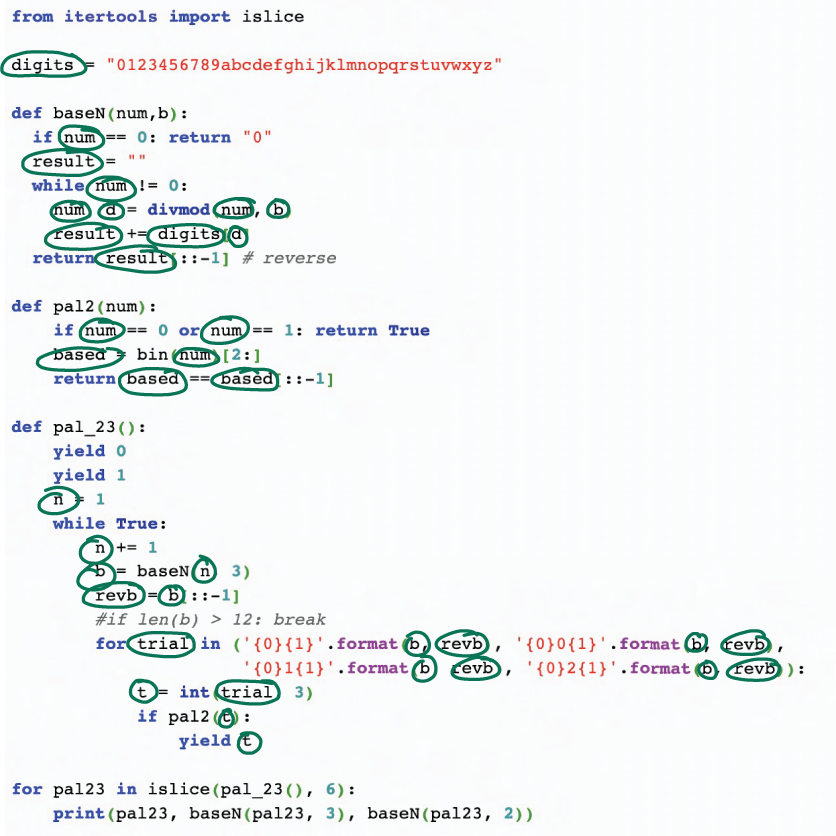
Figure 4.5 Code in which all variables are circled to support understanding
Once you have located all the variables, draw lines between occurrences of the same variable, as illustrated in figure 4.6. This helps you to understand where data is used in the program. Depending on the code, you may also want to link similar variables (for example, accesses into a list, as in customers[0] and customers[i]).
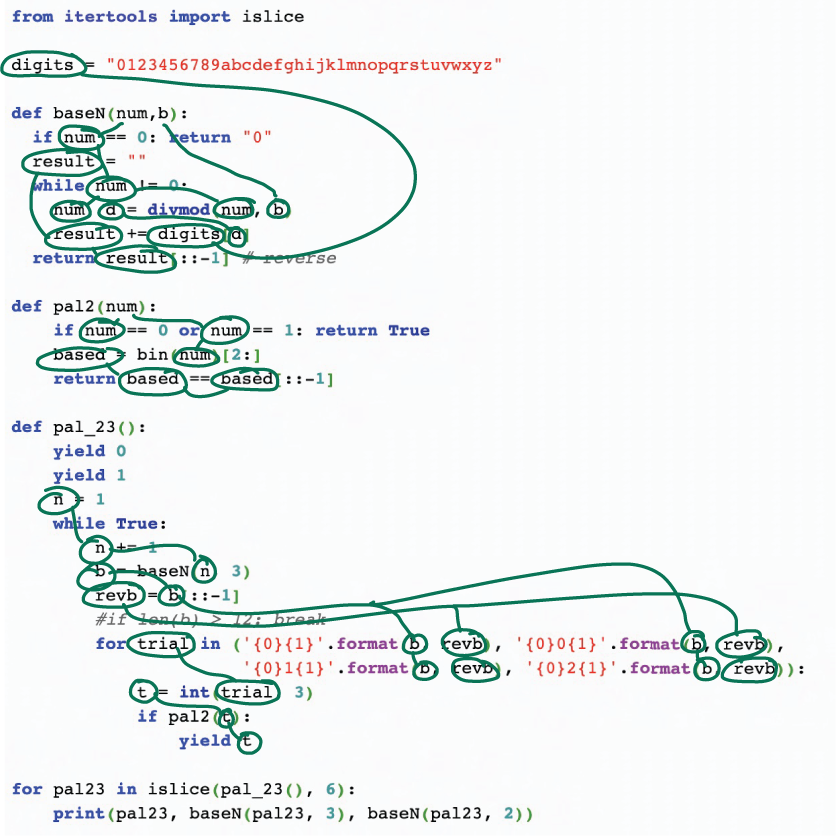
Figure 4.6 Code in which all variables are circled and linked to their other occurrences to support understanding
Linking all the variables will help you read the code, because instead of searching for other occurrences, you can simply follow the lines. This lowers your cognitive load and thus frees up working memory for you to focus on the code’s functionality.
Circle all method/function calls.
Once you have located all the variables, focus on the methods and functions in the code. Circle them in a different color.
Link methods/functions to their definitions.
Draw a line between each function or method definition and the locations where they are invoked. Focus special attention on methods with just one invocation, because these methods are candidates to be inlined with a refactoring, as explained earlier in this chapter.
Circle all instances of classes.
Once you have located the variables and functions, focus on classes. Circle all instances of classes in a third color.
As a final step in examining the code, link instances of the same class to their definition if that definition is present in the code. If the definition is not present, you can link the instances of the same class to each other.
The colored pattern you have created using the previous six steps indicates the flow of the code and can be used as an aid in reading it. You now have a reference you can refer to for information about the code’s structure, saving you the effort of, for example, having to search for definitions while also deciphering the meaning of the code, which can overload your working memory. You can start at an entry point of the code, such as the main () method, and read it from there. Whenever you encounter a link to a method call or class instantiation, you can follow the line you drew and continue reading at the right place straight away, avoiding wasting time searching or reading more code than needed.
Even when code is refactored to the easiest possible form aligned with your prior knowledge and with all dependencies marked, it can still be confusing. Sometimes the cause of the confusion is not the structure of the code but the calculations it performs. This is an issue of a lack of processing power.
For example, let’s revisit a the BASIC code from chapter 1 that converts the number N into a binary representation. In this program the variables influence each other heavily, so a detailed examination of their values is required to understand it. You can use a memory aid, like a dependency graph for code like this that performs complicated calculations, but there’s another tool that can help with calculation-heavy code: a state table.
A state table focuses on the values of variables rather than the structure of the code. It has columns for each variable and lines for each step in the code. Take another look at our example BASIC program in the next listing. It’s confusing because you cannot see all the intermediate calculations and their effects on the different variables.
Listing 4.12 BASIC code that converts a number N to its binary representation
1  LET N2 =  ABS (INT (N))
2  LET B$ = ""
3  FOR N1 = N2 TO 0 STEP 0
4      LET N2 =  INT (N1 / 2)
5      LET B$ =  STR$ (N1 - N2 * 2) + B$
6      LET N1 = N2
7  NEXT N1
8  PRINT B$
9  RETURN
If you need to understand code like this with many interconnected calculations, you can use a memory aid like the partial state table shown in figure 4.7.
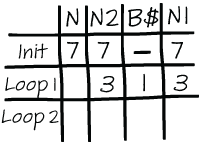
Figure 4.7 An example of a partial state table of the BASIC code for calculating the binary representation of a number
Follow these steps to create a state table:
Make a list of all the variables.
If you have already created a dependency graph for this program, as described in the previous section, it will be easy to list the variables because you’ll have circled all of them in the same color.
Create a table and give each variable its own column.
In the state table, each variable will get one column in which its intermediate values can be recorded, as shown in figure 4.7.
Add one row to the table for each distinct part of the execution of the code.
Code that contains complex calculations will most likely also contain some complex dependencies, such as a loop depending on a calculation, or a complicated if statement. Rows in the state table represent separate parts of the dependencies. For example, as shown in figure 4.7, a row can represent one iteration in a loop, preceded by the initialization code. Alternatively, a row could represent a branch in a large if statement, or simply a group of coherent lines of code. In extremely complex and terse code, one row in the table might even represent one line of code.
Execute each part of the code and then write down the value each variable has in the correct row and column.
Once you’ve prepared the table, work your way through the code and calculate the new value of each variable for each row in the state table. The process of mentally executing code is called tracing or cognitive compiling . When tracing the code using a state table, it can be tempting to skip a few variables and only fill in part of the table, but try to resist that temptation. Working through it meticulously will help you gain a deeper understanding of the code, and the resulting table will support your overloaded working memory. On a second read of the program you can use the table as a reference, allowing you to concentrate on the coherence of the program rather than on the detailed calculations.
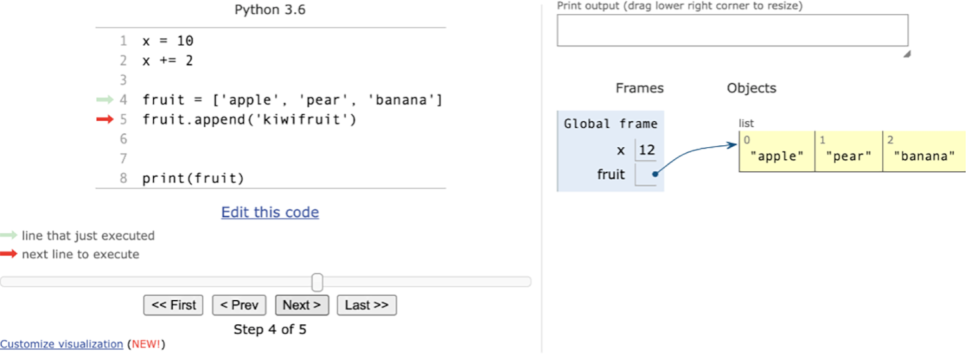
Figure 4.8 Python Tutor showing the difference between storing the integer x and its value directly and storing a list fruit with a pointer
This section and section 4.2 describe two techniques to support your working memory when reading code by offloading some information about the code onto paper: drawing a dependency graph and creating a state table. These techniques focus on different parts of the code: while the dependency graph draws your attention to how the code is organized, the state table captures the calculations in the code. When exploring unfamiliar code, you can use both exercises to gain a full picture of its inner workings and to use as memory aids when reading the code after completing them.
EXERCISE 4.2 Following the steps outlined in the previous sections, create both a dependency graph and a state table for each of the following Java programs.
public class Calculations {
    public static void main(String[] args) {
        char[] chars = {'a', 'b', 'c', 'd'};
        // looking for bba
        calculate(chars, 3, i -> i[0] == 1 && i[1] == 1 && i[2] == 0);
    }
    static void calculate(char[] a, int k, Predicate<int[]> decider) {
        int n = a.length;
        if (k < 1 || k > n)
            throw new IllegalArgumentException("Forbidden");

        int[] indexes = new int[n];
        int total = (int) Math.pow(n, k);

        while (total-- > 0) {
            for (int i = 0; i < n - (n - k); i++)
                System.out.print(a[indexes[i]]);
            System.out.println();

            if (decider.test(indexes))
                break;

            for (int i = 0; i < n; i++) {
                if (indexes[i] >= n - 1) {
                    indexes[i] = 0;
                } else {
                    indexes[i]++;
                    break;
                }
            }
        }
    }
}
public class App {
    private static final int WIDTH = 81;
    private static final int HEIGHT = 5;

    private static char[][] lines;
    static {
        lines = new char[HEIGHT][WIDTH];
        for (int i = 0; i < HEIGHT; i++) {
            for (int j = 0; j < WIDTH; j++) {
                lines[i][j] = '*';
            }
        }
    }

    private static void show(int start, int len, int index) {
        int seg = len / 3;
        if (seg == 0) return;
        for (int i = index; i < HEIGHT; i++) {
            for (int j = start + seg; j < start + seg * 2; j++) {
                lines[i][j] = ' ';
            }
        }
        show(start, seg, index + 1);
        show(start + seg * 2, seg, index + 1);
    }

    public static void main(String[] args) {
        show(0, WIDTH, 1);
        for (int i = 0; i < HEIGHT; i++) {
            for (int j = 0; j < WIDTH; j++) {
                System.out.print(lines[i][j]);
            }
            System.out.println();
        }
    }
}
Cognitive load represents the limit of what the working memory can process. When you experience too much cognitive load, you cannot properly process code.
There are two types of cognitive load that are relevant in programming: intrinsic cognitive load is created by the inherent complexity of a piece of code, while extraneous cognitive load is added to code either accidentally (by the way it is presented) or because of gaps in the knowledge of the person reading the code.
Refactoring is a way to reduce extraneous cognitive load by transforming code to align better with your prior knowledge.
Creating a dependency graph can help you understand a piece of complex and interconnected code.
Creating a state table containing the intermediate values of variables can aid in reading code that is heavy on calculations.
1. See “The Use of Python Tutor on Programming Laboratory Session: Student Perspectives” by Oscar Karnalim and Mewati Ayub (2017), https://kinetik.umm.ac.id/index.php/kinetik/article/view/442.