Chapter 1 introduced three cognitive processes that play a role when programming and reading code. The first cognitive process we covered was LTM, which you can think of as a hard drive that stores memories and facts. The second cognitive process was STM, which is like random-access memory, storing information that comes into the brain for a short time. Finally, there’s the working memory, which acts a bit like a processor and processes information from LTM and STM to perform thinking.
The focus of this chapter is on reading code. Reading code is a larger part of a programmer’s working life than you might realize. Research indicates that almost 60% of programmers’ time is spent understanding rather than writing code.1 Thus, improving how quickly you can read code, without losing accuracy, can help you improve your programming skills substantially.
In the previous chapter you learned that STM is where information is stored first when you read code. This chapter will begin by helping you understand why it is so hard to process a lot of information stored in code. If you know what happens in your brain when you are quickly reading code, you can more easily self-monitor your understanding. Next, I’ll show you methods to improve your code skills, for example by practicing speed-reading several code snippets. By the end of the chapter, you will know why reading code is so hard. You will also understand how to read code quicker, and you will be aware of techniques you can use to keep improving your code reading skills.
The book Structure and Interpretation of Computer Programs by Harold Abelson, Gerald Jay Sussman, and Julie Sussman (MIT Press, 1996) contains this well-known sentence: “Programs must be written for people to read and only incidentally for machines to execute.” That might be true, but the reality is that programmers practice writing code a lot more than they practice reading code.
This starts early on. When learning to program, there is often a lot of focus on producing code. Most likely, when you learned to program—whether that was in college, at a job, or in a bootcamp—there was a strong focus on creating code. Exercises centered on learning how to solve problems and write code for them. Exercises where you read code were probably nonexistent. Because of this lack of practice, reading code is often harder than it needs to be. This chapter will help you improve your code reading skills.
Reading code is done for a variety of reasons: to add a feature, to find a bug, or to build an understanding of a larger system. What all situations in which you are reading code have in common is that you are looking for specific information present in the code. Examples of information that you could be looking for are the right location to implement a new feature, the location of a certain bug, where you last edited the code, or how a certain method is implemented.
By improving your ability to quickly find relevant information, you can reduce the number of times you have to go back to the code. A higher level of skill in reading code can also reduce how often you have to navigate through the code to find additional information. The time you save on searching through code can then be spent on fixing bugs or adding new features so that you can become a more effective programmer.
In the previous chapter, I asked you to read programs in three different programming languages to get a sense of the three different parts of the brain at work. To dive into the role of STM in more depth, look at the following Java program that implements the insertion sort algorithm. You may look at the program for no more than three minutes. Use a clock or stopwatch so you know when the time is up. After the three minutes are up, cover the Java code with a sheet of paper or with your hand.
Keeping the code covered, try to reproduce it as best as you can.
Listing 2.1 A Java program implementing insertion sort
public class InsertionSort {
  public static void main (String [] args) {
    int [] array = {45,12,85,32,89,39,69,44,42,1,6,8};
    int temp;
    for (int i = 1; i < array.length; i++) {
      for (int j = i; j > 0; j--) {
        if (array[j] < array [j - 1]) {
          temp = array[j];
          array[j] = array[j - 1];
                        array[j - 1] = temp;
        }
      }
    }
    for (int i = 0; i < array.length; i++) {
      System.out.println(array[i]);
    }
  }
}
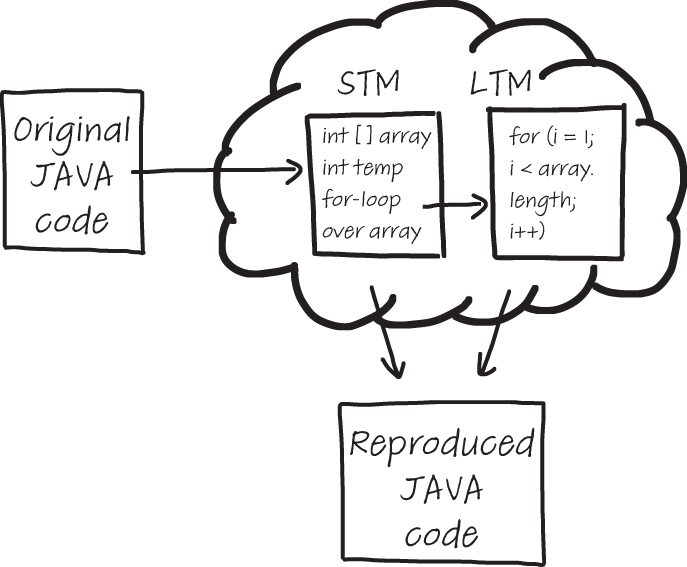
In reproducing the insertion sort Java program, you used both your STM and LTM. This is illustrated in figure 2.1.
Figure 2.1 An illustration of the cognitive processes in play when remembering code. Some parts of the code are stored in STM, such as variable names and values of variables. For other parts of the code, such as the syntax of a for-loop, you use knowledge stored in your LTM.
Your STM was able to hold some of the information you just read. Your LTM added to this knowledge in two ways. First, you were able to rely on syntactic knowledge of Java. Maybe you remembered “a for-loop over the array,” which your LTM knows is equivalent to for (int i = 0; i < array.length; i++). Maybe you also remembered “print all elements of the array,” which in Java is for (i = 0; i < array.length; i++) {System.out.println(array[i])}.
Second, you could rely on the fact that you knew the code was implementing insertion sort. That might have helped you to fill in some blanks in the program, which you could not remember precisely. For example, maybe you didn’t remember from reading the code that two values of the array were swapped, but because you’re familiar with insertion sort you knew this was supposed to happen somewhere.
To dive into your cognitive processes, have a second look at your reproduced code. Annotate which parts of the code you think came from your STM directly and which parts were retrieved from LTM. An example of the reproduced code with an annotation of cognitive processes is shown in figure 2.2.
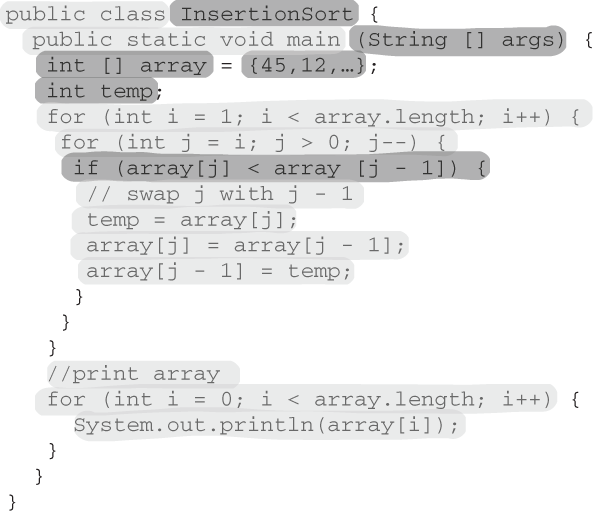
Figure 2.2 An example of the code from listing 2.1 reproduced by an experienced Java programmer, annotated to indicate the cognitive process in play. The parts of the code that are more darkly shaded are the parts stored in STM, and the lighter shading represents code coming from LTM. Note that more code is reproduced here than was present in the original code listing—for example, some comments were added.
What information is retrieved from your LTM, of course, depends on what you have stored there. Someone less experienced in Java is likely to retrieve a lot less from their LTM, so the image might look very different for you. Also note that in this reproduction some comments are present that were not in the original Java code. In experiments I’ve conducted with programmers remembering source code, I have found that sometimes people add comments to reproduced code to facilitate remembering. People would, for example, first write down “print the array” and later fill out the actual implementation. Did you do that too?
Comments are, of course, often used to describe code that is already written, but as you can see in this example, they have diverse uses and can also be used as a memory aid for future code. We will discuss the use of comments more extensively in later chapters.
A second attempt at remembering Java
In chapter 1, I explained how LTM and STM collaborate when you’re reading code. You’ve just experienced this collaboration in more depth as you reproduced some parts of the Java insertion sort program from information stored in your LTM.
To deepen your understanding of how extensively you rely on your LTM when reading and understanding code, let’s do another exercise. It’s the same exercise as the previous one: inspect the program for a maximum of three minutes, then cover the code and try to reproduce it as best as you can without peeking!
The Java code in the next listing is to be used as a memory exercise. Study for three minutes and try to reproduce to your best ability.
    void execute(int x[]){
        int b = x.length;

        for (int v = b / 2 - 1; v >= 0; v--)
            func(x, b, v);

        // Extract elements one by one
        for (int l = b-1; l > 0; l--)
       {
            // Move current to end
            int temp = x[0];
            x[0] = x[l];
            x[l] = temp;

            func (x, l, 0);
       }
    }
Without knowing anything about you or your expertise in Java, I feel it’s safe to bet that remembering this second program was probably a lot harder. There are a few reasons for this. First, you don’t know exactly what this code is doing, which makes it a lot harder to fill in things you forget with knowledge from your LTM.
Second, I intentionally chose “weird” variable names, like b and l for-loop iterators. Unfamiliar names make it harder for you to quickly detect, recognize, and remember patterns. l as loop iterator is especially misleading since it is visually so similar to 1.
As the previous example showed, it’s not easy to reproduce code you’ve read. Why is remembering code so hard? The most crucial reason is the limited capacity of your STM.
You cannot physically store all the information that is present in the code you are reading in your STM in order to process it. As you learned in chapter 1, STM stores information that you read or hear for a brief period of time. And when I say brief, I really mean brief! Research indicates it cannot hold information for more than 30 seconds. After 30 seconds, you will have to store the information in your LTM, or it will be lost forever. Imagine someone is reading a phone number to you over the phone, and you lack a place to write it down. If you don’t find somewhere to write it down soon (e.g., a physical cache), you will not remember the phone number.
The time for which you can remember information is not the only limitation of STM—the second limitation is size.
Like in a computer, in your brain the long-term storage is a lot bigger than short-term storage. But while for RAM you might be talking about a few gigabytes of memory, your brain’s quick storage is a lot smaller. Your STM has just a few slots available for information. George Miller, one of the most influential cognitive science researchers of the previous century, described this phenomenon in his 1956 paper “The Magical Number Seven, Plus or Minus Two: Some Limits on Our Capacity for Processing Information.”
More recent research indicates the STM is even smaller, estimating a capacity of between two and six things. This limit holds for almost all people, and scientists so far have not found reliable ways to increase the size of the STM. Isn’t it a miracle that humans can do anything with no more than 1 byte of memory?
To cope with these limits, your STM collaborates with your LTM to make sense of what you are reading or remembering. The next section details how the STM collaborates with the LTM in order to overcome its size limitations.
In the previous section you learned about the limits of STM. You experienced them firsthand by trying to remember a piece of code. However, you probably remembered more than six characters from the code snippet. Isn’t that a contradiction with having a maximum of just six slots available to store information?
Our ability to store only six things in STM does not only hold for reading code; it holds for any cognitive task. So how is it that people can do anything at all with such a limited memory? How can you read this sentence, for example?
According to Miller’s theory, after you’ve read about six letters, shouldn’t you be starting to forget the first letters you read? Clearly you can remember and process more than six letters, but how is that possible? To be able to understand why reading unfamiliar code is so hard, let’s look at an important experiment that used chess to teach us more about STM.
Chunks were first described by the Dutch mathematician Adrian de Groot. (De Groot, by the way, is not pronounced as rhyming with “boot” or “tooth,” but sounds more like “growth.”) De Groot was a PhD student in mathematics and an avid chess player. He became deeply interested in the question of why one person can become a great chess player while other players are bound to remain “medium” chess players for their entire lives. To investigate the topic of chess ability, de Groot performed two different experiments.
In experiment 1, illustrated in figure 2.3, de Groot showed a chess setup to chess players for a few seconds. After the players had inspected the setup, the pieces were covered and the players had to recreate the setup from memory. De Groot’s experiment, in fact, was similar to the exercise you did earlier in this chapter with source code. De Groot was not just interested in everyone’s ability to remember the locations of chess pieces. He specifically compared two groups of people. The first group consisted of average chess players, the second of expert players (chess masters). When comparing the performance of average players with chess masters, de Groot found that expert players were much better at recreating the chess setups than average players.
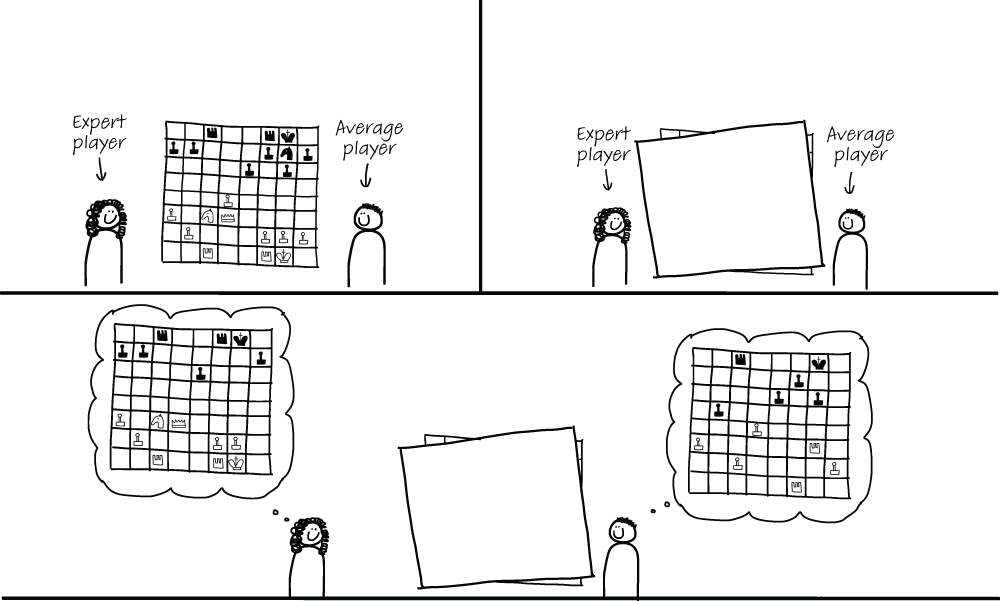
Figure 2.3 De Groot’s first chess experiment in which experts and average chess players were asked to remember a chess setup. Expert players were able to recall more pieces than average players.
De Groot’s conclusion from this experiment was that experts outperformed average players because expert chess players simply had an STM with a larger capacity than average players. He also hypothesized that a larger STM could be the reason that the expert players became experts in the first place; expert players could fit more chess pieces in their memories, which allowed them to play better in chess games too.
However, de Groot was not entirely convinced, so he performed another experiment. It was similar to the first experiment: again, average and expert players were asked to remember chess setups after inspecting the setups for a brief period of time. The difference was in the chess setups themselves. Instead of showing the participants a real chess setup like in experiment 1, he showed them chessboards with randomly placed pieces—and not just a little bit random; the chess pieces were set up in entirely unrealistic configurations. De Groot then again compared the performance of the expert players with average players. The results came out differently for the second experiment: both types of players performed equally badly!
The results of experiment 1 and experiment 2 led de Groot to dive deeper into how exactly both groups of chess players remembered the setups. It turned out that in both experiments the average players mostly remembered the setups piece by piece. They would try to recall the setups by saying “a rook at A7, a pawn at B5, a king at C8,” and so on.
In the first experiment, however, the expert chess players exhibited a different strategy. The experts very heavily relied on information stored in their LTM. For example, they might remember “a Sicilian opening, but one knight is two squares to the left.” Remembering the setup like that, of course, is only possible if you know what pieces are used in the Sicilian opening, which is stored in the LTM. Remembering the setups as the experts did occupies only about four places in working memory (Sicilian opening, knight, 2, left). As you know, the STM is estimated to hold between two and six elements, so four elements could fit.
Some expert players could also connect the setups to their own personal playing history, or the history of games they’d watched or read about. They might remember a setup as “the game I played that one rainy Saturday in March against Betsie, but with castling on the left.” This too is information that is stored in the LTM. Remembering a setup by thinking of a previous experience also only occupies just a few slots in STM.
Average players, however, who were trying to remember all the individual pieces would quickly run out of STM. They could not group information in logical ways as experts did. This explained why average players performed worse than experts in experiment 1; when their STM was full, no new locations could be stored.
De Groot called the groups into which people combined information chunks. He considered “Sicilian opening,” for example, one chunk, which can fit into one slot in STM. The theory of chunks also adequately explains why both types of players performed equally in experiment 2. In a random chess setup, expert players could no longer rely on the repository of boards in their LTM to quickly divide the pieces into larger groups.
EXERCISE 2.1 Maybe you are convinced by de Groot’s experiments, but it would be even more powerful to experience chunking yourself!
Look at this sentence for five seconds and try to remember it as best as you can:

How much can you remember of that sentence?
EXERCISE 2.2 Now try to remember this sentence by inspecting it for five seconds:

I’d guess that second sentence was easier than the first one. That’s because this second sentence consists of letters that you recognize. It may be hard to believe, but these two sentences were the same length: 3 words, 12 characters, 9 different characters.
EXERCISE 2.3 Let’s try one more. This sentence again consists of three words and nine different characters. Look at this sentence for five seconds and try to remember it:

The third sentence was a lot easier than the other two, right? You can remember this sentence with great ease. That’s because you can chunk the characters in the third sentence into words. You can then remember just three chunks: “cat,” “loves,” and “cake.” The amount of three elements is well below the capacity of your STM, so it’s possible to remember all of this sentence easily, while in the first two examples the number of elements likely exceeds the limits of your STM.
So far in this chapter, you’ve seen that the more information you have stored about a specific topic, the easier it is to effectively divide information into chunks. Expert chess players have many different chess setups stored in their LTM, so they can remember a board better. In the previous exercise, in which you were asked to remember characters, letters, and then words, you were able to recall the words with a lot more ease than unfamiliar characters. Words are easier to remember because you can retrieve their meaning from your LTM.
The finding that it is easier to remember when you have a lot of knowledge about something in your LTM also holds in programming. In the remainder of this chapter, we will explore research findings on programming and chunking specifically. After that, we will dive into how to practice chunking code and how to write code that is easy to chunk.
De Groot’s studies have been widely influential in cognitive science. His experiments also motivated computer science researchers to study whether similar results would hold for programming.
For example, in 1981 Katherine McKeithen, a researcher at Bell Labs, tried to repeat de Groot’s experiments on programmers.2 She and her colleagues showed small, 30-line ALGOL programs to 53 people: beginner, intermediate, and expert programmers. Some of the programs were real programs, inspired by de Groot’s first experiment in which he asked participants to remember realistic chess setups. In other programs the lines of code were scrambled, similar to de Groot’s second experiment in which the chess pieces were placed in random locations. Participants were allowed to study the ALGOL programs for two minutes, after which they had to reproduce the code to the best of their ability.
McKeithen’s results were quite similar to de Groot’s: with the unscrambled programs, experts did better than intermediate programmers, and intermediate programmers in turn performed better than beginners. With the scrambled programs there was hardly any difference between the three different groups of programmers, as shown in figure 2.4.
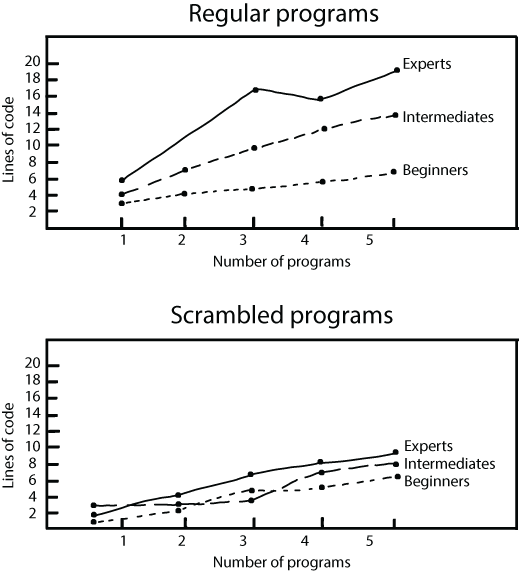
Figure 2.4 The number of lines of code that beginners, intermediates, and experts could recall in McKeithen et al.’s experiments. The top image shows participants’ performance on regular programs, where experts clearly excel. The bottom image shows performance on scrambled, nonsensical programs; here, the performance of experts, intermediates, and beginners is very similar.
The biggest takeaway from this research is that beginners will be able to process a lot less code than experts. This can be important to remember when you are onboarding a new team member or when you are learning a new programming language yourself. Even a smart person capable of programming well in a different programming language or context will struggle with unfamiliar keywords, structures, and domain concepts when these aren’t yet stored in their LTM. You’ll learn strategies for doing this quickly and reliably in the next chapter.
Before we dive deeper into the details of STM, I first want to spend some time on what happens when information enters the brain. There is a stage that information passes through before it reaches STM, called sensory memory .
In our computer metaphor, you can think of sensory memory as an I/O buffer communicating with an input device like a mouse or a keyboard. Information sent from peripheral devices is briefly stored in the I/O buffer. This is true for our sensory memory too; it briefly holds visual, auditory, or haptic input. Each of the five senses—sight, hearing, taste, smell, touch—has its own cache in the sensory memory. Not all of these are interesting to discuss in the context of programming, so in this chapter we will limit ourselves to the one for sight, called the iconic memory .
Before information reaches your STM, it first enters the sensory memory through your senses. When reading code, information comes in through your eyes, after which it is briefly stored in the iconic memory.
The best way to illustrate the iconic memory is to imagine that it is New Year’s Eve, and you are holding a sparkler. If you move the sparkler quickly enough, you can form a letter in the air. You’ve probably never thought about what makes that possible, but your iconic memory is what enables you to see patterns in light. The iconic memory can store visual stimuli, which are created by an image you just saw, for a little while. You can experience another example if you close your eyes after reading this sentence. With your eyes closed, you still “see” the shape of the page. That too is iconic memory.
Before we investigate how we can use the iconic memory in reading code, let’s examine what we know about it. One of the pioneers of research on iconic memory was American cognitive psychologist George Sperling, who researched sensory memory in the 1960s. In his most famous study,3 participants were shown a 3×3- or 3×4-letter grid. This grid was similar to those you might see at an eye exam, but with all the letters being the same size, as shown in figure 2.5.
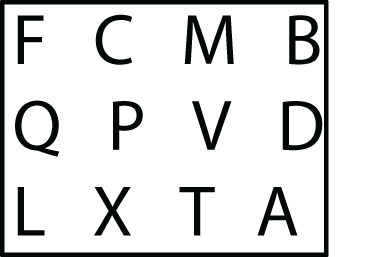
Figure 2.5 An example of Sperling’s letter grid, which participants had to remember
Participants were shown the images for a twentieth of a second (0.05 seconds or 50 milliseconds), after which they were asked to recall a randomly selected line of the grid, such as the top row or the left column. In 50 milliseconds they would never be able to really read the letters, because the reaction time of a human eye is around 200 milliseconds (one-fifth of a second)—which is quick, but not quick enough. Yet in this experiment, participants could remember all letters in a random line or column from the grid in about 75% of the cases. Because the participants were recalling a random line, the fact that they succeeded 75% of the time meant that they had stored many or all of the 9 or 12 letters in the grid, which is more than would fit in STM.
It was not the case that these participants had excellent memories. When participants were asked to reproduce all the letters, they did a lot worse than when they were asked to name a specific set of letters. Typically participants could remember about half of the letters. That second finding fits with what we already know about the STM, which was also known when Sperling conducted his experiments: it can store up to about six items. The fact that many of the participants were able to remember all the letters when asked for only three or four at a time, however, showed that the letter grid in its entirety was stored somewhere, and that “somewhere” needed to be different than the STM with its limited capacity. Sperling called the location of information coming from the visual sense the iconic memory. As shown in his experiments, not all information that is stored in the iconic memory can be processed in the STM.
As you just learned, everything you read is first stored in your iconic memory. But not everything that your iconic memory stores can be processed by your STM, so when you read code in detail, you have to make choices about what you can process. These choices, however, do not happen consciously—overlooking certain details in code often happens by accident. This means that you can theoretically remember more information about code than you can process in your STM.
You can use this knowledge to try to read code more efficiently by first looking at it for a brief period of time and then reflecting on what you have seen. This “code at a glance” exercise will help you gain an initial image of the code.
Select a piece of code that is somewhat familiar to you. It can be something from your own codebase, or a small and simple piece of code from GitHub. It doesn’t matter all that much what code you select, or the programming language used. Something the size of half a page works best, and if possible, printing it on paper is encouraged.
Look at the code for a few seconds, then remove it from sight and try to answer the following questions:
When you try to reproduce code you just read, studying the lines of code that you can reproduce can be a great diagnostic tool that helps you understand your own (mis)understanding. However, it’s not just what you can remember—the order in which you remember the code can also be a tool for understanding.
The researchers who repeated de Groot’s chess studies using ALGOL programs performed another experiment that provided more insights into chunking.4 In the second experiment, beginner, intermediate, and expert programmers were trained to remember 21 ALGOL keywords, such as IF, TRUE, and END.
The keywords used in the study are shown in figure 2.6. If you want to, you can try to remember all the keywords yourself.
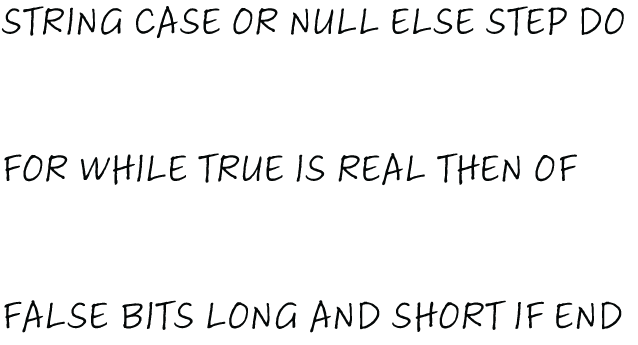
Figure 2.6 The 21 ALGOL keywords that McKeithen et al. used in their study. Beginners, intermediate programmers, and experts were trained to learn all 21 keywords.
When the participants could repeat all 21 keywords reliably the researchers asked them to list all the keywords. If you have memorized them too, try to write them down now, so you can compare yourself with the people in the study.
From the order in which participants repeated the keywords, McKeithen et al. were able to gain insight into the connections they had created between keywords. The results of the study showed that beginners grouped the ALGOL keywords in different ways than experts. Beginners, for example, often used sentences as memory aids, such as “TRUE IS REAL THEN FALSE.” Experts, however, would use their prior knowledge of programming to group the keywords; for example, they combined TRUE and FALSE, and IF, THEN, and ELSE. This study again confirmed that experts think about code in a different way than beginners do.
Once you have done the earlier remember-and-chunk exercise several times, you will start to develop an intuition about what types of code are chunkable. From de Groot’s study with chess players, we know that situations that are usual or predictable, like famous openings, ease chunking. So, if your goal is to create chess boards that are easy to remember, use a well-known opening. But what can we do in code to make it easier to read? Several researchers have studied ways to write code in such a way that it is easier to chunk, and thus easier to process.
If you want to write code that is easy to chunk, make use of design patterns. Those were the findings of Walter Tichy, professor of computer science at the Karlsruhe Institute of Technology in Germany. Tichy has investigated chunking in code, but this happened somewhat by accident. He was not studying code memory skills, but instead was looking into design patterns. He was especially interested in the question of whether design patterns help programmers when they are maintaining code (adding new features or fixing bugs).
Tichy started small, with a group of students, testing whether giving them information on design patterns helped them understand code.5 He divided the students into two groups: one group received code with documentation, while the other group received the same code but without documentation on design patterns. The results of Tichy’s study showed that having a design pattern present in the code was more helpful for performing maintenance tasks when the programmers knew that the pattern was present in the code.
Tichy performed a similar study on professionals, too.6 In this case the participants started with the code modification exercise, then subsequently took a course on design patterns. After the course, they again modified code, with or without a design pattern. The results of this study on professionals are shown in figure 2.7. It should be noted that the participants in this study maintained different code after the test, so they were not familiar with the code used after the course. The study used two codebases: participants who saw codebase A before the course used codebase B afterward, and vice versa.
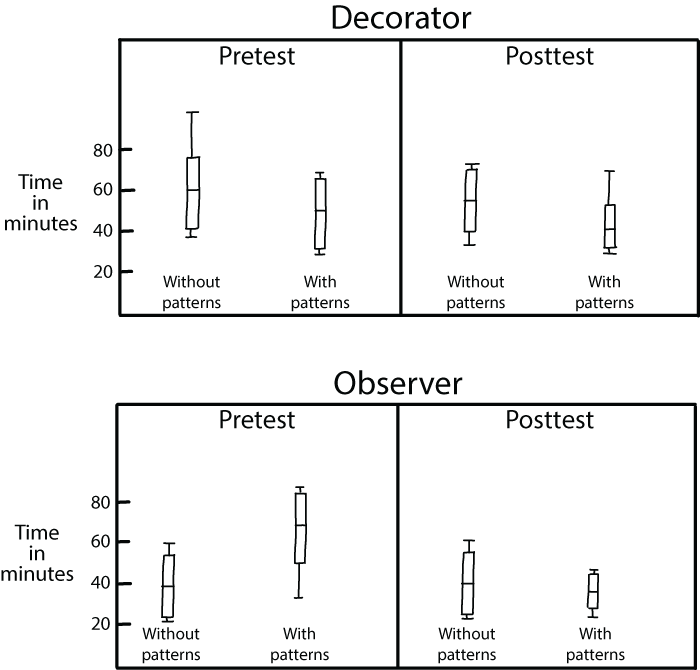
Figure 2.7 These graphs show the results of Walter Tichy’s study on design patterns with professionals. “Without patterns” indicates the time participants took to modify the original code without design patterns, while “with patterns” shows the time they took on the code that included design patterns. “Pretest” is the time that participants took before the course on design patterns; “posttest” is the time after the design patterns course. The results show that after the course maintenance time was significantly lower for code that contains design patterns.
This figure presents the results of Tichy’s study with box-and-whisker plots.7 It shows that after taking a course on design patterns (as seen in the righthand graphs labeled “posttest”), the time participants needed to maintain code was lower for the code with patterns but not for the code without patterns. The results of this study indicate that gaining knowledge about design patterns, which is likely going to improve your chunking ability, helps you process code faster. You can also see in the graphs that there is a difference in effect for different design patterns: the decrease in time is bigger for the observer pattern than for the decorator pattern.
Should you write comments or should code “document itself”? This is a question that often sparks debate among programmers. Researchers have studied this question too and have found several interesting directions to dive into.
Research has shown that when code contains comments, programmers will take more time to read it. You might think that is a bad thing—that comments slow you down—but in fact, this is a sign that comments are being read when programmers read code. At the very least this is showing that you are not adding comments to your code for nothing. Martha Elizabeth Crosby, a researcher at the University of Hawaii, studied how programmers read code and what role comments play in their reading behavior.8 Crosby’s work shows that beginners focus a lot more on comments than experienced programmers do. Part 4 of this book will cover the process of onboarding junior colleagues into your team in more depth, but Crosby’s findings suggest that adding comments to code can be a good way to make it easier for new programmers to understand your codebase.
In addition to supporting novice programmers, comments also play a role in how developers chunk code. Quiyin Fan’s 2010 dissertation at the University of Maryland, “The Effects of Beacons, Comments, and Tasks on Program Comprehension Process in Software Maintenance,” showed that developers depend heavily on comments when reading code. In particular, high-level comments like “This function prints a given binary tree in order” can help programmers chunk larger pieces of code. Low-level comments, on the other hand, such as “Increment i (by one)” after a line that reads i++;, can create a burden on the chunking process.
A final thing you can do to make the process of chunking code easier is to include beacons. Beacons are parts of a program that help a programmer understand what the code does. You can think of a beacon like a line of code, or even part of a line of code, that your eye falls on which makes you think, “Aha, now I see.”
Beacons typically indicate that a piece of code contains certain data structures, algorithms, or approaches. As an example of beacons, consider the following Python code that traverses a binary tree.
Listing 2.3 In-order tree traversal in Python
# A class that represents a node in a tree

class Node:
    def __init__(self, key):
        self.left = None
        self.right = None
        self.val = key


# A function to do in-order tree traversal
def print_in_order(root):
    if root:

        # First recur on left child
        print_in_order(root.left)

        # then print the data of node
        print(root.val)

        # now recur on right child
        print_in_order(root.right)


print("Contents of the tree are")
print_in_order(tree)
This Python code contains several beacons from which a reader can deduce that this code uses a binary tree as the data structure:
Beacons provide an important signaling service for programmers during the comprehension process because they often act as a trigger for programmers to confirm or refute hypotheses about the source. For example, when you start to read the Python code in the previous listing, you might not have any idea what this code is doing. When you read the first comment and the class Node , you get the sense that this code concerns trees. The fields left and right then further narrow your hypothesis, indicating that this code works on a binary tree.
We typically distinguish two different types of beacons: simple beacons and compound beacons.
Simple beacons are self-explaining syntactic code elements, such as meaningful variable names. In the preceding Python code, root and tree are simple beacons. In some code, operators such as +, >, and && and structural statements such as if, else, and so on can be considered simple beacons too because they are simple enough to process and can help a reader unlock the functionality of code by themselves.
Compound beacons are larger code structures comprised of simple beacons. Compound beacons provide semantic meaning for functions that simple beacons execute together. In the Python code in listing 2.3, self.left and self.right together form a compound beacon. Separately, they do not offer much insight into the code, but together they do. Code elements can also serve as compound beacons. For instance, a for-loop can be a compound beacon because it contains the variable, the initial assignment, and the increment and the boundary values.
Beacons can take many forms; we have already seen that variable and class names can serve as beacons, and other identifiers such as method names can be beacons too. In addition to names, specific programming constructs like a swap or initialization to an empty list can also be beacons.
Beacons have a relationship to the chunks, but most researchers see them as different concepts. Beacons are usually seen as smaller parts of code than chunks. Crosby, whose work on the use of comments I summarized earlier, also studied the role of beacons. She found that expert programmers, but not novices, make heavy use of beacons when they are reading and comprehending code.9 The following exercise will help you recognize useful beacons.
Selecting the right kinds of beacons to use in code can take some practice. Use this exercise to deliberately practice using beacons in code.
For this exercise select an unfamiliar codebase, but do select one in a programming language that you are familiar with. If possible, it would be great to do this exercise on a codebase where you know someone familiar with the details. You can then use that person as a judge of your understanding. In the codebase, select one method or function.
Study the selected code and try to summarize the meaning of the code.
Step 3: Actively notice beacons that you use
Whenever you have an “aha” moment where you get a bit closer to the functionality of the code, stop and write down what it was that led you to that conclusion. This could be a comment, a variable name, a method name, or an intermediate value—all of those can be beacons.
When you have a thorough understanding of the code and a list of beacons, reflect using these questions:
Step 5: Contribute back to the code (optional)
Sometimes, but not always, the beacons you have selected could be improved or extended. Or the code might be in need of additional beacons that aren’t there yet. This is a great moment to enrich the code with the new or improved beacons. Because you weren’t familiar with the code before this exercise, you have a good perspective on what would help someone else who is new to the codebase too.
Step 6: Compare with someone else (optional)
If you have a coworker or friend who wants to improve their beacon use too, you can do this exercise together. It can be interesting to reflect on the differences both of you had in reproducing code. Because we know there are large differences between beginners and experts, this exercise might also help you understand your level of skill in a programming language relative to someone else’s.
The studies described earlier in this chapter showed that people with more experience can remember more chess pieces or words or lines of code. While knowing more programming concepts comes with experience, there are several things you can do to practice chunking code deliberately.
In many places in this book, you will see the phrase deliberate practice . Deliberate practice is using small exercises to improve a certain skill. Push-ups are deliberate practice for your arm muscles; tone ladders are deliberate practice for musicians; spelling words is deliberate practice for new readers. In programming, for many different reasons, deliberate practice is not all that commonly used. Many people have learned programming mainly by programming a lot. While that works, it might not work as effectively as possible. To deliberately practice chunking, actively trying to remember code is a great exercise.
This exercise helps you recognize what concepts you are familiar with and what concepts are harder for you by testing your code reading memory. The underlying assumption is that, as shown by the experiments outlined, familiar concepts are easier to remember. What you can remember is what you know, so these exercises can be used for (self) diagnosis of your code knowledge.
Select a codebase you are somewhat familiar with—maybe something you work with regularly, but not mainly. It can also be something you personally wrote a while ago. Make sure you have at least some knowledge of the programming language the code is written in. You have to know more or less what the code does, but not know it intimately. You want to be in a situation similar to the chess players; they know the board and the pieces but not the setup.
In the codebase, select a method or function, or another coherent piece of code roughly the size of half a page, with a maximum of 50 lines of code.
Study the selected code for a bit, for a maximum of two minutes. Set a timer so you don’t lose track of the time. After the timer runs out, close or cover the code.
Take a piece of paper, or open a new file in your IDE, and try to recreate the code as best as you can.
When you are sure you have reproduced all the code you possibly can, open the original code and compare. Reflect using these questions:
Do the lines of code that you missed contain programming concepts that are unfamiliar to you?
Do the lines of code that you missed contain domain concepts that are unfamiliar to you?
Step 5: Compare with someone else (optional)
If you have a coworker who wants to improve their chunking abilities too, you can do this exercise together. It can be very interesting to reflect on the differences in the code you reproduce. Because we know there are large differences between beginners and experts, this exercise might also help you understand your level of skill in a programming language relative to someone else’s.
To overcome the size limitation, your STM collaborates with your LTM when you remember information.
When you read new information, your brain tries to divide the information into recognizable parts called chunks.
When you lack enough knowledge in your LTM, you have to rely on low-level reading of code, like letters and keywords. When doing that, you will quickly run out of space in your STM.
When your LTM stores enough relevant information, you can remember abstract concepts like “a for-loop in Java” or “selection sort in Python” instead of the code at a lower level, occupying less space in your STM.
When you read code, it is first stored in the iconic memory. Only a bit of the code is subsequently sent to the STM.
Remembering code can be used as a tool for (self) diagnosis of your knowledge of coding. Because you can most easily remember what you already know, the parts of code that you remember can reveal the design patterns, programming constructs, and domain concepts you are most familiar with.
Code can contain characteristics that make it easier to process, such as design patterns, comments, and explicit beacons.
1. See “Measuring Program Comprehension: A Large-Scale Field Study with Professionals” by Xin Xia et al. (2017), https://ieeexplore.ieee.org/abstract/document/7997917.
2. “Knowledge Organization and Skill Differences in Computer Programmers” by Katherine B. McKeithen et al. (1981), http://mng.bz/YA5a.
3. “The Information Available in Brief Visual Presentations” by George Sperling (1960), http://mng.bz/O1ao.
4. The results of this experiment were reported in the same paper, “Knowledge Organization and Skill Differences in Computer Programmers” by Katherine B. McKeithen et al.
5. See “Two Controlled Experiments Assessing the Usefulness of Design Pattern Information During Program Maintenance,” by Lutz Prechelt, Barbara Unger, and Walter Tichy (1998), http://mng.bz/YA9K.
6. “A Controlled Experiment Comparing the Maintainability of Programs Designed with and without Design Patterns—A Replication in a Real Programming Environment,” by Marek Vokácˇ, Walter Tichy, Dag I. K. Sjøberg, Erik Arisholm, Magne Aldrin (2004), http://mng.bz/G6oR.
7. The box represents half of the data, with the top line the median of the third quartile and the bottom line the median of the first quartile. The line within the box represents the median and the “whiskers” show the minimum and maximum values.
8. “How Do We Read Algorithms? A Case Study” by Martha E. Crosby and Jan Stelovsky, https://ieeexplore.ieee .org/document/48797.
9. See “The Roles Beacons Play in Comprehension for Novice and Expert Programmers” by Martha E. Crosby, Jean Scholtz, and Susan Wiedenbeck, http://mng.bz/zGKX.