Confusion is part of programming. When you learn a new programming language, concept, or framework, the new ideas might scare you. When reading unfamiliar code or code that you wrote a long time ago, you might not understand what the code does or why it was written the way it was. Whenever you start to work in a new business domain, new terms and jargon can all bump into each other in your brain.
It’s not a problem to be confused for a while, of course, but you don’t want to be confused for longer than needed. This chapter teaches you to recognize and decode your confusion. Maybe you’ve never thought about this, but there are different ways to be confused. Not knowing the meaning of a domain concept is a different sort of confusion than trying to read a complicated algorithm step by step.
Different types of confusion relate to different kinds of cognitive processes. Using various code examples, this chapter will detail three different kinds of confusion and explain what happens in your mind.
By the end of this chapter, you will be able to recognize the different ways that code might cause confusion and understand the cognitive process happening in your brain in each case. Once you know about the three different types of confusion, and the three related cognitive processes, later chapters will teach you how to improve these cognitive processes.
All unfamiliar code is confusing to a certain extent, but not all code is confusing in the same way. Let’s illustrate that with three different code examples. All three examples translate a given number N or n to binary. The first program is written in APL, the second one in Java, and the third one in BASIC.
Give yourself a few minutes to deeply inspect these programs. What type of knowledge do you rely on when reading them? How does that differ for the three programs? You might not have the words at this point to express what happens in your brain when you read these programs, but I would guess it will feel differently for each. At the end of this chapter, you will have the vocabulary to discuss the different cognitive processes that take place when you read code.
The example in listing 1.1 is a program converting the number n into a binary representation in APL. The confusion here lies in the fact that you might not know what T means. Unless you are a mathematician from the 1960s, you’ve probably never used APL (a programming language). It was designed specifically for mathematical operations and is hardly in use anywhere today.
Listing 1.1 Binary representation in APL
2 2 2 2 2 ⊤ n
The second example is a program converting the number n into a binary representation in Java. Confusion can be caused here by not knowing about the inner workings of toBinaryString () .
Listing 1.2 Binary representation in Java
public class BinaryCalculator {
    public static void mian(Integer n) {
       System.out.println(Integer.toBinaryString(n));
    }
}
The final example is a program converting the number N into a binary representation in BASIC. This program is confusing because you cannot see all the small steps that are being executed
Listing 1.3 Binary representation in BASIC
 1  LET N2 =  ABS (INT (N))
 2  LET B$ = ""
 3  FOR N1 = N2 TO 0 STEP 0
 4      LET N2 =  INT (N1 / 2)
 5      LET B$ =  STR$ (N1 - N2 * 2) + B$
 6      LET N1 = N2
 7  NEXT N1
 8  PRINT B$
 9  RETURN
Now let’s dive into what happens when you read the three programs. First is the APL program. See how the program is converting number n into binary representation in APL. The confusion here lies in the fact that you might not know what T means.
Listing 1.4 Binary representation in APL
2 2 2 2 2 ⊤ n
I am assuming most readers of this book are not that familiar with APL and will not know the meaning of the operator T. Hence, the confusion here lies in a lack of knowledge.
For the second program, the source of the confusion is different. I assume that with some familiarity with programming, even if you are not an expert in Java, your brain can find the relevant parts of the Java program. This shows a program converting number n into binary representation in Java. Confusion can be caused here by not knowing about the inner workings of toBinaryString ().
Listing 1.5 Binary representation in Java
public class BinaryCalculator {
    public static void mian(Integer n) {
       System.out.println(Integer.toBinaryString(n));
    }
}
Based on the name of the method, you can guess the functionality. However, to deeply understand what the code does, you would need to navigate to the definition of toBinaryString () elsewhere in the code and continue reading there. Thus, the problem here is a lack of information. The information about exactly how toBinary-String () works is not readily available but needs to be found somewhere else in the code.
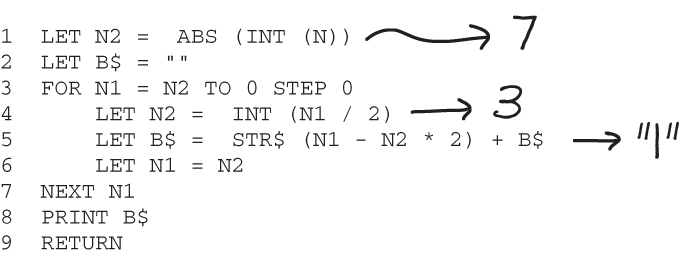
In the third program, based on the names of variables and the operations, you can make an educated guess about what the code does. But if you really want to follow along, you cannot process the entire execution in your brain. The program converting number N into binary representation in BASIC is confusing because you cannot oversee all the small steps being executed. If you need to understand all the steps, you can use a memory aid like intermediate values of variables shown in figure 1.1.
Figure 1.1 Binary representation in BASIC
The confusion here is related to a lack of processing power. It’s too hard to hold all the intermediate values of the variables and the corresponding actions in your mind at the same time. If you really want to mentally calculate what this program does, you will likely use a pen and paper to scribble down a few intermediate values, or even write them next to the lines in the code snippet, as shown in this example. In these three programs we have seen that confusion, while always annoying and uncomfortable, can have three different sources. First, confusion can be caused by a lack of knowledge of the programming language, algorithm, or domain at hand. But confusion can also be caused by not having full access to all the information you need to understand code. Especially because code nowadays often uses various libraries, modules, and packages, understanding code can require extensive navigation in which you have to gather new information while also remembering what you were doing in the first place. Finally, sometimes code is more complicated than your brain can process, and what confuses you is a lack of processing power.
Now let’s dive into the different cognitive processes that are associated with each of these three types of confusion.
Let’s zoom in on the three different cognitive processes that happen in your brain when reading the three example programs. As outlined, different forms of confusion are related to issues with different cognitive processes, all related to memory. These are explained in the remainder of the chapter in more detail.
A lack of knowledge means that not enough relevant facts are present in your long-term memory (LTM), the place where all your memories are permanently stored. A lack of information, on the other hand, presents a challenge for your short-term memory (STM). Information that you are gathering has to be stored in STM temporarily, but if you have to search in a lot of different places, you might forget some of the things you already read. Finally, when you must process a lot of information, that takes a toll on the working memory, which is where your thinking happens.
Here is a quick summary of how the different types of confusion are related to the different cognitive processes:
These three cognitive processes are not only in play when reading code, but in all cognitive activities, including (in the context of programming) writing code, designing the architecture of a system, or writing documentation.
The first cognitive process that is used while programming is LTM. This can store your memories for a very long time. Most people can recall events that happened years or even decades ago. Your LTM plays a role in everything that you do, from tying your shoelaces, where your muscles remember what to do almost automatically, to writing a binary search, where you remember the abstract algorithm, the syntax of the programming language, and how to type on a keyboard. Chapter 3 will detail the use of LTM in more detail, including these different forms of remembering and ways to strengthen this cognitive process.
Your LTM stores several types of relevant programming information. It can, for example, store memories of when you successfully applied a certain technique, the meaning of keywords in Java, the meaning of words in English, or the fact that maxint in Java is 2147483647.
The LTM can be compared to the hard drive of a computer, holding facts for long periods of time.
In reading the program in APL, what you use most is your LTM. If you know the meaning of the APL keyword ⊤, you will retrieve that from LTM when reading this program.
The APL program also illustrates the importance of relevant syntax knowledge. If you do not know what ⊤means in APL, you will have a very hard time understanding the program. On the other hand, if you know that it represents the dyadic encod function, which is a function that translates a value into a different number representation, reading the program is almost trivial. No words need to be understood, and you do not have to figure out the working of the code step by step either.
The second cognitive process involved in programming is STM. Your STM is used to briefly hold incoming information. For example, when someone reads a phone number to you over the phone, it does not go into your LTM straight away. The phone number first goes into your STM, which has a limited size. The estimates differ, but most scientists agree that just a few items fit in STM, and certainly not more than a dozen.
For example, when reading a program, keywords, variable names, and data structures used are temporarily stored in the STM.
In the Java program, the biggest cognitive process in play is STM. You first process line 1 of listing 1.6, which teaches you that the input parameter n of the function is an integer. At that point, you are not sure what the function will do, but you can continue reading while also remembering that n is a number. The knowledge that n is an integer is stored in your STM for a while. You then continue to line 2, where toBinaryString () indicates to you what the function will return. You might not remember this function in a day, or even in an hour. When your brain has solved the problem at hand—in this case, understanding the function—the STM is emptied.
Listing 1.6 A program converting number n into binary representation in Java
    public static void mian(Int n) {
       System.out.println(Integer.toBinaryString(n));
    }
}
Confusion can be caused here by not knowing about the inner workings of toBinaryString ().
Even though STM plays a large role in the comprehension of this program, LTM is involved in reading this program too. In fact, our LTM is involved in everything we do. So, when reading the Java program, you use your LTM as well.
For example, if you are familiar with Java, as I assume most readers are, you know that the keywords public class and public static void main can be disregarded if you are asked to explain what the function does. It is likely you did not even notice that the method is in fact called “mian” and not “main.”
Your brain took a shortcut there by assuming a name, showing a blending of the two cognitive processes. It decided to use “main” based on prior experience stored in your LTM rather than using the actual name that you read and that was stored in your STM. This shows that these two cognitive processes are not as separate from each other as I have presented them.
If the LTM is like the hard drive of your brain, storing memories forever, you can think of the STM like the computer’s RAM or a cache that can be used to temporarily store values.
The third cognitive process that plays a role in programming is working memory. STM and LTM are mostly storage devices. They hold information, either for a short while after reading or hearing it, in the case of STM, or for a long time, in the case of LTM. The actual thinking, however, happens not in the LTM or STM, but in working memory. This is where new thoughts, ideas, and solutions are formed. If you think of the LTM as a hard drive and the STM as RAM, the working memory is best compared to the processor of the brain.
In reading the BASIC program, you use your LTM—for example, when remembering the meaning of keywords like LET and EXIT. In addition, you use your STM to store some of the information you encounter, like the fact that B$ starts off as an empty string.
However, your brain does a lot more while you are reading the BASIC program. You are mentally trying to execute the code, to understand what is happening. That process is called tracing —the mental compiling and executing of code. The part of the brain used to do tracing and other cognitively complex tasks is called the working memory. You can compare it to the processor of a computer, which performs calculations.
When tracing very complex programs, you might feel the need to note the values of variables, either in the code or in a separate table.
The fact that your brain feels the need to store information externally can be a sign that your working memory is too full to process more information. We will cover this information overload and how to prevent the brain from overloading in chapter 4.
In the previous section, I described in detail three important cognitive processes that are relevant to programming. In summary, your LTM stores information you have acquired for a long time, the STM temporarily stores information you have just read or heard, and the working memory processes information and forms new thoughts. While I described them as separate processes, these cognitive processes have strong relationships with each other. Let’s touch on how they relate to one another.
In fact, all three cognitive processes are activated to a certain extent when you do any thinking, as illustrated by figure 1.2. You might have experienced all three processes consciously when you were reading the Java code snippet earlier in this chapter (listing 1.2). Some pieces of information were stored in your STM, for example when you read that n was an integer. At the same time, your brain retrieved the meaning of what an integer is from your LTM, and you were thinking about the meaning of the program using your working memory.
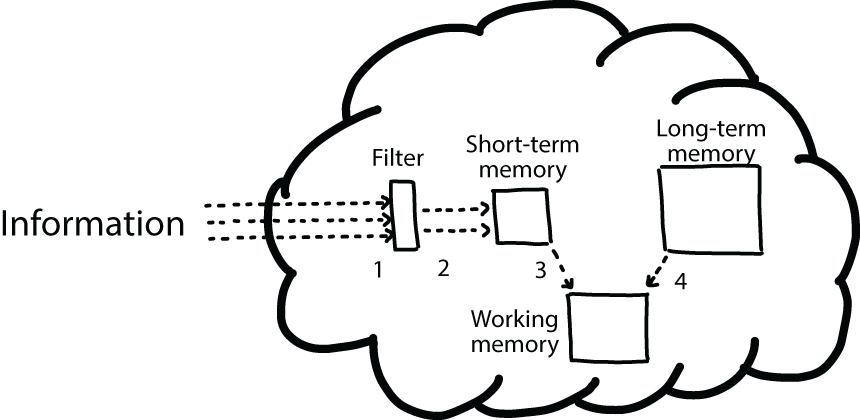
Figure 1.2 An overview of the three cognitive processes that this book covers: STM, LTM, and working memory. The arrows labeled 1 represent information coming into your brain. The arrows labeled 2 indicate the information that proceeds into your STM. Arrow 3 represents information traveling from the STM into the working memory, where it’s combined with information from the LTM (arrow 4). Working memory is where the information is processed while you think about it.
So far in this chapter, we have focused specifically on the cognitive processes that happen when you read code. However, these three cognitive processes are involved in many other programming-related tasks too.
For example, consider when you read a bug report from a customer. The bug seems to be caused by an off-by-one error. This bug report enters the brain through your senses—your eyes if you are sighted, or your ears if you read with a screen reader. To solve the bug, you must reread code that you wrote a few months ago. While you are rereading the code, your STM stores what you read, while your LTM tells you about what you implemented a few months ago—for example, that you used the actor model then. In addition to memories about your experiences, you also have factual information stored in your LTM, like how you could solve an off-by-one error. All this information—the new information about the bug report from your STM and your personal memories and relevant facts about how to solve similar bugs from your LTM—enters your working memory, where you can think about the problem at hand.
EXERCISE 1.1 To practice your newly gained understanding of the three cognitive processes involved in programming, I’ve prepared three programs. This time, though, no explanation is given of what the code snippets do. You will, therefore, have to read the programs and decide what they do for yourself. The programs are again written in APL, Java, and BASIC, in that order. However, each of the programs performs a different operation, so you cannot rely on your understanding of the first program to support reading the other programs.
Read the programs carefully and try to determine what they do. While doing this, reflect on the mechanisms that you use. Use the questions in the following table to guide your self-analysis.
Code snippet 1: An APL program
f ← {⍵≤1:⍵ ⋄ (∇ ⍵-1)+∇ ⍵-2}
What does this code do? What cognitive processes are involved?
Code snippet 2: A Java program
public class Luhn {
    public static void main(String[] args) {
        System.out.println(luhnTest("49927398716"));
    }

    public static boolean luhnTest(String number){
        int s1 = 0, s2 = 0;
        String reverse = new StringBuffer(number).reverse().toString();
        for(int i = 0 ;i < reverse.length();i++){
            int digit = Character.digit(reverse.charAt(i), 10);
            if(i % 2 == 0){//this is for odd digits
                s1 += digit;
            }else{//add 2 * digit for 0-4, add 2 * digit - 9 for 5-9
                s2 += 2 * digit;
                if(digit >= 5){
                    s2 -= 9;
                }
            }
        }
        return (s1 + s2) % 10 == 0;
    }
}
What does this code do? What cognitive processes are involved?
Code snippet 3: A BASIC program
100 INPUT PROMPT "String: ":TX$
120 LET RES$=""
130 FOR I=LEN(TX$) TO 1 STEP-1
140   LET RES$=RES$&TX$(I)
150 NEXT
160 PRINT RES$
What does this code do? What cognitive processes are involved?
Confusion while coding can be caused by three issues: a lack of knowledge, a lack of easy-to-access information, or a lack of processing power in the brain.
Three cognitive processes are involved when you read or write code.
The first process is the retrieval of information from LTM, where the meaning of keywords is stored, for example.
In the second process, information about the program at hand is stored in your STM, which can temporarily hold information like the name of a method or variable.
The final process involved is the working memory. This is where processing of the code happens, for example, deciding that an index is one too low.
All three cognitive processes are at work while you’re reading code, and the processes complement each other. For example, if your STM encounters a variable name like n, your brain searches your LTM for related programs you’ve read in the past. And when you read an ambiguous word, your working memory is activated and your brain will try to decide the right meaning in this context.