STEP 3:
Create Additional Folders as Needed
In the past, I would advise people at this stage to also create new folders for each of the areas and resources they imagined they would one day like to use. I thought having all those folders ready to go would make it more convenient to save new things in the future, but I’ve since realized the error of my ways.
My lightbulb moment came when I was hired to work with a software development firm in Silicon Valley on organizing their shared cloud storage drive.
We brainstormed all the PARA folders they might want to use and created their entire PARA system in one day. It felt great! But in the following weeks and months, I heard a very different story. Every time the engineers were looking for something, they would encounter a perfectly titled folder that seemed to promise exactly what they were seeking, only to double-click on it and find it empty. We had created a labyrinth of tantalizing doorways leading to empty rooms, which only caused frustration and disappointment as they failed to find what they were looking for again and again!
This experience led me to form a new rule: never create an empty folder (or tag, or directory, or other container) before you have something to put in it.
Therefore, for your areas and resources, I recommend you hold off on creating any “speculative” folders until you’re sure what you want to put in them. It takes only a moment to create a new folder anyway, so there’s no reason to do it in advance. These two categories are less actionable, and therefore less important, so it’s not critical that you have them completely fleshed out from day one.
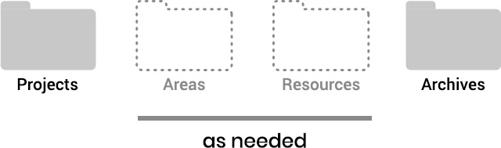
When you’re ready, follow the same three steps above with your cloud storage drive, notetaking app, and anywhere else you store information, and your digital world will become a paradise (get it?) of simplicity and efficiency.7
You now have a fully functional PARA system!
As you reorganize your digital life, I recommend taking this opportunity to reflect on how you want to change your attitude toward information going forward. Don’t dump new stuff willy-nilly into your shiny new PARA folders, or you’ll quickly find yourself right back in the chaos you had in the first place.
Think carefully about what you want to save in all four categories of PARA. What is truly unique or useful? What do you need in front of you when you sit down to focus on a project or area? Which resources are truly valuable, and which could you easily find again with a Google search?