Chapter 5  Organize—Save for Actionability
Be regular and orderly in your life so that you may be violent and original in your work.
—Gustave Flaubert, French novelist
Twyla Tharp is one of the most celebrated, inventive dance choreographers in modern times. Her body of work is made up of more than 160 pieces, including 129 dances, twelve television specials, six major Hollywood movies, four full-length ballets, four Broadway shows, and two figure-skating routines.
Dance might seem like the creative medium that could least benefit from “organizing.” It is performed live each time, using primarily the dancers’ own bodies, and often seems improvisational and spontaneous. Yet in her book The Creative Habit,1 Tharp revealed that a simple organizing technique lies at the heart of a creative process that has propelled her through an incredibly prolific six-decade career.
Tharp calls her approach “the box.” Every time she begins a new project, she takes out a foldable file box and labels it with the name of the project, usually the name of the dance she is choreographing. This initial act gives her a sense of purpose as she begins: “The box makes me feel organized, that I have my act together even when I don’t know where I’m going yet. It also represents a commitment. The simple act of writing a project name on the box means I’ve started work.”
Into the box she puts anything and everything related to the project, like a swirling cauldron of creative energy. Any time she finds a new piece of material—such as “notebooks, news clippings, CDs, videotapes of me working alone in my studio, videos of the dancers rehearsing, books and photographs and pieces of art that may have inspired me”—she always knows where to put it. It all goes into the box. Which means that any time she works on that project, she knows exactly where to look—in the box.
In her book, Tharp tells the story of a specific project where the box proved invaluable: a collaboration with the pop rock icon Billy Joel to turn a collection of his songs into a full-length dance performance. It was a bold idea, somewhere between a concert and a musical, but quite distinct from either one. It wasn’t clear how the characters in different songs, who weren’t written as part of the same story, could be combined into the same narrative.
Even a project as open-ended as this one started the same way as all the others, with her goals: “I believe in starting each project with a stated goal. Sometimes the goal is nothing more than a personal mantra such as ‘keep it simple’ or ‘something perfect’ or ‘economy’ to remind me of what I was thinking at the beginning if and when I lose my way. I write it down on a slip of paper and it’s the first thing that goes into the box.”
For the collaboration with Joel, Tharp had two goals: The first was to understand and master the role of narrative in dance, a long-standing creative challenge that had captured her curiosity. The second goal was much more practical, but no less motivating: to pay her dancers well. She said, “So I wrote my goals for the project, ‘tell a story’ and ‘make dance pay,’ on two blue index cards and watched them float to the bottom of the Joel box… they sit there as I write this, covered by months of research, like an anchor keeping me connected to my original impulse.”
After that, every bit of research and every idea potentially relevant to the project went into Tharp’s box. Recordings of Billy Joel’s music videos, live performances, lectures, photographs, news clippings, song lists, and notes about those songs. She gathered news footage and movies about the Vietnam War, important books from the era, and even material from other boxes, including research from an abandoned project that never made it onto the stage.
The artifacts that Tharp collected weren’t just for her own use. They became sparks of inspiration for her team: a pair of earrings and a macramé vest shared with the costume designer; books about psychedelic light events to inspire the lighting designer; photographs from other shows and Joel’s childhood home in Long Island to discuss with the production designer.
All this creative raw material eventually filled twelve boxes, but all the collecting and gathering from the outside world doesn’t mean that Tharp didn’t add her own creativity. For example, she found an elaborate set of notes from an early song of Joel’s called “She’s Got a Way,” which was full of innocence and sweetness. She decided to change its meaning: “In my notes you can see the song morphing into something harsher, eventually becoming two simultaneous sleazy bar scenes, one in Vietnam, the other back home. I felt obliged to run this by Billy, warning him, ‘This is going to destroy the song.’ He wasn’t worried. ‘Go for it,’ he said.”
Twyla Tharp’s box gave her several powerful advantages as she set out on her creative journey.
The box gave her the security to venture out and take risks: “a box is like soil to me. It’s basic, earthy, elemental. It’s home. It’s what I can always go back to when I need to regroup and keep my bearings. Knowing that the box is always there gives me the freedom to venture out, be bold, dare to fall flat on my face.”
The box gave Tharp a way to put projects on hold and revisit them later: “The box makes me feel connected to a project… I feel this even when I’ve back-burnered a project: I may have put the box away on a shelf, but I know it’s there. The project name on the box in bold black lettering is a constant reminder that I had an idea once and may come back to it very soon.”
Finally, it gave her a way to look back on her past victories: “There’s one final benefit to the box: It gives you a chance to look back. A lot of people don’t appreciate this. When they’re done with a project, they’re relieved. They’re ready for a break and then they want to move forward to the next idea. The box gives you the opportunity to reflect on your performance. Dig down through the boxes archaeologically and you’ll see a project’s beginnings. This can be instructive. How did you do? Did you get to your goal? Did you improve on it? Did it change along the way? Could you have done it all more efficiently?”
Twyla Tharp’s box reveals the true value of a simple container: it is easy to use, easy to understand, easy to create, and easy to maintain. It can be moved from place to place without losing its contents. A container requires no effort to identify, to share with others, and to put in storage when it’s no longer needed. We don’t need complex, sophisticated systems to be able to produce complex, sophisticated works.
The Cathedral Effect: Designing a Space for Your Ideas
Consider how much time we spend designing and arranging our physical environment.
We buy nice furniture, deliberate for weeks over the color of our walls, and fiddle with the placement of plants and books. We know that the details of lighting, temperature, and the layout of a space dramatically affect how we feel and think.
There’s a name for this phenomenon: the Cathedral Effect.2 Studies have shown that the environment we find ourselves in powerfully shapes our thinking. When we are in a space with high ceilings, for example—think of the lofty architecture of classic churches invoking the grandeur of heaven—we tend to think in more abstract ways. When we’re in a room with low ceilings, such as a small workshop, we’re more likely to think concretely.
No one questions the importance of having physical spaces that make us feel calm and centered, but when it comes to your digital workspace, it’s likely you’ve spent little time, if any, arranging that space to enhance your productivity or creativity. As knowledge workers we spend many hours every day within digital environments—our computers, smartphones, and the web. Unless you take control of those virtual spaces and shape them to support the kinds of thinking you want to do, every minute spent there will feel taxing and distracting.
Your Second Brain isn’t just a tool—it’s an environment. It is a garden of knowledge full of familiar, winding pathways, but also secret and secluded corners. Every pathway is a jumping-off point to new ideas and perspectives. Gardens are natural, but they don’t happen by accident. They require a caretaker to seed the plants, trim the weeds, and shape the paths winding through them. It’s time for us to put more intention into the digital environments where we now spend so many of our waking hours.
Once you’ve created this environment, you’ll know where to go when it’s time to execute or create. You won’t have to sit down and spend half an hour painstakingly gathering together all the materials you need to get started. Your Second Brain is like a mind cathedral that you can step into any time you want to shut out the world and imagine a world of your own.
The next step in building your Second Brain is to take the morsels of insight you’ve begun to capture and organize them in a space where you can do your best thinking.
Organizing for Action: Where 99 Percent of Notetakers Get Stuck (And How to Solve It)
As you begin to capture your ideas in a consistent way, you’re likely to experience a new sense of excitement about the information flowing all around you.
You’ll start to pay closer attention to the books you read, the conversations you have, and the interviews you listen to, knowing that any interesting idea you encounter can be reliably saved and utilized. You no longer have to hope that you’ll remember your best ideas—you can ensure that you will.
Soon, however, you’ll run head on into a new problem: what to do with all this valuable material you’ve gathered. The more diligently you collect it, the bigger this problem will be! Capturing notes without an effective way to organize and retrieve them only leads to more overwhelm.
I spent years trying different ways of solving the problem of how to organize my digital life. I tried techniques borrowed from organizing physical spaces, every kind of specially formatted notebook, and even the Dewey decimal system used in libraries. I tried organizing my files by date, by subject, by kind, and countless other elaborate schemes, but every method I tried soon failed.
The problem was that none of these systems was integrated into my daily life. They always required me to follow a series of elaborate rules that took time away from my other priorities, which meant they would quickly become outdated and obsolete. Every time I fell off the organizing wagon, I reverted to dropping all my notes and files into a folder for whichever project I was currently focused on. This ensured that at least I had exactly what I needed for my current work immediately on hand—no tagging, filing, or keywords needed.
Then one day I had a realization: Why didn’t I just organize my files that way all the time? If organizing by project was the most natural way to manage information with minimal effort, why not make it the default?
That is what I did, and to my surprise, it worked. Over time, I refined, simplified, and tested this action-based approach with thousands of students and followers. I eventually named this organizing system PARA,I which stands for the four main categories of information in our lives: Projects, Areas, Resources, and Archives. These four categories are universal, encompassing any kind of information, from any source, in any format, for any purpose.II
PARA can handle it all, regardless of your profession or field, for one reason: it organizes information based on how actionable it is, not what kind of information it is. The project becomes the main unit of organization for your digital files. Instead of having to sort your notes according to a complex hierarchy of topics and subtopics, you have to answer only one simple question: “In which project will this be most useful?” It assumes only that you are currently working on a certain set of projects, and that your information should be organized to support them.
For example, say you come across a useful article on how to become more resilient and capture it in your notes. You’re sure that this information will come in handy one day, but how do you know where to put those notes in the meantime? How will you remember where to look the next time you need them? This can quickly become an anxiety-provoking decision because of the risk of making the wrong choice.
Most people would save this note by subject in a folder called “Psychology.” That seems like a perfectly logical choice. Here’s the problem: the subject of “Psychology” is far too broad to be useful. Imagine your future self a few weeks or months from now. In the middle of your workday, how much time will you have to search through all your notes on such a broad subject? There might be notes from many dozens of articles, books, and other resources in there, much of which won’t be actionable at all. It would take hours just to figure out what you have.
There’s another way. I will show you how to take the notes you’ve captured and save them according to a practical use case. By taking that small extra step of putting a note into a folder (or tagging itIII) for a specific project, such as a psychology paper you’re writing or a presentation you’re preparing, you’ll encounter that idea right at the moment it’s most relevant. Not a moment before, and not a moment after.
If there isn’t a current project that your note would be useful for, we have a couple of other options of where to put it, including dedicated places for each of the main “areas” of your life that you are responsible for, and “resources,” which is like a personal library of references, facts, and inspiration. Over time, as you complete your projects, master new skills, and progress toward your goals, you’ll discover that some notes and resources are no longer actionable. I’ll show you how to move them to your “archives” to keep them out of sight but within easy reach.
These four categories—Projects, Areas, Resources, and Archives—make up the four categories of PARA. We’ll explore each of them soon.
Instead of requiring tons of time meticulously organizing your digital world, PARA guides you in quickly sorting your ideas according to what really matters: your goals.
One of the biggest temptations with organizing is to get too perfectionistic, treating the process of organizing as an end in itself. There is something inherently satisfying about order, and it’s easy to stop there instead of going on to develop and share our knowledge. We need to always be wary of accumulating so much information that we spend all our time managing it, instead of putting it to use in the outside world.
Instead of inventing a completely different organizational scheme for every place you store information, which creates a tremendous amount of friction navigating the inconsistencies between them, PARA can be used everywhere, across any software program, platform, or notetaking tool. You can use the same system with the same categories and the same principles across your digital life.
You’ll always need to use multiple platforms to move your projects forward. No single platform can do everything. The intention here is not to use a single software program, but to use a single organizing system, one that provides consistency even as you switch between apps many times per day. A project will be the same project whether it’s found in your notes app, your computer file system, or your cloud storage drive, allowing you to move seamlessly between them without losing your train of thought.
By structuring your notes and files around the completion of your active projects, your knowledge can go to work for you, instead of collecting dust like an “idea graveyard.” The promise of PARA is that it changes “getting organized” from a herculean, never-ending endeavor into a straightforward task to get over with so you can move on to more important work.
How PARA Works: Priming Your Mind (and Notes) for Action
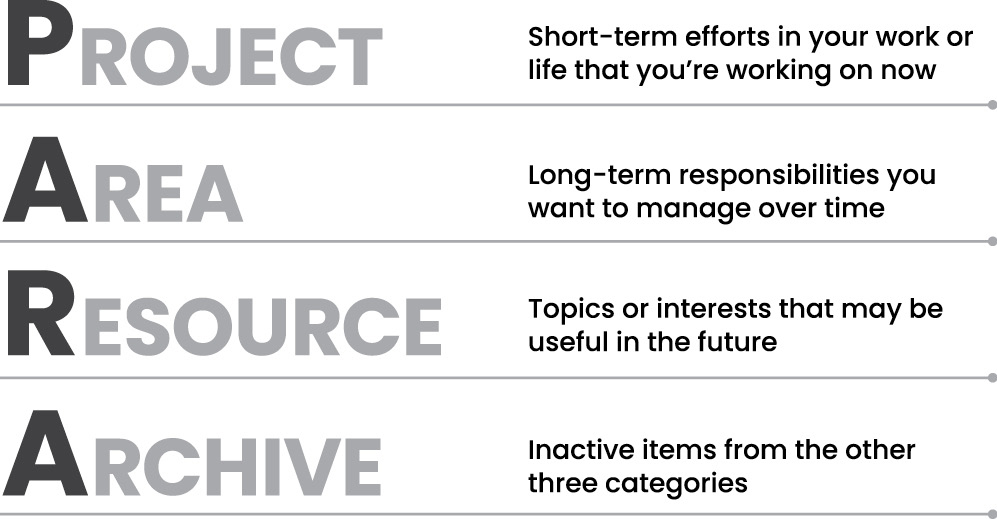
With the PARA system, every piece of information you want to save can be placed into one of just four categories:
- Projects: Short-term efforts in your work or life that you’re working on now.
- Areas: Long-term responsibilities you want to manage over time.
- Resources: Topics or interests that may be useful in the future.
- Archives: Inactive items from the other three categories.
Projects: What I’m Working on Right Now
Projects include the short-term outcomes you’re actively working toward right now.
Projects have a couple of features that make them an ideal way to organize modern work. First, they have a beginning and an end; they take place during a specific period of time and then they finish. Second, they have a specific, clear outcome that needs to happen in order for them to be checked off as complete, such as “finalize,” “green-light,” “launch,” or “publish.”
A project-centric way of working comes naturally in the creative and performing arts. Artists have paintings, dancers have dances, musicians have songs, and poets have poems. These are clearly identifiable, discrete chunks of work. This project-centric approach is increasingly finding its way into all knowledge work, a trend named the “Hollywood model” after the way films are made.
As an article in the New York Times3 explains, “A project is identified; a team is assembled; it works together for precisely as long as is needed to complete the task; then the team disbands… The Hollywood model is now used to build bridges, design apps or start restaurants.” It is becoming more and more common for all of us to work across teams, departments, and even different companies to execute collaborative projects, and then once it’s over, each go our own way.
Examples of projects could include:
- Projects at work: Complete web-page design; Create slide deck for conference; Develop project schedule; Plan recruitment drive.
- Personal projects: Finish Spanish language course; Plan vacation; Buy new living room furniture; Find local volunteer opportunity.
- Side projects: Publish blog post; Launch crowdfunding campaign; Research best podcast microphone; Complete online course.
If you are not already framing your work in terms of specific, concrete projects, making this shift will give you a powerful jump start to your productivity. Whether you’re self-employed, at a large corporation, or somewhere in between, we are all moving toward a world of project-based work. Knowing which projects you’re currently committed to is crucial to being able to prioritize your week, plan your progress, and say no to things that aren’t important.
Areas: What I’m Committed to Over Time
As important as projects are, not everything is a project.
For example, the area of our lives called “Finances” doesn’t have a definite end date. It’s something that we will have to think about and manage, in one way or another, for as long as we live. It doesn’t have a final objective. Even if you win the lottery, you’ll still have finances to manage (and it will probably require a lot more attention!).
In our work lives, we have various ongoing areas we’re responsible for, such as “product development,” “quality control,” or “human resources.” These are the job responsibilities that we were hired to take on. Sometimes there are others that we officially or unofficially have taken ownership of over time.
Each of these is an example of an area of responsibility, and together they make up the second main category of PARA. All these areas, both personal and professional, require certain information to be handled effectively, but they’re not the same as projects.
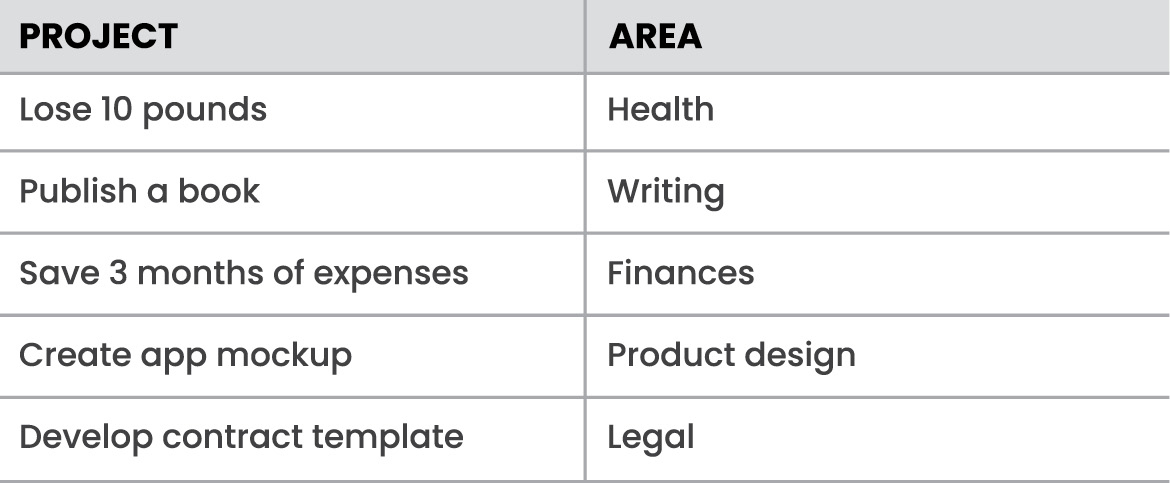
In the case of finances, you may have notes from calls with your financial advisor, receipts or invoices for business purchases, and your monthly household budget, among many other kinds of information. You might also have more speculative information to manage, like financial projections, research on personal finance software, and data on investment trends you’re keeping an eye on.
For a work-related area like “product development,” you might need to save product specifications, R&D findings, notes from customer research interviews, and customer satisfaction ratings. You could also have photos of products you admire to use as design inspiration, manufacturing blueprints, or color palettes. It all depends on your relationship to that area of your life, and how you want to manage it or move it forward.
Examples of areas from your personal life could include:
- Activities or places you are responsible for: Home/apartment; Cooking; Travel; Car.
- People you are responsible for or accountable to: Friends; Kids; Spouse; Pets.
- Standards of performance you are responsible for: Health; Personal growth; Friendships; Finances.
In your job or business:
- Departments or functions you are responsible for: Account management; Marketing; Operations; Product development.
- People or teams you are responsible for or accountable to: Direct reports; Manager; Board of directors; Suppliers.
- Standards of performance you are responsible for: Professional development; Sales and marketing; Relationships and networking; Recruiting and hiring.
Even though areas have no final outcome, it is still important to manage them. In fact, if you look at the list above, these areas are critical to your health, happiness, security, and life satisfaction.
While there is no goal to reach, there is a standard that you want to uphold in each of these areas. For finances, that standard may be that you always pay your bills on time and provide for your family’s basic needs. For health, it may be that you exercise a certain number of times per week and keep your cholesterol below a certain number. For family, it may be that you spend quality time with them every evening and on the weekend.
Only you can decide what those standards are. For our purposes, it helps tremendously to have a place dedicated to each of them. That way you always have somewhere to put any thought, reflection, idea, or useful tidbit of information relevant to each important aspect of your life.
Resources: Things I Want to Reference in the Future
The third category of information that we want to keep is resources. This is basically a catchall for anything that doesn’t belong to a project or an area and could include any topic you’re interested in gathering information about.
For example:
- What topics are you interested in? Architecture; Interior design; English literature; Beer brewing.
- What subjects are you researching? Habit formation; Notetaking; Project management; Nutrition.
- What useful information do you want to be able to reference? Vacation itineraries; Life goals; Stock photos; Product testimonials.
- Which hobbies or passions do you have? Coffee; Classic movies; Hip-hop music; Japanese anime.
Any one of these subjects could become its own resource folder. You can also think of them as “research” or “reference materials.” They are trends you are keeping track of, ideas related to your job or industry, hobbies and side interests, and things you’re merely curious about. These folders are like the class notebooks you probably kept in school: one for biology, another for history, another for math. Any note or file that isn’t relevant or actionable for a current project or area can be placed into resources for future reference.
Archives: Things I’ve Completed or Put on Hold
Finally, we have our archives. This includes any item from the previous three categories that is no longer active. For example:
- Projects that are completed or canceled
- Areas of responsibility that you are no longer committed to maintaining (such as when a relationship ends or after moving out of your apartment)
- Resources that are no longer relevant (hobbies you lose interest in or subjects you no longer care about)
The archives are an important part of PARA because they allow you to place a folder in “cold storage” so that it doesn’t clutter your workspace, while safekeeping it forever just in case you need it. Unlike with your house or garage, there is no penalty for keeping digital stuff forever, as long as it doesn’t distract from your day-to-day focus. If you need access to that information in the future—for example, if you take on a project similar to one you previously completed—you can call it up within seconds.
What PARA Looks Like: A Behind-the-Scenes Snapshot
PARA is a universal system of organization designed to work across your digital world. It doesn’t work in only one place, requiring you to use completely different organizing schemes in each of the dozens of places you keep things. It can and should be used everywhere, such as the documents folder on your computer, your cloud storage drives, and of course, your digital notes app.
Let me show you what it looks like.
Here’s an example of what the folders in my notes app look like with PARA:
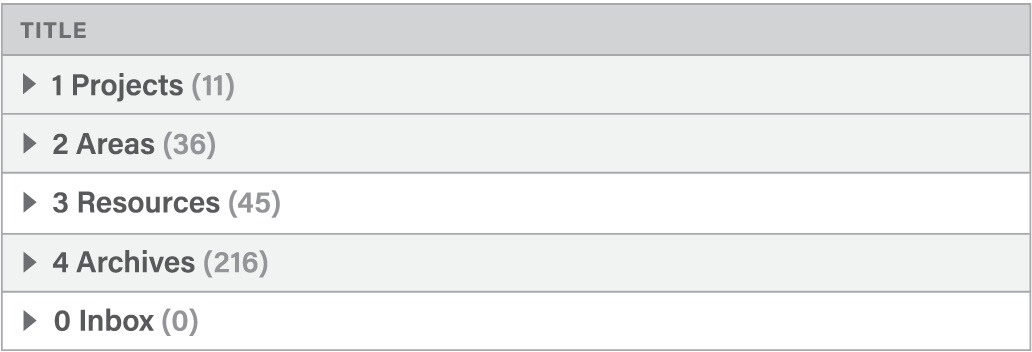
Inside each of these top-level folders, I have individual folders for the specific projects, areas, resources, and archives that make up my life. For example, here are the folders for each one of my active projects:
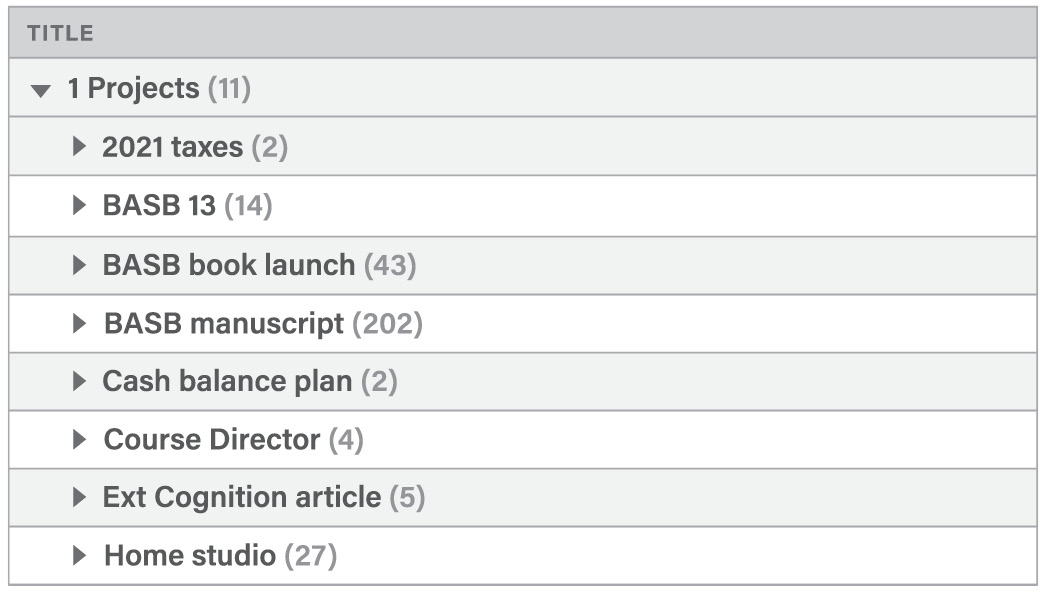
Inside these folders live the actual notes that contain my ideas. The number of active projects usually ranges from five to fifteen for the average person. Notice that the number of notes inside each one (indicated by the number in parentheses after the title) varies greatly, from just two to over two hundred for the book you’re reading right now.
Here are the notes found within a typical project folder for a midsize project, a remodel of our garage into a home studio (which we’ll dive deeper into in subsequent chapters):
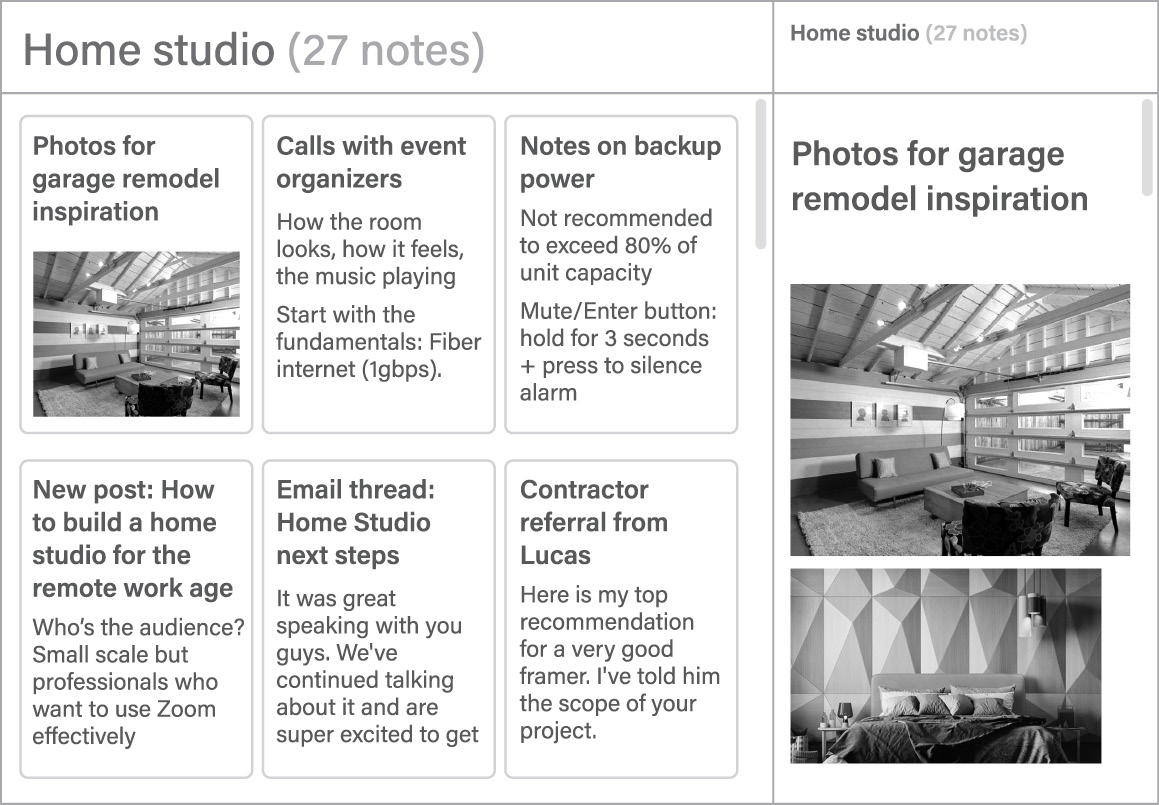
The left half of the window displays a list of the twenty-seven notes within this folder. Clicking a note, such as the one shown above containing a collection of photos we used to inspire our own remodel, reveals its contents in the right half of the window.
That’s it—just three levels of hierarchy to encompass the thousands of notes I’ve accumulated over the years: the top-level PARA categories, the project folder, and the notes themselves.
Here is what some of my areas look like:
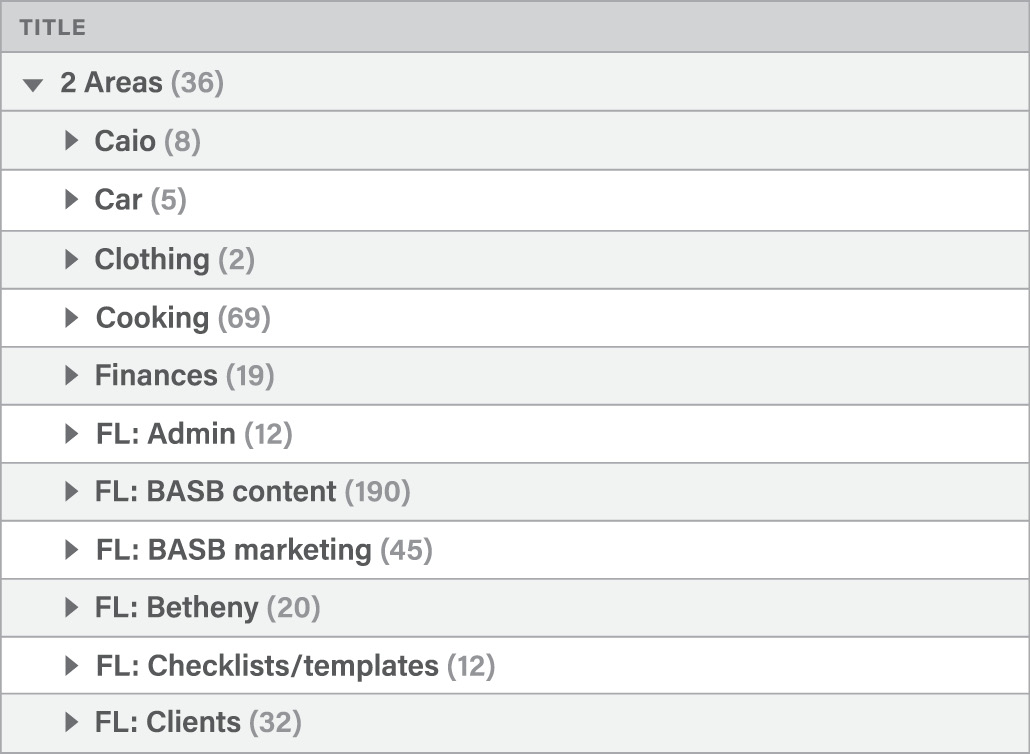
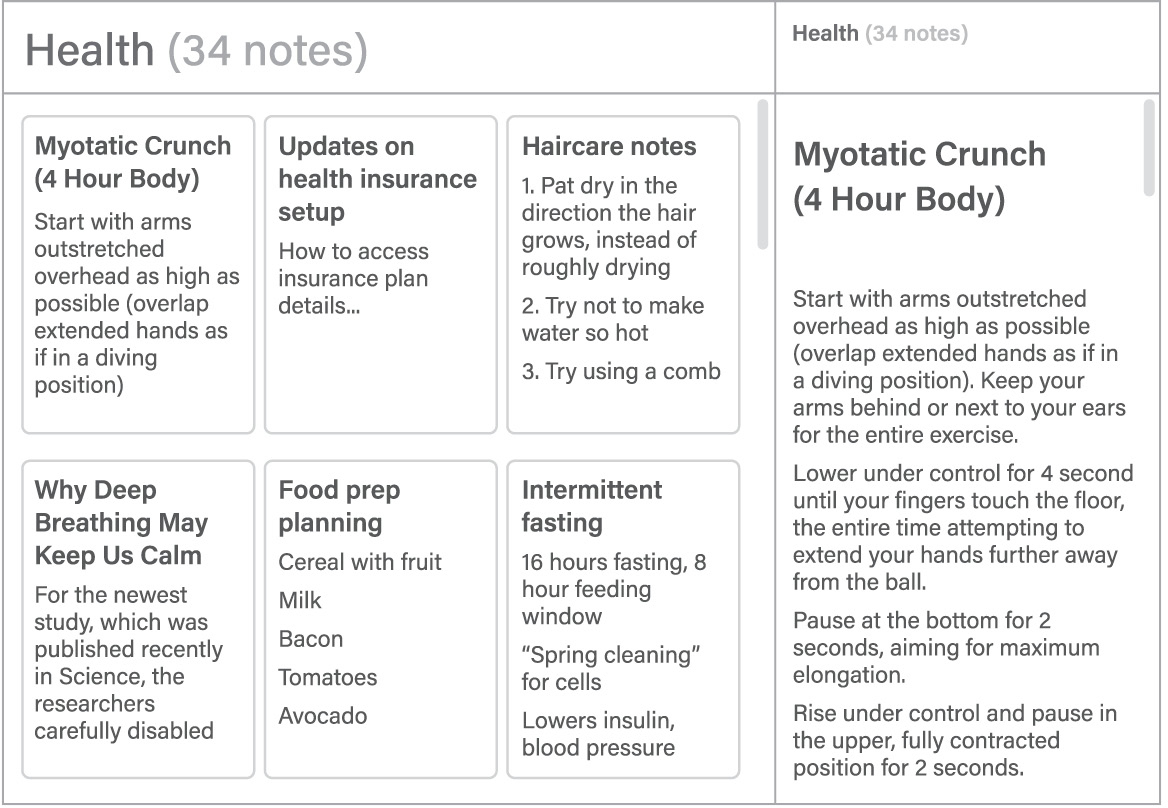
Each of these folders contains the notes relevant to each of those ongoing areas of my life. Areas related to my business begin with “FL” for Forte Labs, so they appear together in alphabetical order. Here are some of the notes in the “Health” area:
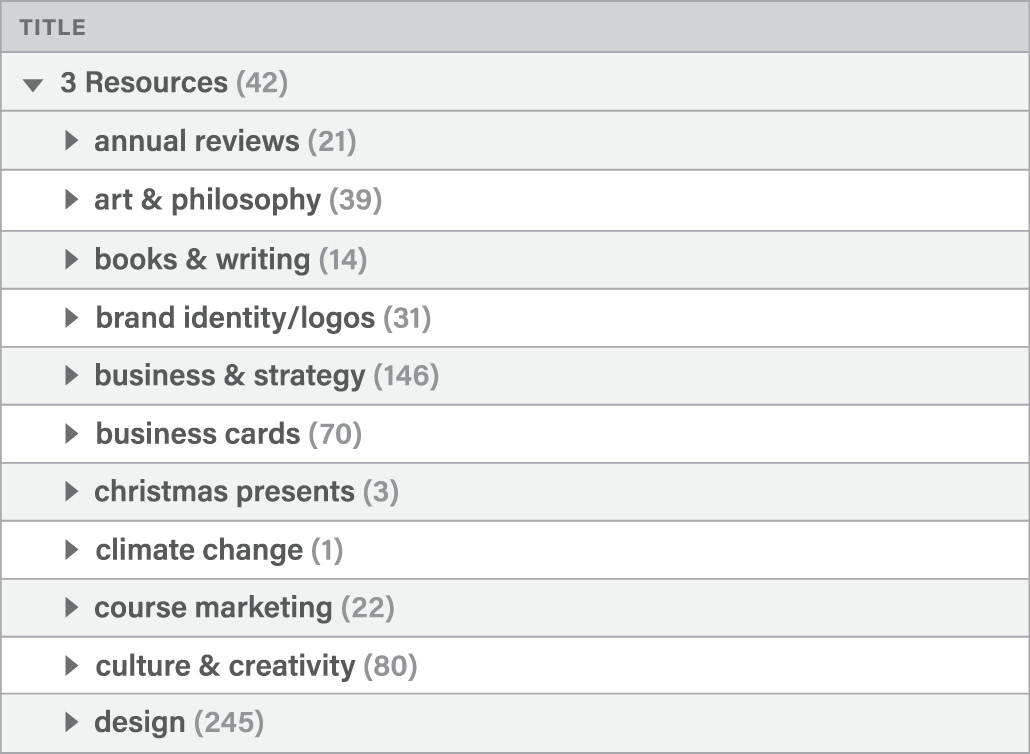
Under resources I have folders for each of the topics I’m interested in. This information isn’t currently actionable, so I don’t want it cluttering up my projects, but it will be ready and waiting if I ever need it.
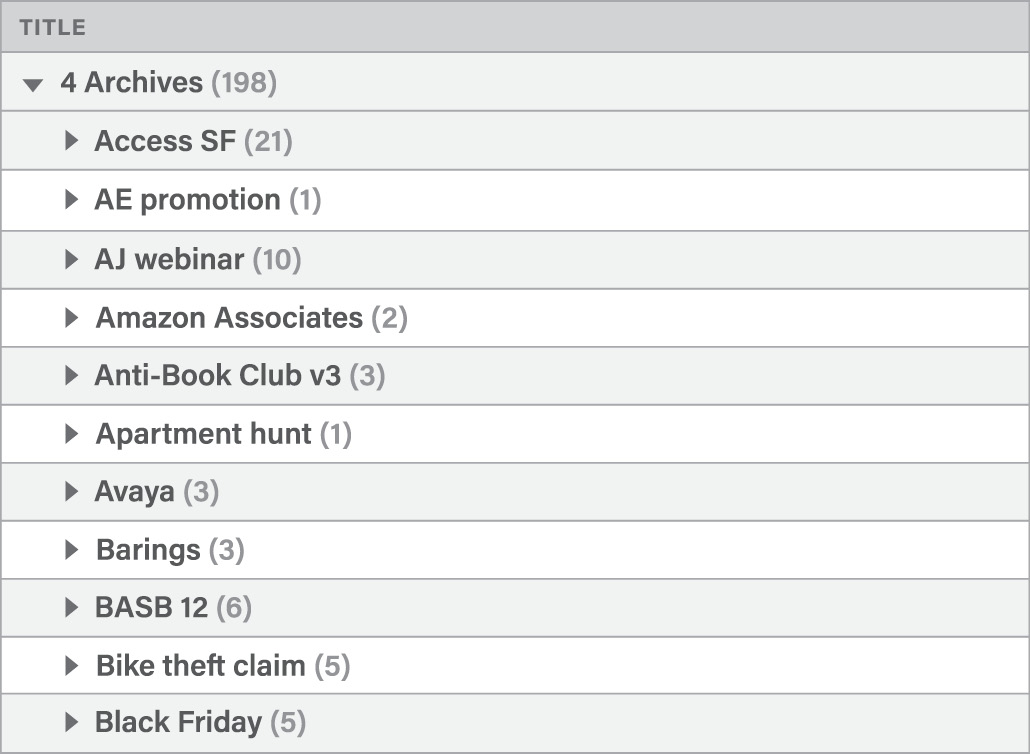
The archives contain any folder from the previous three categories that is no longer active. I want them completely out of sight and off my mind, but in case I ever need to access research, learnings, or material from the past, it will always be preserved.
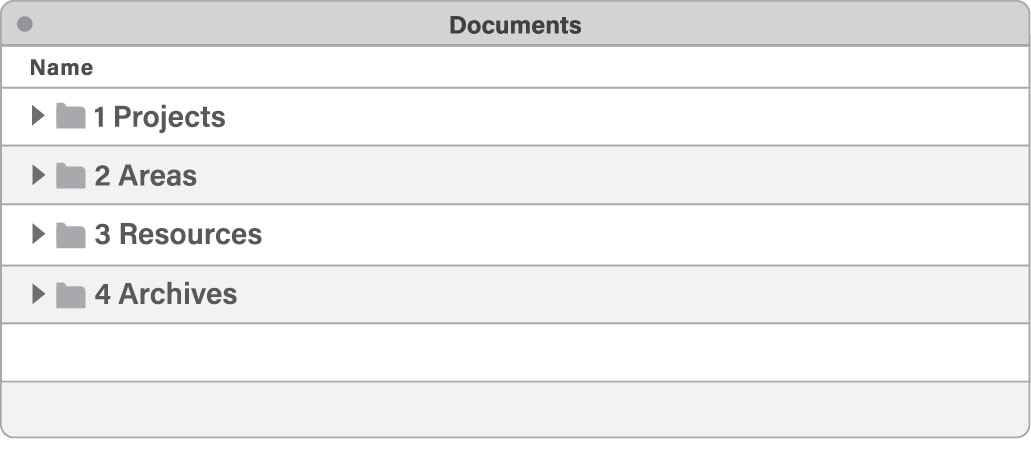
PARA can be used across all the different places where you store information, meaning you can use the same categories and the same rules of thumb no matter where you keep content. For example, here is the documents folder on my computer:
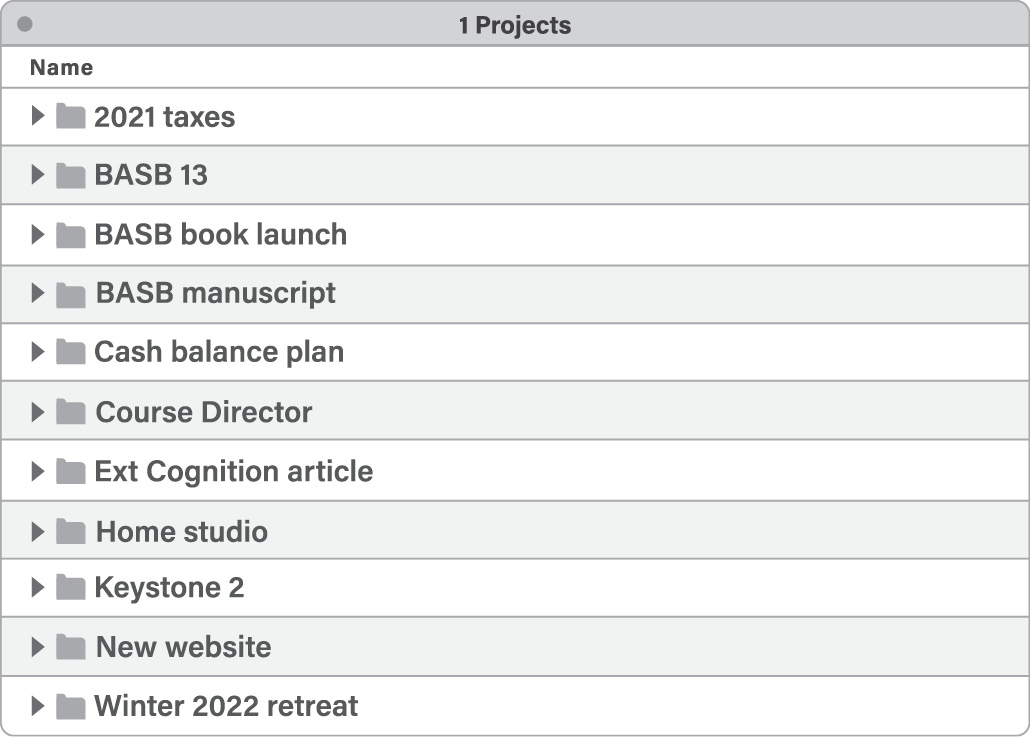
And the folders for each one of my active projects:
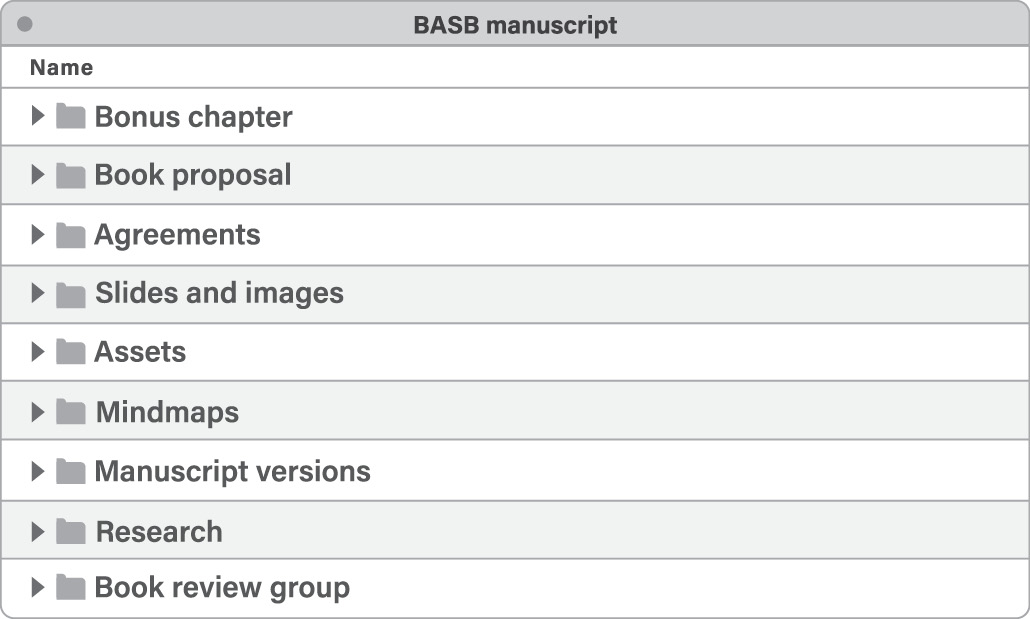
Inside these folders live the files that I use to execute each project. Here is the project folder dedicated to the book you’re reading right now:
Where Do I Put This?—How to Decide Where to Save Individual Notes
Setting up folders is relatively easy. The harder question that strikes fear into the heart of every organizer is “Where do I put this?”
Apps have made it extremely easy to capture content—it’s just a click or a tap away. However, we are given no guidance for what to do next. Where does a note go once it’s been created? What is the correct location for an incoming file? The more material piles up, the more urgent and stressful this problem becomes.
The temptation when initially capturing notes is to also try to decide where they should go and what they mean. Here’s the problem: the moment you first capture an idea is the worst time to try to decide what it relates to. First, because you’ve just encountered it and haven’t had any time to ponder its ultimate purpose, but more importantly, because forcing yourself to make decisions every time you capture something adds a lot of friction to the process. This makes the experience mentally taxing and thus less likely to happen in the first place.
This is why it’s so important to separate capture and organize into two distinct steps: “keeping what resonates” in the moment is a separate decision from deciding to save something for the long term. Most notes apps have an “inbox” or “daily notes” section where new notes you’ve captured are saved until you can revisit them and decide where they belong. Think of it as a waiting area where new ideas live until you are ready to digest them into your Second Brain. Separating the capturing and organizing of ideas helps you stay present, notice what resonates, and leave the decision of what to do with them to a separate time (such as a “weekly review,” which I will cover in Chapter 9).
Once you’ve captured a batch of notes and it’s time to organize them, PARA comes into play. The four main categories are ordered by actionability to make the decision of where to put notes as easy as possible:
- Projects are most actionable because you’re working on them right now and with a concrete deadline in mind.
- Areas have a longer time horizon and are less immediately actionable.
- Resources may become actionable depending on the situation.
- Archives remain inactive unless they are needed.
This order gives us a convenient checklist for deciding where to put a note, starting at the top of the list and moving down:
- In which project will this be most useful?
- If none: In which area will this be most useful?
- If none: Which resource does this belong to?
- If none: Place in archives.
In other words, you are always trying to place a note or file not only where it will be useful, but where it will be useful the soonest. By placing a note in a project folder, you ensure you’ll see it next time you work on that project. By placing it in an area folder, you’ll come across it next time you’re thinking about that area of your work or life. By placing it in a resource folder, you’ll notice it only if and when you decide to dive into that topic and do some reading or research. By placing it in archives, you never need to see it again unless you want to.
It can be easy to let our projects and goals fall by the wayside when life gets busy. Personal projects and long-term goals feel especially flexible, like you can always get around to them later. Notes, bookmarks, highlights, and research that we worked hard to find sink deeper and deeper into our file systems, until eventually we forget they even exist.
Organizing by actionability counteracts our tendency to constantly procrastinate and postpone our aspirations to some far-off future. PARA pulls these distant dreams into the here and now, by helping us see that we already have a lot of the information we need to get started. The goal of organizing our knowledge is to move our goals forward, not get a PhD in notetaking. Knowledge is best applied through execution, which means whatever doesn’t help you make progress on your projects is probably detracting from them.
Organizing Information Like a Kitchen—What Am I Making?
There is a parallel between PARA and how kitchens are organized.
Everything in a kitchen is designed and organized to support an outcome—preparing a meal as efficiently as possible. The archives are like the freezer—items are in cold storage until they are needed, which could be far into the future. Resources are like the pantry—available for use in any meal you make, but neatly tucked away out of sight in the meantime. Areas are like the fridge—items that you plan on using relatively soon, and that you want to check on more frequently. Projects are like the pots and pans cooking on the stove—the items you are actively preparing right now. Each kind of food is organized according to how accessible it needs to be for you to make the meals you want to eat.
Imagine how absurd it would be to organize a kitchen instead by kind of food: fresh fruit, dried fruit, fruit juice, and frozen fruit would all be stored in the same place, just because they all happen to be made of fruit. Yet this is exactly the way most people organize their files and notes—keeping all their book notes together just because they happen to come from books, or all their saved quotes together just because they happen to be quotes.
Instead of organizing ideas according to where they come from, I recommend organizing them according to where they are going—specifically, the outcomes that they can help you realize. The true test of whether a piece of knowledge is valuable is not whether it is perfectly organized and neatly labeled, but whether it can have an impact on someone or something that matters to you.
PARA isn’t a filing system; it’s a production system. It’s no use trying to find the “perfect place” where a note or file belongs. There isn’t one. The whole system is constantly shifting and changing in sync with your constantly changing life.
This is a challenging idea for a lot of people to wrap their head around. We are used to organizational systems that are static and fixed. We expect to find a strict set of rules that tells us exactly where each item goes, like the precise call numbers for books in a library.
When it comes to our personal knowledge, there is no such assigned spot. We are organizing for actionability, and “what’s actionable” is always changing. Sometimes we can receive one text message or email and the entire landscape of our day changes. Because our priorities can change at a moment’s notice, we have to minimize the time we spend filing, labeling, tagging, and maintaining our digital notes. We can’t run the risk of all that effort going to waste.
Any piece of information (whether a text document, an image, a note, or an entire folder) can and should flow between categories. You might save a note on coaching techniques to a project folder called “Coaching class,” for a class you’re taking. Later, when you become a manager at work and need to coach your direct reports, you might move that note to an area folder called “Direct reports.” At some point you might leave that company, but still remain interested in coaching, and move the note to resources. One day you might lose interest in the subject altogether and move it to the archives. In the future, that note could find its way all the way back to projects when you decide to start a side gig as a business coach, making that knowledge actionable once again.
The purpose of a single note or group of notes can and does change over time as your needs and goals change. Every life moves through seasons, and your digital notes should move along with them, churning and surfacing new tidbits of insight from the deep waters of your experience.
Completed Projects Are the Oxygen of Your Second Brain
Your efforts to capture content for future use will be tremendously easier and more effective if you know what that content is for. Using PARA is not just about creating a bunch of folders to put things in. It is about identifying the structure of your work and life—what you are committed to, what you want to change, and where you want to go.
I had to learn this lesson the hard way. Back in college, I worked part-time at an Apple Store in San Diego while I finished my studies. At the time it was one of the five busiest Apple Stores in the world, with thousands of people walking through our doors every day. It was there that I got my first taste of teaching people how to use computers more effectively.
I taught morning classes to small groups of people who had just bought their first Mac, and also did one-on-one consultation sessions. This was the golden age of Apple’s iLife suite of creative software: every single Mac computer came preinstalled with user-friendly apps for creating websites, recording music, printing photo books, and making videos. It was like having a complete multimedia studio at your fingertips at no additional cost.
I would sit down with customers and answer any questions they had about the new computer they had just bought. In most cases they had just migrated all their files over from Windows, and years of accumulated documents lay scattered across their desktop and documents folders.
At first I tried guiding them through organizing each document one at a time. It quickly became clear that this didn’t work at all. The one-on-one sessions were only one hour, not nearly enough time to make even a dent in the hundreds or even thousands of files they had. It wasn’t time well spent anyway, because these were often old documents that weren’t relevant to their current goals or interests.
I knew I needed a new approach. I started asking questions and listening, and eventually realized that these people didn’t need or want an organized computer. They had spent all this money and time moving to a Mac because there was something they wanted to create or achieve.
They wanted to make a video for their parents’ anniversary party, a website for their cupcake shop, or a record showcasing their band’s songs. They wanted to research their family genealogy, graduate from college, or land a better job. Everything else was just an obstacle to get past on the way to their goal.
I decided to take a different approach: I took all the files they’d migrated over and moved them all to a new folder titled “Archive” plus the date (for example, “Archive 5-2-21”). There was always a moment of fear and hesitation at first. They didn’t want anything to get lost, but very quickly, as they saw that they would always be able to access anything from the past, I watched them come alive with a renewed sense of hope and possibility.
They had repeatedly postponed their creative ambitions to some far-off, mythical time when somehow everything would be perfectly in order. Once we set that aside and just focused on what they actually wanted to do right now, they suddenly gained a tremendous sense of clarity and motivation.
For a while I was sure this would come back to haunt me. Eventually they’d want to go back and organize all those old files, right? I would often see the same people coming back to our store again and again. I waited expectantly in fear for someone to return and accuse me of losing all their old files.
Let me tell you: no one ever did.
Not once did someone come back and say, “You know, I’d really like to go back and organize all those files from my old computer.” What they did tell me were the stories of the impact their creative projects had: on their families, on their business, on their grades, on their career. One person organized a fundraising drive for a friend who had recently been diagnosed with leukemia. Another put together a successful application for a small business loan to start a dance studio. One student told me that the ability to tame the chaos of her digital world was the only reason she had finished college as the first graduate from her family. The details of how they organized their computer or took notes were trivial, but the impact their creativity had on their own lives and the lives of others—that was anything but.
There are a few lessons I took away from this experience.
The first is that people need clear workspaces to be able to create. We cannot do our best thinking and our best work when all the “stuff” from the past is crowding and cluttering our space. That’s why that archiving step is so crucial: you’re not losing anything, and it can all be found via search, but you need to move it all out of sight and out of mind.
Second, I learned that creating new things is what really matters. I’d see a fire light up in people’s eyes when they reached the finish line and published that slideshow or exported that video or printed that résumé. The newfound confidence they had in themselves was unmistakable as they walked out of the store knowing they had everything they needed to move forward.
I’ve learned that completed creative projects are the blood flow of your Second Brain. They keep the whole system nourished, fresh, and primed for action. It doesn’t matter how organized, aesthetically pleasing, or impressive your notetaking system is. It is only the steady completion of tangible wins that can infuse you with a sense of determination, momentum, and accomplishment. It doesn’t matter how small the victories. Even the tiniest breakthrough can become a stepping-stone to more creative, more interesting futures than you can imagine.
Your Turn: Move Quickly, Touch Lightly
A mentor of mine once gave me a piece of advice that has served me ever since: move quickly and touch lightly.
She saw that my standard approach to my work was brute force: to stay late at the office, fill every single minute with productivity, and power through mountains of work as if my life depended on it. That wasn’t a path to success; it was a path to burnout. Not only did I exhaust my mental and physical reserves time and again; my frontal assaults weren’t even very effective. I didn’t know how to set my intentions, craft a strategy, and look for sources of leverage that would allow me to accomplish things with minimal effort.
My mentor advised me to “move quickly and touch lightly” instead. To look for the path of least resistance and make progress in short steps. I want to give the same advice to you: don’t make organizing your Second Brain into yet another heavy obligation. Ask yourself: “What is the smallest, easiest step I can take that moves me in the right direction?”
When it comes to PARA, that step is generally to create folders for each of your active projects in your notes app and begin to fill them with the content related to those projects. Once you have a home for something, you tend to find more of it. Start by asking yourself, “What projects am I currently committed to moving forward?” and then create a new project folder for each one. Here are some questions to ask yourself to help you think of the projects that might be on your plate:
- Notice what’s on your mind: What’s worrying you that you haven’t taken the time to identify as a project? What needs to happen that you’re not making consistent progress on?
- Look at your calendar: What do you need to follow up on from the past? What needs planning and preparation for the future?
- Look at your to-do list: What actions are you already taking that are actually part of a bigger project you’ve not yet identified? What communication or follow-up actions you’ve scheduled with people are actually part of a bigger project?
- Look at your computer desktop, downloads folder, documents folder, bookmarks, emails, or open browser tabs: What are you keeping around because it is part of a larger project?
Here’s some examples of projects my students have come up with:
- Find new doctor who accepts my insurance
- Plan goals and agenda for annual team retreat
- Collect list of common food supplies and set up recurring deliveries
- Develop content strategy for next quarter
- Review draft of new reimbursement policy and provide feedback
- Share collaboration ideas with research partner
- Research and draft article on health equity
- Complete online course on creative writing
You could also create folders for your areas and resources, but I recommend starting only with projects to avoid creating lots of empty containers. You can always add others later when you have something to put inside them. Although you can and should use PARA across all the platforms where you store information—the three most common ones besides a notetaking app are the documents folder on your computer, cloud storage drives like Dropbox, and online collaboration suites like Google Docs—I recommend starting with just your notes app for now.
Practice capturing new notes, organizing them into folders, and moving them from one folder to another. Each time you finish a project, move its folder wholesale to the archives, and each time you start a new project, look through your archives to see if any past project might have assets you can reuse.
As you create these folders and move notes into them, don’t worry about reorganizing or “cleaning up” any existing notes. You can’t afford to spend a lot of time on old content that you’re not sure you’re ever going to need. Start with a clean slate by putting your existing notes in the archives for safekeeping. If you ever need them, they’ll show up in searches and remain just as you left them.
Your goal is to clear your virtual workspace and gather all the items related to each active project in one place. Once you do, you’ll gain the confidence and clarity to take action on those ideas, rather than letting them pile up with no end in sight.
The key thing to keep in mind is that these categories are anything but final. PARA is a dynamic, constantly changing system, not a static one. Your Second Brain evolves as constantly as your projects and goals change, which means you never have to worry about getting it perfect, or having it finished.
In the next chapter, we’ll look at how to distill the knowledge we’ve gathered to be able to put it to use effectively.
- I. Para is a Greek word that means “side by side,” as in “parallel”; this convenient definition reminds us that our Second Brain works “side by side” with our biological brain.
- II. As you can probably tell, I’m a big fan of four-letter frameworks. Researchers have called it the “Magic Number 4” because it is the highest number that we can count at a glance and hold in our minds without extra effort.
- III. I will use the term “folder” to refer to the main unit of organization used by most notes apps; some software instead uses tags, which work just as well.